> ## Documentation Index
> Fetch the complete documentation index at: https://documentation.2cloudnine.com/llms.txt
> Use this file to discover all available pages before exploring further.
# Configurators - Administrator Guide
## Purpose
The purpose of this Administrator Guide is to provide information about Configurators. The content in this
guide is optional, and may be utilised during implementation, or even after a project has gone live. The
intended audience for this document is System Administrators.
## Overview
Configurators are a type of Custom Setting within 2cloudnine Payroll, where you can automate data
being copied from one record to another related record upon creation of the second record. The
Configurator is able to populate packaged fields as well as Custom Fields, and is able to define different
logic treatment based on different Record Types.
The other feature that makes this a really useful tool is the ability to populate any type of field i.e. picklists,
checkboxes, lookups, etc. This gives flexibility not possible with Flows, as these fields are populated
before the Save of the record occurs, therefore bypassing any validations that would fire.
## Time2Pay Assignment Configurator
The Time2Pay Assignment Configurator is used to map field values to be defaulted from the Client to the
Assignment when Assignments are created. System Admin can assign default values for specific
Assignment Record Types, therefore, the default Pay Schedule for Temp Assignments might be different
from the default Pay Schedule for Employee Assignments (perhaps Weekly vs Monthly, or some other
difference). There are 4 Custom Fields in this Custom Setting:
* Assignment Field
* The Assignment field api name where the value pulled from the Client needs to be
populated.
* Client Field
* The Client field api name that will be used to populate the defined Assignment field.
* On Create Override Existing.
* If the User has already entered a value in the above Assignment field before the initial
save, when True, the User-entered value will be overridden with the value from the
above-defined Client field.
* The value will only override the User entry on initial save of the record.
* Record Types
* List the Assignment Record Type Developer Name(s) (case sensitive) from which the field
will be copied. Separated by a comma (,) and no spaces.
* If left blank, this field will be defaulted for all Assignments regardless of Record Type.
**Setup the Assignment Configurator**
Go to **Setup > Custom Settings > Time2Pay Assignment Configurator > Manage**
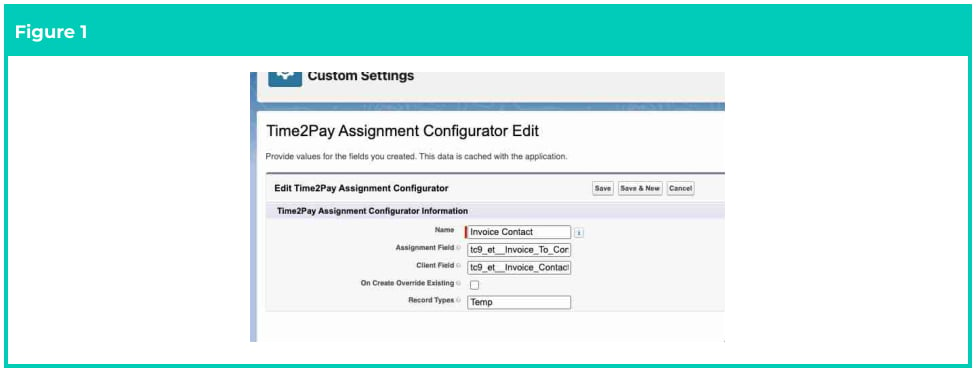
1. Complete the fields as per these common examples below from other Orgs (see Figure 1):
1. Invoice Contact
* **Name** = Invoice Contact
* **Assignment Field** = tc9\_et\_\_Invoice\_To\_Contact\_\_c
* **Client Field** = tc9\_et\_\_Invoice\_Contact\_\_c
* **On Create Override Existing** = FALSE
* **Record Types** = Leave blank or populate as required - e.g. “Temp, Perm”
* Click **Save** .
2. Invoice Schedule
* **Name** = Invoice Schedule
* **Assignment Field** = tc9\_et\_\_Invoice\_Schedule\_\_c
* **Client Field** = tc9\_et\_\_Default\_Invoice\_Schedule\_\_c
* **On Create Override Existing** = FALSE
* **Record Types** = Leave blank or populate as required - e.g. “Temp, Perm”
* Click **Save** .
3. Invoice Tax ID
* **Name** = Invoice Tax ID
* **Assignment Field** = tc9\_et\_\_Invoice\_Tax\_ID\_\_c
* **Client Field** = tc9\_et\_\_Default\_Invoice\_Tax\_ID\_\_c
* **On Create Override Existing** = FALSE
* **Record Types** = Leave blank or populate as required - e.g. “Temp, Perm”
* Click **Save** .
4. Invoice Taxable
* **Name** = Invoice Taxable
* **Assignment Field** = tc9\_et\_\_Invoice\_Taxable\_\_c
* **Client Field** = tc9\_et\_\_Default\_Invoice\_Taxable\_\_c
* **On Create Override Existing** = FALSE
* **Record Types** = Leave blank or populate as required - e.g. “Temp, Perm”
* Click **Save** .
 **Important Notes**
*(Figure 1)*
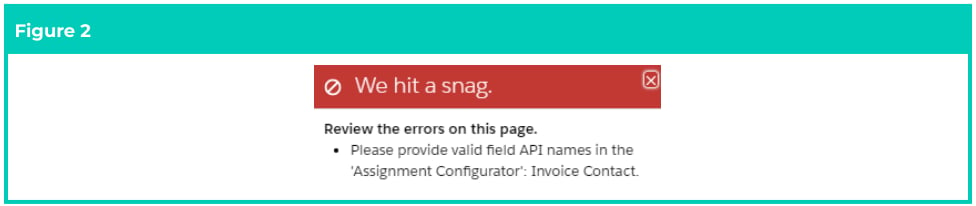
*If any of the field api names are referenced incorrectly in the Assignment Fields and/or Client Fields, a*
*validation error will be triggered when attempting to save a new Assignment.*
**Important Notes**
*(Figure 1)*
*If any of the field api names are referenced incorrectly in the Assignment Fields and/or Client Fields, a*
*validation error will be triggered when attempting to save a new Assignment.*
 ## Further Information
| Document | Document Type | Description |
| ----------------------------------------------- | ------------------- | ------------------------------------------------------------------- |
| Configuration Guide to 2cloudnine Payroll Suite | Configuration Guide | Configuration Guide for the implementation of 2cloudnine Payroll. |
| Configuration Guide To 2cloudnine Utilities | Configuration Guide | Configuration Guide for the implementation of 2cloudnine Utilities. |
| Create an Account - Client | Task Instructions | How to create a Client Account record. |
| QRG Create an Assignment - Temp | Task Instructions | How to create a Temp Assignment. |
| QRG Create an Assignment - Perm | Task Instructions | How to create a Perm Assignment. |
## Further Information
| Document | Document Type | Description |
| ----------------------------------------------- | ------------------- | ------------------------------------------------------------------- |
| Configuration Guide to 2cloudnine Payroll Suite | Configuration Guide | Configuration Guide for the implementation of 2cloudnine Payroll. |
| Configuration Guide To 2cloudnine Utilities | Configuration Guide | Configuration Guide for the implementation of 2cloudnine Utilities. |
| Create an Account - Client | Task Instructions | How to create a Client Account record. |
| QRG Create an Assignment - Temp | Task Instructions | How to create a Temp Assignment. |
| QRG Create an Assignment - Perm | Task Instructions | How to create a Perm Assignment. |