> ## Documentation Index
> Fetch the complete documentation index at: https://documentation.2cloudnine.com/llms.txt
> Use this file to discover all available pages before exploring further.
# Timesheet Email Approvals (Utilities) - Administrator Guide
## Purpose
The purpose of this Administrator Guide is to provide information about Utilities packaged Timesheet
Email Approvals. The intended audience for this document is System Administrators.
## Overview
Once the configuration steps are complete, Approvers will be able to directly view and approve
Timesheets from their email notifications, without the need to log in to the relevant Community and
identify Timesheets for approval.
**Required Guest Approver Site**
The ‘Timesheet Email Approvals’ functionality only works with a Guest User Approver Site.
To utilise this functionality, you must first configure the Guest User Approver Community as per the [2c9 -](https://docs.google.com/document/d/1kieiufIcF8Bwf9TaR6Awf5AOx940LuL5/edit#heading=h.gjdgxs)
[Guest User Approval Guide.](https://docs.google.com/document/d/1kieiufIcF8Bwf9TaR6Awf5AOx940LuL5/edit#heading=h.gjdgxs)
## Sending Submitted Timesheets for Approval
As noted in the configuration, there are two available options for Timesheet Email Approvals - Single and
Consolidated. The sending of Submitted Timesheets for Approval differs based on the method used.
**Single Sending**
The single sending will automatically send all Timesheets to the related ‘Timesheet > Assignment >
Timesheet Approver’ that meet the criteria defined in the Custom Setting **Email Approval Field**, at the
scheduled interval defined. If no **Email Approval Field** api name is defined, the Product will default to the
packaged formula field **EmailApproval,** which will simply send all Timesheets with a status of ‘Submitted’
that have not yet been sent.
**Scenario**
A group of customers has requested to receive a single email for each submitted Timesheet. Another
group has requested a single consolidated email for all submitted Timesheets, sent once a week. To
accommodate this, the System Administrator creates a new field on the Account object called ‘Email
Approval Type’, with the options ‘Single’ and ‘Consolidated’.
The System Administrator then creates a custom boolean formula field on the Timesheet object. This
formula field returns TRUE only if the related Account’s Email Approval Type is set to ‘Single’ and the
Timesheet’s Status is ‘Approved’. Afterward, the System Administrator updates the ‘Email Approval
Field’ Custom Setting to reference the API name of this formula field.
This confirmation ensures that Timesheets linked to customers who have selected ‘Single’ in the Email
Approval Type field are automatically sent for approval immediately upon Timesheets being Submitted
and Approved, via a Scheduled job. Conversely, customers who have chosen ‘Consolidated’ will not
receive individual Timesheet emails. Instead, they will receive a single, consolidated email
summarising all Submitted Timesheets on a weekly basis.
**Consolidated Sending**
Consolidated sending differs from Single Sending by grouping multiple Timesheets into a single email
before being sent to the Approver. Unlike single sending, which is an automated process that schedules
and sends one email per Timesheet, consolidated sending is manual and must be triggered via a custom
solution. While the Utilities Package does not include built-in automation for consolidated sending,
customers can implement this functionality themselves by invoking the Apex Class:
**tc9\_util\_\_ConsolidatedTimesheetEmailInvocable** .
To use this Apex Class, simply populate the following input variables:
* approverId: the Contact ID of the Approver to send the consolidated email.
* timesheetIds: a list of Timesheet Record IDs to include in the consolidated email
This approach allows Customers to tailor the sending logic to suit their unique business requirements.
**Important Notes**
*(Single vs Consolidated Sending Methods)*
*Single and Consolidated Sending Methods can be used in combination. An Org might use Single*
*sending via a Scheduled Job for regular Timesheet submissions, while leveraging Consolidated*
*sending for Reminders or Summary emails.*
## Approving Timesheets from Email
**Single Approval**
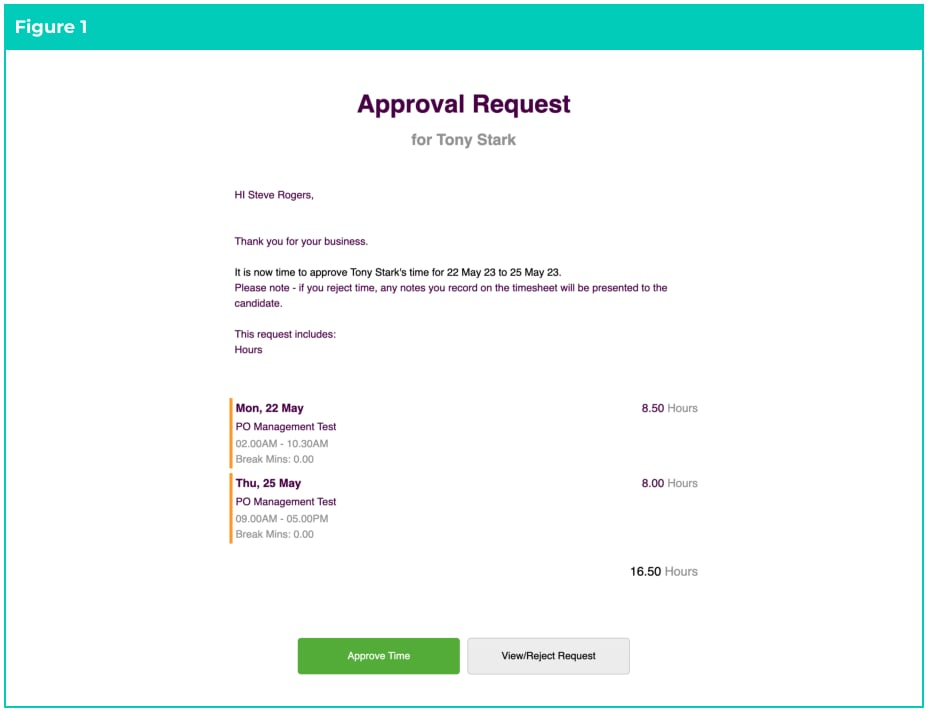
On submission of a Timesheet, the Timesheet Approver will be emailed the Employee Timesheet,
inclusive of the day and time worked, Break Times, and Total Hours (see Figure 1).
The Approver can view the requested Timesheet by clicking on the **View/Reject Request** button, which
will direct them to the Guest Approver Community. Alternatively, they can select **Approve Time,** which
will instantly Approve the Timesheet (via the Guest Approver Community).
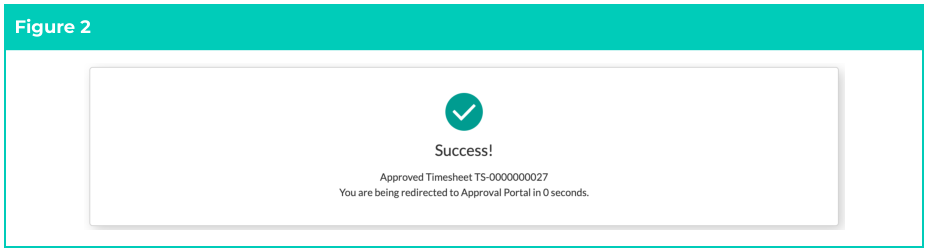
 Once approved, the User will be redirected to the Guest Approver Community as per Figure 2:
 **Consolidated Approval**
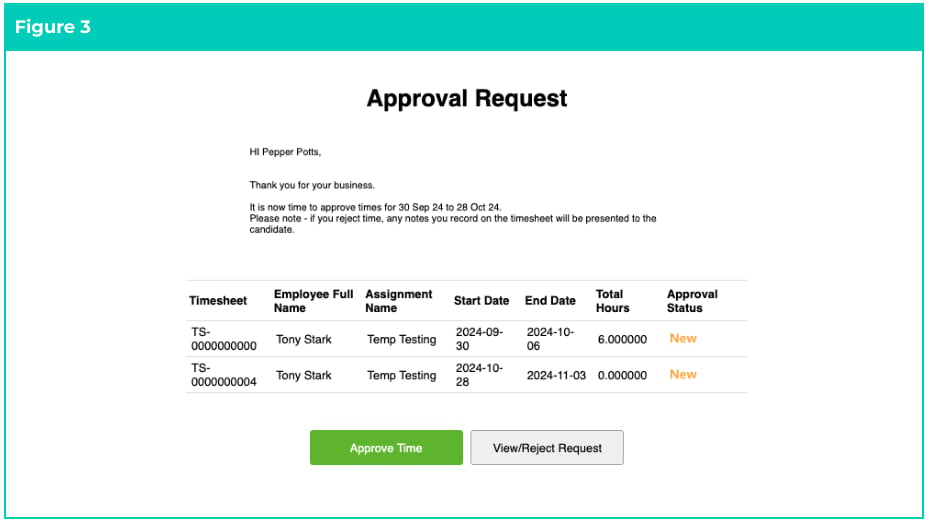
On sending of the Consolidated Approver Email (see above), the defined Approver will receive a Single
email containing a list of all Timesheets awaiting Approval. The columns displayed in the email are
defined in the Field Set from the Custom Setting **Consolidated Timesheet Column Fieldset** .
The Approver can view the requested Timesheets by clicking on the **View/Reject Request** button, which
will direct them to the Guest Approver Community. Alternatively, they can select **Approve Time,** which
will instantly Approve the Timesheets via the Guest Approver Community (see Figure 3).
**Consolidated Approval**
On sending of the Consolidated Approver Email (see above), the defined Approver will receive a Single
email containing a list of all Timesheets awaiting Approval. The columns displayed in the email are
defined in the Field Set from the Custom Setting **Consolidated Timesheet Column Fieldset** .
The Approver can view the requested Timesheets by clicking on the **View/Reject Request** button, which
will direct them to the Guest Approver Community. Alternatively, they can select **Approve Time,** which
will instantly Approve the Timesheets via the Guest Approver Community (see Figure 3).
 **Approver Actions**
Timesheet Email Approval requires the configuration of the Guest Approver Community to successfully
work. Approval of Timesheets from email utilises the same Guest Approver functionality of ‘Approver
Actions’ to bypass restrictions set by Salesforce on Guest Users. If a Timesheet Status does not change
after email approval, please ensure you troubleshoot by referring to the Approver Actions.
## Update Custom Settings
The Timesheet Email Approval process uses Custom Settings to define details across both the Single and
Consolidated Approver Email options. The configuration differs based upon the Email Approval Type, but
it is highly recommended both are configured. To configure the Custom Settings:
Go to **Setup** - **Custom Settings** - **Manage** (next to 2c9 - Approver Portal)
1. Click **Edit** in the Header and update the required Custom Settings as per the table below.
2. Click **Save** .
| Custom Setting | Status | Type | Details |
| -------------------------------------- | -------- | ------------ | -------------------------------------------------------------------------------------------------------------------------------------------------------------------------------------------------------------------------------------------------------------------------------------------------------------------------------------------------------------------------------------------------------------------------------------------------------------------------------------------------------------------------------------------------------------------------------------------------------------------------------------------------------------------------------------------------------------------------------------------------------------------------------------------------------------------------------------------------------------------------------------------------------------------------------------------------------------------------------------------------------------------------------------------------------------------------------------------------------------------------------------------------------------------------------------------------------------------------------------------------------------------------------------------------------------------------------------------------------------------------------------------------------------------------------------------------------------------------------------------------------------------------------------------------------------------------------------------------------------------------------------------------------------------------------------------------------------------------------------------------------------------------------------------------------------------------------------------------------------------------------------------------------------------------------------------------------------------------------------------------------------------------------------------------------------------------------------------------------------------------------------------------------------------------------------------------------------------------------------------------------------------------------------------------------------------------------------------------------------------------------------------------------------------------------------------------------------------------------------------------------------------------------------------------------------------------------------------------------------------------------------------------------------------------------------------------------------------------------------------------------------------------------------------------------------------------------------------------------------------------------------------------------------------------------------------------------------------------------------------------------------------------------------------------------------------------------------------------------------- |
| Org Wide Sender Name | Required | Both | The org wide email address > Display Name you want the emails to be sent from. Go to**Setup** > **Organization-Wide Addresses** and copy the ‘Display Name’ from the email and paste into this field. |
| Email Approval Field | Optional | Single | Defines a Custom Boolean Field on the Timesheet object to control Approval Email sending. If blank, defaults to**tc9\_util\_\_EmailApproval\_\_c**, which auto-sends to submitted Timesheets. |
| Approve Timesheet Path | Required | Single | If using the recommended naming, this would be **/approve-timesheets** as per step 2. |
| Consolidated Approve Timesheet Path | Required | Consolidated | If using the recommended naming, this would be **/approve-consolidated-timesheets** as per step 2. |
| Consolidated Timesheet Column Fieldset | Optional | Consolidated | API name of the fieldset on the Timesheets object used to control the columns in the Approval List. You can use **tc9\_util\_\_Consolidated\_Email\_Timesheet\_Colum** **ns** which is an existing Field Set provided in the Package. |
| Consolidated Timesheet Email Header | Optional | Consolidated | Can be used to change the header in the consolidated Timesheet email. If left BLANK, this will default to ‘Approval Request’
**Approver Actions**
Timesheet Email Approval requires the configuration of the Guest Approver Community to successfully
work. Approval of Timesheets from email utilises the same Guest Approver functionality of ‘Approver
Actions’ to bypass restrictions set by Salesforce on Guest Users. If a Timesheet Status does not change
after email approval, please ensure you troubleshoot by referring to the Approver Actions.
## Update Custom Settings
The Timesheet Email Approval process uses Custom Settings to define details across both the Single and
Consolidated Approver Email options. The configuration differs based upon the Email Approval Type, but
it is highly recommended both are configured. To configure the Custom Settings:
Go to **Setup** - **Custom Settings** - **Manage** (next to 2c9 - Approver Portal)
1. Click **Edit** in the Header and update the required Custom Settings as per the table below.
2. Click **Save** .
| Custom Setting | Status | Type | Details |
| -------------------------------------- | -------- | ------------ | -------------------------------------------------------------------------------------------------------------------------------------------------------------------------------------------------------------------------------------------------------------------------------------------------------------------------------------------------------------------------------------------------------------------------------------------------------------------------------------------------------------------------------------------------------------------------------------------------------------------------------------------------------------------------------------------------------------------------------------------------------------------------------------------------------------------------------------------------------------------------------------------------------------------------------------------------------------------------------------------------------------------------------------------------------------------------------------------------------------------------------------------------------------------------------------------------------------------------------------------------------------------------------------------------------------------------------------------------------------------------------------------------------------------------------------------------------------------------------------------------------------------------------------------------------------------------------------------------------------------------------------------------------------------------------------------------------------------------------------------------------------------------------------------------------------------------------------------------------------------------------------------------------------------------------------------------------------------------------------------------------------------------------------------------------------------------------------------------------------------------------------------------------------------------------------------------------------------------------------------------------------------------------------------------------------------------------------------------------------------------------------------------------------------------------------------------------------------------------------------------------------------------------------------------------------------------------------------------------------------------------------------------------------------------------------------------------------------------------------------------------------------------------------------------------------------------------------------------------------------------------------------------------------------------------------------------------------------------------------------------------------------------------------------------------------------------------------------------------------- |
| Org Wide Sender Name | Required | Both | The org wide email address > Display Name you want the emails to be sent from. Go to**Setup** > **Organization-Wide Addresses** and copy the ‘Display Name’ from the email and paste into this field. |
| Email Approval Field | Optional | Single | Defines a Custom Boolean Field on the Timesheet object to control Approval Email sending. If blank, defaults to**tc9\_util\_\_EmailApproval\_\_c**, which auto-sends to submitted Timesheets. |
| Approve Timesheet Path | Required | Single | If using the recommended naming, this would be **/approve-timesheets** as per step 2. |
| Consolidated Approve Timesheet Path | Required | Consolidated | If using the recommended naming, this would be **/approve-consolidated-timesheets** as per step 2. |
| Consolidated Timesheet Column Fieldset | Optional | Consolidated | API name of the fieldset on the Timesheets object used to control the columns in the Approval List. You can use **tc9\_util\_\_Consolidated\_Email\_Timesheet\_Colum** **ns** which is an existing Field Set provided in the Package. |
| Consolidated Timesheet Email Header | Optional | Consolidated | Can be used to change the header in the consolidated Timesheet email. If left BLANK, this will default to ‘Approval Request’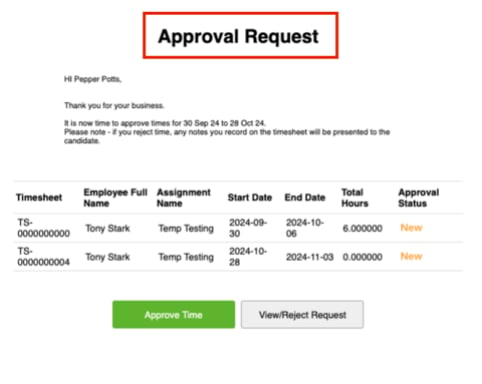 |
| Consolidated Timesheet Email Body | Optional | Consolidated | Can be used to change the body in the Email Body consolidated email. By default, the system will use the custom label **Consolidated\_Timesheet\_Email\_Approval\_Messa** **ge** . A new custom label can be created and the API entered into this field.
|
| Consolidated Timesheet Email Body | Optional | Consolidated | Can be used to change the body in the Email Body consolidated email. By default, the system will use the custom label **Consolidated\_Timesheet\_Email\_Approval\_Messa** **ge** . A new custom label can be created and the API entered into this field. 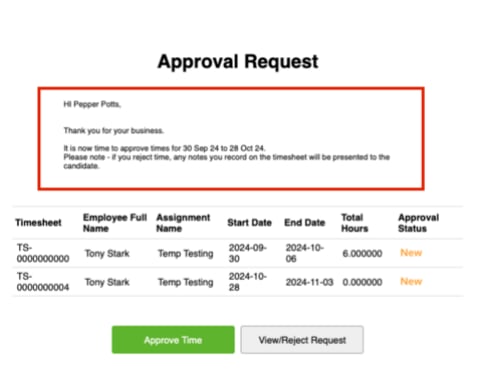 |
## Scheduled Job (Optional)
This configuration is only required if you are using the Single Timesheet Approval Email. If using the
Consolidated Timesheet Approval option for all Customers, this step can be skipped.
This schedules the Timesheet Email Approval process to run every 5 minutes and to send any recently
Submitted Timesheets to nominated Approvers for approval.
**Scheduled Batch Job**
To run the script:
1. Copy the block of script to be run.
2. Select **Setup > Developer Console** .
3. **Debug > Open Execute Anonymous Window** .
4. Delete or comment out any code that is in the window.
5. Paste in the copied script from below.
6. Click the **Execute** button.
**Important Notes**
*(Single Method)*
*The script below can be amended to run less frequently to reduce the number of Scheduled jobs*
*running in your Customer Org.*
```apex Script theme={null}
//script for timesheet email approval batch
System.schedule('TimesheetEmailApprovalBatch 05', '0 05 * * * ?', new
tc9_util.TimesheetEmailApprovalBatch());
System.schedule('TimesheetEmailApprovalBatch 10', '0 10 * * * ?', new
tc9_util.TimesheetEmailApprovalBatch());
System.schedule('TimesheetEmailApprovalBatch 15', '0 15 * * * ?', new
tc9_util.TimesheetEmailApprovalBatch());
System.schedule('TimesheetEmailApprovalBatch 20', '0 20 * * * ?', new
tc9_util.TimesheetEmailApprovalBatch());
System.schedule('TimesheetEmailApprovalBatch 25', '0 25 * * * ?', new
tc9_util.TimesheetEmailApprovalBatch());
System.schedule('TimesheetEmailApprovalBatch 30', '0 30 * * * ?', new
tc9_util.TimesheetEmailApprovalBatch());
System.schedule('TimesheetEmailApprovalBatch 35', '0 35 * * * ?', new
tc9_util.TimesheetEmailApprovalBatch());
System.schedule('TimesheetEmailApprovalBatch 40', '0 40 * * * ?', new
tc9_util.TimesheetEmailApprovalBatch());
System.schedule('TimesheetEmailApprovalBatch 45', '0 45 * * * ?', new
tc9_util.TimesheetEmailApprovalBatch());
System.schedule('TimesheetEmailApprovalBatch 50', '0 50 * * * ?', new
tc9_util.TimesheetEmailApprovalBatch());
System.schedule('TimesheetEmailApprovalBatch 55', '0 55 * * * ?', new
tc9_util.TimesheetEmailApprovalBatch());
System.schedule('TimesheetEmailApprovalBatch 00', '0 00 * * * ?', new
tc9_util.TimesheetEmailApprovalBatch());
```
The Apex Jobs will now be scheduled. Please confirm they are set up correctly by going to **Setup** **Scheduled Jobs**.
## Further Information
| Document | Document Type | Description |
| ------------------------------------------------------- | ------------------- | --------------------------------------------------------------------------- |
| Configuration Guide to 2cloudnine Payroll Suite | Configuration Guide | Configuration Guide for the implementation of 2cloudnine Payroll. |
| Configuration Guide To 2cloudnine Utilities | Configuration Guide | Configuration Guide for the implementation of 2cloudnine Utilities. |
| Guest User Approver Solution - Configuration Guide v1.1 | Configuration Guide | Configuration Guide for the implementation of Guest User Approver Solution. |
|
## Scheduled Job (Optional)
This configuration is only required if you are using the Single Timesheet Approval Email. If using the
Consolidated Timesheet Approval option for all Customers, this step can be skipped.
This schedules the Timesheet Email Approval process to run every 5 minutes and to send any recently
Submitted Timesheets to nominated Approvers for approval.
**Scheduled Batch Job**
To run the script:
1. Copy the block of script to be run.
2. Select **Setup > Developer Console** .
3. **Debug > Open Execute Anonymous Window** .
4. Delete or comment out any code that is in the window.
5. Paste in the copied script from below.
6. Click the **Execute** button.
**Important Notes**
*(Single Method)*
*The script below can be amended to run less frequently to reduce the number of Scheduled jobs*
*running in your Customer Org.*
```apex Script theme={null}
//script for timesheet email approval batch
System.schedule('TimesheetEmailApprovalBatch 05', '0 05 * * * ?', new
tc9_util.TimesheetEmailApprovalBatch());
System.schedule('TimesheetEmailApprovalBatch 10', '0 10 * * * ?', new
tc9_util.TimesheetEmailApprovalBatch());
System.schedule('TimesheetEmailApprovalBatch 15', '0 15 * * * ?', new
tc9_util.TimesheetEmailApprovalBatch());
System.schedule('TimesheetEmailApprovalBatch 20', '0 20 * * * ?', new
tc9_util.TimesheetEmailApprovalBatch());
System.schedule('TimesheetEmailApprovalBatch 25', '0 25 * * * ?', new
tc9_util.TimesheetEmailApprovalBatch());
System.schedule('TimesheetEmailApprovalBatch 30', '0 30 * * * ?', new
tc9_util.TimesheetEmailApprovalBatch());
System.schedule('TimesheetEmailApprovalBatch 35', '0 35 * * * ?', new
tc9_util.TimesheetEmailApprovalBatch());
System.schedule('TimesheetEmailApprovalBatch 40', '0 40 * * * ?', new
tc9_util.TimesheetEmailApprovalBatch());
System.schedule('TimesheetEmailApprovalBatch 45', '0 45 * * * ?', new
tc9_util.TimesheetEmailApprovalBatch());
System.schedule('TimesheetEmailApprovalBatch 50', '0 50 * * * ?', new
tc9_util.TimesheetEmailApprovalBatch());
System.schedule('TimesheetEmailApprovalBatch 55', '0 55 * * * ?', new
tc9_util.TimesheetEmailApprovalBatch());
System.schedule('TimesheetEmailApprovalBatch 00', '0 00 * * * ?', new
tc9_util.TimesheetEmailApprovalBatch());
```
The Apex Jobs will now be scheduled. Please confirm they are set up correctly by going to **Setup** **Scheduled Jobs**.
## Further Information
| Document | Document Type | Description |
| ------------------------------------------------------- | ------------------- | --------------------------------------------------------------------------- |
| Configuration Guide to 2cloudnine Payroll Suite | Configuration Guide | Configuration Guide for the implementation of 2cloudnine Payroll. |
| Configuration Guide To 2cloudnine Utilities | Configuration Guide | Configuration Guide for the implementation of 2cloudnine Utilities. |
| Guest User Approver Solution - Configuration Guide v1.1 | Configuration Guide | Configuration Guide for the implementation of Guest User Approver Solution. |