> ## Documentation Index
> Fetch the complete documentation index at: https://documentation.2cloudnine.com/llms.txt
> Use this file to discover all available pages before exploring further.
# Validation Overrides - Administrator Guide
## Purpose
The purpose of this Administrator Guide is to provide information about Validation Overrides. The
intended audience for this document is System Administrators.
## Validation Overrides
**Overview**
There are various standard validations within 2cloudnine Payroll to ensure adherence to data integrity,
especially relevant when data is integrated with other third parties such as Superannuation Funds, the
Australian Taxation Office (ATO), and online banking software.
There are, however, times when Users of 2cloudnine Payroll need customisations or some integrations.
There may be a need to deactivate validations to enable data to be created and for processes to be
completed as normal. To facilitate this, we have a Custom Setting within 2cloudnine Payroll to utilise
when required.
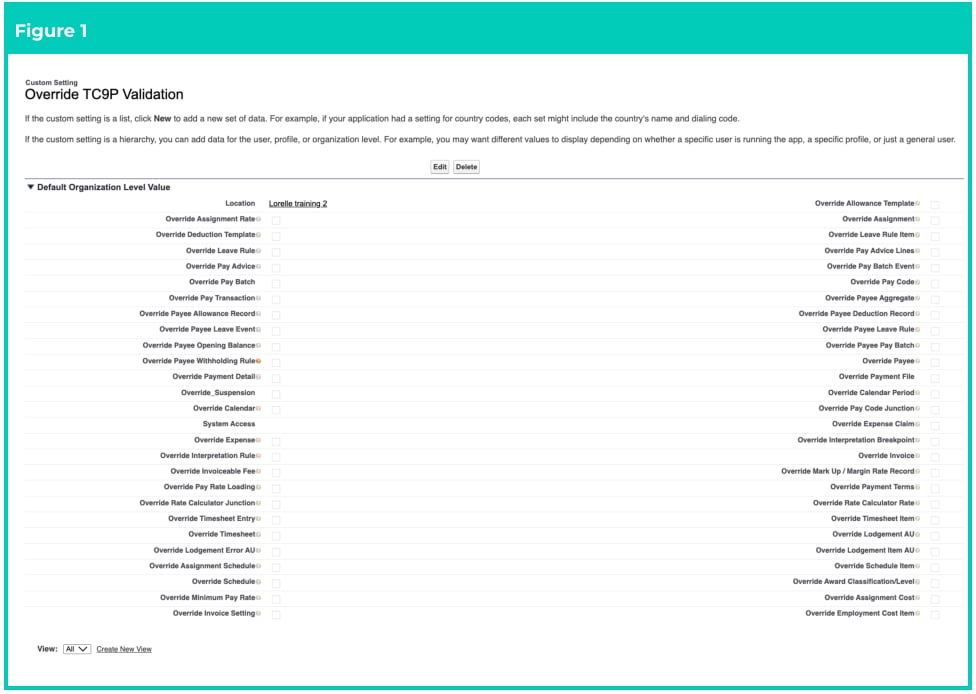
**Override TC9P Validation**
There are several checkboxes in this Custom Setting that provide additional control over in-code
validations performed on the related objects. By setting checkboxes to TRUE in this Custom Setting, you
are turning off the in-code validation for that particular object. Any auto-populate triggers on that object
will still fire, but the data validation will not.
It is recommended that you ensure the checkboxes in this Custom Setting are set to FALSE unless you
need to turn off validation for some historic data to be entered, or other custom process requiring the
validation to be disabled momentarily, with the understanding of reinstating the validations as
determined by the Product Team. To locate the Validation Override Custom Settings:
Go to **Setup > Custom Settings >** select **Manage** next to **Override TC9P Validation**
1. Select **Edit** at the top of the main window (see Figure 1).
2. Select the various checkboxes of the Object that requires the current Product Validations to be
momentarily deactivated.
3. Select the **Save** button.
4. Users should immediately proceed with the process, which requires this validation to be turned
off.
5. Once the process is complete, Users must return to **Setup > Custom Settings >** select **Manage**
next to **Override TC9P Validation.**
6. Select **Edit** at the top of the main window.
7. Deselect all the checkboxes to ensure the Product Validations are turned back on.
8. Select the **Save** button.
**Important Notes**
*(Figure 1)*
*You must NEVER share this information with Clients. If they are aware of this, they can potentially*
*activate this without our knowledge, therefore will have issues later with software not processing as*
*required due to the overrides being active, as well as not complying with other legislative agencies*
*and integrations.*
 **Important Notes**
*(Figure 1)*
*If an Org has the Scheduled Job ‘Automatic Status Update’ running each night, this job will also*
*perform the additional task of reviewing any of these checkboxes that are ticked in Figure 1 for*
*Validation Overrides, and will uncheck them so all validations will resume to launch as per the*
*standard Product design.*
## Further Information
| Document | Document Type | Description |
| ----------------------------------------------- | ------------------- | ------------------------------------------------------------------- |
| Configuration Guide to 2cloudnine Payroll Suite | Configuration Guide | Configuration Guide for the implementation of 2cloudnine Payroll. |
| Configuration Guide To 2cloudnine Utilities | Configuration Guide | Configuration Guide for the implementation of 2cloudnine Utilities. |
**Important Notes**
*(Figure 1)*
*If an Org has the Scheduled Job ‘Automatic Status Update’ running each night, this job will also*
*perform the additional task of reviewing any of these checkboxes that are ticked in Figure 1 for*
*Validation Overrides, and will uncheck them so all validations will resume to launch as per the*
*standard Product design.*
## Further Information
| Document | Document Type | Description |
| ----------------------------------------------- | ------------------- | ------------------------------------------------------------------- |
| Configuration Guide to 2cloudnine Payroll Suite | Configuration Guide | Configuration Guide for the implementation of 2cloudnine Payroll. |
| Configuration Guide To 2cloudnine Utilities | Configuration Guide | Configuration Guide for the implementation of 2cloudnine Utilities. |