> ## Documentation Index
> Fetch the complete documentation index at: https://documentation.2cloudnine.com/llms.txt
> Use this file to discover all available pages before exploring further.
# 3B WFM Integration - Configuration and Implementation Guide
## **Read Before Installing**
### Introduction & Overview
This guide is to be used for the implementation and configuration of the 2cloudnine 3B
WFM Integration.
In order to be 100% configured you must complete all mandatory steps outlined in this
guide (Steps 1-6).
**Important Notes**
The following packages must be installed in the org before you can install the 2cloudnine
3B WFM Integration package. All current links for updated packages can be found in the
configuration guide linked below:
| Package | Installation Link |
| ------------------------------------- | ---------------------------------------------------------------------------------------------------------------------------------------------------------------------- |
| 2cloudnine Payroll | Configuration Guide To 2cloudnine Payroll |
| 2cloudnine Payroll Time2Pay Extension | 2cloudnine Payroll Time2Pay Extension |
| 3B Integration Package | [https://login.salesforce.com/packaging/installPackage.apexp?p0=04tMp0000004HOrIAM](https://login.salesforce.com/packaging/installPackage.apexp?p0=04tMp0000004HOrIAM) |
| 3B WFM | Contact 3B for installation instructions |
| 3B CLM | Contact 3B for installation instructions |
| 3B Forms for Salesforce | Contact 3B for installation instructions |
| 3B for Salesforce | Contact 3B for installation instructions |
#### Installing a Package
When you install a managed package you need to select if the security is going to be
applied to all profiles or you need to manually select which profiles you will be applying
the security to.
As the package contains permission sets, we highly recommend installing it only for the
**System Administrator** profile and then using permission sets to grant access to other
users.
This will only happen on the first install of the product so **make sure you select correctly.**
## **Configuration**
### 1. Create Unique Records
The 2cloudnine 3B WFM Integration requires the creation of some unique records to be
created and configured in a specific way to ensure the integration functions as intended.
#### Timesheet Calendars
As the 2cloudnine 3B WFM Integration is responsible for creating Timesheet and
Timesheet Entries, the Timesheet Calendar is used only to control the Timesheet
Frequency. The frequency of your Timesheet Calendars should match that of your pay
schedules and Interpretation Rules.
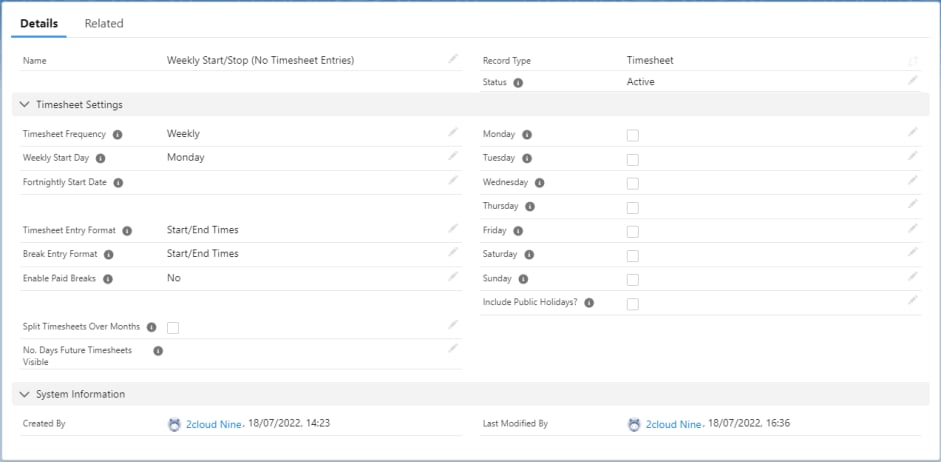
The following is for a Weekly timesheet. This must be completed for each Timesheet
Calendar frequency you require.
1. Go to the **App launcher**
2. Search for **Calendars**
3. Click **New**
4. Select **Timesheet**
5. Enter information as per the following screenshot.
**Important -** Do not select any individual dates or ‘Include Public Holidays’. These fields
determine what Timesheet Entry records are automatically created when a Timesheet is
generated. As the integration is responsible for creating records we do not want the
system to automatically create any Timesheet Entry records.
[Please refer to the Create a Timesheet Calendar QRG](https://drive.google.com/file/d/1y_hm7R6mAK2fZbuJcQCOgLnn0clOJ9OD/view) for options related to defining a
different Weekly or Fortnightly starting day of the week.
### 2. Salesforce Flows
To provide customers with the greatest level of flexibility, some key data points across the
various objects must be set using custom automation.
Whilst the criteria may differ per customer the following flows must be deployed and
configured for the integration to function as intended.
**Important -** The following flows have already been created by 2cloudnine and are
available to deploy upon request. If you wish to use the 2cloudnine flows as a base in
which you can edit as required, please contact your 2cloudnine consultant.
 #### Update Shift on Edit (Mandatory)
This flow is used to update the Shift record on Edit. Its primary purpose is indicating when
a shift is to be processed by the integration.
The following fields are typically updated using this flow.
* **Integration Pending** - Determines if the shift is to be processed from the
integration batch job. Shifts where this is True will be processed.
* **Sent to Payroll** - Determines if the processed Shift will create the related
2cloudnine Records. If Sent to Payroll is checked and then unchecked and the Shift
processed again, only the related Timesheet Entry record is deleted.
* **AssignmentString** - The default AssignmentString set by the 2cloudnine 3B WFM
Integration is ‘2c9 Job Role + Contact’. This default value is set by a trigger on the
creation of a Shift record only. In the event a Job Role or Contact is changed on a
Shift the flow will ensure the AssignmentString is also updated.
Failure to deploy this flow will mean there is no logic to determine which Shift records are
to be processed by the integration.
*In the event a customer wants to use a different AssignmentString, a new flow which runs*
*on create will be required. This flow must run on record save (not fast action) due to the*
*order of execution.*
#### Update Shift Break Times (Mandatory)
This flow is used to update the Shift's break fields from the related ‘Break’ object. Unlike
the 2cloudnine Timesheet Entry, breaks in 3B WFM are captured in a related object called
‘Break’ which allows for more than 2 breaks.
This flow runs on the create and edit of Breaks and updates the relevant break 1 and break
2 fields on the Shift. This flow contains logic to accumulate break lengths when there are
greater than 2 Shift Breaks.
*As the 2cloudnine Timesheet Entry supports a maximum of 2 breaks, this flow will*
*accumulate break lengths when there are more than 2 Breaks ensuring separation*
*between paid and unpaid breaks.*
#### Update Project Code on Create (Mandatory)
This flow is used to set the Record ID of Project Codes where the record type equals
‘Template Level’ OR ‘Timesheet Activity - Template Level’ into the ‘External ID’ field of the
created record.
When a Shift is processed that contains a Project Code and\or Timesheet Activity, the
2cloudnine 3B WFM Integration first checks if an existing Assignment Level Project Code
and\or Timesheet Activity exists. It does this by matching the Shift’s Project Code and\or
Timesheet Activity Record ID against the Assignment Levels Project Code and\or
Timesheet Activity External ID field.
Failure to deploy and activate this flow can result in duplicate Assignment level Project
Code and\or Timesheet Activity records being created every time a shift is processed.
### 3. Page Layout Assignments and Required Fields
The 2cloudnine 3B WFM Integration contains page layouts for the Agreement, 3B Job and
Shift objects. It is recommended that these page layouts are assigned to the required
profiles post installation.
| Object | Page Layout |
| --------- | ------------------------------------- |
| Agreement | 2cloudnine 3B Integration - Agreement |
| 3B Job | 2cloudnine 3B Integration - 3B Job |
| Shift | 2cloudnine 3B Integration - Shift |
If using the 3B WFM page layouts or a custom page layout the following fields should be
added to the respective page layouts you have in use.
Where a field's user input is indicated as ‘Required’, it must contain data for the
Integration to work without error. These fields **MUST** be included and required on the
page layouts or populated using automation to ensure data always exists.
**Agreement**
Page Layout - 2cloudnine 3B Integration - Agreement
| Field Label | User Input | Package |
| ------------------------ | ---------- | ------------------------- |
| Default Payment Entity | Required | 2cloudnine 3B Integration |
| Pay Schedule | Required | 2cloudnine 3B Integration |
| Default Invoice Schedule | Required | 2cloudnine 3B Integration |
| Default Invoice Tax ID | Required | 2cloudnine 3B Integration |
| Default Invoice Taxable | Required | 2cloudnine 3B Integration |
| Invoice to Account | Required | 2cloudnine 3B Integration |
| Assignment Primary Payee | Optional | 2cloudnine 3B Integration |
| Auto Create Payee | Optional | 2cloudnine 3B Integration |
**3B Job**
Page Layout - 2cloudnine 3B Integration - Job Role
| Field Label | User Input | Package |
| --------------- | ---------- | ------------------------- |
| Rate Calculator | Required | 2cloudnine 3B Integration |
| Inherit Rate Calculator Values From | Optional | 2cloudnine 3B Integration |
| ----------------------------------- | -------- | ------------------------- |
| Location | Optional | 2cloudnine 3B Integration |
| Industry | Optional | 2cloudnine 3B Integration |
| Risk Classification | Optional | 2cloudnine 3B Integration |
| Award Classification | Optional | 2cloudnine 3B Integration |
| Award Level | Optional | 2cloudnine 3B Integration |
| Timesheet Calendar | Required | 2cloudnine 3B Integration |
| Public Holiday Calendar | Required | 2cloudnine 3B Integration |
| Interpretation Rule | Required | 2cloudnine 3B Integration |
| Default Assignment Contact | Required | 2cloudnine 3B Integration |
| Default Invoice Contact | Optional | 2cloudnine 3B Integration |
| Timesheet Approver | Optional | 2cloudnine 3B Integration |
| Expense Claim Approver | Optional | 2cloudnine 3B Integration |
| Leave Approver | Optional | 2cloudnine 3B Integration |
| Does not use online Expense Claims | Optional | 2cloudnine 3B Integration |
**Shift**
Page Layout - 2cloudnine 3B Integration - Shift
| Field Label | User Input | Package |
| ------------------------------ | --------------------------------------------------------------- | ------------------------- |
| Contact | Mandatory | 3B |
| 3B Job | Mandatory | 3B |
| Sent to Payroll | Flow Populated | 2cloudnine 3B Integration |
| Payroll Time Type | Mandatory | 2cloudnine 3B Integration |
| Scheduled Start Time | Conditionally Mandatory (If Pay Scheduled Time is selected) | 3B |
| Scheduled End Time | Conditionally Mandatory (If Pay Scheduled Time is selected) | 3B |
| Actual Start Time | Conditionally Mandatory (If Pay Scheduled Time is NOT selected) | 3B |
| Actual End Time | Conditionally Mandatory (If Pay Scheduled Time is NOT selected) | 3B |
| Allowance | Optional | 2cloudnine 3B Integration |
| Allowance Only | Optional | 2cloudnine 3B Integration |
| Project Code | Optional | 2cloudnine 3B Integration |
| Timesheet Activity | Optional | 2cloudnine 3B Integration |
| Public Holiday Calendar | Optional | 2cloudnine 3B Integration |
| Award Classification | Optional | 2cloudnine 3B Integration |
| Award Level | Optional | 2cloudnine 3B Integration |
| Location | Optional | 2cloudnine 3B Integration |
| Industry | Optional | 2cloudnine 3B Integration |
| Risk Classification | Optional | 2cloudnine 3B Integration |
| Employee Notes | Optional | 2cloudnine 3B Integration |
| AssignmentString | Integration | 2cloudnine 3B Integration |
| Integration Pending | Flow Populated | 2cloudnine 3B Integration |
| Shift Item Integration Pending | Flow Populated | 2cloudnine 3B Integration |
| Assignment | Integration | 2cloudnine 3B Integration |
| Timesheet | Integration | 2cloudnine 3B Integration |
| Timesheet Entry | Integration | 2cloudnine 3B Integration |
| TSE Start Date | Optional | 2cloudnine 3B Integration |
| TSE End Date | Optional | 2cloudnine 3B Integration |
| TSE Start Time | Optional | 2cloudnine 3B Integration |
| TSE End Time | Optional | 2cloudnine 3B Integration |
**Assignment**
| 3B Job | Integration | 2cloudnine 3B Integration |
| ---------------- | ----------- | ------------------------- |
| AssignmentString | Integration | 2cloudnine 3B Integration |
**Timesheet**
| Field Label | User Input | Package |
| ------------------- | -------------- | ------------------------- |
| Integration Pending | Flow Populated | 2cloudnine 3B Integration |
**Timesheet Entry**
| Field Label | User Input | Package |
| ----------- | ----------- | ------------------------- |
| Shift | Integration | 2cloudnine 3B Integration |
| Site | Integration | 2cloudnine 3B Integration |
| Agreement | Integration | 2cloudnine 3B Integration |
**Timesheet Item**
| Field Label | User Input | Package |
| ----------- | ----------- | ------------------------------ |
| Shift | Integration | 2cloudnine Sirenum Integration |
| Site | Integration | 2cloudnine Sirenum Integration |
| Agreement | Integration | 2cloudnine Sirenum Integration |
### 4. Permission Set & Sharing Settings
#### Permission Set
A permission set has been added to the 2cloudnine 3B WFM Integration package which
provides access to the minimum objects, fields and record types needed to process the
Shift Integration.
**Important:** This permission set contains access to only those fields included within the
2cloudnine 3B WFM Integration package. It is assumed users accessing the objects and
other fields from both 3B WFM and 2cloudnine packages will have profile or permission
set access as determined by the respective setup of those packages.
To assign the permission set to users:
1. Go to **Setup**
2. Search for **Permission Sets**
3. Select the **2cloudnine 3B Integration** permission set
4. Select the **Manage Assignments** button.
5. Select the **Add Assignments** button.
6. Select the user(s) you wish to assign the permission set to.
7. Select the **Assign** button.
#### Sharing Settings
The 2cloudnine 3B WFM Integration uses only standard Salesforce objects and those
contained with the 3B WFM and 2cloudnine packages. Where a private sharing model is
used within an org, users accessing the package must be provided access to the following
objects either via sharing settings or profile/permission set access to View/Modify All.
Salesforce
* Account
* Contact
3B WFM Package
* Agreement
* 3B Job
* Shift
2cloudnine Package
* Assignment
* Timesheet
* Timesheet Entry
* Timesheet Item (Master-Detail with Timesheet)
* Project Code
* Calendar
* Rate Calculator
* Interpretation Rule
* Location
* Award Classification and Level
* Payee Allowance Record
### 5. Scheduled Job
#### Shift Integration Scheduled Job
The following scheduled job processes all Shift records where ‘Integration Pending is True
in 5 minute intervals.
To run the script:
1. Copy the block of script below\..
2. Select Setup Cog > Development console
3. Debug > Open Execute Anonymous window
4. Delete or comment out any code that is in the window and paste in the copied
script > click the execute button
The apex jobs will now be scheduled. Please confirm they are set up correctly by going to
Setup > Scheduled Jobs.
```
System.schedule('ShiftAssignmentBatch 05', '0 05 * * * ?', new
tc9_3bInt.ShiftAssignmentBatch());
System.schedule('ShiftAssignmentBatch 10', '0 10 * * * ?', new
tc9_3bInt.ShiftAssignmentBatch());
System.schedule('ShiftAssignmentBatch 15', '0 15 * * * ?', new
tc9_3bInt.ShiftAssignmentBatch());
System.schedule('ShiftAssignmentBatch 20', '0 20 * * * ?', new
tc9_3bInt.ShiftAssignmentBatch());
System.schedule('ShiftAssignmentBatch 25', '0 25 * * * ?', new
tc9_3bInt.ShiftAssignmentBatch());
System.schedule('ShiftAssignmentBatch 30', '0 30 * * * ?', new
tc9_3bInt.ShiftAssignmentBatch());
System.schedule('ShiftAssignmentBatch 35', '0 35 * * * ?', new
tc9_3bInt.ShiftAssignmentBatch());
System.schedule('ShiftAssignmentBatch 40', '0 40 * * * ?', new
tc9_3bInt.ShiftAssignmentBatch());
System.schedule('ShiftAssignmentBatch 45', '0 45 * * * ?', new
tc9_3bInt.ShiftAssignmentBatch());
System.schedule('ShiftAssignmentBatch 50', '0 50 * * * ?', new
tc9_3bInt.ShiftAssignmentBatch());
System.schedule('ShiftAssignmentBatch 55', '0 55 * * * ?', new
tc9_3bInt.ShiftAssignmentBatch());
System.schedule('ShiftAssignmentBatch 00', '0 00 * * * ?', new
tc9_3bInt.ShiftAssignmentBatch());
```
You can also instantly call the apex class by following the above steps but instead pasting
the following code. This will run the Shift Integration as a one off process:
```
tc9_3bInt.ShiftAssignmentBatch s=new tc9_3bInt.ShiftAssignmentBatch();
s.execute(null);
```
#### Error Handling
The 2cloudnine 3B WFM Integration includes two methods of Error Handling:
**Email Notification**
The user who invokes the ‘ShiftAssignmentBatch’ apex class will receive an email
notification when an error occurs within the batch job.
For the scheduled batch class, this will be the user who scheduled the batch job (typically
the admin account). Where the class is invoked from another process such as a
screenflow, this will be the user who invoked the class.
**Debug Logs**
Where the integration fails, a **Debug Header** and related **Debug Logs** are created.
A single Debug Header is created per processed Batch, with related Debug Logs for each
individual failed Shift.
For example, if a batch contained 30 Shifts, and within that batch 3 failed, there would be
a single Debug Header record with 3 related Debug Logs for the 3 failed Shifts.
### 6. Additional Mandatory Configuration
#### Payee Record
Any Contact placed into a shift and processed for Integration must have at least 1 Payee
record that meets the Payee selection criteria (Refer User Guide).
The 2cloudnine 3B WFM Integration includes functionality to support the automated
creation of Payee records.
If this functionality is not used and where a Payee is not found based upon the Payee
selection criteria, the integration will fail and a debug record will be created (see above).
#### Update Picklist Value Access for Record Types
The following picklist values must be added to provide access to the following record
types.
| Object | Record Type | Picklist Field | Value |
| ------------ | ------------------------------------- | ------------------- | ---------- |
| Project Code | Timesheet Activity - Assignment Level | Variation Type | Assignment |
| Assignment | Temp | Risk Classification | All |
### 7. Additional Optional Configuration
#### Assignment RecordType
The Assignment created by the 2cloudnine 3B WFM Integration will have a default
RecordType of ‘Temp’. If a different RecordType is required, an admin can define this in the
‘3B Integration Settings’ custom setting.
To set a different Assignment RecordType:
1. Go to **Setup**
2. Search for **Custom Settings**
3. Locate **3B Integration Settings** and select **Manage** .
4. Select **Edit** (You will need to click **New** if it is the first time accessing the custom setting).
5. Enter the Assignment RecordType ID into the field **Assignment Record Type ID** .
#### Integration Batch Sizes
The 2cloudnine 3B WFM Integration utilises 3 separate batch jobs for the creation and
updating of Assignment, Timesheets and Timesheet Entries. When processing Shifts, the
default batch size used by integration is 200. This can however be updated to process
more or less Shifts as determined by the system administrator.
To update the default batch sizes:
1. Go to **Setup**
2. Search for **Custom Settings**
3. Locate **3B Integration Settings** and select **Manage** .
4. Select **Edit** (You will need to click **New** if it is the first time accessing the custom
setting).
5. Enter the desired batch size into the fields **Batch Size Shift Assignment**, **Batch**
**Size Shift Timesheet** and **Batch Size Shift Timesheet Entry** .
*When a single record fails in a batch, all records included in the same batch will also fail.*
*Whilst setting a higher batch size will result in faster batch processing, there is the inherent*
*risk of more failed records. We strongly recommend when first configuring and testing the*
*2cloudnine 3B WFM Integration to set a batch size of 1 so that a failed record does not*
*affect other records.*
#### Process Shift Integration Screenflow
A screenflow that allows users to manually process the Shift Integration can be deployed
to orgs and made available via a utility bar or lightning page.
Please contact 2cloudnine if you would like to have this screenflow deployed.
### 8. Timesheet Adjustments
#### Important
Timesheet Adjustments is a feature within the 2cloudnine Utilities Package that can be
triggered by the 2cloudnine 3B WFM Integration Package.
Please note that the 2cloudnine 3B WFM Integration can be installed without Timesheet
Adjustments. However, if you choose not to use Timesheet Adjustments, you will not be
able to update or create new shifts on an Approved Timesheet. Any attempt to do so will
result in an integration failure.
#### Configuring Timesheet Adjustments
Please refer to the [2c9 Utilities - Timesheet Adjustments Configuration Guide](https://docs.google.com/document/d/1caCFOsZNcPraI7LsSSMoci-OdIjOkhhN/edit#heading=h.gjdgxs) for
installation and configuration instructions.
#### Update Timesheet for Adjustments Flow
The Update Timesheet for Adjustments flow must be deployed and Activated in order for
Timesheet Adjustments to function. This flow is used to update the Timesheet fields
‘ScheduledJobProcessed’ within the 2cloudnine 3B WFM Integration package and the
‘Integration Pending’ used by the Timesheet Adjustments process.
#### Update Shift on Edit (Mandatory)
This flow is used to update the Shift record on Edit. Its primary purpose is indicating when
a shift is to be processed by the integration.
The following fields are typically updated using this flow.
* **Integration Pending** - Determines if the shift is to be processed from the
integration batch job. Shifts where this is True will be processed.
* **Sent to Payroll** - Determines if the processed Shift will create the related
2cloudnine Records. If Sent to Payroll is checked and then unchecked and the Shift
processed again, only the related Timesheet Entry record is deleted.
* **AssignmentString** - The default AssignmentString set by the 2cloudnine 3B WFM
Integration is ‘2c9 Job Role + Contact’. This default value is set by a trigger on the
creation of a Shift record only. In the event a Job Role or Contact is changed on a
Shift the flow will ensure the AssignmentString is also updated.
Failure to deploy this flow will mean there is no logic to determine which Shift records are
to be processed by the integration.
*In the event a customer wants to use a different AssignmentString, a new flow which runs*
*on create will be required. This flow must run on record save (not fast action) due to the*
*order of execution.*
#### Update Shift Break Times (Mandatory)
This flow is used to update the Shift's break fields from the related ‘Break’ object. Unlike
the 2cloudnine Timesheet Entry, breaks in 3B WFM are captured in a related object called
‘Break’ which allows for more than 2 breaks.
This flow runs on the create and edit of Breaks and updates the relevant break 1 and break
2 fields on the Shift. This flow contains logic to accumulate break lengths when there are
greater than 2 Shift Breaks.
*As the 2cloudnine Timesheet Entry supports a maximum of 2 breaks, this flow will*
*accumulate break lengths when there are more than 2 Breaks ensuring separation*
*between paid and unpaid breaks.*
#### Update Project Code on Create (Mandatory)
This flow is used to set the Record ID of Project Codes where the record type equals
‘Template Level’ OR ‘Timesheet Activity - Template Level’ into the ‘External ID’ field of the
created record.
When a Shift is processed that contains a Project Code and\or Timesheet Activity, the
2cloudnine 3B WFM Integration first checks if an existing Assignment Level Project Code
and\or Timesheet Activity exists. It does this by matching the Shift’s Project Code and\or
Timesheet Activity Record ID against the Assignment Levels Project Code and\or
Timesheet Activity External ID field.
Failure to deploy and activate this flow can result in duplicate Assignment level Project
Code and\or Timesheet Activity records being created every time a shift is processed.
### 3. Page Layout Assignments and Required Fields
The 2cloudnine 3B WFM Integration contains page layouts for the Agreement, 3B Job and
Shift objects. It is recommended that these page layouts are assigned to the required
profiles post installation.
| Object | Page Layout |
| --------- | ------------------------------------- |
| Agreement | 2cloudnine 3B Integration - Agreement |
| 3B Job | 2cloudnine 3B Integration - 3B Job |
| Shift | 2cloudnine 3B Integration - Shift |
If using the 3B WFM page layouts or a custom page layout the following fields should be
added to the respective page layouts you have in use.
Where a field's user input is indicated as ‘Required’, it must contain data for the
Integration to work without error. These fields **MUST** be included and required on the
page layouts or populated using automation to ensure data always exists.
**Agreement**
Page Layout - 2cloudnine 3B Integration - Agreement
| Field Label | User Input | Package |
| ------------------------ | ---------- | ------------------------- |
| Default Payment Entity | Required | 2cloudnine 3B Integration |
| Pay Schedule | Required | 2cloudnine 3B Integration |
| Default Invoice Schedule | Required | 2cloudnine 3B Integration |
| Default Invoice Tax ID | Required | 2cloudnine 3B Integration |
| Default Invoice Taxable | Required | 2cloudnine 3B Integration |
| Invoice to Account | Required | 2cloudnine 3B Integration |
| Assignment Primary Payee | Optional | 2cloudnine 3B Integration |
| Auto Create Payee | Optional | 2cloudnine 3B Integration |
**3B Job**
Page Layout - 2cloudnine 3B Integration - Job Role
| Field Label | User Input | Package |
| --------------- | ---------- | ------------------------- |
| Rate Calculator | Required | 2cloudnine 3B Integration |
| Inherit Rate Calculator Values From | Optional | 2cloudnine 3B Integration |
| ----------------------------------- | -------- | ------------------------- |
| Location | Optional | 2cloudnine 3B Integration |
| Industry | Optional | 2cloudnine 3B Integration |
| Risk Classification | Optional | 2cloudnine 3B Integration |
| Award Classification | Optional | 2cloudnine 3B Integration |
| Award Level | Optional | 2cloudnine 3B Integration |
| Timesheet Calendar | Required | 2cloudnine 3B Integration |
| Public Holiday Calendar | Required | 2cloudnine 3B Integration |
| Interpretation Rule | Required | 2cloudnine 3B Integration |
| Default Assignment Contact | Required | 2cloudnine 3B Integration |
| Default Invoice Contact | Optional | 2cloudnine 3B Integration |
| Timesheet Approver | Optional | 2cloudnine 3B Integration |
| Expense Claim Approver | Optional | 2cloudnine 3B Integration |
| Leave Approver | Optional | 2cloudnine 3B Integration |
| Does not use online Expense Claims | Optional | 2cloudnine 3B Integration |
**Shift**
Page Layout - 2cloudnine 3B Integration - Shift
| Field Label | User Input | Package |
| ------------------------------ | --------------------------------------------------------------- | ------------------------- |
| Contact | Mandatory | 3B |
| 3B Job | Mandatory | 3B |
| Sent to Payroll | Flow Populated | 2cloudnine 3B Integration |
| Payroll Time Type | Mandatory | 2cloudnine 3B Integration |
| Scheduled Start Time | Conditionally Mandatory (If Pay Scheduled Time is selected) | 3B |
| Scheduled End Time | Conditionally Mandatory (If Pay Scheduled Time is selected) | 3B |
| Actual Start Time | Conditionally Mandatory (If Pay Scheduled Time is NOT selected) | 3B |
| Actual End Time | Conditionally Mandatory (If Pay Scheduled Time is NOT selected) | 3B |
| Allowance | Optional | 2cloudnine 3B Integration |
| Allowance Only | Optional | 2cloudnine 3B Integration |
| Project Code | Optional | 2cloudnine 3B Integration |
| Timesheet Activity | Optional | 2cloudnine 3B Integration |
| Public Holiday Calendar | Optional | 2cloudnine 3B Integration |
| Award Classification | Optional | 2cloudnine 3B Integration |
| Award Level | Optional | 2cloudnine 3B Integration |
| Location | Optional | 2cloudnine 3B Integration |
| Industry | Optional | 2cloudnine 3B Integration |
| Risk Classification | Optional | 2cloudnine 3B Integration |
| Employee Notes | Optional | 2cloudnine 3B Integration |
| AssignmentString | Integration | 2cloudnine 3B Integration |
| Integration Pending | Flow Populated | 2cloudnine 3B Integration |
| Shift Item Integration Pending | Flow Populated | 2cloudnine 3B Integration |
| Assignment | Integration | 2cloudnine 3B Integration |
| Timesheet | Integration | 2cloudnine 3B Integration |
| Timesheet Entry | Integration | 2cloudnine 3B Integration |
| TSE Start Date | Optional | 2cloudnine 3B Integration |
| TSE End Date | Optional | 2cloudnine 3B Integration |
| TSE Start Time | Optional | 2cloudnine 3B Integration |
| TSE End Time | Optional | 2cloudnine 3B Integration |
**Assignment**
| 3B Job | Integration | 2cloudnine 3B Integration |
| ---------------- | ----------- | ------------------------- |
| AssignmentString | Integration | 2cloudnine 3B Integration |
**Timesheet**
| Field Label | User Input | Package |
| ------------------- | -------------- | ------------------------- |
| Integration Pending | Flow Populated | 2cloudnine 3B Integration |
**Timesheet Entry**
| Field Label | User Input | Package |
| ----------- | ----------- | ------------------------- |
| Shift | Integration | 2cloudnine 3B Integration |
| Site | Integration | 2cloudnine 3B Integration |
| Agreement | Integration | 2cloudnine 3B Integration |
**Timesheet Item**
| Field Label | User Input | Package |
| ----------- | ----------- | ------------------------------ |
| Shift | Integration | 2cloudnine Sirenum Integration |
| Site | Integration | 2cloudnine Sirenum Integration |
| Agreement | Integration | 2cloudnine Sirenum Integration |
### 4. Permission Set & Sharing Settings
#### Permission Set
A permission set has been added to the 2cloudnine 3B WFM Integration package which
provides access to the minimum objects, fields and record types needed to process the
Shift Integration.
**Important:** This permission set contains access to only those fields included within the
2cloudnine 3B WFM Integration package. It is assumed users accessing the objects and
other fields from both 3B WFM and 2cloudnine packages will have profile or permission
set access as determined by the respective setup of those packages.
To assign the permission set to users:
1. Go to **Setup**
2. Search for **Permission Sets**
3. Select the **2cloudnine 3B Integration** permission set
4. Select the **Manage Assignments** button.
5. Select the **Add Assignments** button.
6. Select the user(s) you wish to assign the permission set to.
7. Select the **Assign** button.
#### Sharing Settings
The 2cloudnine 3B WFM Integration uses only standard Salesforce objects and those
contained with the 3B WFM and 2cloudnine packages. Where a private sharing model is
used within an org, users accessing the package must be provided access to the following
objects either via sharing settings or profile/permission set access to View/Modify All.
Salesforce
* Account
* Contact
3B WFM Package
* Agreement
* 3B Job
* Shift
2cloudnine Package
* Assignment
* Timesheet
* Timesheet Entry
* Timesheet Item (Master-Detail with Timesheet)
* Project Code
* Calendar
* Rate Calculator
* Interpretation Rule
* Location
* Award Classification and Level
* Payee Allowance Record
### 5. Scheduled Job
#### Shift Integration Scheduled Job
The following scheduled job processes all Shift records where ‘Integration Pending is True
in 5 minute intervals.
To run the script:
1. Copy the block of script below\..
2. Select Setup Cog > Development console
3. Debug > Open Execute Anonymous window
4. Delete or comment out any code that is in the window and paste in the copied
script > click the execute button
The apex jobs will now be scheduled. Please confirm they are set up correctly by going to
Setup > Scheduled Jobs.
```
System.schedule('ShiftAssignmentBatch 05', '0 05 * * * ?', new
tc9_3bInt.ShiftAssignmentBatch());
System.schedule('ShiftAssignmentBatch 10', '0 10 * * * ?', new
tc9_3bInt.ShiftAssignmentBatch());
System.schedule('ShiftAssignmentBatch 15', '0 15 * * * ?', new
tc9_3bInt.ShiftAssignmentBatch());
System.schedule('ShiftAssignmentBatch 20', '0 20 * * * ?', new
tc9_3bInt.ShiftAssignmentBatch());
System.schedule('ShiftAssignmentBatch 25', '0 25 * * * ?', new
tc9_3bInt.ShiftAssignmentBatch());
System.schedule('ShiftAssignmentBatch 30', '0 30 * * * ?', new
tc9_3bInt.ShiftAssignmentBatch());
System.schedule('ShiftAssignmentBatch 35', '0 35 * * * ?', new
tc9_3bInt.ShiftAssignmentBatch());
System.schedule('ShiftAssignmentBatch 40', '0 40 * * * ?', new
tc9_3bInt.ShiftAssignmentBatch());
System.schedule('ShiftAssignmentBatch 45', '0 45 * * * ?', new
tc9_3bInt.ShiftAssignmentBatch());
System.schedule('ShiftAssignmentBatch 50', '0 50 * * * ?', new
tc9_3bInt.ShiftAssignmentBatch());
System.schedule('ShiftAssignmentBatch 55', '0 55 * * * ?', new
tc9_3bInt.ShiftAssignmentBatch());
System.schedule('ShiftAssignmentBatch 00', '0 00 * * * ?', new
tc9_3bInt.ShiftAssignmentBatch());
```
You can also instantly call the apex class by following the above steps but instead pasting
the following code. This will run the Shift Integration as a one off process:
```
tc9_3bInt.ShiftAssignmentBatch s=new tc9_3bInt.ShiftAssignmentBatch();
s.execute(null);
```
#### Error Handling
The 2cloudnine 3B WFM Integration includes two methods of Error Handling:
**Email Notification**
The user who invokes the ‘ShiftAssignmentBatch’ apex class will receive an email
notification when an error occurs within the batch job.
For the scheduled batch class, this will be the user who scheduled the batch job (typically
the admin account). Where the class is invoked from another process such as a
screenflow, this will be the user who invoked the class.
**Debug Logs**
Where the integration fails, a **Debug Header** and related **Debug Logs** are created.
A single Debug Header is created per processed Batch, with related Debug Logs for each
individual failed Shift.
For example, if a batch contained 30 Shifts, and within that batch 3 failed, there would be
a single Debug Header record with 3 related Debug Logs for the 3 failed Shifts.
### 6. Additional Mandatory Configuration
#### Payee Record
Any Contact placed into a shift and processed for Integration must have at least 1 Payee
record that meets the Payee selection criteria (Refer User Guide).
The 2cloudnine 3B WFM Integration includes functionality to support the automated
creation of Payee records.
If this functionality is not used and where a Payee is not found based upon the Payee
selection criteria, the integration will fail and a debug record will be created (see above).
#### Update Picklist Value Access for Record Types
The following picklist values must be added to provide access to the following record
types.
| Object | Record Type | Picklist Field | Value |
| ------------ | ------------------------------------- | ------------------- | ---------- |
| Project Code | Timesheet Activity - Assignment Level | Variation Type | Assignment |
| Assignment | Temp | Risk Classification | All |
### 7. Additional Optional Configuration
#### Assignment RecordType
The Assignment created by the 2cloudnine 3B WFM Integration will have a default
RecordType of ‘Temp’. If a different RecordType is required, an admin can define this in the
‘3B Integration Settings’ custom setting.
To set a different Assignment RecordType:
1. Go to **Setup**
2. Search for **Custom Settings**
3. Locate **3B Integration Settings** and select **Manage** .
4. Select **Edit** (You will need to click **New** if it is the first time accessing the custom setting).
5. Enter the Assignment RecordType ID into the field **Assignment Record Type ID** .
#### Integration Batch Sizes
The 2cloudnine 3B WFM Integration utilises 3 separate batch jobs for the creation and
updating of Assignment, Timesheets and Timesheet Entries. When processing Shifts, the
default batch size used by integration is 200. This can however be updated to process
more or less Shifts as determined by the system administrator.
To update the default batch sizes:
1. Go to **Setup**
2. Search for **Custom Settings**
3. Locate **3B Integration Settings** and select **Manage** .
4. Select **Edit** (You will need to click **New** if it is the first time accessing the custom
setting).
5. Enter the desired batch size into the fields **Batch Size Shift Assignment**, **Batch**
**Size Shift Timesheet** and **Batch Size Shift Timesheet Entry** .
*When a single record fails in a batch, all records included in the same batch will also fail.*
*Whilst setting a higher batch size will result in faster batch processing, there is the inherent*
*risk of more failed records. We strongly recommend when first configuring and testing the*
*2cloudnine 3B WFM Integration to set a batch size of 1 so that a failed record does not*
*affect other records.*
#### Process Shift Integration Screenflow
A screenflow that allows users to manually process the Shift Integration can be deployed
to orgs and made available via a utility bar or lightning page.
Please contact 2cloudnine if you would like to have this screenflow deployed.
### 8. Timesheet Adjustments
#### Important
Timesheet Adjustments is a feature within the 2cloudnine Utilities Package that can be
triggered by the 2cloudnine 3B WFM Integration Package.
Please note that the 2cloudnine 3B WFM Integration can be installed without Timesheet
Adjustments. However, if you choose not to use Timesheet Adjustments, you will not be
able to update or create new shifts on an Approved Timesheet. Any attempt to do so will
result in an integration failure.
#### Configuring Timesheet Adjustments
Please refer to the [2c9 Utilities - Timesheet Adjustments Configuration Guide](https://docs.google.com/document/d/1caCFOsZNcPraI7LsSSMoci-OdIjOkhhN/edit#heading=h.gjdgxs) for
installation and configuration instructions.
#### Update Timesheet for Adjustments Flow
The Update Timesheet for Adjustments flow must be deployed and Activated in order for
Timesheet Adjustments to function. This flow is used to update the Timesheet fields
‘ScheduledJobProcessed’ within the 2cloudnine 3B WFM Integration package and the
‘Integration Pending’ used by the Timesheet Adjustments process.