> ## Documentation Index
> Fetch the complete documentation index at: https://documentation.2cloudnine.com/llms.txt
> Use this file to discover all available pages before exploring further.

# Integrated Import Tool - Configuration and Implementation Guide

### **Packages Included in 2cloudnine Payroll Integrated Import Tool**

This Configuration Guide to the 2cloudnine Payroll Import Tool Extension covers the following package,
which must be installed only after you have completed the Pre-Installation checklist, detailed later in this
document. Following this guide in sequence will ensure the correct installation and configuration of the
Import Tool Extension package.

| Package                                  | Version | Latest Release Date      |
| ---------------------------------------- | ------- | ------------------------ |
| 2cloudnine Payroll Import Tool Extension | 1.60    | Desert Flame ‘24 Release |

### **Important Information**

Only an authorised Salesforce System Administrator or Partner should be actioning any installation,
configuration items, and tasks.

There may be compulsory and optional configuration items and tasks that must be completed before
and after the package's installation. These will be highlighted in the checklists provided in this document,
and further details will be provided within this document.

You are required to complete the installation and configuration of the main 2cloudnine Payroll packages
before attempting to install the General Ledger Extension Package. You can do so by following the
Configuration Guide To 2cloudnine Payroll Suite steps. This will ensure that any prerequisite/base
configuration needed for the Integrated Import Tool has also been completed.

The installer will be responsible for ensuring all these configuration items and tasks are completed within
a reasonable timeframe of the package being installed. Please familiarise yourself with all of the
requirements PRIOR to installing the package and ensure you have sufficient time and resources
available. Failing to do so can negatively impact the User experience and stability of 2cloudnine Payroll
and Integrated Import Tool.

This guide should always be accessed from Salesforce and used via your web browser. This will ensure
you are viewing the most recent version of the document. Further, downloading the document and
opening it with desktop programs, such as Adobe, has been found to cause errors when copying and
using the scripts provided for data updates. These errors do not occur when viewed through a browser.

### Read First: How to Use this Configuration Guide

### **What is covered by this Configuration Guide?**

This Configuration Guide outlines the ‘out-of-the-box’ setup of the 2cloudnine Integrated Import Tool,
including built-in customisations to the customer's required processes and data. Where customisation is
built into the product, we will cover how to install and configure it correctly.

Where, during the sales process and discovery, it is identified that further customisations outside of those
built by the 2cloudnine Integrated Import Tool are required, this would not be covered by the
Configuration Guide.

### **Discovery and Configuration Guides**

This Configuration Guide is meant to be used with the Discovery Template. Through Discovery, you will
assess the customer's needs and identify the 2cloudnine Integrated Import Tool requirements and
functionality required to meet those needs.

Once we have established the required work, we can use the Configuration Guide to determine what
configuration needs to be completed.

### **Task Types**

* General Salesforce Setup
* Custom Settings, Metadata Types and Setting Configuration
* Schedule Jobs
* Baseline Testing
* Data Migration

### **Task Classifications**

This Configuration Guide comprises a series of tasks that are either compulsory or optional and must be
completed to use the 2cloudnine Integrated Import Tool successfully. Each task is allocated 1 of 3 possible
classifications, which are:

* **Compulsory** must be completed regardless of whetherthe organisation will use the related
  functionality.
  For example, it is Compulsory to create and configure an Integration User for use with 2-factor
  Authentication using 1Password.
* **Conditionally Compulsory** must be completed if theorganisation uses a specific functionality
  within the 2cloudnine Integrated Import Tool. When a task is conditionally compulsory, we will
  detail the condition(s) that make it compulsory.
  For example, if the organisation has already implemented the original version of the Import Tool,
  field migration will need to be completed for External ID fields.
* **Optional** tasks will only need to be completed to usean optional feature of the 2cloudnine
  Integrated Import Tool. In these cases, a Default behaviour(s) is often built into the 2cloudnine
  Integrated Import Tool. If the organisation wishes to use the Default behaviour(s), they don’t have
  to do anything else. An optional task will be set where an organisation will not use the Default
  behaviour(s).
  Example: According to the organisation's requirements, modifying the batch size for import
  objects so that larger quantities of data may be processed simultaneously, is optional.

### 1. Pre-Installation

### **Prerequisites**

Before installing the 2cloudnine Integrated Import Tool package, you must (at a minimum) already have
2cloudnine Payroll, 2cloudnine Time2Pay Extension, and the 2cloudnine Data Creation packages installed
and configured. Refer to the Configuration Guide for these here:

<table>
  <tr>
    <th>Package</th>
    <th>Installation Link</th>
  </tr>

  <tr>
    <td>2cloudnine Payroll</td>

    <td rowspan="3">
      <a href="/config-guides/configuration-guide-to-2cloudnine-payroll-suite-v1-13">
        Configuration Guide To 2cloudnine Payroll
      </a>
    </td>
  </tr>

  <tr>
    <td>2cloudnine Payroll Time2Pay Extension</td>
  </tr>

  <tr>
    <td>2cloudnine Payroll Data Creation Extension</td>
  </tr>
</table>

### **2cloudnine Integration User**

As the Payroll Configuration Guide outlines, each organisation must have a 2cloudnine Integrations User
in addition to the 2cloudnine Admin User. The Integration user is essential to enabling Import Tool
processing.

To check whether the Integration User has been created in your Org, complete the following:

Go to **Setup** > **Users**

1. Review the Administrator Users and confirm there are two for 2cloudnine: the standard System
   Admin User and the 2cloudnine Integration User.
2. If the Integration User is set up, you don’t need to proceed, but if there is no user, please proceed
   to step 3.
3. Send an email to the 2cloudnine Tech Services Team at [usercredentialsinternal@2cloudnine.com](mailto:usercredentialsinternal@2cloudnine.com)
   to advise them that this organisation requires them to create an Integrations User and provide
   the 2cloudnine Admin User login username so they can prioritise this.

### **Before you get started, you will need to know the following:**

To assist with a successful configuration of your 2cloudnine Integrated Import Tool package, it’s essential
to make sure you have already gained the required information for the following questions:

1. Has a previous version of the Import Tool been installed? If so, is it version v1.20 or prior? If yes:
   1. The customer must be enabled to use the newer User Experience.
   2. The Scheduled Jobs to set external ID strings will need to be scheduled.
2. Does the customer have custom automation for each of the objects imported? If so, consider
   setting a lower batch size to overcome potential platform errors (CPU timeouts, etc).

### 2. Installation and Configuration Checklist

### **Installation and Configuration Checklist**

The following checklist summarises the tasks to install and configure the 2cloudnine General Ledger
Extension. Each specific task requires more detail, which can be found by following the link to that task.
Each task should be completed in the sequence below to ensure seamless installation and configuration
of the packages.

<table className="pdf-checklist-table">
  <thead>
    <tr>
      <th>Task</th>
      <th>Requirement</th>
      <th>Completed</th>
    </tr>
  </thead>

  <tbody>
    <tr>
      <td colSpan={3}><strong><a href="#3-package-installation">Package Installation</a></strong></td>
    </tr>

    <tr>
      <td>Installing Packages</td>
      <td className="pdf-checklist-requirement pdf-checklist-requirement-compulsory"><strong>Compulsory</strong></td>
      <td className="pdf-checklist-completed">⃞</td>
    </tr>

    <tr>
      <td>Installation Process</td>
      <td className="pdf-checklist-requirement pdf-checklist-requirement-compulsory"><strong>Compulsory</strong></td>
      <td className="pdf-checklist-completed">⃞</td>
    </tr>

    <tr>
      <td colSpan={3}><strong><a href="#4-custom-settings">Custom Settings</a></strong></td>
    </tr>

    <tr>
      <td><a href="#4-custom-settings">Custom Settings</a></td>
      <td className="pdf-checklist-requirement pdf-checklist-requirement-compulsory"><strong>Compulsory</strong></td>
      <td className="pdf-checklist-completed">⃞</td>
    </tr>

    <tr>
      <td colSpan={3}><strong>Remote Site Settings</strong></td>
    </tr>

    <tr>
      <td>Remote Site Settings</td>
      <td className="pdf-checklist-requirement pdf-checklist-requirement-compulsory"><strong>Compulsory</strong></td>
      <td className="pdf-checklist-completed">⃞</td>
    </tr>

    <tr>
      <td colSpan={3}><strong>Batch Size Settings</strong></td>
    </tr>

    <tr>
      <td>Batch Size Settings</td>
      <td className="pdf-checklist-requirement pdf-checklist-requirement-optional"><strong>Optional</strong></td>
      <td className="pdf-checklist-completed">⃞</td>
    </tr>

    <tr>
      <td colSpan={3}><strong><a href="#7-schedule-apex-jobs">Schedule Apex Jobs</a></strong></td>
    </tr>

    <tr>
      <td>Timesheets</td>
      <td className="pdf-checklist-requirement pdf-checklist-requirement-compulsory"><strong>Compulsory</strong></td>
      <td className="pdf-checklist-completed">⃞</td>
    </tr>

    <tr>
      <td>Timesheet Entries</td>
      <td className="pdf-checklist-requirement pdf-checklist-requirement-compulsory"><strong>Compulsory</strong></td>
      <td className="pdf-checklist-completed">⃞</td>
    </tr>

    <tr>
      <td>Assignment</td>
      <td className="pdf-checklist-requirement pdf-checklist-requirement-optional"><strong>Optional</strong></td>
      <td className="pdf-checklist-completed">⃞</td>
    </tr>

    <tr>
      <td>Payee</td>
      <td className="pdf-checklist-requirement pdf-checklist-requirement-optional"><strong>Optional</strong></td>
      <td className="pdf-checklist-completed">⃞</td>
    </tr>

    <tr>
      <td>Payee Leave Rule</td>
      <td className="pdf-checklist-requirement pdf-checklist-requirement-optional"><strong>Optional</strong></td>
      <td className="pdf-checklist-completed">⃞</td>
    </tr>

    <tr>
      <td>Payee Allowance Record</td>
      <td className="pdf-checklist-requirement pdf-checklist-requirement-optional"><strong>Optional</strong></td>
      <td className="pdf-checklist-completed">⃞</td>
    </tr>

    <tr>
      <td>Project Code</td>
      <td className="pdf-checklist-requirement pdf-checklist-requirement-optional"><strong>Optional</strong></td>
      <td className="pdf-checklist-completed">⃞</td>
    </tr>
  </tbody>
</table>

### 3. Package Installation

### **Installing Packages**

Please install the required packages now before completing any further configuration. You must:

* Proceed further only once all the required packages have been installed.
* Install the following packages in the suggested sequence below:

| Package                                  | Version | Installation Link                                            |
| ---------------------------------------- | ------- | ------------------------------------------------------------ |
| 2cloudnine Payroll Import Tool Extension | 1.60    | packaging/installPackage.apexp?p0=04tIg0000 008qd6\&isdtp=p1 |

### **Installation Process**

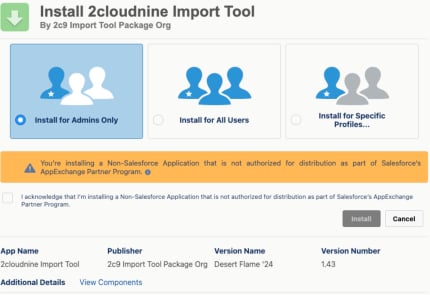
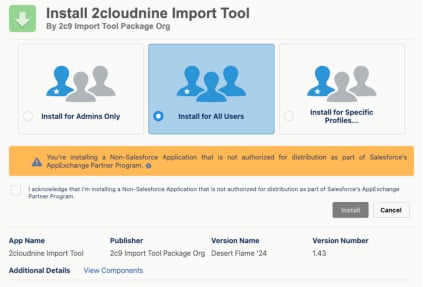
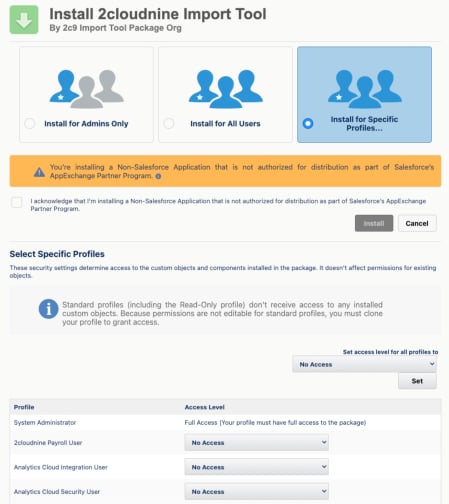
When you install a managed package, you need to select the correct option of either 1), 2), or 3) below to
ensure access to the Package is provided to the Profiles as needed:

1. Install for Admins Only

<Frame>
  <img src="https://mintcdn.com/2cloudnine-2edf05eb/1TEygQHVPV4UC-ab/images/generated/configuration-guides/2cloudnine-integrated-import-tool-configuration-and-implementation-guide/2cloudnine-integrated-import-tool-configuration-and-implementation-guide-pdf-4-1.png?fit=max&auto=format&n=1TEygQHVPV4UC-ab&q=85&s=cf33ef7be2be8df13f7d14fca665adfb" alt="Screenshot from 2cloudnine Integrated Import Tool - Configuration and Implementation Guide" width="430" height="295" data-path="images/generated/configuration-guides/2cloudnine-integrated-import-tool-configuration-and-implementation-guide/2cloudnine-integrated-import-tool-configuration-and-implementation-guide-pdf-4-1.png" />
</Frame>

2. Install for All Users

<Frame>
  <img src="https://mintcdn.com/2cloudnine-2edf05eb/1TEygQHVPV4UC-ab/images/generated/configuration-guides/2cloudnine-integrated-import-tool-configuration-and-implementation-guide/2cloudnine-integrated-import-tool-configuration-and-implementation-guide-pdf-4-2.png?fit=max&auto=format&n=1TEygQHVPV4UC-ab&q=85&s=69b9d125d9715f29067f3448fb241a7d" alt="Screenshot from 2cloudnine Integrated Import Tool - Configuration and Implementation Guide" width="423" height="287" data-path="images/generated/configuration-guides/2cloudnine-integrated-import-tool-configuration-and-implementation-guide/2cloudnine-integrated-import-tool-configuration-and-implementation-guide-pdf-4-2.png" />
</Frame>

3. Install for Specific Profiles—This step allows you to select which profiles you will apply the security
   to manually. Please note that you must choose the required option carefully, as this step can not
   be repeated.
<Frame>
  <img src="https://mintcdn.com/2cloudnine-2edf05eb/1TEygQHVPV4UC-ab/images/generated/configuration-guides/2cloudnine-integrated-import-tool-configuration-and-implementation-guide/2cloudnine-integrated-import-tool-configuration-and-implementation-guide-pdf-5-1.png?fit=max&auto=format&n=1TEygQHVPV4UC-ab&q=85&s=2ca248991e267723a8170a2e44f8b4b0" alt="Screenshot from 2cloudnine Integrated Import Tool - Configuration and Implementation Guide" width="449" height="504" data-path="images/generated/configuration-guides/2cloudnine-integrated-import-tool-configuration-and-implementation-guide/2cloudnine-integrated-import-tool-configuration-and-implementation-guide-pdf-5-1.png" />
</Frame>

To proceed further, you must tick the “I acknowledge that I’m installing a Non-Salesforce Application that
is not authorised for distribution as part of Salesforce’s AppExchange Partner Program.” After this, you
must select the **Upgrade** button to install the package.

Salesforce will begin installing the package. If you are presented with some dialogue informing you that
the installation is taking a while, you can accept it, and it will return you to the Installed Packages page.
Salesforce will send an email advising when the installation has been completed, and the package will be
listed if you refresh the page.

### 4. Custom Settings

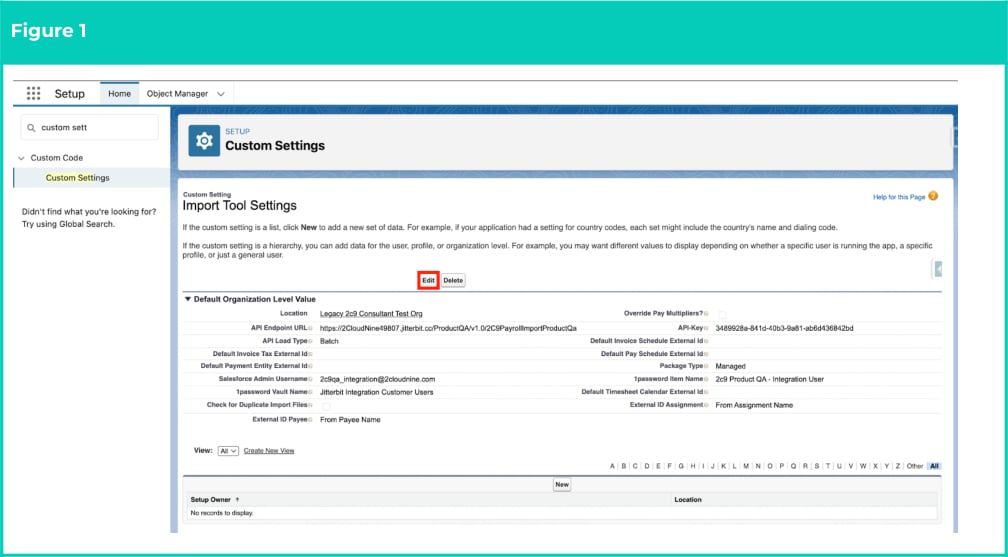
1. Go to **Setup** > **Custom Settings**
2. Click on the **Manage** button next to Import Tool Settings.
   1. If the Tech Services Team has created the Integrated User, click the **Edit** button (see
      Figure 1).
<Frame>
  <img src="https://mintcdn.com/2cloudnine-2edf05eb/k-DDL_uXxoSEwjPi/images/generated/configuration-guides/2cloudnine-integrated-import-tool-configuration-and-implementation-guide/2cloudnine-integrated-import-tool-configuration-and-implementation-guide-pdf-6-2.png?fit=max&auto=format&n=k-DDL_uXxoSEwjPi&q=85&s=e5673b8fd88819fb50e5648cce272522" alt="Screenshot from 2cloudnine Integrated Import Tool - Configuration and Implementation Guide" width="1008" height="557" data-path="images/generated/configuration-guides/2cloudnine-integrated-import-tool-configuration-and-implementation-guide/2cloudnine-integrated-import-tool-configuration-and-implementation-guide-pdf-6-2.png" />
</Frame>

OR

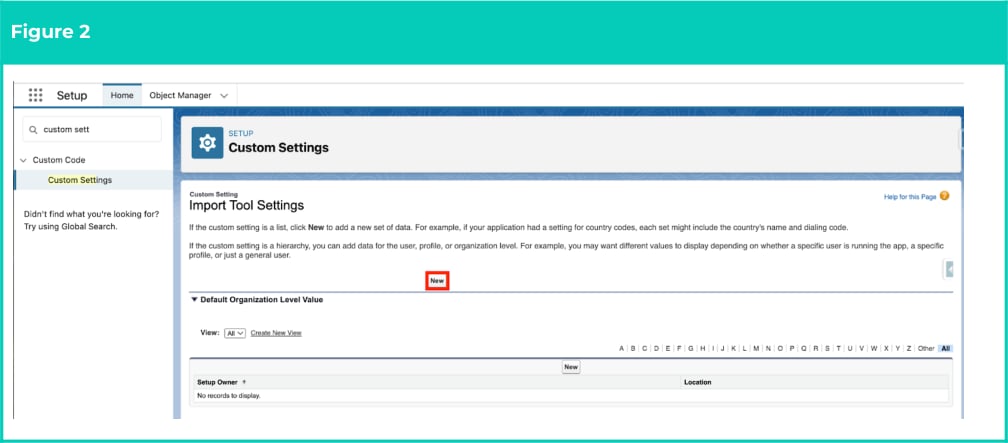
2. Alternatively, if the Integrated User still needs to be created (and no other Custom Settings have been added for the new Org), click the **New** button (see Figure 2).
<Frame>
  <img src="https://mintcdn.com/2cloudnine-2edf05eb/k-DDL_uXxoSEwjPi/images/generated/configuration-guides/2cloudnine-integrated-import-tool-configuration-and-implementation-guide/2cloudnine-integrated-import-tool-configuration-and-implementation-guide-pdf-6-4.png?fit=max&auto=format&n=k-DDL_uXxoSEwjPi&q=85&s=f23eb6353057d3c55222fcef248eb0e5" alt="Screenshot from 2cloudnine Integrated Import Tool - Configuration and Implementation Guide" width="1008" height="443" data-path="images/generated/configuration-guides/2cloudnine-integrated-import-tool-configuration-and-implementation-guide/2cloudnine-integrated-import-tool-configuration-and-implementation-guide-pdf-6-4.png" />
</Frame>

3. Populate the values displayed below:
   1. API values:

   2. If configuring in a Production Org:
      * **API Endpoint URL**: [https://2cloudnine49807.jitterbit.cc/Production/v1.0/2C9PayrollImport](https://2cloudnine49807.jitterbit.cc/Production/v1.0/2C9PayrollImport)
      * **API-Key**: 11289963-6e8f-42bc-b7da-b5c257638e01

   3. If configuring in a Sandbox Org:
      * **API Endpoint URL**: [https://2cloudnine49807.jitterbit.cc/Sandbox/v1.0/2C9PayrollImportSandbox](https://2cloudnine49807.jitterbit.cc/Sandbox/v1.0/2C9PayrollImportSandbox)
      * **API-Key**: 639d5539-e063-4c92-8e3d-5e7104826716

   4. **API Load Type**: Batch

   5. **Package Type**: Managed

   6. **Salesforce Admin User Name**:
      1. Go to the **Setup** > **Users**
      2. Copy the name of the 2cloudnine Integration User, e.g. [anglicare.integration@2cloudnine.com](mailto:anglicare_integration@2cloudnine.com)

   7. **External ID Payee**: enter one of the following valuesto define whether the External ID used by the Integrated Import Tool for Payee records should be sourced from the related Contact record or the Payee Name:
      1. From Contact External ID
      2. From Payee Name

   8. **External ID Assignment**: enter one of the followingvalues to define whether the External ID used by the Integrated Import Tool for Assignment records should be sourced from the related Contact record or the Assignment Name:
      1. From Contact External ID
      2. From Assignment Name
<Danger>
  **IMPORTANT**: The data necessary to populate the SalesforceAdmin User Name may not be available until
  30 minutes after the Tech Services Team creates the Integration User.
</Danger>

<Danger>
  **IMPORTANT**: If the customer has v1.49 or greater installed,then the following Custom Settings within
  Import Tool Settings can remain blank (if v1.49 or lower, please reach out to Tech Services for assistance):

  * 1password Vault Name
  * 1password Item Name
</Danger>

4. Configure the following optional settings as required:
   1. **Check for Duplicate Import Files:** populate this fieldto enable validation to check and
      flag any existing files with the same name as the file that has been uploaded for import.
   2. **Override Pay Multipliers?**: populate this checkbox field If Pay Rate Multipliers should be
      overridden to 1 during Pay Transaction Imports.
   3. Select the checkboxes for any of the following records where validation should not flag
      External Ids containing special characters during import:
      1. **Disable Contact ExtId Validation**
      2. **Disable PayeeLeaveRule ExtId Validation**
      3. **Disable ProjectCode Extid Validation**
      4. **Disable Assignment ExtId Validation**
      5. **Disable PayeeAllowance ExtId Validation**
      6. **Disable Payee ExtId Validation**
   4. **Check for Manual Timesheet Update:** set this customsetting as true if the instance has
      another integration like Field Service that is responsible for the creation or update of
      timesheet entries, otherwise this can remain unticked.

<Danger>
  **IMPORTANT**: If the Check for Duplicate Import Files checkbox has been set to true, the Imported Record  Page Layout MUST be updated to include the following fields:

  * Duplicate File Detected
  * Allow Duplicate File Impor
</Danger>

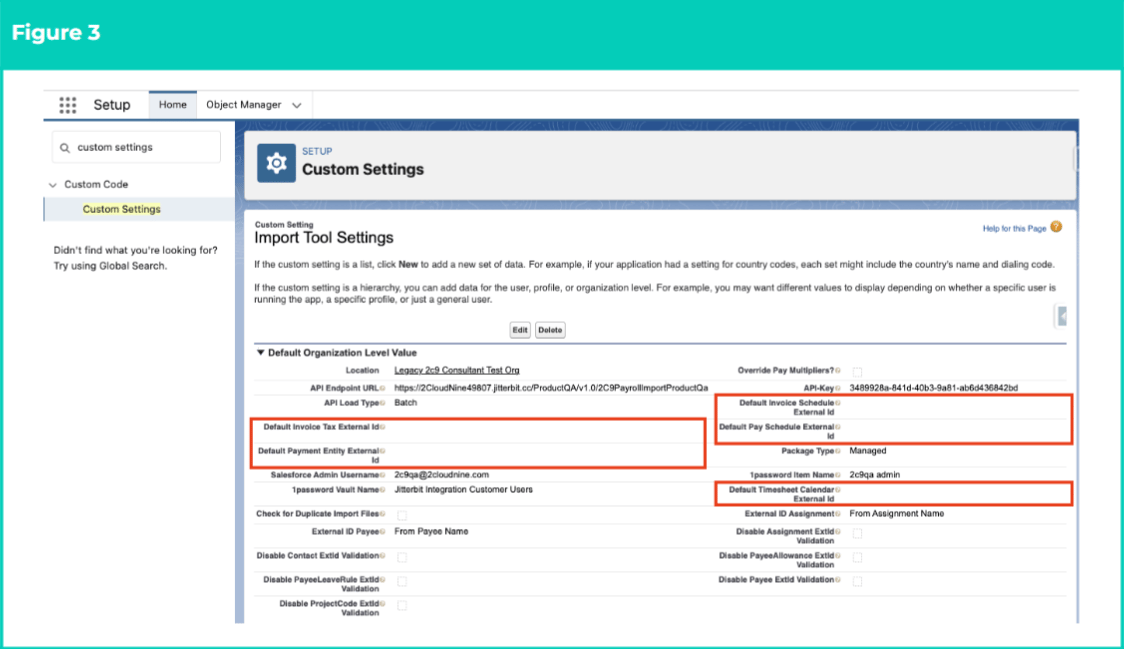
**Please Note**: The Integrated Import Tool no longer  uses the Default \[record name] External ID fields (a  total of 5 fields) and should not be populated (see Figure 3).

<Frame>
  <img src="https://mintcdn.com/2cloudnine-2edf05eb/k-DDL_uXxoSEwjPi/images/generated/configuration-guides/2cloudnine-integrated-import-tool-configuration-and-implementation-guide/3.png?fit=max&auto=format&n=k-DDL_uXxoSEwjPi&q=85&s=4e3bd76e91cf9d3a44621b7bad7e6352" alt="Screenshot from 2cloudnine Integrated Import Tool - Configuration and Implementation Guide" width="1124" height="649" data-path="images/generated/configuration-guides/2cloudnine-integrated-import-tool-configuration-and-implementation-guide/3.png" />
</Frame>

### 5. Remote Site Settings

As part of the improvements made within the Integrated Import Tool, users must complete the below configuration to ensure the correct Remote Site is called during the ongoing operations.

Go to **Setup > Remote Site Settings**

1. Click the **New Remove Site** button.

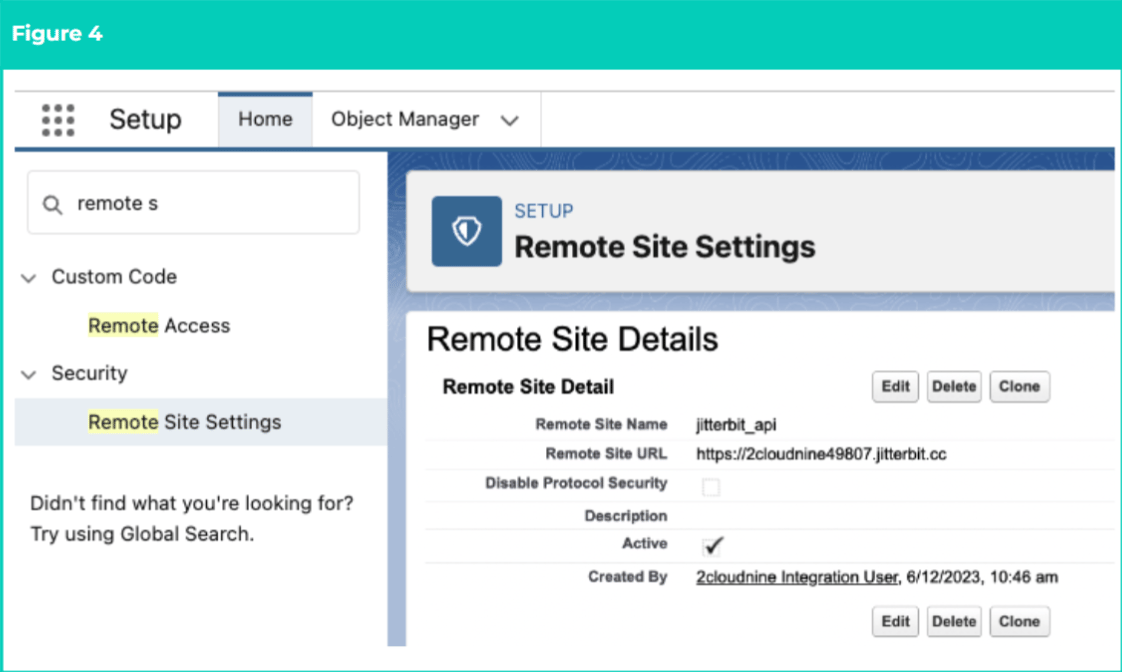
2. Populate the following values (see Figure 4):
   a. **Remote Site Name:** jitterbit\_api\
   b. **Remote site URL:** [https://2cloudnine49807.jitterbit.cc/](https://2cloudnine49807.jitterbit.cc/)\
   c. **Disable Protocol Security:** False\
   d. **Active:** True

3. Click the **Save** button.
<Frame>
  <img src="https://mintcdn.com/2cloudnine-2edf05eb/k-DDL_uXxoSEwjPi/images/generated/configuration-guides/2cloudnine-integrated-import-tool-configuration-and-implementation-guide/4.png?fit=max&auto=format&n=k-DDL_uXxoSEwjPi&q=85&s=b1af0cdcfa3dead92551c6ee941af293" alt="Screenshot from 2cloudnine Integrated Import Tool - Configuration and Implementation Guide" width="1122" height="672" data-path="images/generated/configuration-guides/2cloudnine-integrated-import-tool-configuration-and-implementation-guide/4.png" />
</Frame>

### 6. Batch Size Settings

You can modify the batch size of any import objects you deem fit for the org requirements and capability. If left blank, the default batch size = 200.

Go to **Setup > Custom Settings**

1. Click on the **Manage** button next to **Import Tool Batch Size v2**.

2. Click on **New**.

3. Populate the desired value (below 200) next to the necessary field(s):
   a. **Allowance Batch Size**\
   b. **Pay Transaction Batch Size**\
   c. **Timesheet Batch Size**\
   d. **Timesheet Header Batch Size**

4. Click **Save**.

<Frame>
  <img src="https://mintcdn.com/2cloudnine-2edf05eb/k-DDL_uXxoSEwjPi/images/generated/configuration-guides/2cloudnine-integrated-import-tool-configuration-and-implementation-guide/5.png?fit=max&auto=format&n=k-DDL_uXxoSEwjPi&q=85&s=732467790ae144d0547162c31ede0c02" alt="Screenshot from 2cloudnine Integrated Import Tool - Configuration and Implementation Guide" width="1122" height="648" data-path="images/generated/configuration-guides/2cloudnine-integrated-import-tool-configuration-and-implementation-guide/5.png" />
</Frame>

### 7. Schedule Apex Jobs

Use the below Scripts to create Scheduled jobs that run every 10 minutes to find and populate the
External ID used by the Integrated Import Tool for the following Objects:

* Timesheet
* Timesheet Entry
* Assignment
* Payee
* Payee Leave Rule
* Payee Allowance
* Project Code

To run scripts:

1. Copy the block of scripts to be run.
2. Select **Setup > Developer Console**
3. **Debug > Open Execute Anonymous Window**
4. Delete or comment out any code that is in the window
5. Paste in the copied script from below.
6. Click the **Execute** button.
7. Repeat the above steps until the last script.
8. Once completed:
   1. Ensure External IDs are loaded for Contacts, Assignments, Payees, etc.
   2. Inform Tech Services to have the Jitterbit recipe connected to the specific Org.
<Danger>
  **IMPORTANT**: Once the jobs have been set, the Consultantmust review the Timesheet and Timesheet
  Entries (unprocessed) to confirm the External Id (it) has been populated correctly, post Scheduled Job
  execution.
</Danger>

When scheduling these jobs, you have two options:

* Schedule records to be updated for all Object types at once; OR
* Schedule records to be updated for individual Object types.

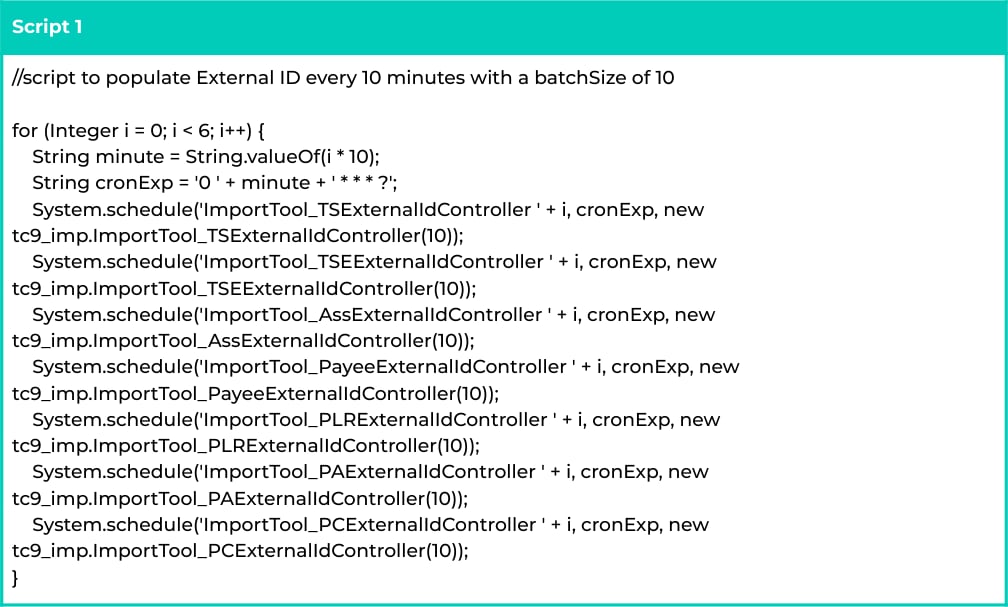
The code snippets included in this section cover both options. A batch size of 10 has been used
throughout; please increase or decrease it based on your preference. Valid values are from 1 to 199.

### **All Objects**

To create a Scheduled Job to populate the External Id (it) field on all Timesheet, Timesheet Entry,
Assignment, Payee, Payee Leave Rule, Payee Allowance and Project Code records every 10 mins, with a
batch size of 10, use the following script:

```java Script 1 theme={null}
//script to populate External ID every 10 minutes with a batchSize of 10

for (Integer i = 0; i < 6; i++) {
    String minute = String.valueOf(i * 10);
    String cronExp = '0 ' + minute + ' * * * ?';

    System.schedule(
        'ImportTool_TSExternalIdController ' + i,
        cronExp,
        new tc9_imp.ImportTool_TSExternalIdController(10)
    );

    System.schedule(
        'ImportTool_TSEExternalIdController ' + i,
        cronExp,
        new tc9_imp.ImportTool_TSEExternalIdController(10)
    );

    System.schedule(
        'ImportTool_AssExternalIdController ' + i,
        cronExp,
        new tc9_imp.ImportTool_AssExternalIdController(10)
    );

    System.schedule(
        'ImportTool_PayeeExternalIdController ' + i,
        cronExp,
        new tc9_imp.ImportTool_PayeeExternalIdController(10)
    );

    System.schedule(
        'ImportTool_PLRExternalIdController ' + i,
        cronExp,
        new tc9_imp.ImportTool_PLRExternalIdController(10)
    );

    System.schedule(
        'ImportTool_PAExternalIdController ' + i,
        cronExp,
        new tc9_imp.ImportTool_PAExternalIdController(10)
    );

    System.schedule(
        'ImportTool_PCExternalIdController ' + i,
        cronExp,
        new tc9_imp.ImportTool_PCExternalIdController(10)
    );
}
```

<Frame>
  <img src="https://mintcdn.com/2cloudnine-2edf05eb/1TEygQHVPV4UC-ab/images/generated/configuration-guides/2cloudnine-integrated-import-tool-configuration-and-implementation-guide/2cloudnine-integrated-import-tool-configuration-and-implementation-guide-pdf-12-1.png?fit=max&auto=format&n=1TEygQHVPV4UC-ab&q=85&s=6a1e207a4b5e4331e669f775994021d8" alt="Screenshot from 2cloudnine Integrated Import Tool - Configuration and Implementation Guide" width="1008" height="607" data-path="images/generated/configuration-guides/2cloudnine-integrated-import-tool-configuration-and-implementation-guide/2cloudnine-integrated-import-tool-configuration-and-implementation-guide-pdf-12-1.png" />
</Frame>

To create a Scheduled Job to populate the External Id (it) field on all Timesheets, Timesheet Entries,
Assignments, Payees, Payee Leave Rules, Payee Allowances and Project Codes records every 10 mins, with
a batch size of 200, use the following script:

```java Script 2 theme={null}
//script to populate External ID every 10 minutes with default batchSize of 200

for (Integer i = 0; i < 6; i++) {
    String minute = String.valueOf(i * 10);
    String cronExp = '0 ' + minute + ' * * * ?';

    System.schedule(
        'ImportTool_TSExternalIdController ' + i,
        cronExp,
        new tc9_imp.ImportTool_TSExternalIdController()
    );

    System.schedule(
        'ImportTool_TSEExternalIdController ' + i,
        cronExp,
        new tc9_imp.ImportTool_TSEExternalIdController()
    );

    System.schedule(
        'ImportTool_AssExternalIdController ' + i,
        cronExp,
        new tc9_imp.ImportTool_AssExternalIdController()
    );

    System.schedule(
        'ImportTool_PayeeExternalIdController ' + i,
        cronExp,
        new tc9_imp.ImportTool_PayeeExternalIdController()
    );

    System.schedule(
        'ImportTool_PLRExternalIdController ' + i,
        cronExp,
        new tc9_imp.ImportTool_PLRExternalIdController()
    );

    System.schedule(
        'ImportTool_PAExternalIdController ' + i,
        cronExp,
        new tc9_imp.ImportTool_PAExternalIdController()
    );

    System.schedule(
        'ImportTool_PCExternalIdController ' + i,
        cronExp,
        new tc9_imp.ImportTool_PCExternalIdController()
    );
}
```

### **Timesheets**

Scheduling the following scripts will enable the External Id (It) field to be regularly updated for Timesheet
records. The External Id (it) value will be generated by referencing the related Employee External Id,
Assignment External Id and Timesheet End Date fields on Timesheet records, per the below formula:

* employeeExternalId + '*' + assignmentExternalId + '*' + timesheetEndDate

The below query can be run to identify the exact Timesheet records that will be processed by the
Scheduled Job. Any records not displayed when this query is returned will not be updated with an
External Id (it) when the Scheduled Job is run:

```sql Query Logic 1 theme={null}
//script to process records using SOQL query

SELECT Id,
       tc9_et__Employee__r.tc9_imp__External_Id_it__c,
       tc9_et__Assignment__r.tc9_imp__External_Id_it__c,
       tc9_et__End_Date__c
FROM tc9_et__Timesheet__c
WHERE tc9_et__Employee__r.tc9_imp__External_Id_it__c != null
AND tc9_et__Assignment__r.tc9_imp__External_Id_it__c != null
AND tc9_et__End_Date__c != null
AND tc9_et__Start_Date__c >= Last_90_Days
AND tc9_imp__External_Id_it__c = null
```

To create a Scheduled Job to populate the External Id (it) field on Timesheets every 10 minutes, with a
batch size of 10, use the following script:

```java Script 3 theme={null}
//script to populate External ID on Timesheets every 10 minutes with batchSize of 10

for (Integer i = 0; i < 6; i++) {
    String minute = String.valueOf(i * 10);
    String cronExp = '0 ' + minute + ' * * * ?';

    System.schedule(
        'ImportTool_TSExternalIdController ' + i,
        cronExp,
        new tc9_imp.ImportTool_TSExternalIdController(10)
    );
}
```

To create a Scheduled Job to populate the External Id (it) field on Timesheets every 10 minutes, with a  batch size of 200, use the following script:

```java Script 4 theme={null}
//script to populate External ID on Timesheets every 10 minutes with a default batchSize of 200

for (Integer i = 0; i < 6; i++) {
    String minute = String.valueOf(i * 10);
    String cronExp = '0 ' + minute + ' * * * ?';

    System.schedule(
        'ImportTool_TSExternalIdController ' + i,
        cronExp,
        new tc9_imp.ImportTool_TSExternalIdController()
    );
}
```

### Timesheet Entries

Scheduling the following scripts will enable the External Id (It) field to be regularly updated for Timesheet Entry records. The External Id (it) value will be generated by referencing the related Employee External Id, Assignment External Id and Timesheet End Date fields on Timesheet Entry records, per the below formula:

* `employeeExternalId + '_' + assignmentExternalId + '_' + timesheetEndDate`

The below query can be run to identify the exact Timesheet Entry records that will be processed by the Scheduled Job. Any records not displayed when this query is returned will not be updated with an External Id (it) when the Scheduled Job is run.

```sql Quey logic 2 theme={null}
//script to process records using SOQL query

SELECT Id,
       tc9_et__Employee__r.External_Id_it__c,
       tc9_et__Assignment__r.External_Id_it__c,
       tc9_et__Start_Date__c
FROM tc9_et__Timesheet_Entry__c
WHERE tc9_et__Employee__r.External_Id_it__c != null
AND tc9_et__Assignment__r.External_Id_it__c != null
AND tc9_et__Start_Date__c != null
AND tc9_et__Start_Date__c >= LAST_N_DAYS:90
AND External_Id_it__c = null
AND tc9_et__Date_Pay_Transaction_Generated__c = null
AND (tc9_et__Start_Time__c = null OR tc9_et__Start_Time__c = 00:00:00.000Z)
AND (tc9_et__End_Time__c = null OR tc9_et__End_Time__c = 00:00:00.000Z)
AND tc9_et__Total_Hours__c = 0
AND tc9_et__Total_Time_hours__c = null
AND tc9_et__Total_Time_mins__c = null
AND (tc9_et__Break_1_Total__c = null OR tc9_et__Break_1_Total__c = 0)
AND (tc9_et__Break_2_Total__c = null OR tc9_et__Break_2_Total__c = 0)
AND tc9_et__Break_1_Start_Time__c = null
AND tc9_et__Break_1_End_Time__c = null
AND tc9_et__Break_2_Start_Time__c = null
AND tc9_et__Break_2_End_Time__c = null
```

To create a Scheduled Job to populate the External Id (it) field on Timesheet Entries every 10 minutes, with a batch size of 10, use the following script:

```java Script 5 theme={null}
//script to populate External ID on Timesheet Entries every 10 minutes with a batchSize of 10

for (Integer i = 0; i < 6; i++) {
    String minute = String.valueOf(i * 10);
    String cronExp = '0 ' + minute + ' * * * ?';

    System.schedule(
        'ImportTool_TSEExternalIdController ' + i,
        cronExp,
        new tc9_imp.ImportTool_TSEExternalIdController(10)
    );
}
```

To create a Scheduled Job to populate the External Id (it) field on Timesheet Entries every 10 minutes, with a batch size of 200, use the following script:

```java Script 6 theme={null}
//script to populate External ID on Timesheet Entries every 10 minutes with a default batchSize of 200

for (Integer i = 0; i < 6; i++) {
    String minute = String.valueOf(i * 10);
    String cronExp = '0 ' + minute + ' * * * ?';

    System.schedule(
        'ImportTool_TSEExternalIdController ' + i,
        cronExp,
        new tc9_imp.ImportTool_TSEExternalIdController()
    );
}
```

### Assignments

Scheduling the following scripts enables the External Id (it) field to be regularly updated for Assignment records. The following formula will be used for determining when the External Id (it) field should be updated for Assignment records, as well as the value generated for this field:

* IF `Import_Tool_Settings__r.External_ID_Assignment__c = ‘From Assignment Name’`
  THEN `<assignmentName>`

* IF `Import_Tool_Settings__r.External_ID_Assignment__c = ‘From Contact External ID’`
  THEN `<contactExternalId>`

* IF `Import_Tool_Settings__r.External_ID_Assignment__c = NULL`
  THEN External does not get set

The below query can be run to identify the exact Assignment records that will be processed by the Scheduled Job. Any records not displayed when this query is returned will not be updated with an External Id (it) when the Scheduled Job is run.

```sql Query Logic 3 theme={null}
//script to process records using SOQL query

SELECT Id,
       Name,
       tc9_pr__Employee__r.tc9_imp__External_Id_it__c
FROM tc9_pr__Assignment__c
WHERE tc9_imp__External_Id_it__c = null
AND tc9_pr__Employee__r.tc9_imp__External_Id_it__c != null
```

To create a Scheduled Job to populate the External Id (it) field on Assignments every 10 mins, with a batch size of 10, use the following script:

```java Script 7 theme={null}
//script to populate External ID on Assignments every 10 minutes with a batchSize of 10

for (Integer i = 0; i < 6; i++) {
    String minute = String.valueOf(i * 10);
    String cronExp = '0 ' + minute + ' * * * ?';

    System.schedule(
        'ImportTool_AssExternalIdController ' + i,
        cronExp,
        new tc9_imp.ImportTool_AssExternalIdController(10)
    );
}
```

To create a Scheduled Job to populate the External Id (it) field on Assignments every 10 mins, with a batch size of 200, use the following script.

```java Script 8 theme={null}
//script to populate External ID on Assignments every 10 minutes with a default batchSize of 200

for (Integer i = 0; i < 6; i++) {
    String minute = String.valueOf(i * 10);
    String cronExp = '0 ' + minute + ' * * * ?';

    System.schedule(
        'ImportTool_AssExternalIdController ' + i,
        cronExp,
        new tc9_imp.ImportTool_AssExternalIdController()
    );
}
```

### Payees

Scheduling the following scripts enables the External Id (it) field to be regularly updated for Payee records. The following formula will be used for determining when the External Id (it) field should be updated for Payee records, as well as the value generated for this field:

* IF `Import_Tool_Settings__r.External_ID_Payee__c = ‘From Payee Name’`
  THEN `<assignmentName>`

* IF `Import_Tool_Settings__r.External_ID_Payee__c = ‘From Contact External ID’`
  THEN `<contactExternalId>`

* IF `Import_Tool_Settings__r.External_ID_Payee__c = NULL`
  THEN External does not get set

The below query can be run to identify the exact Payee records that will be processed by the Scheduled Job. Any records not displayed when this query is returned will not be updated with an External Id (it) when the Scheduled Job is run.

```sql Query Logic 4 theme={null}
//script to process records using SOQL query

SELECT Name,
       tc9_pr__Employee__r.tc9_imp__External_Id_it__c
FROM tc9_pr__Payee__c
WHERE tc9_pr__Employee__r.tc9_imp__External_Id_it__c != null
AND tc9_imp__External_Id_it__c = null
```

To create a Scheduled Job to populate the External Id (it) field on Payees every 10 mins, with a batch size of 10, use the following script:

```java Script 9 theme={null}
//script to populate External ID on Payees every 10 minutes with a batchSize of 10

for (Integer i = 0; i < 6; i++) {
    String minute = String.valueOf(i * 10);
    String cronExp = '0 ' + minute + ' * * * ?';

    System.schedule(
        'ImportTool_PayeeExternalIdController ' + i,
        cronExp,
        new tc9_imp.ImportTool_PayeeExternalIdController(10)
    );
}
```

To create a Scheduled Job to populate the External Id (it) field on Payees every 10 mins, with a batch size of 200, use the following script:

```java Script 10 theme={null}
//script to populate External ID on Payees every 10 minutes with a default batchSize of 200

for (Integer i = 0; i < 6; i++) {
    String minute = String.valueOf(i * 10);
    String cronExp = '0 ' + minute + ' * * * ?';

    System.schedule(
        'ImportTool_PayeeExternalIdController ' + i,
        cronExp,
        new tc9_imp.ImportTool_PayeeExternalIdController()
    );
}
```

### Payee Leave Rules

Scheduling the following scripts enables the External Id (It) field to be regularly updated for Payee Leave Rule records. The External Id (it) value will be generated by referencing the related Employee External Id and record name fields on Payee Leave Rule records, per the below formula:

* `employeeExternalId + '_' + payeeLeaveRuleName`

The below query can be run to identify the exact Payee Leave Rule records that will be processed by the Scheduled Job. Any records not displayed when this query is returned will not be updated with an External Id (it) when the Scheduled Job is run.

```sql Query Logic 5 theme={null}
//script to process records using SOQL query

SELECT tc9_pr__Leave_Rule__r.Name,
       tc9_pr__Employee__r.tc9_imp__External_Id_it__c
FROM tc9_pr__Payee_Leave_Rule__c
WHERE tc9_pr__Employee__r.tc9_imp__External_Id_it__c != null
AND tc9_imp__External_Id_it__c = null
```

To create a Scheduled Job to populate the External Id (it) field on Payee Leave Rules every 10 mins, with a batch size of 10, use the following script:

```java Script 11 theme={null}
//script to populate External ID on Payee Leave Rules every 10 minutes with a batchSize of 10

for (Integer i = 0; i < 6; i++) {
    String minute = String.valueOf(i * 10);
    String cronExp = '0 ' + minute + ' * * * ?';

    System.schedule(
        'ImportTool_PLRExternalIdController ' + i,
        cronExp,
        new tc9_imp.ImportTool_PLRExternalIdController(10)
    );
}
```

To create a Scheduled Job to populate the External Id (it) field on Payee Leave Rules every 10 mins, with a batch size of 200, use the following script:

```java Script 12 theme={null}
//script to populate External ID on Payee Leave Rules every 10 minutes with a default batchSize of 200

for (Integer i = 0; i < 6; i++) {
    String minute = String.valueOf(i * 10);
    String cronExp = '0 ' + minute + ' * * * ?';

    System.schedule(
        'ImportTool_PLRExternalIdController ' + i,
        cronExp,
        new tc9_imp.ImportTool_PLRExternalIdController()
    );
}
```

### Payee Allowances

Scheduling the following scripts enables the External Id (It) field to be regularly updated for Payee Allowance records. The External Id (it) value will be generated by referencing the related Payee External Id and record name fields on Payee Allowance records, per the below formula:

* `payeeExternalIdString + '_' + payeeAllowanceRecordName`

The below query can be run to identify the exact Payee Allowance records that will be processed by the Scheduled Job. Any records not displayed when this query is returned will not be updated with an External Id (it) when the Scheduled Job is run.

```sql Query Logic 6 theme={null}
//script to process records using SOQL query

SELECT Id,
       Name,
       tc9_pr__Payee__r.tc9_imp__External_Id_it__c
FROM tc9_pr__Payee_Allowance_Record__c
WHERE tc9_pr__Payee__r.tc9_imp__External_Id_it__c != null
AND tc9_imp__External_Id_it__c = null
```

### Payee Allowances

To create a Scheduled Job to populate the External Id (it) field on Payee Allowance every 10 mins, with a batch size of 10, use the following script:

```java Script 13 theme={null}
//script to populate External ID on Payee Allowance Records every 10 minutes with a batchSize of 10

for (Integer i = 0; i < 6; i++) {
    String minute = String.valueOf(i * 10);
    String cronExp = '0 ' + minute + ' * * * ?';

    System.schedule(
        'ImportTool_PAExternalIdController ' + i,
        cronExp,
        new tc9_imp.ImportTool_PAExternalIdController(10)
    );
}
```

OR

To create a Scheduled Job to populate the External Id (it) field on Payee Allowance every 10 mins, with a batch size of 200, use the following script:

```java Script 14 theme={null}
//script to populate External ID on Payee Allowance Records every 10 minutes with a default batchSize of 200

for (Integer i = 0; i < 6; i++) {
    String minute = String.valueOf(i * 10);
    String cronExp = '0 ' + minute + ' * * * ?';

    System.schedule(
        'ImportTool_PAExternalIdController ' + i,
        cronExp,
        new tc9_imp.ImportTool_PAExternalIdController()
    );
}
```

### Project Codes

Scheduling the following scripts enables the External Id (It) field to be regularly updated for Project Code records. The External Id (it) value will be generated by referencing the related Employee External Id, Assignment External Id and record name fields on Project Code records, per the below formula:

* `employeeExternalId + '_' + assignmentExternalId + '_' + projectCodeName`

The below query can be run to identify the exact Project Code records that will be processed by the Scheduled Job. Any records not displayed when this query is returned will not be updated with an External Id (it) when the Scheduled Job is run:

```sql Query Logic 7 theme={null}
//script to process records using SOQL query

SELECT Id,
       Name,
       tc9_pr__Assignment__r.Id,
       tc9_pr__Assignment__r.tc9_imp__External_Id_it__c,
       tc9_pr__Assignment__r.tc9_pr__Employee__r.Id,
       tc9_pr__Assignment__r.tc9_pr__Employee__r.tc9_imp__External_Id_it__c
FROM tc9_pr__Project_Code__c
WHERE tc9_pr__Assignment__r.tc9_pr__Employee__r.tc9_imp__External_Id_it__c != null
AND tc9_pr__Assignment__r.tc9_imp__External_Id_it__c != null
AND tc9_imp__External_Id_it__c = null
```

To create a Scheduled Job to populate the External Id (it) field on Project Code every 10 mins, with a batch size of 10, use the following script:

```java Script 15 theme={null}
//script to populate External ID on Project Codes every 10 minutes with a batchSize of 10

for (Integer i = 0; i < 6; i++) {
    String minute = String.valueOf(i * 10);
    String cronExp = '0 ' + minute + ' * * * ?';

    System.schedule(
        'ImportTool_PCExternalIdController ' + i,
        cronExp,
        new tc9_imp.ImportTool_PCExternalIdController(10)
    );
}
```

To create a Scheduled Job to populate the External Id (it) field on Project Codes every 10 mins, with a batch size of 200, use the following script:

```java Script 16 theme={null}
//script to populate External ID on Project Codes every 10 minutes with a default batchSize of 200

for (Integer i = 0; i < 6; i++) {
    String minute = String.valueOf(i * 10);
    String cronExp = '0 ' + minute + ' * * * ?';

    System.schedule(
        'ImportTool_PCExternalIdController ' + i,
        cronExp,
        new tc9_imp.ImportTool_PCExternalIdController()
    );
}
```

### 8. Field Migration

If implementing the Integrated Import Tool in an Org that was previously utilising an older original version of the Import Tool (v1.20 or below), object and field
migration is required to ensure that the External Id fields are being mapped correctly.

Please refer to the below tables for the field mapping information for each Integrated Import Tool Import Type.

### **Timesheet (Standard)**

| CSV File Column Headings       | Field Mapping                                                                         | Related Object     | Mandatory / Optional                      | Notes for Importing                                                                                                                                                                                                                                  | Example of Data | External ID Format                                                                                                  |
| ------------------------------ | ------------------------------------------------------------------------------------- | ------------------ | ----------------------------------------- | ---------------------------------------------------------------------------------------------------------------------------------------------------------------------------------------------------------------------------------------------------- | --------------- | ------------------------------------------------------------------------------------------------------------------- |
| Employee External ID           | `tc9_et__Timesheet_Entry__c.tc9_et__Employee__r.tc9_imp__External_Id_it__c`           | Contact            | Mandatory                                 | External ID is to be populated on the Contact (Candidate/Employee Record Type) Record                                                                                                                                                                | Jay001          |                                                                                                                     |
| Assignment External ID         | `tc9_et__Timesheet_Entry__c.tc9_et__Assignment__r.tc9_imp__External_Id_it__c`         | Assignment         | Mandatory                                 | Define either:<br />- Assignment.EmployeeExternalID<br />- AssignmentName<br />- Custom defined by customer                                                                                                                                          | AI91112         |                                                                                                                     |
| Payee External ID              | `tc9_et__Timesheet_Entry__c.tc9_et__Payee__r.tc9_imp__External_Id_it__c`              | Payee              | Optional                                  | External ID is to be populated on the Payee Record. If not defined, then logic assumes payee holds the same External Id as the Employee External Id                                                                                                  |                 |                                                                                                                     |
| Project Code External ID       | `tc9_et__Timesheet_Entry__c.tc9_et__Project_Code__r.tc9_imp__External_Id_it__c`       | Project Code       | Optional                                  | Define Project Code Name                                                                                                                                                                                                                             |                 | `Employee_External_ID + '_' + Assignment_External_ID + '_' + Project_Name`                                          |
| Timesheet Activity External ID | `tc9_et__Timesheet_Entry__c.tc9_et__Timesheet_Activity__r.tc9_imp__External_Id_it__c` | Timesheet Activity | Optional                                  | Define Project Code Name                                                                                                                                                                                                                             |                 | `Employee_External_ID + '_' + Assignment_External_ID + '_' + Timesheet_Activity_External_ID`                        |
| Payee Leave Rule               | `tc9_et__Timesheet_Entry__c.tc9_et__Payee_Leave_Rule__r.tc9_imp__External_Id_it__c`   | Payee Leave Rule   | Optional but Mandatory if uploading Leave | Define Payee Leave Rule Name                                                                                                                                                                                                                         |                 | `Employee_External_ID + '_' + Payee_Leave_Rule_Name`<br />OR<br />`Payee_External_ID + '_' + Payee_Leave_Rule_Name` |
| Start Date                     | `tc9_et__Timesheet_Entry__c.tc9_et__Start_Date__c`                                    |                    | Mandatory                                 | Date format is dd/mm/yyyy                                                                                                                                                                                                                            | 26/03/2020      |                                                                                                                     |
| End Date                       | `tc9_et__Timesheet_Entry__c.tc9_et__End_Date__c`                                      |                    | Mandatory                                 | Date format is dd/mm/yyyy                                                                                                                                                                                                                            | 26/03/2020      |                                                                                                                     |
| Start Time                     | `tc9_et__Timesheet_Entry__c.tc9_et__Start_Time__c`                                    |                    | Validation Controlled                     | Enter Time in either 00:00 OR 0:00 format e.g. 8:00 for 8am                                                                                                                                                                                          |                 |                                                                                                                     |
| End Time                       | `tc9_et__Timesheet_Entry__c.tc9_et__End_Time__c`                                      |                    | Validation Controlled                     | Enter Time in either 00:00 OR 0:00 format e.g. 16:00 for 4pm                                                                                                                                                                                         |                 |                                                                                                                     |
| Total Time(in hours)           | `tc9_et__Timesheet_Entry__c.tc9_et__Total_Time_hours__c`                              |                    | Validation Controlled                     | Enter Amount e.g. 10 for 10 hours                                                                                                                                                                                                                    | 10              |                                                                                                                     |
| Total Time(in mins)            | `Total Time(in mins)`                                                                 |                    | Validation Controlled                     | Enter Amount e.g. 45 for 45 minutes                                                                                                                                                                                                                  | 45              |                                                                                                                     |
| Break 1 Start Time             | `tc9_et__Timesheet_Entry__c.tc9_et__Break_1_Start_Time__c`                            |                    | Optional                                  | Enter Time in either 00:00 OR 0:00 format e.g. 10:00 for 10am                                                                                                                                                                                        |                 |                                                                                                                     |
| Break 1 End Time               | `tc9_et__Timesheet_Entry__c.tc9_et__Break_1_End_Time__c`                              |                    | Optional                                  | Enter Time in either 00:00 OR 0:00 format e.g. 14:30 for 2:30pm                                                                                                                                                                                      |                 |                                                                                                                     |
| Break 2 Start Time             | `tc9_et__Timesheet_Entry__c.tc9_et__Break_2_Start_Time__c`                            |                    | Optional                                  | Enter Time in either 00:00 OR 0:00 format                                                                                                                                                                                                            |                 |                                                                                                                     |
| Break 2 End Time               | `tc9_et__Timesheet_Entry__c.tc9_et__Break_2_End_Time__c`                              |                    | Optional                                  | Enter Time in either 00:00 OR 0:00 format                                                                                                                                                                                                            |                 |                                                                                                                     |
| Break 1 Total                  | `tc9_et__Timesheet_Entry__c.tc9_et__Break_1_Total__c`                                 |                    | Optional                                  | Enter Amount e.g 15 for 15 minutes                                                                                                                                                                                                                   | 15              |                                                                                                                     |
| Break 2 Total                  | `tc9_et__Timesheet_Entry__c.tc9_et__Break_2_Total__c`                                 |                    | Optional                                  | Enter Amount e.g 30 minutes for 30 mins                                                                                                                                                                                                              | 30              |                                                                                                                     |
| Manual Adjustment              | `tc9_et__Timesheet_Entry__c.tc9_et__Manual_Adjustment__c`                             |                    | Optional                                  | Enter 1 for Yes or 0 for no                                                                                                                                                                                                                          |                 |                                                                                                                     |
| Submitted Date                 | `tc9_et__Timesheet_Entry__c.tc9_et__Submitted_Date__c`                                |                    | Optional                                  | This will auto populate based on today's current date and time if this is blank, if required to be populated based on the Employee's actual submission date, then please enter in the following format DD/MM/YYYY HH:MM e.g. 10/08/2020 11:34        |                 |                                                                                                                     |
| Approved/Rejected Date         | `tc9_et__Timesheet_Entry__c.tc9_et__Approved_Rejected_Date__c`                        |                    | Optional                                  | This will auto populate based on today's current date and time if this is blank. If required to be populated based on the Approver's actual approval/rejected date, then please enter in the following format DD/MM/YYYY HH:MM e.g. 10/08/2020 16:34 |                 |                                                                                                                     |
| Approved/Rejected By           | `tc9_et__Timesheet_Entry__c.tc9_et__Approved_Rejected_By__c`                          |                    | Optional                                  | Define the contact record id                                                                                                                                                                                                                         |                 |                                                                                                                     |
| Approver Notes                 | `tc9_et__Timesheet_Entry__c.tc9_et__Approver_Notes__c`                                |                    | Optional                                  | Free Text                                                                                                                                                                                                                                            |                 |                                                                                                                     |
| Employee Notes                 | `tc9_et__Employee_Notes__c`                                                           |                    | Optional                                  |                                                                                                                                                                                                                                                      |                 |                                                                                                                     |
| Break 1 Paid                   | `tc9_et__Break_1_Paid__c`                                                             |                    | Optional                                  | Supports 'Yes' or 'No' value                                                                                                                                                                                                                         |                 |                                                                                                                     |
| Break 2 Paid                   | `tc9_et__Break_2_Paid__c`                                                             |                    | Optional                                  | Supports 'Yes' or 'No' value                                                                                                                                                                                                                         |                 |                                                                                                                     |

### **Timesheet (Enhanced)**

| CSV File Column Headings       | Field Mapping                                                                         | Related Object     | Mandatory / Optional                      | Notes for Importing                                                                                                                                                                                                                                            | Example of Data | External ID Format                                                                           |
| ------------------------------ | ------------------------------------------------------------------------------------- | ------------------ | ----------------------------------------- | -------------------------------------------------------------------------------------------------------------------------------------------------------------------------------------------------------------------------------------------------------------- | --------------- | -------------------------------------------------------------------------------------------- |
| Employee External ID           | `tc9_et__Timesheet_Entry__c.tc9_et__Employee__r.tc9_imp__External_Id_it__c`           | Contact            | Mandatory                                 | External ID is to be populated on the Contact (Candidate/Employee Record Type) Record                                                                                                                                                                          | Jay001          |                                                                                              |
| Assignment External ID         | `tc9_et__Timesheet_Entry__c.tc9_et__Assignment__r.tc9_imp__External_Id_it__c`         | Assignment         | Mandatory                                 | External ID is to be populated on the Assignment Record                                                                                                                                                                                                        | AI91112         |                                                                                              |
| Payee External ID              | `tc9_et__Timesheet_Entry__c.tc9_et__Payee__r.tc9_imp__External_Id_it__c`              | Payee              | Optional                                  | External ID is to be populated on the Payee Record                                                                                                                                                                                                             |                 |                                                                                              |
| Project Code External ID       | `tc9_et__Timesheet_Entry__c.tc9_et__Project_Code__r.tc9_imp__External_Id_it__c`       | Project Code       | Optional                                  | Define Project Code Name                                                                                                                                                                                                                                       |                 | `Employee_External_ID + '_' + Assignment_External_ID + '_' + Project_Code_Name`              |
| Timesheet Activity External ID | `tc9_et__Timesheet_Entry__c.tc9_et__Timesheet_Activity__r.tc9_imp__External_Id_it__c` | Timesheet Activity | Optional                                  | Define Project Code Name                                                                                                                                                                                                                                       |                 | `Employee_External_ID + '_' + Assignment_External_ID + '_' + Timesheet_Activity_External_ID` |
| Payee Leave Rule               | `tc9_et__Timesheet_Entry__c.tc9_et__Payee_Leave_Rule__r.tc9_imp__External_Id_it__c`   | Payee Leave Rule   | Optional but Mandatory if uploading Leave | If the payee's external id is defined within the CSV<br /><br />THEN match on `Payee_External_ID + '_' + Payee_Leave_Rule`<br /><br />IF the Payee's External Id is not defined within the CSV<br /><br />THEN `Employee_External_ID + '_' + Payee_Leave_Rule` |                 | `Payee_External_ID + '_' + Payee_Leave_Rule_Name`                                            |
| Start Date                     | `tc9_et__Timesheet_Entry__c.tc9_et__Start_Date__c`                                    |                    | Mandatory                                 | Date format is dd/mm/yyyy                                                                                                                                                                                                                                      | 3/26/2020       |                                                                                              |
| End Date                       | `tc9_et__Timesheet_Entry__c.tc9_et__End_Date__c`                                      |                    | Mandatory                                 | Date format is dd/mm/yyyy                                                                                                                                                                                                                                      | 3/26/2020       |                                                                                              |
| Start Time                     | `tc9_et__Timesheet_Entry__c.tc9_et__Start_Time__c`                                    |                    | Validation Controlled                     | Enter Time in either 00:00 OR 0:00 format e.g. 8:00 for 8am                                                                                                                                                                                                    |                 |                                                                                              |
| End Time                       | `tc9_et__Timesheet_Entry__c.tc9_et__End_Time__c`                                      |                    | Validation Controlled                     | Enter Time in either 00:00 OR 0:00 format e.g. 16:00 for 4pm                                                                                                                                                                                                   |                 |                                                                                              |
| Total Time(in hours)           | `tc9_et__Timesheet_Entry__c.tc9_et__Total_Time_hours__c`                              |                    | Validation Controlled                     | Enter Amount e.g. 10 for 10 hours                                                                                                                                                                                                                              | 10              |                                                                                              |
| Total Time(in mins)            | `tc9_et__Timesheet_Entry__c.tc9_et__Total_Time_mins__c`                               |                    | Validation Controlled                     | Enter Amount e.g. 45 for 45 minutes                                                                                                                                                                                                                            | 45              |                                                                                              |
| Break 1 Start Time             | `tc9_et__Timesheet_Entry__c.tc9_et__Break_1_Start_Time__c`                            |                    | Optional                                  | Enter Time in either 00:00 OR 0:00 format e.g. 10:00 for 10am                                                                                                                                                                                                  |                 |                                                                                              |
| Break 1 End Time               | `tc9_et__Timesheet_Entry__c.tc9_et__Break_1_End_Time__c`                              |                    | Optional                                  | Enter Time in either 00:00 OR 0:00 format e.g. 14:30 for 2:30pm                                                                                                                                                                                                |                 |                                                                                              |
| Break 2 Start Time             | `tc9_et__Timesheet_Entry__c.tc9_et__Break_2_Start_Time__c`                            |                    | Optional                                  | Enter Time in either 00:00 OR 0:00 format                                                                                                                                                                                                                      |                 |                                                                                              |
| Break 2 End Time               | `tc9_et__Timesheet_Entry__c.tc9_et__Break_2_End_Time__c`                              |                    | Optional                                  | Enter Time in either 00:00 OR 0:00 format                                                                                                                                                                                                                      |                 |                                                                                              |
| Break 1 Total                  | `tc9_et__Timesheet_Entry__c.tc9_et__Break_1_Total__c`                                 |                    | Optional                                  | Enter Amount e.g 15 for 15 minutes                                                                                                                                                                                                                             | 15              |                                                                                              |
| Break 2 Total                  | `tc9_et__Timesheet_Entry__c.tc9_et__Break_2_Total__c`                                 |                    | Optional                                  | Enter Amount e.g 30 minutes for 30 mins                                                                                                                                                                                                                        | 30              |                                                                                              |
| Manual Adjustment              | `tc9_et__Timesheet_Entry__c.tc9_et__Manual_Adjustment__c`                             |                    | Optional                                  | Enter 1 for Yes or 0 for no                                                                                                                                                                                                                                    |                 |                                                                                              |
| Submitted Date                 | `tc9_et__Timesheet_Entry__c.tc9_et__Submitted_Date__c`                                |                    | Optional                                  | This will auto populate based on today's current date and time if this is blank. If required to be populated based on the Employee's actual submission date, then please enter in the following format DD/MM/YYYY HH:MM e.g. 10/08/2020 11:34                  |                 |                                                                                              |
| Approved/Rejected Date         | `tc9_et__Timesheet_Entry__c.tc9_et__Approved_Rejected_Date__c`                        |                    | Optional                                  | This will auto populate based on today's current date and time if this is blank. If required to be populated based on the Approver's actual approval/rejected date, then please enter in the following format DD/MM/YYYY HH:MM e.g. 10/08/2020 16:34           |                 |                                                                                              |
| Approved/Rejected By           | `tc9_et__Timesheet_Entry__c.tc9_et__Approved_Rejected_By__c`                          |                    | Optional                                  | Define the contact record id                                                                                                                                                                                                                                   |                 |                                                                                              |
| Approver Notes                 | `tc9_et__Timesheet_Entry__c.tc9_et__Approver_Notes__c`                                |                    | Optional                                  | Free Text                                                                                                                                                                                                                                                      |                 |                                                                                              |

### **Allowance (Standard)**

| CSV File Column Headings           | Field Mapping                                                                            | Related Object     | Mandatory / Optional | Notes for Importing                                                                                               | Example of Data | External ID Format                   |
| ---------------------------------- | ---------------------------------------------------------------------------------------- | ------------------ | -------------------- | ----------------------------------------------------------------------------------------------------------------- | --------------- | ------------------------------------ |
| Employee External ID               | `tc9_et__Timesheet_Item__c.tc9_et__Employee__r.tc9_Imp__External_Id_it__c`               | Contact            | Mandatory            | Define EmployeeExternalId                                                                                         | Jay001          | `employeeExternalId`                 |
| Payee External ID                  | `tc9_et__Timesheet_Item__c.tc9_et__Payee__r.tc9_Imp__External_Id_it__c`                  | Assignment         | Mandatory            | Define either:<br /><br />- Assignment.EmployeeExternalID<br />- AssignmentName<br />- Custom defined by customer | Jay001          |                                      |
| Assignment External ID             | `tc9_et__Timesheet_Item__c.tc9_et__Assignment__r.tc9_Imp__External_Id_it__c`             | Payee              | Mandatory            | Define PayeeExternalId                                                                                            | AI91112         | `payeeExternalId`                    |
| Timesheet External ID              | `tc9_et__Timesheet_Item__c.tc9_et__Timesheet__r.tc9_Imp__External_Id_it__c`              | Timesheet          | NOT REQUIRED         |                                                                                                                   |                 |                                      |
| Payee Allowance Record External Id | `tc9_et__Timesheet_Item__c.tc9_et__Payee_Allowance_Record__r.tc9_Imp__External_Id_it__c` | Timesheet Activity | Mandatory            | Define PayeeAllowanceRecordName                                                                                   | Breakfast       | `payeeExternalId_payeeAllowanceName` |
| Date Incurred                      | `tc9_et__Timesheet_Item__c.tc9_et__Date_Incurred__c`                                     |                    | Mandatory            | Date format is dd/mm/yyyy                                                                                         | 3/26/2020       |                                      |
| Quantity                           | `tc9_et__Timesheet_Item__c.tc9_et__Quantity__c`                                          |                    | Mandatory            | Integer value with up to 4 decimal places                                                                         | 20.45           |                                      |
| Internal Reference                 |                                                                                          |                    |                      |                                                                                                                   |                 |                                      |

### **Allowance (Enhanced)**

| CSV File Column Headings           | Field Mapping                                                                            | Related Object     | Mandatory / Optional | Notes for Importing                       | Example of Data | External ID Format                   |
| ---------------------------------- | ---------------------------------------------------------------------------------------- | ------------------ | -------------------- | ----------------------------------------- | --------------- | ------------------------------------ |
| Employee External ID               | `tc9_et__Timesheet_Item__c.tc9_et__Employee__r.tc9_Imp__External_Id_it__c`               | Contact            | Mandatory            | Define EmployeeExternalId                 | Jay001          | `employeeExternalId`                 |
| Payee External ID                  | `tc9_et__Timesheet_Item__c.tc9_et__Payee__r.tc9_Imp__External_Id_it__c`                  | Assignment         | Mandatory            | Define PayeeExternalId                    | Jay001          | `payeeExternalId`                    |
| Assignment External ID             | `tc9_et__Timesheet_Item__c.tc9_et__Assignment__r.tc9_Imp__External_Id_it__c`             | Payee              | Mandatory            | Define AssignmentExternalId               | AI91112         | `assignmentExternalId`               |
| Date Incurred                      | `tc9_et__Timesheet_Item__c.tc9_et__Date_Incurred__c`                                     |                    | Mandatory            | Date format is dd/mm/yyyy                 | 3/26/2020       |                                      |
| Payee Allowance Record External Id | `tc9_et__Timesheet_Item__c.tc9_et__Payee_Allowance_Record__r.tc9_Imp__External_Id_it__c` | Timesheet Activity | Mandatory            | Define PayeeAllowanceRecordName           | Breakfast       | `payeeExternalId_payeeAllowanceName` |
| Quantity                           | `tc9_et__Timesheet_Item__c.tc9_et__Quantity__c`                                          |                    | Mandatory            | Integer value with up to 4 decimal places | 20.45           |                                      |
| Internal Reference                 |                                                                                          |                    |                      |                                           |                 |                                      |

### **Pay Transaction**

| CSV File Column Headings | Field Mapping                                                                       | Related Object   | Mandatory / Optional                                                                                                                             | Notes for Importing                                                                                                                                                                                                                                                                                                                                                                                                                                                                                                            | Example of Data        | External ID Format                                                              |
| ------------------------ | ----------------------------------------------------------------------------------- | ---------------- | ------------------------------------------------------------------------------------------------------------------------------------------------ | ------------------------------------------------------------------------------------------------------------------------------------------------------------------------------------------------------------------------------------------------------------------------------------------------------------------------------------------------------------------------------------------------------------------------------------------------------------------------------------------------------------------------------ | ---------------------- | ------------------------------------------------------------------------------- |
| Assignment               | `tc9_pr__Pay_Transaction__c.tc9_pr__Assignment__r.tc9_Imp__External_Id_it__c`       | Assignment       | Mandatory / Optional                                                                                                                             | Define either:<br />- Assignment.EmployeeExternalID<br />- AssignmentName<br />- Custom defined by customer                                                                                                                                                                                                                                                                                                                                                                                                                    | AI91112                |                                                                                 |
| Payment Entity           | `tc9_pr__Pay_Transaction__c.tc9_pr__Payment_Entity__r.tc9_Imp__External_Id_it__c`   | Payment Entity   | Mandatory                                                                                                                                        | External ID is to be populated on the Payment Entity Record                                                                                                                                                                                                                                                                                                                                                                                                                                                                    | 001PAY                 |                                                                                 |
| Invoice Tax ID           | `tc9_pr__Pay_Transaction__c.tc9_et__Invoice_Tax_ID__r.tc9_Imp__External_Id_it__c`   | Invoice Tax ID   | Optional but Mandatory if there are no Assignment Rates related to the Pay Code on the Assignment and the Transaction is required to be Invoiced | External ID is to be populated on the Invoice Tax ID                                                                                                                                                                                                                                                                                                                                                                                                                                                                           | GST001                 |                                                                                 |
| Pay Code                 | `tc9_pr__Pay_Transaction__c.tc9_pr__Pay_Code__r.tc9_Imp__External_Id_it__c`         | Pay Code         | Mandatory                                                                                                                                        | External ID is to be populated on the Pay Code Record                                                                                                                                                                                                                                                                                                                                                                                                                                                                          | ORD001                 |                                                                                 |
| Payee                    | `tc9_pr__Pay_Transaction__c.tc9_pr__Payee__r.tc9_Imp__External_Id_it__c`            | Payee            | Optional                                                                                                                                         | External ID is to be populated on the Payee Record                                                                                                                                                                                                                                                                                                                                                                                                                                                                             | 15272                  |                                                                                 |
| Employee                 | `tc9_pr__Pay_Transaction__c.tc9_pr__Employee__r.tc9_Imp__External_Id__c`            | Contact          | Mandatory                                                                                                                                        | External ID is to be populated on the Contact (Candidate/Employee Record Type) Record                                                                                                                                                                                                                                                                                                                                                                                                                                          | Jay001                 |                                                                                 |
| Project Code             | `tc9_pr__Pay_Transaction__c.tc9_pr__Project_Code__r.tc9_Imp__External_Id_it__c`     | Project Code     | Optional                                                                                                                                         | Define Project Code Name                                                                                                                                                                                                                                                                                                                                                                                                                                                                                                       | TRAIN001               | `Employee_External_ID + "_" + Assignment_External_ID + "_" + Project_Code_Name` |
| Invoice Schedule         | `tc9_pr__Pay_Transaction__c.tc9_et__Invoice_Schedule__r.tc9_Imp__External_Id_it__c` | Invoice Schedule | Optional but Mandatory if there are no Assignment Rates related to the Pay Code on the Assignment and the Transaction is required to be Invoiced | External ID is to be populated on the Schedule (Invoice Record Type) Record                                                                                                                                                                                                                                                                                                                                                                                                                                                    | INV001                 |                                                                                 |
| Pay Schedule             | `tc9_pr__Pay_Transaction__c.tc9_pr__Schedule__r.tc9_Imp__External_Id_it__c`         | Schedule         | Mandatory                                                                                                                                        | External ID is to be populated on the Pay Schedule record                                                                                                                                                                                                                                                                                                                                                                                                                                                                      | Week001                |                                                                                 |
| To Be Invoiced?          | `tc9_pr__Pay_Transaction__c.tc9_et__To_Be_Invoiced__c`                              |                  | Optional but Mandatory if no Assignment Rates                                                                                                    | Enter Yes/No                                                                                                                                                                                                                                                                                                                                                                                                                                                                                                                   | Yes                    |                                                                                 |
| Entry Date               | `tc9_pr__Pay_Transaction__c.tc9_pr__Entry_Date__c`                                  |                  | Mandatory                                                                                                                                        | Date format is dd/mm/yyyy                                                                                                                                                                                                                                                                                                                                                                                                                                                                                                      | 5/6/2020               |                                                                                 |
| Description              | `tc9_pr__Pay_Transaction__c.tc9_pr__Description__c`                                 |                  | Optional                                                                                                                                         | Enter a Description                                                                                                                                                                                                                                                                                                                                                                                                                                                                                                            | Monday's Pay           |                                                                                 |
| Invoice Rate             | `tc9_pr__Pay_Transaction__c.tc9_et__Invoice_Rate__c`                                |                  | Optional but Mandatory if there are no Assignment Rates related to the Pay Code on the Assignment and the Transaction is required to be Invoiced | Enter Amount                                                                                                                                                                                                                                                                                                                                                                                                                                                                                                                   | 25                     |                                                                                 |
| Pay Rate                 | `tc9_pr__Pay_Transaction__c.tc9_pr__Pay_Rate__c`                                    |                  | Optional but Mandatory if there are no Assignment Rates related to the Pay Code on the Assignment                                                | Enter Amount                                                                                                                                                                                                                                                                                                                                                                                                                                                                                                                   | 20                     |                                                                                 |
| Quantity                 | `tc9_pr__Pay_Transaction__c.tc9_pr__Quantity__c`                                    |                  | Mandatory                                                                                                                                        | Enter the Quantity                                                                                                                                                                                                                                                                                                                                                                                                                                                                                                             | 8                      |                                                                                 |
| Transaction Type         | `tc9_pr__Pay_Transaction__c.tc9_pr__Transaction_Type__c`                            |                  | Mandatory                                                                                                                                        | Enter Timesheet, Allowance, Deduction or Expense                                                                                                                                                                                                                                                                                                                                                                                                                                                                               | Timesheet              |                                                                                 |
| RecordTypeId             | `tc9_pr__Pay_Transaction__c.RecordTypeId`                                           |                  | Mandatory                                                                                                                                        | if(PayTransactionEntry.Transaction\_Type\_\_c == 'Timesheet'), tc9\_pr\_\_Pay\_Transaction\_\_c.RecordTypeId = Payment<br /><br />if(PayTransactionEntry.Transaction\_Type\_\_c == 'Allowance'), tc9\_pr\_\_Pay\_Transaction\_\_c.RecordTypeId = Allowance<br /><br />if(PayTransactionEntry.Transaction\_Type\_\_c == 'Deduction'), tc9\_pr\_\_Pay\_Transaction\_\_c.RecordTypeId = Deduction<br /><br />if(PayTransactionEntry.Transaction\_Type\_\_c == 'Expense'), tc9\_pr\_\_Pay\_Transaction\_\_c.RecordTypeId = Expense | Timesheet or Allowance |                                                                                 |
| External Id              | `tc9_Imp__External_Id_it__c`                                                        |                  | Optional                                                                                                                                         |                                                                                                                                                                                                                                                                                                                                                                                                                                                                                                                                |                        |                                                                                 |
| Internal Reference       |                                                                                     |                  |                                                                                                                                                  |                                                                                                                                                                                                                                                                                                                                                                                                                                                                                                                                |                        |                                                                                 |