> ## Documentation Index
> Fetch the complete documentation index at: https://documentation.2cloudnine.com/llms.txt
> Use this file to discover all available pages before exploring further.
# Create an Invoice Tax ID
## Purpose
The purpose of this quick reference guide is to step through the process of creating an Invoice Tax ID
record. The intended audience for this document are System Administrators.
## Steps
Invoice Tax ID is used to populate the rate of GST/Tax that is then automatically applied within the Pay
Transactions, and will ultimately be updated automatically onto the Invoice Items that are created.
Invoice Tax IDs are required in all Orgs using 2cloudnine Payroll, even if they aren’t using the invoicing
functionality.
To create a new Invoice Tax ID record, follow the steps below:
1. Click on the **App Launcher** icon. (See Figure 1)
2. Go to the **Invoice Tax IDs** object by using the Search function. (See Figure 2)
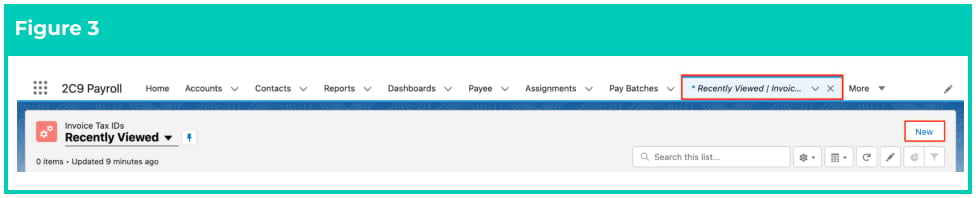
3. Click on the **New** button. (See Figure 3)
 4. Populate the following required fields to provide the base details of the Invoice Tax ID record: (See Figure 4)
1. **Invoice Tax ID Name**
2. **Tax Rate**
5. Click on the **Save** button.
4. Populate the following required fields to provide the base details of the Invoice Tax ID record: (See Figure 4)
1. **Invoice Tax ID Name**
2. **Tax Rate**
5. Click on the **Save** button.
 6. A new Invoice Tax ID record has been created. (See Figure 5)
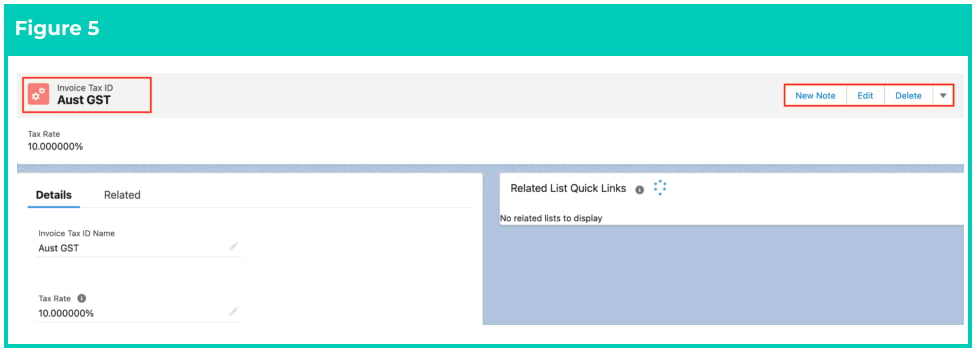 7. To modify an existing **Invoice Tax ID** record, open the required record and select the **Edit** button
available on the top right side of the page. You can also double click in any of the fields that need
editing or just click on the pencil icon that appears within fields when you move your cursor
over the field.
8. When complete, click on the **Save** button.
At least one Invoice Tax ID record needs to be created in every Org where 2c9 Payroll is
being processed. It is a required field for Pay Transactions to create successfully.
If you will be using various Invoice tax rates, you will need to create an individual
record for each rate being used.
## Field Descriptions
**Invoice Tax ID Name** is the name given to the Invoice Tax ID record that is being created.
**Tax Rate** defines the Invoice Tax Rate that will apply when the Invoice Tax ID is used.
## Further Information
| Document | Document Type | Description |
| ---------------------------------------------- | ----------------- | ------------------------------------------------------ |
| QRG Create an Account - Invoice Entity | Task Instructions | How to create an Invoice Entity |
| QRG Create Invoice Schedules | Task Instructions | How to create an Invoice Schedule |
| QRG Create Invoice Calendar & Calendar Periods | Task Instructions | How to create an Invoice Calendar and Calendar Periods |
| QRG Create Invoice Settings | Task Instructions | How to create Invoice Settings |
7. To modify an existing **Invoice Tax ID** record, open the required record and select the **Edit** button
available on the top right side of the page. You can also double click in any of the fields that need
editing or just click on the pencil icon that appears within fields when you move your cursor
over the field.
8. When complete, click on the **Save** button.
At least one Invoice Tax ID record needs to be created in every Org where 2c9 Payroll is
being processed. It is a required field for Pay Transactions to create successfully.
If you will be using various Invoice tax rates, you will need to create an individual
record for each rate being used.
## Field Descriptions
**Invoice Tax ID Name** is the name given to the Invoice Tax ID record that is being created.
**Tax Rate** defines the Invoice Tax Rate that will apply when the Invoice Tax ID is used.
## Further Information
| Document | Document Type | Description |
| ---------------------------------------------- | ----------------- | ------------------------------------------------------ |
| QRG Create an Account - Invoice Entity | Task Instructions | How to create an Invoice Entity |
| QRG Create Invoice Schedules | Task Instructions | How to create an Invoice Schedule |
| QRG Create Invoice Calendar & Calendar Periods | Task Instructions | How to create an Invoice Calendar and Calendar Periods |
| QRG Create Invoice Settings | Task Instructions | How to create Invoice Settings |