> ## Documentation Index
> Fetch the complete documentation index at: https://documentation.2cloudnine.com/llms.txt
> Use this file to discover all available pages before exploring further.
# QRG Create Pay Codes - Deduction Pay Codes STP2
export const InlineImage = ({src, alt = "", height = "1.6em"}) => {
return  ;
};
## Purpose
The purpose of this quick reference guide is to step through the process of creating Deduction Pay Codes.
The intended audience for this document are system administrators / standard users.
## Steps
### Create a Deduction Pay Code record
Pay Codes are applied to Pay Transactions, Payee Deduction Records and Purchase Leave Rules processed
for an Employee.
The Deduction Pay Code record is used to define Pay Codes used for Deductions made for a Payee. The
record holds General Information and Pay Code Setup details.
Create a new Deduction Pay Code record by following the below steps:
;
};
## Purpose
The purpose of this quick reference guide is to step through the process of creating Deduction Pay Codes.
The intended audience for this document are system administrators / standard users.
## Steps
### Create a Deduction Pay Code record
Pay Codes are applied to Pay Transactions, Payee Deduction Records and Purchase Leave Rules processed
for an Employee.
The Deduction Pay Code record is used to define Pay Codes used for Deductions made for a Payee. The
record holds General Information and Pay Code Setup details.
Create a new Deduction Pay Code record by following the below steps:
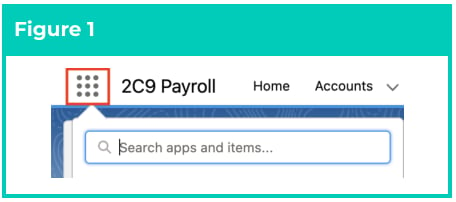
1. Click on the **App Launcher** icon (see
Figure 1).
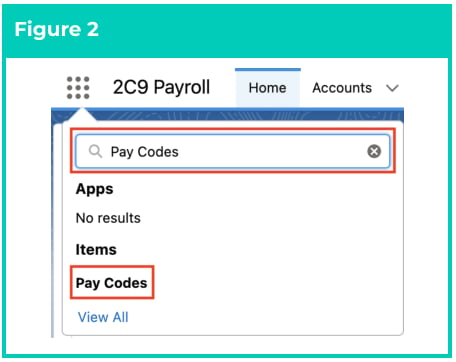
2. Go to the **Pay Codes** object by using the
Search function (see Figure 2).
3. Click on the **New** button (see Figure 3).
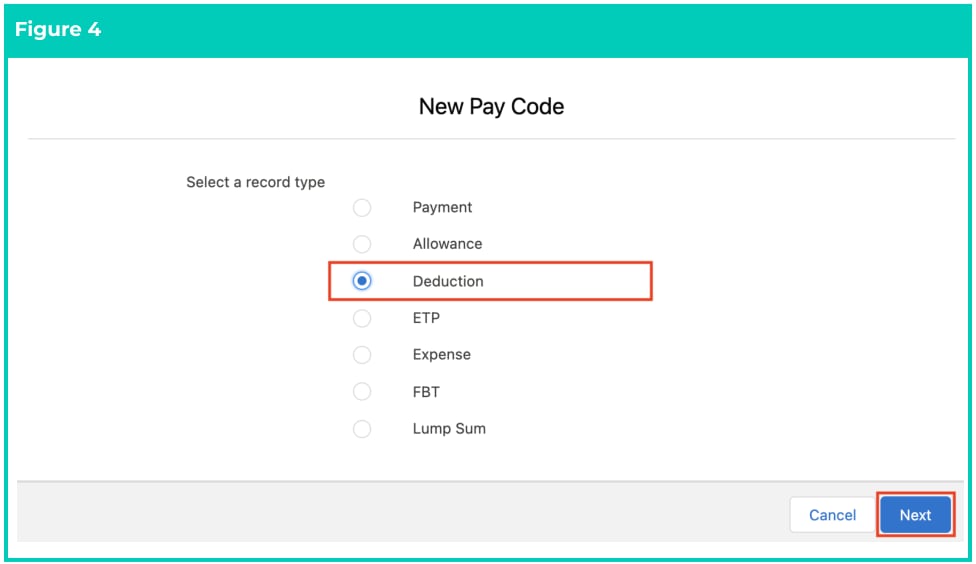
 4. Choose the record type of **Deduction** and click **Next** (see Figure 4).
 5. Follow this step in the sequence given below:
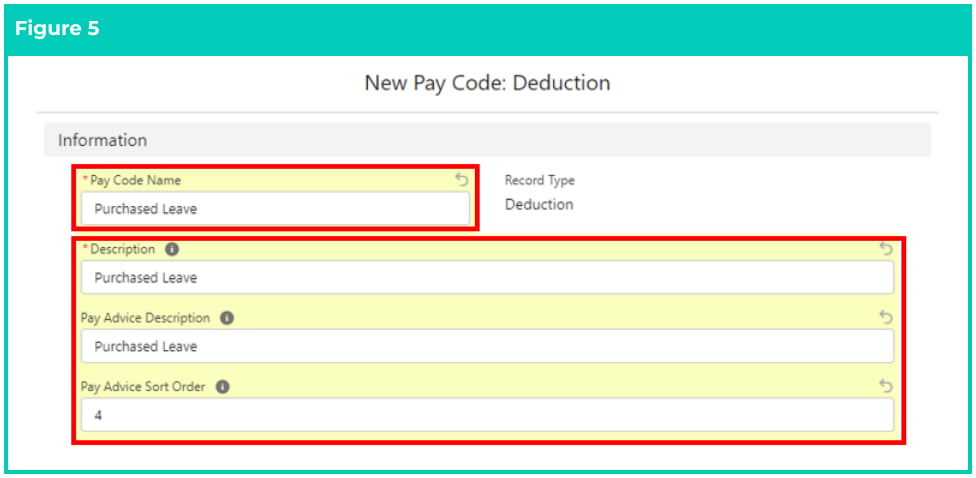
1. To create a Deduction Pay Code, populate the following required fields to provide the base
details of the Deduction Pay Code (see Figure 5):
1. **Pay Code Name**
2. **Description**
3. **Pay Advice Description**
4. **Pay Advice Sort Order**
5. Follow this step in the sequence given below:
1. To create a Deduction Pay Code, populate the following required fields to provide the base
details of the Deduction Pay Code (see Figure 5):
1. **Pay Code Name**
2. **Description**
3. **Pay Advice Description**
4. **Pay Advice Sort Order**
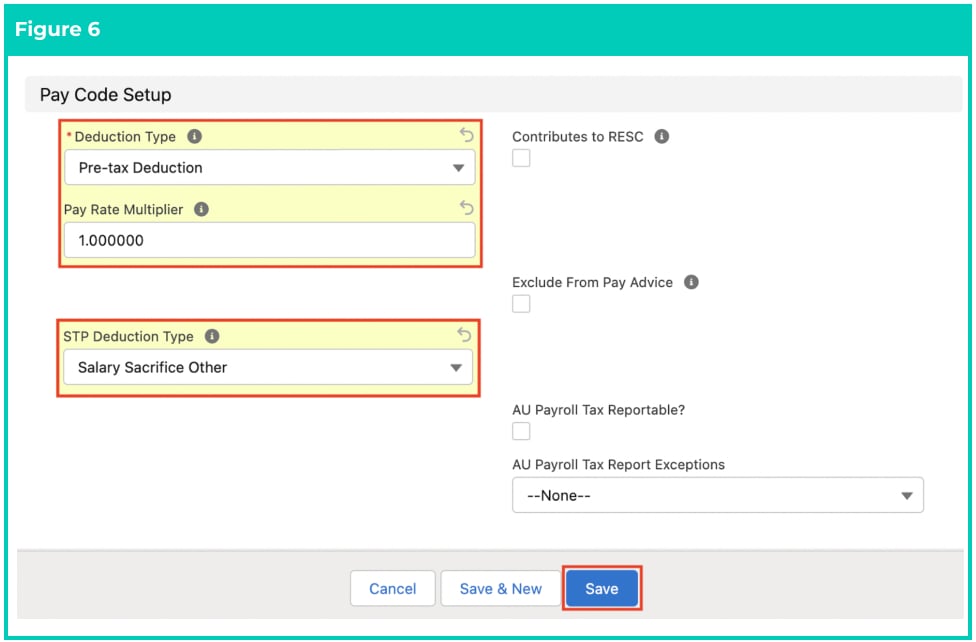
 2. To create a Deduction Pay Code, populate the following required fields to provide the base
details of the Deduction Pay Code (see Figure 6):
1. **Deduction Type**
2. **Pay Rate Multiplier**
3. **STP Deduction Type**
3. Populate the following optional fields as required (see Figure 6):
1. If the Pay Code contributes to RESC, tick the **Contributes to RESC** checkbox.
2. To exclude any transactions related to this Pay Code from the standard Pay Advice
PDF, check the **Exclude From Pay Advice** checkbox.
3. If Payroll Tax needs to be reported for Pay Transactions using this Pay Code, check
the **AU Payroll Tax Reportable?** checkbox.
4. To apply regional Payroll Tax exemptions for Pay Transactions using this Pay Code,
select from the picklist values provided in the **AU Payroll Tax Report Exemptions**
field.
6. Click on the **Save** button.
2. To create a Deduction Pay Code, populate the following required fields to provide the base
details of the Deduction Pay Code (see Figure 6):
1. **Deduction Type**
2. **Pay Rate Multiplier**
3. **STP Deduction Type**
3. Populate the following optional fields as required (see Figure 6):
1. If the Pay Code contributes to RESC, tick the **Contributes to RESC** checkbox.
2. To exclude any transactions related to this Pay Code from the standard Pay Advice
PDF, check the **Exclude From Pay Advice** checkbox.
3. If Payroll Tax needs to be reported for Pay Transactions using this Pay Code, check
the **AU Payroll Tax Reportable?** checkbox.
4. To apply regional Payroll Tax exemptions for Pay Transactions using this Pay Code,
select from the picklist values provided in the **AU Payroll Tax Report Exemptions**
field.
6. Click on the **Save** button.
 The Pay Rate Multiplier field is applied to the Pay Rate on the Assignment Rate Record,
to determine the Pay Rate for the related Pay Transactions.
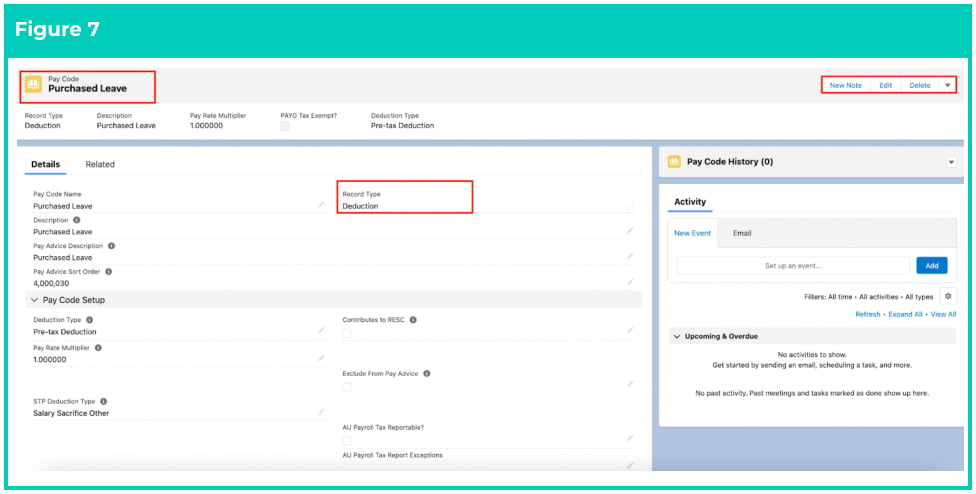
A new **Deduction Pay Code** record has been created (see Figure 7).
The Pay Rate Multiplier field is applied to the Pay Rate on the Assignment Rate Record,
to determine the Pay Rate for the related Pay Transactions.
A new **Deduction Pay Code** record has been created (see Figure 7).
 Deduction Pay Code records CAN NOT be deleted if they have related records or are
used in other records. Deleting records is not recommended unless absolutely essential.
A Pay Code can only be edited if it has not already been referenced within Pay Transactions,
Interpretation Rules or Payee Allowance records. A new Pay Code will need to be created if updates
are required after this point.
7. To modify an existing **Deduction Pay Code** record, open the required record and select the **Edit**
button available on the top right side of the page. You can also double click in any of the fields that
need editing or just click on the pencil icon that appears within fields when you move your
cursor over the field.
8. When complete, click on the **Save** button.
## Field Descriptions
**AU Payroll Tax Reportable?** determines if the Pay Code will be considered during 2cloudnine Payroll Tax
reporting processing.
**AU Payroll Tax Report Exceptions** where a Pay Code is reportable for Payroll Tax, list any localities here
where the Pay Code is considered not reportable.
**Contributes to RESC** indicates if the Pay Code Contributes to RESC.
**Deduction Type** indicates whether Pay Transactions created using this Pay Code will be calculated as
Pre-tax Deductions or Post-tax Deductions
**Description** is the user friendly description of this Pay Code.
**Exclude From Pay Advice** indicates that any transactions related to this Pay Code will not be displayed on
the standard Pay Advice PDF.
**Pay Advice Description** is the description that will be displayed to a Payee on their Pay Advice PDFs for
any Pay Transactions related to this Pay Code.
**Pay Advice Sort Order** defines the order in which Pay Transactions referencing this Pay Code will be
displayed on Pay Advice PDFs.
**Pay Code Name** is the name given to the Pay Code record that is being created.
**Pay Rate Multiplier** is the multiplier which will be applied to Pay Transactions using this Pay Code.
**STP Deduction Type** defines how this Deduction Pay Code will be reported in STP2.
## Further Information
| Document | Document Type | Description |
| ------------------------------------- | ----------------- | -------------------------------- |
| Create Pay Codes - Expense Pay Codes | Task Instructions | How to create Expense Pay Codes |
| Create Pay Codes - ETP Pay Codes | Task Instructions | How to create ETP Pay Codes |
| Create Pay Codes - Lump Sum Pay Codes | Task Instructions | How to create Lump Sum Pay Codes |
| Create Pay Codes - Payment Pay Codes | Task Instructions | How to create Payment Pay Codes |
Deduction Pay Code records CAN NOT be deleted if they have related records or are
used in other records. Deleting records is not recommended unless absolutely essential.
A Pay Code can only be edited if it has not already been referenced within Pay Transactions,
Interpretation Rules or Payee Allowance records. A new Pay Code will need to be created if updates
are required after this point.
7. To modify an existing **Deduction Pay Code** record, open the required record and select the **Edit**
button available on the top right side of the page. You can also double click in any of the fields that
need editing or just click on the pencil icon that appears within fields when you move your
cursor over the field.
8. When complete, click on the **Save** button.
## Field Descriptions
**AU Payroll Tax Reportable?** determines if the Pay Code will be considered during 2cloudnine Payroll Tax
reporting processing.
**AU Payroll Tax Report Exceptions** where a Pay Code is reportable for Payroll Tax, list any localities here
where the Pay Code is considered not reportable.
**Contributes to RESC** indicates if the Pay Code Contributes to RESC.
**Deduction Type** indicates whether Pay Transactions created using this Pay Code will be calculated as
Pre-tax Deductions or Post-tax Deductions
**Description** is the user friendly description of this Pay Code.
**Exclude From Pay Advice** indicates that any transactions related to this Pay Code will not be displayed on
the standard Pay Advice PDF.
**Pay Advice Description** is the description that will be displayed to a Payee on their Pay Advice PDFs for
any Pay Transactions related to this Pay Code.
**Pay Advice Sort Order** defines the order in which Pay Transactions referencing this Pay Code will be
displayed on Pay Advice PDFs.
**Pay Code Name** is the name given to the Pay Code record that is being created.
**Pay Rate Multiplier** is the multiplier which will be applied to Pay Transactions using this Pay Code.
**STP Deduction Type** defines how this Deduction Pay Code will be reported in STP2.
## Further Information
| Document | Document Type | Description |
| ------------------------------------- | ----------------- | -------------------------------- |
| Create Pay Codes - Expense Pay Codes | Task Instructions | How to create Expense Pay Codes |
| Create Pay Codes - ETP Pay Codes | Task Instructions | How to create ETP Pay Codes |
| Create Pay Codes - Lump Sum Pay Codes | Task Instructions | How to create Lump Sum Pay Codes |
| Create Pay Codes - Payment Pay Codes | Task Instructions | How to create Payment Pay Codes |