> ## Documentation Index
> Fetch the complete documentation index at: https://documentation.2cloudnine.com/llms.txt
> Use this file to discover all available pages before exploring further.
# QRG Create Payee Withholdings - AU PAYG
export const InlineImage = ({src, alt = "", height = "1.6em"}) => {
return  ;
};
## Purpose
The purpose of this quick reference guide is to step through the process of creating an AU PAYG Payee
Withholding. The intended audience for this document is system administrators / standard users.
## Steps
### Create a new AU PAYG Payee Withholding record
The AU PAYG Payee Withholding record holds the General Information, TFN, and Tax Offset Details for a
Payee.
Create an AU PAYG Payee Withholding by following the below steps:
;
};
## Purpose
The purpose of this quick reference guide is to step through the process of creating an AU PAYG Payee
Withholding. The intended audience for this document is system administrators / standard users.
## Steps
### Create a new AU PAYG Payee Withholding record
The AU PAYG Payee Withholding record holds the General Information, TFN, and Tax Offset Details for a
Payee.
Create an AU PAYG Payee Withholding by following the below steps:
1. Navigate to the **Payee** record.
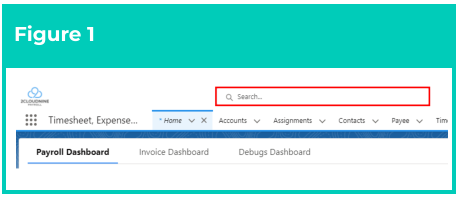
1. To identify a Payee record from
an Employee record, enter the
Employee name into the **Global**
**Search** (see Figure 1).
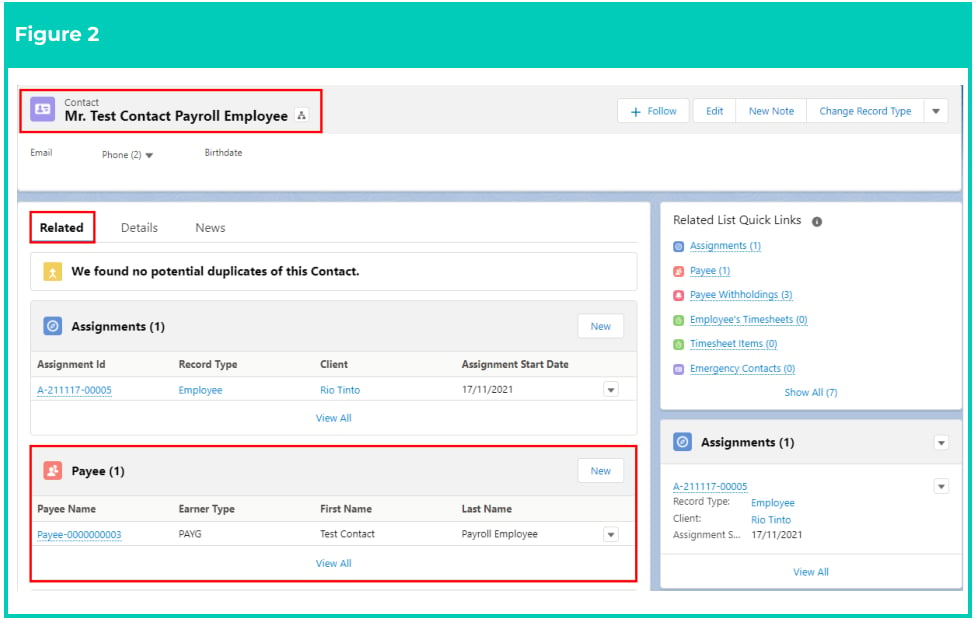
2. Select the **Employee** record
from the suggestions provided.
3. Open the **Related** tab.
4. Identify the **Payee** related list.
5. Select the **Payee** record (see
Figure 2).
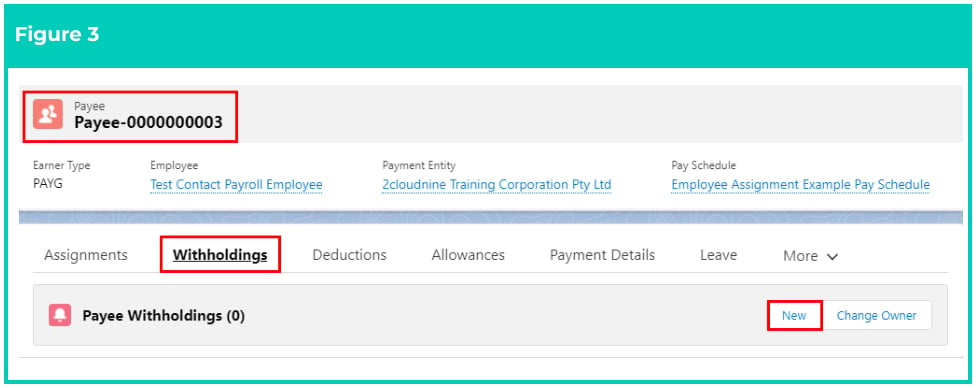
 2. Click **Withholdings** from the tab options (see Figure 3)
3. Click **New**
2. Click **Withholdings** from the tab options (see Figure 3)
3. Click **New**
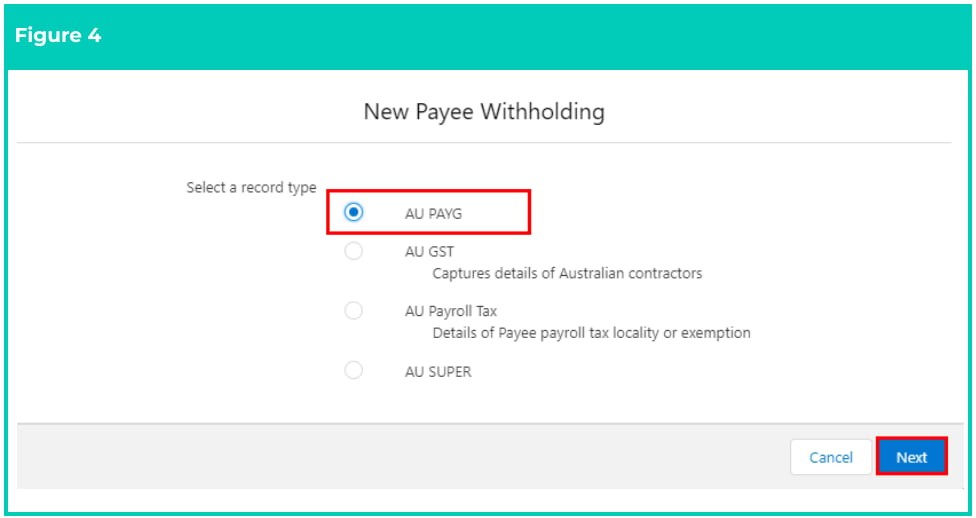
 4. Select **AU PAYG** from the available record types and click **Next** (see Figure 4).
 5. Populate the following required fields to provide the base details of the Payee Withholding (see
Figure 5):
1. **Employee**
2. **Payee**
3. **Effective Date**
4. **ATO Income Classification**
5. **Australian Resident**
6. **Claim Tax Free**
7. **STSL**
8. **Approved Working Holiday Maker**
9. **Basis of Payment**
10. **Additional Week/Fortnight**
11. **Medicare Levy Exemption**
6. Populate the following optional fields as needed:
1. If the Payee is PAYG exempt, detail the reason for the exemption in the **PAYG Exempt**
**Reason** field.
2. To ensure PAYG Withholdings are recorded with the ATO against the Payee’s existing
TFN, populate the **Tax File Number** field. If the TFN is not available, leave this field blank
and instead select from the picklist options provided in the **Reason TFN Not Provided**
field.
3. To apply an ATO variation to PAYG Withholdings for this Payee, populate the **Tax**
**Variation Percentage** field.
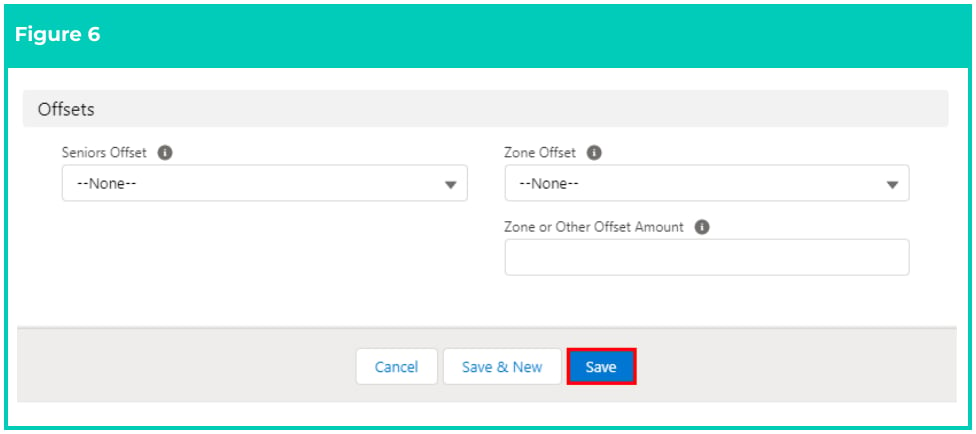
4. To ensure any eligible tax offsets are calculated against Payee PAYG Withholdings, select
from the picklist options for the **Seniors Offset** and **Zone Offset** fields. Populate the **Zone**
**Offset or Other Amount** field with the annual offset amount, if applicable (Figure 6).
5. If the Tax File Number has not been provided and the Employer is now going to apply the
higher rate of PAYG, the **No TFN Apply Higher Rate** field must be populated. To action
this change, Payroll Users need to create a new PAYG Payee Withholding record
reflecting these changes, with the original Withholding record expiring the day prior to
the Effective Date of the new record.
6. To set a fixed term for the Payee Withholding record, or if the details are no longer
applicable and should be replaced with a new record, populate the **Expiry Date** field. If
left blank, no expiry date will apply.
7. To prevent the Status of the Payee Withholding from being automatically updated by the
automatic status update scheduled job, check the **Exclude From Auto Update** checkbox.
8. If the Payee is an Approved Working Holiday Maker or Inbound Assignee to Australia, or if
they are a Foreign Employment Income, the field **Country of Visa/Work** needs to be
populated with the relevant country from the list available.
Payroll Users are reminded again that if 28 days have expired since the original PAYG
Payee Withholding has been completed, and the Employee has not provided their Tax
File Number, Payroll Users need to expire the existing Payee Withholding and create a
new one effective the following day, with the No TFN Apply Higher Rate field populated as Yes.
5. Populate the following required fields to provide the base details of the Payee Withholding (see
Figure 5):
1. **Employee**
2. **Payee**
3. **Effective Date**
4. **ATO Income Classification**
5. **Australian Resident**
6. **Claim Tax Free**
7. **STSL**
8. **Approved Working Holiday Maker**
9. **Basis of Payment**
10. **Additional Week/Fortnight**
11. **Medicare Levy Exemption**
6. Populate the following optional fields as needed:
1. If the Payee is PAYG exempt, detail the reason for the exemption in the **PAYG Exempt**
**Reason** field.
2. To ensure PAYG Withholdings are recorded with the ATO against the Payee’s existing
TFN, populate the **Tax File Number** field. If the TFN is not available, leave this field blank
and instead select from the picklist options provided in the **Reason TFN Not Provided**
field.
3. To apply an ATO variation to PAYG Withholdings for this Payee, populate the **Tax**
**Variation Percentage** field.
4. To ensure any eligible tax offsets are calculated against Payee PAYG Withholdings, select
from the picklist options for the **Seniors Offset** and **Zone Offset** fields. Populate the **Zone**
**Offset or Other Amount** field with the annual offset amount, if applicable (Figure 6).
5. If the Tax File Number has not been provided and the Employer is now going to apply the
higher rate of PAYG, the **No TFN Apply Higher Rate** field must be populated. To action
this change, Payroll Users need to create a new PAYG Payee Withholding record
reflecting these changes, with the original Withholding record expiring the day prior to
the Effective Date of the new record.
6. To set a fixed term for the Payee Withholding record, or if the details are no longer
applicable and should be replaced with a new record, populate the **Expiry Date** field. If
left blank, no expiry date will apply.
7. To prevent the Status of the Payee Withholding from being automatically updated by the
automatic status update scheduled job, check the **Exclude From Auto Update** checkbox.
8. If the Payee is an Approved Working Holiday Maker or Inbound Assignee to Australia, or if
they are a Foreign Employment Income, the field **Country of Visa/Work** needs to be
populated with the relevant country from the list available.
Payroll Users are reminded again that if 28 days have expired since the original PAYG
Payee Withholding has been completed, and the Employee has not provided their Tax
File Number, Payroll Users need to expire the existing Payee Withholding and create a
new one effective the following day, with the No TFN Apply Higher Rate field populated as Yes.
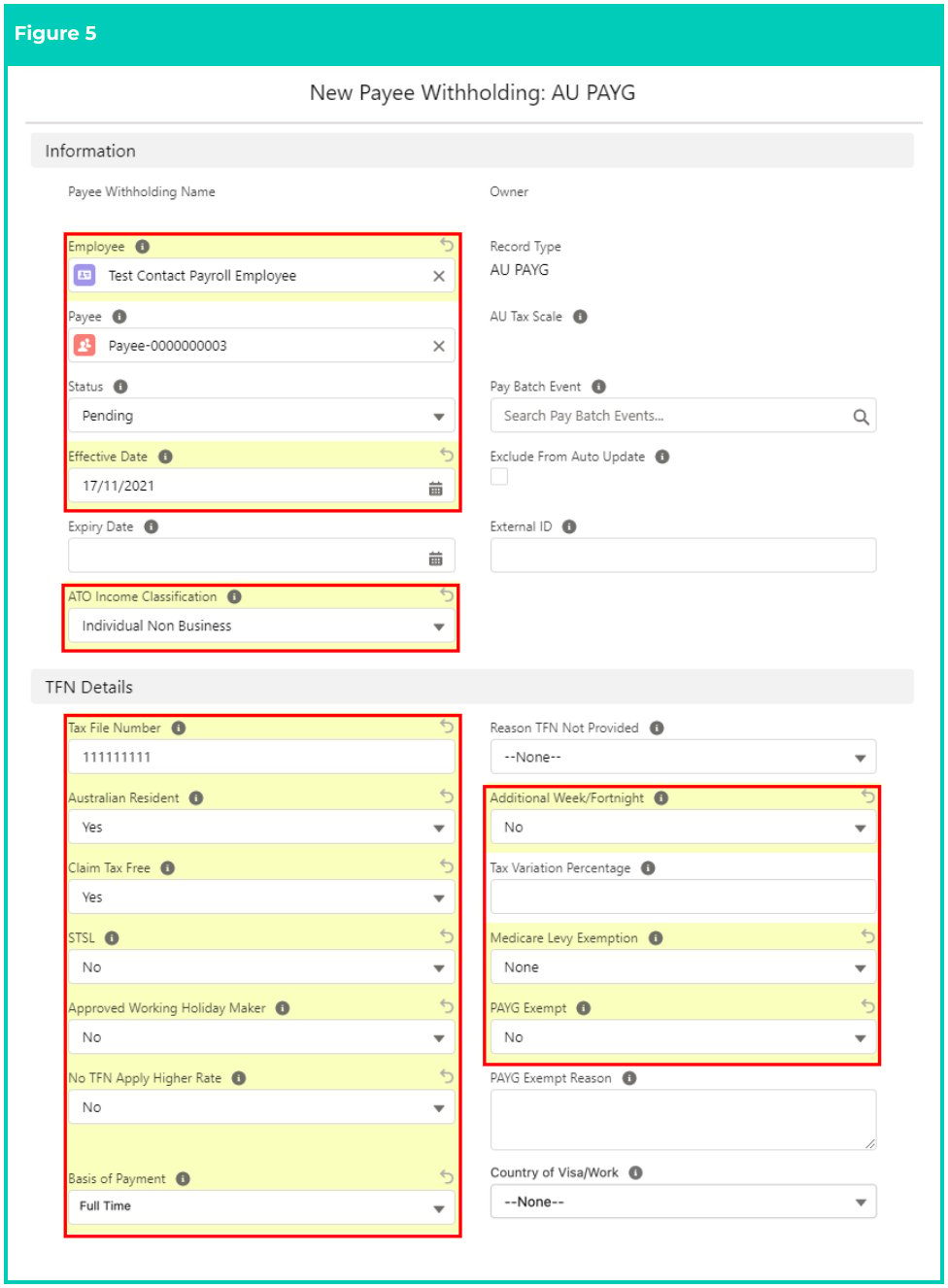 The Pay Batch Event field will be automatically populated upon saving the record, and
should not be manually entered.
The Status of the record will be automatically updated upon saving the record, based
on the Start Date and End Date (see Figure 5).
The External ID field will be automatically populated if required for system integration.
7. Click **Save** .
The Pay Batch Event field will be automatically populated upon saving the record, and
should not be manually entered.
The Status of the record will be automatically updated upon saving the record, based
on the Start Date and End Date (see Figure 5).
The External ID field will be automatically populated if required for system integration.
7. Click **Save** .
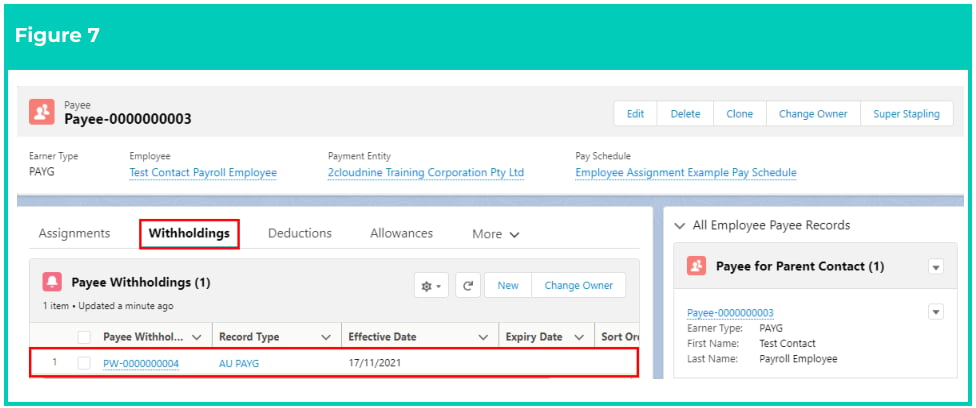
 A new **AU PAYG Payee Withholding** record is now created (see Figure 7).
 Payee Withholding records CANNOT be deleted if they have related records or are
used in other records. Deleting records is not recommended unless absolutely essential.
8. To modify an existing **Payee Withholding** record, open the required record and select the **Edit**
button available on the top right side of the page. You can also double click within fields that
need editing or just click on the pencil icon that appears within fields when hovering with
your cursor.
9. When complete, click on the **Save** button.
## Field Descriptions
| Field Name | Description |
| -------------------------------------- | -------------------------------------------------------------------------------------------------------------------------------------------------------------------------------------------------------------------------------------------------------------------------------------------------------------------------------------------------------------------------------------------------------------------------------------------------------------------------------------------------------------------------------------------------------------------------- |
| **Additional** **Week/Fortnight** | indicates that the Payee has elected to have PAYG calculated including the additional week/fortnight, as per the ATO schedule, where there is an additional week or fortnight in the year. |
| **Approved Working** **Holiday Maker** | indicates whether the Payee is an Approved Working Holiday Maker working for an approved employer, and therefore will have their PAYG tax calculated as per the ATO tax table for Working Holiday Makers. |
| **ATO Income** **Classification** | is the associated ATO Income Classification for this PAYG withholding:
Payee Withholding records CANNOT be deleted if they have related records or are
used in other records. Deleting records is not recommended unless absolutely essential.
8. To modify an existing **Payee Withholding** record, open the required record and select the **Edit**
button available on the top right side of the page. You can also double click within fields that
need editing or just click on the pencil icon that appears within fields when hovering with
your cursor.
9. When complete, click on the **Save** button.
## Field Descriptions
| Field Name | Description |
| -------------------------------------- | -------------------------------------------------------------------------------------------------------------------------------------------------------------------------------------------------------------------------------------------------------------------------------------------------------------------------------------------------------------------------------------------------------------------------------------------------------------------------------------------------------------------------------------------------------------------------- |
| **Additional** **Week/Fortnight** | indicates that the Payee has elected to have PAYG calculated including the additional week/fortnight, as per the ATO schedule, where there is an additional week or fortnight in the year. |
| **Approved Working** **Holiday Maker** | indicates whether the Payee is an Approved Working Holiday Maker working for an approved employer, and therefore will have their PAYG tax calculated as per the ATO tax table for Working Holiday Makers. |
| **ATO Income** **Classification** | is the associated ATO Income Classification for this PAYG withholding: - Individual Non Business
- Community Development Employment Project
- Exempt Foreign Employment
- Voluntary Agreement
- Business and Personal Services
- Joint Petroleum Development Area
- Foreign Employment
- Other Specified
- Working Holiday Maker
- Not Reportable
- Death Beneficiary
- Non-Employee
- Closely Held Payees
- Inbound Assignee to Australia
- Seasonal Worker Programme
|
| **Australian Resident** | indicates whether the Payee is an Australian Resident for PAYG tax purposes. |
| **Basis of Payment** | is the type of arrangement between the Payment Entity and the Payee: - Full Time
- Part Time
- Labour Hire
- Superannuation Income Stream
- Casual
- Voluntary Agreement
- Death Beneficiary
- Non-Employee
|
| **Claim Tax Free** | indicates whether the Payee wishes to claim the ATO allowable tax free threshold. |
| **Country of** **Visa/Work** | the home country for WHM (Working Holiday Maker) and IAA (Inbound Assignees to Australia), or the country of work for FEI (Foreign Employment Income). |
| **Effective Date** | the date the Withholding will become effective. Withholdings will not be paid before this date. |
| **Employee** | the Employee record this Payee Withholding Record relates to. This must match the Employee of the Payee. |
| **Exclude From Auto** **Update** | when checked, the record will be skipped by the Automatic Status Update scheduled job. |
| **Expiry Date** | the date the Withholding expires. This Withholding record will be ignored for PAYG calculations after this date. If blank, no expiry date applies. |
| External ID | defines the ID of the corresponding record in an external system that has been used to create/update the record. |
| --- | --- |
| **No TFN Apply** **Higher Rate** | when 'Yes' is selected, the highest ATO tax rate will be applied based on the current tax scales. |
| **Medicare Levy** **Exemption** | indicates whether the Payee has provided an ATO declaration and which type of Medicare Levy Exemption is being claimed. |
| **Payee** | is the Payee record this Payee Withholding Record relates to. |
| **PAYG Exempt** | indicates that PAYG calculations will not be applied to this Payee. |
| **PAYG Exemption** **Reason** | is the PAYG exempt reason. |
| **Reason TFN Not** **Provided** | is the ATO approved reason why this Payee has not provided a tax file number: - No TFN Provided
- TFN applied for but not received
- Employee is under 18
- Employee has claimed an exemption from providing a TFN
|
| **Seniors Offset** | indicates whether the Payee wishes to claim a Seniors offset. |
| **STSL** | indicates whether the Payee wishes to make STSL repayments to the ATO via their PAYG Withholding. |
| **Tax File Number** | is the 9 digit Tax File Number of the Payee as provided by the ATO. The previously approved standard TFN of 987654321 is no longer valid to send through STP2. |
| **Tax Variation** **Percentage** | to be populated when the employer has received notification from the ATO that PAYG Withholding should be calculated on a percentage basis. |
| **Zone Offset** | indicates whether the Payee wishes to claim a Zone offset. |
| **Zone or Other** **Offset Amount** | the amount of Zone Offset or Senior offset to apply during PAYG calculation if required. |
## Further Information
| Document | Document Type | Description |
| ---------------------------------------------- | ----------------- | ------------------------------------------------------ |
| QRG Create a Payee record | Task Instructions | How to create a Payee record |
| QRG Create Payee Withholdings - AU Super | Task Instructions | How to create Superannuation Payee Withholding Records |
| QRG Create Payee Withholdings - AU Payroll Tax | Task Instructions | How to create Payroll Tax Payee Withholding Records |
| QRG Create Payee Withholdings - AU GST | Task Instructions | How to create GST Payee Withholding Records |