> ## Documentation Index
> Fetch the complete documentation index at: https://documentation.2cloudnine.com/llms.txt
> Use this file to discover all available pages before exploring further.
# QRG Create Superannuation Fund - Default Employer Fund
export const InlineImage = ({src, alt = "", height = "1.6em"}) => {
return  ;
};
## Purpose
The purpose of this quick reference guide is to step through the process of creating Default Employer
Superannuation Fund records. The intended audience for this document is system administrators.
## Steps
### Create a Default Employer Fund record
To create a Default Employer Fund record, follow the steps below:
;
};
## Purpose
The purpose of this quick reference guide is to step through the process of creating Default Employer
Superannuation Fund records. The intended audience for this document is system administrators.
## Steps
### Create a Default Employer Fund record
To create a Default Employer Fund record, follow the steps below:
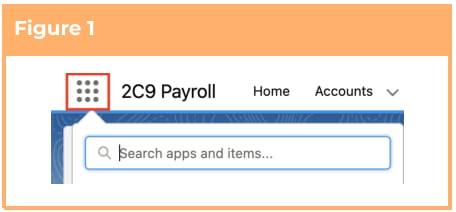
1. Click on the **App Launcher** icon. (See
Figure 1)
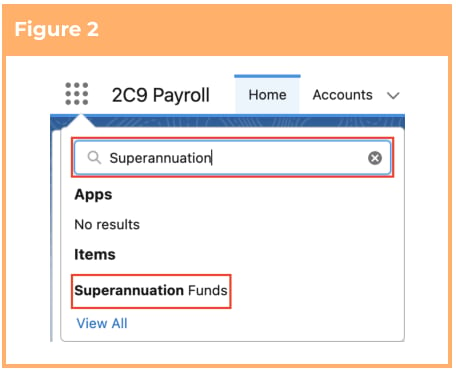
2. Go to the **Superannuation Funds** object
by using the Search function. (See Figure 2)
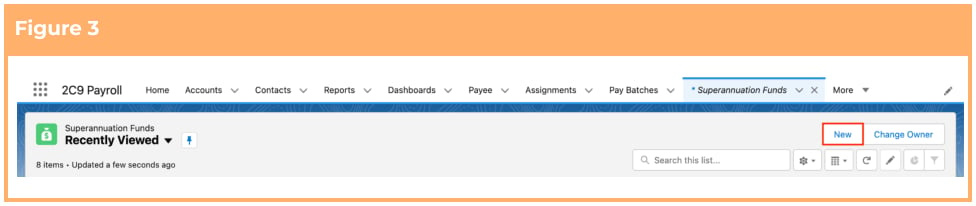
3. Click on the **New** button. (See Figure 3)
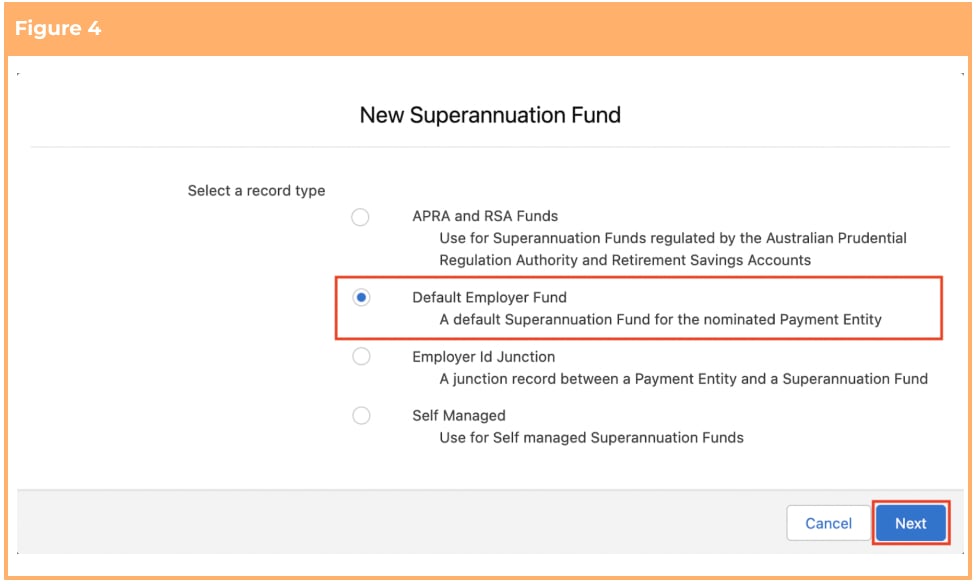
 4. Choose the record type of **Default Employer Fund** . (See Figure 4)
5. Click **Next.**
4. Choose the record type of **Default Employer Fund** . (See Figure 4)
5. Click **Next.**
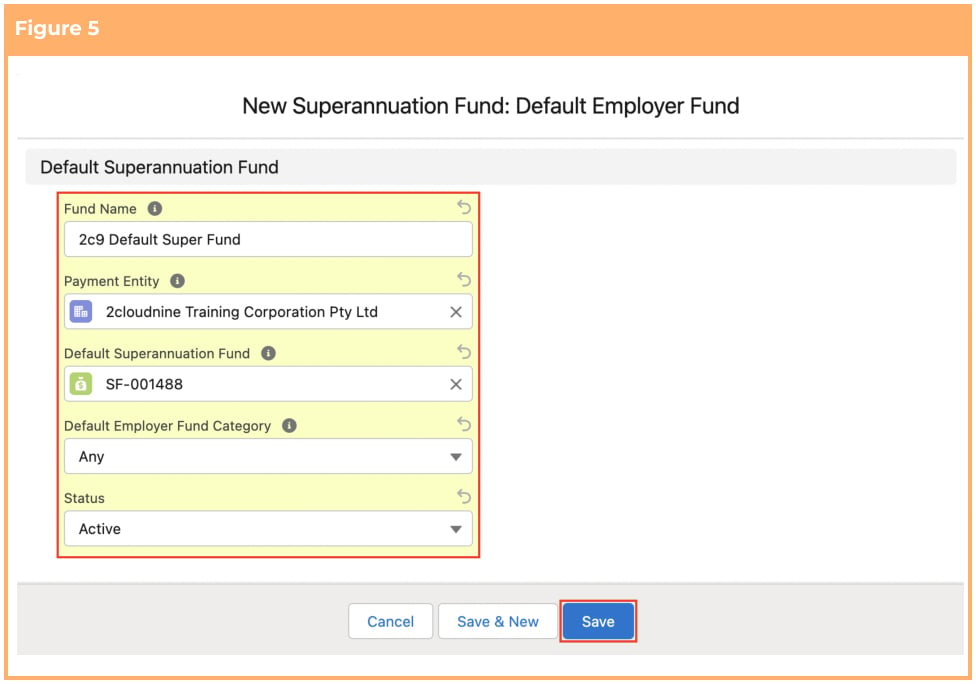
 6. Populate the following required fields to provide the base details of the Superannuation Fund
record: (See Figure 5)
1. **Fund Name**
2. **Payment Entity**
3. **Default Superannuation Fund**
4. **Status**
7. Populate the following optional fields as needed: (See Figure 5)
1. To apply this Default Fund to only a section or group of the Payees marked as a
specific Employer Fund Category, populate the **Default Employer Fund Category** field
to match the Payee field Default Employer Fund Category.
8. Click on the **Save** button.
6. Populate the following required fields to provide the base details of the Superannuation Fund
record: (See Figure 5)
1. **Fund Name**
2. **Payment Entity**
3. **Default Superannuation Fund**
4. **Status**
7. Populate the following optional fields as needed: (See Figure 5)
1. To apply this Default Fund to only a section or group of the Payees marked as a
specific Employer Fund Category, populate the **Default Employer Fund Category** field
to match the Payee field Default Employer Fund Category.
8. Click on the **Save** button.
 A Superannuation Fund record with APRA and RSA Funds record type should be
created prior to creation of this record, so that it can be populated in the Default
Superannuation Fund field.
Default Employer Fund Category is a picklist field that can be configured by your
System Administrator to distinguish various default Superannuation Funds for the same
Payment Entity. The picklists can be created to best reflect the group of Payees who are
covered by this default fund, and may be identified by location, role, worksite, Award, etc
(i.e. Admin, Warehouse, Nursing Award, NSW, etc).
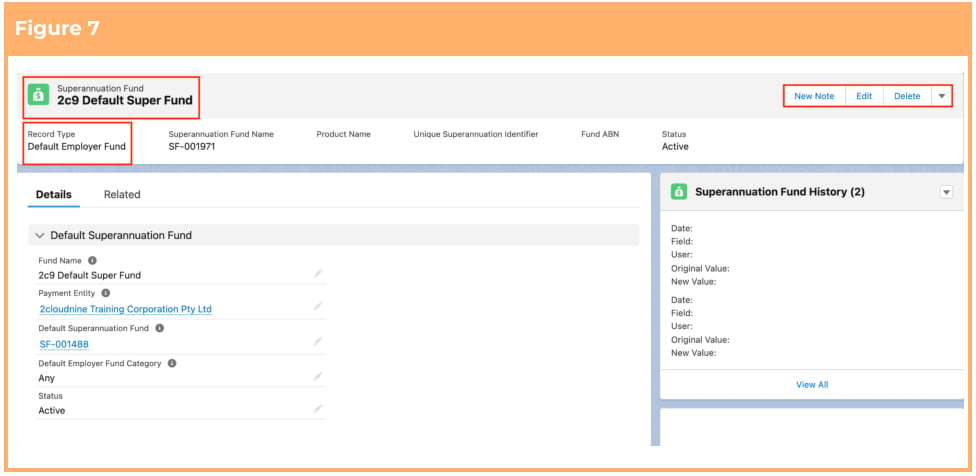
9. A new Default Employer Superannuation Fund record has been created. (See Figure 7)
A Superannuation Fund record with APRA and RSA Funds record type should be
created prior to creation of this record, so that it can be populated in the Default
Superannuation Fund field.
Default Employer Fund Category is a picklist field that can be configured by your
System Administrator to distinguish various default Superannuation Funds for the same
Payment Entity. The picklists can be created to best reflect the group of Payees who are
covered by this default fund, and may be identified by location, role, worksite, Award, etc
(i.e. Admin, Warehouse, Nursing Award, NSW, etc).
9. A new Default Employer Superannuation Fund record has been created. (See Figure 7)
 10. To modify an existing **Superannuation Fund** record, open the required record and select the **Edit**
button available on the top right side of the page. You can also double click in any of the fields that
need editing or just click on the pencil icon that appears within fields when you move your
cursor over the field.
11. When complete, click on the **Save** button.
Superannuation Fund records CANNOT be deleted if they have related records or are
used in other records. Deleting records is not recommended unless absolutely essential.
## Field Descriptions
**Fund Name** is the name of this Default Employer Superannuation Fund.
**Payment Entity** is the Payment Entity that the default fund relates to.
**Default Superannuation Fund** is the nominated default fund for the Payment Entity and Default
Employer Fund Category.
**Default Employer Fund Category** For Payment Entities with multiple default funds, this allows different
default funds to be applied to different areas based on the category set on the Payee.
**Status** is the current status of the Superannuation Fund record.
## Further Information
| Document | Document Type | Description |
| --------------------------------------------------- | ----------------- | ------------------------------------------------------ |
| QRG Create a Payee record | Task Instructions | How to create a Payee Record |
| QRG Create Payee Withholdings - AU Super | Task Instructions | How to create Superannuation Payee Withholding Records |
| QRG Create Superannuation Fund - APRA and RSA Funds | Task Instructions | How to create APRA and RSA Superannuation Fund Records |
| QRG Create Superannuation Fund - Self Managed | Task Instructions | How to create Self Managed Superannuation Fund Records |
10. To modify an existing **Superannuation Fund** record, open the required record and select the **Edit**
button available on the top right side of the page. You can also double click in any of the fields that
need editing or just click on the pencil icon that appears within fields when you move your
cursor over the field.
11. When complete, click on the **Save** button.
Superannuation Fund records CANNOT be deleted if they have related records or are
used in other records. Deleting records is not recommended unless absolutely essential.
## Field Descriptions
**Fund Name** is the name of this Default Employer Superannuation Fund.
**Payment Entity** is the Payment Entity that the default fund relates to.
**Default Superannuation Fund** is the nominated default fund for the Payment Entity and Default
Employer Fund Category.
**Default Employer Fund Category** For Payment Entities with multiple default funds, this allows different
default funds to be applied to different areas based on the category set on the Payee.
**Status** is the current status of the Superannuation Fund record.
## Further Information
| Document | Document Type | Description |
| --------------------------------------------------- | ----------------- | ------------------------------------------------------ |
| QRG Create a Payee record | Task Instructions | How to create a Payee Record |
| QRG Create Payee Withholdings - AU Super | Task Instructions | How to create Superannuation Payee Withholding Records |
| QRG Create Superannuation Fund - APRA and RSA Funds | Task Instructions | How to create APRA and RSA Superannuation Fund Records |
| QRG Create Superannuation Fund - Self Managed | Task Instructions | How to create Self Managed Superannuation Fund Records |