> ## Documentation Index
> Fetch the complete documentation index at: https://documentation.2cloudnine.com/llms.txt
> Use this file to discover all available pages before exploring further.

# QRG View Withholding Rules

## Purpose

The purpose of this quick reference guide is to step through the process of viewing Withholding Rules
which include AU GST, AU PAYG, and AU Super. The intended audience for this document is Payroll Users.

## Steps

### View Withholding Rules

To View Withholding Rules, the following steps should be followed:

<Columns cols={2}>
  <div>
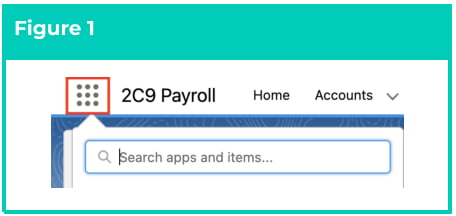
    1. Click on the **App Launcher** icon (see
       Figure 1).
  </div>

  <div>
    <Frame>
      <img src="https://mintcdn.com/2cloudnine-2edf05eb/lDWOeqMlr7c8LFHi/images/generated/reference-guides/data-set-up-and-creation/qrg-view-withholding-rules/qrg-view-withholding-rules-pdf-0-figure-1.png?fit=max&auto=format&n=lDWOeqMlr7c8LFHi&q=85&s=d61d58550ac81046d5fb24799a7b9a91" alt="Screenshot from QRG View Withholding Rules" width="456" height="216" data-path="images/generated/reference-guides/data-set-up-and-creation/qrg-view-withholding-rules/qrg-view-withholding-rules-pdf-0-figure-1.png" />
    </Frame>
  </div>
</Columns>

<Columns cols={2}>
  <div>
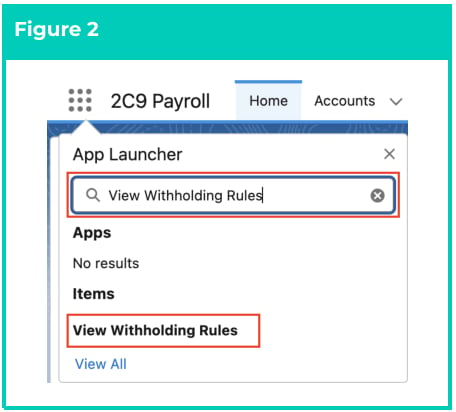
    2. Go to the **View Withholding Rules** tab
       by using the Search function (see Figure 2).
  </div>

  <div>
    <Frame>
      <img src="https://mintcdn.com/2cloudnine-2edf05eb/lDWOeqMlr7c8LFHi/images/generated/reference-guides/data-set-up-and-creation/qrg-view-withholding-rules/qrg-view-withholding-rules-pdf-0-figure-2.png?fit=max&auto=format&n=lDWOeqMlr7c8LFHi&q=85&s=95669bf384896117f2d7e5648c534024" alt="Screenshot from QRG View Withholding Rules" width="456" height="412" data-path="images/generated/reference-guides/data-set-up-and-creation/qrg-view-withholding-rules/qrg-view-withholding-rules-pdf-0-figure-2.png" />
    </Frame>
  </div>
</Columns>

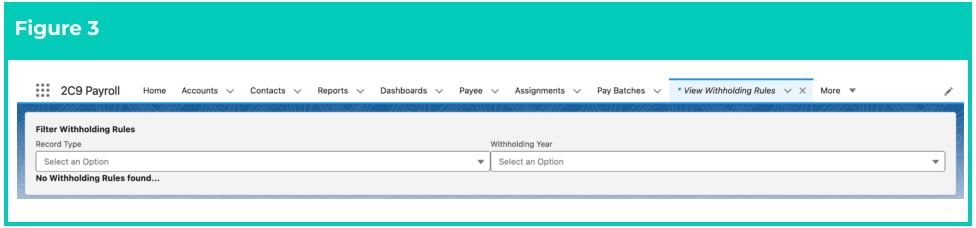
3. The View Withholding Rules page will open. You will see two fields - Record Types and
   Withholding Rules, as shown in the screenshot below (see Figure 3).

<Frame>
  <img src="https://mintcdn.com/2cloudnine-2edf05eb/lDWOeqMlr7c8LFHi/images/generated/reference-guides/data-set-up-and-creation/qrg-view-withholding-rules/qrg-view-withholding-rules-pdf-0-figure-3.png?fit=max&auto=format&n=lDWOeqMlr7c8LFHi&q=85&s=465b8db4fe186b89f1984e65b1f0eec4" alt="Screenshot from QRG View Withholding Rules" width="976" height="228" data-path="images/generated/reference-guides/data-set-up-and-creation/qrg-view-withholding-rules/qrg-view-withholding-rules-pdf-0-figure-3.png" />
</Frame>

4. Populate the **Record Type** field by choosing one of the available Record Types (see Figure 4):

   The Picklist values available are:

   * AU GST
   * AU PAYG
   * AU Payroll Tax
   * AU SUPER
   * NZ PAYE

<Frame>
  <img src="https://mintcdn.com/2cloudnine-2edf05eb/lDWOeqMlr7c8LFHi/images/generated/reference-guides/data-set-up-and-creation/qrg-view-withholding-rules/qrg-view-withholding-rules-pdf-1-figure-4.png?fit=max&auto=format&n=lDWOeqMlr7c8LFHi&q=85&s=251aa7a0d0501be91ef427b565f7c47e" alt="Screenshot from QRG View Withholding Rules" width="976" height="330" data-path="images/generated/reference-guides/data-set-up-and-creation/qrg-view-withholding-rules/qrg-view-withholding-rules-pdf-1-figure-4.png" />
</Frame>

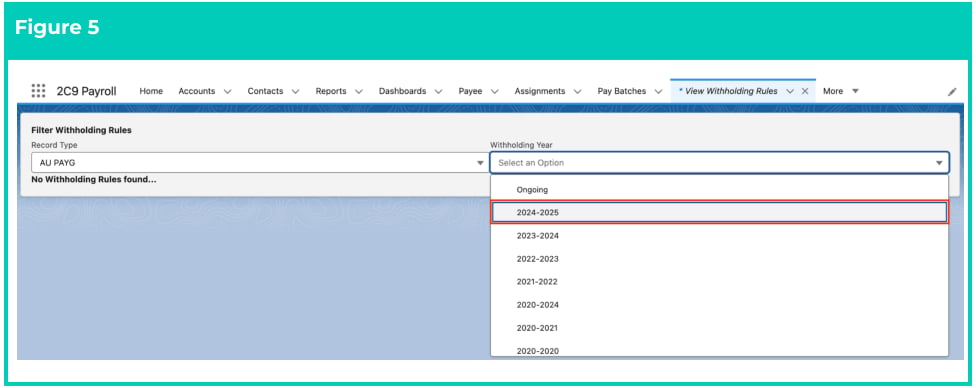
5. Populate the **Withholding Year** field with the required Period (see Figure 5):
<Frame>
  <img src="https://mintcdn.com/2cloudnine-2edf05eb/lDWOeqMlr7c8LFHi/images/generated/reference-guides/data-set-up-and-creation/qrg-view-withholding-rules/qrg-view-withholding-rules-pdf-1-figure-5.png?fit=max&auto=format&n=lDWOeqMlr7c8LFHi&q=85&s=a0d1198e4812b0d88357f32b52eaa763" alt="Screenshot from QRG View Withholding Rules" width="976" height="388" data-path="images/generated/reference-guides/data-set-up-and-creation/qrg-view-withholding-rules/qrg-view-withholding-rules-pdf-1-figure-5.png" />
</Frame>

<Warning>
  Some withholding rules can span multiple financial years and as such their Withholding Year may be
  2020-2024, for example. Other Withholding Rules are specific to one financial year. Please select
  your Withholding Year carefully. If you do not see the data you are expecting, please review the
  Withholding Year you have selected.
</Warning>

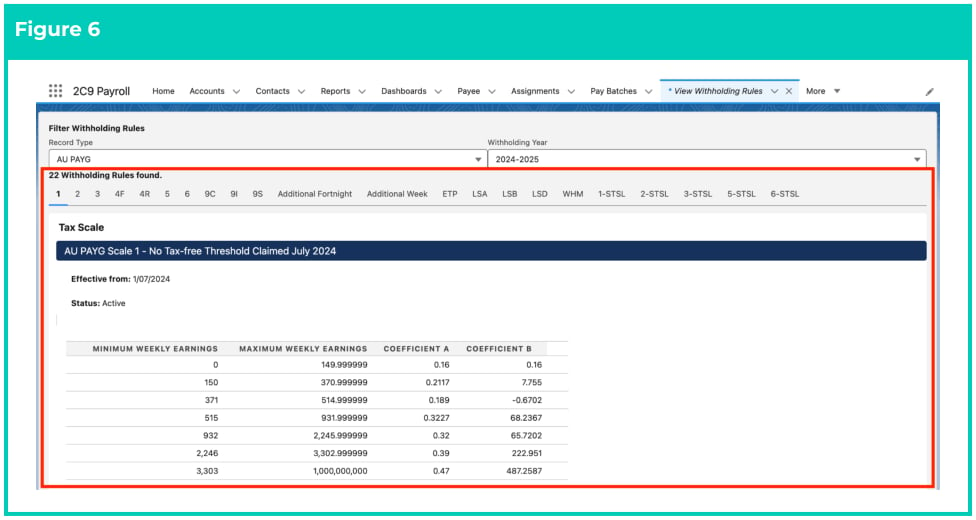
6. Once the Record Type and Withholding Year fields are populated, the page will automatically
   display the Tax Scale table as shown in the screenshot below (see Figure 6).
7. The relevant Withholding Rules for the Record Type and Withholding Year will be displayed. The
   Effective From date and Status will also be displayed below the Tax Scale, and if Inactive, will also
   include the date it ceased being applied.

<Frame>
  <img src="https://mintcdn.com/2cloudnine-2edf05eb/lDWOeqMlr7c8LFHi/images/generated/reference-guides/data-set-up-and-creation/qrg-view-withholding-rules/qrg-view-withholding-rules-pdf-2-figure-6.png?fit=max&auto=format&n=lDWOeqMlr7c8LFHi&q=85&s=8e9941b594f36c8b6acdf21d94def3e6" alt="Screenshot from QRG View Withholding Rules" width="976" height="520" data-path="images/generated/reference-guides/data-set-up-and-creation/qrg-view-withholding-rules/qrg-view-withholding-rules-pdf-2-figure-6.png" />
</Frame>

<Warning>
  The descriptions for individual Tax Scales will be displayed in the blue-coloured header,
  which updates automatically when a different Tax Scale is selected.
</Warning>

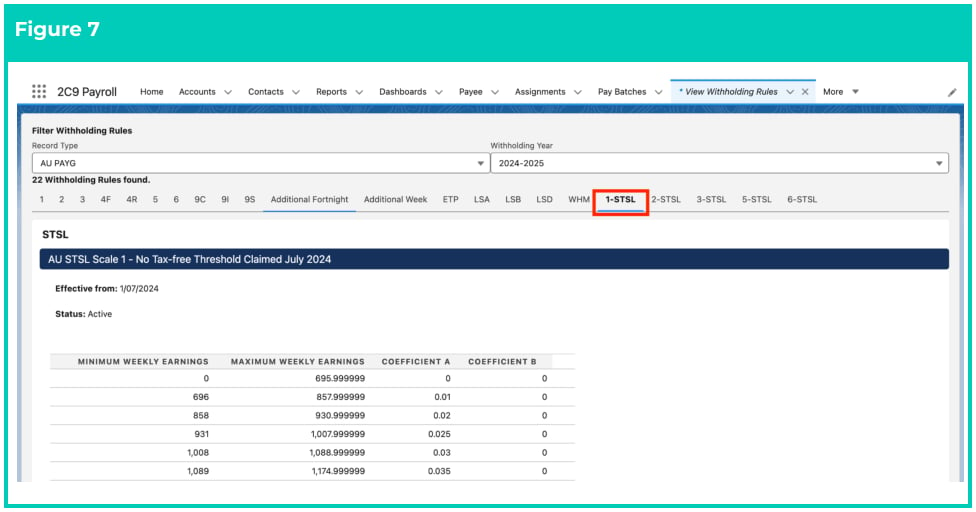
8. To view different Tax Scales within the same Withholding Year, select one of the tabs below the
   picklists, as shown in the screenshot below (see Figure 7).

<Frame>
  <img src="https://mintcdn.com/2cloudnine-2edf05eb/lDWOeqMlr7c8LFHi/images/generated/reference-guides/data-set-up-and-creation/qrg-view-withholding-rules/qrg-view-withholding-rules-pdf-2-figure-7.png?fit=max&auto=format&n=lDWOeqMlr7c8LFHi&q=85&s=9d75a1a945fd485b76b7d565411bcabe" alt="Screenshot from QRG View Withholding Rules" width="976" height="512" data-path="images/generated/reference-guides/data-set-up-and-creation/qrg-view-withholding-rules/qrg-view-withholding-rules-pdf-2-figure-7.png" />
</Frame>

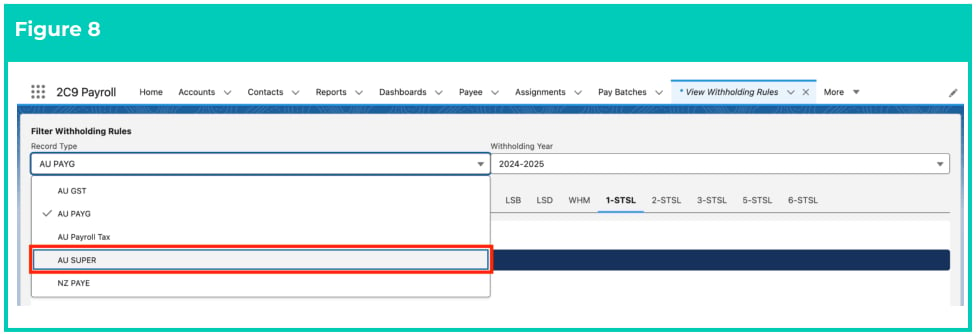
9. To view Tax Scales for other Record Types of Withholding Rules, select a different **Record Type** as
   shown below (see Figure 8):
<Frame>
  <img src="https://mintcdn.com/2cloudnine-2edf05eb/lDWOeqMlr7c8LFHi/images/generated/reference-guides/data-set-up-and-creation/qrg-view-withholding-rules/qrg-view-withholding-rules-pdf-3-figure-8.png?fit=max&auto=format&n=lDWOeqMlr7c8LFHi&q=85&s=51fad12bba0f26b59e6031902a5ca996" alt="Screenshot from QRG View Withholding Rules" width="976" height="334" data-path="images/generated/reference-guides/data-set-up-and-creation/qrg-view-withholding-rules/qrg-view-withholding-rules-pdf-3-figure-8.png" />
</Frame>

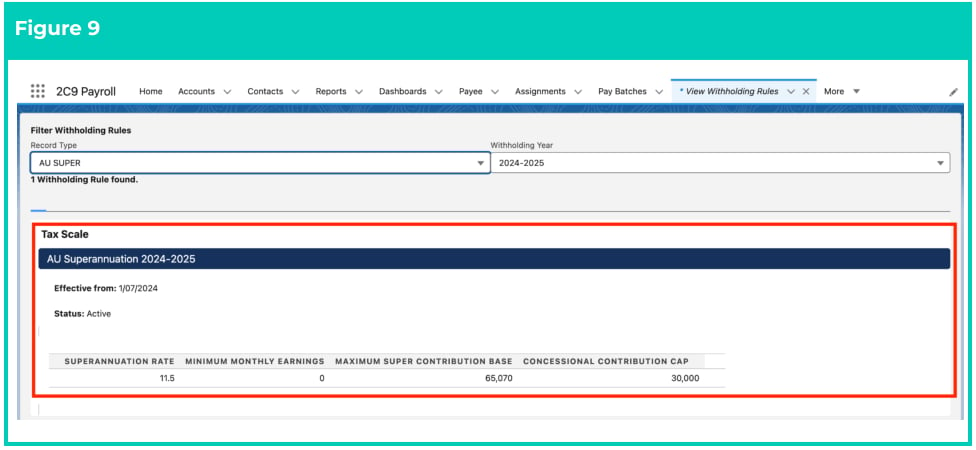
10. Once a different Record Type is selected, the Tax Scale being displayed will update automatically
    (see Figure 9):
<Frame>
  <img src="https://mintcdn.com/2cloudnine-2edf05eb/lDWOeqMlr7c8LFHi/images/generated/reference-guides/data-set-up-and-creation/qrg-view-withholding-rules/qrg-view-withholding-rules-pdf-3-figure-9.png?fit=max&auto=format&n=lDWOeqMlr7c8LFHi&q=85&s=22c750fcad3067ba8b644c4774c04cd0" alt="Screenshot from QRG View Withholding Rules" width="976" height="450" data-path="images/generated/reference-guides/data-set-up-and-creation/qrg-view-withholding-rules/qrg-view-withholding-rules-pdf-3-figure-9.png" />
</Frame>

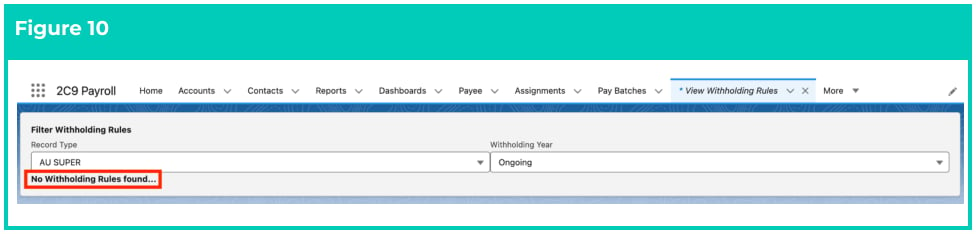
11. When a particular Record Type or Withholding Year doesn’t contain any Withholding Rules, you
    will see a note saying ‘No Withholding Rules found…’ (see Figure 10):
<Frame>
  <img src="https://mintcdn.com/2cloudnine-2edf05eb/lDWOeqMlr7c8LFHi/images/generated/reference-guides/data-set-up-and-creation/qrg-view-withholding-rules/qrg-view-withholding-rules-pdf-3-figure-10.png?fit=max&auto=format&n=lDWOeqMlr7c8LFHi&q=85&s=8ed18e8b941ac41e00bf5b2ea543d5b4" alt="Screenshot from QRG View Withholding Rules" width="976" height="234" data-path="images/generated/reference-guides/data-set-up-and-creation/qrg-view-withholding-rules/qrg-view-withholding-rules-pdf-3-figure-10.png" />
</Frame>

## Further Information

| Document                                               | Document Type     | Description                                                |
| ------------------------------------------------------ | ----------------- | ---------------------------------------------------------- |
| QRG Create a Payee record                              | Task Instructions | How to create a Payee Record                               |
| QRG Create Payee Withholdings - AU PAYG                | Task Instructions | How to create PAYG Payee Withholding Records               |
| QRG Create Payee Withholdings - AU Super               | Task Instructions | How to create Superannuation Payee Withholding Records     |
| QRG Create Payee Withholdings - AU Payroll Tax         | Task Instructions | How to create Payroll Tax Payee Withholding Records        |
| QRG Create Payee Withholdings - AU GST                 | Task Instructions | How to create GST Payee Withholding Records                |
| QRG Checking Stapled Super                             | Task Instructions | How to check for an Employee’s Stapled Superannuation Fund |
| QRG Create Superannuation Fund - Default Employer Fund | Task Instructions | How to create a Default Employer Fund                      |