> ## Documentation Index
> Fetch the complete documentation index at: https://documentation.2cloudnine.com/llms.txt
> Use this file to discover all available pages before exploring further.
# QRG Create Accounting Segments - Invoice Entity
export const InlineImage = ({src, alt = "", height = "1.6em"}) => {
return  ;
};
## Purpose
The purpose of this quick reference guide is to step through the process of creating an Accounting
Invoice Entity. The intended audience for this document is System Administrators / Standard Users.
## Steps
### Create Accounting Segments - Invoice Entity
The Invoice Entity Accounting Segment is used to link an Invoice Entity at 2cloudnine Payroll with a
corresponding Invoice Entity dimension in the Accounting System.
To create an Invoice Entity Accounting Segment, the following steps should be completed:
;
};
## Purpose
The purpose of this quick reference guide is to step through the process of creating an Accounting
Invoice Entity. The intended audience for this document is System Administrators / Standard Users.
## Steps
### Create Accounting Segments - Invoice Entity
The Invoice Entity Accounting Segment is used to link an Invoice Entity at 2cloudnine Payroll with a
corresponding Invoice Entity dimension in the Accounting System.
To create an Invoice Entity Accounting Segment, the following steps should be completed:
1. Click on the **App Launcher** icon. (See
Figure 1)
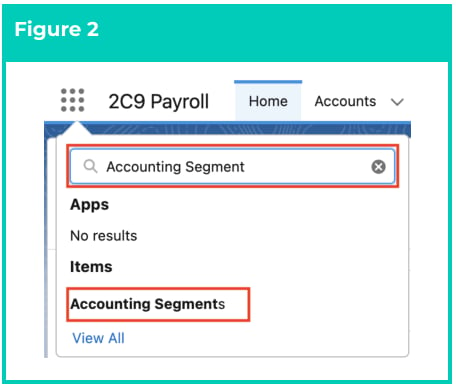
2. Go to the **Accounting Segments** object
by using the Search function. (See
Figure 2)
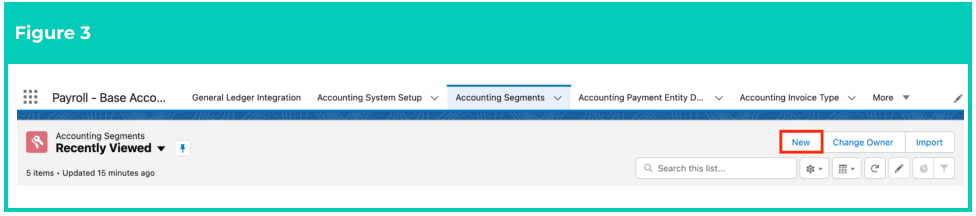
3. Click on the **New** button. (See Figure 3)
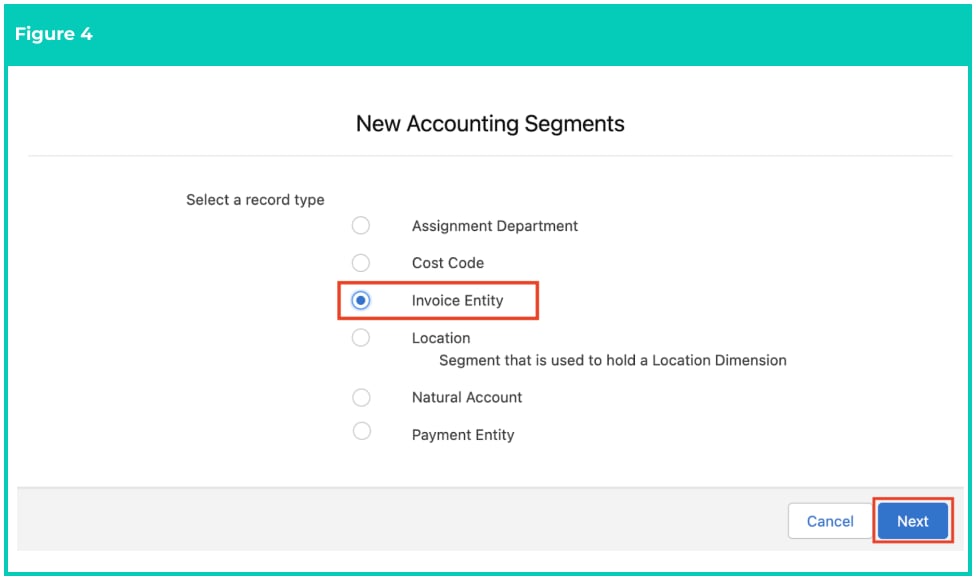
 4. Select **Invoice Entity** from the available record types and click on the **Next** button. (See Figure 4).
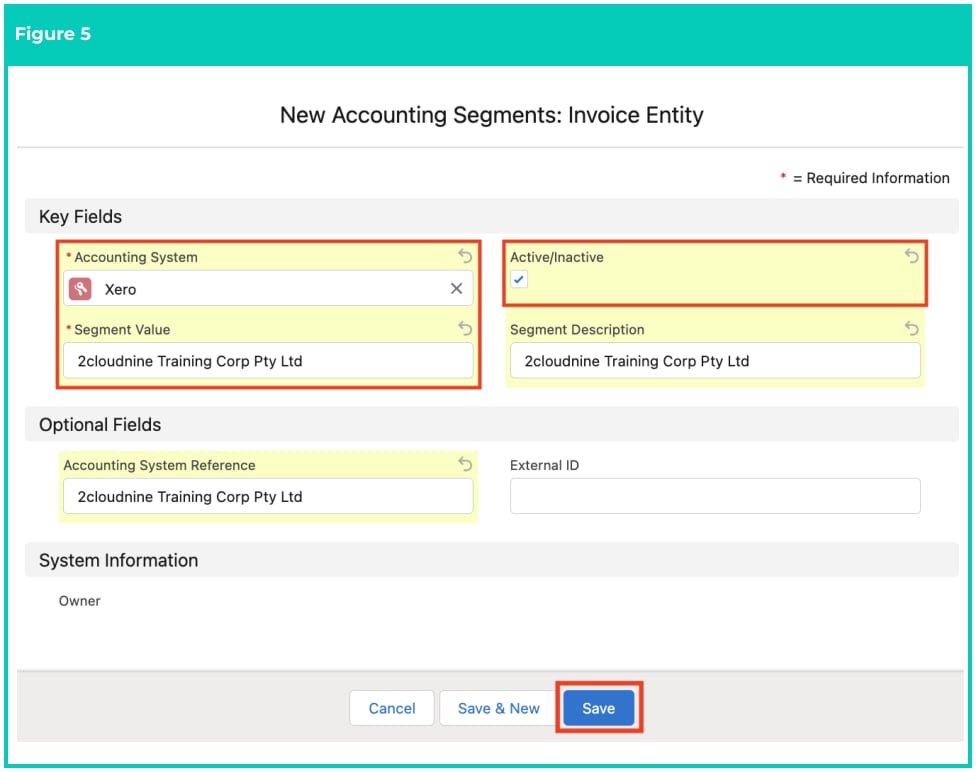
 5. Populate the following required fields to provide the base details of the Invoice Entity Accounting
Segment record (see Figure 5):
1. **Accounting System**
2. **Active/Inactive** - set to true
3. **Segment Value** - this will be your dimension for the Invoice Entity as held within the
Accounting system (eg 2cloudnine Training Corporation Pty Ltd)
6. Populate the following optional fields as required (see Figure 5):
1. **Segment description** - description of the Invoice Entity value (eg Johnson Staffing
Agency)
2. **Accounting System Reference** - can be used as a secondary field to provide additional
description of the Accounting dimension in the Accounting System.
3. **External ID** - optional field for exporting data using the Accounting System Record Id.
7. Click on the **Save** button (see Figure 5).
5. Populate the following required fields to provide the base details of the Invoice Entity Accounting
Segment record (see Figure 5):
1. **Accounting System**
2. **Active/Inactive** - set to true
3. **Segment Value** - this will be your dimension for the Invoice Entity as held within the
Accounting system (eg 2cloudnine Training Corporation Pty Ltd)
6. Populate the following optional fields as required (see Figure 5):
1. **Segment description** - description of the Invoice Entity value (eg Johnson Staffing
Agency)
2. **Accounting System Reference** - can be used as a secondary field to provide additional
description of the Accounting dimension in the Accounting System.
3. **External ID** - optional field for exporting data using the Accounting System Record Id.
7. Click on the **Save** button (see Figure 5).
 If there are a large number of Invoice Entities to create, it is advisable to data load
these records using a suitable data loading tool.
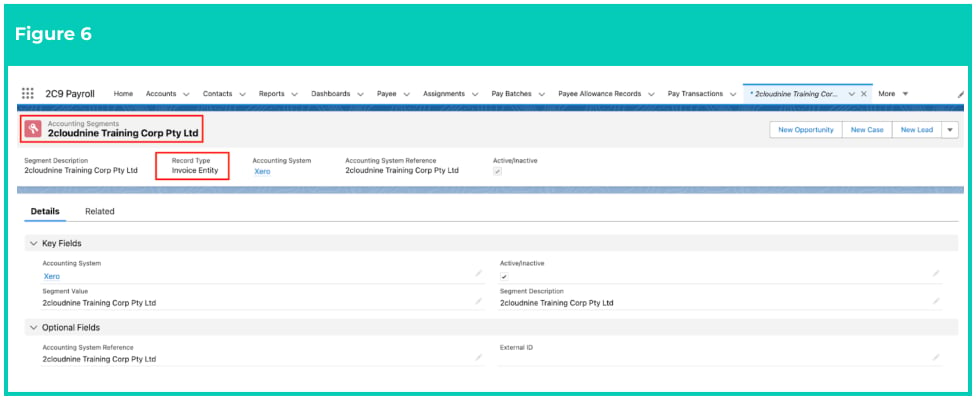
8. A new **Invoice Entity Accounting Segment** is now created. (See Figure 6)
9. Repeat for any additional Invoice Entity Accounting Segments required.
If there are a large number of Invoice Entities to create, it is advisable to data load
these records using a suitable data loading tool.
8. A new **Invoice Entity Accounting Segment** is now created. (See Figure 6)
9. Repeat for any additional Invoice Entity Accounting Segments required.
 Invoice Entity records CAN NOT be deleted if they have related records or are used in
other records. Deleting records is not recommended unless absolutely essential.
10. To modify an existing **Invoice Entity Accounting Segment**, select the required record and select
the **Edit** button available on the top right side of the page. You can also double click within fields
that need editing or just click on the pencil icon that appears within fields when hovering
with your cursor.
11. When complete, click on the **Save** button.
## Field Descriptions
**Accounting System** is the Accounting System this Invoice Entity Accounting Segment relates to.
**Accounting System Reference** is the reference given to this Invoice Entity within the external
Accounting System. This is the optional/secondary field that can be used to assist describing the value.
**Active/Inactive** defines if the record is currently active.
**External ID** defines the ID of the corresponding record in an external Accounting system that has been
used to create/update this record, or used if this data is integrated to an external Accounting system.
**Segment Description** is a description that is provided to the Invoice Entity Accounting Segment.
**Segment Value** is the value given to the Invoice Entity Accounting Segment that maps to a
corresponding dimension value in the Accounting System.
## Further Information
| Document | Document Type | Description |
| ------------------------------------------------------- | ----------------- | -------------------------------------------------------------------------------------------------------------------------------------------------------------------- |
| QRG General Ledger Key Information | Key Information | Outlines useful information relevant to the General Ledger functionality. The document includes definitions, prerequisites, and other non-instructional information. |
| Accounting System Setup | Task Instructions | How to create the Accounting System Setup record. |
| Create Accounting Segments - Payment Entity | Task Instructions | How to create a Payment Entity Accounting Segment record. |
| Create Accounting Segments - Natural Account | Task Instructions | How to create a Natural Account Accounting Segment record. |
| Create Accounting Segments - Assignment Department | Task Instructions | How to create an Assignment Department Accounting Segment record. |
| Create Accounting Segments - Location | Task Instructions | How to create a Location Accounting Segment record. |
| Create Accounting Segments - Cost Code | Task Instructions | How to create a Cost Code Accounting Segment record. |
| Accounting Invoice Type | Task Instructions | How to create the Accounting Invoice Type record. |
| Accounting Payment Entity Defaults | Task Instructions | How to create the Accounting Payment Entity Default record. |
| Accounting Default Account - Allowances and Expenses | Task Instructions | How to create the Accounting Default Account record for the record types of Allowance Pay Codes, or Expense Pay Codes. |
| Accounting Default Account - Deductions | Task Instructions | How to create the Accounting Default Account record for the record type of Deduction Pay Codes. |
| --- | --- | --- |
| Accounting Default Account - Earnings | Task Instructions | How to create the Accounting Default Account record for Payment Pay Codes, and can be split by PAYG vs RCTI. |
| Accounting Default Account - Leave Rules | Task Instructions | How to create the Accounting Default Account record for Leave Rules. |
| QRG Create an Employment Cost record - All record types | Task Instructions | How to create an Employment Cost record. |
| QRG Create an Employment Cost Template Group | Task Instructions | How to create an Employment Cost Template Group record. |
| QRG Create an Accounting Assignment Department | Task Instructions | How to create an Accounting Assignment Department record. |
| Create a Location Record | Task Instructions | How to create a Location record. |
| QRG Create Invoice Journal | Task Instructions | How to create an Invoice Journal record. |
| QRG Create an Assignment - Employee | Task Instructions | How to create an Assignment record. |
Invoice Entity records CAN NOT be deleted if they have related records or are used in
other records. Deleting records is not recommended unless absolutely essential.
10. To modify an existing **Invoice Entity Accounting Segment**, select the required record and select
the **Edit** button available on the top right side of the page. You can also double click within fields
that need editing or just click on the pencil icon that appears within fields when hovering
with your cursor.
11. When complete, click on the **Save** button.
## Field Descriptions
**Accounting System** is the Accounting System this Invoice Entity Accounting Segment relates to.
**Accounting System Reference** is the reference given to this Invoice Entity within the external
Accounting System. This is the optional/secondary field that can be used to assist describing the value.
**Active/Inactive** defines if the record is currently active.
**External ID** defines the ID of the corresponding record in an external Accounting system that has been
used to create/update this record, or used if this data is integrated to an external Accounting system.
**Segment Description** is a description that is provided to the Invoice Entity Accounting Segment.
**Segment Value** is the value given to the Invoice Entity Accounting Segment that maps to a
corresponding dimension value in the Accounting System.
## Further Information
| Document | Document Type | Description |
| ------------------------------------------------------- | ----------------- | -------------------------------------------------------------------------------------------------------------------------------------------------------------------- |
| QRG General Ledger Key Information | Key Information | Outlines useful information relevant to the General Ledger functionality. The document includes definitions, prerequisites, and other non-instructional information. |
| Accounting System Setup | Task Instructions | How to create the Accounting System Setup record. |
| Create Accounting Segments - Payment Entity | Task Instructions | How to create a Payment Entity Accounting Segment record. |
| Create Accounting Segments - Natural Account | Task Instructions | How to create a Natural Account Accounting Segment record. |
| Create Accounting Segments - Assignment Department | Task Instructions | How to create an Assignment Department Accounting Segment record. |
| Create Accounting Segments - Location | Task Instructions | How to create a Location Accounting Segment record. |
| Create Accounting Segments - Cost Code | Task Instructions | How to create a Cost Code Accounting Segment record. |
| Accounting Invoice Type | Task Instructions | How to create the Accounting Invoice Type record. |
| Accounting Payment Entity Defaults | Task Instructions | How to create the Accounting Payment Entity Default record. |
| Accounting Default Account - Allowances and Expenses | Task Instructions | How to create the Accounting Default Account record for the record types of Allowance Pay Codes, or Expense Pay Codes. |
| Accounting Default Account - Deductions | Task Instructions | How to create the Accounting Default Account record for the record type of Deduction Pay Codes. |
| --- | --- | --- |
| Accounting Default Account - Earnings | Task Instructions | How to create the Accounting Default Account record for Payment Pay Codes, and can be split by PAYG vs RCTI. |
| Accounting Default Account - Leave Rules | Task Instructions | How to create the Accounting Default Account record for Leave Rules. |
| QRG Create an Employment Cost record - All record types | Task Instructions | How to create an Employment Cost record. |
| QRG Create an Employment Cost Template Group | Task Instructions | How to create an Employment Cost Template Group record. |
| QRG Create an Accounting Assignment Department | Task Instructions | How to create an Accounting Assignment Department record. |
| Create a Location Record | Task Instructions | How to create a Location record. |
| QRG Create Invoice Journal | Task Instructions | How to create an Invoice Journal record. |
| QRG Create an Assignment - Employee | Task Instructions | How to create an Assignment record. |