> ## Documentation Index
> Fetch the complete documentation index at: https://documentation.2cloudnine.com/llms.txt
> Use this file to discover all available pages before exploring further.
# QRG Create an Accounting Assignment Department
export const InlineImage = ({src, alt = "", height = "1.6em"}) => {
return  ;
};
## Purpose
The purpose of this quick reference guide is to step through the process of creating an Accounting
Assignment Department record as required for General Ledger reporting purposes. The intended
audience for this document are System Administrators / Standard Users.
## Steps
### Manual Creation of an Accounting Assignment Department
Accounting Assignment Departments are related to the Assignment. They allow for the creation of
multiple Department split records against an Assignment that can be used to split Accounting Invoices,
Cost of Payroll Journals and Leave Accrual Journals by Department.
To create an Accounting Assignment Department, the following steps should be completed:
;
};
## Purpose
The purpose of this quick reference guide is to step through the process of creating an Accounting
Assignment Department record as required for General Ledger reporting purposes. The intended
audience for this document are System Administrators / Standard Users.
## Steps
### Manual Creation of an Accounting Assignment Department
Accounting Assignment Departments are related to the Assignment. They allow for the creation of
multiple Department split records against an Assignment that can be used to split Accounting Invoices,
Cost of Payroll Journals and Leave Accrual Journals by Department.
To create an Accounting Assignment Department, the following steps should be completed:
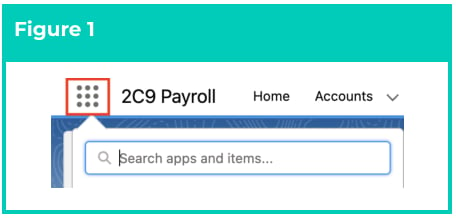
1. Click on the **App Launcher** icon. (See
Figure 1)
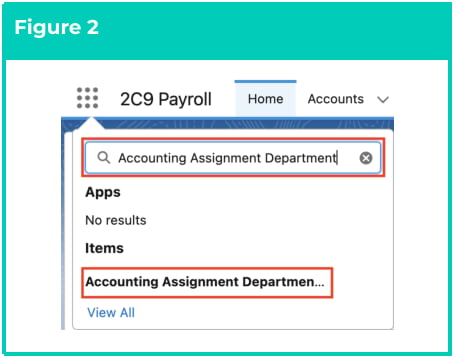
2. Go to the **Accounting Assignment**
**Department** object by using the Search
function. (See Figure 2)
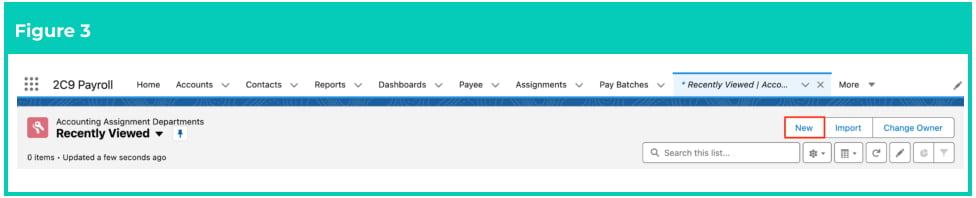
3. Click on the **New** button. (See Figure 3)
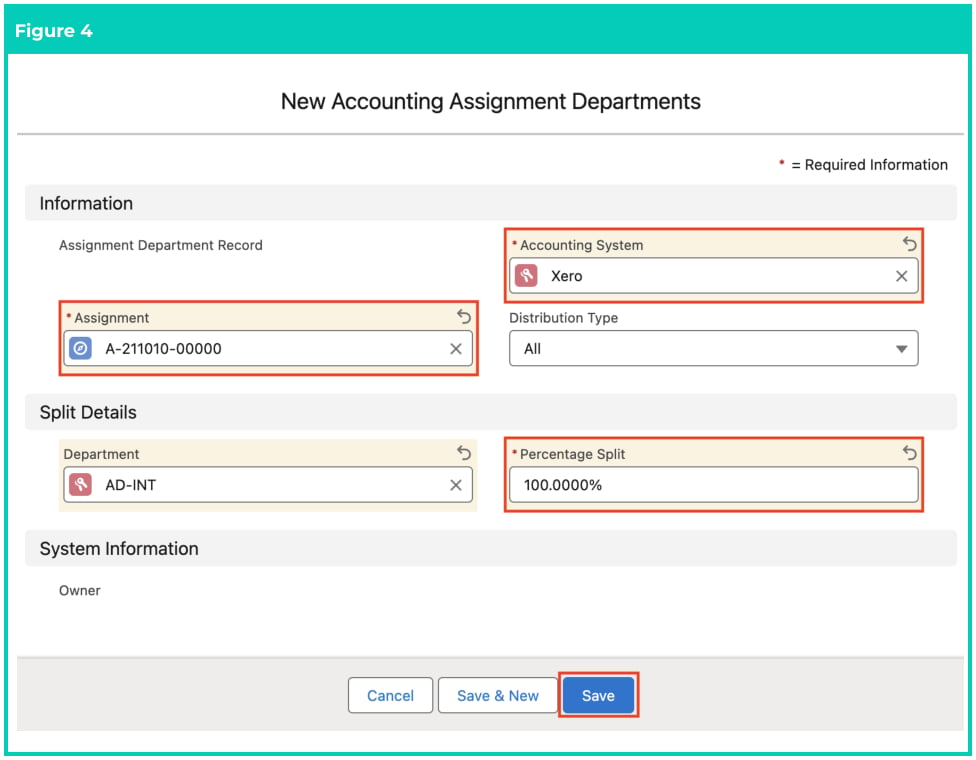
 4. Populate the following required fields to provide the base details of the Accounting Assignment
Department record (see Figure 4):
1. **Assignment**
2. **Accounting System**
3. **Percentage Split**
4. **Department**
5. The **Distribution Type** field will be populated by default (see Figure 4).
6. Click on the **Save** button.
4. Populate the following required fields to provide the base details of the Accounting Assignment
Department record (see Figure 4):
1. **Assignment**
2. **Accounting System**
3. **Percentage Split**
4. **Department**
5. The **Distribution Type** field will be populated by default (see Figure 4).
6. Click on the **Save** button.
 For the Percentage Split field, it is worth noting that splits of up to 100% are possible,
more than 100% are not possible, and if the splits are less than 100%, the default
Department for each posting type will be used to allocate the remaining balance.
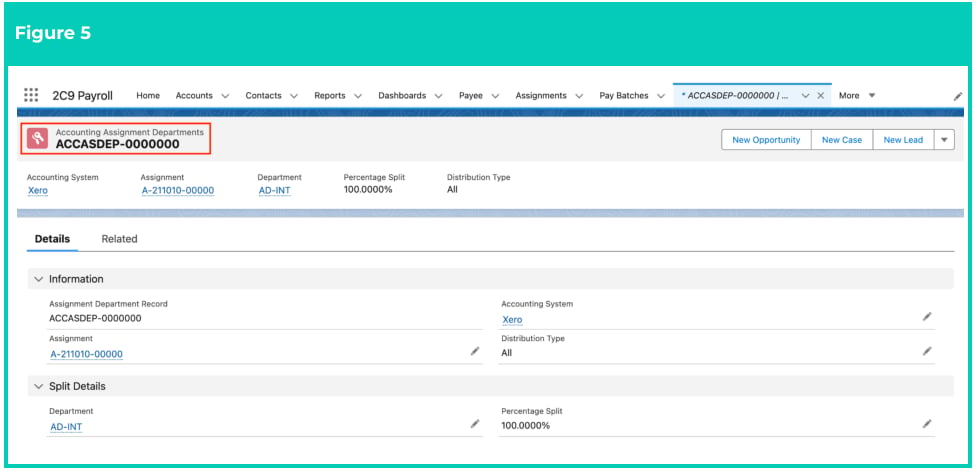
7. A new **Accounting Assignment Department** is now created (see Figure 5).
For the Percentage Split field, it is worth noting that splits of up to 100% are possible,
more than 100% are not possible, and if the splits are less than 100%, the default
Department for each posting type will be used to allocate the remaining balance.
7. A new **Accounting Assignment Department** is now created (see Figure 5).
 Accounting Assignment Department records CAN NOT be deleted if they have related
records or are used in other records. Deleting records is not recommended unless
absolutely essential.
8. To modify an existing **Accounting Assignment Department**, select the required record and
select the **Edit** button available on the top right side of the page. You can also double click within
fields that need editing or just click on the pencil icon that appears within fields when
hovering with your cursor.
9. When complete, click on the **Save** button.
### Automatic Creation of an Accounting Assignment Department
In many cases, the creation of the Accounting Assignment Department records will need to be
automated (e.g. there will be revenue splits defined in a HR system that need to be imported into 2c9
Payroll). In such cases, Users will need to implement an automation such as a Flow to support the
automatic creation and maintenance of the Assignment Department records upon creation of
Assignments. Please contact your System Administrator or Consultant for assistance with making this
automation possible.
## Field Descriptions
**Assignment** is the Assignment this Accounting Assignment Department relates to, so that the revenue
and costs of this specific Assignment can be split.
**Accounting System** is the Accounting System this Accounting Assignment Department relates to.
**Percentage Split** is the percentage of the revenue or costs that this Accounting Assignment Department
consists of, out of the total 100%.
**Distribution Type** is pre-populated by default and is set to the default value of All.
**Department** is used to define the Accounting Segment Department that this Accounting Assignment
Department record relates to.
## Further Information
| Document | Document Type | Description |
| ------------------------------------------------------- | ----------------- | -------------------------------------------------------------------------------------------------------------------------------------------------------------------- |
| QRG General Ledger Key Information | Key Information | Outlines useful information relevant to the General Ledger functionality. The document includes definitions, prerequisites, and other non-instructional information. |
| Accounting System Setup | Task Instructions | How to create the Accounting System Setup record. |
| Create Accounting Segments - Payment Entity | Task Instructions | How to create a Payment Entity Accounting Segment record. |
| Create Accounting Segments - Invoice Entity | Task Instructions | How to create an Invoice Entity Accounting Segment record. |
| Create Accounting Segments - Natural Account | Task Instructions | How to create a Natural Account Accounting Segment record. |
| Create Accounting Segments - Assignment Department | Task Instructions | How to create an Assignment Department Accounting Segment record. |
| Create Accounting Segments - Location | Task Instructions | How to create a Location Accounting Segment record. |
| Create Accounting Segments - Cost Code | Task Instructions | How to create a Cost Code Accounting Segment record. |
| Accounting Invoice Type | Task Instructions | How to create the Accounting Invoice Type record. |
| Accounting Payment Entity Defaults | Task Instructions | How to create the Accounting Payment Entity Default record. |
| Accounting Default Account - Allowances and Expenses | Task Instructions | How to create the Accounting Default Account record for the record types of Allowance Pay Codes, or Expense Pay Codes. |
| Accounting Default Account - Deductions | Task Instructions | How to create the Accounting Default Account record for the record type of Deduction Pay Codes. |
| --- | --- | --- |
| Accounting Default Account - Earnings | Task Instructions | How to create the Accounting Default Account record for Payment Pay Codes, and can be split by PAYG vs RCTI. |
| Accounting Default Account - Leave Rules | Task Instructions | How to create the Accounting Default Account record for Leave Rules. |
| QRG Create an Employment Cost record - All record types | Task Instructions | How to create an Employment Cost record. |
| QRG Create an Employment Cost Template Group | Task Instructions | How to create an Employment Cost Template Group record. |
| Create a Location Record | Task Instructions | How to create a Location record. |
| QRG Create Invoice Journal | Task Instructions | How to create an Invoice Journal record. |
| QRG Create an Assignment - Employee | Task Instructions | How to create an Assignment record. |
Accounting Assignment Department records CAN NOT be deleted if they have related
records or are used in other records. Deleting records is not recommended unless
absolutely essential.
8. To modify an existing **Accounting Assignment Department**, select the required record and
select the **Edit** button available on the top right side of the page. You can also double click within
fields that need editing or just click on the pencil icon that appears within fields when
hovering with your cursor.
9. When complete, click on the **Save** button.
### Automatic Creation of an Accounting Assignment Department
In many cases, the creation of the Accounting Assignment Department records will need to be
automated (e.g. there will be revenue splits defined in a HR system that need to be imported into 2c9
Payroll). In such cases, Users will need to implement an automation such as a Flow to support the
automatic creation and maintenance of the Assignment Department records upon creation of
Assignments. Please contact your System Administrator or Consultant for assistance with making this
automation possible.
## Field Descriptions
**Assignment** is the Assignment this Accounting Assignment Department relates to, so that the revenue
and costs of this specific Assignment can be split.
**Accounting System** is the Accounting System this Accounting Assignment Department relates to.
**Percentage Split** is the percentage of the revenue or costs that this Accounting Assignment Department
consists of, out of the total 100%.
**Distribution Type** is pre-populated by default and is set to the default value of All.
**Department** is used to define the Accounting Segment Department that this Accounting Assignment
Department record relates to.
## Further Information
| Document | Document Type | Description |
| ------------------------------------------------------- | ----------------- | -------------------------------------------------------------------------------------------------------------------------------------------------------------------- |
| QRG General Ledger Key Information | Key Information | Outlines useful information relevant to the General Ledger functionality. The document includes definitions, prerequisites, and other non-instructional information. |
| Accounting System Setup | Task Instructions | How to create the Accounting System Setup record. |
| Create Accounting Segments - Payment Entity | Task Instructions | How to create a Payment Entity Accounting Segment record. |
| Create Accounting Segments - Invoice Entity | Task Instructions | How to create an Invoice Entity Accounting Segment record. |
| Create Accounting Segments - Natural Account | Task Instructions | How to create a Natural Account Accounting Segment record. |
| Create Accounting Segments - Assignment Department | Task Instructions | How to create an Assignment Department Accounting Segment record. |
| Create Accounting Segments - Location | Task Instructions | How to create a Location Accounting Segment record. |
| Create Accounting Segments - Cost Code | Task Instructions | How to create a Cost Code Accounting Segment record. |
| Accounting Invoice Type | Task Instructions | How to create the Accounting Invoice Type record. |
| Accounting Payment Entity Defaults | Task Instructions | How to create the Accounting Payment Entity Default record. |
| Accounting Default Account - Allowances and Expenses | Task Instructions | How to create the Accounting Default Account record for the record types of Allowance Pay Codes, or Expense Pay Codes. |
| Accounting Default Account - Deductions | Task Instructions | How to create the Accounting Default Account record for the record type of Deduction Pay Codes. |
| --- | --- | --- |
| Accounting Default Account - Earnings | Task Instructions | How to create the Accounting Default Account record for Payment Pay Codes, and can be split by PAYG vs RCTI. |
| Accounting Default Account - Leave Rules | Task Instructions | How to create the Accounting Default Account record for Leave Rules. |
| QRG Create an Employment Cost record - All record types | Task Instructions | How to create an Employment Cost record. |
| QRG Create an Employment Cost Template Group | Task Instructions | How to create an Employment Cost Template Group record. |
| Create a Location Record | Task Instructions | How to create a Location record. |
| QRG Create Invoice Journal | Task Instructions | How to create an Invoice Journal record. |
| QRG Create an Assignment - Employee | Task Instructions | How to create an Assignment record. |