> ## Documentation Index
> Fetch the complete documentation index at: https://documentation.2cloudnine.com/llms.txt
> Use this file to discover all available pages before exploring further.
# QRG Create an Accounting Invoice
export const InlineImage = ({src, alt = "", height = "1.6em"}) => {
return  ;
};
## Purpose
The purpose of this quick reference guide is to step through the process of creating an Accounting
Invoice as required for General Ledger reporting purposes. The intended audience for this document is
System Administrators / Standard Users.
## Steps
### Create an Accounting Invoice
The Accounting Invoices contain the Accounting information relating to the Natural Account dimensions
that are created from the Invoice records.
To create an Accounting Invoice, the following steps should be completed:
;
};
## Purpose
The purpose of this quick reference guide is to step through the process of creating an Accounting
Invoice as required for General Ledger reporting purposes. The intended audience for this document is
System Administrators / Standard Users.
## Steps
### Create an Accounting Invoice
The Accounting Invoices contain the Accounting information relating to the Natural Account dimensions
that are created from the Invoice records.
To create an Accounting Invoice, the following steps should be completed:
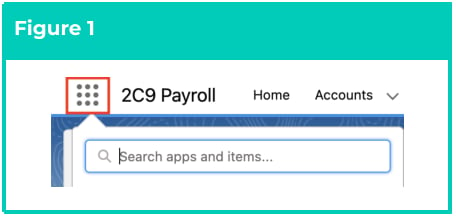
1. Click on the **App Launcher** icon. (See
Figure 1)
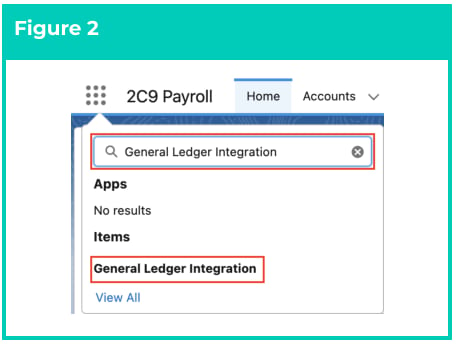
2. Go to the **General Ledger Integration**
object by using the Search function. (See
Figure 2)
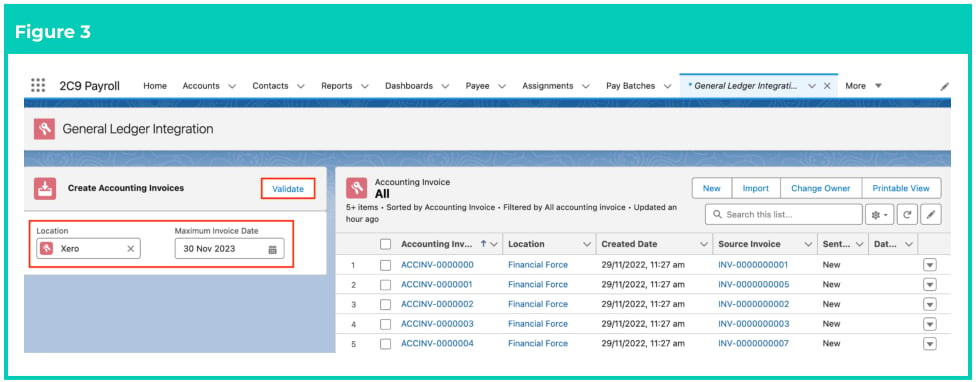
3. Populate the **Location** field with the Accounting System Setup record for this Accounting Invoice.
(See Figure 3)
4. Populate the **Maximum Invoice Date** field. Any Invoices and Credit Notes with an Invoice Date
after this date will not have their Accounting Invoice created. (See Figure 3)
5. Click on the **Validate** button. (See Figure 3)
 For the required Accounting System to appear in the Location picklist, the Accounting
System must have the Active/Inactive checkbox ticked.
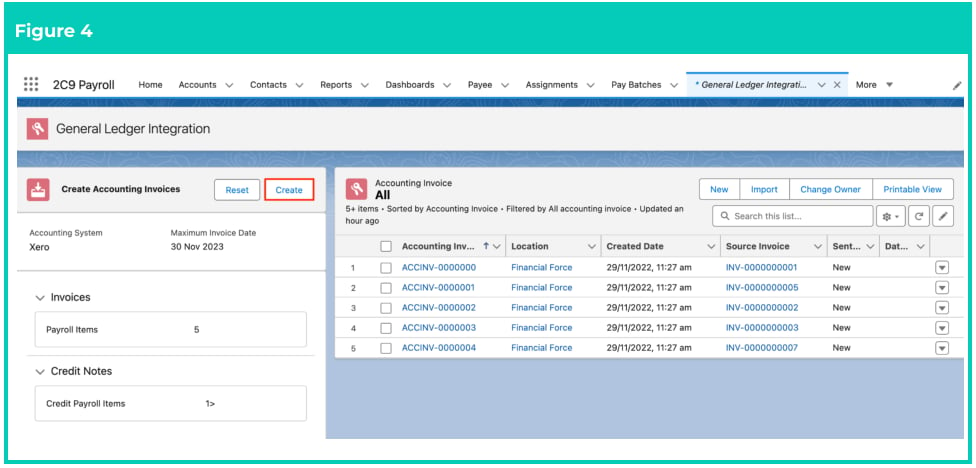
6. The Invoices and Credit Notes will display a total number of items reflecting the number of new
Accounting Invoices to be created. Click on the **Create** button to confirm the requirement of
creating the Accounting Invoices. (See Figure 4)
For the required Accounting System to appear in the Location picklist, the Accounting
System must have the Active/Inactive checkbox ticked.
6. The Invoices and Credit Notes will display a total number of items reflecting the number of new
Accounting Invoices to be created. Click on the **Create** button to confirm the requirement of
creating the Accounting Invoices. (See Figure 4)
 If you disagree with these numbers, or want to change the Accounting System or Maximum Invoice
Date, you can click the Reset button to cease proceeding.
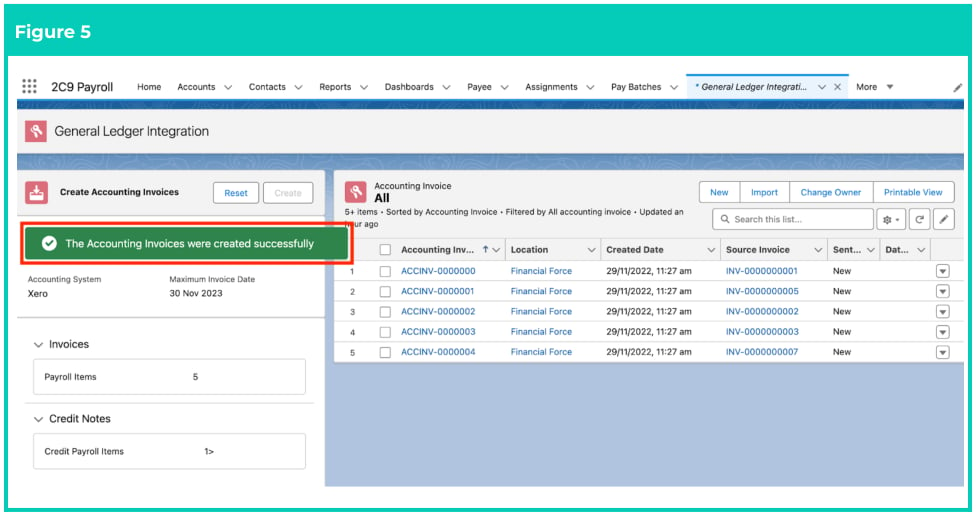
7. A confirmation message will appear saying ’The Accounting Invoices were created successfully’.
(See Figure 5)
If you disagree with these numbers, or want to change the Accounting System or Maximum Invoice
Date, you can click the Reset button to cease proceeding.
7. A confirmation message will appear saying ’The Accounting Invoices were created successfully’.
(See Figure 5)
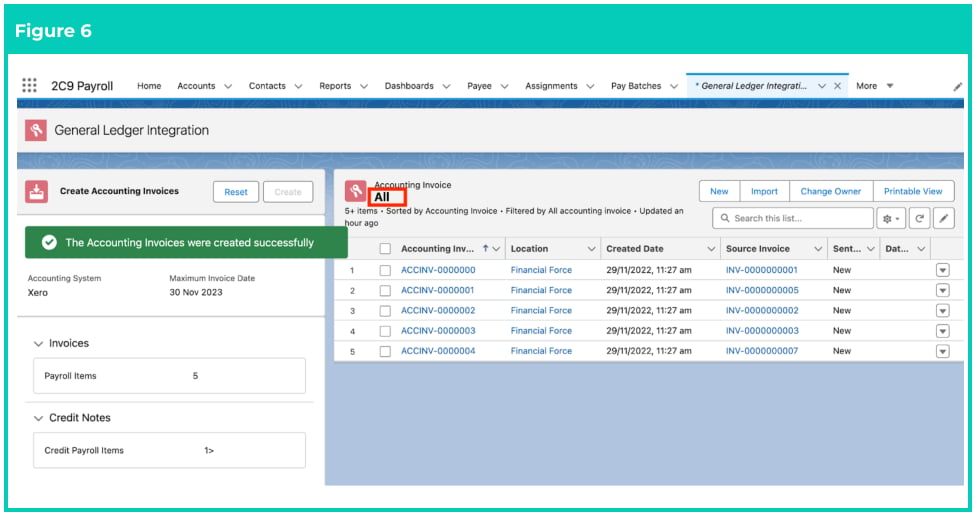
 8. Click on the **All** List View to view a list of all the Accounting Invoices for all the Locations. (See
Figure 6)
8. Click on the **All** List View to view a list of all the Accounting Invoices for all the Locations. (See
Figure 6)
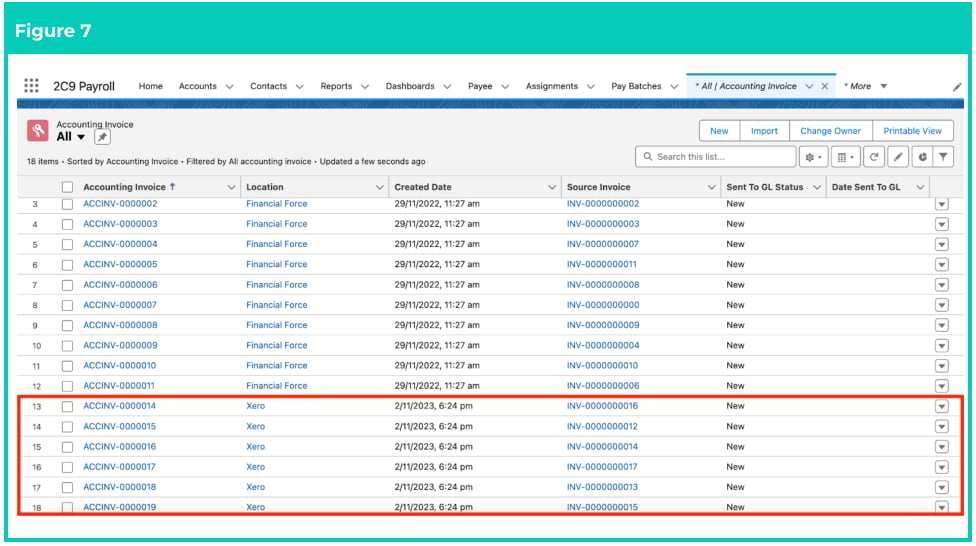
 9. The new **Accounting Invoice** records will display in the list. (See Figure 7)
 Accounting Invoices and the related Accounting Invoice Items should always be
created from following the steps detailed in this document, and never by manually
creating the records.
Accounting Invoice records CAN NOT be deleted if they have related records or are used in other
records. Deleting records is not recommended unless absolutely essential.
Future dated Invoices will not be picked up when trying to create Accounting Invoices.
If Invoices are created with an Invoice date in the future, they will not be in the
Accounting Invoices, until they reach the Invoice Date.
10. To modify an existing **Accounting Invoice** record, open the required record and select the **Edit**
button available on the top right side of the page. You can also double click within fields that
need editing or just click on the pencil icon that appears within fields when hovering with
your cursor.
11. When complete, click on the **Save** button.
## Field Descriptions
**Location** indicates the Accounting System Setup record for which the Accounting Invoice records will be
created.
**Maximum Invoice Date** is the maximum date to filter Invoices when creating Accounting Invoices.
## Further Information
| Document | Document Type | Description |
| ------------------------------------------------------- | ----------------- | -------------------------------------------------------------------------------------------------------------------------------------------------------------------- |
| QRG General Ledger Key Information | Key Information | Outlines useful information relevant to the General Ledger functionality. The document includes definitions, prerequisites, and other non-instructional information. |
| Accounting System Setup | Task Instructions | How to create the Accounting System Setup record. |
| Create Accounting Segments - Payment Entity | Task Instructions | How to create a Payment Entity Accounting Segment record. |
| Create Accounting Segments - Invoice Entity | Task Instructions | How to create an Invoice Entity Accounting Segment record. |
| Create Accounting Segments - Natural Account | Task Instructions | How to create a Natural Account Accounting Segment record. |
| Create Accounting Segments - Assignment Department | Task Instructions | How to create an Assignment Department Accounting Segment record. |
| Create Accounting Segments - Location | Task Instructions | How to create a Location Accounting Segment record. |
| Create Accounting Segments - Cost Code | Task Instructions | How to create a Cost Code Accounting Segment record. |
| Accounting Invoice Type | Task Instructions | How to create the Accounting Invoice Type record. |
| Accounting Payment Entity Defaults | Task Instructions | How to create the Accounting Payment Entity Default record. |
| Accounting Default Account - Allowances and Expenses | Task Instructions | How to create the Accounting Default Account record for the record types of Allowance Pay Codes, or Expense Pay Codes. |
| Accounting Default Account - Deductions | Task Instructions | How to create the Accounting Default Account record for the record type of Deduction Pay Codes. |
| Accounting Default Account - Earnings | Task Instructions | How to create the Accounting Default Account record for Payment Pay Codes, and can be split by PAYG vs RCTI. |
| --- | --- | --- |
| Accounting Default Account - Leave Rules | Task Instructions | How to create the Accounting Default Account record for Leave Rules. |
| QRG Create an Employment Cost record - All record types | Task Instructions | How to create an Employment Cost record. |
| QRG Create an Employment Cost Template Group | Task Instructions | How to create an Employment Cost Template Group record. |
| QRG Create an Accounting Assignment Department | Task Instructions | How to create an Accounting Assignment Department record. |
| Create a Location Record | Task Instructions | How to create a Location record. |
| QRG Create an Assignment - Employee | Task Instructions | How to create an Assignment record. |
Accounting Invoices and the related Accounting Invoice Items should always be
created from following the steps detailed in this document, and never by manually
creating the records.
Accounting Invoice records CAN NOT be deleted if they have related records or are used in other
records. Deleting records is not recommended unless absolutely essential.
Future dated Invoices will not be picked up when trying to create Accounting Invoices.
If Invoices are created with an Invoice date in the future, they will not be in the
Accounting Invoices, until they reach the Invoice Date.
10. To modify an existing **Accounting Invoice** record, open the required record and select the **Edit**
button available on the top right side of the page. You can also double click within fields that
need editing or just click on the pencil icon that appears within fields when hovering with
your cursor.
11. When complete, click on the **Save** button.
## Field Descriptions
**Location** indicates the Accounting System Setup record for which the Accounting Invoice records will be
created.
**Maximum Invoice Date** is the maximum date to filter Invoices when creating Accounting Invoices.
## Further Information
| Document | Document Type | Description |
| ------------------------------------------------------- | ----------------- | -------------------------------------------------------------------------------------------------------------------------------------------------------------------- |
| QRG General Ledger Key Information | Key Information | Outlines useful information relevant to the General Ledger functionality. The document includes definitions, prerequisites, and other non-instructional information. |
| Accounting System Setup | Task Instructions | How to create the Accounting System Setup record. |
| Create Accounting Segments - Payment Entity | Task Instructions | How to create a Payment Entity Accounting Segment record. |
| Create Accounting Segments - Invoice Entity | Task Instructions | How to create an Invoice Entity Accounting Segment record. |
| Create Accounting Segments - Natural Account | Task Instructions | How to create a Natural Account Accounting Segment record. |
| Create Accounting Segments - Assignment Department | Task Instructions | How to create an Assignment Department Accounting Segment record. |
| Create Accounting Segments - Location | Task Instructions | How to create a Location Accounting Segment record. |
| Create Accounting Segments - Cost Code | Task Instructions | How to create a Cost Code Accounting Segment record. |
| Accounting Invoice Type | Task Instructions | How to create the Accounting Invoice Type record. |
| Accounting Payment Entity Defaults | Task Instructions | How to create the Accounting Payment Entity Default record. |
| Accounting Default Account - Allowances and Expenses | Task Instructions | How to create the Accounting Default Account record for the record types of Allowance Pay Codes, or Expense Pay Codes. |
| Accounting Default Account - Deductions | Task Instructions | How to create the Accounting Default Account record for the record type of Deduction Pay Codes. |
| Accounting Default Account - Earnings | Task Instructions | How to create the Accounting Default Account record for Payment Pay Codes, and can be split by PAYG vs RCTI. |
| --- | --- | --- |
| Accounting Default Account - Leave Rules | Task Instructions | How to create the Accounting Default Account record for Leave Rules. |
| QRG Create an Employment Cost record - All record types | Task Instructions | How to create an Employment Cost record. |
| QRG Create an Employment Cost Template Group | Task Instructions | How to create an Employment Cost Template Group record. |
| QRG Create an Accounting Assignment Department | Task Instructions | How to create an Accounting Assignment Department record. |
| Create a Location Record | Task Instructions | How to create a Location record. |
| QRG Create an Assignment - Employee | Task Instructions | How to create an Assignment record. |