> ## Documentation Index
> Fetch the complete documentation index at: https://documentation.2cloudnine.com/llms.txt
> Use this file to discover all available pages before exploring further.
# QRG Create an Employment Cost Template Group
export const InlineImage = ({src, alt = "", height = "1.6em"}) => {
return  ;
};
## Purpose
The purpose of this quick reference guide is to step through the process of creating Employment Cost
Template Groups. The Employment Cost Template Group is used to define a group of Employment Cost
records to be related to an Assignment. The intended audience for this document are System
Administrators / Standard Users.
We recommend creating 4 Employment Cost Template Groups to cover each potential scenario of
Employment Cost requirement:
* Payroll Tax and Workcover
* Payroll Tax Only
* Workcover Only
* No Oncosts
## Steps
### Create an Employment Cost Template Group
To create an Employment Cost Template Group, follow the steps below:
;
};
## Purpose
The purpose of this quick reference guide is to step through the process of creating Employment Cost
Template Groups. The Employment Cost Template Group is used to define a group of Employment Cost
records to be related to an Assignment. The intended audience for this document are System
Administrators / Standard Users.
We recommend creating 4 Employment Cost Template Groups to cover each potential scenario of
Employment Cost requirement:
* Payroll Tax and Workcover
* Payroll Tax Only
* Workcover Only
* No Oncosts
## Steps
### Create an Employment Cost Template Group
To create an Employment Cost Template Group, follow the steps below:
1. Click on the **App Launcher** icon. (See
Figure 1)
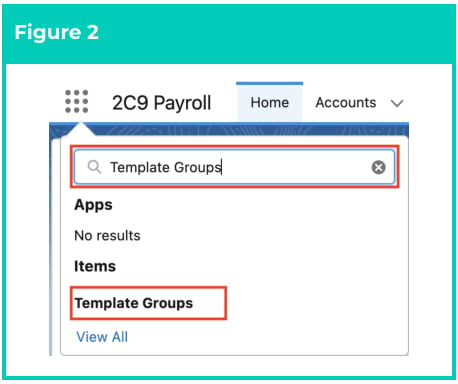
2. Go to the **Template Groups** object by
using the Search function. (See Figure 2)
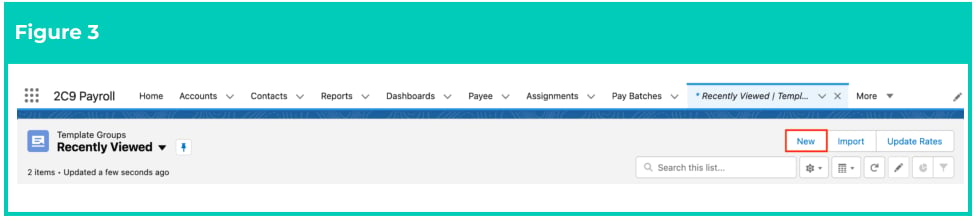
3. Click the **New** button. (See Figure 3)
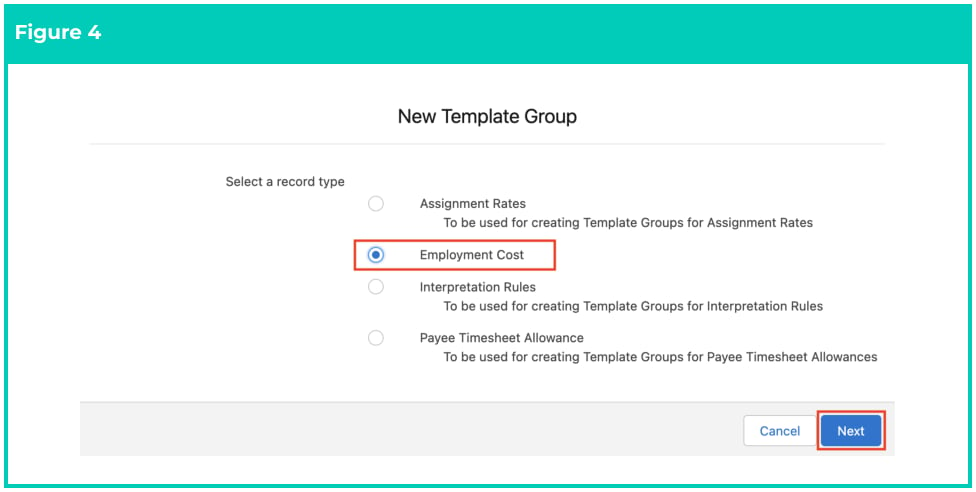
 4. Select **Employment Cost** from the available record types and click the **Next** button. (See Figure 4)
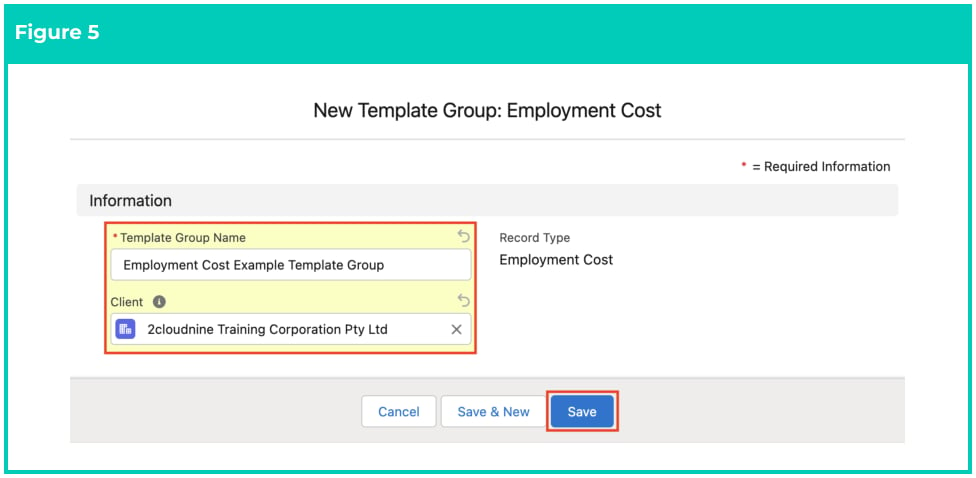
 5. Populate the following required fields to provide the base details of the Employment Cost
Template Group (see Figure 5):
1. **Template Group Name**
6. Populate the following optional field as required:
1. To configure the Template Group so it is only available for a specific Client, populate the
**Client** field.
7. Click the **Save** button (see Figure 5).
5. Populate the following required fields to provide the base details of the Employment Cost
Template Group (see Figure 5):
1. **Template Group Name**
6. Populate the following optional field as required:
1. To configure the Template Group so it is only available for a specific Client, populate the
**Client** field.
7. Click the **Save** button (see Figure 5).
 8. A new Employment Cost Template Group is now created (see Figure 6).
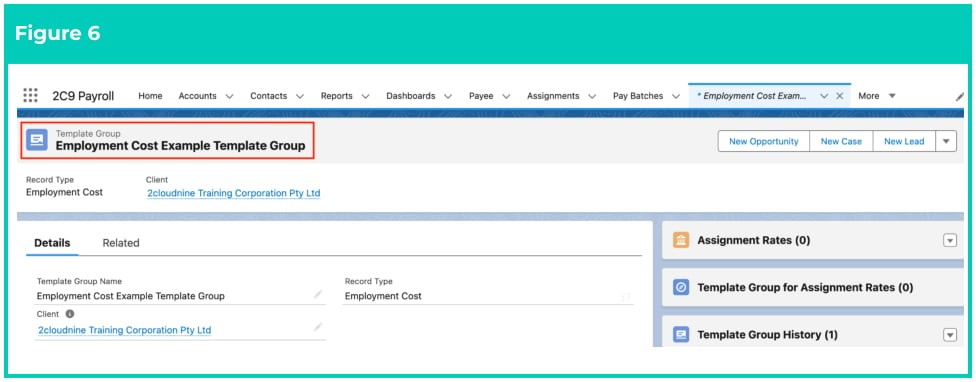 The newly created Employment Cost Template Group will require Assignment Cost
records to be created as related records, to automate the creation of the Assignment
Costs records for an Assignment.
### Add Assignment Cost records to the Template Group
To add records to this Employment Cost Template Group, follow the steps below:
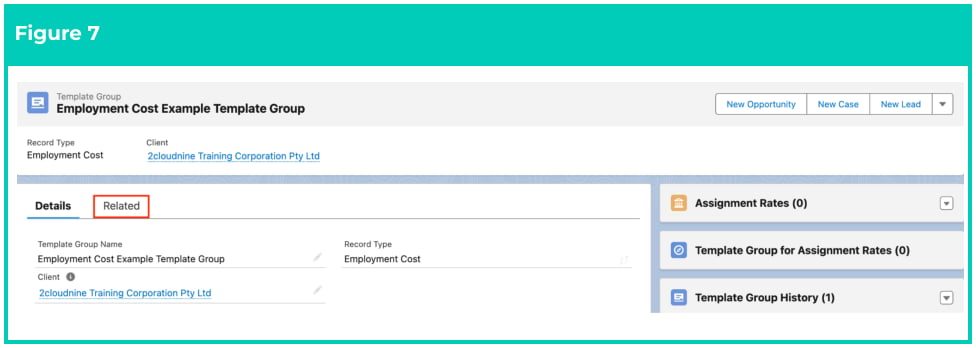
1. Go to the **Related** tab. (See Figure 7)
The newly created Employment Cost Template Group will require Assignment Cost
records to be created as related records, to automate the creation of the Assignment
Costs records for an Assignment.
### Add Assignment Cost records to the Template Group
To add records to this Employment Cost Template Group, follow the steps below:
1. Go to the **Related** tab. (See Figure 7)
 2. Click on the **New** button on the Assignment Costs related list. (See Figure 8)
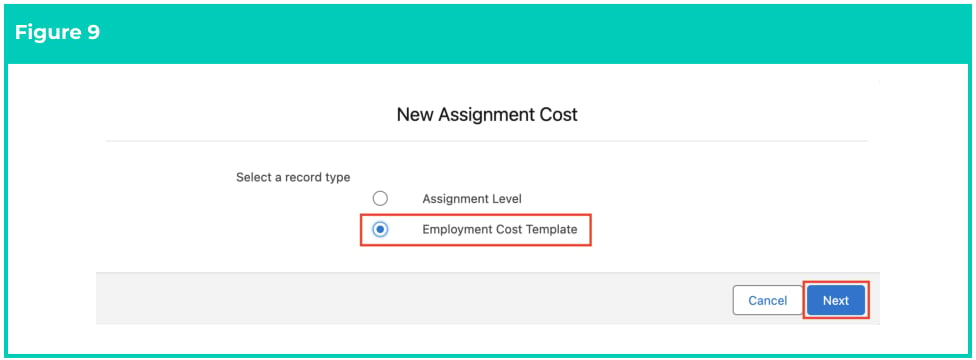
 3. Select the **Employment Cost Template** Record Type. (See Figure 9)
4. Click **Next** .
3. Select the **Employment Cost Template** Record Type. (See Figure 9)
4. Click **Next** .
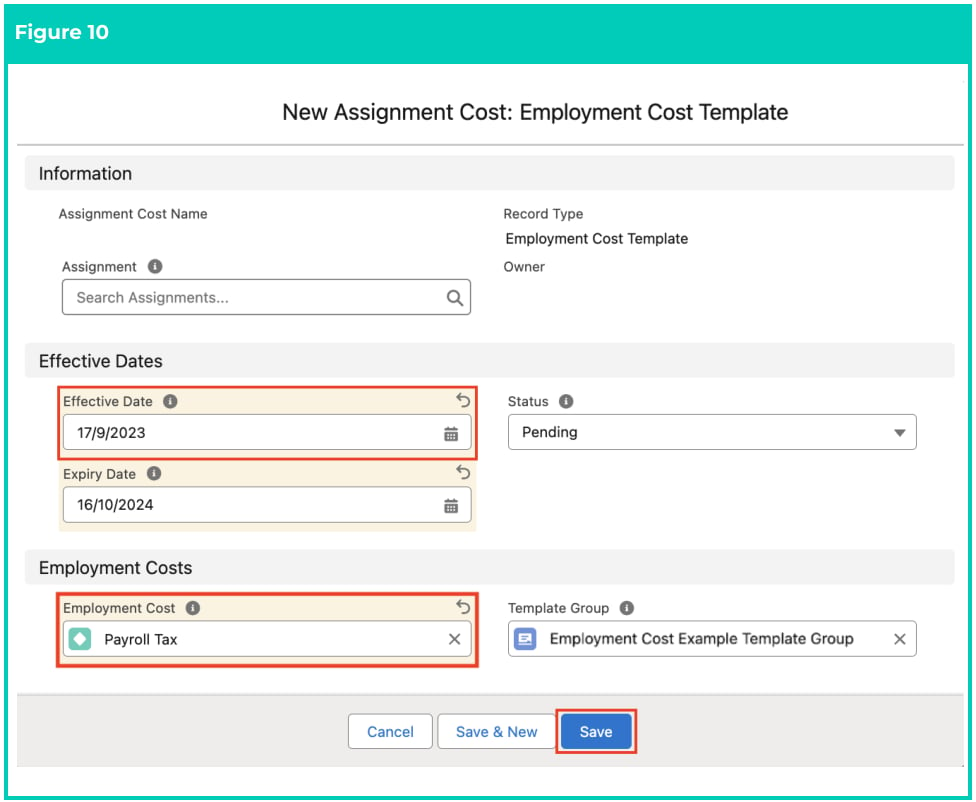
 5. Populate the following required fields to provide the base details of the Employment Cost record
(see Figure 10):
1. **Effective Date**
2. **Employment Cost**
6. To add an expiry date to the Employment Cost, populate the optional field **Expiry Date** .
7. Click on the **Save** button.
5. Populate the following required fields to provide the base details of the Employment Cost record
(see Figure 10):
1. **Effective Date**
2. **Employment Cost**
6. To add an expiry date to the Employment Cost, populate the optional field **Expiry Date** .
7. Click on the **Save** button.
 The Assignment field must be left blank for the Employment Cost Template record
type. Once the record has been created, it can be assigned to an Assignment record
for the automatic creation of the Assignment Cost records.
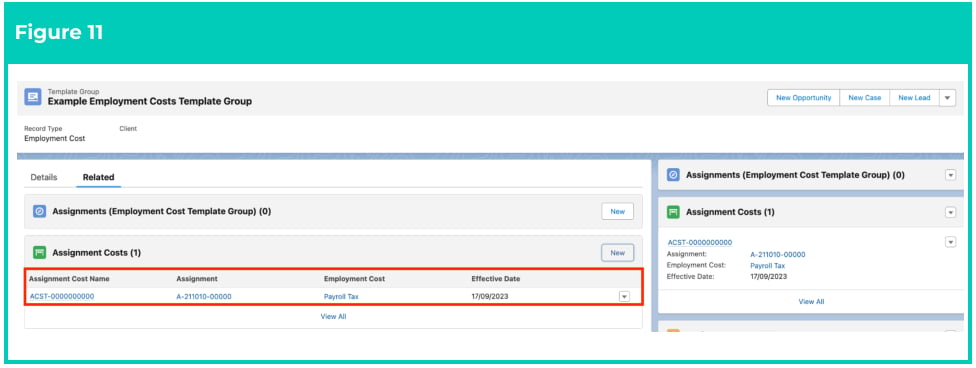
8. Click on the record that appears under the Assignment Costs heading. (See Figure 11)
The Assignment field must be left blank for the Employment Cost Template record
type. Once the record has been created, it can be assigned to an Assignment record
for the automatic creation of the Assignment Cost records.
8. Click on the record that appears under the Assignment Costs heading. (See Figure 11)
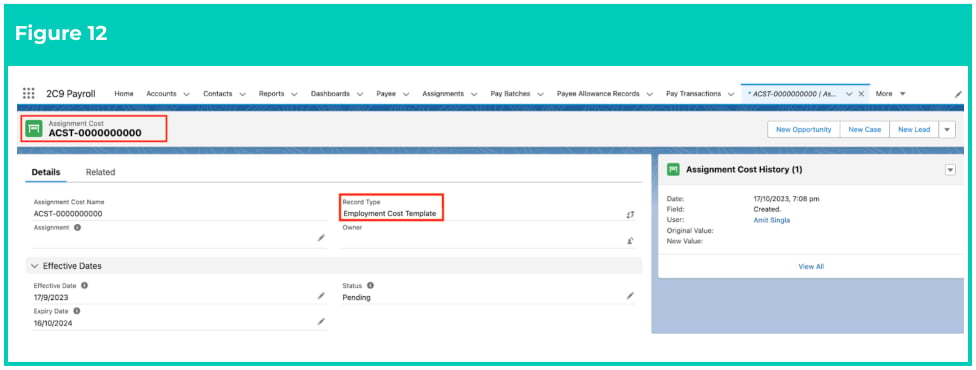
 9. A new Assignment Cost record is now created. (See Figure 12)
 10. Repeat this process to add all required Assignment Cost records to the Employment Cost Template Group.
Employment Cost Template Groups records CAN NOT be deleted if they have related
records or are used in other records. Deleting records is not recommended unless
absolutely essential.
11. To modify an existing Assignment Cost record, open the required record and select the Edit
button available on the top right side of the page. You can also double click within fields that
need editing or just click on the pencil icon that appears within fields when hovering with
your cursor.
12. When complete, click on the **Save** button.
Any changes made to the Employment Cost Template Group or its related records will not update
Assignment Costs already referencing the Employment Cost Template Group.
### Automatic creation of Assignment Costs
With the Employment Costs related to their respective Employment Cost Templates, the templates are
now ready to be populated on Assignments, which will automate the creation of Assignment Cost
records.
During the finalisation of a Pay Batch, it is the Assignment Cost records related to the Assignment that
are used to determine which Pay Transaction Distributions are created and reported in the Payroll
Journals.
Assignment Costs will be automatically created on Assignments if the GL AU Oncost
automation is enabled by the Implementation Consultants. If an Employment Cost
Template is removed, the automation will also remove the related Assignment Costs
from the Assignment.
## Field Descriptions
**Client** defines the Client to whom the Template Group applies.
**Template Group Name** is mandatory to reference the Template Group on Assignments for the
automating creation of Assignment Costs to occur.
### Assignment Costs
**Assignment** is the related Assignment of an Employment Cost Template record.
**Effective Date** is the Effective Date of the Assignment Cost record.
**Expiry Date** is the Expiry Date of the Assignment Cost record.
**Status** is the Status of the Assignment Cost record based on the Effective and Expiry Dates to the current
date.
**Employment Cost** is a lookup field to populate the parent Employment Cost record which contains the
details of the cost associated with this Assignment Cost record.
**Template Group** is a lookup field to assign this record to a parent Template Group record.
## Further Information
| Document | Document Type | Description |
| ------------------------------------------------------------------------ | --------------------------- | ------------------------------------------------------------------------------------------------------------------------------------------------------------------------------------------- |
| QRG General Ledger Key Information | Key Information | Outlines useful information relevant to the General Ledger functionality. The document includes definitions, prerequisites, and other non-instructional information. |
| Accounting System Setup | Task Instructions | How to create the Accounting System Setup record. |
| Create Accounting Segments - Natural Account | Task Instructions | How to create a Natural Account Accounting Segment record. |
| Accounting Invoice Type | Task Instructions | How to create the Accounting Invoice Type record. |
| Accounting Payment Entity Defaults | Task Instructions | How to create the Accounting Payment Entity Default record. |
| Accounting Default Account - Allowances and Expenses | Task Instructions | How to create the Accounting Default Account record for the record types of Allowance Pay Codes, or Expense Pay Codes. |
| QRG Create an Employment Cost record - All record types | Task Instructions | How to create an Employment Cost record. |
| QRG Create an Accounting Assignment Department | Task Instructions | How to create an Accounting Assignment Department record. |
| Create a Location Record | Task Instructions | How to create a Location record. |
| QRG Create Invoice Journal | Task Instructions | How to create an Invoice Journal record. |
| --- | --- | --- |
| QRG Create an Assignment - Employee | Task Instructions | How to create an Assignment record. |
| Quick Reference Guide Index - Rate Calculator | Index | Index document for Rate Calculator QRGs |
| QRG Rate Calculator Key Information | Information Quick Reference | Outlines useful information relevant to the Rate Calculator functionality. The document includes definitions, prerequisites, and other non-instructional information. |
| QRG Create an Employment Cost Item | Task Instructions | How to create Employment Cost Items used for applying costs to the Rate Calculator. |
| QRG Create an Employment Cost Exception | Task Instructions | How to apply Employment Cost Exceptions to Clients, Payees & Pay Codes. |
| QRG Create Pay Rate Loadings | Task Instructions | How to create Pay Rate Loadings used for Casual Loading or Shift Loading. |
| QRG Create Rate Calculators - Templates | Task Instructions | How to create Rate Calculator Templates. |
| QRG Create Rate Calculators - Calculate and Update Rate Calculator Lines | Task Instructions | How to create Rate Calculator Lines used for calculating Pay Rates, Invoice Rates and other associated costs, and how to update Rate Calculator Lines for each Rate Calculator record type. |
| QRG Create Rate Calculators - Preview, Clone & Save as Template | Task Instructions | How to create Rate Calculator Previews, Save existing Rate Calculators as Templates and use the Clone functionality. |
10. Repeat this process to add all required Assignment Cost records to the Employment Cost Template Group.
Employment Cost Template Groups records CAN NOT be deleted if they have related
records or are used in other records. Deleting records is not recommended unless
absolutely essential.
11. To modify an existing Assignment Cost record, open the required record and select the Edit
button available on the top right side of the page. You can also double click within fields that
need editing or just click on the pencil icon that appears within fields when hovering with
your cursor.
12. When complete, click on the **Save** button.
Any changes made to the Employment Cost Template Group or its related records will not update
Assignment Costs already referencing the Employment Cost Template Group.
### Automatic creation of Assignment Costs
With the Employment Costs related to their respective Employment Cost Templates, the templates are
now ready to be populated on Assignments, which will automate the creation of Assignment Cost
records.
During the finalisation of a Pay Batch, it is the Assignment Cost records related to the Assignment that
are used to determine which Pay Transaction Distributions are created and reported in the Payroll
Journals.
Assignment Costs will be automatically created on Assignments if the GL AU Oncost
automation is enabled by the Implementation Consultants. If an Employment Cost
Template is removed, the automation will also remove the related Assignment Costs
from the Assignment.
## Field Descriptions
**Client** defines the Client to whom the Template Group applies.
**Template Group Name** is mandatory to reference the Template Group on Assignments for the
automating creation of Assignment Costs to occur.
### Assignment Costs
**Assignment** is the related Assignment of an Employment Cost Template record.
**Effective Date** is the Effective Date of the Assignment Cost record.
**Expiry Date** is the Expiry Date of the Assignment Cost record.
**Status** is the Status of the Assignment Cost record based on the Effective and Expiry Dates to the current
date.
**Employment Cost** is a lookup field to populate the parent Employment Cost record which contains the
details of the cost associated with this Assignment Cost record.
**Template Group** is a lookup field to assign this record to a parent Template Group record.
## Further Information
| Document | Document Type | Description |
| ------------------------------------------------------------------------ | --------------------------- | ------------------------------------------------------------------------------------------------------------------------------------------------------------------------------------------- |
| QRG General Ledger Key Information | Key Information | Outlines useful information relevant to the General Ledger functionality. The document includes definitions, prerequisites, and other non-instructional information. |
| Accounting System Setup | Task Instructions | How to create the Accounting System Setup record. |
| Create Accounting Segments - Natural Account | Task Instructions | How to create a Natural Account Accounting Segment record. |
| Accounting Invoice Type | Task Instructions | How to create the Accounting Invoice Type record. |
| Accounting Payment Entity Defaults | Task Instructions | How to create the Accounting Payment Entity Default record. |
| Accounting Default Account - Allowances and Expenses | Task Instructions | How to create the Accounting Default Account record for the record types of Allowance Pay Codes, or Expense Pay Codes. |
| QRG Create an Employment Cost record - All record types | Task Instructions | How to create an Employment Cost record. |
| QRG Create an Accounting Assignment Department | Task Instructions | How to create an Accounting Assignment Department record. |
| Create a Location Record | Task Instructions | How to create a Location record. |
| QRG Create Invoice Journal | Task Instructions | How to create an Invoice Journal record. |
| --- | --- | --- |
| QRG Create an Assignment - Employee | Task Instructions | How to create an Assignment record. |
| Quick Reference Guide Index - Rate Calculator | Index | Index document for Rate Calculator QRGs |
| QRG Rate Calculator Key Information | Information Quick Reference | Outlines useful information relevant to the Rate Calculator functionality. The document includes definitions, prerequisites, and other non-instructional information. |
| QRG Create an Employment Cost Item | Task Instructions | How to create Employment Cost Items used for applying costs to the Rate Calculator. |
| QRG Create an Employment Cost Exception | Task Instructions | How to apply Employment Cost Exceptions to Clients, Payees & Pay Codes. |
| QRG Create Pay Rate Loadings | Task Instructions | How to create Pay Rate Loadings used for Casual Loading or Shift Loading. |
| QRG Create Rate Calculators - Templates | Task Instructions | How to create Rate Calculator Templates. |
| QRG Create Rate Calculators - Calculate and Update Rate Calculator Lines | Task Instructions | How to create Rate Calculator Lines used for calculating Pay Rates, Invoice Rates and other associated costs, and how to update Rate Calculator Lines for each Rate Calculator record type. |
| QRG Create Rate Calculators - Preview, Clone & Save as Template | Task Instructions | How to create Rate Calculator Previews, Save existing Rate Calculators as Templates and use the Clone functionality. |