> ## Documentation Index
> Fetch the complete documentation index at: https://documentation.2cloudnine.com/llms.txt
> Use this file to discover all available pages before exploring further.
# QRG General Ledger - Key Information
## About
The General Ledger functionality within 2c9 Payroll allows customers to configure a set of rules and
defaults that supports the automated creation of Cost of Payroll Journals, Leave Accrual Journals and AR
Invoices that are coded to each customer's unique General Ledger configurations. These can then be
integrated into the company’s General Ledger and AR Software either via an automated integration or via
a manual extract.
## Prerequisites
Prior to the creation of an Accounting Payroll Journal or Accounting Invoice, the following prerequisites
must be met:
1. 2cloudnine Payroll Users must be running the Salesforce Lightning Experience.
2. Ensure the latest General Ledger Package is installed.
3. The configuration must be completed by Consultants as outlined in the 2cloudnine General
Ledger - Configuration and Implementation Guide.
4. Pay Codes must be appropriately set up and functional.
5. Users processing within the General Ledger objects must have access to create, edit and delete
the records
## Definitions
These are the important terms used within the General Ledger functionality:
* **Accounting Payroll Journal**
2cloudnine Payroll is able to produce Cost of Payroll Journals and Leave Accrual Journals which
are collectively referred to as Accounting Payroll Journals. These journals are created against each
completed Pay Batch
* **Accounting Invoices**
2cloudnine Payroll is able to produce AR invoices that are summarised and split by the General
Ledger Revenue posting accounts. These Accounting Invoices are created from Temp, Perm and
Fee invoices
* **Accounting System Setup**
The Accounting System Setup is where all default General Ledger posting accounts, departments
and Costs codes are defined. It is the key setup record from which the creation of Accounting
Payroll Journals and Accounting Invoices are based.
* **Accounting Segments**
Accounting Segments define accounting dimensions that are associated together by 2cloudnine
Payroll to form various Accounting Payroll Journals and Accounting Invoices. These are available
to be created in the various record types of:
* Payment Entity
* Invoice Entity
* Natural Accounts
* Assignment Departments
* Cost Codes
* Locations
* **Accounting Assignment Department**
Accounting Assignment Departments allow the users to further split a Payroll Journal or
Accounting Invoice across one or more departments
* **Accounting Default Accounts**
The Accounting Default Accounts are used by the General Ledger package to automatically
assign the default Natural Account dimension for a specified Pay Code, which is different from
the Default Natural Account specified in the Accounting System Setup record.
* **Accounting Payment Entity Defaults**
The Accounting Payment Entity Default record contains all the Default Accounting dimensions of
each Payment Entity.
* **Employment Costs and Assignment Costs**
Employment Costs are used within both Rate Calculators to define employment costs for the
Invoice Rate calculation, as well as in the General Ledger, to detail the specific employment costs
that need to be accounted for as additional on costs in the Payroll Journals. This includes support
for Payroll Tax, Workcover and Superannuation calculations for each Pay Transaction.
* **Employment Cost Template Groups**
Employment Cost Template Groups are used to define a group of Employment Cost records to be
created on the related Assignment.
* **Locations**
The Locations record holds the location information that is used to filter and relate Employment
Cost Item records.
* **Pay Transaction Distribution**
Pay Transaction Distribution records are a breakdown of all the Employment Costs against each
Pay Transaction. Note that these are created once the Pay Batch associated with the Pay
Transaction has a status of Payment File Released.
### General Ledger Interface Appearance and Usability
* The pages within the General Ledger package are Lightning Enabled and must only be used
when the Salesforce Lightning Experience is active.
* All dates and times are displayed as per the location of the logged in User.
* Currency is calculated at 6 decimal places.
* The default display resolution supported for the General Ledger package is 1920 x 1080 (1080p)
scaled at 100%. The minimum display resolution supported is 1024 x 768 as per the Salesforce
standard.
* The pages within the General Ledger package will automatically resize in width and height so
that the components are stretched appropriately depending on resolution.
* In the event that the fields / tabs within the package are unclear or overlap, zoom out (or zoom in)
through the web browser as needed.
## General Overviews
The General Ledger functionality can be split into three parts: Core Setup, Referencing GL data and
System Processes. Each part is detailed below in a diagram.
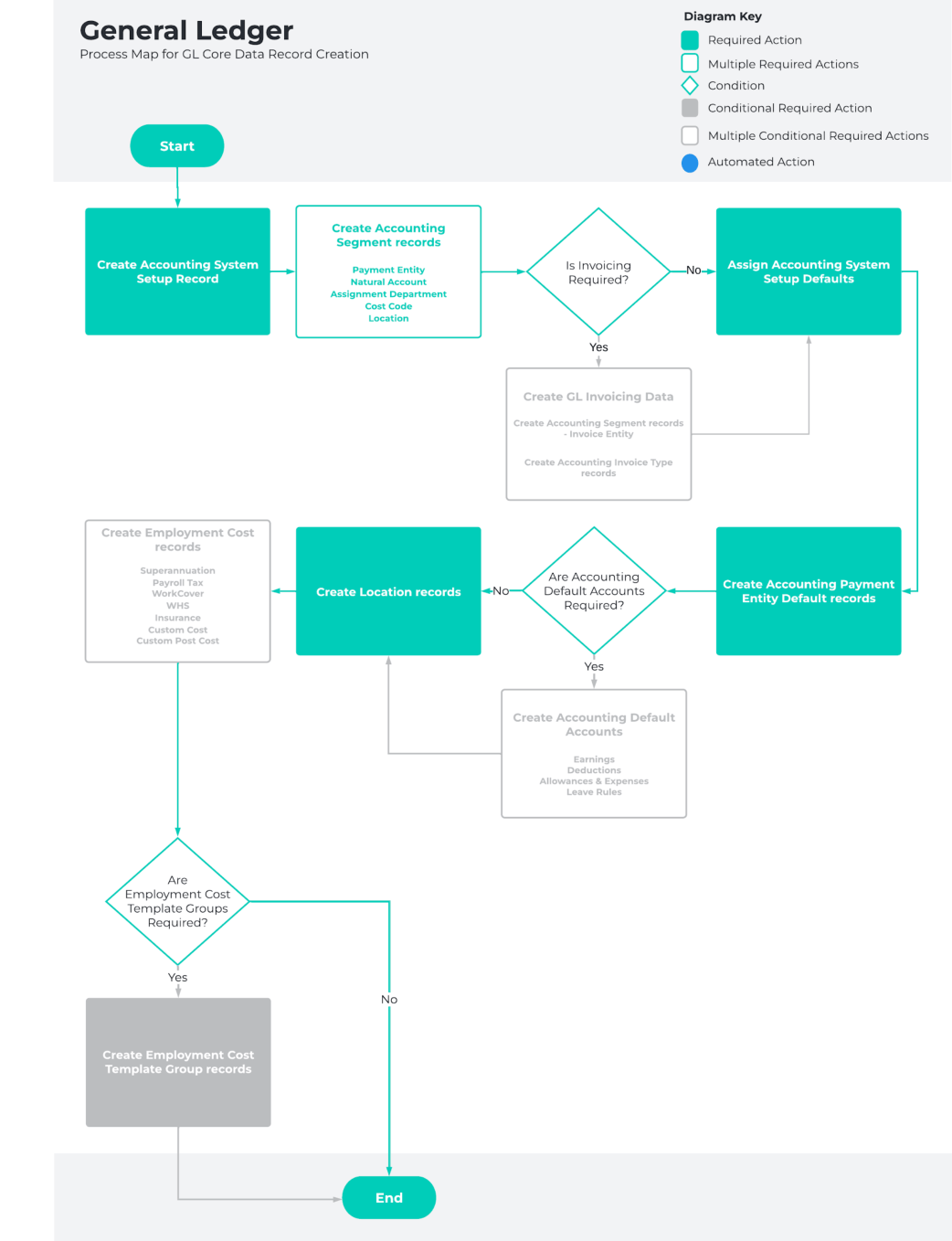
### Core Setup
The following documents provide the detailed information required to use the General Ledger
functionality:
* [QRG Accounting System Setup](https://drive.google.com/open?id=1r0IPDcQQIuVymuqg9JM71JtEAT0RCxSg) (Steps 1 and 2)
* Accounting Segments:
* [QRG Create Accounting Segments - Payment Entity](https://drive.google.com/open?id=13YD3gxPqmmBXy5-AwFovI_InDUfpZFqO)
* [QRG Create Accounting Segments - Invoice Entity](https://drive.google.com/open?id=1zw-2Zzyl34I87QHPgPJ3UWHL2AqJ4laB)
* [QRG Create Accounting Segments - Natural Account](https://drive.google.com/open?id=1dygpO7niMw5oh1moiIQ9xmLtuljKfsjE)
* [QRG Create Accounting Segments - Assignment Department](https://drive.google.com/open?id=1QoZi0TIBrnQDlqfjtMySNYHwRtQbNX0T)
* [QRG Create Accounting Segments - Cost Code](https://drive.google.com/open?id=1dvaVEOoanQt-6b3XVp1Rw3pO43X83w4o)
* [QRG Create Accounting Segments - Location](https://drive.google.com/open?id=1r80m2GZxu1NfIWJj46vk5bh7EJ5LIX6Y)
* [QRG Accounting System Setup](https://drive.google.com/open?id=1r0IPDcQQIuVymuqg9JM71JtEAT0RCxSg) (Step 3)
* [QRG Accounting Payment Entity Defaults](https://drive.google.com/open?id=1YXze7wsx04FXFmK3MD3jebGhuvI2WjK2)
* [QRG Accounting Invoice Type (if invoicing occurs in this Org)](https://drive.google.com/open?id=1lvIdnRn7Si7RBUD4gCrPJmjeESNAIj7Y)
* Accounting Default Accounts:
* [QRG Accounting Default Account - Earnings](https://drive.google.com/open?id=1W1_plkSKGZVBEI-6uRyONRLVfk1c4s-Q)
* [QRG Accounting Default Account - Deductions](https://drive.google.com/open?id=1gJ8TjITvu-VoA_BtcAOiyyAigdCt4Eta)
* [QRG Accounting Default Account - Allowances and Expenses](https://drive.google.com/open?id=1foiYvhlQK3zbrHXe7ZDgeKK0HmCAYYfh)
* [QRG Accounting Default Account - Leave Rules](https://drive.google.com/open?id=1CbGtMBSJianWbSMTXi-IKJJjxU3MjLAY)
* [QRG Create a Location Record](https://drive.google.com/open?id=1CEasz2DrGYEzNfXsmXA3PqiOuj2DIwkx)
* [QRG Create an Employment Cost record - All record types](https://drive.google.com/open?id=17AFmBQEptD8aumNXF_YS5dbRz7ws9A1I)
* Payroll Tax
* Custom Cost 1, 2, 3, and 4
* Custom Post Cost 1, 2, 3, and 4
* Insurance
* Superannuation
* WHS
* WorkCover
* [QRG Create an Employment Cost Template Group](https://drive.google.com/open?id=1rYN93LWgT4oH0nK0xQUbK-wTAfZ615BB)
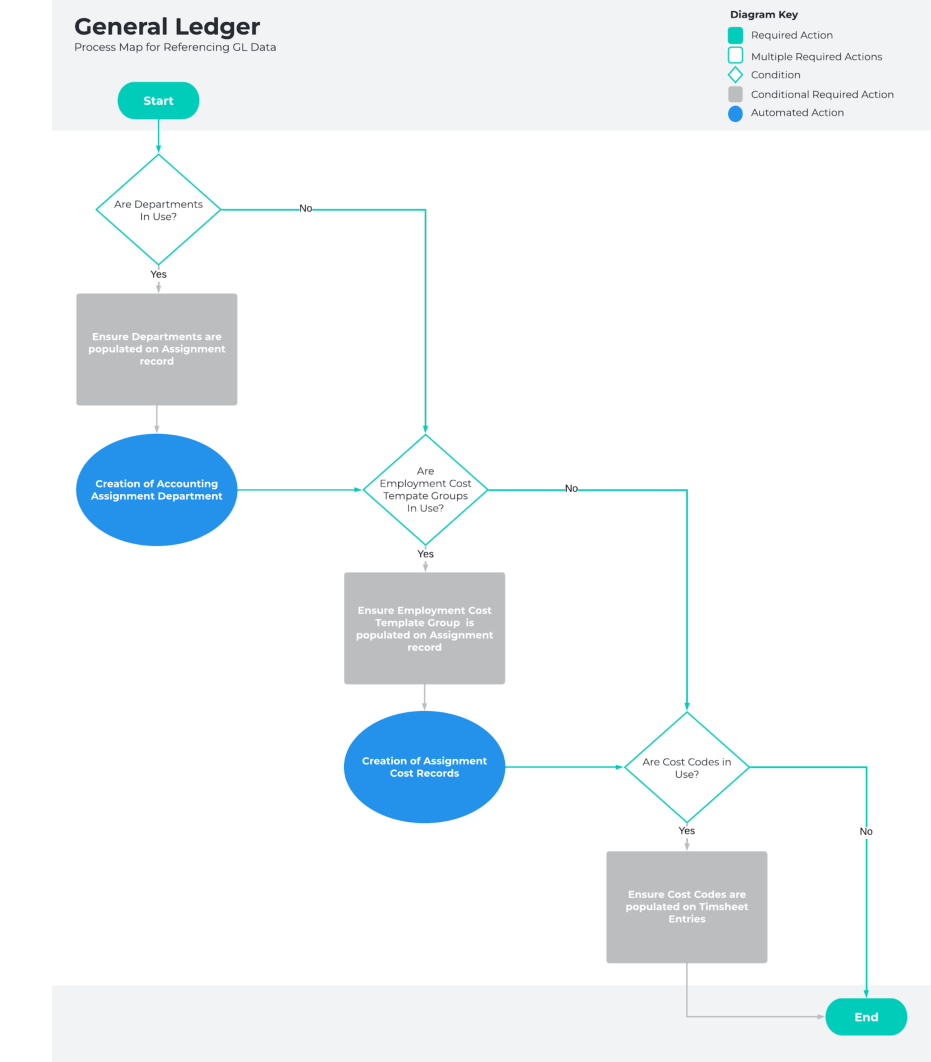
 ### Referencing GL data
* Assignments to reference the Department:
* [Creation of Accounting Assignment Departments (created automatically if the](https://drive.google.com/open?id=148nuBSMFhKbQ6ooyZNPcvOgi3yDoBZ9v)
Department field is populated on the Assignment record).
* Assignments to reference the Employee Cost Template Group:
* Creation of Assignment Costs
* Pay Transaction Distributions will create and report in the Payroll Journal
* Timesheet Entries to reference the Cost Codes:
* Payroll Journal will breakdown to the Cost Codes
### Referencing GL data
* Assignments to reference the Department:
* [Creation of Accounting Assignment Departments (created automatically if the](https://drive.google.com/open?id=148nuBSMFhKbQ6ooyZNPcvOgi3yDoBZ9v)
Department field is populated on the Assignment record).
* Assignments to reference the Employee Cost Template Group:
* Creation of Assignment Costs
* Pay Transaction Distributions will create and report in the Payroll Journal
* Timesheet Entries to reference the Cost Codes:
* Payroll Journal will breakdown to the Cost Codes
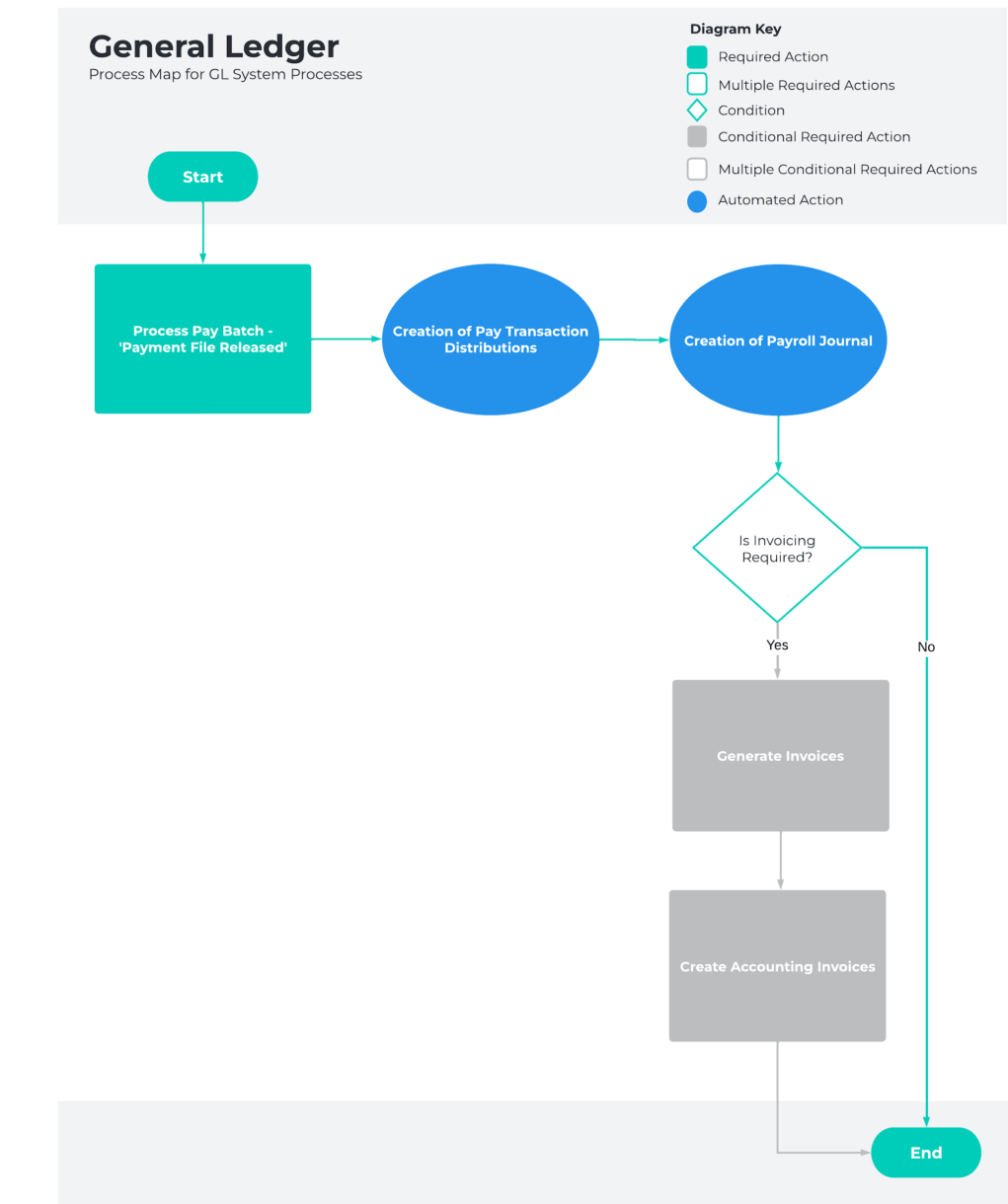
 ### System Processes
* Generate Invoices
* [QRG Create an Accounting Invoice](https://drive.google.com/open?id=1LZxTv0ItPTIr47krJJJsUcwL9lE-JwgD)
* Progress Pay Batch to Payment File Released
* Payroll Journal creates automatically
### System Processes
* Generate Invoices
* [QRG Create an Accounting Invoice](https://drive.google.com/open?id=1LZxTv0ItPTIr47krJJJsUcwL9lE-JwgD)
* Progress Pay Batch to Payment File Released
* Payroll Journal creates automatically