> ## Documentation Index
> Fetch the complete documentation index at: https://documentation.2cloudnine.com/llms.txt
> Use this file to discover all available pages before exploring further.
# QRG Integrated Import Tool - Populate Allowance Timesheet Item CSV Files (Standard)
## Purpose
The purpose of this quick reference guide is to step through the process of populating CSV Templates for Standard Timesheet Allowances with the necessary information to enable data to be imported using the Integrated Import Tool. The intended audience for this document are System Administrators / Standard Users.
## Steps
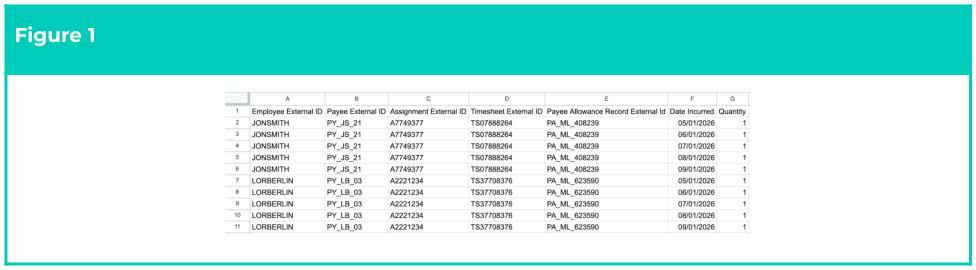
Populate CSV Templates The CSV Templates provided for the Integrated Import Tool detail the necessary fields and formatting for imported data to be aligned with to ensure successful validation and import. Once data has been formatted in line with the CSV Template, it may be uploaded directly to the Imported Records object in readiness for validation and import. The Standard Allowance Timesheet Item CSV Template includes the ability to reference the Timesheet External ID, whereas the Enhanced Timesheet Entry CSV Template has been customised to exclude this data from being imported. A sample of the formatting used for this template can be viewed below (see Figure 1):
 Ensure each line of Allowance Timesheet data contains the required detail by following the below steps:
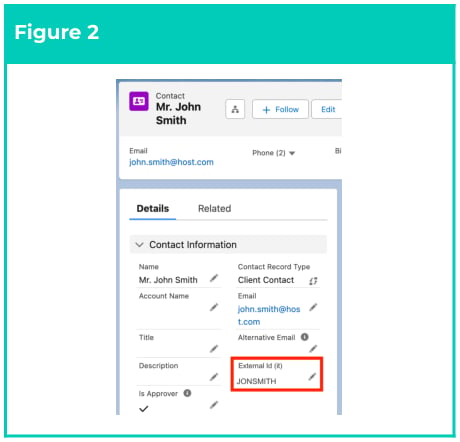
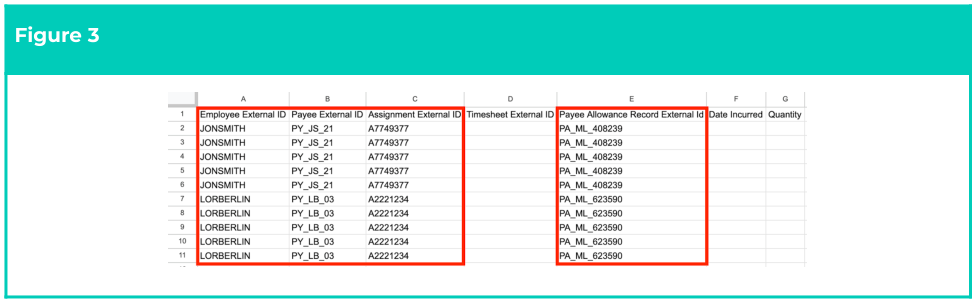
1. Identify each 2cloudnine record to be related with Allowance Timesheet Entries by using the value found in the External Id (it) field (Figure 2) to populate the cells displayed on the following page (Figure 3):
1. Populate Column A with the External Id (it) of the related **Employee Contact**.
2. Populate Column B with the External Id (it) of the related **Payee**.
3. Populate Column C with the External Id (it) of the related **Assignment**.
4. Populate Column D with the External Id (it) of the related **Payee Allowance**.
 **Important Notes**\
*(Required Formats and leading zeros)*
Allowance Timesheet Item data MUST be imported before the related Timesheet Entry data has
been created or imported. If this does not occur, Allowance Timesheet Items will not be interpreted.
The External Id field used by the Integrated Import Tool must not be confused with other External ID
fields. The correct External ID field can be identified by its API name: External\_Id\_it\_\_c External Id
(it).
If this field is not displayed on the Page Layout by default, please contact your Salesforce
Administrator for assistance.
Please be aware of any auto-formatting that removes leading zeros from the entered data, as import will fail if the data entered does not exactly match the data as it exists in 2cloudnine Payroll.
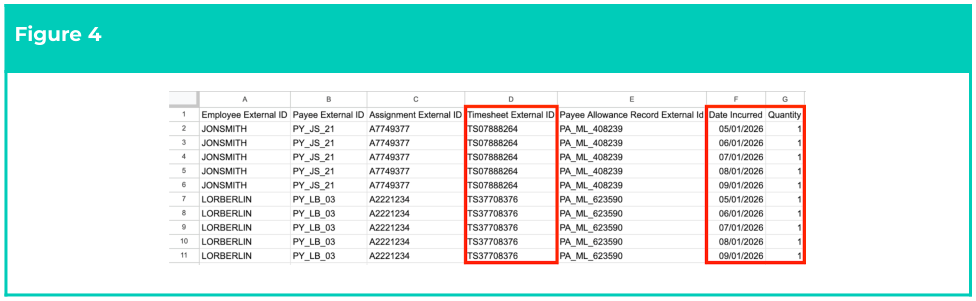
2. Populate the remaining data as follows (see Figure 4):
1. If the Allowance Timesheet Item is related to an existing 2cloudnine Timesheet record, populate Column D with the External Id (it) of the related **Timesheet**.
2. Enter the date of each Allowance Timesheet Item by populating the **Date Incurred** field.
3. Enter the amount of the Allowance Timesheet Items to be processed by populating the **Quantity** field with an amount (up to six decimal places).
**Important Notes**\
*(Required Formats and leading zeros)*
Allowance Timesheet Item data MUST be imported before the related Timesheet Entry data has
been created or imported. If this does not occur, Allowance Timesheet Items will not be interpreted.
The External Id field used by the Integrated Import Tool must not be confused with other External ID
fields. The correct External ID field can be identified by its API name: External\_Id\_it\_\_c External Id
(it).
If this field is not displayed on the Page Layout by default, please contact your Salesforce
Administrator for assistance.
Please be aware of any auto-formatting that removes leading zeros from the entered data, as import will fail if the data entered does not exactly match the data as it exists in 2cloudnine Payroll.
2. Populate the remaining data as follows (see Figure 4):
1. If the Allowance Timesheet Item is related to an existing 2cloudnine Timesheet record, populate Column D with the External Id (it) of the related **Timesheet**.
2. Enter the date of each Allowance Timesheet Item by populating the **Date Incurred** field.
3. Enter the amount of the Allowance Timesheet Items to be processed by populating the **Quantity** field with an amount (up to six decimal places).
 **Important Notes**\
*(Date Formats)*
When entering Dates, the format dd/mm/yyyy must be used.
## Field Descriptions
| Field Name | Description |
| ------------------------------------------ | ------------------------------------------------------------------------------------------------------------------------------------------------------------------------------------------------------------------------------------------------------------------------------------------------------------------------------------- |
| **Assignment External ID** | The unique identifier populated on the CSV when referencing 2cloudnine Assignment records. This value is populated using the value of the External ID field on the related Assignment record. |
| **Employee External ID** | The unique identifier populated on the CSV when referencing 2cloudnine Employee records. This value is populated using the value of the External ID field on the related Employee record. |
| **External ID** | The unique identifier for the 2cloudnine record used by the Integrated Import Tool. This field is updated with a unique value by Payroll Users when records need to be referenced by an external system, and can be differentiated from other External ID field labels by its unique API name: External\_Id\_it\_\_c External ID (it) |
| **Date Incurred** | The date that the Timesheet Allowance is being claimed for. |
| **Payee Allowance Record** **External ID** | The unique identifier populated on the CSV when referencing 2cloudnine Payee Allowance records. This value is populated using the value of the External ID field on the related Payee Allowance record. |
| **Payee External ID** | The unique identifier entered on the CSV when referencing 2c9 Payee records. The value of this field should be populated according to the External ID field on the 2cloudnine Payee record related to the data captured on the CSV. |
| **Quantity** | The amount of Allowance or Pay Transaction that should be applied when importing data. |
| **Timesheet Activity External** **ID** | The unique identifier populated on the CSV when referencing 2cloudnine Timesheet Activity records. This value is populated using the value of the External ID field on the related Timesheet Activity record. |
## Further Information
| Document | Document Type | Description |
| ----------------------------------------------------------------------------------- | --------------- | ---------------------------------------------------------------------------------------------------------------------------------------------------------------------------- |
| Integrated Import Tool - Key Information | Key Information | Outlines useful information relevant to the Integrated Import Tool functionality. The document includes definitions, prerequisites, and other non-instructional information. |
| Integrated Import Tool - Allowance Timesheet Items Template (Standard) | CSV Template | CSV Template Document to be used when preparing Standard Allowance Timesheet Item data for upload and import via the Integrated Import Tool. |
| QRG Integrated Import Tool - Upload and Process Import Files | QRG | How to use the new Integrated Import Tool to validate and process external data for the automatic creation of 2cloudnine Payroll records. |
| QRG Integrated Import Tool - Populate Timesheet CSV Files (Standard) | QRG | How to populate data in the Standard CSV template for Timesheet Entries when uploading to Imported Records. |
| QRG Integrated Import Tool - Populate Timesheet CSV Files (Enhanced) | QRG | How to populate data in the Enhanced CSV template for Timesheet Entries when uploading to Imported Records. |
| QRG Integrated Import Tool - Populate Allowance Timesheet Item CSV Files (Enhanced) | QRG | How to populate data in the Enhanced CSV template for Allowance Timesheet Items when uploading to Imported Records. |
| --- | --- | --- |
| QRG Integrated Import Tool - Populate Pay Transaction CSV Files | QRG | How to populate data in the Standard CSV template for Pay Transactions when uploading to Imported Records. |
**Important Notes**\
*(Date Formats)*
When entering Dates, the format dd/mm/yyyy must be used.
## Field Descriptions
| Field Name | Description |
| ------------------------------------------ | ------------------------------------------------------------------------------------------------------------------------------------------------------------------------------------------------------------------------------------------------------------------------------------------------------------------------------------- |
| **Assignment External ID** | The unique identifier populated on the CSV when referencing 2cloudnine Assignment records. This value is populated using the value of the External ID field on the related Assignment record. |
| **Employee External ID** | The unique identifier populated on the CSV when referencing 2cloudnine Employee records. This value is populated using the value of the External ID field on the related Employee record. |
| **External ID** | The unique identifier for the 2cloudnine record used by the Integrated Import Tool. This field is updated with a unique value by Payroll Users when records need to be referenced by an external system, and can be differentiated from other External ID field labels by its unique API name: External\_Id\_it\_\_c External ID (it) |
| **Date Incurred** | The date that the Timesheet Allowance is being claimed for. |
| **Payee Allowance Record** **External ID** | The unique identifier populated on the CSV when referencing 2cloudnine Payee Allowance records. This value is populated using the value of the External ID field on the related Payee Allowance record. |
| **Payee External ID** | The unique identifier entered on the CSV when referencing 2c9 Payee records. The value of this field should be populated according to the External ID field on the 2cloudnine Payee record related to the data captured on the CSV. |
| **Quantity** | The amount of Allowance or Pay Transaction that should be applied when importing data. |
| **Timesheet Activity External** **ID** | The unique identifier populated on the CSV when referencing 2cloudnine Timesheet Activity records. This value is populated using the value of the External ID field on the related Timesheet Activity record. |
## Further Information
| Document | Document Type | Description |
| ----------------------------------------------------------------------------------- | --------------- | ---------------------------------------------------------------------------------------------------------------------------------------------------------------------------- |
| Integrated Import Tool - Key Information | Key Information | Outlines useful information relevant to the Integrated Import Tool functionality. The document includes definitions, prerequisites, and other non-instructional information. |
| Integrated Import Tool - Allowance Timesheet Items Template (Standard) | CSV Template | CSV Template Document to be used when preparing Standard Allowance Timesheet Item data for upload and import via the Integrated Import Tool. |
| QRG Integrated Import Tool - Upload and Process Import Files | QRG | How to use the new Integrated Import Tool to validate and process external data for the automatic creation of 2cloudnine Payroll records. |
| QRG Integrated Import Tool - Populate Timesheet CSV Files (Standard) | QRG | How to populate data in the Standard CSV template for Timesheet Entries when uploading to Imported Records. |
| QRG Integrated Import Tool - Populate Timesheet CSV Files (Enhanced) | QRG | How to populate data in the Enhanced CSV template for Timesheet Entries when uploading to Imported Records. |
| QRG Integrated Import Tool - Populate Allowance Timesheet Item CSV Files (Enhanced) | QRG | How to populate data in the Enhanced CSV template for Allowance Timesheet Items when uploading to Imported Records. |
| --- | --- | --- |
| QRG Integrated Import Tool - Populate Pay Transaction CSV Files | QRG | How to populate data in the Standard CSV template for Pay Transactions when uploading to Imported Records. |