> ## Documentation Index
> Fetch the complete documentation index at: https://documentation.2cloudnine.com/llms.txt
> Use this file to discover all available pages before exploring further.
# QRG Create Project Codes - Timesheet Activity (Assignment Level)
## Purpose
The purpose of this quick reference guide is to step through the process of creating an Assignment Level
Timesheet Activity Project Code. The intended audience for this document are system administrators /
standard users.
## Steps
### Create an Assignment Level Timesheet Activity Project Code
Timesheet Activity Project Codes are used during Interpretation to identify Timesheet Entries associated
with certain activities requiring different Interpretation Types to be applied. This allows for different Pay
Codes or conditions of work to be associated with the times entered.
Assignment Level Timesheet Activity Project Codes are related to Timesheets at the Assignment Level.
Create an Assignment Level Timesheet Activity Project Code by following the below steps:
1. Click on the **App Launcher** icon (see
Figure 1).
2. Go to the **Project Codes** object by using
the Search function (see Figure 2).
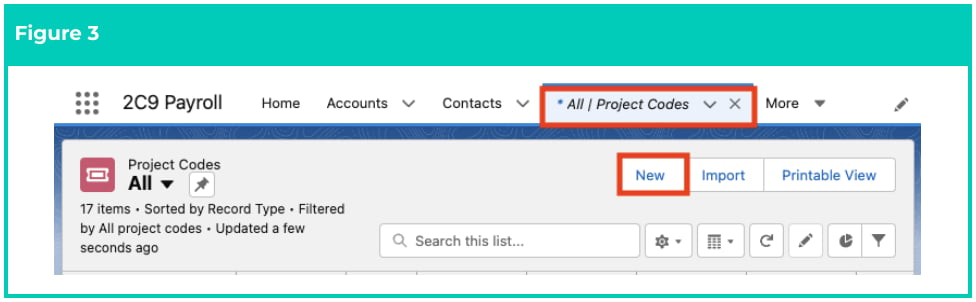
3. Click on the **New** button (see Figure 3).
 4. Select **Timesheet Activity - Assignment Level** from the available record types, and click on the
**Next** button (see Figure 4).
4. Select **Timesheet Activity - Assignment Level** from the available record types, and click on the
**Next** button (see Figure 4).
 5. Populate the following required fields to provide the base details of the Project Code (see Figure
5\):
1. To create a unique identifier for the Project Code, populate the **Project Code Name** field.
2. To define the Client record that the Timesheet Activity Project Code should be related to,
populate the **Client** field using the lookup options available.
3. To define the Assignment record that the Timesheet Activity Project Code should be
related to, populate the **Assignment** field using the lookup options available.
4. Select from the available picklist options in the **Status** field.
6. If the Timesheet Activity Project Code is related to an Interpretation Type, define the
Interpretation Type that should be applied to related Timesheet Entries by selecting from the
following picklist values in the Interpretation **Breakpoint Type** field (see Figure 5):
1. **Overtime Round Up Shift**
2. **Split/Broken Shift**
3. **Wake Up**
4. **Excursion**
5. **Sleepover**
7. If the Timesheet Activity Project Code is related with an Interpretation Variation, populate the
following fields (see Figure 5):
1. Select **Yes** from the available picklist options in the **Is an Interpretation Variation?** field.
2. Select the type of Interpretation Variation that should be applied to related Timesheet
Entries by selecting from the available picklist options in the **Variation Type** field.
8. If the Timesheet Activity Project Code is associated with an Allowance Breakpoint, select from the
available picklist values in the **Allowance Type** field (see Figure 5).
9. Click on the **Save** button (see Figure 5).
5. Populate the following required fields to provide the base details of the Project Code (see Figure
5\):
1. To create a unique identifier for the Project Code, populate the **Project Code Name** field.
2. To define the Client record that the Timesheet Activity Project Code should be related to,
populate the **Client** field using the lookup options available.
3. To define the Assignment record that the Timesheet Activity Project Code should be
related to, populate the **Assignment** field using the lookup options available.
4. Select from the available picklist options in the **Status** field.
6. If the Timesheet Activity Project Code is related to an Interpretation Type, define the
Interpretation Type that should be applied to related Timesheet Entries by selecting from the
following picklist values in the Interpretation **Breakpoint Type** field (see Figure 5):
1. **Overtime Round Up Shift**
2. **Split/Broken Shift**
3. **Wake Up**
4. **Excursion**
5. **Sleepover**
7. If the Timesheet Activity Project Code is related with an Interpretation Variation, populate the
following fields (see Figure 5):
1. Select **Yes** from the available picklist options in the **Is an Interpretation Variation?** field.
2. Select the type of Interpretation Variation that should be applied to related Timesheet
Entries by selecting from the available picklist options in the **Variation Type** field.
8. If the Timesheet Activity Project Code is associated with an Allowance Breakpoint, select from the
available picklist values in the **Allowance Type** field (see Figure 5).
9. Click on the **Save** button (see Figure 5).
 The Timesheet Activity Project Code MUST be populated with either the Interpretation
Breakpoint Type field, the Is an Interpretation Variation / Variation Type fields OR the
Allowance Type field. These are the fields that define the kind of Interpretation applied
to related Timesheet Entries. The Allowance Type field may be populated in
conjunction with either the Interpretation Breakpoint Type field or the Interpretation
Variation fields, if required for Allowance Junction Breakpoints.
The picklist values available in the Variation Type field will differ, depending on the
names given to the custom Variation Types created in an Org. If a required Variation
Type is not available, contact the System Administrator for assistance with the creation
of a new Global Picklist value for the Interpretation Variation Type.
The picklist values available in the Allowance Type will differ, depending on the
requirements of each Org. The value selected here should match the value selected for
the Allowance/Timesheet Activity Junction Breakpoint.
10. A new Assignment Level Timesheet Activity Project Code has been created (see Figure 6).
The Timesheet Activity Project Code MUST be populated with either the Interpretation
Breakpoint Type field, the Is an Interpretation Variation / Variation Type fields OR the
Allowance Type field. These are the fields that define the kind of Interpretation applied
to related Timesheet Entries. The Allowance Type field may be populated in
conjunction with either the Interpretation Breakpoint Type field or the Interpretation
Variation fields, if required for Allowance Junction Breakpoints.
The picklist values available in the Variation Type field will differ, depending on the
names given to the custom Variation Types created in an Org. If a required Variation
Type is not available, contact the System Administrator for assistance with the creation
of a new Global Picklist value for the Interpretation Variation Type.
The picklist values available in the Allowance Type will differ, depending on the
requirements of each Org. The value selected here should match the value selected for
the Allowance/Timesheet Activity Junction Breakpoint.
10. A new Assignment Level Timesheet Activity Project Code has been created (see Figure 6).
 The ‘Client Level’ and ‘Template Level’ Timesheet Activity Project Code record types are
used for the purposes of automation. For assistance with the creation of either of these
record types, contact your system administrator.
Project Codes CAN NOT be deleted if they are used in other records. Deleting records is
not recommended unless absolutely essential.
A Project Code record can only be edited if it has not already been referenced within
Pay Transactions that are processed in a Pay Batch, or have been Invoiced.
11. To modify an existing Assignment Level Timesheet Activity Project Code record, open the
required record and select the **Edit** button available on the top right side of the page. You can
also double click in any of the fields that need editing or just click on the pencil icon that
appears within fields when you move your cursor over the field.
12. When complete, click on the **Save** button.
# Field Descriptions
**Allowance Type** defines the type of Allowance Breakpoint that should be applied to Timesheet Entries
that have been populated with this Timesheet Activity Project Code.
**Assignment** is the specific Assignment this Project Code will be applied to.
**Client** is the specific Client this Project Code will be applied to.
**Interpretation Breakpoint Type** defines the Interpretation Type that will be applied for Timesheet Entries
that have been populated with this Timesheet Activity Project Code.
**Is an Interpretation Variation** determines that an Interpretation Variation will be applied to Timesheet
Entries that have been populated with this Timesheet Activity Project Code.
**Project Code Name** is the unique identifier for the Timesheet Activity Project Code.
**Status** is the Status of the Timesheet Activity Project Code.
**Variation Type** defines the type of Variation that will be applied to Timesheet Entries that have been
populated with this Timesheet Activity Project Code.
# Further Information
| Document | Document Type | Description |
| -------------------------------------------------------------- | ----------------- | ------------------------------------------------------------- |
| QRG Create Project Codes | Task Instructions | How to create Project Codes |
| QRG Create an Assignment - Temp | Task Instructions | How to create an Assignment record for Timesheet Employees |
| QRG Create an Assignment Rate record - Timesheet | Task Instructions | How to create a Timesheet Assignment Rate Record |
| QRG Create Project Codes - Timesheet Activity (Client Level) | Task Instructions | How to create Client Level Timesheet Activity Project Codes |
| QRG Create Project Codes - Timesheet Activity (Template Level) | Task Instructions | How to create Template Level Timesheet Activity Project Codes |
The ‘Client Level’ and ‘Template Level’ Timesheet Activity Project Code record types are
used for the purposes of automation. For assistance with the creation of either of these
record types, contact your system administrator.
Project Codes CAN NOT be deleted if they are used in other records. Deleting records is
not recommended unless absolutely essential.
A Project Code record can only be edited if it has not already been referenced within
Pay Transactions that are processed in a Pay Batch, or have been Invoiced.
11. To modify an existing Assignment Level Timesheet Activity Project Code record, open the
required record and select the **Edit** button available on the top right side of the page. You can
also double click in any of the fields that need editing or just click on the pencil icon that
appears within fields when you move your cursor over the field.
12. When complete, click on the **Save** button.
# Field Descriptions
**Allowance Type** defines the type of Allowance Breakpoint that should be applied to Timesheet Entries
that have been populated with this Timesheet Activity Project Code.
**Assignment** is the specific Assignment this Project Code will be applied to.
**Client** is the specific Client this Project Code will be applied to.
**Interpretation Breakpoint Type** defines the Interpretation Type that will be applied for Timesheet Entries
that have been populated with this Timesheet Activity Project Code.
**Is an Interpretation Variation** determines that an Interpretation Variation will be applied to Timesheet
Entries that have been populated with this Timesheet Activity Project Code.
**Project Code Name** is the unique identifier for the Timesheet Activity Project Code.
**Status** is the Status of the Timesheet Activity Project Code.
**Variation Type** defines the type of Variation that will be applied to Timesheet Entries that have been
populated with this Timesheet Activity Project Code.
# Further Information
| Document | Document Type | Description |
| -------------------------------------------------------------- | ----------------- | ------------------------------------------------------------- |
| QRG Create Project Codes | Task Instructions | How to create Project Codes |
| QRG Create an Assignment - Temp | Task Instructions | How to create an Assignment record for Timesheet Employees |
| QRG Create an Assignment Rate record - Timesheet | Task Instructions | How to create a Timesheet Assignment Rate Record |
| QRG Create Project Codes - Timesheet Activity (Client Level) | Task Instructions | How to create Client Level Timesheet Activity Project Codes |
| QRG Create Project Codes - Timesheet Activity (Template Level) | Task Instructions | How to create Template Level Timesheet Activity Project Codes |

