> ## Documentation Index
> Fetch the complete documentation index at: https://documentation.2cloudnine.com/llms.txt
> Use this file to discover all available pages before exploring further.
# QRG Interpretation Rule Builder - Create Interpretation Variation (Assignment)
## **Purpose**
The purpose of this quick reference guide is to step through the process of creating an Assignment Variation for an Interpretation Rule. The intended audience for this document are system administrators / standard users.
## **Steps**
### **Create a new Assignment Interpretation Variation Rule**
The Interpretation Variation record type allows for variations to be applied to an Interpretation Rule with only minimal information input, and without the need to create a completely new Interpretation Rule.
The Assignment Variation is used for part-time Employees who have differing frequency standard hours from those outlined in the Interpretation Rule associated with the Payee’s Assignment record.
The Assignment Variation record allows input of select information in the following sections of the Interpretation Rule Builder to override data captured in the base Interpretation Rule:
* Basic Information
* Frequency Hours Rules (not including Frequency Overtime Breakpoints)
Create an Assignment Variation by following the below steps:
1. Click on the **App Launcher** icon (see Figure 1).
 2. Go to the **Interpretation Rule** object by using the Search function (see Figure 2).
 3. Click on the **New** button (see Figure 3).
 4. Select **Interpretation Variation Rule** from the available Record types and click on the **Next** button (see Figure 4).
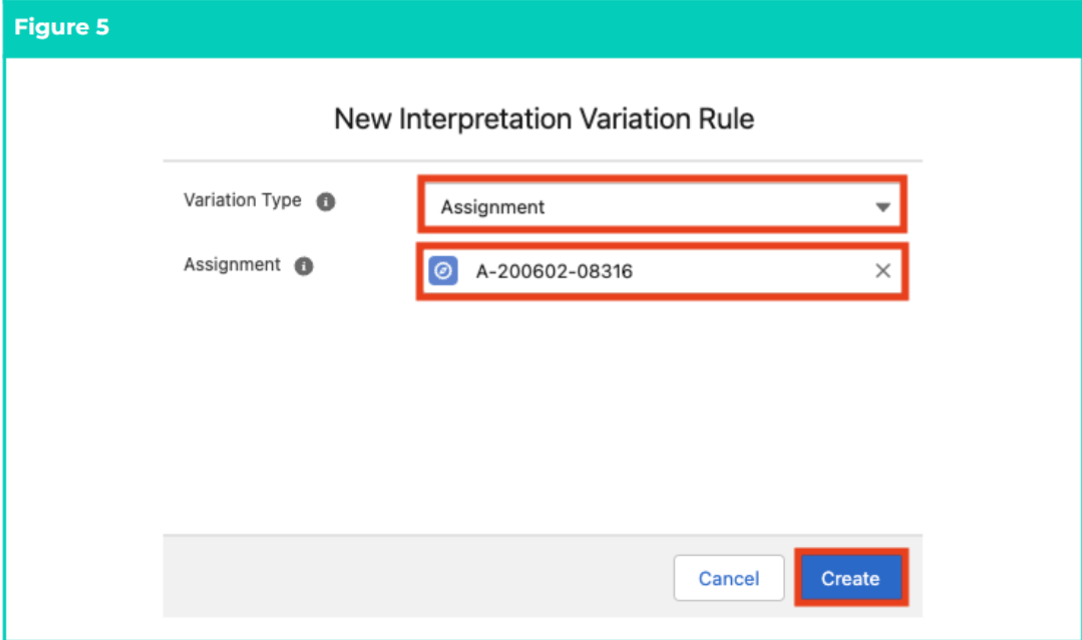
 5. Follow this step in the sequence given (see Figure 5):
1. To determine the Variation type, select **Assignment** from the available picklist values in the Variation Type field.
2. To relate the Variation with the specific Assignment, populate the **Assignment** field using the lookup options available.
3. Click on the **Create** button.
5. Follow this step in the sequence given (see Figure 5):
1. To determine the Variation type, select **Assignment** from the available picklist values in the Variation Type field.
2. To relate the Variation with the specific Assignment, populate the **Assignment** field using the lookup options available.
3. Click on the **Create** button.
 If another Variation Type is required, contact your System Administrator for assistance with creating the new Global Picklist value for the Interpretation Variation Type.
Variations are only applied when the associated Timesheet Activity is populated on a Timesheet. For more information on how to create a Timesheet Activity Project Code, follow the instructions provided in the Create Project Codes - Timesheet Activity (Assignment Level) QRG.
6. Follow this step in the sequence given (see Figure 6):
1. Populate the following required fields to provide the base details of the Variation:
1. **Interpretation Rule Name**
2. **Timesheet Frequency**
3. To identify the Interpretation Rule that the Variation will be related to, populate the **Interpretation Rule** field using the lookup options available.
4. To define the maximum amount of Ordinary Hours payable within the Timesheet Period before Overtime must be paid, populate the **Frequency’ Standard Hours** field.
2. Populate the following optional fields as needed:
1. To provide a description to identify the Interpretation Rule, populate the **Short Description** field.
2. To provide a description to identify the configuration of the Interpretation Rule, populate the **Long Description** field.
3. If the Assignment record selected in Step 5b. is incorrect, the **Assignment** field can be updated using the lookup options available to select the correct Assignment.
7. Click on the **Save All** button (see Figure 6).
If another Variation Type is required, contact your System Administrator for assistance with creating the new Global Picklist value for the Interpretation Variation Type.
Variations are only applied when the associated Timesheet Activity is populated on a Timesheet. For more information on how to create a Timesheet Activity Project Code, follow the instructions provided in the Create Project Codes - Timesheet Activity (Assignment Level) QRG.
6. Follow this step in the sequence given (see Figure 6):
1. Populate the following required fields to provide the base details of the Variation:
1. **Interpretation Rule Name**
2. **Timesheet Frequency**
3. To identify the Interpretation Rule that the Variation will be related to, populate the **Interpretation Rule** field using the lookup options available.
4. To define the maximum amount of Ordinary Hours payable within the Timesheet Period before Overtime must be paid, populate the **Frequency’ Standard Hours** field.
2. Populate the following optional fields as needed:
1. To provide a description to identify the Interpretation Rule, populate the **Short Description** field.
2. To provide a description to identify the configuration of the Interpretation Rule, populate the **Long Description** field.
3. If the Assignment record selected in Step 5b. is incorrect, the **Assignment** field can be updated using the lookup options available to select the correct Assignment.
7. Click on the **Save All** button (see Figure 6).
 The Timesheet Frequency populated for the Variation MUST match the Timesheet Frequency populated for the related Assignment.
The lookup options available from the Interpretation Rule field display all Interpretation Rules related to the Assignment record populated for the Variation.
The fields within the Additional Details section require no input and will be automatically populated once updates and/or changes to the Interpretation Rule have been saved.
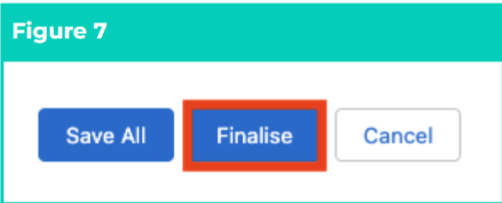
8. Review and confirm the details of the Variation, then click on the **Finalise** button to complete record creation (see Figure 7).
The Timesheet Frequency populated for the Variation MUST match the Timesheet Frequency populated for the related Assignment.
The lookup options available from the Interpretation Rule field display all Interpretation Rules related to the Assignment record populated for the Variation.
The fields within the Additional Details section require no input and will be automatically populated once updates and/or changes to the Interpretation Rule have been saved.
8. Review and confirm the details of the Variation, then click on the **Finalise** button to complete record creation (see Figure 7).
 Although populating Frequency Standard Hours is required for Assignment Variations, the Breakpoints for Frequency Overtime should NOT be populated (unlike the process for creating Hourly or Shift Time Interpretation Rules), as the Breakpoints from the base Interpretation Rule will override these values.
9. A new **Assignment Variation** is now created (see Figure 8).
Although populating Frequency Standard Hours is required for Assignment Variations, the Breakpoints for Frequency Overtime should NOT be populated (unlike the process for creating Hourly or Shift Time Interpretation Rules), as the Breakpoints from the base Interpretation Rule will override these values.
9. A new **Assignment Variation** is now created (see Figure 8).
 Once a Variation has been Finalised, it is not recommended to modify further, but instead to facilitate any changes required by creating a new Variation.
Variations CANNOT be deleted if they have been used to process Timesheet Entries to create Pay Transactions. Deleting records is not recommended unless absolutely essential.
10. To modify an existing Variation, open the required record and select the **Launch** button to open the Builder page, then select the **Unfinalise** button available at the bottom of the record.
11. When complete, click on the **Finalise** button.
## **Field Descriptions**
| Field Name | Description |
| ------------------------- | ---------------------------------------------------------------------------------------------------------------------------------------------------------------------------------------------------------------------------------------------------------------------------------------------------------------------------------------------------------------------------------------------------------------------------------------------------------------------------------------------------------------------- |
| Assignment | Indicates the Assignment that relates to the Interpretation Rule that the Variation will be applied to. |
| Frequency' Standard Hours | Defines the maximum Standard Hours from which Overtime is payable for the remaining hours on the Timesheet (as determined by the Timesheet Frequency). |
| Interpretation Rule | Is the related Interpretation Rule that the Variation will be applied to. |
| Interpretation Rule Name | Defines the name for the Variation record. |
| Long Description | Is the description outlining the Variation’s purpose. Users are encouraged to detail here the brief snapshot of how this Variation is configured, to assist with identifying differences between various Interpretation Rules with similar conditions and/or names. |
| Short Description | Is the description that can be displayed in lookup search to assist users in selecting the correct Interpretation Rule. |
| Timesheet Frequency | Defines the Timesheet Frequency for which the Variation has been set to interpret. The Timesheet Frequency on the Assignment Variation must match the Timesheet Frequency on both the related Interpretation Rule and the Timesheet from the related Assignment. If the Variation does not match the Timesheet Frequency populated for related Timesheets, interpretation will not occur. |
| Variation Type | Is the type of Variation record that is selected for creation:
Once a Variation has been Finalised, it is not recommended to modify further, but instead to facilitate any changes required by creating a new Variation.
Variations CANNOT be deleted if they have been used to process Timesheet Entries to create Pay Transactions. Deleting records is not recommended unless absolutely essential.
10. To modify an existing Variation, open the required record and select the **Launch** button to open the Builder page, then select the **Unfinalise** button available at the bottom of the record.
11. When complete, click on the **Finalise** button.
## **Field Descriptions**
| Field Name | Description |
| ------------------------- | ---------------------------------------------------------------------------------------------------------------------------------------------------------------------------------------------------------------------------------------------------------------------------------------------------------------------------------------------------------------------------------------------------------------------------------------------------------------------------------------------------------------------- |
| Assignment | Indicates the Assignment that relates to the Interpretation Rule that the Variation will be applied to. |
| Frequency' Standard Hours | Defines the maximum Standard Hours from which Overtime is payable for the remaining hours on the Timesheet (as determined by the Timesheet Frequency). |
| Interpretation Rule | Is the related Interpretation Rule that the Variation will be applied to. |
| Interpretation Rule Name | Defines the name for the Variation record. |
| Long Description | Is the description outlining the Variation’s purpose. Users are encouraged to detail here the brief snapshot of how this Variation is configured, to assist with identifying differences between various Interpretation Rules with similar conditions and/or names. |
| Short Description | Is the description that can be displayed in lookup search to assist users in selecting the correct Interpretation Rule. |
| Timesheet Frequency | Defines the Timesheet Frequency for which the Variation has been set to interpret. The Timesheet Frequency on the Assignment Variation must match the Timesheet Frequency on both the related Interpretation Rule and the Timesheet from the related Assignment. If the Variation does not match the Timesheet Frequency populated for related Timesheets, interpretation will not occur. |
| Variation Type | Is the type of Variation record that is selected for creation:
- 24hr Care Shift is utilised for Variations where Employees have differing standard hours, rates of pay or conditions of work from those outlined in the Interpretation Rule related to a Payee’s Assignment.
- Assignment is utilised for part-time Employees with differing standard hours from those outlined in the Interpretation Rule related to a Payee’s Assignment record.
|
## **Further Information**
| **Document** | **Document Type** | **Description** |
| ------------------------------------------------------------------------------------------------- | --------------------------- | ------------------------------------------------------------------------------------------------------------------------------------------------------------------------- |
| QRG Interpretation Rule Builder Functionality - Key Information | Information Quick Reference | Outlines useful information relevant to the Interpretation Rule functionality. The document includes definitions, prerequisites, and other non-instructional information. |
| QRG Interpretation Rule Builder - Create Daily Rates Interpretation Rule | Task Instructions | How to create a Daily Rates Interpretation Rule. |
| QRG Interpretation Rule Builder - Populate Hourly Rate Breakpoints | Task Instructions | How to populate Breakpoints for the Hourly Rate Interpretation Rule Record Type. |
| QRG Interpretation Rule Builder - Populate Shift Time Breakpoints | Task Instructions | How to populate Breakpoints for the Shift Start or Shift End Interpretation Rule Record Type. |
| QRG Interpretation Rule Builder - Populate Break Loading & Minimum Rest Rules | Task Instructions | How to populate Breakpoints for the Break Loading and Minimum Rest Rules using the Interpretation Rule Builder. |
| QRG Interpretation Rule Builder - Populate Split/Broken Shift & Sleepover Rules | Task Instructions | How to populate Breakpoints for the Split/Broken Shift and Sleepover Rules using the Interpretation Rule Builder. |
| QRG Interpretation Rule Builder - Create Breakpoints & Pay Code Caps | Task Instructions | How to create Breakpoints and Pay Code Caps using the Interpretation Rule Builder. |
| QRG Interpretation Rule Builder - Populate Allowance, Leave & Allowance Junction Rule Breakpoints | Task Instructions | How to populate Breakpoints for Allowances, Leave and Allowance Junction Rules using the Interpretation Rule Builder. |
| QRG Create Interpretation Rule - Create Custom Interpretation Variation | Task Instructions | How to create custom Interpretation Variations. |