> ## Documentation Index
> Fetch the complete documentation index at: https://documentation.2cloudnine.com/llms.txt
> Use this file to discover all available pages before exploring further.
# QRG Interpretation Rule Builder Functionality - Key Information
## Prerequisites
Prior to the creation of Interpretation Rules, the following prerequisites must be met:
1. For an Interpretation Rule record to be created, information on Timesheet Calendars, Pay Codes,
Allowances, Timesheet Activities, Leave Rules and Payee Leave Rules should be available.
2. Users must have access to create Interpretation Rule records using the Interpretation Rule
Builder, as well as related Timesheet Calendars, Pay Codes, Allowances, Timesheet Activities and
Leave Rules.
### Interpretation Rule Interface Appearance and Usability
* The Interpretation Rule Builder User Interface pages are Lightning Enabled and must only be
used when the Salesforce Lightning Experience is active.
* All dates and times are displayed as per the location of the logged in User.
* The recommended browser is Chrome as per the Salesforce standard.
* The default display resolution supported for the Rate Calculation User Interface pages is 1920 x
1080 (1080p) scaled at 100%. The minimum display resolution supported is 1024 x 768 as per the
Salesforce standard.
* The Interpretation Rule Builder User Interface pages will automatically resize in width and height
so that the components are stretched appropriately depending on resolution.
* If the fields / tabs within the Interpretation Rule Builder User Interface pages are unclear or
overlap, zoom out (or zoom in) through the web browser as needed.
## Definitions
Interpretation Rules are used to convert Timesheet Entries into Pay Transactions for payment of wages to
Payees, taking into account various calculations for the amount of time worked. To familiarise yourself
with these terms, please refer to the following definitions:
* **Breakpoints**
Breakpoints are created using the Interpretation Rule Builder UI, and are used during Timesheet
Interpretation. They determine the Pay Codes to be applied to the Pay Transactions created for
Timesheet Entries based on the conditions defined in the Interpretation Rule. Breakpoints must
be created before the Interpretation Rule can be saved and finalised.
* **Daily Logic**
This is the default logic applied during Interpretation for Shift Start Time, Shift End Time and
Hourly Interpretation Rules, unless Shift Logic is enabled. Daily Logic enables Timesheet Entries
to be interpreted according to conditions of the calendar day they are entered on, and will assess
each Timesheet Entry individually. Certain Interpretation Rule settings are not compatible with
Daily Logic, and will only be applied during Interpretation if Shift Logic is enabled, including for
Shift Allowance Breakpoints.
* **Interpretation Record Types**
There are five Interpretation Rule Record Types that may be used within the Interpretation Rule
Builder to create Interpretation Rules that behave differently:
* **Daily Rates** -The Daily Rate Interpretation Rule allowsPayees to be paid based on daily
pay rates, calculated according to the amount of time entered in related Timesheet
Entries for each day worked. Depending on the configuration in the Interpretation Rule,
this can also be broken down into brackets for partial daily rates to be applied.
* **Hourly Rates** - The Hourly Rate Interpretation Ruleallows Payees to be paid based on
hourly rates, calculated according to the time of day captured in Timesheet Entries for
each hour worked.
* **Interpretation Variation** - The Interpretation VariationRule is used to amend the
conditions for an existing Interpretation Rule, based on Timesheet Entries.
* **Shift Start Time -** The Shift Start Time InterpretationRule allows Payee Pay Transactions
to be created based on the time of day that a Timesheet Entry starts. Shift End Time
Breakpoints may be conditionally applied alongside Shift Start Time Breakpoints, when
Apply Shift End or Start Interpretation? is enabled.
* When Shift Start and End Time Interpretation is applied on a Shift Start Time
Interpretation Rule, any Timesheet Entries that fall within both Shift Start and
Shift End Breakpoints will be interpreted using the Shift End Time Pay Codes.
* **Shift End Time** - The Shift Start Time InterpretationRule allows Payee Pay Transactions to
be created based on the time of day that a Timesheet Entry ends. Shift Start Time
Breakpoints may be conditionally applied alongside Shift End Time Breakpoints, when
Apply Shift End or Start Interpretation? is enabled.
* When Shift Start and End Time Interpretation is applied on a Shift End Time
Interpretation Rule, any Timesheet Entries that fall within both Shift Start and
Shift End Breakpoints will be interpreted using the Shift Start Time Pay Codes.
* **Interpretation Rule Builder User Interface (UI)**
The Interpretation Rule Builder is the User Interface developed to enable the creation of
Interpretation Rules for each Interpretation Record Type. The Interpretation Rule Builder consists
of a series of dynamic fields, some of which are optional, and some of which differ based on the
record type selected, to allow for the interpretation of various types of Awards and Agreements.
The available fields within the Interpretation Rule Builder are grouped into several different
sections, as listed below:
* **Basic Information** - This section defines the systemidentifiers for the Interpretation Rule
record.
* **General Rule Settings** - This section defines the generalfeatures that may be enabled for
the Interpretation Rule.
* **Break Loading and Minimum Rest Rules** - This sectiondefines how breaches in Rest
Break calculations should be defined when creating Pay Transactions related to the
Interpretation Rule.
* **Split/Broken Shift and Sleepover Rules** - This sectiondefines how Split/Broken Shift and
Sleepover Timesheet Entries should be assessed and calculated when creating Pay
Transactions related to the Interpretation Rule.
* **Weekday, Saturday, Sunday and Public Holiday Rules** - These sections define the
conditions for Weekday, Weekend and Public Holiday Breakpoints, and allow for defined
Breakpoints to be populated in accordance with the Record Type and Interpretation Type
selected.
* **Frequency Hours Rules** - This section defines the maximumnumber of Ordinary hours
an Employee can be paid within each Timesheet period, and the subsequent Pay Codes
that apply once these defined maximums have been reached (i.e. Overtime).
* **Allowance Rules** - This section defines the conditionsthat must be met before Allowance
Pay Transactions will be created during Timesheet interpretation.
* **Allowance Junction Rules** - This section defines Allowancesthat are associated with
either a specific Leave Type or Timesheet Activity. Allowance Junction Rules may be
applied to Hourly, Shift Start, Shift End or Custom Variation Interpretation record types.
* **Leave Breakpoints** - This section defines the typesof Leave Rules that could be included
during Timesheet Interpretation of Leave Timesheet Entries. Leave Breakpoints will
define the Pay Codes to be applied for each Leave Type available to Employees.
* **Pay Code Caps** - This section defines the limitationsthat apply to Pay Codes across
Breakpoints, ensuring any overlapping Breakpoints do not exceed the maximum number
of Pay Code units per day or per calendar frequency.
* **Pay Transactions**
Pay Transactions detail the quantified units of Pay Codes from the Interpretation Rule, and the
Pay Rate (and possibly Invoice Rate) as detailed in the Assignment Rate Records for those Pay
Codes related to the Timesheet’s Assignment. During Interpretation, Timesheet Entries are
calculated and used to create Pay Transactions related to the original Timesheet Entries. Once
created, Pay Transactions are ready for Payroll processing via Pay Batch Manager.
* **Project Codes**
Project Codes are used to define the different Pay Rates (and Invoice Rates) that should be
applied to Pay Codes for tasks performed outside the defined scope of a role.
* **Shift Logic**
When applied to Hourly or Shift Interpretation Rules, Shift Logic enables multiple Timesheet
Entries to be ‘grouped’ together for interpretation. This allows Timesheet Entries to be assessed
according to the conditions of the whole Shift, rather than the calendar day they occur on.
* When Shift Logic has been applied during Interpretation, the values populated for the
following Timesheet Entry fields will determine whether or not individual Entries are
grouped for assessment:
* Shift Start Date
* Shift Start Time
* Shift End Date
* Shift End Time
* These fields will be automatically populated on Timesheet Entries falling within the
defined Split/Broken Shift periods, enabling Entries related to the same Shift period to be
‘grouped’ and assessed together.
* Timesheet Entries that do not fall within defined Split/Broken Shift periods will not be
populated with any Shift Date/Time values, so that they may be assessed individually.
* Custom logic or integrations may be enabled in place of Split/Broken Shift settings to
define Shift Logic, if required.
* In addition to this, some Interpretation functionality may only be applied when Shift
Logic is enabled, such as Shift Allowance Breakpoints.
* **Timesheet Activity - Project Code**
Timesheet Activity Project Codes are used within Timesheet Entries to identify time that relates
to a specific task detailed in an Interpretation Rule, which requires a different Pay Code or pay
conditions for Interpretation **.**
* **Timesheet Entries**
Timesheet Entries are used to capture the times and hours of work completed by Payees during
each Timesheet Period. Timesheet Entries are records of time or hours entered by a Payee during
the Timesheet Period. These Entries may also include the following details, depending on the
configuration of the Assignment record, Timesheet Calendar and related Interpretation Rule for
the Payee:
* Start/End Times
* Total Hours/Total Minutes
* Break Times
* Paid Breaks
* Project Codes
* Timesheet Activities
* Leave Rules
Once Timesheets are Approved, the conditions defined in the related Interpretation Rule are used
to create Pay Transactions related to the Timesheet Entries, so Payees are compensated in
accordance with their entitlements in their Award, EBA, CA or other employment conditions.
* **Timesheet Frequency**
The Timesheet Frequency defines how often Timesheet Entries are split into individual
Timesheets for Payees (i.e. Weekly, Fortnightly, Monthly, etc). The Timesheet Frequency defined
on a Temp Assignment must match the Timesheet Frequency defined in the related
Interpretation Rule for successful Interpretation to occur.
* The frequency of the Timesheet Calendar may differ from the Pay Schedule, which is
different to the need for the Interpretation Frequency to match the Timesheet Calendar
Frequency. For instance, the Pay Schedule might be Fortnightly, but Weekly Timesheets
are submitted.
## General Overviews
### QRG Interpretation Rule Builder - Shift Time and Hourly Rates
* Populate Hourly Rate Interpretation Rules
* Populate Shift Time Interpretation Rules
* Populate Break Loading & Minimum Rest Rules (optional)
* Populate Split/Broken Shift & Sleepover Rules (optional)
* Populate Allowance, Leave & Allowance Junction Rule Breakpoints (optional)
* Create Breakpoints & Pay Code Caps
 ### QRG Interpretation Rule Builder - Daily Rates
* Create Daily Rates Interpretation Rule
### QRG Interpretation Rule Builder - Daily Rates
* Create Daily Rates Interpretation Rule
 ### QRG Interpretation Rule Builder - Variation (Assignment)
* Create an Interpretation Variation (Assignment)
### QRG Interpretation Rule Builder - Variation (Assignment)
* Create an Interpretation Variation (Assignment)
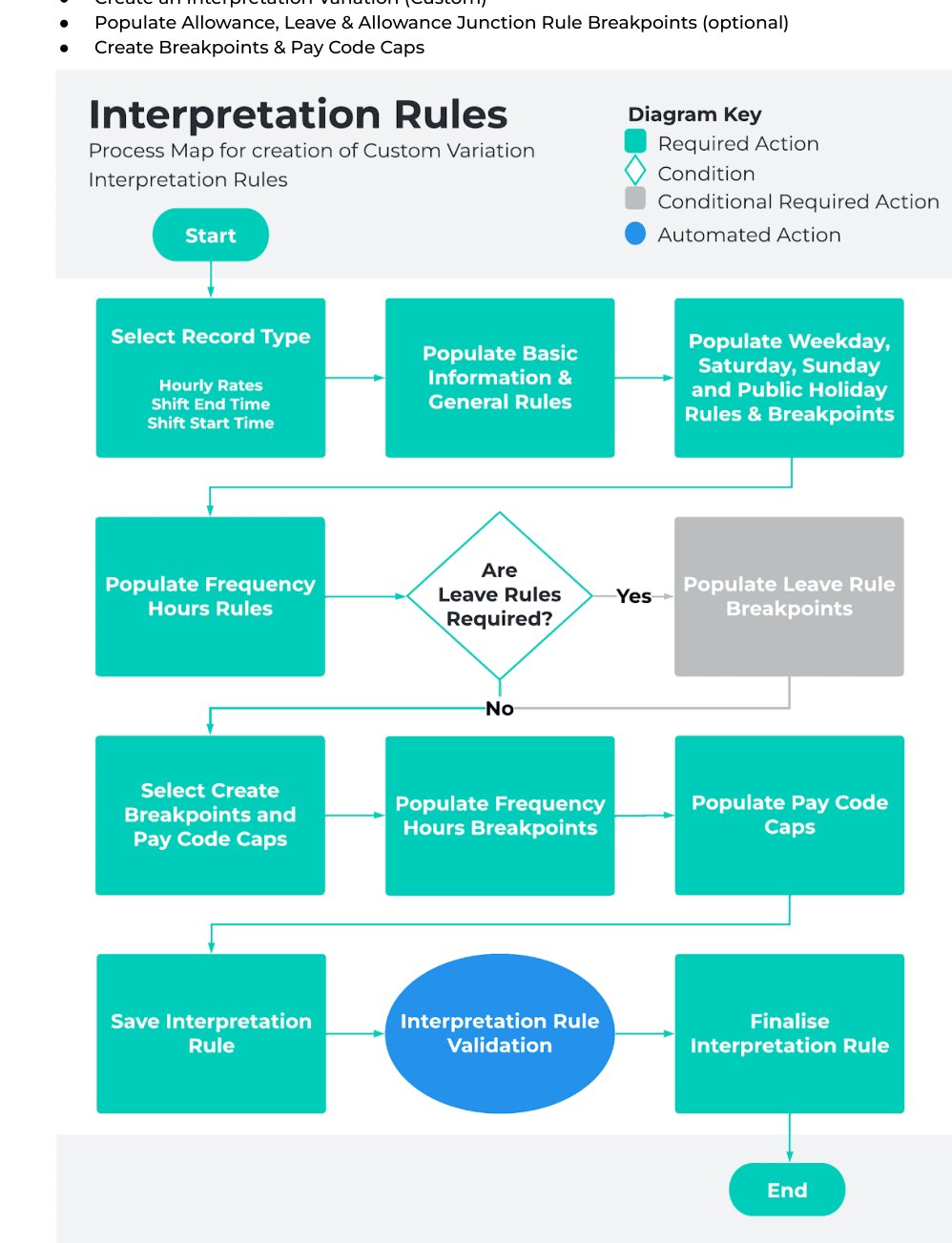
 ### QRG Interpretation Rule Builder - Variation (Custom)
* Create an Interpretation Variation (Custom)
* Populate Allowance, Leave & Allowance Junction Rule Breakpoints (optional)
* Create Breakpoints & Pay Code Caps
### QRG Interpretation Rule Builder - Variation (Custom)
* Create an Interpretation Variation (Custom)
* Populate Allowance, Leave & Allowance Junction Rule Breakpoints (optional)
* Create Breakpoints & Pay Code Caps
 ### QRG Create Project Codes
* Timesheet Activity (Assignment Level)
### QRG Create Project Codes
* Timesheet Activity (Assignment Level)
 ### QRG Timesheet Processing
* Enter Timesheets as a Payroll User
### QRG Timesheet Processing
* Enter Timesheets as a Payroll User
 ## Further Information
| Document | Document Type | Description |
| ------------------------------------------------------------------------------------------------- | ----------------- | ---------------------------------------------------------------------------------------------------------------------------------- |
| QRG Interpretation Rule Builder - Create Daily Rates Interpretation Rule | Task Instructions | How to create a Daily Rates Interpretation Rule. |
| QRG Interpretation Rule Builder - Populate Hourly Rate Breakpoints | Task Instructions | How to populate Breakpoints for the Hourly Rate Interpretation Rule Record Type. |
| QRG Interpretation Rule Builder - Populate Shift Time Breakpoints | Task Instructions | How to populate Breakpoints for the Shift Start or Shift End Interpretation Rule Record Type. |
| QRG Interpretation Rule Builder - Populate Break Loading & Minimum Rest Rules | Task Instructions | How to populate Breakpoints for the Break Loading and Minimum Rest Rules using the Interpretation Rule Builder. |
| QRG Interpretation Rule Builder - Populate Split/Broken Shift & Sleepover Rules | Task Instructions | How to populate Breakpoints for the Split/Broken Shift and Sleepover Rules using the Interpretation Rule Builder. |
| QRG Interpretation Rule Builder - Create Breakpoints & Pay Code Caps | Task Instructions | How to create Breakpoints and Pay Code Caps using the Interpretation Rule Builder. |
| QRG Interpretation Rule Builder - Populate Allowance, Leave & Allowance Junction Rule Breakpoints | Task Instructions | How to populate Breakpoints for Allowances, Leave and Allowance Junction Rules using the Interpretation Rule Builder. |
| QRG Create Interpretation Rule - Create Custom Interpretation Variation | Task Instructions | How to create custom Interpretation Variations. |
| QRG Create Interpretation Rule - Create Assignment Interpretation Variation | Task Instructions | How to create Assignment Interpretation Variations. |
| QRG Timesheet Processing - Enter Timesheets as a Payroll User | Task Instructions | How to complete Timesheets as a Payroll User using the Timesheet Manager and submit for Interpretation / Pay Transaction Creation. |
## Further Information
| Document | Document Type | Description |
| ------------------------------------------------------------------------------------------------- | ----------------- | ---------------------------------------------------------------------------------------------------------------------------------- |
| QRG Interpretation Rule Builder - Create Daily Rates Interpretation Rule | Task Instructions | How to create a Daily Rates Interpretation Rule. |
| QRG Interpretation Rule Builder - Populate Hourly Rate Breakpoints | Task Instructions | How to populate Breakpoints for the Hourly Rate Interpretation Rule Record Type. |
| QRG Interpretation Rule Builder - Populate Shift Time Breakpoints | Task Instructions | How to populate Breakpoints for the Shift Start or Shift End Interpretation Rule Record Type. |
| QRG Interpretation Rule Builder - Populate Break Loading & Minimum Rest Rules | Task Instructions | How to populate Breakpoints for the Break Loading and Minimum Rest Rules using the Interpretation Rule Builder. |
| QRG Interpretation Rule Builder - Populate Split/Broken Shift & Sleepover Rules | Task Instructions | How to populate Breakpoints for the Split/Broken Shift and Sleepover Rules using the Interpretation Rule Builder. |
| QRG Interpretation Rule Builder - Create Breakpoints & Pay Code Caps | Task Instructions | How to create Breakpoints and Pay Code Caps using the Interpretation Rule Builder. |
| QRG Interpretation Rule Builder - Populate Allowance, Leave & Allowance Junction Rule Breakpoints | Task Instructions | How to populate Breakpoints for Allowances, Leave and Allowance Junction Rules using the Interpretation Rule Builder. |
| QRG Create Interpretation Rule - Create Custom Interpretation Variation | Task Instructions | How to create custom Interpretation Variations. |
| QRG Create Interpretation Rule - Create Assignment Interpretation Variation | Task Instructions | How to create Assignment Interpretation Variations. |
| QRG Timesheet Processing - Enter Timesheets as a Payroll User | Task Instructions | How to complete Timesheets as a Payroll User using the Timesheet Manager and submit for Interpretation / Pay Transaction Creation. |