> ## Documentation Index
> Fetch the complete documentation index at: https://documentation.2cloudnine.com/llms.txt
> Use this file to discover all available pages before exploring further.
# QRG Interpretation Rule Builder - Populate Hourly Rate Interpretation Rules
## **Purpose**
The purpose of this quick reference guide is to step through the process of defining and populating the required Breakpoints for Hourly Rate record types within the Interpretation Rule Builder. The intended audience for this document are system administrators / standard users.
## **Steps**
### **Populate an Hourly Rate Interpretation Rule**
Interpretation Rules determine how Pay Transactions are calculated for Timesheet Entries, according to the amount of time worked, the conditions of work, and any associated entitlements.
The Interpretation Rule Builder consists of a series of dynamic fields that differ based on record type, and are broken into several sections. Some sections (and fields) are optional, allowing specific types of working conditions to be catered to.
Hourly Rate Interpretation Rules will assess Timesheet Entries based on the amount of hours entered.
See below for an ordered list of the QRGs related to each section of the Interpretation Rule Builder page for Hourly Rate record types:
1. Populate Hourly Rate Interpretation Rules
2. Populate Break Loading and Minimum Rest Rules **(optional)**
3. Populate Split/Broken Shift and Sleepover Rules **(optional)**
4. Populate Allowance, Leave & Allowance Junction Rule Breakpoints **(optional)**
5. Create Breakpoints and Pay Code Caps
Populate an Hourly Rate Interpretation Rule using the Interpretation Rule Builder by following the below steps:
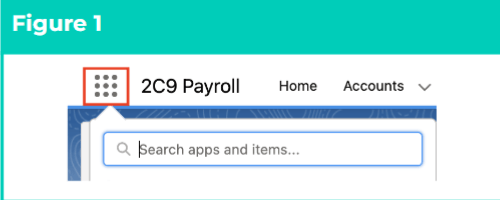
1. Click on the **App Launcher** icon (see Figure 1).
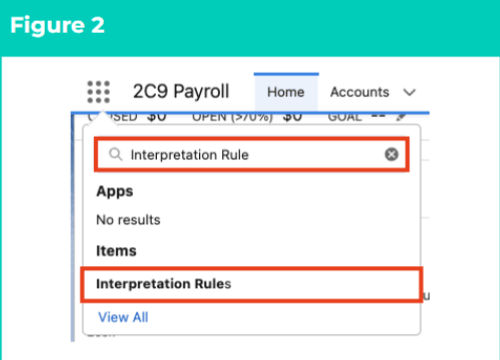
 2. Go to the **Interpretation Rule** object by using the Search function (see Figure 2).
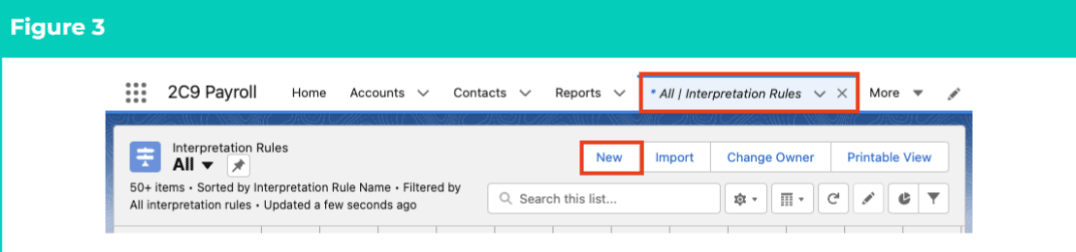
 3. Click on the **New** button (see Figure 3).
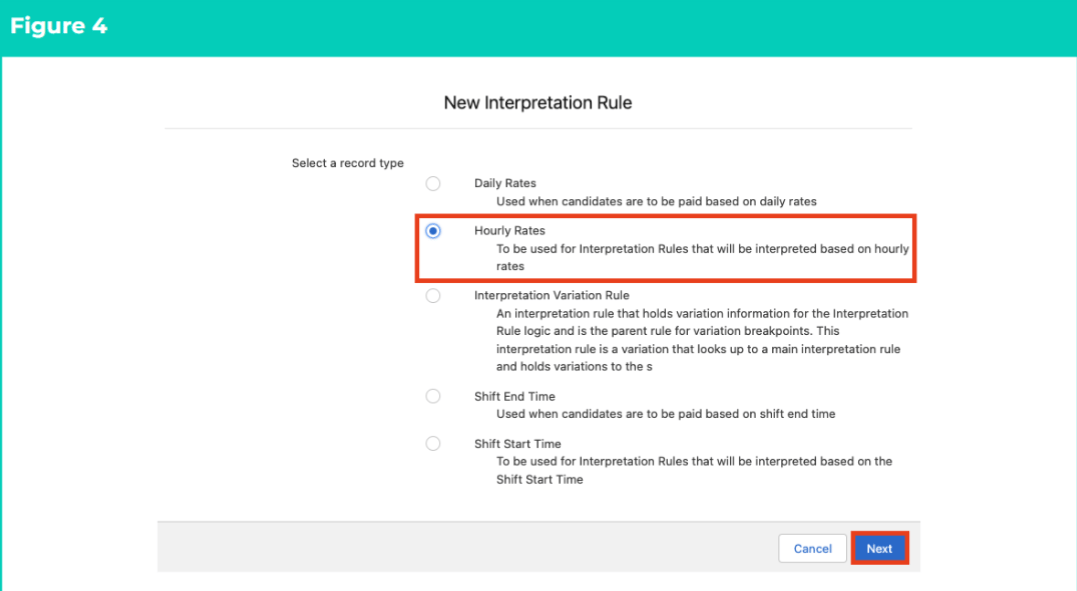
 4. Select **Hourly Rates** from the available record types and click on the **Next** button (see Figure 4).
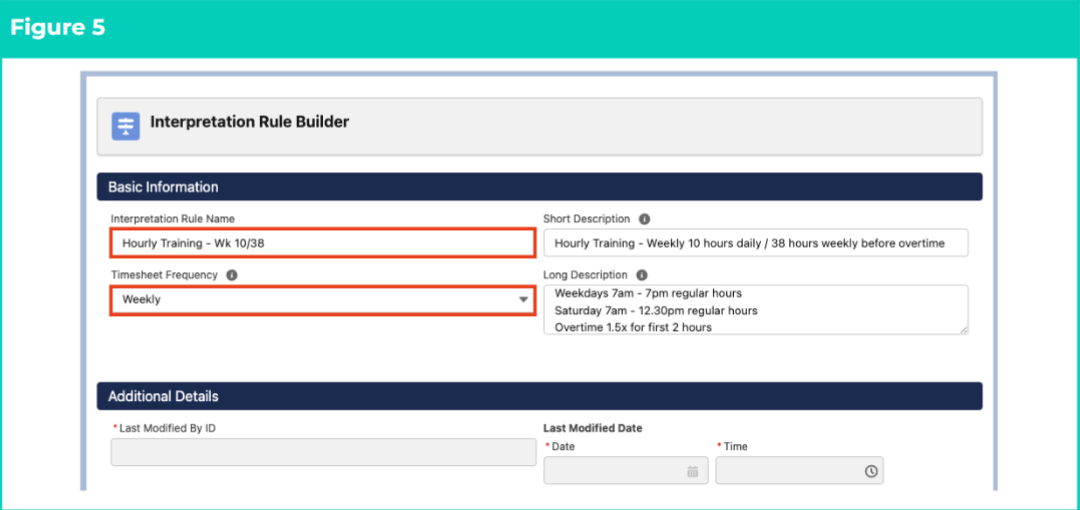
 5. To complete Basic Information for the Interpretation Rule, follow this step in the sequence given below (see Figure 5):
1. Populate the following required fields to provide the base details of the Interpretation Rule:
1. **Interpretation Rule Name**
2. **Timesheet Frequency**
2. Populate the following optional fields as needed:
1. To provide a description used to identify the Interpretation Rule, populate the **Short Description** field.
2. To provide a description used to identify the configuration of the Interpretation Rule, populate the **Long Description** field.
5. To complete Basic Information for the Interpretation Rule, follow this step in the sequence given below (see Figure 5):
1. Populate the following required fields to provide the base details of the Interpretation Rule:
1. **Interpretation Rule Name**
2. **Timesheet Frequency**
2. Populate the following optional fields as needed:
1. To provide a description used to identify the Interpretation Rule, populate the **Short Description** field.
2. To provide a description used to identify the configuration of the Interpretation Rule, populate the **Long Description** field.
 ***Important Notes***
*(Figure 5)*
*Timesheet Frequency CANNOT be updated once Pay Transactions have been generated using the Interpretation Rule.*
*The fields within the Additional Details section require no input, and will be automatically populated once updates and/or changes to the Interpretation Rule have been saved.*
### **General Rule Settings**
This section of the Interpretation Rule Builder defines general conditions applied to Interpretation logic. Some of the selections made in this section of the Builder will impact the fields available in later sections (including Breakpoint fields) due to the dynamic nature of the Interpretation Builder.
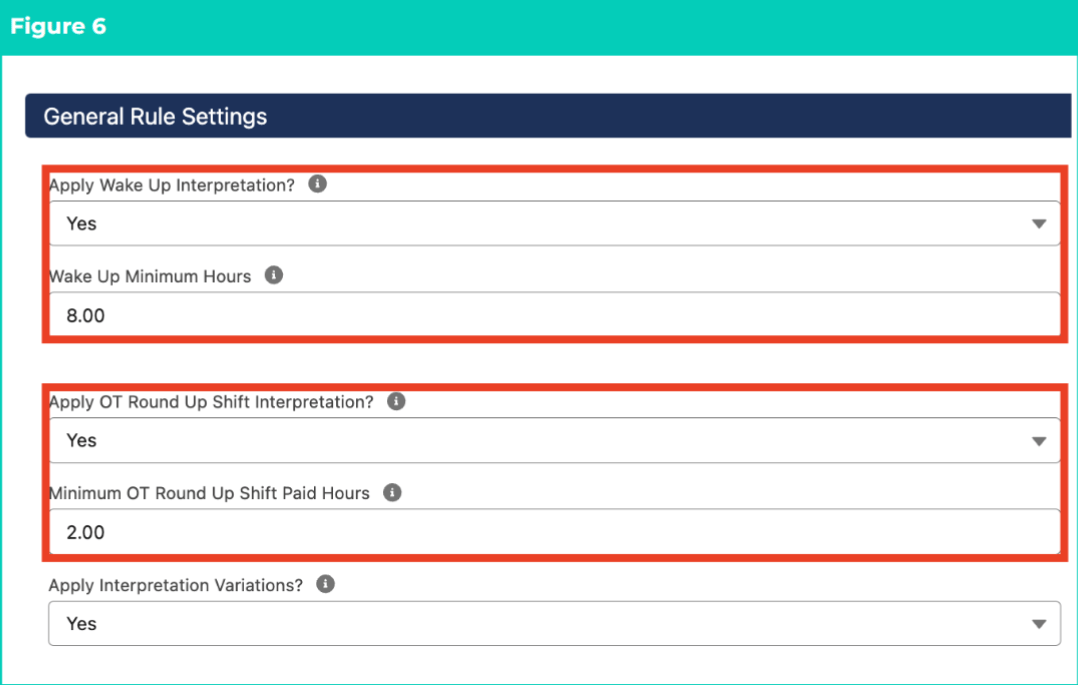
Populate General Rule Settings for the Interpretation Rule by following the below steps (see Figure 6):
6. For Wake Up Interpretation:
1. Apply Overtime Breakpoints to Timesheet Entries with a Wake Up Timesheet Activity by selecting **Yes** in the **Apply Wake Up Interpretation** field.
2. Define the accumulative minimum payable hours for Wake Up Timesheet Activities that occur within the Sleepover Period by populating the **Wake Up Minimum Hours** field.
7. For Overtime rounding:
1. Round up Overtime to the nearest whole hour for Timesheet Entries with a Timesheet Activity by selecting **Yes** in the **Apply OT Round Up Shift Interpretation?** field.
2. Define the minimum amount of hours payable for OT Round Up Shift Interpretation by populating the **Minimum OT Round Up Shift Paid Hours** field.
8. To enable Interpretation Variations records to be applied, select **Yes** in the **Apply Interpretation Variations?** field.
***Important Notes***
*(Figure 5)*
*Timesheet Frequency CANNOT be updated once Pay Transactions have been generated using the Interpretation Rule.*
*The fields within the Additional Details section require no input, and will be automatically populated once updates and/or changes to the Interpretation Rule have been saved.*
### **General Rule Settings**
This section of the Interpretation Rule Builder defines general conditions applied to Interpretation logic. Some of the selections made in this section of the Builder will impact the fields available in later sections (including Breakpoint fields) due to the dynamic nature of the Interpretation Builder.
Populate General Rule Settings for the Interpretation Rule by following the below steps (see Figure 6):
6. For Wake Up Interpretation:
1. Apply Overtime Breakpoints to Timesheet Entries with a Wake Up Timesheet Activity by selecting **Yes** in the **Apply Wake Up Interpretation** field.
2. Define the accumulative minimum payable hours for Wake Up Timesheet Activities that occur within the Sleepover Period by populating the **Wake Up Minimum Hours** field.
7. For Overtime rounding:
1. Round up Overtime to the nearest whole hour for Timesheet Entries with a Timesheet Activity by selecting **Yes** in the **Apply OT Round Up Shift Interpretation?** field.
2. Define the minimum amount of hours payable for OT Round Up Shift Interpretation by populating the **Minimum OT Round Up Shift Paid Hours** field.
8. To enable Interpretation Variations records to be applied, select **Yes** in the **Apply Interpretation Variations?** field.
 ***Important Notes***
*(Figure 6)*
*Interpretation will only apply Wake Up, OT Round Up or Excursion logic when the corresponding Timesheet Activity Project Code has been populated.*
*Overtime related to the OT Round Up or Wake Up Timesheet Activities will be calculated using Weekday, Weekend or Public Holiday Overtime Breakpoints.*
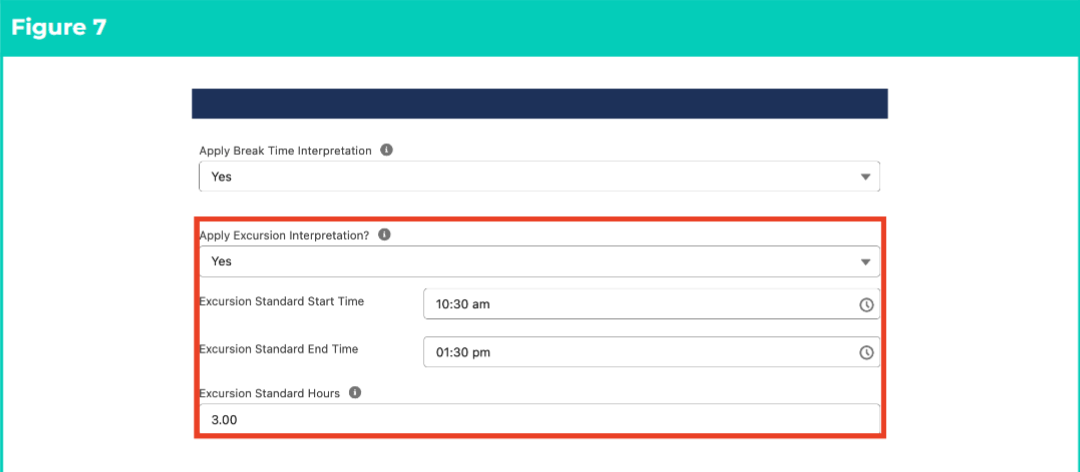
9. For Break Time considerations (see Figure 7):
1. To ensure Break Time Interpretation is applied to all applicable Breakpoint types, select **Yes** in the **Apply Break Time Interpretation** field.
10. If Excursions are required:
11. Include Excursion Timesheet Activities in ordinary time calculations by selecting **Yes** in the **Apply Excursion Interpretation?** field.
12. Define when Excursions should begin and cease being Interpreted with ordinary time Pay Codes by populating the **Excursion Standard Start Time** and **Excursion Standard End Time** fields.
13. Define the amount of hours each day that Excursions can be Interpreted with ordinary time Pay Codes by populating the **Excursion Standard Hours** field.
***Important Notes***
*(Figure 6)*
*Interpretation will only apply Wake Up, OT Round Up or Excursion logic when the corresponding Timesheet Activity Project Code has been populated.*
*Overtime related to the OT Round Up or Wake Up Timesheet Activities will be calculated using Weekday, Weekend or Public Holiday Overtime Breakpoints.*
9. For Break Time considerations (see Figure 7):
1. To ensure Break Time Interpretation is applied to all applicable Breakpoint types, select **Yes** in the **Apply Break Time Interpretation** field.
10. If Excursions are required:
11. Include Excursion Timesheet Activities in ordinary time calculations by selecting **Yes** in the **Apply Excursion Interpretation?** field.
12. Define when Excursions should begin and cease being Interpreted with ordinary time Pay Codes by populating the **Excursion Standard Start Time** and **Excursion Standard End Time** fields.
13. Define the amount of hours each day that Excursions can be Interpreted with ordinary time Pay Codes by populating the **Excursion Standard Hours** field.
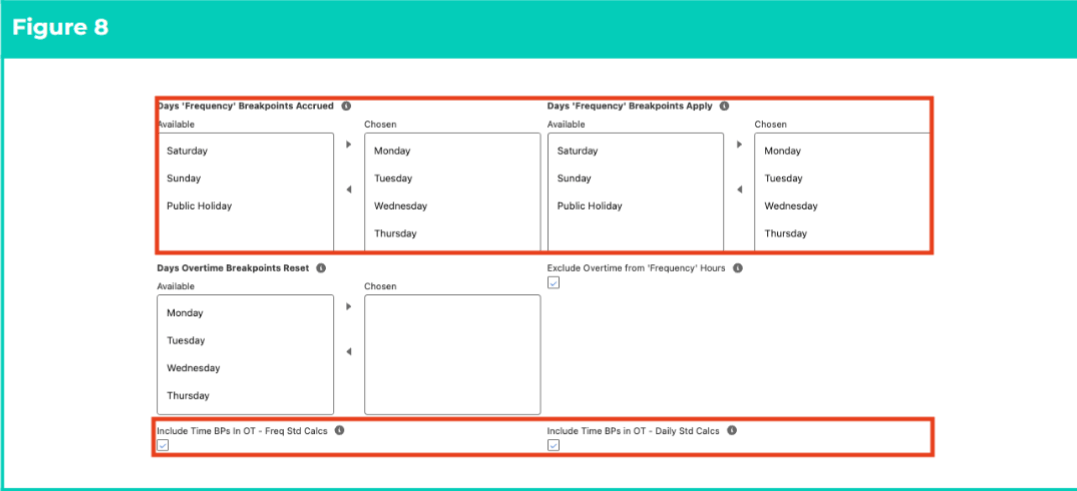
 11. Define Frequency Breakpoint calculations (see Figure 8):
12. To populate the following fields, use the arrow buttons provided to move days from the **Available** to **Chosen** columns.
1. Select days where time contributes to Frequency Standard Hours using the **Days ‘Frequency’ Breakpoints Accrued** field.
2. Select days where time contributes to Frequency Overtime Breakpoints once the count of Frequency Standard Hours is exceeded using the **Days ‘Frequency’ Breakpoints Accrued** field.
3. If required, define days where Frequency Overtime Breakpoints will reset to the first Breakpoint, instead of continuing to apply as Overtime from the previous day using the **Days Overtime Breakpoints Reset** field.
13. To exclude time associated with Overtime Breakpoints from Frequency Standard Hours calculations, select the **Exclude Overtime from ‘Frequency’ Hours** checkbox.
14. If using Standard Time with Time Breakpoints:
15. Enable Frequency Breakpoints to be interpreted using Overtime logic by selecting the **Include Time BPs in OT - Freq Std Calcs** checkbox.
1. If **Yes** , enable Overtime to be included in Daily Standard Hours assessments by selecting the **Include Time BPs in OT - Daily Std Calcs** checkbox.
11. Define Frequency Breakpoint calculations (see Figure 8):
12. To populate the following fields, use the arrow buttons provided to move days from the **Available** to **Chosen** columns.
1. Select days where time contributes to Frequency Standard Hours using the **Days ‘Frequency’ Breakpoints Accrued** field.
2. Select days where time contributes to Frequency Overtime Breakpoints once the count of Frequency Standard Hours is exceeded using the **Days ‘Frequency’ Breakpoints Accrued** field.
3. If required, define days where Frequency Overtime Breakpoints will reset to the first Breakpoint, instead of continuing to apply as Overtime from the previous day using the **Days Overtime Breakpoints Reset** field.
13. To exclude time associated with Overtime Breakpoints from Frequency Standard Hours calculations, select the **Exclude Overtime from ‘Frequency’ Hours** checkbox.
14. If using Standard Time with Time Breakpoints:
15. Enable Frequency Breakpoints to be interpreted using Overtime logic by selecting the **Include Time BPs in OT - Freq Std Calcs** checkbox.
1. If **Yes** , enable Overtime to be included in Daily Standard Hours assessments by selecting the **Include Time BPs in OT - Daily Std Calcs** checkbox.
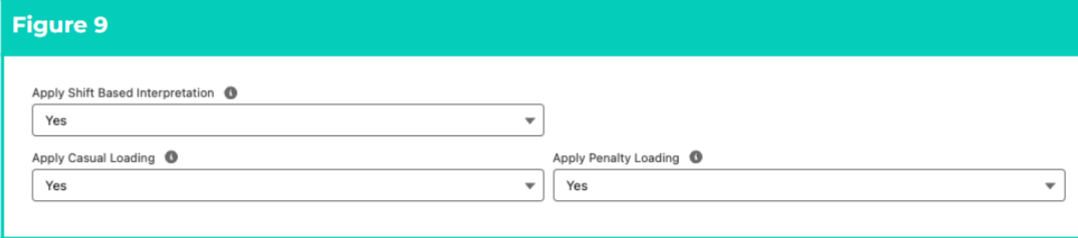
 13. Apply Shift Logic to Overtime and Minimum Hour calculations by selecting **Yes** in the **Apply Shift Based Interpretation** field (see Figure 9).
14. To calculate Loadings:
15. If separate Pay Transactions should be created when Casual Loading Pay Codes apply, select **Yes** in the **Apply Casual Loading** field.
16. If separate Pay Transactions should be created when Penalty Loading Pay Codes apply, select **Yes** in the **Apply Penalty Loading** field.
17. If Dual Leave Loading calculations need to be applied to Leave Breakpoints, select **Yes** in the **Apply Dual Leave Loading Calculations** field.
13. Apply Shift Logic to Overtime and Minimum Hour calculations by selecting **Yes** in the **Apply Shift Based Interpretation** field (see Figure 9).
14. To calculate Loadings:
15. If separate Pay Transactions should be created when Casual Loading Pay Codes apply, select **Yes** in the **Apply Casual Loading** field.
16. If separate Pay Transactions should be created when Penalty Loading Pay Codes apply, select **Yes** in the **Apply Penalty Loading** field.
17. If Dual Leave Loading calculations need to be applied to Leave Breakpoints, select **Yes** in the **Apply Dual Leave Loading Calculations** field.
 ***Important Notes***
*(Figure 9)*
*If Apply Shift Based Interpretation is No or blank, Daily Logic will be used to interpret Overtime and Minimum Hours calculations.*
*If Shift Logic is applied, Split/Broken Shift settings will be used to populate the Shift Start Time, Shift Start Date, Shift End Time and Shift End Date fields on Timesheet Entries, enabling interpretation to assess multiple Timesheet Entries as a group. To group shifts according to custom settings or integrations, rather Broken Shift Rules, please speak to your system Administrator.*
*If Yes is selected in the Apply Dual Leave Loading Calculations field, related Payee Leave Rules must also be configured to enable Leave Loading to avoid validation errors during Interpretation.*
### **Break Loading and Minimum Rest Rules**
15. To define any Break Loading or Minimum Rest logic, follow the instructions provided in the Populate Break Loading & Minimum Rest Rules QRG.
### **Split/Broken Shift and Sleepover Rules**
16. To define any Split/Broken Shift or Sleepover logic, follow the instructions provided in the Populate Split/Broken Shift & Sleepover Rules QRG.
### **Weekday (Monday to Friday) Rules**
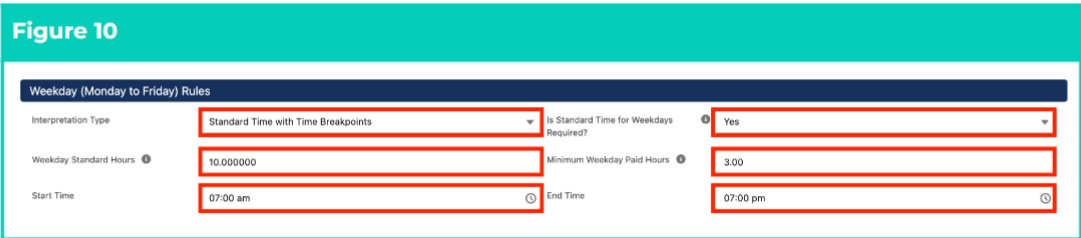
This section of the Interpretation Rule Builder defines Interpretation logic for Weekday Timesheet Entries. Interpretation Type, Standard Hours and Minimum Paid Hours MUST be populated for Weekday, Saturday, Sunday and Public Holiday Rules.
17. To determine how Timesheet Entries are interpreted, select from the available picklist options in the **Interpretation Type** field (see Figure 10):
18. **Standard Time with Time Breakpoints** - Breakpoints allow Pay Codes to be defined according to the amount of hours entered over a 24 hour period.
1. If selected, populate the **Start Time** and **End Time** fields to define the period that ordinary time Pay Codes apply during Weekdays.
19. **Standard Time with Time of Day Breakpoints** - Breakpoints allow Pay Codes to be defined according to the time of day entries occur over a 24 hour period.
20. If Ordinary hours occur Weekdays, select **Yes** from the available picklist options in the **Is Standard Time for Weekdays Required?** field).
21. If **No** , Overtime will be applied to any Timesheet Entries completed for Weekdays.
22. To define the maximum hours payable for ordinary time Pay Codes in a single shift (if Shift Logic is applied) or day (if Daily Logic is applied) before Overtime Pay Codes are applied, populate the **Weekday Standard Hours** field.
23. To define the minimum hours payable each Weekday, regardless of actual hours populated for Timesheet Entries, populate the **Minimum Weekday Paid Hours** field.
***Important Notes***
*(Figure 9)*
*If Apply Shift Based Interpretation is No or blank, Daily Logic will be used to interpret Overtime and Minimum Hours calculations.*
*If Shift Logic is applied, Split/Broken Shift settings will be used to populate the Shift Start Time, Shift Start Date, Shift End Time and Shift End Date fields on Timesheet Entries, enabling interpretation to assess multiple Timesheet Entries as a group. To group shifts according to custom settings or integrations, rather Broken Shift Rules, please speak to your system Administrator.*
*If Yes is selected in the Apply Dual Leave Loading Calculations field, related Payee Leave Rules must also be configured to enable Leave Loading to avoid validation errors during Interpretation.*
### **Break Loading and Minimum Rest Rules**
15. To define any Break Loading or Minimum Rest logic, follow the instructions provided in the Populate Break Loading & Minimum Rest Rules QRG.
### **Split/Broken Shift and Sleepover Rules**
16. To define any Split/Broken Shift or Sleepover logic, follow the instructions provided in the Populate Split/Broken Shift & Sleepover Rules QRG.
### **Weekday (Monday to Friday) Rules**
This section of the Interpretation Rule Builder defines Interpretation logic for Weekday Timesheet Entries. Interpretation Type, Standard Hours and Minimum Paid Hours MUST be populated for Weekday, Saturday, Sunday and Public Holiday Rules.
17. To determine how Timesheet Entries are interpreted, select from the available picklist options in the **Interpretation Type** field (see Figure 10):
18. **Standard Time with Time Breakpoints** - Breakpoints allow Pay Codes to be defined according to the amount of hours entered over a 24 hour period.
1. If selected, populate the **Start Time** and **End Time** fields to define the period that ordinary time Pay Codes apply during Weekdays.
19. **Standard Time with Time of Day Breakpoints** - Breakpoints allow Pay Codes to be defined according to the time of day entries occur over a 24 hour period.
20. If Ordinary hours occur Weekdays, select **Yes** from the available picklist options in the **Is Standard Time for Weekdays Required?** field).
21. If **No** , Overtime will be applied to any Timesheet Entries completed for Weekdays.
22. To define the maximum hours payable for ordinary time Pay Codes in a single shift (if Shift Logic is applied) or day (if Daily Logic is applied) before Overtime Pay Codes are applied, populate the **Weekday Standard Hours** field.
23. To define the minimum hours payable each Weekday, regardless of actual hours populated for Timesheet Entries, populate the **Minimum Weekday Paid Hours** field.
 ### **Time Breakpoints**
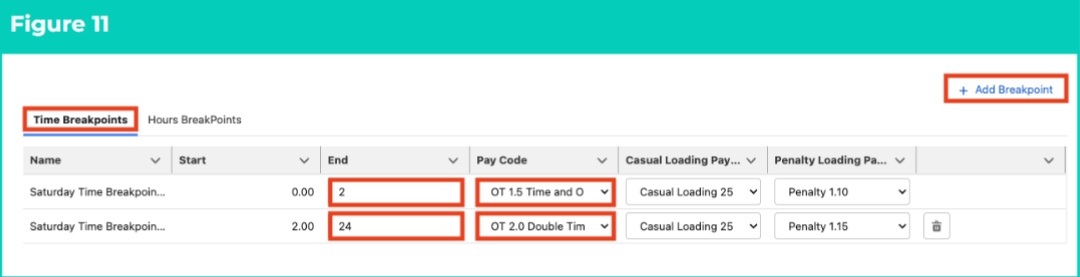
These Breakpoints are mandatory when the Standard Time with Time Breakpoints Interpretation Type is selected for Weekday, Saturday, Sunday or Public Holiday Rules.
21. Follow this step to populate Time Breakpoints (see Figure 11):
22. Click on the **Time Breakpoints** tab.
23. As the **Start** field defaults to 0, and does not need to be populated, define the first Time Breakpoint outside of Weekday ordinary time by populating the **End** field.
1. Weekday ordinary hours for with Time Breakpoints are determined by the values in the Start Time and End Time fields for Weekday Rules.
24. Select a Pay Code for the first Time Breakpoint by populating the **Pay Code** field using the lookup options available.
25. If Loadings were enabled in General Rule Settings:
1. Use the available picklist options to populate the **Casual Loading Pay Code** and/or **Penalty Loading Pay Code** fields.
26. To add another Time Breakpoint, click on the **+ Add Breakpoint** button.
27. Populate the **End** and **Pay Code** fields within the new Breakpoint to define the next Weekday Time Breakpoint.
28. To remove a Breakpoint, click on the **Trash Can** icon next to the corresponding line.
29. Repeat until a full 24 hours of Time Breakpoints have been populated.
### **Time Breakpoints**
These Breakpoints are mandatory when the Standard Time with Time Breakpoints Interpretation Type is selected for Weekday, Saturday, Sunday or Public Holiday Rules.
21. Follow this step to populate Time Breakpoints (see Figure 11):
22. Click on the **Time Breakpoints** tab.
23. As the **Start** field defaults to 0, and does not need to be populated, define the first Time Breakpoint outside of Weekday ordinary time by populating the **End** field.
1. Weekday ordinary hours for with Time Breakpoints are determined by the values in the Start Time and End Time fields for Weekday Rules.
24. Select a Pay Code for the first Time Breakpoint by populating the **Pay Code** field using the lookup options available.
25. If Loadings were enabled in General Rule Settings:
1. Use the available picklist options to populate the **Casual Loading Pay Code** and/or **Penalty Loading Pay Code** fields.
26. To add another Time Breakpoint, click on the **+ Add Breakpoint** button.
27. Populate the **End** and **Pay Code** fields within the new Breakpoint to define the next Weekday Time Breakpoint.
28. To remove a Breakpoint, click on the **Trash Can** icon next to the corresponding line.
29. Repeat until a full 24 hours of Time Breakpoints have been populated.
 ### **Time of Day Breakpoints**
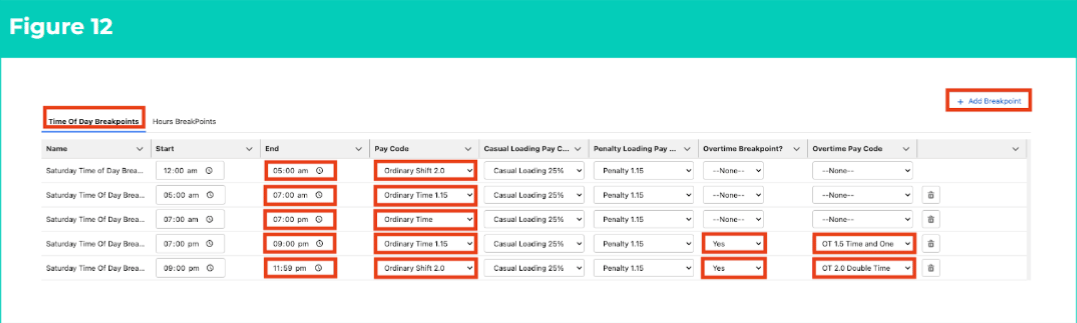
These Breakpoints are mandatory when Standard Time with Time of Day Breakpoints is selected as the Interpretation Type for Weekday, Saturday, Sunday or Public Holiday Rules.
23. Follow this step to populate Time of Day Breakpoints (see Figure 12):
24. Click on the **Time Breakpoints** tab.
25. As the **Start** field defaults to 0, and does not need to be populated, define the first Time of Day Breakpoint that occurs during Weekdays from 12:00 am by populating the **End** field.
26. Select a Pay Code for the first Time of Day Breakpoint by populating the **Pay Code** field using the lookup options available.
1. If the Breakpoint relates to Overtime, select **Yes** in the **Overtime Breakpoint** field and populate the **Overtime Pay Code** field instead of the Pay Code field.
27. If Loadings were enabled in General Rule Settings:
1. Use the available picklist options to populate the **Casual Loading Pay Code** and/or **Penalty Loading Pay Code** fields.
28. To add another Time of Day Breakpoint, click on the **+ Add Breakpoint** button.
29. Populate the **End** and **Pay Code** fields within the new Breakpoint to define the next Weekday Time of Day Breakpoint.
30. To remove a Breakpoint, click on the **Trash Can** icon next to the corresponding line.
31. Repeat until a full 24 hours of Time of Day Breakpoints have been populated.
### **Time of Day Breakpoints**
These Breakpoints are mandatory when Standard Time with Time of Day Breakpoints is selected as the Interpretation Type for Weekday, Saturday, Sunday or Public Holiday Rules.
23. Follow this step to populate Time of Day Breakpoints (see Figure 12):
24. Click on the **Time Breakpoints** tab.
25. As the **Start** field defaults to 0, and does not need to be populated, define the first Time of Day Breakpoint that occurs during Weekdays from 12:00 am by populating the **End** field.
26. Select a Pay Code for the first Time of Day Breakpoint by populating the **Pay Code** field using the lookup options available.
1. If the Breakpoint relates to Overtime, select **Yes** in the **Overtime Breakpoint** field and populate the **Overtime Pay Code** field instead of the Pay Code field.
27. If Loadings were enabled in General Rule Settings:
1. Use the available picklist options to populate the **Casual Loading Pay Code** and/or **Penalty Loading Pay Code** fields.
28. To add another Time of Day Breakpoint, click on the **+ Add Breakpoint** button.
29. Populate the **End** and **Pay Code** fields within the new Breakpoint to define the next Weekday Time of Day Breakpoint.
30. To remove a Breakpoint, click on the **Trash Can** icon next to the corresponding line.
31. Repeat until a full 24 hours of Time of Day Breakpoints have been populated.
 ### **Hours Breakpoints**
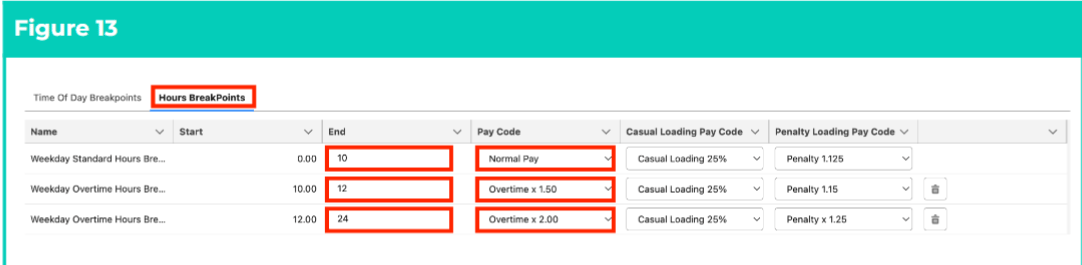
These Breakpoints are mandatory for Weekday, Saturday, Sunday and Public Holiday Rules. A full 24 hours must be populated, and every Breakpoint after the first will represent Overtime.
25. Follow this step to populate Hours Breakpoints (see Figure 13):
26. Click on the **Hours Breakpoints** tab.
27. As the **Start** field defaults to 0, and does not need to be populated, define the hours associated with ordinary time Pay Codes by populating the **End** field.
1. Users must remember that Hours Breakpoints will be overridden by Time Breakpoints, so this amount is the defined maximum payable with ordinary time Pay Codes.
28. Select a Pay Code for the ordinary time Breakpoint by populating the **Pay Code** field using the lookup options available.
29. If Loadings were enabled in General Rule Settings:
1. Use the available picklist options to populate the **Casual Loading Pay Code** and/or **Penalty Loading Pay Code** fields.
30. To add the first Overtime Hours Breakpoint, click on the **+ Add Breakpoint** button.
31. Populate the **End** and **Pay Code** fields within the new Breakpoint to define the first Overtime Hours Breakpoint.
32. To remove a Breakpoint, click on the **Trash Can** icon next to the corresponding line.
33. Repeat until a full 24 hours of Hours Breakpoints have been populated.
### **Hours Breakpoints**
These Breakpoints are mandatory for Weekday, Saturday, Sunday and Public Holiday Rules. A full 24 hours must be populated, and every Breakpoint after the first will represent Overtime.
25. Follow this step to populate Hours Breakpoints (see Figure 13):
26. Click on the **Hours Breakpoints** tab.
27. As the **Start** field defaults to 0, and does not need to be populated, define the hours associated with ordinary time Pay Codes by populating the **End** field.
1. Users must remember that Hours Breakpoints will be overridden by Time Breakpoints, so this amount is the defined maximum payable with ordinary time Pay Codes.
28. Select a Pay Code for the ordinary time Breakpoint by populating the **Pay Code** field using the lookup options available.
29. If Loadings were enabled in General Rule Settings:
1. Use the available picklist options to populate the **Casual Loading Pay Code** and/or **Penalty Loading Pay Code** fields.
30. To add the first Overtime Hours Breakpoint, click on the **+ Add Breakpoint** button.
31. Populate the **End** and **Pay Code** fields within the new Breakpoint to define the first Overtime Hours Breakpoint.
32. To remove a Breakpoint, click on the **Trash Can** icon next to the corresponding line.
33. Repeat until a full 24 hours of Hours Breakpoints have been populated.
 ### **Saturday Rules, Sunday Rules & Public Holiday Rules**
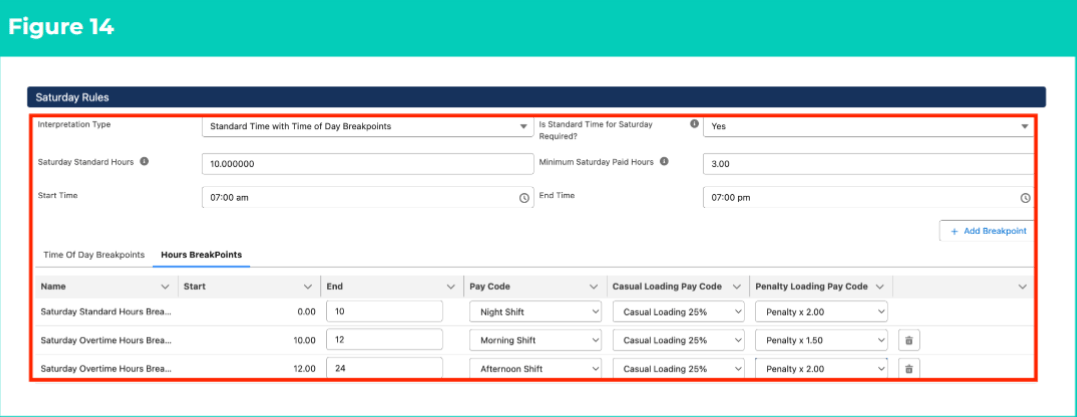
27. Follow the instructions for Weekday (Monday to Friday) Rules for Saturday, Sunday and Public Holiday sections (see Figure 14).
28. Follow the instructions for Time Breakpoints or Time of Day Breakpoints, as well as Hours Breakpoints, for Saturday, Sunday and Public Holiday sections.
### **Saturday Rules, Sunday Rules & Public Holiday Rules**
27. Follow the instructions for Weekday (Monday to Friday) Rules for Saturday, Sunday and Public Holiday sections (see Figure 14).
28. Follow the instructions for Time Breakpoints or Time of Day Breakpoints, as well as Hours Breakpoints, for Saturday, Sunday and Public Holiday sections.
 ***Important Notes***
*(Figure 14)*
*Required fields MUST be populated for Weekday, Saturday, Sunday and Public Holiday Rules, regardless of whether regular shifts occur on these days. Breakpoints MUST also be populated to cover a full 24 hours (i.e. 12:00AM - 11:59PM) for Weekdays, Saturdays, Sundays and Public Holidays, and with at least one Pay Code populated for the period.*
*Breakpoints for Public Holiday Rules should reflect the hours an Employee would work if the Public Holiday fell on a day where regular Timesheet Entries were expected, BUT must be associated with the applicable Penalty Pay Code for Public Holiday work.*
### **Frequency Breakpoints**
29. Follow this step to populate Frequency Hours Rules (see Figure 15):
1. To define the maximum amount of Ordinary Hours payable within the Timesheet Period before overtime must be paid, populate the **Frequency’ Standard Hours** field.
***Important Notes***
*(Figure 14)*
*Required fields MUST be populated for Weekday, Saturday, Sunday and Public Holiday Rules, regardless of whether regular shifts occur on these days. Breakpoints MUST also be populated to cover a full 24 hours (i.e. 12:00AM - 11:59PM) for Weekdays, Saturdays, Sundays and Public Holidays, and with at least one Pay Code populated for the period.*
*Breakpoints for Public Holiday Rules should reflect the hours an Employee would work if the Public Holiday fell on a day where regular Timesheet Entries were expected, BUT must be associated with the applicable Penalty Pay Code for Public Holiday work.*
### **Frequency Breakpoints**
29. Follow this step to populate Frequency Hours Rules (see Figure 15):
1. To define the maximum amount of Ordinary Hours payable within the Timesheet Period before overtime must be paid, populate the **Frequency’ Standard Hours** field.
 ***Important Notes***
*(Figure 19)*
*The Interpretation Rule cannot be saved or finalised until Breakpoint & Pay Code Cap creation has been completed.*
### **Allowance Rules, Allowance Junction Rules & Leave Breakpoints**
30. To define any Allowance Rules or Leave Breakpoints, follow the instructions provided in the Populate Allowance, Leave & Allowance Junction Rule Breakpoints QRG.
31. To define Allowances applied in conjunction with certain Payee Leave Rules or Timesheet Activities:
32. Populate the Allowance and / or Leave Breakpoints according to the instructions provided in the Populate Allowance, Leave & Allowance Junction Rule Breakpoints QRG.
33. Create Breakpoints according to the instructions provided in the Create Breakpoints & Pay Code Caps QRG.
34. Populate Allowance Junction Rule Breakpoints according to the instructions provided in the Populate Allowance, Leave & Allowance Junction Rule Breakpoints QRG.
### **Create Breakpoints & Pay Code Caps**
32. To complete Frequency Breakpoints and finalise Interpretation Rule creation, follow the instructions provided in the Create Breakpoints & Pay Code Caps QRG.
## **Field Descriptions**
| Field Name | Description |
| ---------------------------------------------------------------------------------------------------------------------------------------------------------------------------------- | -------------------------------------------------------------------------------------------------------------------------------------------------------------------------------------------------------------------------------------------------------------------------------------------------------------------------------------------------------------------------------------------------------------------------------------------------------------------------------------------------------------------------------------------------------------------------------------------------------------------------------------------------------------------------------------------------------------- |
| Apply Break Time Interpretation | Indicates whether the Interpretation Rule will apply Break Time logic to all relevant Breakpoint types within the Interpretation. |
| Apply Casual Loading | Indicates the requirement for a separate Pay Code for Casual Loading to be applied during Interpretation and detailed as individual Pay Transactions in addition to the standard Pay Transactions for the same quantity of time. |
| Apply Excursion Interpretation? | Indicates whether Excursion Shift logic will be applied to this Interpretation Rule.
***Important Notes***
*(Figure 19)*
*The Interpretation Rule cannot be saved or finalised until Breakpoint & Pay Code Cap creation has been completed.*
### **Allowance Rules, Allowance Junction Rules & Leave Breakpoints**
30. To define any Allowance Rules or Leave Breakpoints, follow the instructions provided in the Populate Allowance, Leave & Allowance Junction Rule Breakpoints QRG.
31. To define Allowances applied in conjunction with certain Payee Leave Rules or Timesheet Activities:
32. Populate the Allowance and / or Leave Breakpoints according to the instructions provided in the Populate Allowance, Leave & Allowance Junction Rule Breakpoints QRG.
33. Create Breakpoints according to the instructions provided in the Create Breakpoints & Pay Code Caps QRG.
34. Populate Allowance Junction Rule Breakpoints according to the instructions provided in the Populate Allowance, Leave & Allowance Junction Rule Breakpoints QRG.
### **Create Breakpoints & Pay Code Caps**
32. To complete Frequency Breakpoints and finalise Interpretation Rule creation, follow the instructions provided in the Create Breakpoints & Pay Code Caps QRG.
## **Field Descriptions**
| Field Name | Description |
| ---------------------------------------------------------------------------------------------------------------------------------------------------------------------------------- | -------------------------------------------------------------------------------------------------------------------------------------------------------------------------------------------------------------------------------------------------------------------------------------------------------------------------------------------------------------------------------------------------------------------------------------------------------------------------------------------------------------------------------------------------------------------------------------------------------------------------------------------------------------------------------------------------------------- |
| Apply Break Time Interpretation | Indicates whether the Interpretation Rule will apply Break Time logic to all relevant Breakpoint types within the Interpretation. |
| Apply Casual Loading | Indicates the requirement for a separate Pay Code for Casual Loading to be applied during Interpretation and detailed as individual Pay Transactions in addition to the standard Pay Transactions for the same quantity of time. |
| Apply Excursion Interpretation? | Indicates whether Excursion Shift logic will be applied to this Interpretation Rule.
- Excursion Standard End Time indicates the time that Timesheet Entries with the Excursion Timesheet Activity should cease being interpreted using ordinary Time Pay Codes.
- Excursion Standard Hours indicates the total time that Timesheet Entries with the Excursion Timesheet Activity should be interpreted using ordinary Time Pay Codes.
- Excursion Standard Start Time indicates the time that Timesheet Entries with the Excursion Timesheet Activity should start being interpreted using ordinary time Pay Codes.
|
| Apply Interpretation Variations? | Indicates whether Interpretation Variations are required for the Interpretation Rule. |
| Apply OT Round Up Shift Interpretation? | Indicates whether the Interpretation Rule requires Overtime Round Up Timesheet Entries to be calculated.
- Minimum OT Round Up Shift Paid Hours indicates the minimum hours that must be paid for OT Round Up Shift Interpretation.
|
| Apply Penalty Loading | Indicates the requirement for Interpretation to apply a separate Penalty Loading Pay Code, which is payable in addition to other Pay Codes for time entered. |
| Apply Shift Based Interpretation | Determines whether Overtime and (optionally) Minimum Hours should be Interpreted using Shift Logic or Daily Logic.
- If Shift Logic is applied, Split/Broken Shift settings (or other custom integrations) will be used to populate the following fields for each Timesheet Entry:
- Shift Start Date
- Shift Start Time
- Shift End Date
- Shift End Time
- The values of these fields will determine whether Timesheet Entries are assessed individually, or as part of a Shift. If blank, the Timesheet Entry will be assessed individually.
|
| Apply Wake Up Interpretation? | Indicates whether Wake Up Shift Logic will be applied to this Interpretation Rule. |
| Casual Loading Pay Code | Defines the Pay Code that applies for Casual Loading Breakpoints. |
| Days 'Frequency' Breakpoints Accrued | Defines the specific days where the hours recorded in Timesheet Entries are included in the count of hours when assessing 'Frequency' Breakpoints. |
| Days 'Frequency' Breakpoints Apply | When 'Frequency' Breakpoint Overtime is reached for selected days, 'Frequency' Breakpoints will override all other Breakpoints that apply to the day selected. |
| Days Overtime Breakpoints Reset | Defines the days where 'Frequency' Overtime Breakpoints are reset back to the first Frequency Overtime Breakpoint. |
| End | Defines the end of the Breakpoint. |
| End Time | Indicates when ordinary time Pay Codes cease to be payable for Timesheet Entries interpreted using Standard Time with Time Breakpoints. |
| Exclude Overtime from 'Frequency' Hours | Defines if Breakpoints considered as Overtime hours will be excluded in the count of hours worked during the period and assessed against 'Frequency' breakpoints. |
| Frequency' Standard Hours | Defines the maximum time payable with ordinary time Pay Codes on each Timesheet before Overtime Pay Codes should be applied to the remaining time (as determined by the Timesheet Frequency). |
| Include Time BPs in OT - Freq Std Calcs | Determines whether Timesheet Entries for Standard Time with Time Breakpoints will be treated as Overtime for Frequency Breakpoints.
- Include Time BTs in OT - Daily Standard Calcs - If Time Breakpoints have been included in Overtime, this field defines whether Overtime Hours should be included when assessing Daily Standard Hours. Only applicable to Standard Time with Time Breakpoints.
|
| Interpretation Type | Defines the type of Interpretation used when processing Breakpoints for related Timesheet Entries, according to either the amount of time or the time of day that Timesheet Entries occur:
- Standard Time with Time Breakpoints - allows Pay Codes to be defined for Breakpoints that apply once the hours populated in the Start/End Time fields is exceeded.
- Standard Time with Time of Day Breakpoints - allows Pay Codes to be defined for Breakpoints interpreted according to the time of day recorded for Timesheet Entries.
|
| Interpretation Rule Name | Defines the name for the Interpretation Rule. |
| Is Standard Time for Weekdays Required? (also Is Standard Time for Saturdays Required?, Is Standard Time for Sundays Required? and Is Standard Time for Public Holidays Required?) | Defines whether Ordinary hours will apply for Weekday, Saturday, Sunday and Public Holiday Rules. If Ordinary hours are not required, Time Breakpoints will not apply and only Hourly Breakpoints will be used. |
| Long Description | Is the description outlining the Interpretation Rules purpose. Users are encouraged to detail here the brief snapshot of how this Interpretation Rule is configured, to assist with identifying differences between various Interpretation Rules with similar conditions and/or names. |
| Minimum Weekday Paid Hours (also Minimum Saturday Paid Hours, Minimum Sunday Paid Hours and Minimum Public Holiday Paid Hours) | Defines the minimum hours payable when assessing total Timesheet Entries for each day. This field must be defined within Weekday, Saturday, Sunday and Public Holiday Rules. |
| Pay Code | Defines the Pay Code that applies to the Breakpoint. |
| Penalty Loading Pay Code | Defines the Pay Code that applies to Penalty Loading Breakpoints. |
| Short Description | Is the description displayed in a lookup search to assist users in selecting the correct Interpretation. |
| Start | Defines the start of the Breakpoint. |
| Start Time | Indicates when ordinary time Pay Codes begin to be payable for Timesheet Entries interpreted using Standard Time with Time Breakpoints. |
| Timesheet Frequency | Defines the Timesheet Frequency for the Interpretation Rule. If the Timesheet Frequency on the Timesheet and the Interpretation Rule do not match, Interpretation will fail. |
| Wake Up Minimum Hours | Defines the accumulative minimum payable hours for Wake Up Timesheet Activities occurring during Sleepover period. |
| Weekday Standard Hours (also Saturday Standard Hours, Sunday Standard Hours and Public Holiday Standard Hours) | Defines the maximum hours payable using ordinary time Pay Codes before overtime Pay Codes are applied for Weekday, Saturday, Sunday and Public Holiday Rules. |
## **Further Information**
| **Document** | **Document Type** | **Description** |
| ------------------------------------------------------------------------------------------------- | --------------------------- | ------------------------------------------------------------------------------------------------------------------------------------------------------------------------- |
| QRG Interpretation Rule Builder Functionality - Key Information | Information Quick Reference | Outlines useful information relevant to the Interpretation Rule functionality. The document includes definitions, prerequisites, and other non-instructional information. |
| QRG Interpretation Rule Builder - Create Daily Rates Interpretation Rule | Task Instructions | How to create a Daily Rates Interpretation Rule. |
| QRG Interpretation Rule Builder - Populate Shift Time Interpretation Rules | Task Instructions | How to populate Breakpoints for the Shift Start or Shift End Interpretation Rule Record Type. |
| QRG Interpretation Rule Builder - Populate Break Loading & Minimum Rest Rules | Task Instructions | How to populate Breakpoints for the Break Loading and Minimum Rest Rules using the Interpretation Rule Builder. |
| QRG Interpretation Rule Builder - Populate Split/Broken Shift & Sleepover Rules | Task Instructions | How to populate Breakpoints for the Split/Broken Shift and Sleepover Rules using the Interpretation Rule Builder. |
| QRG Interpretation Rule Builder - Create Breakpoints & Pay Code Caps | Task Instructions | How to create Breakpoints and Pay Code Caps using the Interpretation Rule Builder. |
| QRG Interpretation Rule Builder - Populate Allowance, Leave & Allowance Junction Rule Breakpoints | Task Instructions | How to populate Breakpoints for Allowances, Leave and Allowance Junction Rules using the Interpretation Rule Builder. |
| QRG Create Interpretation Rule - Create Custom Interpretation Variation | Task Instructions | How to create custom Interpretation Variations. |
| QRG Create Interpretation Rule - Create Assignment Interpretation Variation | Task Instructions | How to create Assignment Interpretation Variations. |