> ## Documentation Index
> Fetch the complete documentation index at: https://documentation.2cloudnine.com/llms.txt
> Use this file to discover all available pages before exploring further.
# QRG Interpretation Rule Builder - Populate Split/Broken Shift & Sleepover Rules
## **Purpose**
The purpose of this quick reference guide is to step through the process of populating Split/Broken Shift & Sleepover Rules within the Interpretation Rule Builder. The intended audience for this document are system administrators / standard users.
## **Steps**
### **Populate Split/Broken Shift & Sleepover Rules**
Interpretation Rules are used to convert Timesheet Entries into Pay Transactions for payment of wages to Payees, taking into account different calculations for the amount of time worked.
Interpretation Rules are created using the Interpretation Rule Builder, which consists of a series of dynamic fields that differ based on the record type selected. These fields are broken into several sections, some of which are optional, to allow for various interpretation types.
See below for an ordered list of the QRGs related to each section of the Interpretation Rule Builder page for Hourly Rate, Shift End Time or Shift Start Time record types:
1. Populate Hourly Rate Interpretation Rules OR Shift Time Interpretation Rules
2. Populate Break Loading and Minimum Rest Rules **(optional)**
3. Create Split/Broken Shift and Sleepover Rules **(optional)**
4. Populate Allowance, Leave & Allowance Junction Rule Breakpoints **(optional)**
5. Create Breakpoints and Pay Code Caps
The Split/Broken Shift and Sleepover Rules define how fragmented and overnight shift work should be defined and calculated when creating Pay Transactions in association with this Interpretation Rule.
### **Sleepover Interpretation**
To enable Sleepover Interpretation, identify the Split/Broken Shift and Sleepover Rules section of the Interpretation Rule Builder and follow the below steps.
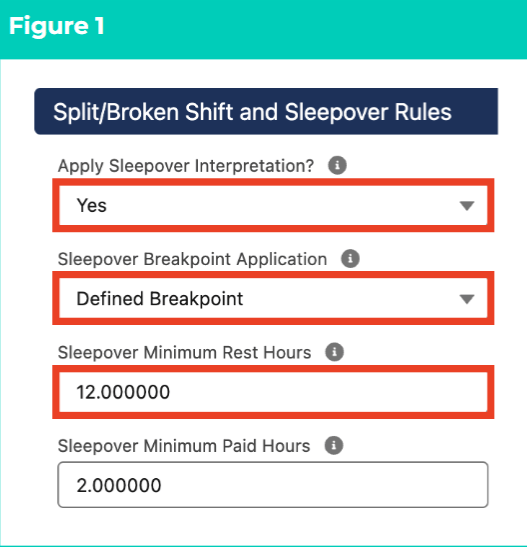
1. Populate the following fields (see Figure 1):
1. To apply Sleepover Interpretation to Timesheet Entries that occur before or after a sleepover period, select **Yes** from the available picklist options in the **Apply Sleepover Interpretation?** field.
If Yes, a Sleepover Timesheet Activity Project Code MUST be created.
2. Determine how Sleepover Timesheet Entries are interpreted by selecting from the available picklist options in the **Sleepover Breakpoint Application** field:
1. **First Timesheet Entry** - Interpretation uses Breakpoints from the first Timesheet Entry.
 2. **Second Timesheet Entry** - Interpretation uses Breakpoints from the second Timesheet Entry.
3. **Defined Breakpoint** - Interpretation uses Pay Codes from the Sleepover Breakpoint.
4. **Standard Interpretation** - Interpretation uses Breakpoints from the Timesheet Entry that the Sleepover occurs on.
5. Define the minimum amount of hours that should lapse between each Sleepover Timesheet Entry by populating the **Sleepover Minimum Rest Hours field** .
6. To define the minimum amount of payable hours for Sleepover Timesheet Entries, populate the **Sleepover Minimum Paid Hours** field.
Sleepover Minimum Paid Hours are only applicable when Shift Logic is enabled. For more information on Shift Logic, please refer to the Interpretation Rule Builder Functionality Key Info QRG.
Enabling Shift Logic for Sleepover Interpretation will prevent Sleepover Timesheet Entries crossing days from applying Daily Minimum Hour calculations.
2. If Defined Breakpoint was selected in the Sleepover Breakpoint Application field, populate the following required fields (see Figure 2):
1. From the Sleepover Breakpoint tab, click on the **+ Add Breakpoints** button.
2. To define the Pay Code for Sleepover Pay Transactions during ordinary time, select from the available picklist options in the **Paycode** field.
3. To define the remaining Pay Codes for Sleepover Pay Transactions, select from the available picklist options in each of the following fields:
1. **Public Holiday Paycode**
2. **Public Holiday Penalty Paycode** (if Penalty Loading is enabled)
3. **Saturday Paycode**
4. **Saturday Penalty Paycode** (if Penalty Loading is enabled)
5. **Sunday Paycode**
6. **Sunday Public Holiday Paycode**
7. **Penalty Loading Paycode** (if Penalty Loading is enabled)
8. **Casual Loading Paycode** (if Casual Loading is enabled)
2. **Second Timesheet Entry** - Interpretation uses Breakpoints from the second Timesheet Entry.
3. **Defined Breakpoint** - Interpretation uses Pay Codes from the Sleepover Breakpoint.
4. **Standard Interpretation** - Interpretation uses Breakpoints from the Timesheet Entry that the Sleepover occurs on.
5. Define the minimum amount of hours that should lapse between each Sleepover Timesheet Entry by populating the **Sleepover Minimum Rest Hours field** .
6. To define the minimum amount of payable hours for Sleepover Timesheet Entries, populate the **Sleepover Minimum Paid Hours** field.
Sleepover Minimum Paid Hours are only applicable when Shift Logic is enabled. For more information on Shift Logic, please refer to the Interpretation Rule Builder Functionality Key Info QRG.
Enabling Shift Logic for Sleepover Interpretation will prevent Sleepover Timesheet Entries crossing days from applying Daily Minimum Hour calculations.
2. If Defined Breakpoint was selected in the Sleepover Breakpoint Application field, populate the following required fields (see Figure 2):
1. From the Sleepover Breakpoint tab, click on the **+ Add Breakpoints** button.
2. To define the Pay Code for Sleepover Pay Transactions during ordinary time, select from the available picklist options in the **Paycode** field.
3. To define the remaining Pay Codes for Sleepover Pay Transactions, select from the available picklist options in each of the following fields:
1. **Public Holiday Paycode**
2. **Public Holiday Penalty Paycode** (if Penalty Loading is enabled)
3. **Saturday Paycode**
4. **Saturday Penalty Paycode** (if Penalty Loading is enabled)
5. **Sunday Paycode**
6. **Sunday Public Holiday Paycode**
7. **Penalty Loading Paycode** (if Penalty Loading is enabled)
8. **Casual Loading Paycode** (if Casual Loading is enabled)
 ### **Split/Broken Shift Interpretation**
To enable Split/Broken Shift Interpretation, identify the Split/Broken Shift and Sleepover Rules section of the Interpretation Rule Builder and follow the below steps.
### **Split/Broken Shift Interpretation**
To enable Split/Broken Shift Interpretation, identify the Split/Broken Shift and Sleepover Rules section of the Interpretation Rule Builder and follow the below steps.
3. Populate the following fields (see Figure 3):
1. To apply Split/Broken Shift Interpretation to separate Timesheet Entries that relate to the same period of work, select **Yes** from the available picklist options in the **Apply Sleepover Interpretation?** field.
2. Determine how Pay Transactions related to Broken Shift Timesheet Entries are interpreted by selecting from the available picklist options in the **Broken Shift Breakpoint Application** field:
1. **First Timesheet Entry** - Pay Transactions for two linked Broken Shift Timesheet Entries are Interpreted using Breakpoints from the first Timesheet Entry.
2. **Second Timesheet Entry** - Pay Transactions for two linked Broken Shift Timesheet Entries are Interpreted using Breakpoints from the second Timesheet Entry.
3. **Defined Breakpoint** - Pay Transactions for Broken Shift Timesheet Entries are Interpreted according to Pay Codes from the Split/Broken Shift Breakpoint.
4. **Standard Interpretation** - Pay Transactions for Broken Shift Timesheet Entries are Interpreted using Breakpoints for the Timesheet Entry that the Broken Shift occurs on.
3. Define the amount of hours that must be worked before Split/Broken Shift Breakpoints apply by populating the **Total Span Hours** field.
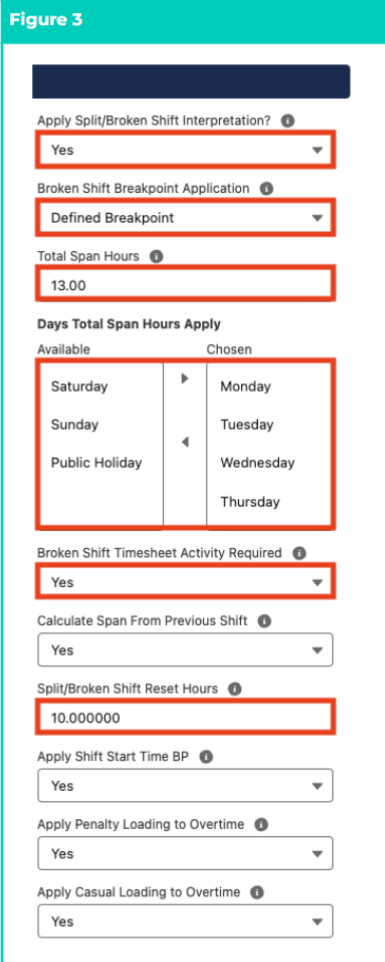
4. Define the days that Split/Broken Shift conditions should be applied on by using the arrow buttons to move days from the **Available** to the **Chosen** column in the **Days Total Span Hours Apply** field.
5. Determine whether a Broken Shift Timesheet Activity Entry is required in order to trigger Broken Shift conditions by selecting from the available picklist opinions in the **Broken Shift Timesheet Activity Required** field
6. To enable Timesheet Entries associated with the Split/Broken Shift Timesheet Activity to be Interpreted using Shift Logic, rather than Daily Logic, populate the **Calculate Span From Previous Shift** field.
1. If **Yes** , define the maximum amount of hours that may elapse between Split/Broken Timesheet Entries related to the same Shift by populating the **Split/Broken Shift Reset Hours** field.
7. For Shift End Interpretation Rules, determine whether Interpretation should assess Split/Broken Shift Timesheet Entries using Shift Start Time and Shift End Time rather than only Shift End Time by selecting from the available picklist options in the **Apply Shift Start Time BP** field.
8. If Penalty Loading is enabled, determine whether Penalty Loading Pay Codes should be applied to Overtime for Broken Shift Timesheet Entries by selecting from the available picklist options in the **Apply Penalty Loading to Overtime** field.
9. If Casual Loading is enabled, define whether Casual Loading Pay Codes should be applied to Overtime for Broken Shift Timesheet Entries by selecting from the available picklist options in the **Apply Casual Loading to Overtime** field.
10. Populate the following required fields to define the Pay Codes that will be applied for Split/Broken Shift Penalties, where Split/Broken Shifts have occurred outside of the maximum limit defined in the Total Span Hours field (see Figure 4):
1. From the Split/Broken Shift Breakpoint tab, click on the **+ Add Breakpoints** button.
2. To define the Pay Code for Split/Broken Shift Pay Transactions during ordinary time, select from the available picklist options in the **Paycode** field.
3. To define the remaining Pay Codes for Split/Broken Shift Pay Transactions, select from the available picklist options in each of the following fields:
1. **Overtime Pay Code**
2. **Public Holiday Pay Code**
3. **Public Holiday Overtime Pay Code**
4. **Public Holiday Penalty Pay Code** (if Penalty Loading is enabled)
5. **Casual Loading Pay Code** (if Casual Loading is enabled)
6. **Penalty Loading Pay Code** (if Penalty Loading is enabled)
 5. If Defined Breakpoint was selected in the Broken Shift Breakpoint Application field, populate the following required fields (see Figure 5):
1. From the Split/Broken Shift Standard Breakpoint tab, click on the **+ Add Breakpoints** button.
2. To define the Pay Code for Broken Shift Pay Transactions during ordinary time, select from the available picklist options in the **Paycode** field.
3. To define the remaining Pay Codes to apply to Split/Broken Shift Pay Transactions, select from the available picklist options in each of the following fields:
1. **Public Holiday Paycode**
2. **Public Holiday Penalty Paycode** (if Penalty Loading is enabled)
3. **Saturday Paycode**
4. **Saturday Penalty Paycode** (if Penalty Loading is enabled)
5. **Sunday Paycode**
6. **Sunday Public Holiday Paycode**
7. **Penalty Loading Paycode** (if Penalty Loading is enabled)
8. **Casual Loading Paycode** (if Casual Loading is enabled)
5. If Defined Breakpoint was selected in the Broken Shift Breakpoint Application field, populate the following required fields (see Figure 5):
1. From the Split/Broken Shift Standard Breakpoint tab, click on the **+ Add Breakpoints** button.
2. To define the Pay Code for Broken Shift Pay Transactions during ordinary time, select from the available picklist options in the **Paycode** field.
3. To define the remaining Pay Codes to apply to Split/Broken Shift Pay Transactions, select from the available picklist options in each of the following fields:
1. **Public Holiday Paycode**
2. **Public Holiday Penalty Paycode** (if Penalty Loading is enabled)
3. **Saturday Paycode**
4. **Saturday Penalty Paycode** (if Penalty Loading is enabled)
5. **Sunday Paycode**
6. **Sunday Public Holiday Paycode**
7. **Penalty Loading Paycode** (if Penalty Loading is enabled)
8. **Casual Loading Paycode** (if Casual Loading is enabled)
 6. To complete the remaining required fields for this Interpretation Rule, follow the instructions provided in the Populate Hourly Rate Interpretation Rules or Populate Shift Time Interpretation Rules QRG
The Interpretation Rule cannot be saved or finalised until all required fields and Breakpoints have been populated, and Breakpoint & Pay Code Cap creation has been completed.
## **Field Descriptions**
| Field Name | Description |
| ---------------------------------------- | ------------------------------------------------------------------------------------------------------------------------------------------------------------------------------------------------------------------------------------------------------------------------------------------------------------------------------------------------------------------------------------------------------------------------------------------------------------------------------------------------------------------------------------------------------------------------------------------------------------------------------------------------------------------------------------------------------------------------------------------------------------------------------------------------------------------------------------------------------------------------------------------------------------------------------------------------------------------------------------------------------------------------------------------------ |
| Apply Casual Loading to Overtime | Enables Casual Loading Pay Codes to be used to interpret Overtime hours on Split/Broken Shift Timesheet Entries. |
| Apply Penalty Loading to Overtime | Enables Penalty Loading Pay Codes to be used to interpret Overtime hours on Split/Broken Shift Timesheet Entries. |
| Apply Shift Start Time BP | Allows Shift Start Time Interpretation to be used when assessing Split/Broken Shift Timesheet Entries for Shift End Time Record Types. |
| Apply Sleepover Interpretation? | Defines whether the Interpretation Rule requires Sleepover Interpretation to be calculated. |
| Apply Split/Broken Shift Interpretation? | Defines whether the Interpretation Rule requires Split/Broken Shift Interpretation to be calculated. |
| Broken Shift Breakpoint Application | Defines how the Broken Shift Timesheet Entries are calculated during Interpretation:
6. To complete the remaining required fields for this Interpretation Rule, follow the instructions provided in the Populate Hourly Rate Interpretation Rules or Populate Shift Time Interpretation Rules QRG
The Interpretation Rule cannot be saved or finalised until all required fields and Breakpoints have been populated, and Breakpoint & Pay Code Cap creation has been completed.
## **Field Descriptions**
| Field Name | Description |
| ---------------------------------------- | ------------------------------------------------------------------------------------------------------------------------------------------------------------------------------------------------------------------------------------------------------------------------------------------------------------------------------------------------------------------------------------------------------------------------------------------------------------------------------------------------------------------------------------------------------------------------------------------------------------------------------------------------------------------------------------------------------------------------------------------------------------------------------------------------------------------------------------------------------------------------------------------------------------------------------------------------------------------------------------------------------------------------------------------------ |
| Apply Casual Loading to Overtime | Enables Casual Loading Pay Codes to be used to interpret Overtime hours on Split/Broken Shift Timesheet Entries. |
| Apply Penalty Loading to Overtime | Enables Penalty Loading Pay Codes to be used to interpret Overtime hours on Split/Broken Shift Timesheet Entries. |
| Apply Shift Start Time BP | Allows Shift Start Time Interpretation to be used when assessing Split/Broken Shift Timesheet Entries for Shift End Time Record Types. |
| Apply Sleepover Interpretation? | Defines whether the Interpretation Rule requires Sleepover Interpretation to be calculated. |
| Apply Split/Broken Shift Interpretation? | Defines whether the Interpretation Rule requires Split/Broken Shift Interpretation to be calculated. |
| Broken Shift Breakpoint Application | Defines how the Broken Shift Timesheet Entries are calculated during Interpretation:
- First Timesheet Entry causes all Pay Transactions associated with two linked Broken Shift Timesheet Entries to be interpreted using the Breakpoint that has been applied to the first Timesheet Entry.
- Second Timesheet Entry causes all Pay Transactions associated with two linked Broken Shift Timesheet Entries to be interpreted using the Breakpoint that has been applied to the second Timesheet Entry.
- Defined Breakpoint causes Pay Transactions associated with two linked Broken Shift Timesheet Entries to be interpreted according to the Pay Codes defined within the Sleepover Breakpoint.
- Standard Interpretation causes Pay Transactions associated with two linked Broken Shift Timesheet Entries to be interpreted according to the existing Breakpoints for the Timesheet Entry that the Sleepover occurs on.
|
| Broken Shift Timesheet Activity Required | Defines whether Broken Shift logic requires a Timesheet Activity to be calculated.
- If Yes, Shift logic will only be applied to Timesheet Entries populated with a Split/Broken Shift Timesheet Activity.
|
| Calculate Span from Previous Shift | Enables Timesheet Entries that are considered Split/Broken Shift to be calculated based on the previous Timesheet Entry using the Split/Broken Shift Reset Hours. |
| Days Total Span Hours Apply | Defines the days that Shift/Broken Shift conditions should be applied on. |
| Sleepover Breakpoint Application | Defines how Sleepover Timesheet Entries are calculated during Interpretation:
- First Timesheet Entry causes all Pay Transactions associated with two linked Sleepover Timesheet Entries to be interpreted using the Breakpoint that has been applied to the first Timesheet Entry.
- Second Timesheet Entry causes all Pay Transactions associated with two linked Sleepover Timesheet Entries to be interpreted using the Breakpoint that has been applied to the second Timesheet Entry.
- Defined Breakpoint causes Pay Transactions associated with two linked Sleepover Timesheet Entries to be interpreted according to the Pay Codes defined within the Standard Interpretation.
- Standard Interpretation causes Pay Transactions associated with two linked Sleepover Timesheet Entries to be interpreted according to the existing Breakpoints for the Timesheet Entry that the Sleepover occurs on.
|
| Sleepover Minimum Paid Hours | Defines the minimum amount of hours payable for Sleepover Timesheet Activities occurring on Sleepover Timesheet Entries. When this field is defined, Interpretation will assess minimum hours for ONE of the active Sleepover periods. If the defined amount of minimum hours has not been met, the Sleepover Timesheet Entry that is closest to the Sleepover Minimum Paid Hours will be uplifted. |
| Sleepover Minimum Rest Hours | Defines the hours that Minimum Rest logic would apply for Sleepover Entries. |
| Split/Broken Shift Reset Hours | Defines the maximum gap of hours between consecutive Timesheet Entries to be considered as part of the same Split/Broken Shift. |
| Total Span Hours | Defines the total hours that apply per day for handling Split/Broken Shifts. |
## **Further Information**
| **Document** | **Document Type** | **Description** |
| ------------------------------------------------------------------------------------------------- | --------------------------- | ------------------------------------------------------------------------------------------------------------------------------------------------------------------------- |
| QRG Interpretation Rule Builder Functionality - Key Information | Information Quick Reference | Outlines useful information relevant to the Interpretation Rule functionality. The document includes definitions, prerequisites, and other non-instructional information. |
| QRG Interpretation Rule Builder - Create Daily Rates Interpretation Rule | Task Instructions | How to create a Daily Rates Interpretation Rule. |
| QRG Interpretation Rule Builder - Populate Hourly Rate Interpretation Rules | Task Instructions | How to populate Breakpoints for the Hourly Rate Interpretation Rule Record Type. |
| QRG Interpretation Rule Builder - Populate Shift Time Interpretation Rules | Task Instructions | How to populate Breakpoints for the Shift Start or Shift End Interpretation Rule record type. |
| QRG Interpretation Rule Builder - Populate Break Loading & Minimum Rest Rules | Task Instructions | How to populate Breakpoints for the Break Loading and Minimum Rest Rules using the Interpretation Rule Builder. |
| QRG Interpretation Rule Builder - Create Breakpoints & Pay Code Caps | Task Instructions | How to create Breakpoints and Pay Code Caps using the Interpretation Rule Builder. |
| QRG Interpretation Rule Builder - Populate Allowance, Leave & Allowance Junction Rule Breakpoints | Task Instructions | How to populate Breakpoints for Allowances, Leave and Allowance Junction Rules using the Interpretation Rule Builder. |
| QRG Create Interpretation Rule - Create Custom Interpretation Variation | Task Instructions | How to create custom Interpretation Variations. |
| QRG Create Interpretation Rule - Create Assignment Interpretation Variation | Task Instructions | How to create Assignment Interpretation Variations. |