> ## Documentation Index
> Fetch the complete documentation index at: https://documentation.2cloudnine.com/llms.txt
> Use this file to discover all available pages before exploring further.
# QRG Payee Leave Forecast
## Purpose
The purpose of this quick reference guide is to step through the process of Payee Leave Forecast. The
intended audience for this document are Standard Users.
## Steps
### **Leave Forecast**
To forecast a Payee’s Leave Balance, follow the steps below:
1. Go to the **Payee** record.
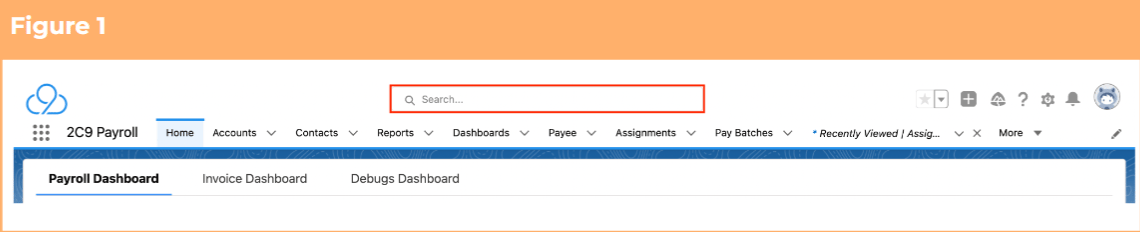
1. To identify a Payee record from an Employee record, enter the Employee name into the **Global Search**. (See Figure 1)
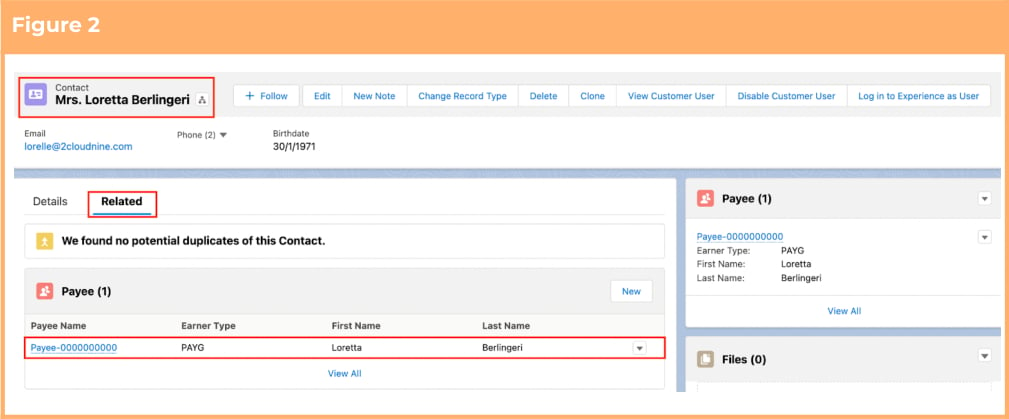
 2. Select the **Employee** record from the suggestions provided. (See Figure 2)
3. Open the **Related** tab.
4. Identify the **Payee** record(s).
5. Select the **Payee** record.
2. Select the **Employee** record from the suggestions provided. (See Figure 2)
3. Open the **Related** tab.
4. Identify the **Payee** record(s).
5. Select the **Payee** record.
 2. Within the Payee record, navigate to the **Leave** tab. (See Figure 3)
3. Click on the **Forecast** sub-tab.
2. Within the Payee record, navigate to the **Leave** tab. (See Figure 3)
3. Click on the **Forecast** sub-tab.
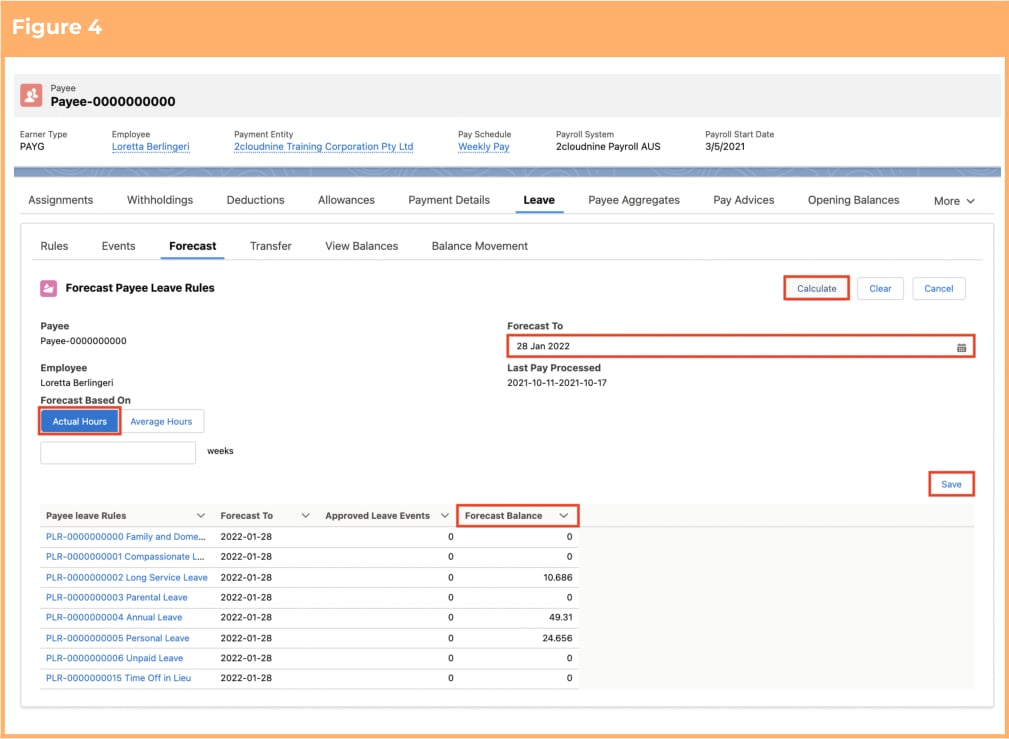
 4. To forecast the estimated leave balance available at a specific date in the future using the Payee’s actual standard hours, click on **Based on Actual Hours** and populate the following required fields to provide the base details of the Leave Forecast: (See Figure 4)
1. Define the **Forecast To**
2. Click **Calculate** to calculate the forecast hours
3. Click **Save** to save the forecasted leave (if required).
4. To forecast leave for a different date, click **Clear**.
4. To forecast the estimated leave balance available at a specific date in the future using the Payee’s actual standard hours, click on **Based on Actual Hours** and populate the following required fields to provide the base details of the Leave Forecast: (See Figure 4)
1. Define the **Forecast To**
2. Click **Calculate** to calculate the forecast hours
3. Click **Save** to save the forecasted leave (if required).
4. To forecast leave for a different date, click **Clear**.
 Calculations based on Actual Hours will only work if the Payee has a default Assignment
Rate Record, with the Hours per Period field populated.
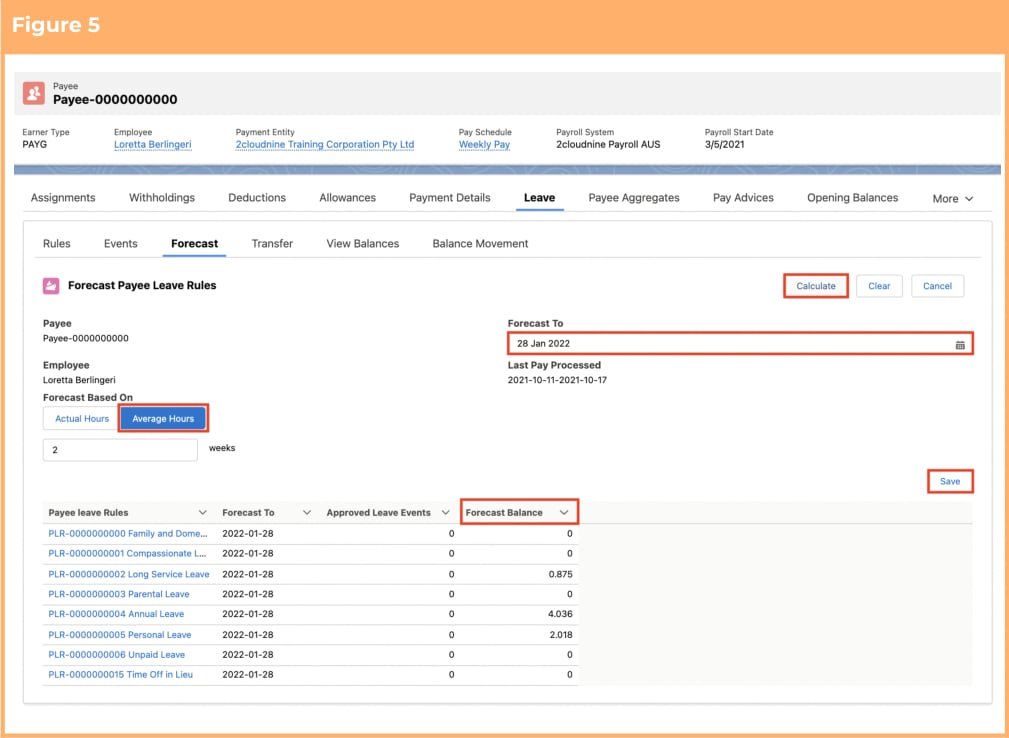
5. To forecast the estimated leave balance available at a specific date in the future, based on a Payee’s average hours over a specified number of pay periods, click on **Based on Average Hours** and populate the following required fields to provide the base details of the Leave Forecast: (See Figure 5)
1. Define the **Forecast To**
2. Define the number of Pay Calendar Periods to use as the average hours
3. Click **Calculate** to calculate the forecast hours
4. Click **Save** to save the forecasted leave (if required).
5. To forecast leave for a different date, click **Clear**.
Calculations based on Actual Hours will only work if the Payee has a default Assignment
Rate Record, with the Hours per Period field populated.
5. To forecast the estimated leave balance available at a specific date in the future, based on a Payee’s average hours over a specified number of pay periods, click on **Based on Average Hours** and populate the following required fields to provide the base details of the Leave Forecast: (See Figure 5)
1. Define the **Forecast To**
2. Define the number of Pay Calendar Periods to use as the average hours
3. Click **Calculate** to calculate the forecast hours
4. Click **Save** to save the forecasted leave (if required).
5. To forecast leave for a different date, click **Clear**.
 Calculations based on Average Hours will only work if the Payee has already got a
Finalised Pay Batch in 2cloudnine Payroll. If there are no finalised Pay Batches, the
Calculate process will fail.
Forecast To date must always be greater than the current date.
## Field Descriptions
No field descriptions are required for this QRG document.
## Further Information
| Document | Document Type | Description |
| --------------------------------------------- | ---------------------------- | ----------------------------------------------------------------------------------------------------------------------------------------------------------------------------------------------------------------------------------------------------------------------------------------------------------------------------------------------------------- |
| Quick Reference Guide Index - xLeave | Index | An index document that lists and provides links xto all Quick Reference Guides relating to Leave |
| Leave Setup and Processing - xKey Information | Information Quick xReference | Outlines useful information relevant to Leave xwithin 2cloudnine Payroll. The document xincludes definitions, prerequisites, and other xnon-instructional information relating to Leave. xThis includes details on creation and xmanagement of Leave Rules, Payee Leave xRules, and Leave Templates, along with the xtaking of Leave Events, Accruals, etc. |
| QRG Setup Payee Leave Rules | Task Instructions | How to create Payee Leave Rules |
| QRG Create Leave Takes - xPayroll Users | Task Instructions | How to create Payee Leave Events of Record xType Leave Take, as Payroll Users |
Calculations based on Average Hours will only work if the Payee has already got a
Finalised Pay Batch in 2cloudnine Payroll. If there are no finalised Pay Batches, the
Calculate process will fail.
Forecast To date must always be greater than the current date.
## Field Descriptions
No field descriptions are required for this QRG document.
## Further Information
| Document | Document Type | Description |
| --------------------------------------------- | ---------------------------- | ----------------------------------------------------------------------------------------------------------------------------------------------------------------------------------------------------------------------------------------------------------------------------------------------------------------------------------------------------------- |
| Quick Reference Guide Index - xLeave | Index | An index document that lists and provides links xto all Quick Reference Guides relating to Leave |
| Leave Setup and Processing - xKey Information | Information Quick xReference | Outlines useful information relevant to Leave xwithin 2cloudnine Payroll. The document xincludes definitions, prerequisites, and other xnon-instructional information relating to Leave. xThis includes details on creation and xmanagement of Leave Rules, Payee Leave xRules, and Leave Templates, along with the xtaking of Leave Events, Accruals, etc. |
| QRG Setup Payee Leave Rules | Task Instructions | How to create Payee Leave Rules |
| QRG Create Leave Takes - xPayroll Users | Task Instructions | How to create Payee Leave Events of Record xType Leave Take, as Payroll Users |