> ## Documentation Index
> Fetch the complete documentation index at: https://documentation.2cloudnine.com/llms.txt
> Use this file to discover all available pages before exploring further.
# QRG Send Email Notifications to Leave Approvers
## Purpose
The purpose of this quick reference guide is to step through the process of sending email notifications to
Leave Approvers for approving and rejecting Leave Events. The notifications are in addition to the
automated ones which occur when a Leave Event is Submitted which relates to an Assignment on which
they are named as the Leave Approver. The intended audience for this document are Standard Users.
## Steps
### **Send Notification to Approve/Reject Leave to Primary or Alternative Approver**
To send an email notification to a Primary or Alternative Leave Approver to approve a submitted Leave
Event record:
1. Go to the **Payee** record.
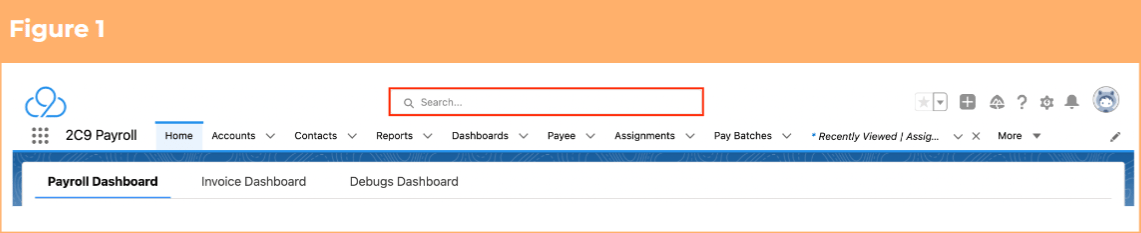
1. To identify a Payee record from an Employee record, enter the Employee name into the **Global Search**. (See Figure 1)
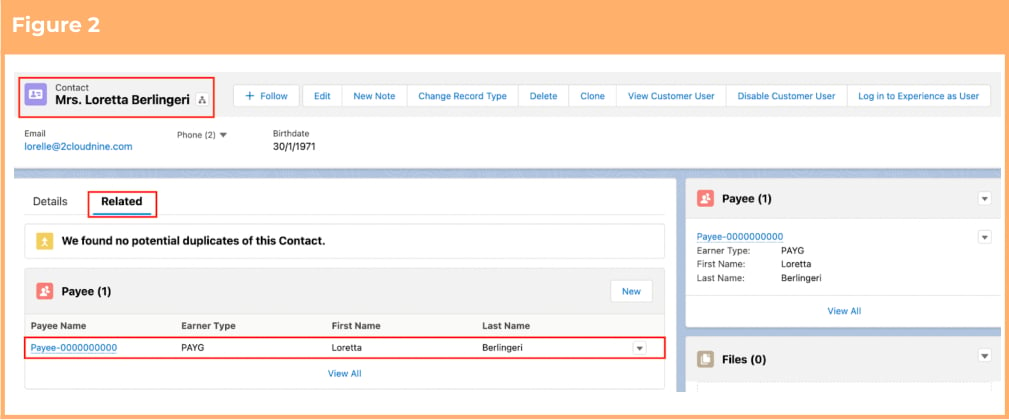
 2. Select the **Employee** record from the suggestions provided. (See Figure 2)
3. Open the **Related** tab.
4. Identify the **Payee** record(s).
5. Select the **Payee** record.
2. Select the **Employee** record from the suggestions provided. (See Figure 2)
3. Open the **Related** tab.
4. Identify the **Payee** record(s).
5. Select the **Payee** record.
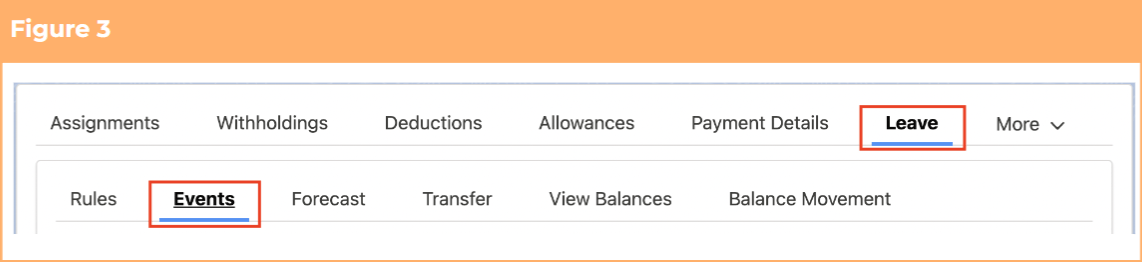
 2. Within the Payee record, navigate to the **Leave** tab. (See Figure 3)
3. Click on the **Events** sub-tab.
2. Within the Payee record, navigate to the **Leave** tab. (See Figure 3)
3. Click on the **Events** sub-tab.
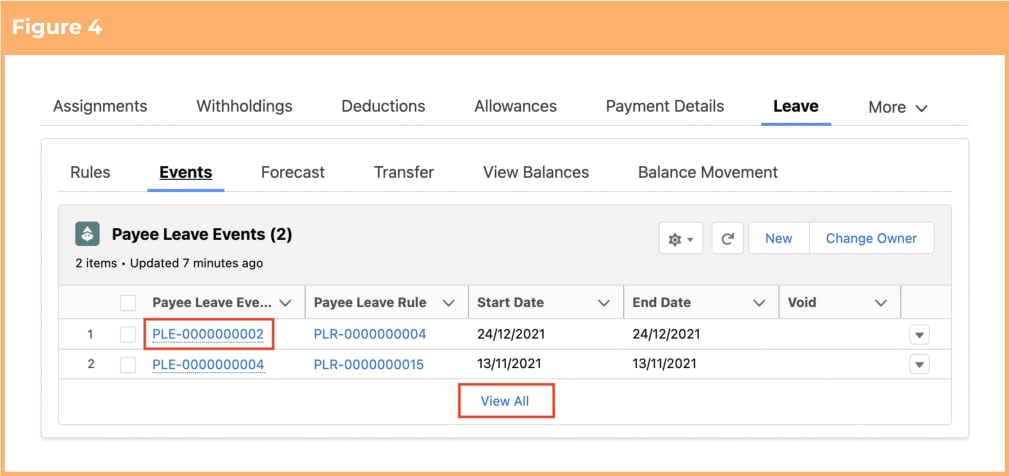
 4. Click on the required **Payee Leave Event** name to view details of the Payee Leave Event or select
**View all** to expand the view. (See Figure 4)
4. Click on the required **Payee Leave Event** name to view details of the Payee Leave Event or select
**View all** to expand the view. (See Figure 4)
 Payee Leave Events can also be seen from the Payee and Payee Leave Rule records’
related list.
Leave Approvers and Alternative Leave Approvers are set up on their Assignment
records. For more information on that process, please review the QRG Temp
Assignments or QRG Employee Assignments.
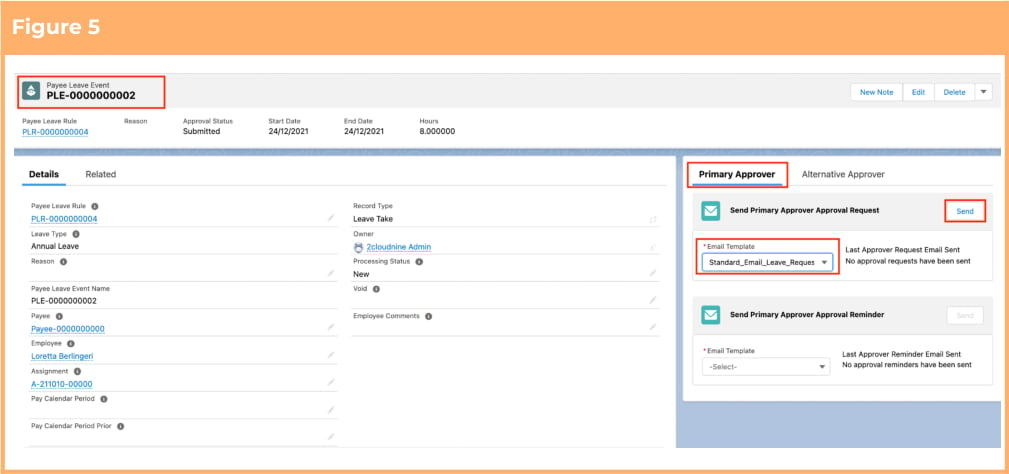
5. To send an approval request to the Primary Approver:
1. Go to the **Primary Approver** tab. (See Figure 5)
2. Select the required email template from the picklist under the Send Primary Approver Approval Request section.
3. Click **Send**.
6. To send a reminder to the Primary Approver:
1. Go to the **Primary Approver** tab. (See Figure 5)
2. Select the required email template from the picklist under the Send Primary Approver Approval Reminder section.
3. Click **Send**.
Payee Leave Events can also be seen from the Payee and Payee Leave Rule records’
related list.
Leave Approvers and Alternative Leave Approvers are set up on their Assignment
records. For more information on that process, please review the QRG Temp
Assignments or QRG Employee Assignments.
5. To send an approval request to the Primary Approver:
1. Go to the **Primary Approver** tab. (See Figure 5)
2. Select the required email template from the picklist under the Send Primary Approver Approval Request section.
3. Click **Send**.
6. To send a reminder to the Primary Approver:
1. Go to the **Primary Approver** tab. (See Figure 5)
2. Select the required email template from the picklist under the Send Primary Approver Approval Reminder section.
3. Click **Send**.
 The tabs of Primary Approver and Alternative Approver are only displayed if the Payee
Leave Event is still not Approved. Once Approved, it no longer displays for that Payee
Leave Event.
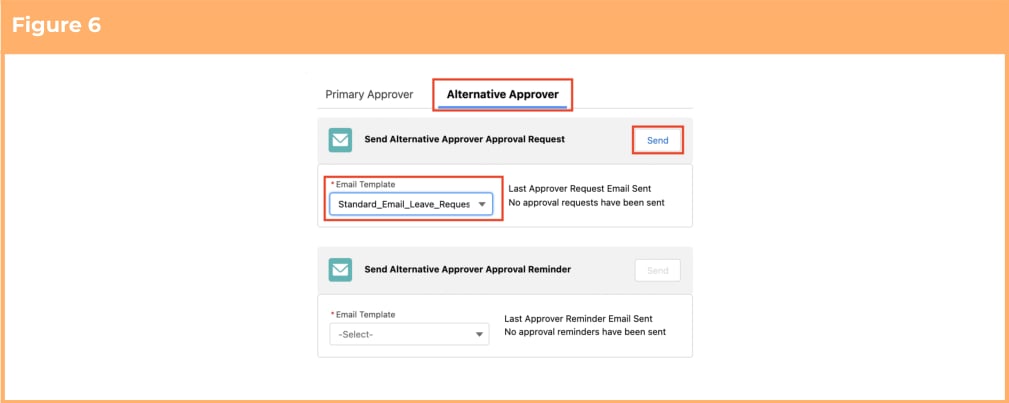
7. To send an approval request to the Alternative Approver:
1. Go to the **Alternative Approver** tab. (See Figure 6)
2. Select the required email template from the picklist under the Send Alternative Approver Approval Request section.
3. Click **Send**.
8. To send a reminder to the Alternative Approver:
1. Go to the **Alternative Approver** tab. (See Figure 6)
2. Select the required email template from the picklist under the Send Alternative Approver Approval Reminder section.
3. Click **Send**.
The tabs of Primary Approver and Alternative Approver are only displayed if the Payee
Leave Event is still not Approved. Once Approved, it no longer displays for that Payee
Leave Event.
7. To send an approval request to the Alternative Approver:
1. Go to the **Alternative Approver** tab. (See Figure 6)
2. Select the required email template from the picklist under the Send Alternative Approver Approval Request section.
3. Click **Send**.
8. To send a reminder to the Alternative Approver:
1. Go to the **Alternative Approver** tab. (See Figure 6)
2. Select the required email template from the picklist under the Send Alternative Approver Approval Reminder section.
3. Click **Send**.
 ## Field Descriptions
No field descriptions are required for this QRG document.
## Further Information
| Document | Document Type | Description |
| ------------------------------------------ | --------------------------- | ------------------------------------------------------------------------------------------------------------------------------------------------------------------------------------------------------------------- |
| Quick Reference Guide Index - Leave | Index | An index document that lists and provides links to all Quick Reference Guides relating to Leave |
| Managing Payee Leave Event Key Information | Information Quick Reference | A quick reference guide outlining some useful information relevant to the Leave functionality. The document includes definitions, pre-requisites and other non-instructional information relating to Leave records. |
| QRG Create Leave Takes - Payroll Users | Task Instructions | How to create Payee Leave Events of Record Type Leave Take, as Payroll Users. |
## Field Descriptions
No field descriptions are required for this QRG document.
## Further Information
| Document | Document Type | Description |
| ------------------------------------------ | --------------------------- | ------------------------------------------------------------------------------------------------------------------------------------------------------------------------------------------------------------------- |
| Quick Reference Guide Index - Leave | Index | An index document that lists and provides links to all Quick Reference Guides relating to Leave |
| Managing Payee Leave Event Key Information | Information Quick Reference | A quick reference guide outlining some useful information relevant to the Leave functionality. The document includes definitions, pre-requisites and other non-instructional information relating to Leave records. |
| QRG Create Leave Takes - Payroll Users | Task Instructions | How to create Payee Leave Events of Record Type Leave Take, as Payroll Users. |