> ## Documentation Index
> Fetch the complete documentation index at: https://documentation.2cloudnine.com/llms.txt
> Use this file to discover all available pages before exploring further.
# QRG Setup Leave Rule Items
export const InlineImage = ({src, alt = "", height = "1.6em"}) => {
return  ;
};
## Purpose
The purpose of this quick reference guide is to step through the process of Leave Rule Items setup. The
intended audience for this document are Standard Users.
## Steps
### **Create Related Leave Rule Items**
Having defined the governing Leave Rule, the Leave Rule Item object is used to define the desired accrual
characteristics. If a Leave Rule requires accruals, they must have at least one related Leave Rule Item
record.
To create a Leave Rule Item record, follow the steps below:
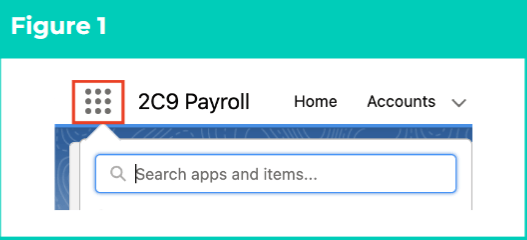
1. Click on the **App Launcher** icon. (See Figure 1)
;
};
## Purpose
The purpose of this quick reference guide is to step through the process of Leave Rule Items setup. The
intended audience for this document are Standard Users.
## Steps
### **Create Related Leave Rule Items**
Having defined the governing Leave Rule, the Leave Rule Item object is used to define the desired accrual
characteristics. If a Leave Rule requires accruals, they must have at least one related Leave Rule Item
record.
To create a Leave Rule Item record, follow the steps below:
1. Click on the **App Launcher** icon. (See Figure 1)
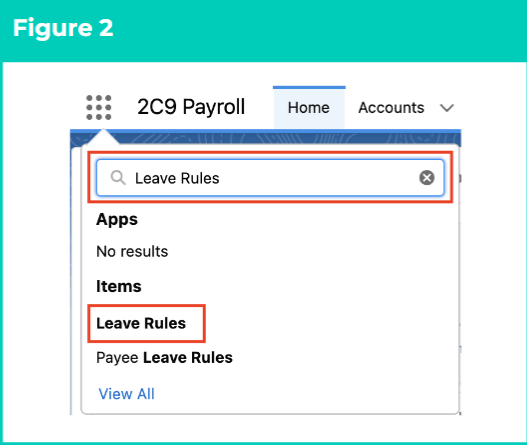
 2. Go to the **Leave Rules** object by using the Search function. (See Figure 2)
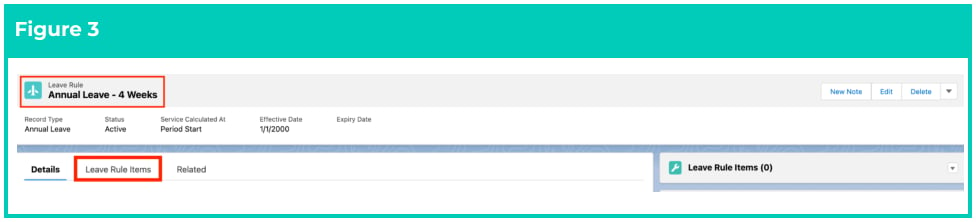
 3. Open the required Leave Rule record. (See Figure 3)
4. Within the Leave Rule record, click on the **Leave Rule Items** tab.
3. Open the required Leave Rule record. (See Figure 3)
4. Within the Leave Rule record, click on the **Leave Rule Items** tab.
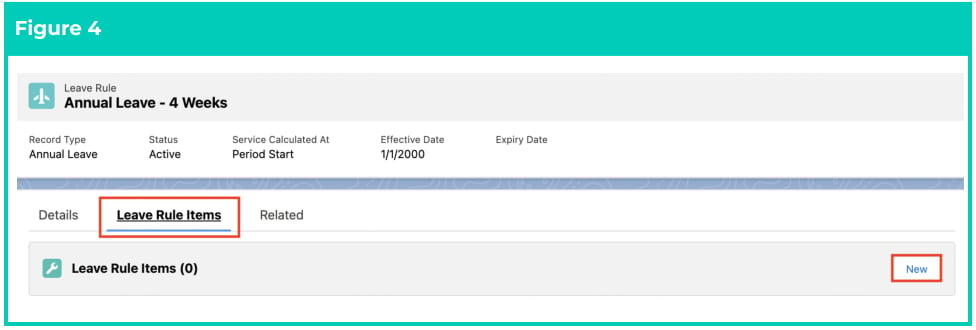
 5. On the Leave Rule Items panel, click on the **New** button. (See Figure 4)
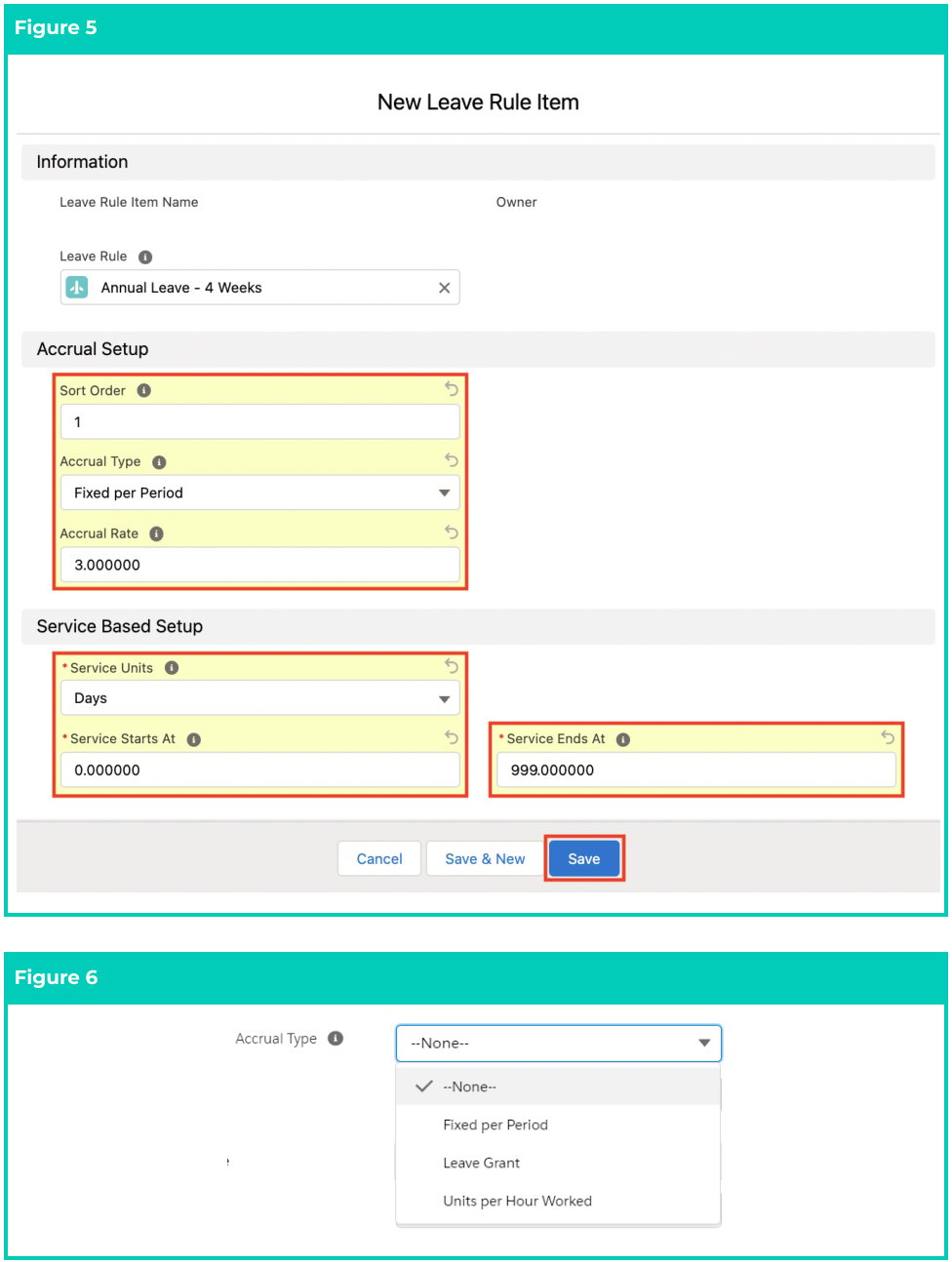
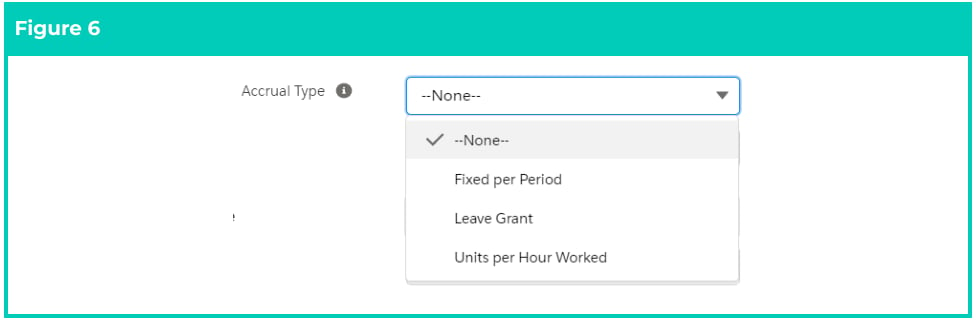
 6. Populate the following required fields to provide the base details of the Leave Rule Item record: (See Figures 5 and 6)
1. **Leave Rule** (should be pre-populated)
2. **Sort Order**
3. **Accrual Type** (Fixed Per Period, Leave Grant, Units per Hour Worked)
4. **Accrual Rate** (based on the type selected)
7. When there is only one accrual rate for the entirety of the Leave Rule, populate the following fields as per below: (See Figures 5 and 6)
1. **Service Units** = Years
2. **Service Starts At** = 0
3. **Service Ends At** = 999
Alternatively; when the Accrual Rate changes at a defined period, create two or more Leave Rule
Items by populating the following fields as per below: (See Figures 5 and 6)
Leave Rule Item 1:
1. **Service Units** = Years
2. **Service Starts At** = 0
3. **Service Ends At** = x
Where x = number of units after which the Accrual Rate changes
Leave Rule Item 2:
4. **Service Units** = Years
5. **Service Starts At** = x+1
6. **Service Ends At** = y
Where y = number of units after which Accrual Rate again changes, or ceases (in that case
would be 999)
And then repeat again as many times as required until all the required Leave Rule Items are
created to cover all the defined accrual rate changes needed.
If the Leave Rule has accruals that are ongoing, it’s recommended to ensure the final
Leave Rule Item has a “Service Ends At” value that will cover the entirety of a possible
employment period (i.e 999 Years).
8. Click on the **Save** button.
6. Populate the following required fields to provide the base details of the Leave Rule Item record: (See Figures 5 and 6)
1. **Leave Rule** (should be pre-populated)
2. **Sort Order**
3. **Accrual Type** (Fixed Per Period, Leave Grant, Units per Hour Worked)
4. **Accrual Rate** (based on the type selected)
7. When there is only one accrual rate for the entirety of the Leave Rule, populate the following fields as per below: (See Figures 5 and 6)
1. **Service Units** = Years
2. **Service Starts At** = 0
3. **Service Ends At** = 999
Alternatively; when the Accrual Rate changes at a defined period, create two or more Leave Rule
Items by populating the following fields as per below: (See Figures 5 and 6)
Leave Rule Item 1:
1. **Service Units** = Years
2. **Service Starts At** = 0
3. **Service Ends At** = x
Where x = number of units after which the Accrual Rate changes
Leave Rule Item 2:
4. **Service Units** = Years
5. **Service Starts At** = x+1
6. **Service Ends At** = y
Where y = number of units after which Accrual Rate again changes, or ceases (in that case
would be 999)
And then repeat again as many times as required until all the required Leave Rule Items are
created to cover all the defined accrual rate changes needed.
If the Leave Rule has accruals that are ongoing, it’s recommended to ensure the final
Leave Rule Item has a “Service Ends At” value that will cover the entirety of a possible
employment period (i.e 999 Years).
8. Click on the **Save** button.
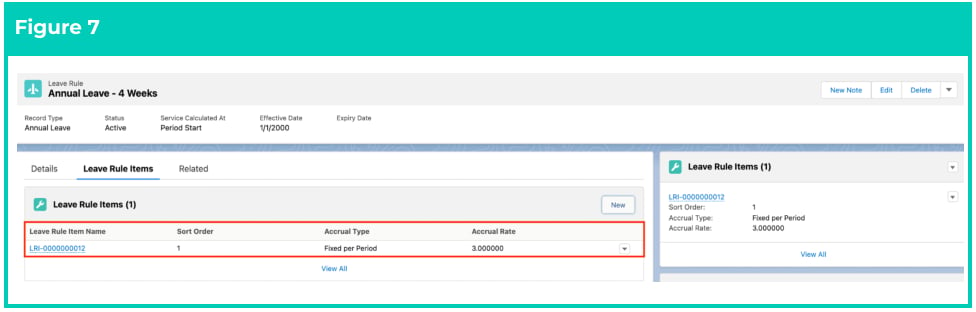
 9. The Leave rule Item is now created, and is visible under the Leave Rule Item panel. To create
another Leave Rule Item if there is a change to the accrual(s), select the **New** button and repeat
steps 5-7.
10. To review the details of the record, click on the name of the **Leave Rule Item** record. (See Figure 7)
9. The Leave rule Item is now created, and is visible under the Leave Rule Item panel. To create
another Leave Rule Item if there is a change to the accrual(s), select the **New** button and repeat
steps 5-7.
10. To review the details of the record, click on the name of the **Leave Rule Item** record. (See Figure 7)
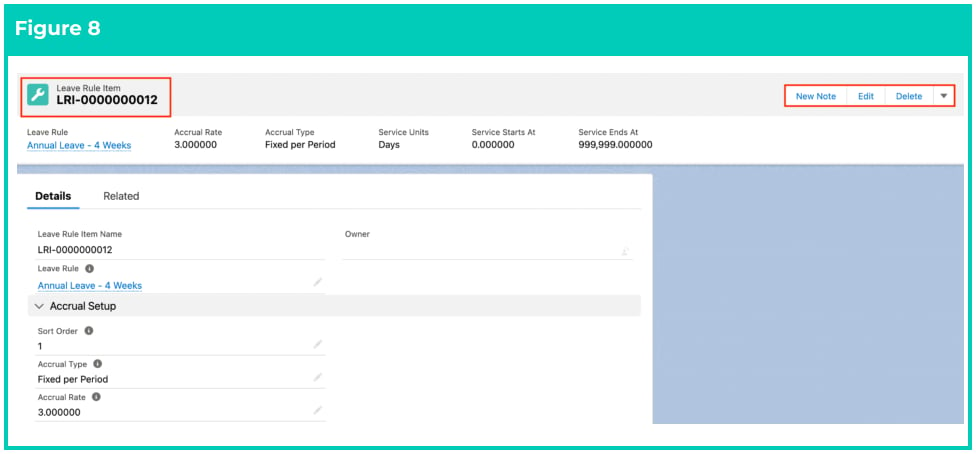
 11. To view the details of the Leave Rule Item or to make any edits, please do so from here. (See Figure
 A Leave Rule may have multiple Leave Rule Item records, and these will be processed in
ascending Sort Order, and in line with the service starts and service ends dates.
Leave Rule Item records CAN NOT be deleted if they have related records or are used in
other records. Deleting records is not recommended unless absolutely essential.
12. To modify an existing **Leave Rule Item** record, open the required record and select the **Edit** button
available on the top right side of the page. You can also double click in any of the fields that need
editing or just click on the pencil icon that appears within fields when you move your cursor over the field.
13. When complete, click on the **Save** button.
## Field Descriptions
### **Leave Rule Items**
**Accrual Rate** is the value to be used within the accrual calculation process, based on the Accrual Type
selected.
**Accrual Type** indicates how the accruals for this Leave Rule will be calculated. The picklist values are Fixed
Per Period, Leave Grant and Units per Hour Worked.
**Leave Rule** is a lookup to the related Leave Rule record.
**Leave Rule Item Name** is the auto-generated name given to the Leave Rule Item record.
**Service Units** Where the accrual is service based this field defines the service period in association with
Service Starts At and Service Ends At.
**Service Starts At** where the accrual is service based this field defines the point at which this Leave Rule
Item is applied.
**Service Ends At** where the accrual is service based this field defines the point at which this Leave Rule
Item ends.
**Sort Order** where multiple Leave Rule Items are related to the same Leave Rule this field indicates the
order in which the Leave Rule Items should be assessed.
## Further Information
| Document | Document Type | Description |
| -------------------------------------------- | --------------------------- | ---------------------------------------------------------------------------------------------------------------------------------------------------------------------------------------------------------------------------------------------------------------------------------------------------------------------------------------------------- |
| Quick Reference Guide Index - Leave | Index | An index document that lists and provides links to all Quick Reference Guides relating to Leave |
| Leave Setup and Processing - Key Information | Information Quick Reference | Outlines useful information relevant to Leave within 2cloudnine Payroll. The document includes definitions, prerequisites, and other non-instructional information relating to Leave. This includes details on creation and management of Leave Rules, Payee Leave Rules, and Leave Templates, along with the taking of Leave Events, Accruals, etc. |
| QRG Setup Leave Rules | Task Instructions | How to create Leave Rules |
| QRG Setup Leave Templates | Task Instructions | How to Create Leave Templates |
A Leave Rule may have multiple Leave Rule Item records, and these will be processed in
ascending Sort Order, and in line with the service starts and service ends dates.
Leave Rule Item records CAN NOT be deleted if they have related records or are used in
other records. Deleting records is not recommended unless absolutely essential.
12. To modify an existing **Leave Rule Item** record, open the required record and select the **Edit** button
available on the top right side of the page. You can also double click in any of the fields that need
editing or just click on the pencil icon that appears within fields when you move your cursor over the field.
13. When complete, click on the **Save** button.
## Field Descriptions
### **Leave Rule Items**
**Accrual Rate** is the value to be used within the accrual calculation process, based on the Accrual Type
selected.
**Accrual Type** indicates how the accruals for this Leave Rule will be calculated. The picklist values are Fixed
Per Period, Leave Grant and Units per Hour Worked.
**Leave Rule** is a lookup to the related Leave Rule record.
**Leave Rule Item Name** is the auto-generated name given to the Leave Rule Item record.
**Service Units** Where the accrual is service based this field defines the service period in association with
Service Starts At and Service Ends At.
**Service Starts At** where the accrual is service based this field defines the point at which this Leave Rule
Item is applied.
**Service Ends At** where the accrual is service based this field defines the point at which this Leave Rule
Item ends.
**Sort Order** where multiple Leave Rule Items are related to the same Leave Rule this field indicates the
order in which the Leave Rule Items should be assessed.
## Further Information
| Document | Document Type | Description |
| -------------------------------------------- | --------------------------- | ---------------------------------------------------------------------------------------------------------------------------------------------------------------------------------------------------------------------------------------------------------------------------------------------------------------------------------------------------- |
| Quick Reference Guide Index - Leave | Index | An index document that lists and provides links to all Quick Reference Guides relating to Leave |
| Leave Setup and Processing - Key Information | Information Quick Reference | Outlines useful information relevant to Leave within 2cloudnine Payroll. The document includes definitions, prerequisites, and other non-instructional information relating to Leave. This includes details on creation and management of Leave Rules, Payee Leave Rules, and Leave Templates, along with the taking of Leave Events, Accruals, etc. |
| QRG Setup Leave Rules | Task Instructions | How to create Leave Rules |
| QRG Setup Leave Templates | Task Instructions | How to Create Leave Templates |