> ## Documentation Index
> Fetch the complete documentation index at: https://documentation.2cloudnine.com/llms.txt
> Use this file to discover all available pages before exploring further.
# QRG Authorised Contacts
## Purpose
The purpose of this quick reference guide is to step through the process of creating Authorised Contacts.
The intended audience for this document are standard users.
## Steps
### **Create a new Authorised Contact**
To create a new Authorised Contact, follow these steps:
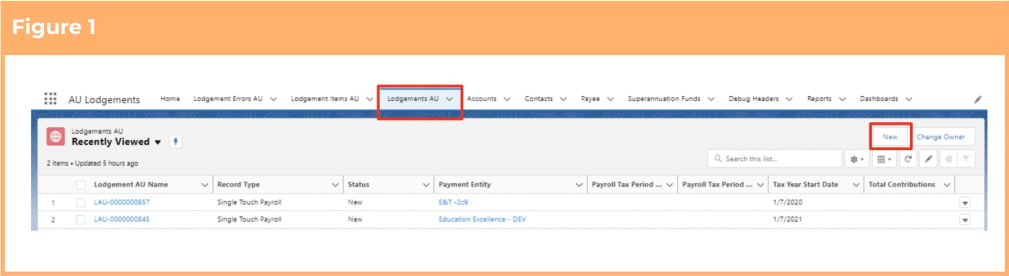
1. Click on the **Lodgement AU** object. (See Figure 1)
2. Click on the **New** button.
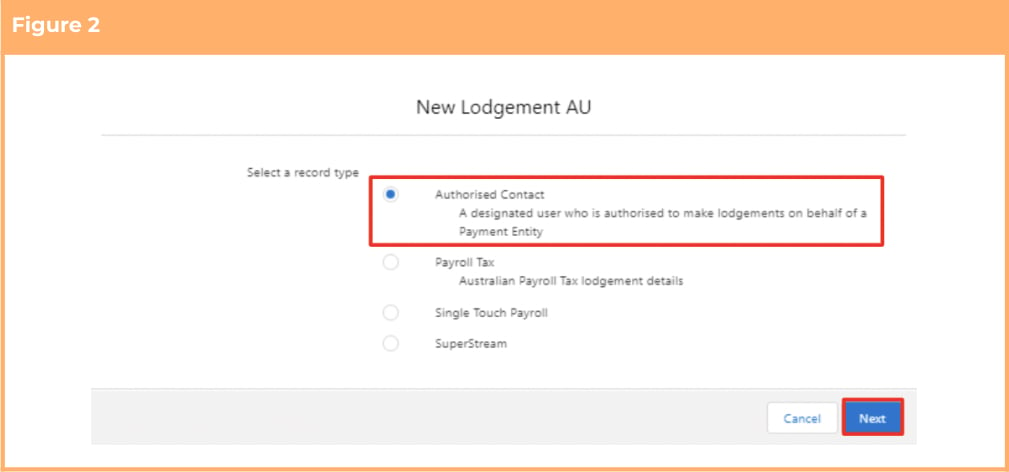
 3. Select the **Authorised Contact** Record Type and click **Next** . (See Figure 2)
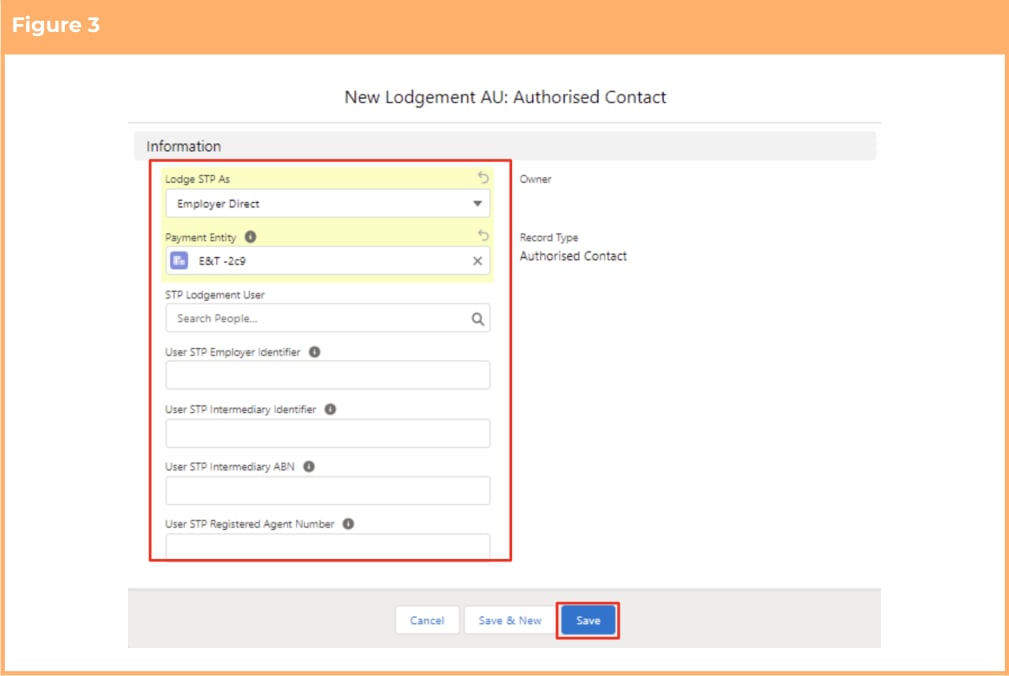
 4. Enter details of the New Authorised Contact (See Figure 3) and please note the conditions for required field values as below, depending on the value set in the **Lodge STP As** field:
1. If the value ‘Employer Intermediary’ is selected, populate Payment Entity, STP Lodgement User, User STP Intermediary Identifier and the ‘User STP Intermediary ABN’.
2. If the value ‘Employer Direct’ is selected, populate Payment Entity, STP Lodgement User, and User STP Employer Identifier.
3. If the value ‘Registered Tax/BAS Agent’ is selected, populate Payment Entity, STP Lodgement User and User STP Registered Agent Number.
5. Click on the **Save** button. (See Figure 3)
4. Enter details of the New Authorised Contact (See Figure 3) and please note the conditions for required field values as below, depending on the value set in the **Lodge STP As** field:
1. If the value ‘Employer Intermediary’ is selected, populate Payment Entity, STP Lodgement User, User STP Intermediary Identifier and the ‘User STP Intermediary ABN’.
2. If the value ‘Employer Direct’ is selected, populate Payment Entity, STP Lodgement User, and User STP Employer Identifier.
3. If the value ‘Registered Tax/BAS Agent’ is selected, populate Payment Entity, STP Lodgement User and User STP Registered Agent Number.
5. Click on the **Save** button. (See Figure 3)
 ## Field Descriptions
**Lodge STP As** defines how STP Lodgements made by this User will be lodged to the ATO. The picklist
values are Employer Direct, Employer Intermediary and Registered Tax/BAS Agent.
**Payment Entity** is the related Payment Entity specific to this Authorised Contact. If Users are required to
submit for multiple Payment Entities, they will be required to create a new Authorised Contact for each
Entity.
**STP Lodgement User** is a lookup to the user record of the Salesforce User this record relates to. This
Salesforce User cannot be a Community User.
**User STP Employer Identifier** is the unique identifier that will be used to identify this User whilst
submitting lodgements (e.g. Name, Email Address, mobile number).
**User STP Intermediary ABN** is the Australian Business Number of the Payment Entity if this Authorised
Contact is going to be making lodgements as an Intermediary User.
**User STP Intermediary Identifier** is the unique identifier that will be used to identify this User whilst
submitting lodgements (e.g. Name, Email Address, mobile number).
**User STP Registered Agent Number** is the Registered Agent Number of the User submitting this
lodgement if they are a Registered Tax/BAS Agent.
## Further Information
| Document | Document Type | Description |
| ------------------------------------------------------------ | -------------------- | ---------------------------------------------------------------------------------------------------------------------------------------- |
| Quick Reference Guide Index - STP and SuperStream Lodgements | Index | An index document that lists and provides links to all Quick Reference Guides relating to STP and SuperStream Lodgements. |
| QRG Creating and Sending STP Lodgements | Process Instructions | Step-by-step instructions on how to create a new STP Batch. This includes creating new and editing existing STP Batches. |
| QRG SuperStream Reporting | Process Instructions | Step-by-step instructions on how to create a new SuperStream Batch. This includes creating new and editing existing SuperStream Batches. |
## Field Descriptions
**Lodge STP As** defines how STP Lodgements made by this User will be lodged to the ATO. The picklist
values are Employer Direct, Employer Intermediary and Registered Tax/BAS Agent.
**Payment Entity** is the related Payment Entity specific to this Authorised Contact. If Users are required to
submit for multiple Payment Entities, they will be required to create a new Authorised Contact for each
Entity.
**STP Lodgement User** is a lookup to the user record of the Salesforce User this record relates to. This
Salesforce User cannot be a Community User.
**User STP Employer Identifier** is the unique identifier that will be used to identify this User whilst
submitting lodgements (e.g. Name, Email Address, mobile number).
**User STP Intermediary ABN** is the Australian Business Number of the Payment Entity if this Authorised
Contact is going to be making lodgements as an Intermediary User.
**User STP Intermediary Identifier** is the unique identifier that will be used to identify this User whilst
submitting lodgements (e.g. Name, Email Address, mobile number).
**User STP Registered Agent Number** is the Registered Agent Number of the User submitting this
lodgement if they are a Registered Tax/BAS Agent.
## Further Information
| Document | Document Type | Description |
| ------------------------------------------------------------ | -------------------- | ---------------------------------------------------------------------------------------------------------------------------------------- |
| Quick Reference Guide Index - STP and SuperStream Lodgements | Index | An index document that lists and provides links to all Quick Reference Guides relating to STP and SuperStream Lodgements. |
| QRG Creating and Sending STP Lodgements | Process Instructions | Step-by-step instructions on how to create a new STP Batch. This includes creating new and editing existing STP Batches. |
| QRG SuperStream Reporting | Process Instructions | Step-by-step instructions on how to create a new SuperStream Batch. This includes creating new and editing existing SuperStream Batches. |