> ## Documentation Index
> Fetch the complete documentation index at: https://documentation.2cloudnine.com/llms.txt
> Use this file to discover all available pages before exploring further.

# QRG Calculate a single Payee within a Pay Batch

## Purpose

The purpose of this quick reference guide is to step through the process of calculating a single Payee
within a Pay Batch instead of using the Calculate on the entire Pay Batch. The intended audience for this
document is Standard Payroll Users.

The ability to calculate a single Payee is used mainly when adjustments have been made to a Payee’s Pay
Batch, such as Pay Transactions, Superannuation Withholding, PAYG Withholding, or other related
records, and therefore the Payee Pay Batch needs to be recalculated.

## Steps

### **Calculate a single Payee within a Pay Batch**

To Calculate a single Payee within a Pay Batch, the following steps should be completed. Please skip to
the next page if you already have the Pay Batch Manager UI open on your screen:

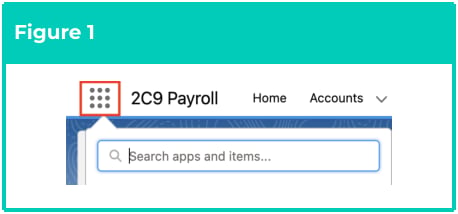
1. Click on the **App Launcher** icon (see Figure 1).
<Frame>
  <img src="https://mintcdn.com/2cloudnine-2edf05eb/HpAUdZHSUT0Tefm0/images/generated/reference-guides/pay-batch-advanced/qrg-calculate-a-single-payee-within-a-pay-batch/qrg-calculate-a-single-payee-within-a-pay-batch-pdf-0-figure-1.png?fit=max&auto=format&n=HpAUdZHSUT0Tefm0&q=85&s=f983e25ad99e5f869476f9c05f4d5c93" alt="Screenshot from QRG Calculate a single Payee within a Pay Batch" width="458" height="214" data-path="images/generated/reference-guides/pay-batch-advanced/qrg-calculate-a-single-payee-within-a-pay-batch/qrg-calculate-a-single-payee-within-a-pay-batch-pdf-0-figure-1.png" />
</Frame>

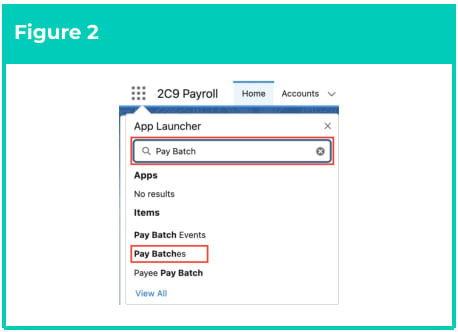
2. Go to the **Pay Batches** object by using the Search function (see Figure 2).
<Frame>
  <img src="https://mintcdn.com/2cloudnine-2edf05eb/HpAUdZHSUT0Tefm0/images/generated/reference-guides/pay-batch-advanced/qrg-calculate-a-single-payee-within-a-pay-batch/qrg-calculate-a-single-payee-within-a-pay-batch-pdf-0-figure-2.png?fit=max&auto=format&n=HpAUdZHSUT0Tefm0&q=85&s=b1d3d163212bedd5f0a5edd8c1fe4f3f" alt="Screenshot from QRG Calculate a single Payee within a Pay Batch" width="458" height="332" data-path="images/generated/reference-guides/pay-batch-advanced/qrg-calculate-a-single-payee-within-a-pay-batch/qrg-calculate-a-single-payee-within-a-pay-batch-pdf-0-figure-2.png" />
</Frame>

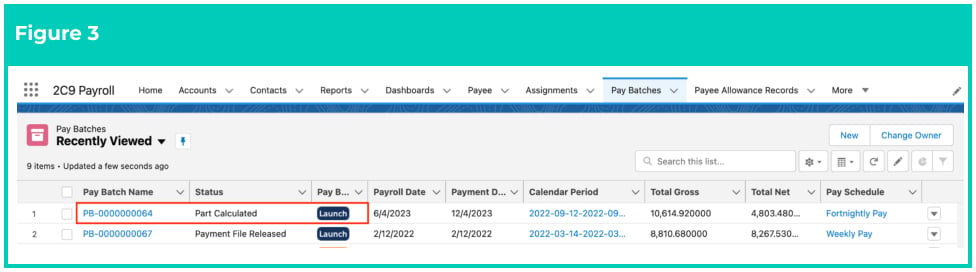
3. From the List View, select a Pay Batch with the status of Part Calculated suggesting that changes
   have already been made to the records since the last calculation was performed, or, a status of
   Calculated if there are changes that are yet to be applied to one of the Payee Pay Batches, which
   will then change the status to Part Calculated, and click the **Launch** button (see Figure 3).
<Frame>
  <img src="https://mintcdn.com/2cloudnine-2edf05eb/HpAUdZHSUT0Tefm0/images/generated/reference-guides/pay-batch-advanced/qrg-calculate-a-single-payee-within-a-pay-batch/qrg-calculate-a-single-payee-within-a-pay-batch-pdf-0-figure-3.png?fit=max&auto=format&n=HpAUdZHSUT0Tefm0&q=85&s=3634a1e1f0bd3b1de5798c4b418955a4" alt="Screenshot from QRG Calculate a single Payee within a Pay Batch" width="976" height="272" data-path="images/generated/reference-guides/pay-batch-advanced/qrg-calculate-a-single-payee-within-a-pay-batch/qrg-calculate-a-single-payee-within-a-pay-batch-pdf-0-figure-3.png" />
</Frame>

<Warning>
  For newly created Payee Pay Batches, if the Status is Uncalculated and they have never
  been Calculated before, the individual Part Calculate button will remain disabled.
  Whereas if their Status is Uncalculated and they have been Calculated before, the
  individual Part Calculate button will be enabled for these Payee Pay Batches, and the
  Pay Batch status will be Part Calculated.
</Warning>

### **Calculate a single Payee’s Pay Batches via the Manual Adjustments screen**

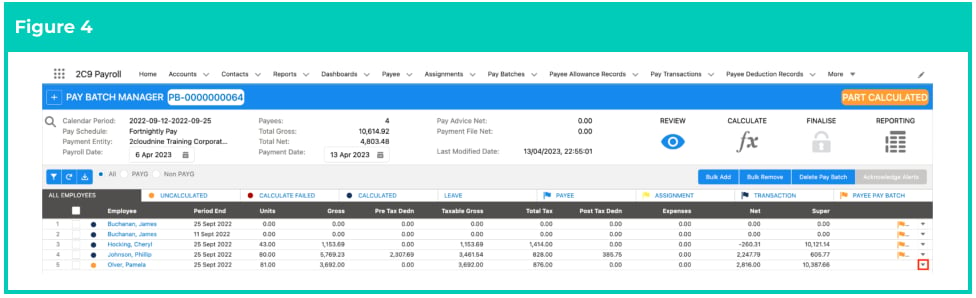
1. Under the **Review** screen of the Pay Batch Manager, locate the Payee Pay Batch that requires
   adjustments and/or recalculation, and click the action button <Icon icon="square-caret-down" /> at the end of the row (see Figure 4).

<Frame>
  <img src="https://mintcdn.com/2cloudnine-2edf05eb/HpAUdZHSUT0Tefm0/images/generated/reference-guides/pay-batch-advanced/qrg-calculate-a-single-payee-within-a-pay-batch/qrg-calculate-a-single-payee-within-a-pay-batch-pdf-1-figure-4.png?fit=max&auto=format&n=HpAUdZHSUT0Tefm0&q=85&s=e70d724d17b4a3710e994d46e3449430" alt="Screenshot from QRG Calculate a single Payee within a Pay Batch" width="976" height="298" data-path="images/generated/reference-guides/pay-batch-advanced/qrg-calculate-a-single-payee-within-a-pay-batch/qrg-calculate-a-single-payee-within-a-pay-batch-pdf-1-figure-4.png" />
</Frame>

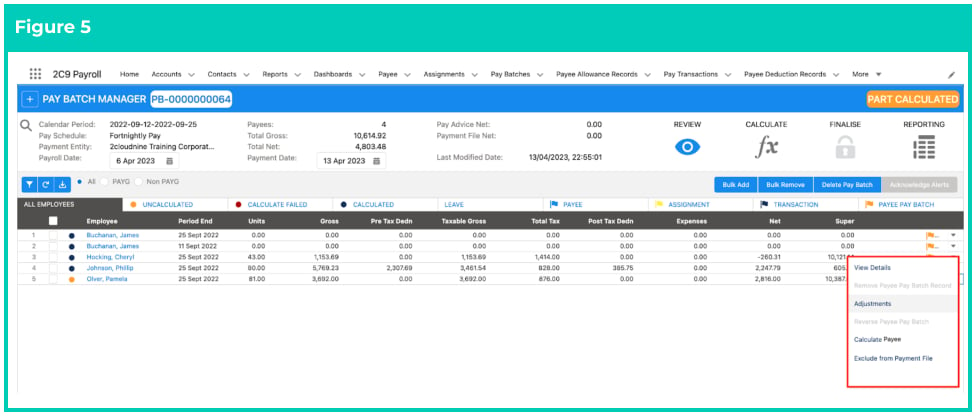
2. Click on the **Adjustments** option (see Figure 5).
<Frame>
  <img src="https://mintcdn.com/2cloudnine-2edf05eb/HpAUdZHSUT0Tefm0/images/generated/reference-guides/pay-batch-advanced/qrg-calculate-a-single-payee-within-a-pay-batch/qrg-calculate-a-single-payee-within-a-pay-batch-pdf-1-figure-5.png?fit=max&auto=format&n=HpAUdZHSUT0Tefm0&q=85&s=a6e70d5f47285f9a3a1f8b602ab2ad5e" alt="Screenshot from QRG Calculate a single Payee within a Pay Batch" width="976" height="416" data-path="images/generated/reference-guides/pay-batch-advanced/qrg-calculate-a-single-payee-within-a-pay-batch/qrg-calculate-a-single-payee-within-a-pay-batch-pdf-1-figure-5.png" />
</Frame>

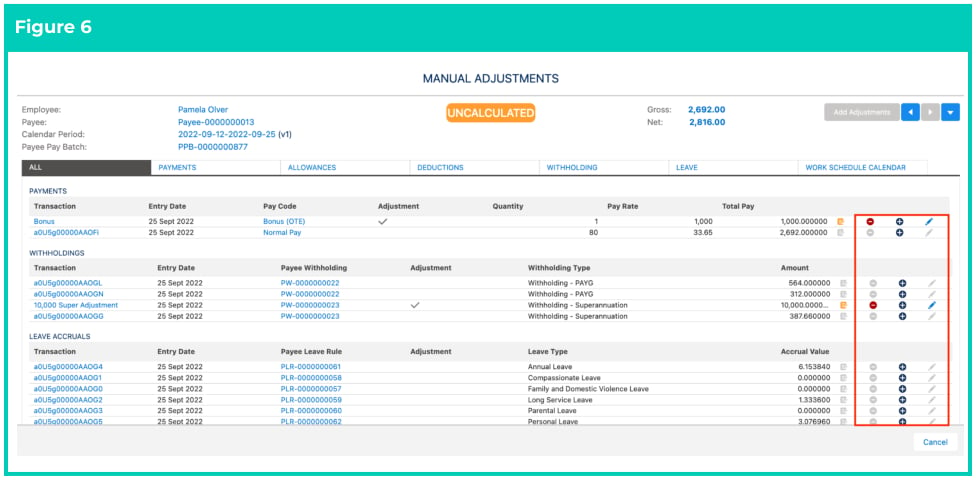
3. From the **Manual Adjustments** screen, new Pay Transactions can be created if needed, and/or
   existing Pay Transactions can be edited/deleted if required. If no manual changes are required,
   please proceed to Step 7 (see Figure 6).
<Frame>
  <img src="https://mintcdn.com/2cloudnine-2edf05eb/HpAUdZHSUT0Tefm0/images/generated/reference-guides/pay-batch-advanced/qrg-calculate-a-single-payee-within-a-pay-batch/qrg-calculate-a-single-payee-within-a-pay-batch-pdf-2-figure-6.png?fit=max&auto=format&n=HpAUdZHSUT0Tefm0&q=85&s=3871d95532043329a0f2b08931681a84" alt="Screenshot from QRG Calculate a single Payee within a Pay Batch" width="976" height="480" data-path="images/generated/reference-guides/pay-batch-advanced/qrg-calculate-a-single-payee-within-a-pay-batch/qrg-calculate-a-single-payee-within-a-pay-batch-pdf-2-figure-6.png" />
</Frame>

4. Click on the <Icon icon="square-caret-down" /> icon on the right-hand side and select **Calculate Payee** (see Figure 7).

<Frame>
  <img src="https://mintcdn.com/2cloudnine-2edf05eb/HpAUdZHSUT0Tefm0/images/generated/reference-guides/pay-batch-advanced/qrg-calculate-a-single-payee-within-a-pay-batch/qrg-calculate-a-single-payee-within-a-pay-batch-pdf-2-figure-7.png?fit=max&auto=format&n=HpAUdZHSUT0Tefm0&q=85&s=4be733f1209c9c7ad4d210f82f5dbc51" alt="Screenshot from QRG Calculate a single Payee within a Pay Batch" width="976" height="478" data-path="images/generated/reference-guides/pay-batch-advanced/qrg-calculate-a-single-payee-within-a-pay-batch/qrg-calculate-a-single-payee-within-a-pay-batch-pdf-2-figure-7.png" />
</Frame>

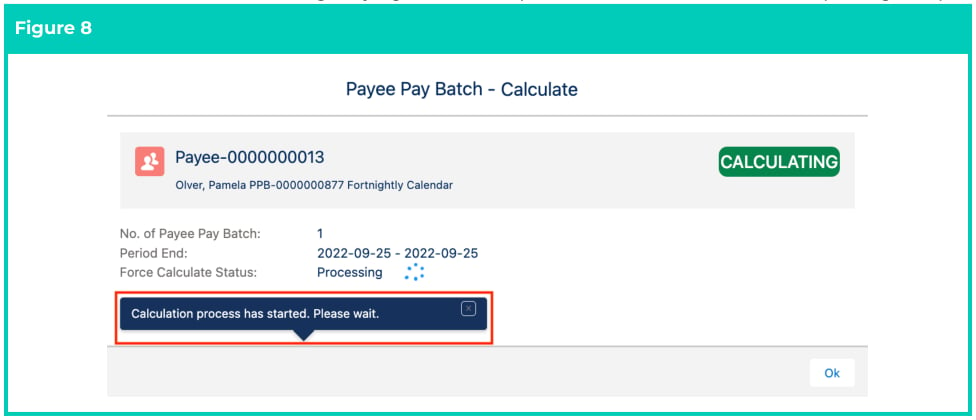
5. The **Payee Pay Batch - Calculate** popup will automatically appear with a Status of Calculating,
   and a confirmation message saying ‘Calculation process has started. Please wait.’ (see Figure 8).
<Frame>
  <img src="https://mintcdn.com/2cloudnine-2edf05eb/HpAUdZHSUT0Tefm0/images/generated/reference-guides/pay-batch-advanced/qrg-calculate-a-single-payee-within-a-pay-batch/qrg-calculate-a-single-payee-within-a-pay-batch-pdf-3-figure-8.png?fit=max&auto=format&n=HpAUdZHSUT0Tefm0&q=85&s=7464699cc261383e5412cc1ef5f594bc" alt="Screenshot from QRG Calculate a single Payee within a Pay Batch" width="976" height="420" data-path="images/generated/reference-guides/pay-batch-advanced/qrg-calculate-a-single-payee-within-a-pay-batch/qrg-calculate-a-single-payee-within-a-pay-batch-pdf-3-figure-8.png" />
</Frame>

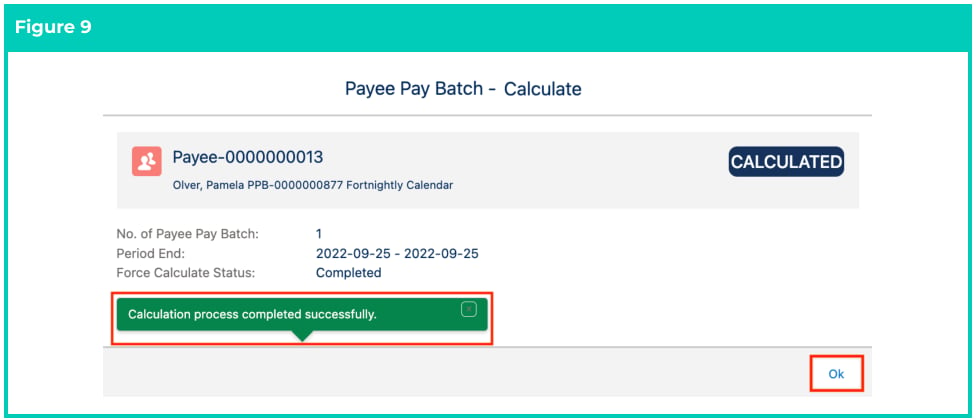
6. Once the Calculation has been completed, the **Payee Pay Batch - Calculate** popup will display an
   update of the Status to either Calculated or Calculate Failed, based on the successful completion
   of the Calculation Process (see Figure 9).
7. Click on the **Ok** button.
<Frame>
  <img src="https://mintcdn.com/2cloudnine-2edf05eb/HpAUdZHSUT0Tefm0/images/generated/reference-guides/pay-batch-advanced/qrg-calculate-a-single-payee-within-a-pay-batch/qrg-calculate-a-single-payee-within-a-pay-batch-pdf-3-figure-9.png?fit=max&auto=format&n=HpAUdZHSUT0Tefm0&q=85&s=22f63b287521b9900d6fdef94119b288" alt="Screenshot from QRG Calculate a single Payee within a Pay Batch" width="976" height="420" data-path="images/generated/reference-guides/pay-batch-advanced/qrg-calculate-a-single-payee-within-a-pay-batch/qrg-calculate-a-single-payee-within-a-pay-batch-pdf-3-figure-9.png" />
</Frame>

<Warning>
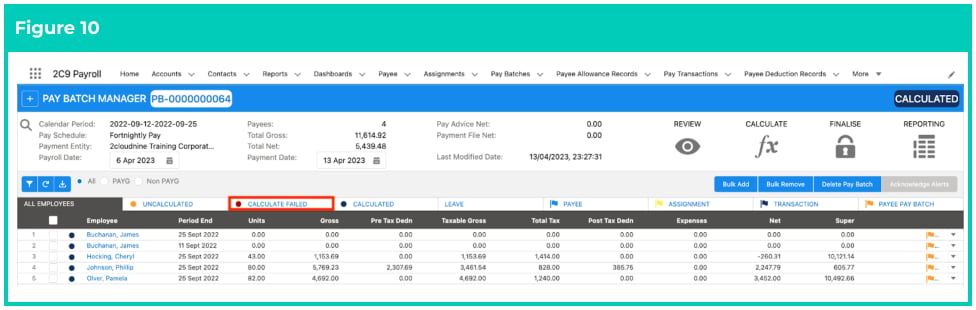
  If the Status changes to Calculate Failed, Users need to investigate the reason for the
  Failed Calculation by reviewing the Calculation Failed tab and investigating any
  debugs that were created (see Figure 10).
</Warning>

<Frame>
  <img src="https://mintcdn.com/2cloudnine-2edf05eb/HpAUdZHSUT0Tefm0/images/generated/reference-guides/pay-batch-advanced/qrg-calculate-a-single-payee-within-a-pay-batch/qrg-calculate-a-single-payee-within-a-pay-batch-pdf-4-figure-10.png?fit=max&auto=format&n=HpAUdZHSUT0Tefm0&q=85&s=3db81f82902d95e6866f227da3eda223" alt="Screenshot from QRG Calculate a single Payee within a Pay Batch" width="976" height="310" data-path="images/generated/reference-guides/pay-batch-advanced/qrg-calculate-a-single-payee-within-a-pay-batch/qrg-calculate-a-single-payee-within-a-pay-batch-pdf-4-figure-10.png" />
</Frame>

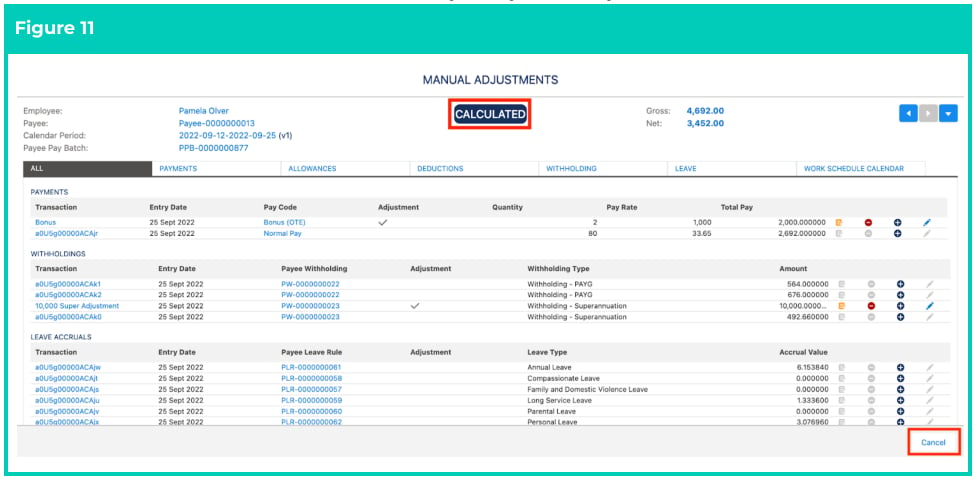
8. If the calculation was successful, the status of the Manual Adjustments screen will change to
   Calculated (see Figure 11).
9. Click on the **Cancel** button to exit this Payee Pay Batch Adjustments screen.
<Frame>
  <img src="https://mintcdn.com/2cloudnine-2edf05eb/HpAUdZHSUT0Tefm0/images/generated/reference-guides/pay-batch-advanced/qrg-calculate-a-single-payee-within-a-pay-batch/qrg-calculate-a-single-payee-within-a-pay-batch-pdf-4-figure-11.png?fit=max&auto=format&n=HpAUdZHSUT0Tefm0&q=85&s=aa27a3eae4fcee1c700239d86ae88369" alt="Screenshot from QRG Calculate a single Payee within a Pay Batch" width="976" height="480" data-path="images/generated/reference-guides/pay-batch-advanced/qrg-calculate-a-single-payee-within-a-pay-batch/qrg-calculate-a-single-payee-within-a-pay-batch-pdf-4-figure-11.png" />
</Frame>

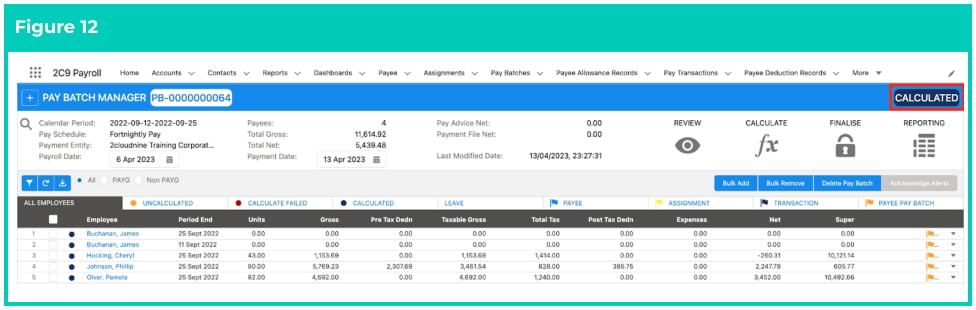
10. Once all Payee Pay Batches have been Calculated successfully, the Status of the Pay Batch will change to Calculated, and the Pay Batch will be ready to Finalise (see Figure 12).
<Frame>
  <img src="https://mintcdn.com/2cloudnine-2edf05eb/HpAUdZHSUT0Tefm0/images/generated/reference-guides/pay-batch-advanced/qrg-calculate-a-single-payee-within-a-pay-batch/qrg-calculate-a-single-payee-within-a-pay-batch-pdf-4-figure-12.png?fit=max&auto=format&n=HpAUdZHSUT0Tefm0&q=85&s=695cc12d4a7c7ca81181eecf6b1408f4" alt="Screenshot from QRG Calculate a single Payee within a Pay Batch" width="976" height="310" data-path="images/generated/reference-guides/pay-batch-advanced/qrg-calculate-a-single-payee-within-a-pay-batch/qrg-calculate-a-single-payee-within-a-pay-batch-pdf-4-figure-12.png" />
</Frame>

### **Calculate an Individual Payee Pay Batch via the Standard UI List**

1. Go to the **Review** navigation icon.
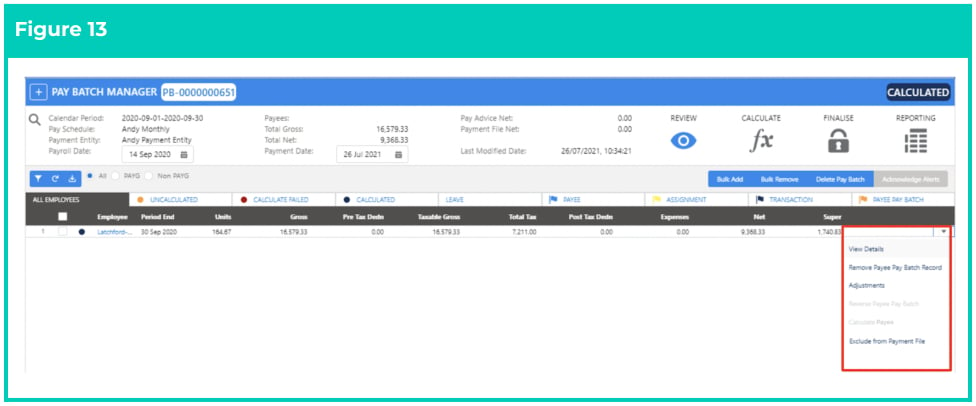
2. From the **All Employee**, **Uncalculated**, **Calculate Failed**, or **Calculated** tab, click the action
   dropdown button at the end of the row for the **Payee Pay Batch** record that requires
   recalculation (see Figure 13).
<Frame>
  <img src="https://mintcdn.com/2cloudnine-2edf05eb/HpAUdZHSUT0Tefm0/images/generated/reference-guides/pay-batch-advanced/qrg-calculate-a-single-payee-within-a-pay-batch/qrg-calculate-a-single-payee-within-a-pay-batch-pdf-5-figure-13.png?fit=max&auto=format&n=HpAUdZHSUT0Tefm0&q=85&s=08c982ec98858666a81fd5b2ce3d17d7" alt="Screenshot from QRG Calculate a single Payee within a Pay Batch" width="976" height="406" data-path="images/generated/reference-guides/pay-batch-advanced/qrg-calculate-a-single-payee-within-a-pay-batch/qrg-calculate-a-single-payee-within-a-pay-batch-pdf-5-figure-13.png" />
</Frame>

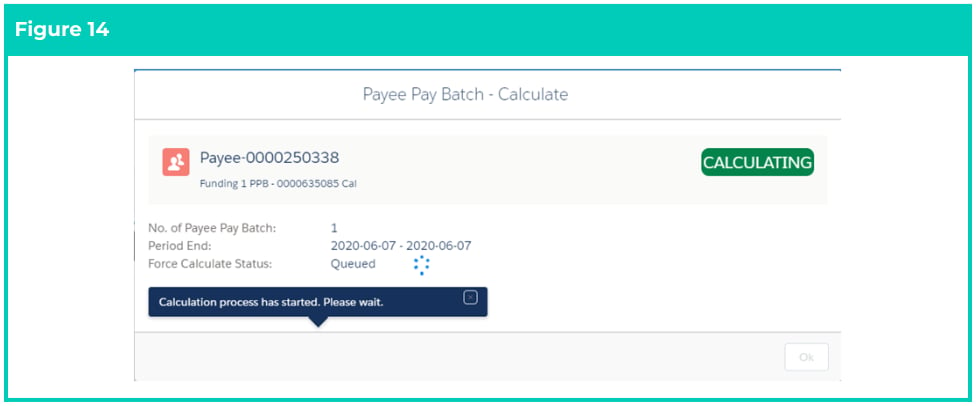
3. Select the **Calculate Payee** option. The Payee Pay Batch - Calculate page will be displayed to show the progress of the Calculation (see Figure 14).
<Frame>
  <img src="https://mintcdn.com/2cloudnine-2edf05eb/HpAUdZHSUT0Tefm0/images/generated/reference-guides/pay-batch-advanced/qrg-calculate-a-single-payee-within-a-pay-batch/qrg-calculate-a-single-payee-within-a-pay-batch-pdf-5-figure-14.png?fit=max&auto=format&n=HpAUdZHSUT0Tefm0&q=85&s=baa8f2fba1cd07c198b100b7abec49e0" alt="Screenshot from QRG Calculate a single Payee within a Pay Batch" width="976" height="406" data-path="images/generated/reference-guides/pay-batch-advanced/qrg-calculate-a-single-payee-within-a-pay-batch/qrg-calculate-a-single-payee-within-a-pay-batch-pdf-5-figure-14.png" />
</Frame>

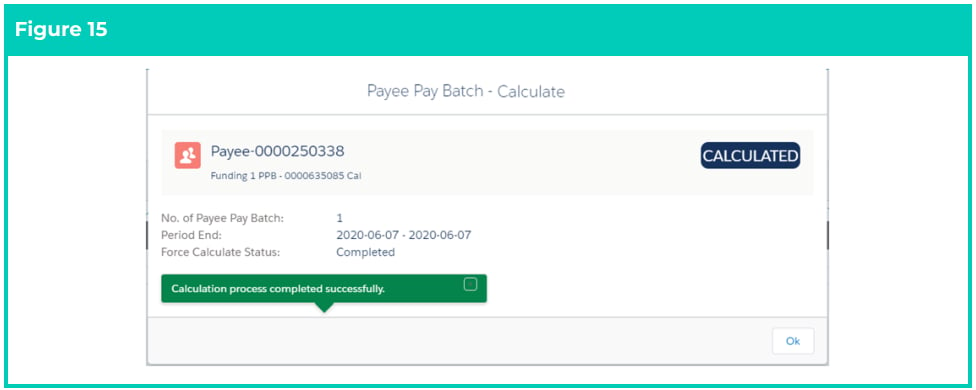
Once the Calculation is complete the Payee Pay Batch - Calculate page will reflect the updated Status to
either Calculated or Calculate Failed based on the successful completion of the process (see Figure 15).
<Frame>
  <img src="https://mintcdn.com/2cloudnine-2edf05eb/HpAUdZHSUT0Tefm0/images/generated/reference-guides/pay-batch-advanced/qrg-calculate-a-single-payee-within-a-pay-batch/qrg-calculate-a-single-payee-within-a-pay-batch-pdf-6-figure-15.png?fit=max&auto=format&n=HpAUdZHSUT0Tefm0&q=85&s=be666b00ca69e177a47860ba28f7ea6e" alt="Screenshot from QRG Calculate a single Payee within a Pay Batch" width="976" height="390" data-path="images/generated/reference-guides/pay-batch-advanced/qrg-calculate-a-single-payee-within-a-pay-batch/qrg-calculate-a-single-payee-within-a-pay-batch-pdf-6-figure-15.png" />
</Frame>

## Field Descriptions

| Field Name                                                                                                                   | Description                                                                                                                                                                                                                                                                                                                                                                                                                                                                                                                                                                                                                                                                                                                                                                                                                                                                                             |
| ---------------------------------------------------------------------------------------------------------------------------- | ------------------------------------------------------------------------------------------------------------------------------------------------------------------------------------------------------------------------------------------------------------------------------------------------------------------------------------------------------------------------------------------------------------------------------------------------------------------------------------------------------------------------------------------------------------------------------------------------------------------------------------------------------------------------------------------------------------------------------------------------------------------------------------------------------------------------------------------------------------------------------------------------------- |
| **Main UI**                                                                                                                  |                                                                                                                                                                                                                                                                                                                                                                                                                                                                                                                                                                                                                                                                                                                                                                                                                                                                                                         |
| Acknowledge Alerts                                                                                                           | is used to accept alerts that appear as warnings but do not need any further action or updates to the records.                                                                                                                                                                                                                                                                                                                                                                                                                                                                                                                                                                                                                                                                                                                                                                                          |
| Tabs (All Employees, Uncalculated, Calculate Failed, Calculated, Leave, Payee, Assignment, Transaction, and Payee Pay Batch) | <strong>All Employees</strong> tab displays all the Payee Pay Batches in this Pay Batch.<br /><strong>Uncalculated</strong> tab displays only the Uncalculated Payee Pay Batches.<br /><strong>Calculate Failed</strong> tab displays only the Payee Pay Batches with a status of Failed.<br /><strong>Calculated</strong> tab displays only the Calculated Payee Pay Batches.<br /><strong>Leave</strong> tab will display all leave Transactions and Accruals.<br /><strong>Payee</strong> tab displays a list of warnings flagged for Payees to be reviewed.<br /><strong>Assignment</strong> tab displays a list of warnings flagged for Assignments to be reviewed.<br /><strong>Transaction</strong> tab displays a list of warnings flagged for Transactions to be reviewed.<br /><strong>Payee Pay Batch</strong> tab displays a list of warnings flagged for Payee Pay Batches to be reviewed. |
| Bulk Add                                                                                                                     | is used to add Payee Pay Batches or individual Pay Transactions that match the original filter of the Pay Batch creation to the Pay Batch.                                                                                                                                                                                                                                                                                                                                                                                                                                                                                                                                                                                                                                                                                                                                                              |
| Bulk Remove                                                                                                                  | is used to remove Payee Pay Batches from the Pay Batch in bulk.                                                                                                                                                                                                                                                                                                                                                                                                                                                                                                                                                                                                                                                                                                                                                                                                                                         |
| Calculate (navigation icon)                                                                                                  | click this navigation icon to view options related to Calculating the Pay Batch and the Part Calculate or Calculate All buttons.                                                                                                                                                                                                                                                                                                                                                                                                                                                                                                                                                                                                                                                                                                                                                                        |
| Calendar Period                                                                                                              | is the date range applicable for this Pay Batch. The Pay Batch may also contain Payee Pay batches relating to earlier Pay Calendar Periods if it was created with the ‘Include Earlier Periods’ checkbox selected.                                                                                                                                                                                                                                                                                                                                                                                                                                                                                                                                                                                                                                                                                      |
| Delete Pay Batch                                                                                                             | this option can be used to permanently delete the Pay Batch. Using this option doesn’t delete any Payee data, but deletes only the PayBatch and any relationship with this Pay Batch on related records (ie. Pay Transactions, Leave Events, etc) so that a new Pay Batch can be created.                                                                                                                                                                                                                                                                                                                                                                                                                                                                                                                                                                                                               |
| Finalise (navigation icon)                                                                                                   | click this navigation icon to view and action various options related to finalising the Pay Batch.                                                                                                                                                                                                                                                                                                                                                                                                                                                                                                                                                                                                                                                                                                                                                                                                      |
| Pay Advice Net                                                                                                               | is the total net amount of related Pay Advices.                                                                                                                                                                                                                                                                                                                                                                                                                                                                                                                                                                                                                                                                                                                                                                                                                                                         |
| Pay Schedule                                                                                                                 | defines the Pay Schedule filter applied to the Pay Batch upon creation.                                                                                                                                                                                                                                                                                                                                                                                                                                                                                                                                                                                                                                                                                                                                                                                                                                 |
| Payees                                                                                                                       | is the count of unique Payees from related Payee Pay Batch records.                                                                                                                                                                                                                                                                                                                                                                                                                                                                                                                                                                                                                                                                                                                                                                                                                                     |
| Payroll Date                                                                                                                 | is the anticipated date that a Pay Batch will be finalised.                                                                                                                                                                                                                                                                                                                                                                                                                                                                                                                                                                                                                                                                                                                                                                                                                                             |
| Payment Date                                                                                                                 | defines the Payment File Release Date.                                                                                                                                                                                                                                                                                                                                                                                                                                                                                                                                                                                                                                                                                                                                                                                                                                                                  |
| Payment Entity                                                                                                               | is the Payment Entity detailed on related Pay Advices, Payment Files, and STP Lodgements for this Pay Batch. Each Pay Batch is specific to only one Payment Entity.                                                                                                                                                                                                                                                                                                                                                                                                                                                                                                                                                                                                                                                                                                                                     |
| Payment File Net                                                                                                             | is the total net amount of related Payment Files.                                                                                                                                                                                                                                                                                                                                                                                                                                                                                                                                                                                                                                                                                                                                                                                                                                                       |
| Reporting (navigation icon)                                                                                                  | click this navigation icon to generate a Variation Report for this Pay Batch to compare it to another Pay Batch.                                                                                                                                                                                                                                                                                                                                                                                                                                                                                                                                                                                                                                                                                                                                                                                        |
| Review (navigation icon)                                                                                                     | click this navigation icon to view options related to reviewing the Pay Batch.                                                                                                                                                                                                                                                                                                                                                                                                                                                                                                                                                                                                                                                                                                                                                                                                                          |
| Total Gross                                                                                                                  | is the total gross earnings from all related Payee Pay Batch records.                                                                                                                                                                                                                                                                                                                                                                                                                                                                                                                                                                                                                                                                                                                                                                                                                                   |
| Total Net                                                                                                                    | is the total net earnings from all related Payee Pay Batch records.                                                                                                                                                                                                                                                                                                                                                                                                                                                                                                                                                                                                                                                                                                                                                                                                                                     |
| **Payee Pay Batch rows (under the action drop-down button next to Payee Pay Batch rows)**                                    |                                                                                                                                                                                                                                                                                                                                                                                                                                                                                                                                                                                                                                                                                                                                                                                                                                                                                                         |
| Adjustments                                                                                                                  | click this button to open the Adjustments screen for an individual Payee Pay Batch.                                                                                                                                                                                                                                                                                                                                                                                                                                                                                                                                                                                                                                                                                                                                                                                                                     |
| Calculate Payee                                                                                                              | use this button to calculate the individual Payee Pay Batch.                                                                                                                                                                                                                                                                                                                                                                                                                                                                                                                                                                                                                                                                                                                                                                                                                                            |
| Exclude from Payment File                                                                                                    | use this button to exclude the total net amount associated with this Payee Pay Batch from the Payment File. This can be reversed at any time up until the Payment File is a status of Released.                                                                                                                                                                                                                                                                                                                                                                                                                                                                                                                                                                                                                                                                                                         |
| Include in Payment File                                                                                                      | use this button to include this Payee Pay Batch if previously ‘excluded from the Payment File’ back into the Payment File.                                                                                                                                                                                                                                                                                                                                                                                                                                                                                                                                                                                                                                                                                                                                                                              |
| Remove Payee Pay Batch Record                                                                                                | use this button to delete the individual Payee Pay Batch record.                                                                                                                                                                                                                                                                                                                                                                                                                                                                                                                                                                                                                                                                                                                                                                                                                                        |
| Reverse Payee Pay Batch                                                                                                      | use this button to reverse all components of this Payee Pay Batch, to be processed in a new Pay Batch.                                                                                                                                                                                                                                                                                                                                                                                                                                                                                                                                                                                                                                                                                                                                                                                                  |
| View Details                                                                                                                 | click this button to open the View Details Panel.                                                                                                                                                                                                                                                                                                                                                                                                                                                                                                                                                                                                                                                                                                                                                                                                                                                       |
| **Manual Adjustments Panel**                                                                                                 |                                                                                                                                                                                                                                                                                                                                                                                                                                                                                                                                                                                                                                                                                                                                                                                                                                                                                                         |
| Add Adjustments                                                                                                              | click this button to manually add new Pay Transactions or delete/edit existing Pay Transactions.                                                                                                                                                                                                                                                                                                                                                                                                                                                                                                                                                                                                                                                                                                                                                                                                        |
| Delete All Adjustments                                                                                                       | click this button to delete all the Adjustment Pay Transactions created directly in the Pay Batch.                                                                                                                                                                                                                                                                                                                                                                                                                                                                                                                                                                                                                                                                                                                                                                                                      |
| Calculate Payee                                                                                                              | this button will Calculate the Payee Pay Batch that is currently open via the Manual Adjustments Panel.                                                                                                                                                                                                                                                                                                                                                                                                                                                                                                                                                                                                                                                                                                                                                                                                 |
| Gross                                                                                                                        | displays the gross earnings from this Payee Pay Batch record.                                                                                                                                                                                                                                                                                                                                                                                                                                                                                                                                                                                                                                                                                                                                                                                                                                           |
| Net                                                                                                                          | displays the net earnings from this Payee Pay Batch record.                                                                                                                                                                                                                                                                                                                                                                                                                                                                                                                                                                                                                                                                                                                                                                                                                                             |
| Remove Payee Pay Batch Record                                                                                                | this button can be used to delete the current Payee Pay Batch record.                                                                                                                                                                                                                                                                                                                                                                                                                                                                                                                                                                                                                                                                                                                                                                                                                                   |
| Payee Pay Batch                                                                                                              | represents the unique identification number of the Payee Pay Batch.                                                                                                                                                                                                                                                                                                                                                                                                                                                                                                                                                                                                                                                                                                                                                                                                                                     |

## Further Information

| Document                                      | Document Type               | Description                                                                                                                                                                                                                                                                                                      |
| --------------------------------------------- | --------------------------- | ---------------------------------------------------------------------------------------------------------------------------------------------------------------------------------------------------------------------------------------------------------------------------------------------------------------- |
| QRG Pay Batch Key Information                 | Information Quick Reference | Outlines useful information relevant to 2cloudnine Payroll’s Pay Batch functionality. The document includes definitions, prerequisites, diagrams, and other non-instructional information on how it facilitates efficient management of Pay Batches from Creation through Review, Calculation, and Finalisation. |
| QRG Create a New Pay Batch                    | Task Instructions           | How to create a new Pay Batch through the Pay Batch Manager.                                                                                                                                                                                                                                                     |
| QRG Review a Pay Batch                        | Task Instructions           | How to Review the Pay Batch on a Pay Batch level and an individual Payee Pay Batch level, as well as the steps required to use the Remove Pay Transaction, Remove Individual Payee Pay Batch records, Bulk Remove, Bulk Add, and Manual Adjustment functionalities within the Pay Batch Manager.                 |
| QRG Calculate a Pay Batch                     | Task Instructions           | How to Calculate a Pay Batch as well as the steps to View and Resolve / Acknowledge Flags through the Pay Batch Manager.                                                                                                                                                                                         |
| QRG Finalise a Pay Batch                      | Task Instructions           | How to Finalise a Pay Batch, Unfinalise a Pay Batch, Create and Distribute Pay Advice documents, and Create and Release Payment Files through the Pay Batch Manager.                                                                                                                                             |
| QRG View Leave Accruals via Pay Batch Manager | Task Instructions           | How to view Automatic Leave Accruals using Pay Batch Manager.                                                                                                                                                                                                                                                    |
| QRG Reverse Payee Pay Batch                   | Task Instructions           | How to Reverse a Payee Pay Batch within the Pay Batch Manager.                                                                                                                                                                                                                                                   |
| QRG Exclude from Payment File                 | Task Instructions           | How to Exclude a Payee Pay Batch from the Payment File.                                                                                                                                                                                                                                                          |
| QRG Create a Variance Report                  | Task Instructions           | How to create a Variance Report within the Pay Batch Manager.                                                                                                                                                                                                                                                    |