> ## Documentation Index
> Fetch the complete documentation index at: https://documentation.2cloudnine.com/llms.txt
> Use this file to discover all available pages before exploring further.
# QRG View Leave Accruals via Pay Batch Manager
## Purpose
The purpose of this quick reference guide is to step through the process of viewing Leave Accruals via
Pay Batch Manager. The intended audience for this document is Standard Payroll Users.
## Steps
A Payee’s detailed Leave Accruals and complete breakdown of Leave for a particular period can be seen
via:
* Pay Batch Manager
* Leave tab (Please refer to QRG View Leave Accruals via the Payee Leave tab)
### **View Leave Accruals via Pay Batch Manager**
To view the Leave accrued for a Payee and the breakdown of Leave for a particular period, the following
steps should be completed. Please skip to step 4, if you already have the UI open on your screen:
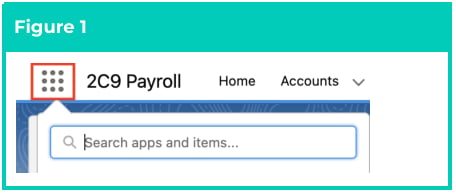
1. Click on the **App Launcher** icon (see Figure 1).
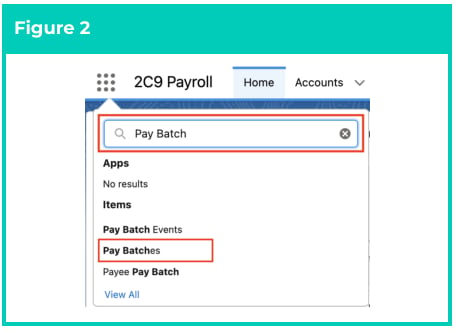
 2. Go to the **Pay Batches** object by using the Search function (see Figure 2).
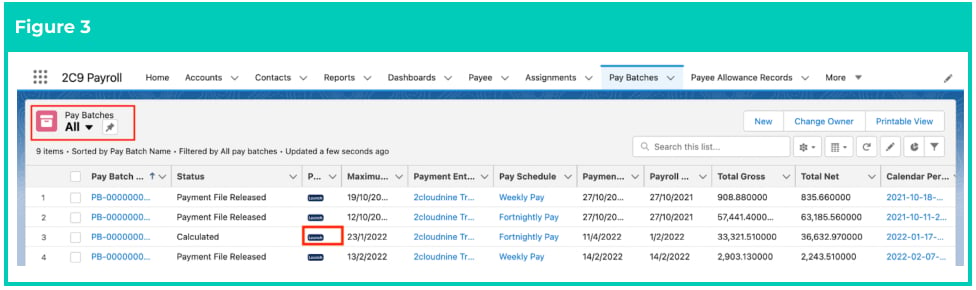
 3. Choose the relevant List View, select the Pay Batch you want to review with a status of
Calculated, Finalised, Pay Advice Created, Payment File Created, or Payment File Released, and
click the **Launch** button (see Figure 3).
3. Choose the relevant List View, select the Pay Batch you want to review with a status of
Calculated, Finalised, Pay Advice Created, Payment File Created, or Payment File Released, and
click the **Launch** button (see Figure 3).
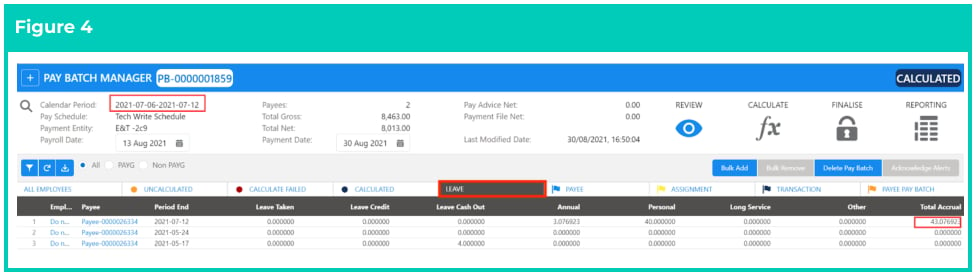
 4. Click on the **Leave** tab to view the total Leave Taken, total Leave Credit, and total Leave Cash Out,
and the breakdown of the Accruals specific to the Leave Types of Annual, Personal, Long Service,
and Other in separate columns. Each Payee Pay Batch will be on a separate line (see Figure 4).
4. Click on the **Leave** tab to view the total Leave Taken, total Leave Credit, and total Leave Cash Out,
and the breakdown of the Accruals specific to the Leave Types of Annual, Personal, Long Service,
and Other in separate columns. Each Payee Pay Batch will be on a separate line (see Figure 4).
 The rate of accrual relates to the value defined in the related Leave Rule Items record.
Please refer to the Leave Rule Items QRG for more information.
## Field Descriptions
No field descriptions are required for this QRG document.
## Further Information
| Document | Document Type | Description |
| ----------------------------------------------- | --------------------------- | ---------------------------------------------------------------------------------------------------------------------------------------------------------------------------------------------------------------------------------------------------------------------------------------------------------------------------------------------------- |
| Leave Setup and Processing - Key Information | Information Quick Reference | Outlines useful information relevant to Leave within 2cloudnine Payroll. The document includes definitions, prerequisites, and other non-instructional information relating to Leave. This includes details on the creation and management of Leave Rules, Payee Leave Rules, and Leave Templates, along with taking of Leave Events, Accruals, etc. |
| QRG Setup Leave Rules | Task Instructions | How to create Leave Rules |
| QRG Setup Leave Rule Items | Task Instructions | How to create Leave Rule Items |
| QRG Setup Payee Leave Rules | Task Instructions | How to create Payee Leave Rules |
| QRG Pay Batch Key Information | Information Quick Reference | Outlines useful information relevant to 2cloudnine Payroll’s Pay Batch functionality. The document includes definitions, prerequisites, diagrams, and other non-instructional information on how it facilitates efficient management of Pay Batches from Creation through Review, Calculation, and Finalisation. |
| QRG Review a Pay Batch | Task Instructions | How to Review the Pay Batch on a Pay Batch level and an individual Payee Pay Batch level, as well as the steps required to use the Remove Pay Transaction, Remove Individual Payee Pay Batch records, Bulk Remove, Bulk Add, and Manual Adjustment functionalities within the Pay Batch Manager. |
| QRG View Leave Accruals via the Payee Leave tab | Task Instructions | How to view Automatic Leave Accruals. |
| QRG Create a Variance Report | Task Instructions | How to create a Variance Report within the Pay Batch Manager. |
The rate of accrual relates to the value defined in the related Leave Rule Items record.
Please refer to the Leave Rule Items QRG for more information.
## Field Descriptions
No field descriptions are required for this QRG document.
## Further Information
| Document | Document Type | Description |
| ----------------------------------------------- | --------------------------- | ---------------------------------------------------------------------------------------------------------------------------------------------------------------------------------------------------------------------------------------------------------------------------------------------------------------------------------------------------- |
| Leave Setup and Processing - Key Information | Information Quick Reference | Outlines useful information relevant to Leave within 2cloudnine Payroll. The document includes definitions, prerequisites, and other non-instructional information relating to Leave. This includes details on the creation and management of Leave Rules, Payee Leave Rules, and Leave Templates, along with taking of Leave Events, Accruals, etc. |
| QRG Setup Leave Rules | Task Instructions | How to create Leave Rules |
| QRG Setup Leave Rule Items | Task Instructions | How to create Leave Rule Items |
| QRG Setup Payee Leave Rules | Task Instructions | How to create Payee Leave Rules |
| QRG Pay Batch Key Information | Information Quick Reference | Outlines useful information relevant to 2cloudnine Payroll’s Pay Batch functionality. The document includes definitions, prerequisites, diagrams, and other non-instructional information on how it facilitates efficient management of Pay Batches from Creation through Review, Calculation, and Finalisation. |
| QRG Review a Pay Batch | Task Instructions | How to Review the Pay Batch on a Pay Batch level and an individual Payee Pay Batch level, as well as the steps required to use the Remove Pay Transaction, Remove Individual Payee Pay Batch records, Bulk Remove, Bulk Add, and Manual Adjustment functionalities within the Pay Batch Manager. |
| QRG View Leave Accruals via the Payee Leave tab | Task Instructions | How to view Automatic Leave Accruals. |
| QRG Create a Variance Report | Task Instructions | How to create a Variance Report within the Pay Batch Manager. |