> ## Documentation Index
> Fetch the complete documentation index at: https://documentation.2cloudnine.com/llms.txt
> Use this file to discover all available pages before exploring further.
# QRG View Leave Accruals via the Payee Leave tab
## Purpose
The purpose of this quick reference guide is to step through the process of viewing Leave Accruals via the
Payee Leave tab. The intended audience for this document is Standard Payroll Users.
## Steps
A Payee’s detailed Leave Accruals and complete breakdown of Leave for a particular period can be seen
via:
* Leave tab
* Pay Batch Manager (Please refer to QRG View Leave Accruals via Pay Batch Manager)
### **Leave Accruals via the Payee Leave tab**
To view Leave Balances via the Payee Leave tab, the following steps should be completed:
1. Go to the **Payee** record.
1. To identify a Payee record from an Employee record, enter the Employee name into the **Global Search** (see Figure 1).
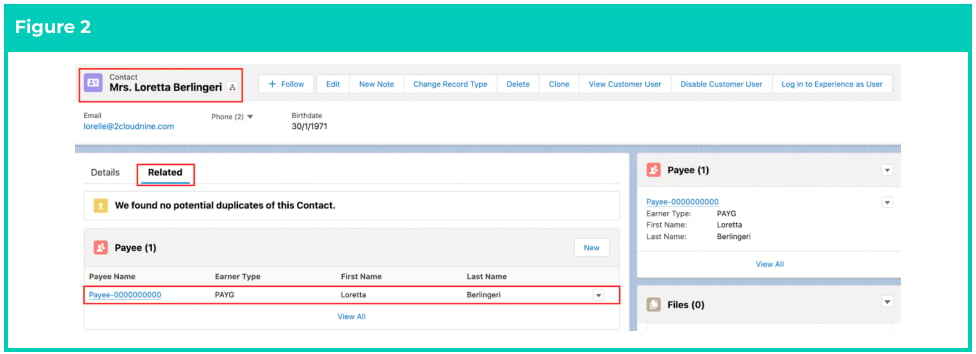
 2. Select the **Employee** record from the suggestions provided (see Figure 2).
3. Open the **Related** tab.
4. Select the **Payee** record for the Leave Accruals to be reviewed.
2. Select the **Employee** record from the suggestions provided (see Figure 2).
3. Open the **Related** tab.
4. Select the **Payee** record for the Leave Accruals to be reviewed.
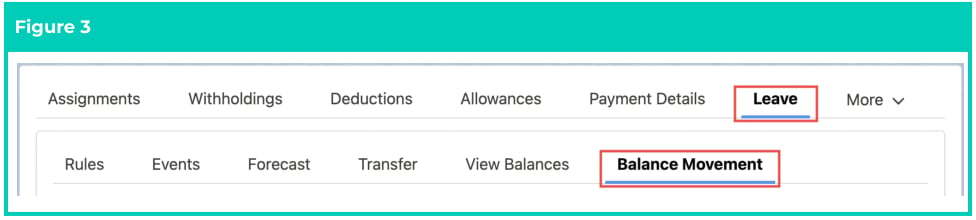
 2. Navigate to the **Leave** tab and click on the **Balance Movement** sub-tab (see Figure 3).
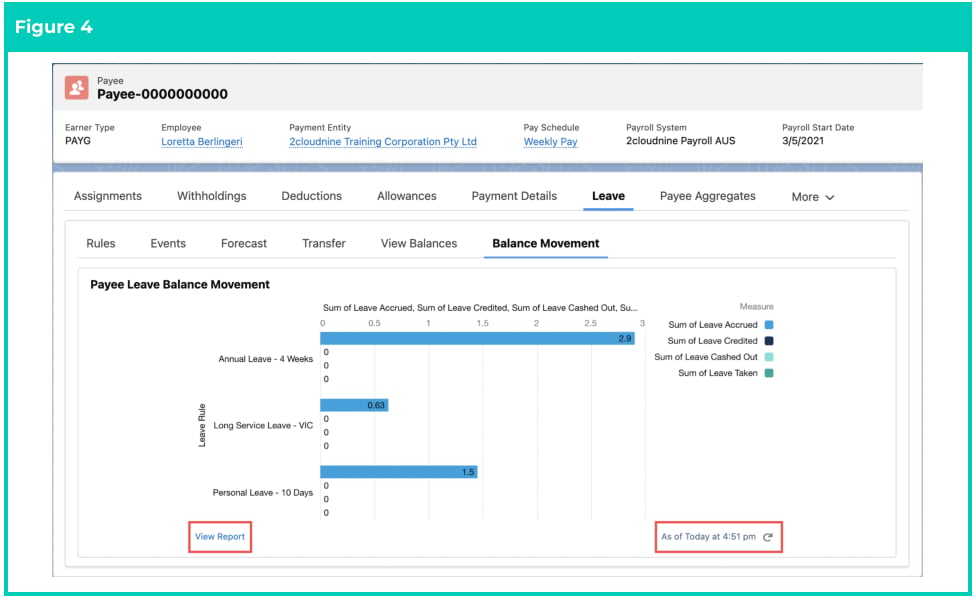
 3. A chart will display the individual accruals across each Leave Type, along with any Leave Credited,
Leave Cashed Out, and Leave Taken. Click **View Report** if you wish to navigate away from this
Payee record, and open the Payee Leave Balance Movement Report within the standard Reports
object, displaying the tabular report underneath the chart shown here (see Figure 4).
3. A chart will display the individual accruals across each Leave Type, along with any Leave Credited,
Leave Cashed Out, and Leave Taken. Click **View Report** if you wish to navigate away from this
Payee record, and open the Payee Leave Balance Movement Report within the standard Reports
object, displaying the tabular report underneath the chart shown here (see Figure 4).
 ## Field Descriptions
No field descriptions are required for this QRG document.
## Further Information
| Document | Document Type | Description |
| --------------------------------------------- | --------------------------- | ---------------------------------------------------------------------------------------------------------------------------------------------------------------------------------------------------------------------------------------------------------------------------------------------------------------------------------------------------- |
| Leave Setup and Processing - Key Information | Information Quick Reference | Outlines useful information relevant to Leave within 2cloudnine Payroll. The document includes definitions, prerequisites, and other non-instructional information relating to Leave. This includes details on the creation and management of Leave Rules, Payee Leave Rules, and Leave Templates, along with taking of Leave Events, Accruals, etc. |
| QRG Setup Leave Rules | Task Instructions | How to create Leave Rules |
| QRG Setup Leave Rule Items | Task Instructions | How to create Leave Rule Items |
| QRG Setup Payee Leave Rules | Task Instructions | How to create Payee Leave Rules |
| QRG View Leave Accruals via Pay Batch Manager | Task Instructions | How to view Leave Accruals as well as Leave Events and Leave Credits within Pay Batch Manager. |
## Field Descriptions
No field descriptions are required for this QRG document.
## Further Information
| Document | Document Type | Description |
| --------------------------------------------- | --------------------------- | ---------------------------------------------------------------------------------------------------------------------------------------------------------------------------------------------------------------------------------------------------------------------------------------------------------------------------------------------------- |
| Leave Setup and Processing - Key Information | Information Quick Reference | Outlines useful information relevant to Leave within 2cloudnine Payroll. The document includes definitions, prerequisites, and other non-instructional information relating to Leave. This includes details on the creation and management of Leave Rules, Payee Leave Rules, and Leave Templates, along with taking of Leave Events, Accruals, etc. |
| QRG Setup Leave Rules | Task Instructions | How to create Leave Rules |
| QRG Setup Leave Rule Items | Task Instructions | How to create Leave Rule Items |
| QRG Setup Payee Leave Rules | Task Instructions | How to create Payee Leave Rules |
| QRG View Leave Accruals via Pay Batch Manager | Task Instructions | How to view Leave Accruals as well as Leave Events and Leave Credits within Pay Batch Manager. |