> ## Documentation Index
> Fetch the complete documentation index at: https://documentation.2cloudnine.com/llms.txt
> Use this file to discover all available pages before exploring further.
# QRG Create a Locations record
export const InlineImage = ({src, alt = "", height = "1.6em"}) => {
return  ;
};
## Purpose
The purpose of this quick reference guide is to step through the process of creating a Locations record.
The intended audience for this document is System Administrators / Standard Users.
The Locations record holds the location information that is used to filter and relate Employment Cost
Item records.
## Steps
### **Create a Locations record**
To create a Locations record, the following steps should be completed:
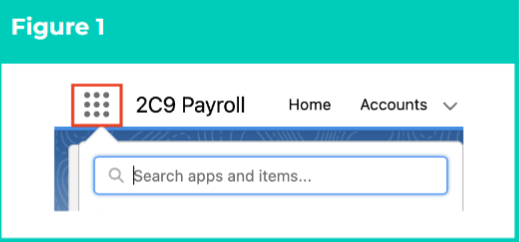
1. Click on the **App Launcher** icon (see Figure 1).
;
};
## Purpose
The purpose of this quick reference guide is to step through the process of creating a Locations record.
The intended audience for this document is System Administrators / Standard Users.
The Locations record holds the location information that is used to filter and relate Employment Cost
Item records.
## Steps
### **Create a Locations record**
To create a Locations record, the following steps should be completed:
1. Click on the **App Launcher** icon (see Figure 1).
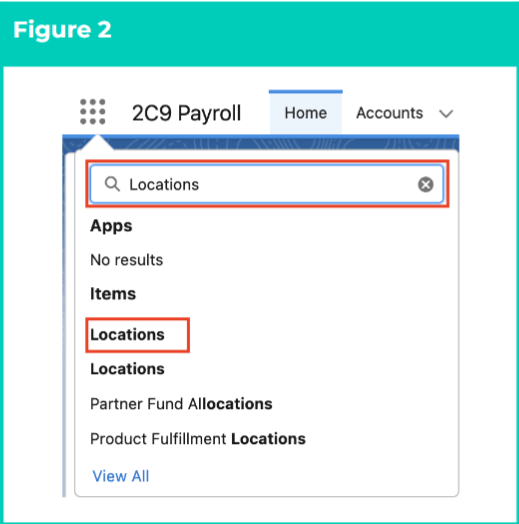
 2. Go to the **Locations** object by using the Search function (see Figure 2).
 **Important Notes**
*(Figure 2)*
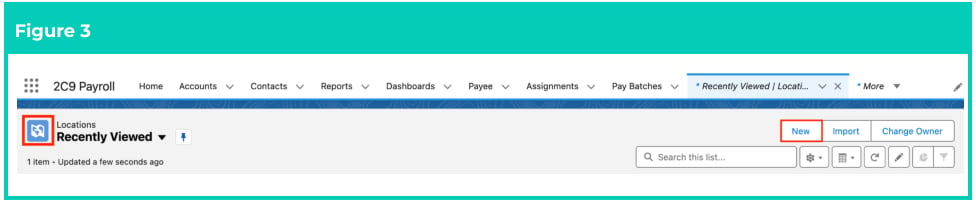
*As there are currently two objects with the name ‘Locations’, please select the ‘Locations’ object*
*represented with a blue map icon (see Figure 3). The other ‘Locations’ object is represented with a*
*green map icon, and is a standard Salesforce object with no relation to Employment Costs or any*
*other 2c9 Payroll functionality.*
3. Click on the **New** button (see Figure 3).
**Important Notes**
*(Figure 2)*
*As there are currently two objects with the name ‘Locations’, please select the ‘Locations’ object*
*represented with a blue map icon (see Figure 3). The other ‘Locations’ object is represented with a*
*green map icon, and is a standard Salesforce object with no relation to Employment Costs or any*
*other 2c9 Payroll functionality.*
3. Click on the **New** button (see Figure 3).
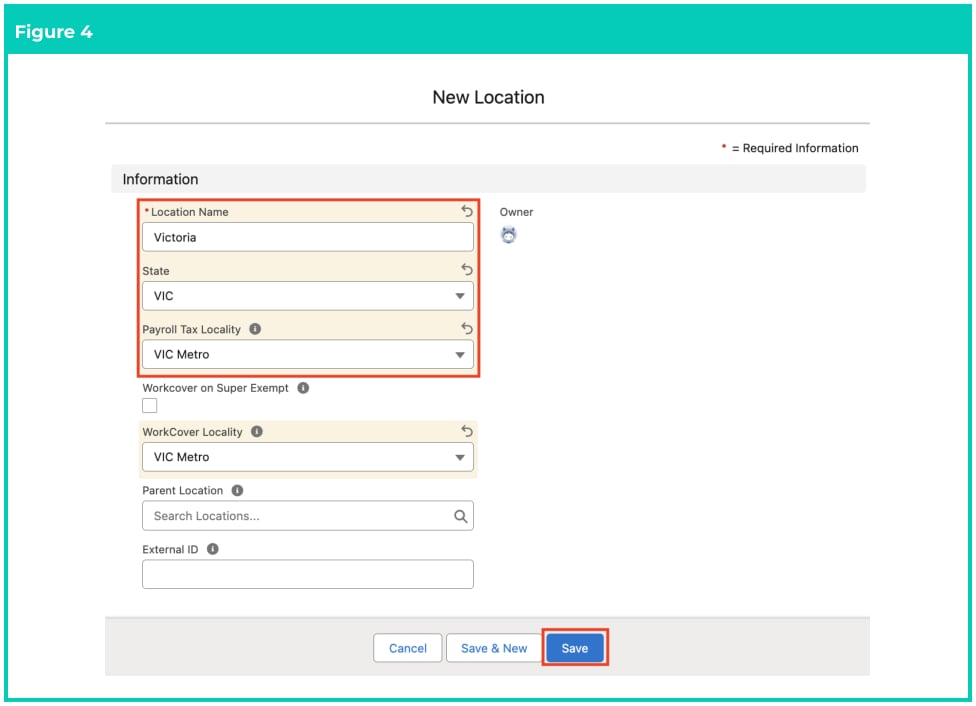
 4. Populate the following required fields to provide the base details for use within the General Ledger and the Rate Calculator (see Figure 4):
1. **Location Name**
2. **State**
5. To apply an Australian Payroll Tax Locality to this Location, as used within General Ledger reporting and Rate Calculator calculations, populate the **Payroll Tax Locality** field.
6. If WorkCover is exempt on Super for this Location, tick the **Workcover on Super Exempt** checkbox.
7. To apply a WorkCover Locality to this Location, as used by the General Ledger reporting and Rate Calculator calculations, populate the **WorkCover Locality** field.
8. To allow setting a hierarchy of locations, populate the **Parent Location** optional field.
9. To integrate the Location record with an external system, populate the **External Id** optional field.
10. Click on the **Save** button (see Figure 4).
4. Populate the following required fields to provide the base details for use within the General Ledger and the Rate Calculator (see Figure 4):
1. **Location Name**
2. **State**
5. To apply an Australian Payroll Tax Locality to this Location, as used within General Ledger reporting and Rate Calculator calculations, populate the **Payroll Tax Locality** field.
6. If WorkCover is exempt on Super for this Location, tick the **Workcover on Super Exempt** checkbox.
7. To apply a WorkCover Locality to this Location, as used by the General Ledger reporting and Rate Calculator calculations, populate the **WorkCover Locality** field.
8. To allow setting a hierarchy of locations, populate the **Parent Location** optional field.
9. To integrate the Location record with an external system, populate the **External Id** optional field.
10. Click on the **Save** button (see Figure 4).
 **Important Notes**
*(Figure 4)*
*The Payroll Tax Locality and WorkCover Locality fields are not utilised as part of the Rate Calculator*
*functionality. They are only utilised by the General Ledger package for calculating Workcover and*
*Payroll Tax oncosts for each Pay Batch and subsequently referenced in Cost of Payroll Journals.*
It is recommended to create a minimum of one Location record for each state, and also one Location
record that can be used as a catch-all for every Location, such as All Locations or Any Location. These
catch-all Location records can be used to populate other records where Location information is
required to complete calculations, but should not be filtered to a single state.
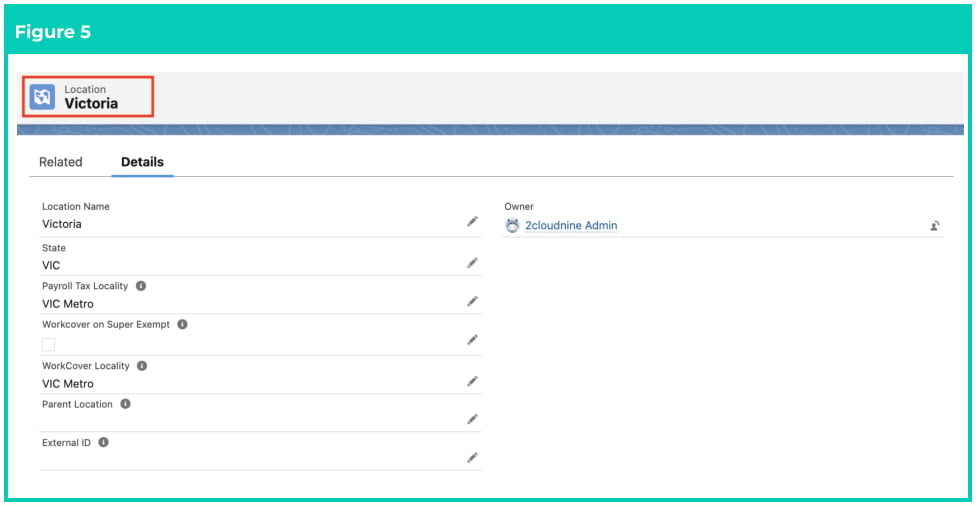
11. A new **Locations** record is now created (see Figure 5).
**Important Notes**
*(Figure 4)*
*The Payroll Tax Locality and WorkCover Locality fields are not utilised as part of the Rate Calculator*
*functionality. They are only utilised by the General Ledger package for calculating Workcover and*
*Payroll Tax oncosts for each Pay Batch and subsequently referenced in Cost of Payroll Journals.*
It is recommended to create a minimum of one Location record for each state, and also one Location
record that can be used as a catch-all for every Location, such as All Locations or Any Location. These
catch-all Location records can be used to populate other records where Location information is
required to complete calculations, but should not be filtered to a single state.
11. A new **Locations** record is now created (see Figure 5).
 Locations records CAN NOT be deleted if they have related records or are used in other
records. Deleting records is not recommended unless absolutely essential.
12. To modify an existing **Location** record, open the required record and select the **Edit** button
available on the top right side of the page. You can also double click within fields that need
editing, or just click on the pencil icon that appears within fields when hovering with your cursor.
13. When complete, click on the **Save** button.
## Field Descriptions
| Field Name | Description |
| --------------------------------- | ------------------------------------------------------------------------------------------------------------------------------- |
| **Location Name** | indicates the full name given to the Location record for identifcation. |
| **State** | defines the Australian State or Territory that the Location exists within. |
| **Payroll Tax Locality** | defines the Australian Payroll Tax Locality that applies to the Location for Accounting reporting. |
| **Workcover on Super** **Exempt** | if selected, Workcover oncosts will not calculate on the related Superannuation Pay Transactions. |
| **WorkCover Locality** | defines the WorkCover Locality that applies to the Location for Accounting reporting. |
| **Parent Location** | is the Parent Location of the Location. Allows for a hierarchy Location setup if required. |
| **External ID** | defines the ID of the corresponding record in an external system that has been used to reference the record using integrations. |
## Further Information
| Document | Document Type | Description |
| --------------------------------------------------------------- | --------------------------- | --------------------------------------------------------------------------------------------------------------------------------------------------------------------- |
| QRG General Ledger Key Information | Key Information | Outlines useful information relevant to the General Ledger functionality. The document includes definitions, prerequisites, and other non-instructional information. |
| QRG Rate Calculator Key Information | Information Quick Reference | Outlines useful information relevant to the Rate Calculator functionality. The document includes definitions, prerequisites, and other non-instructional information. |
| Accounting System Setup | Task Instructions | How to create the Accounting System Setup record. |
| QRG Create an Employment Cost record - All record types | Task Instructions | How to create an Employment Cost record. |
| QRG Create an Employment Cost Template Group | Task Instructions | How to create an Employment Cost Template Group record. |
| QRG Create an Accounting Assignment Department | Task Instructions | How to create an Accounting Assignment Department record. |
| QRG Create an Assignment - Employee | Task Instructions | How to create an Assignment record. |
| QRG Create a Calculation Method | Task Instructions | How to create Calculation Methods to define the calculation type and unit of calculation for Rate Calculator records. |
| QRG Create an Employment Cost Record | Task Instructions | How to create Employment Cost records used for applying costs to the Rate Calculator. |
| QRG Manage Employment Cost Items using ECM | Task Instructions | How to manage Employment Cost Items using the Employment Cost Manager. |
| QRG Create an Employment Cost Exception | Task Instructions | How to apply Employment Cost Exceptions to Clients, Payees & Pay Codes. |
| QRG Create Pay Rate Loadings | Task Instructions | How to create Pay Rate Loadings used for Casual Loading or Shift Loading. |
| QRG Create Rate Calculators - Templates - Initial Setup | Task Instructions | How to create Rate Calculator Templates - Initial Setup. |
| QRG Create Rate Calculator Templates - Final Setup | Task Instructions | How to create Rate Calculator Templates - Final Setup. |
| QRG Create Rate Calculators - Employee Specific | Task Instructions | How to create an Employee Specific Rate calculator using Template automation. |
| QRG Create Rate Calculators - Preview, Clone & Save as Template | Task Instructions | How to create Rate Calculator Previews, Save existing Rate Calculators as Templates, and use the Clone functionality. |
Locations records CAN NOT be deleted if they have related records or are used in other
records. Deleting records is not recommended unless absolutely essential.
12. To modify an existing **Location** record, open the required record and select the **Edit** button
available on the top right side of the page. You can also double click within fields that need
editing, or just click on the pencil icon that appears within fields when hovering with your cursor.
13. When complete, click on the **Save** button.
## Field Descriptions
| Field Name | Description |
| --------------------------------- | ------------------------------------------------------------------------------------------------------------------------------- |
| **Location Name** | indicates the full name given to the Location record for identifcation. |
| **State** | defines the Australian State or Territory that the Location exists within. |
| **Payroll Tax Locality** | defines the Australian Payroll Tax Locality that applies to the Location for Accounting reporting. |
| **Workcover on Super** **Exempt** | if selected, Workcover oncosts will not calculate on the related Superannuation Pay Transactions. |
| **WorkCover Locality** | defines the WorkCover Locality that applies to the Location for Accounting reporting. |
| **Parent Location** | is the Parent Location of the Location. Allows for a hierarchy Location setup if required. |
| **External ID** | defines the ID of the corresponding record in an external system that has been used to reference the record using integrations. |
## Further Information
| Document | Document Type | Description |
| --------------------------------------------------------------- | --------------------------- | --------------------------------------------------------------------------------------------------------------------------------------------------------------------- |
| QRG General Ledger Key Information | Key Information | Outlines useful information relevant to the General Ledger functionality. The document includes definitions, prerequisites, and other non-instructional information. |
| QRG Rate Calculator Key Information | Information Quick Reference | Outlines useful information relevant to the Rate Calculator functionality. The document includes definitions, prerequisites, and other non-instructional information. |
| Accounting System Setup | Task Instructions | How to create the Accounting System Setup record. |
| QRG Create an Employment Cost record - All record types | Task Instructions | How to create an Employment Cost record. |
| QRG Create an Employment Cost Template Group | Task Instructions | How to create an Employment Cost Template Group record. |
| QRG Create an Accounting Assignment Department | Task Instructions | How to create an Accounting Assignment Department record. |
| QRG Create an Assignment - Employee | Task Instructions | How to create an Assignment record. |
| QRG Create a Calculation Method | Task Instructions | How to create Calculation Methods to define the calculation type and unit of calculation for Rate Calculator records. |
| QRG Create an Employment Cost Record | Task Instructions | How to create Employment Cost records used for applying costs to the Rate Calculator. |
| QRG Manage Employment Cost Items using ECM | Task Instructions | How to manage Employment Cost Items using the Employment Cost Manager. |
| QRG Create an Employment Cost Exception | Task Instructions | How to apply Employment Cost Exceptions to Clients, Payees & Pay Codes. |
| QRG Create Pay Rate Loadings | Task Instructions | How to create Pay Rate Loadings used for Casual Loading or Shift Loading. |
| QRG Create Rate Calculators - Templates - Initial Setup | Task Instructions | How to create Rate Calculator Templates - Initial Setup. |
| QRG Create Rate Calculator Templates - Final Setup | Task Instructions | How to create Rate Calculator Templates - Final Setup. |
| QRG Create Rate Calculators - Employee Specific | Task Instructions | How to create an Employee Specific Rate calculator using Template automation. |
| QRG Create Rate Calculators - Preview, Clone & Save as Template | Task Instructions | How to create Rate Calculator Previews, Save existing Rate Calculators as Templates, and use the Clone functionality. |