> ## Documentation Index
> Fetch the complete documentation index at: https://documentation.2cloudnine.com/llms.txt
> Use this file to discover all available pages before exploring further.

# QRG Manage Employment Cost Items using ECM

## Purpose

The purpose of this quick reference guide is to step through the process of managing Employment Costs
using Employment Cost Manager. The intended audience for this document is System Administrators /
Standard Users.

The new Employment Cost Manager UI provides a tool to easily create, expire, clone, and validate the
Employment Cost Items from one place, allowing for validation of the relationship between Employment
Cost Item records and other related records.

## Steps

**Create new Employment Cost Items using Employment Cost Manager**

To create Employer Cost Item records, follow the steps below:

<Columns cols={2}>
  <Column>
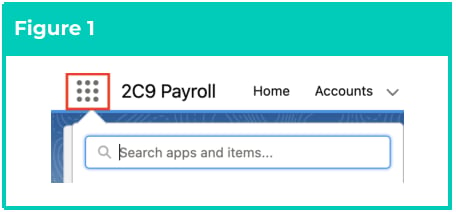
    1. Click on the **App Launcher** icon (see
       Figure 1).
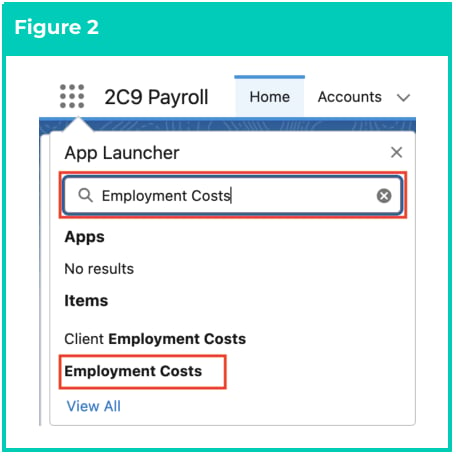
    2. Go to the **Employment Costs** object by
       using the Search function (see Figure 2).
  </Column>

  <Column>
    <Frame>
      <img src="https://mintcdn.com/2cloudnine-2edf05eb/YvlSrmIXKIIQY3K8/images/generated/reference-guides/rate-calculator/qrg-manage-employment-cost-items-using-ecm/qrg-manage-employment-cost-items-using-ecm-pdf-0-figure-1.png?fit=max&auto=format&n=YvlSrmIXKIIQY3K8&q=85&s=091987dbf38b736ca7b4329f319cf75f" alt="Screenshot from QRG Manage Employment Cost Items using ECM" width="456" height="212" data-path="images/generated/reference-guides/rate-calculator/qrg-manage-employment-cost-items-using-ecm/qrg-manage-employment-cost-items-using-ecm-pdf-0-figure-1.png" />
    </Frame>

    <Frame>
      <img src="https://mintcdn.com/2cloudnine-2edf05eb/YvlSrmIXKIIQY3K8/images/generated/reference-guides/rate-calculator/qrg-manage-employment-cost-items-using-ecm/qrg-manage-employment-cost-items-using-ecm-pdf-0-figure-2.png?fit=max&auto=format&n=YvlSrmIXKIIQY3K8&q=85&s=3a0f9fd0fc3822087bb680a1d4c77af6" alt="Screenshot from QRG Manage Employment Cost Items using ECM" width="456" height="456" data-path="images/generated/reference-guides/rate-calculator/qrg-manage-employment-cost-items-using-ecm/qrg-manage-employment-cost-items-using-ecm-pdf-0-figure-2.png" />
    </Frame>
  </Column>
</Columns>

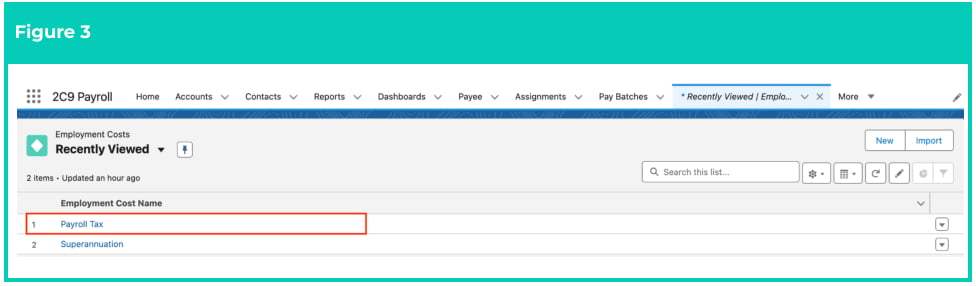
3. Choose the required Employment Cost record (see Figure 3).

To learn more about how to create an Employment Cost record, please refer to the [QRG Create an Employment Cost record - All record types.](https://drive.google.com/open?id=17AFmBQEptD8aumNXF_YS5dbRz7ws9A1I)
<Frame>
  <img src="https://mintcdn.com/2cloudnine-2edf05eb/YvlSrmIXKIIQY3K8/images/generated/reference-guides/rate-calculator/qrg-manage-employment-cost-items-using-ecm/qrg-manage-employment-cost-items-using-ecm-pdf-1-figure-3.png?fit=max&auto=format&n=YvlSrmIXKIIQY3K8&q=85&s=cb7e7f798b748a8ccf24e2d2c7b4aa69" alt="Screenshot from QRG Manage Employment Cost Items using ECM" width="976" height="286" data-path="images/generated/reference-guides/rate-calculator/qrg-manage-employment-cost-items-using-ecm/qrg-manage-employment-cost-items-using-ecm-pdf-1-figure-3.png" />
</Frame>

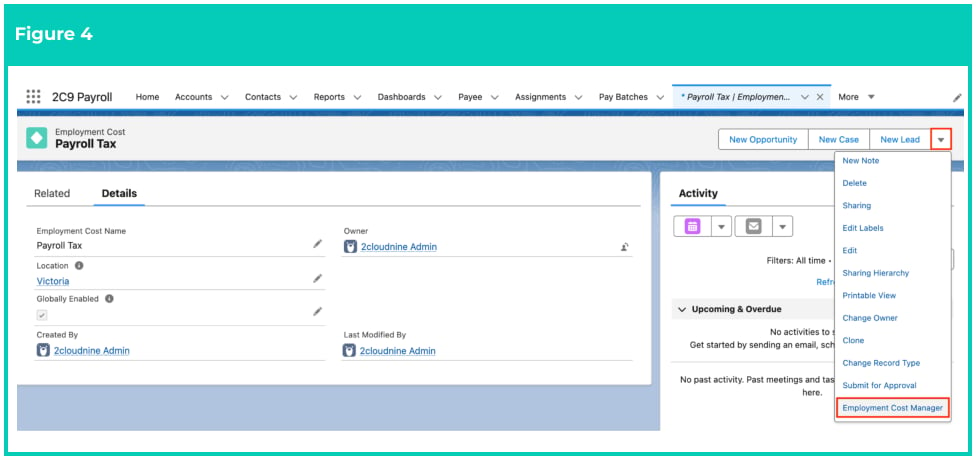
4. On the Employment Cost record Page Layout, click on the drop-down arrow and select
   **Employment Cost Manager** (see Figure 4).
<Frame>
  <img src="https://mintcdn.com/2cloudnine-2edf05eb/YvlSrmIXKIIQY3K8/images/generated/reference-guides/rate-calculator/qrg-manage-employment-cost-items-using-ecm/qrg-manage-employment-cost-items-using-ecm-pdf-1-figure-4.png?fit=max&auto=format&n=YvlSrmIXKIIQY3K8&q=85&s=b7245aa729fa4f7b25692b770f40b165" alt="Screenshot from QRG Manage Employment Cost Items using ECM" width="976" height="460" data-path="images/generated/reference-guides/rate-calculator/qrg-manage-employment-cost-items-using-ecm/qrg-manage-employment-cost-items-using-ecm-pdf-1-figure-4.png" />
</Frame>

<Note>
  **Important Notes**\
  *(Figure 4)*

  *While one Employment Cost Item must be created for every Location record, individual (i.e.*
  *state-based) Location records should NOT be populated for the parent Employment Cost record.*
  *Instead, a single catch-all Location record, such as All Locations or Any Location, should be created to*
  *enable Rate Calculator Templates and Employee Specific Rate Calculators to be identified and*
  *related.*
</Note>

5. A pop-up will appear. On the popup, click the **Open Employment Cost Manager** button (see
   Figure 5).

<Frame>
  <img src="https://mintcdn.com/2cloudnine-2edf05eb/YvlSrmIXKIIQY3K8/images/generated/reference-guides/rate-calculator/qrg-manage-employment-cost-items-using-ecm/qrg-manage-employment-cost-items-using-ecm-pdf-2-figure-5.png?fit=max&auto=format&n=YvlSrmIXKIIQY3K8&q=85&s=ee323ecea35dbc78f3ea9a6843fc9f86" alt="Screenshot from QRG Manage Employment Cost Items using ECM" width="976" height="210" data-path="images/generated/reference-guides/rate-calculator/qrg-manage-employment-cost-items-using-ecm/qrg-manage-employment-cost-items-using-ecm-pdf-2-figure-5.png" />
</Frame>

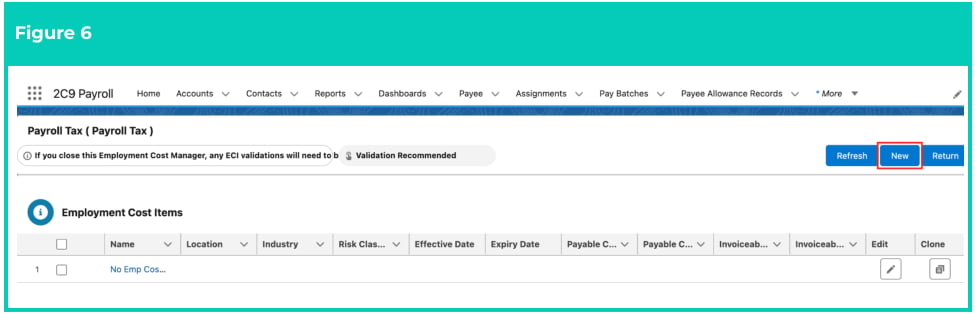
6. The new Employment Cost Manager will open. Within the Employment Cost Manager, click on
   the **New** button (see Figure 6).
<Frame>
  <img src="https://mintcdn.com/2cloudnine-2edf05eb/YvlSrmIXKIIQY3K8/images/generated/reference-guides/rate-calculator/qrg-manage-employment-cost-items-using-ecm/qrg-manage-employment-cost-items-using-ecm-pdf-2-figure-6.png?fit=max&auto=format&n=YvlSrmIXKIIQY3K8&q=85&s=4cf0b8f22a28ffc8054f83f4a82644c0" alt="Screenshot from QRG Manage Employment Cost Items using ECM" width="976" height="314" data-path="images/generated/reference-guides/rate-calculator/qrg-manage-employment-cost-items-using-ecm/qrg-manage-employment-cost-items-using-ecm-pdf-2-figure-6.png" />
</Frame>

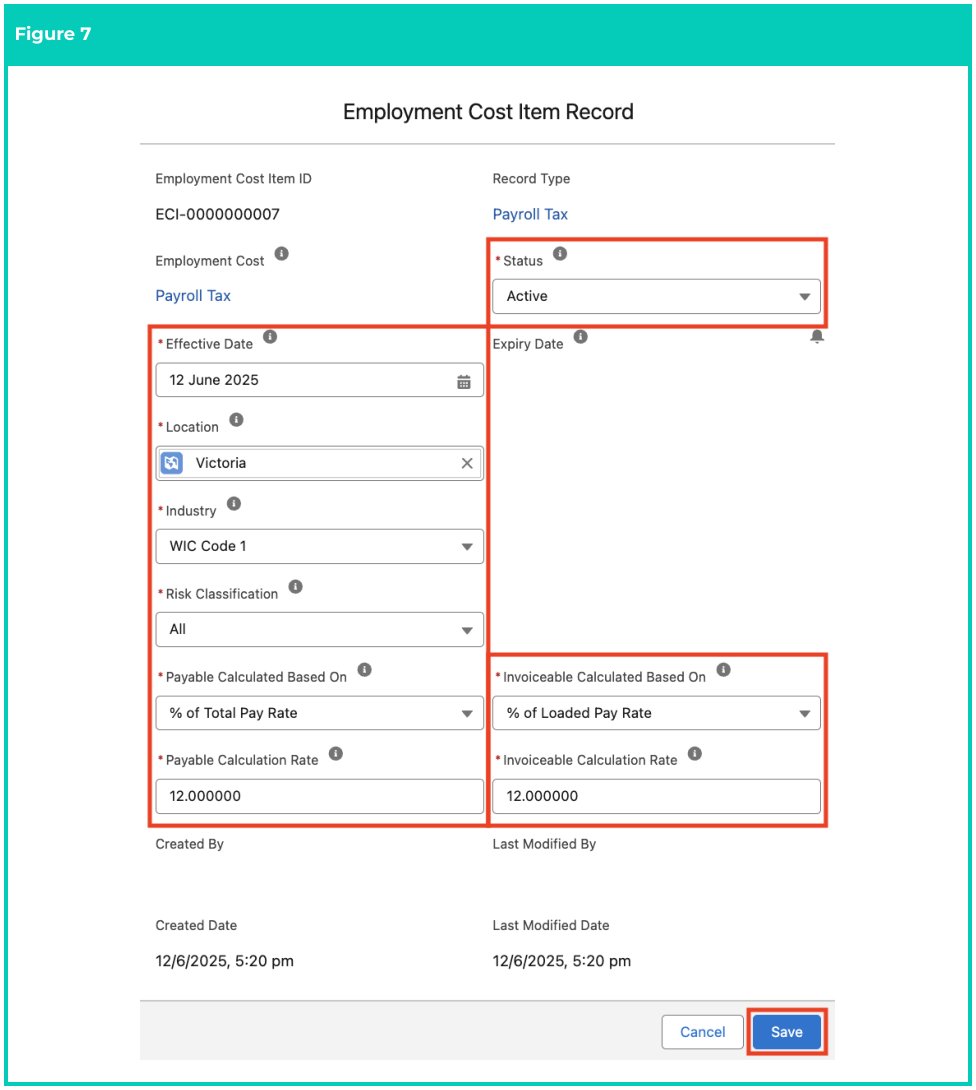
7. Populate the following required fields to provide the base details of the Employment Cost Item
   record (see Figure 7):
   1. **Effective Date**
   2. **Location**
   3. **Industry**
   4. **Risk Classification**
   5. **Payable Calculated Based On**
   6. **Payable Calculation Rate**
   7. **Invoiceable Calculated Based On**
   8. **Invoiceable Calculation Rate**
   9. **Status**
8. Click **Save** .
<Frame>
  <img src="https://mintcdn.com/2cloudnine-2edf05eb/YvlSrmIXKIIQY3K8/images/generated/reference-guides/rate-calculator/qrg-manage-employment-cost-items-using-ecm/qrg-manage-employment-cost-items-using-ecm-pdf-3-figure-7.png?fit=max&auto=format&n=YvlSrmIXKIIQY3K8&q=85&s=5faa5ba223f9bab40d9ff8451f8738f5" alt="Screenshot from QRG Manage Employment Cost Items using ECM" width="976" height="1090" data-path="images/generated/reference-guides/rate-calculator/qrg-manage-employment-cost-items-using-ecm/qrg-manage-employment-cost-items-using-ecm-pdf-3-figure-7.png" />
</Frame>

9. You will receive a confirmation message when the record is created (see Figure 8):

<Frame>
  <img src="https://mintcdn.com/2cloudnine-2edf05eb/YvlSrmIXKIIQY3K8/images/generated/reference-guides/rate-calculator/qrg-manage-employment-cost-items-using-ecm/qrg-manage-employment-cost-items-using-ecm-pdf-3-figure-8.png?fit=max&auto=format&n=YvlSrmIXKIIQY3K8&q=85&s=f4550b947cd0a0c8e3483b700d21af60" alt="Screenshot from QRG Manage Employment Cost Items using ECM" width="976" height="178" data-path="images/generated/reference-guides/rate-calculator/qrg-manage-employment-cost-items-using-ecm/qrg-manage-employment-cost-items-using-ecm-pdf-3-figure-8.png" />
</Frame>

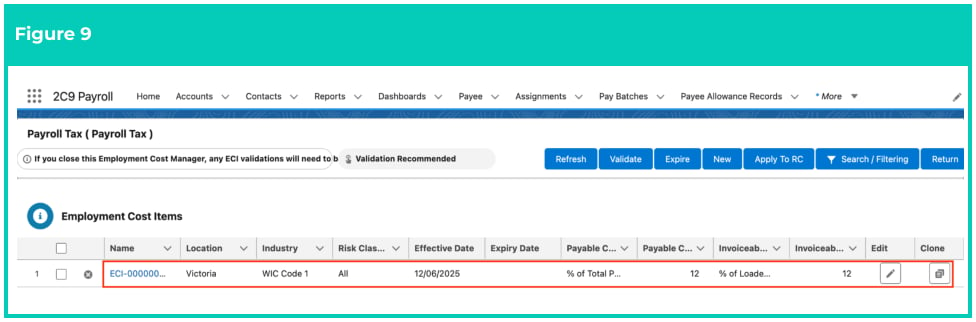
10. A new **Employment Cost Item** record has been created (see Figure 9).
<Frame>
  <img src="https://mintcdn.com/2cloudnine-2edf05eb/YvlSrmIXKIIQY3K8/images/generated/reference-guides/rate-calculator/qrg-manage-employment-cost-items-using-ecm/qrg-manage-employment-cost-items-using-ecm-pdf-4-figure-9.png?fit=max&auto=format&n=YvlSrmIXKIIQY3K8&q=85&s=7036a28ad08690916d995f0320af8082" alt="Screenshot from QRG Manage Employment Cost Items using ECM" width="976" height="322" data-path="images/generated/reference-guides/rate-calculator/qrg-manage-employment-cost-items-using-ecm/qrg-manage-employment-cost-items-using-ecm-pdf-4-figure-9.png" />
</Frame>

<Danger>
  Employment Cost Items CAN NOT be deleted or modified if they have related records
  or are used in other records. Deleting records is not recommended unless absolutely
  essential.
</Danger>

**Create additional Employment Cost Items using the Clone function**

Once an Employment Cost Item record has been created, more Employment Cost Item records can be
created using the Clone feature available within the Employment Cost Manager.

It is important to ensure all Locations have an individual Employment Cost Item Record. The system
doesn’t allow using the same Location on more than one Employment Cost Item Record.

To clone an existing Employment Cost Item record to create a new one, follow these steps:

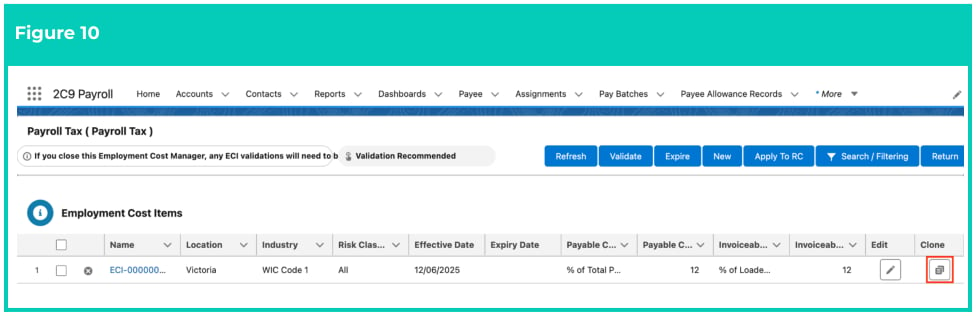
1. In the Employment Cost Manager, click the Clone button next to the Employment Cost Item
   record, as shown in the screenshot below (see Figure 10).
   <Frame>
     <img src="https://mintcdn.com/2cloudnine-2edf05eb/YvlSrmIXKIIQY3K8/images/generated/reference-guides/rate-calculator/qrg-manage-employment-cost-items-using-ecm/qrg-manage-employment-cost-items-using-ecm-pdf-4-figure-10.png?fit=max&auto=format&n=YvlSrmIXKIIQY3K8&q=85&s=3a96f00d83883c9819b76b8cb023f138" alt="Screenshot from QRG Manage Employment Cost Items using ECM" width="976" height="316" data-path="images/generated/reference-guides/rate-calculator/qrg-manage-employment-cost-items-using-ecm/qrg-manage-employment-cost-items-using-ecm-pdf-4-figure-10.png" />
   </Frame>

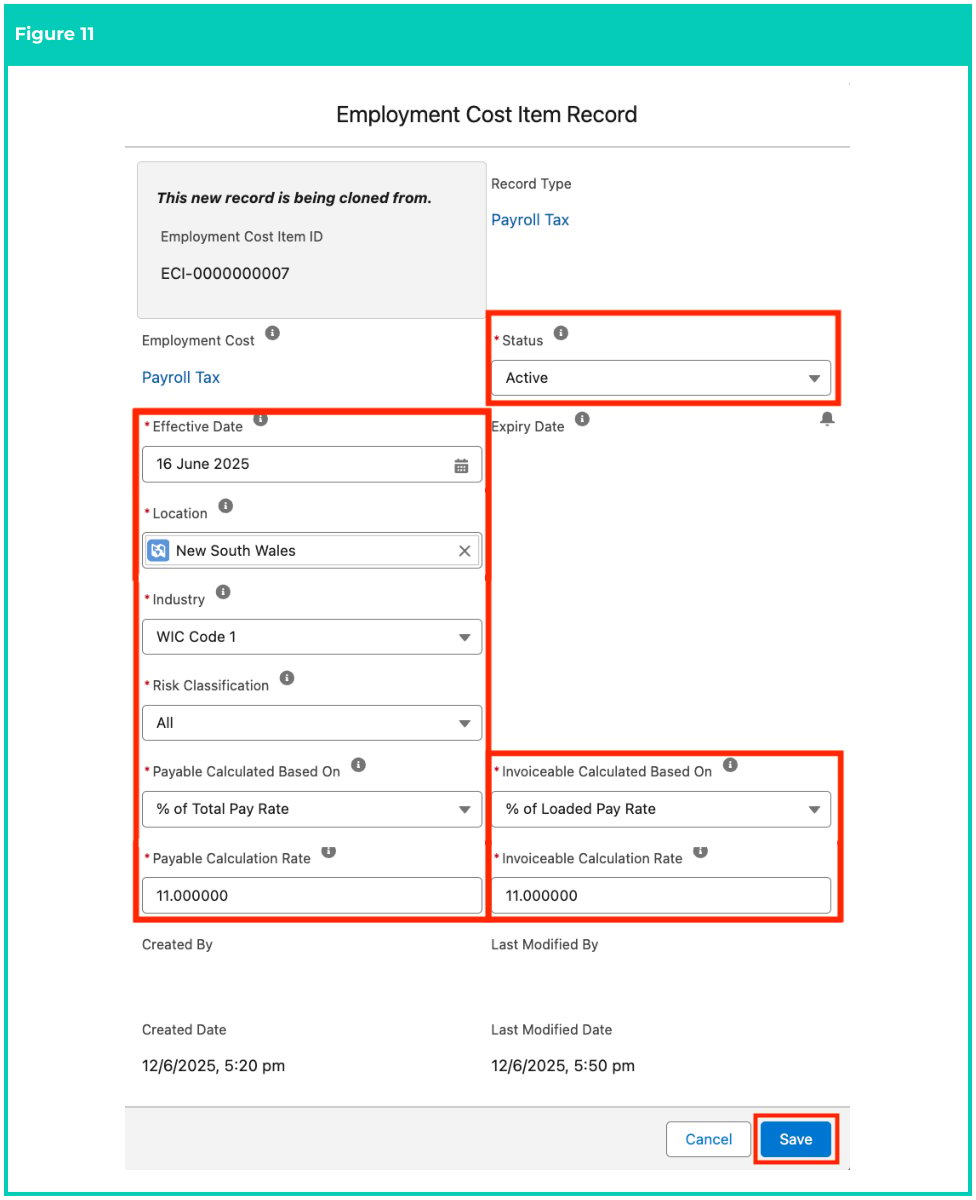
2. A pop-up will appear with the same values copied from the existing record being cloned. You can
   update the values as required, and once done, click **Save** (see Figure 11).
   <Frame>
     <img src="https://mintcdn.com/2cloudnine-2edf05eb/YvlSrmIXKIIQY3K8/images/generated/reference-guides/rate-calculator/qrg-manage-employment-cost-items-using-ecm/qrg-manage-employment-cost-items-using-ecm-pdf-5-figure-11.png?fit=max&auto=format&n=YvlSrmIXKIIQY3K8&q=85&s=81497e3fd3d31e8b09f63f6682e1cb63" alt="Screenshot from QRG Manage Employment Cost Items using ECM" width="976" height="1200" data-path="images/generated/reference-guides/rate-calculator/qrg-manage-employment-cost-items-using-ecm/qrg-manage-employment-cost-items-using-ecm-pdf-5-figure-11.png" />
   </Frame>

3. A new **Employment Cost Item** record has been created (see Figure 12).

   <Frame>
     <img src="https://mintcdn.com/2cloudnine-2edf05eb/YvlSrmIXKIIQY3K8/images/generated/reference-guides/rate-calculator/qrg-manage-employment-cost-items-using-ecm/qrg-manage-employment-cost-items-using-ecm-pdf-6-figure-12.png?fit=max&auto=format&n=YvlSrmIXKIIQY3K8&q=85&s=116ec05c0d90bafe9028ed8599dc4b5c" alt="Screenshot from QRG Manage Employment Cost Items using ECM" width="976" height="344" data-path="images/generated/reference-guides/rate-calculator/qrg-manage-employment-cost-items-using-ecm/qrg-manage-employment-cost-items-using-ecm-pdf-6-figure-12.png" />
   </Frame>

   <Danger>
     Employment Cost Item records CAN NOT be deleted or modified if they have related
     records or are used in other records. Deleting records is not recommended unless
     absolutely essential.
   </Danger>

**Validate Employment Cost Items and apply to the Rate Calculator**

Once all the required Employment Cost Item records have been created, and before they can be used in
Rate Calculators, the next step is to validate the Employment Cost Items. To do this, follow these steps:

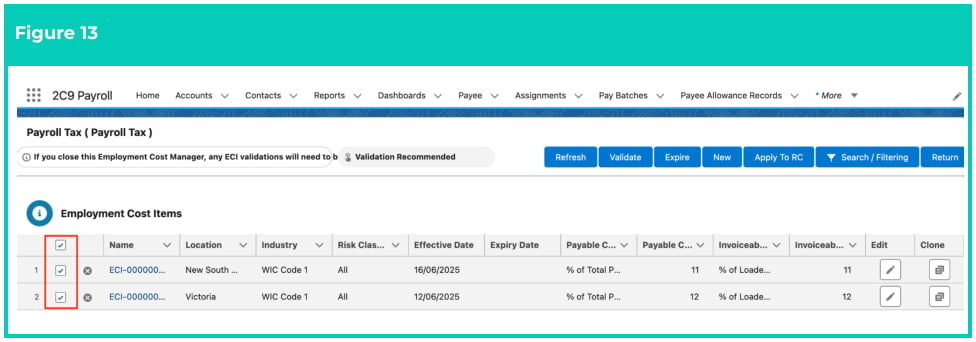
1. In the Employment Cost Manager, select the record that you would like to validate by ticking the
   checkbox and click **Validate** (see Figure 13).
   <Frame>
     <img src="https://mintcdn.com/2cloudnine-2edf05eb/YvlSrmIXKIIQY3K8/images/generated/reference-guides/rate-calculator/qrg-manage-employment-cost-items-using-ecm/qrg-manage-employment-cost-items-using-ecm-pdf-6-figure-13.png?fit=max&auto=format&n=YvlSrmIXKIIQY3K8&q=85&s=fbef9b5dc680fabb9e325e5c9c3bb964" alt="Screenshot from QRG Manage Employment Cost Items using ECM" width="976" height="342" data-path="images/generated/reference-guides/rate-calculator/qrg-manage-employment-cost-items-using-ecm/qrg-manage-employment-cost-items-using-ecm-pdf-6-figure-13.png" />
   </Frame>

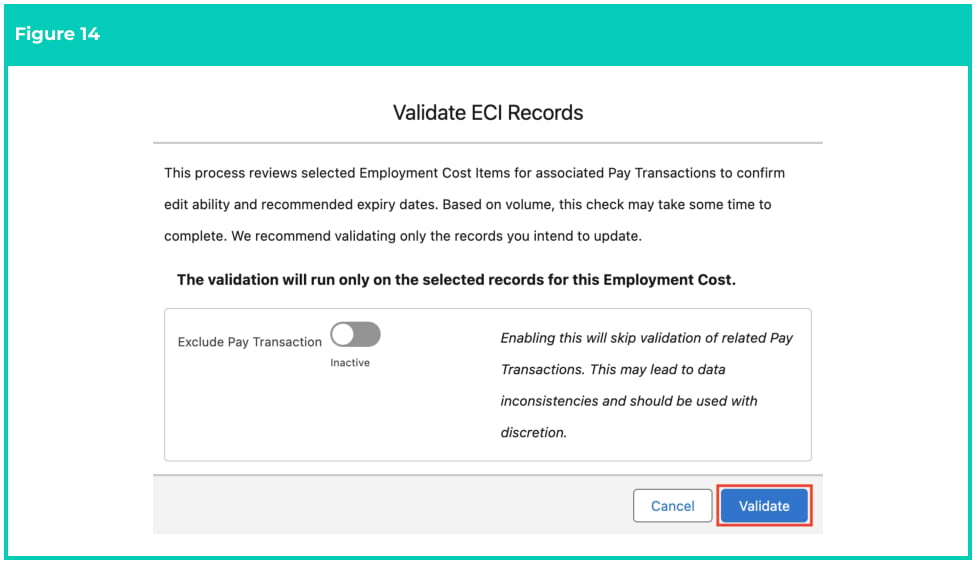
2. A pop-up will appear with further instructions about the validation process. By default, the
   Exclude Pay Transaction Toggle will be disabled. Click on the **Validate** button (see Figure 14).
   <Frame>
     <img src="https://mintcdn.com/2cloudnine-2edf05eb/YvlSrmIXKIIQY3K8/images/generated/reference-guides/rate-calculator/qrg-manage-employment-cost-items-using-ecm/qrg-manage-employment-cost-items-using-ecm-pdf-7-figure-14.png?fit=max&auto=format&n=YvlSrmIXKIIQY3K8&q=85&s=3e5e007835dea40f1e577f5bb48fe974" alt="Screenshot from QRG Manage Employment Cost Items using ECM" width="976" height="564" data-path="images/generated/reference-guides/rate-calculator/qrg-manage-employment-cost-items-using-ecm/qrg-manage-employment-cost-items-using-ecm-pdf-7-figure-14.png" />
   </Frame>

<Warning>
  **Important Notes**\
  *(Figure 14)*

  If the Exclude Pay Transaction Toggle is enabled, this will skip the validation of related Pay
  Transactions and validate only the Employment Cost Item records. This is not recommended and
  must be used with discretion.

  *Please remember that the processing time will vary depending on the underlying Pay Transactions*
  *data. Records related to many Pay Transactions can take a considerable amount of time to validate,*
  *so please be patient and ensure to validate only the records you need, as opposed to all records.*
</Warning>

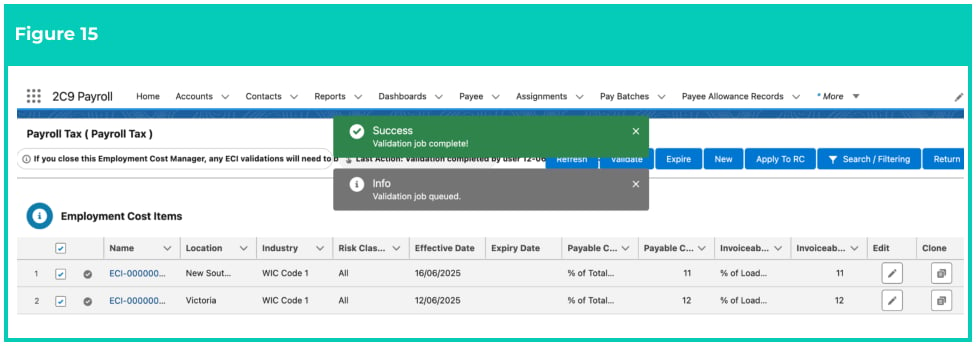
3. You will receive a confirmation message when the validation is complete (see Figure 15).
<Frame>
  <img src="https://mintcdn.com/2cloudnine-2edf05eb/YvlSrmIXKIIQY3K8/images/generated/reference-guides/rate-calculator/qrg-manage-employment-cost-items-using-ecm/qrg-manage-employment-cost-items-using-ecm-pdf-7-figure-15.png?fit=max&auto=format&n=YvlSrmIXKIIQY3K8&q=85&s=2a36bb1a60dda8d15729bd71d3430b02" alt="Screenshot from QRG Manage Employment Cost Items using ECM" width="976" height="346" data-path="images/generated/reference-guides/rate-calculator/qrg-manage-employment-cost-items-using-ecm/qrg-manage-employment-cost-items-using-ecm-pdf-7-figure-15.png" />
</Frame>

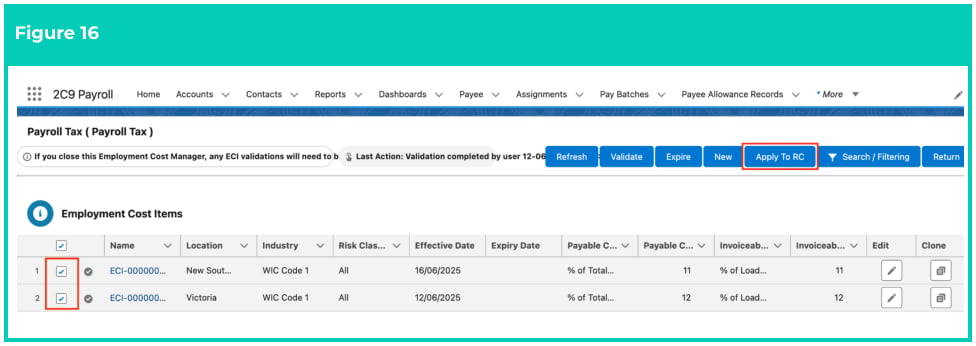
4. After successful validation, select the Employment Cost Items and click **Apply to RC** (see Figure 16).
<Frame>
  <img src="https://mintcdn.com/2cloudnine-2edf05eb/YvlSrmIXKIIQY3K8/images/generated/reference-guides/rate-calculator/qrg-manage-employment-cost-items-using-ecm/qrg-manage-employment-cost-items-using-ecm-pdf-8-figure-16.png?fit=max&auto=format&n=YvlSrmIXKIIQY3K8&q=85&s=e61fbb3b5148e394f173e06803172c6f" alt="Screenshot from QRG Manage Employment Cost Items using ECM" width="976" height="346" data-path="images/generated/reference-guides/rate-calculator/qrg-manage-employment-cost-items-using-ecm/qrg-manage-employment-cost-items-using-ecm-pdf-8-figure-16.png" />
</Frame>

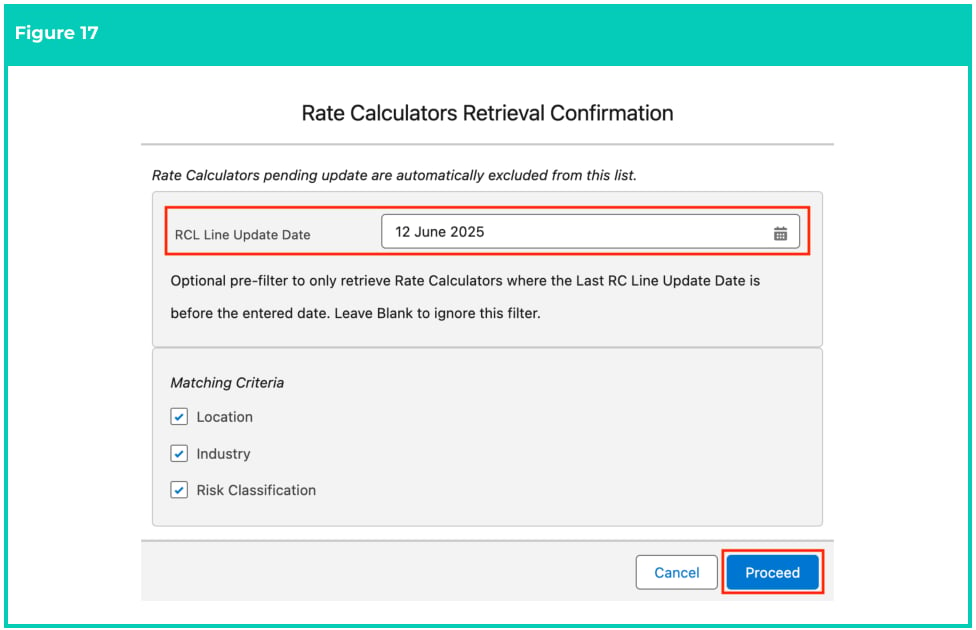
5. A pop-up will appear. Populate the **RCL Line Update Date** to retrieve all Rate Calculator records
   where the Last RC Update Date is before the entered date (see Figure 17).

There are three checkboxes for **Location**, **Industry** and **Risk Classification** . They can be used to
filter the Rate Calculator records. To learn more about this, please refer to the Field Description.

6. Once done, click **Proceed** .
<Frame>
  <img src="https://mintcdn.com/2cloudnine-2edf05eb/YvlSrmIXKIIQY3K8/images/generated/reference-guides/rate-calculator/qrg-manage-employment-cost-items-using-ecm/qrg-manage-employment-cost-items-using-ecm-pdf-8-figure-17.png?fit=max&auto=format&n=YvlSrmIXKIIQY3K8&q=85&s=13820c17aebd3ad88a324862afb0f4d7" alt="Screenshot from QRG Manage Employment Cost Items using ECM" width="976" height="630" data-path="images/generated/reference-guides/rate-calculator/qrg-manage-employment-cost-items-using-ecm/qrg-manage-employment-cost-items-using-ecm-pdf-8-figure-17.png" />
</Frame>

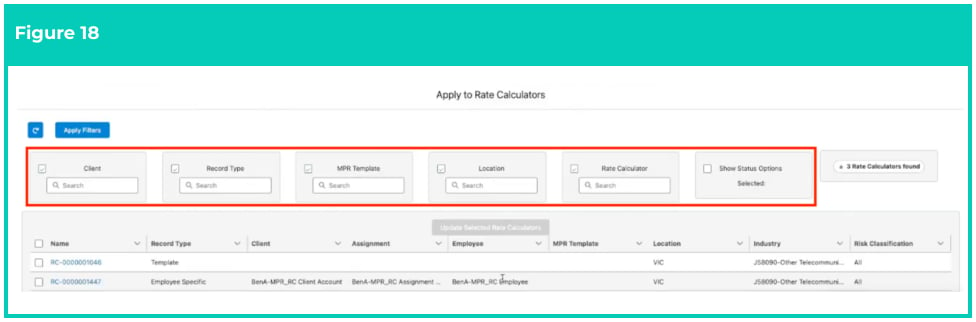
7. From the records retrieved, you can utilise the available filters as shown in the screenshot below
   to further refine and select the required Rate Calculator record (see Figure 18).
<Frame>
  <img src="https://mintcdn.com/2cloudnine-2edf05eb/YvlSrmIXKIIQY3K8/images/generated/reference-guides/rate-calculator/qrg-manage-employment-cost-items-using-ecm/qrg-manage-employment-cost-items-using-ecm-pdf-9-figure-18.png?fit=max&auto=format&n=YvlSrmIXKIIQY3K8&q=85&s=9932c320a1be625c06777de561c21db6" alt="Screenshot from QRG Manage Employment Cost Items using ECM" width="976" height="322" data-path="images/generated/reference-guides/rate-calculator/qrg-manage-employment-cost-items-using-ecm/qrg-manage-employment-cost-items-using-ecm-pdf-9-figure-18.png" />
</Frame>

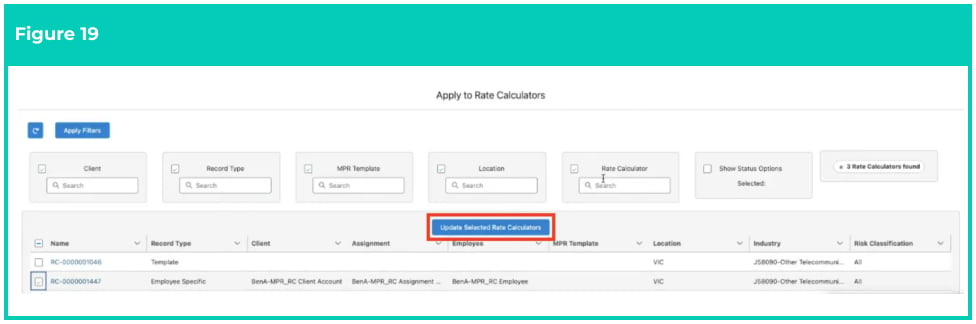
8. Select the required Rate Calculator record(s) and click **Update Selected Rate Calculators** (see
   Figure 19).
<Frame>
  <img src="https://mintcdn.com/2cloudnine-2edf05eb/YvlSrmIXKIIQY3K8/images/generated/reference-guides/rate-calculator/qrg-manage-employment-cost-items-using-ecm/qrg-manage-employment-cost-items-using-ecm-pdf-9-figure-19.png?fit=max&auto=format&n=YvlSrmIXKIIQY3K8&q=85&s=d989f578e806389c504cd204c2c9f36c" alt="Screenshot from QRG Manage Employment Cost Items using ECM" width="976" height="324" data-path="images/generated/reference-guides/rate-calculator/qrg-manage-employment-cost-items-using-ecm/qrg-manage-employment-cost-items-using-ecm-pdf-9-figure-19.png" />
</Frame>

<Note>
  **Important Notes**\
  *(Figure 19)*

  *Once you apply the Employment Cost record to a Rate Calculator record, the field Last Calculator Line*
  *Update Date will be set to Now, and the recalculation will be performed by the next Scheduled Batch*
  *Job or by manually going into a Rate Calculator and selecting Calculate.*
</Note>

**Update existing Employment Cost Items**

As mentioned earlier, the existing Employment Cost Item records can not be modified or deleted from
the Employment Cost Manager, unless they have been validated and there are NO related Pay
Transactions. The option to update an existing record is only suitable when an Employment Cost Item
record has been created incorrectly and doesn’t have related Pay Transactions. In all other scenarios,
whenever an existing Employment Cost Item record needs to be modified, it must be expired from within
the Employment Cost Manager, and then the expired record can be cloned to enter the new details.
To expire an existing Employment Cost Item record and create a new clone of the expired record, follow
these steps:

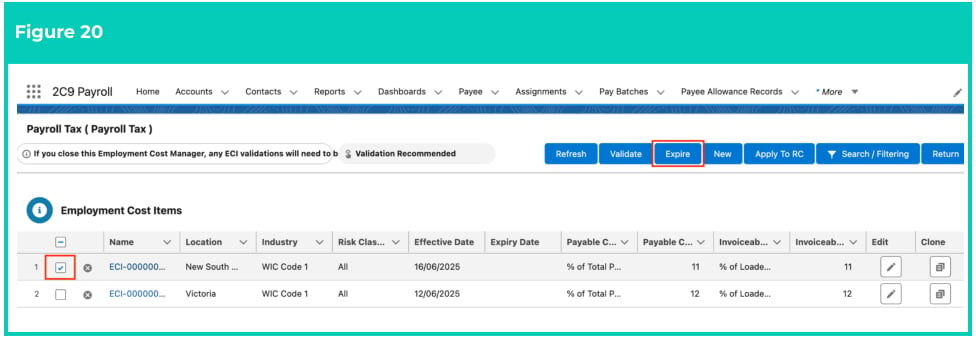
1. In the Employment Cost Manager, select the record that you would like to expire by ticking the
   checkbox next to it and then click **Expire** (see Figure 20).
   <Frame>
     <img src="https://mintcdn.com/2cloudnine-2edf05eb/YvlSrmIXKIIQY3K8/images/generated/reference-guides/rate-calculator/qrg-manage-employment-cost-items-using-ecm/qrg-manage-employment-cost-items-using-ecm-pdf-10-figure-20.png?fit=max&auto=format&n=YvlSrmIXKIIQY3K8&q=85&s=7463f2f7db5c8f7c5b071c8f3f6d1d3f" alt="Screenshot from QRG Manage Employment Cost Items using ECM" width="976" height="340" data-path="images/generated/reference-guides/rate-calculator/qrg-manage-employment-cost-items-using-ecm/qrg-manage-employment-cost-items-using-ecm-pdf-10-figure-20.png" />
   </Frame>

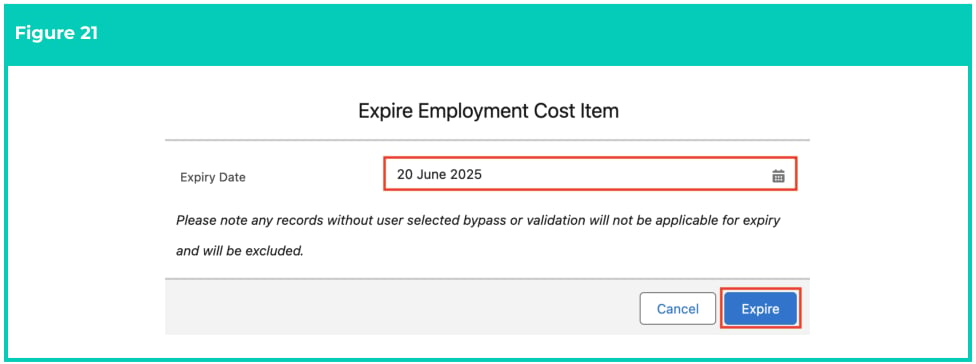
2. Populate the **Expiry Date** field and click **Expire** (see Figure 21).
   <Frame>
     <img src="https://mintcdn.com/2cloudnine-2edf05eb/YvlSrmIXKIIQY3K8/images/generated/reference-guides/rate-calculator/qrg-manage-employment-cost-items-using-ecm/qrg-manage-employment-cost-items-using-ecm-pdf-10-figure-21.png?fit=max&auto=format&n=YvlSrmIXKIIQY3K8&q=85&s=d9fe17ca4babbfa086fc6f9098cb45dd" alt="Screenshot from QRG Manage Employment Cost Items using ECM" width="976" height="364" data-path="images/generated/reference-guides/rate-calculator/qrg-manage-employment-cost-items-using-ecm/qrg-manage-employment-cost-items-using-ecm-pdf-10-figure-21.png" />
   </Frame>

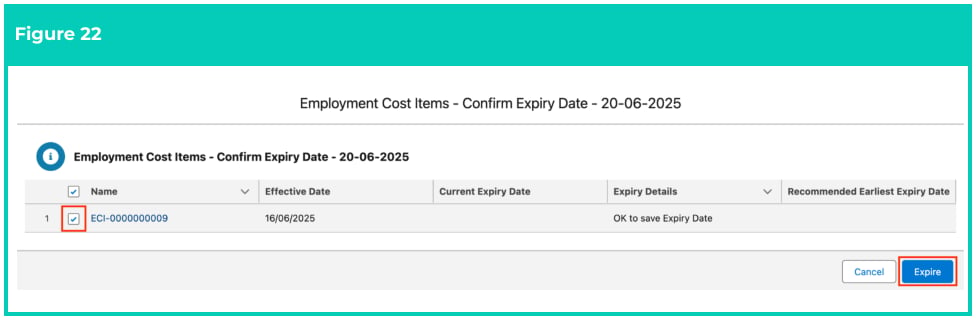
3. On the next screen, tick the required record and click **Expire** to proceed (see Figure 22).
   <Frame>
     <img src="https://mintcdn.com/2cloudnine-2edf05eb/YvlSrmIXKIIQY3K8/images/generated/reference-guides/rate-calculator/qrg-manage-employment-cost-items-using-ecm/qrg-manage-employment-cost-items-using-ecm-pdf-10-figure-22.png?fit=max&auto=format&n=YvlSrmIXKIIQY3K8&q=85&s=190eca48341838e0f0ba6114f75fac55" alt="Screenshot from QRG Manage Employment Cost Items using ECM" width="976" height="320" data-path="images/generated/reference-guides/rate-calculator/qrg-manage-employment-cost-items-using-ecm/qrg-manage-employment-cost-items-using-ecm-pdf-10-figure-22.png" />
   </Frame>

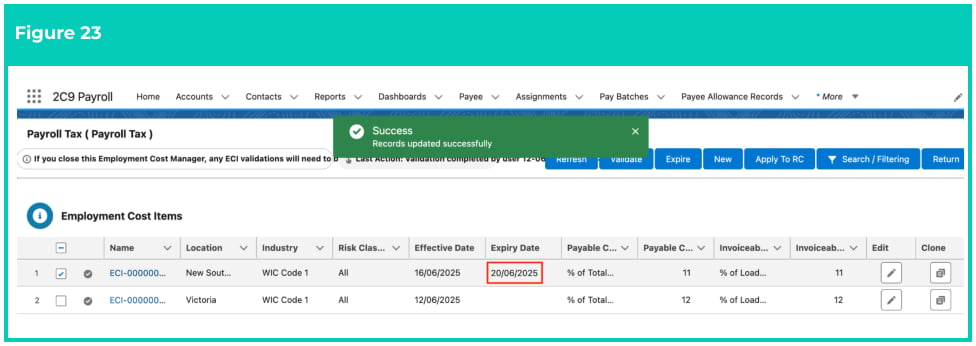
4. The selected record will expire with the Expiry Date populated as shown in the screenshot below
   (see Figure 23).
   <Frame>
     <img src="https://mintcdn.com/2cloudnine-2edf05eb/YvlSrmIXKIIQY3K8/images/generated/reference-guides/rate-calculator/qrg-manage-employment-cost-items-using-ecm/qrg-manage-employment-cost-items-using-ecm-pdf-11-figure-23.png?fit=max&auto=format&n=YvlSrmIXKIIQY3K8&q=85&s=16741c9ea9b4d04b541a124b46f13132" alt="Screenshot from QRG Manage Employment Cost Items using ECM" width="976" height="346" data-path="images/generated/reference-guides/rate-calculator/qrg-manage-employment-cost-items-using-ecm/qrg-manage-employment-cost-items-using-ecm-pdf-11-figure-23.png" />
   </Frame>

5. The expired record can now be cloned following the steps provided above in this document,
   under the section Clone Employment Cost Items.
   <Danger>
     Employment Cost Item records CAN NOT be deleted or modified if they have related
     records or are used in other records. Deleting records is not recommended unless
     absolutely essential.
   </Danger>

## Field descriptions

| Field Name                              | Description                                                                                                                                                                                                                                                                                                                                                                                                                                                                                                                                                                                                                                                                                                                                                                                                                                                                                                                                                                                                                                                                                                                                                                                                                                                                                                                                                                                                                                                                                                                                                     |
| --------------------------------------- | --------------------------------------------------------------------------------------------------------------------------------------------------------------------------------------------------------------------------------------------------------------------------------------------------------------------------------------------------------------------------------------------------------------------------------------------------------------------------------------------------------------------------------------------------------------------------------------------------------------------------------------------------------------------------------------------------------------------------------------------------------------------------------------------------------------------------------------------------------------------------------------------------------------------------------------------------------------------------------------------------------------------------------------------------------------------------------------------------------------------------------------------------------------------------------------------------------------------------------------------------------------------------------------------------------------------------------------------------------------------------------------------------------------------------------------------------------------------------------------------------------------------------------------------------------------- |
| **Effective Date**                      | The Date the Employment Cost Item will come into effect.                                                                                                                                                                                                                                                                                                                                                                                                                                                                                                                                                                                                                                                                                                                                                                                                                                                                                                                                                                                                                                                                                                                                                                                                                                                                                                                                                                                                                                                                                                        |
| **Employment Cost**                     | The Employment Cost associated with this Employment Cost Item.                                                                                                                                                                                                                                                                                                                                                                                                                                                                                                                                                                                                                                                                                                                                                                                                                                                                                                                                                                                                                                                                                                                                                                                                                                                                                                                                                                                                                                                                                                  |
| **Expiry Date**                         | The Date the Employment Cost Item will expire or has expired.                                                                                                                                                                                                                                                                                                                                                                                                                                                                                                                                                                                                                                                                                                                                                                                                                                                                                                                                                                                                                                                                                                                                                                                                                                                                                                                                                                                                                                                                                                   |
| **Industry**                            | The Industry that the Employment Cost Item relates to.                                                                                                                                                                                                                                                                                                                                                                                                                                                                                                                                                                                                                                                                                                                                                                                                                                                                                                                                                                                                                                                                                                                                                                                                                                                                                                                                                                                                                                                                                                          |
| **Invoiceable Calculated Based** **On** | The calculation that will be used on the value entered in the **Invoiceable Calculation Rate** field to determine the Invoice Rate: <ul><li>**% of Base Pay Rate** will be calculated using the value populated in the Invoiceable Calculation Rate field as a percentage of the Base Pay Rate.</li><li>**% of Multiplied Pay Rate** will be calculated using the value populated in the Invoiceable Calculation Rate field as a percentage of the Base Pay Rate, multiplied by the Pay Code Multiplier.</li><li>**% of Total Pay Rate + Costs** will be calculated using the value populated in the Invoiceable. Calculation Rate field as a percentage of the Base Pay Rate, added to the Casual Loading and all other Pre-Costs.</li><li>**% of Total Cost + Mark Up/Margin** will be calculated using the value populated in the Invoiceable Calculation Rate field as a percentage of the Base Pay Rate, added to the Casual Loading rate along with all Pre-Costs, with Margin/ Markup/Margin values also added.</li><li>**Fixed Amount** will be calculated using the value populated in the Invoiceable Calculation Rate field as a fxed amount.</li><li>**% of Pay Rate** will be calculated using the value populated in the Invoiceable Calculation Rate field as a percentage of the Pay Rate.</li><li>**% of Loaded Pay Rate** will be calculated using the value populated in the Invoiceable Calculation Rate field as a percentage of the Base Pay Rate, multiplied by the Pay Code Multiplier, and added to the Casual Loading rate.</li></ul> |
| **Invoiceable Calculation Rate**        | Defines what rate will be used in calculating the amount Invoiceable.                                                                                                                                                                                                                                                                                                                                                                                                                                                                                                                                                                                                                                                                                                                                                                                                                                                                                                                                                                                                                                                                                                                                                                                                                                                                                                                                                                                                                                                                                           |
| **Location**                            | The Location associated with this Employment Cost Item.                                                                                                                                                                                                                                                                                                                                                                                                                                                                                                                                                                                                                                                                                                                                                                                                                                                                                                                                                                                                                                                                                                                                                                                                                                                                                                                                                                                                                                                                                                         |
| **Matching Criteria**                   | These are three checkboxes for Location, Industry, and Risk Classification. They can be used to flter the Rate Calculator records. You will need to select the different flters, based on which Record Types of Employment Costs you are applying to Rate Calculators. <ol><li>When validating the Superannuation or Payroll Tax Record Types, check the Location flter, whereas Industry and Risk Classification flters can remain unchecked.</li><li>When validating the Workcover Record Types, all three flters should be checked.</li></ol>                                                                                                                                                                                                                                                                                                                                                                                                                                                                                                                                                                                                                                                                                                                                                                                                                                                                                                                                                                                                                |
| **Payable Calculated Based On**         | Defines what value the amount payable will be based on: <ul><li>**% of Pay Rate** will be calculated using the value populated in the Payable Calculation Rate field as a percentage of the Pay Rate.</li><li>**% of Total Pay Rate** will be calculated using the value populated in the Payable Calculation field as a percentage of the Base Pay Rate, multiplied by the Pay Code Multiplier, added to Casual Loading and Superannuation.</li><li>**Fixed Amount** will be calculated using the value populated in the Payable Calculation field as fxed amount.</li></ul>                                                                                                                                                                                                                                                                                                                                                                                                                                                                                                                                                                                                                                                                                                                                                                                                                                                                                                                                                                                   |
| **Payable Calculation Rate**            | Defines the rate that will be used in calculating the Pay Rate.                                                                                                                                                                                                                                                                                                                                                                                                                                                                                                                                                                                                                                                                                                                                                                                                                                                                                                                                                                                                                                                                                                                                                                                                                                                                                                                                                                                                                                                                                                 |
| **RCL Line Update Date**                | This is an optional pre-flter to only retrieve Rate Calculators where the Last RC Line Update Date is before the entered date. Leave Blank to ignore this flter.                                                                                                                                                                                                                                                                                                                                                                                                                                                                                                                                                                                                                                                                                                                                                                                                                                                                                                                                                                                                                                                                                                                                                                                                                                                                                                                                                                                                |
| **Risk Classification**                 | The Risk Classification that the Employment Cost Item relates to applies.                                                                                                                                                                                                                                                                                                                                                                                                                                                                                                                                                                                                                                                                                                                                                                                                                                                                                                                                                                                                                                                                                                                                                                                                                                                                                                                                                                                                                                                                                       |
| **Status**                              | The Status of the Employment Cost Item.                                                                                                                                                                                                                                                                                                                                                                                                                                                                                                                                                                                                                                                                                                                                                                                                                                                                                                                                                                                                                                                                                                                                                                                                                                                                                                                                                                                                                                                                                                                         |

## Further information

| Document                                                        | Document Type               | Description                                                                                                                                                           |
| --------------------------------------------------------------- | --------------------------- | --------------------------------------------------------------------------------------------------------------------------------------------------------------------- |
| QRG Rate Calculator Key Information                             | Information Quick Reference | Outlines useful information relevant to the Rate Calculator functionality. The document includes definitions, prerequisites, and other non-instructional information. |
| QRG Create a Location record                                    | Task Instructions           | How to create a Location record used for Rate Calculators.                                                                                                            |
| QRG Create a Calculation Method                                 | Task Instructions           | How to create Calculation Methods to define the calculation type and unit of calculation for Rate Calculator records.                                                 |
| QRG Create an Employment Cost Record                            | Task Instructions           | How to create Employment Cost records used for applying costs to the Rate Calculator.                                                                                 |
| QRG Create an Employment Cost Exception                         | Task Instructions           | How to apply Employment Cost Exceptions to Clients, Payees & Pay Codes.                                                                                               |
| QRG Create Pay Rate Loadings                                    | Task Instructions           | How to create Pay Rate Loadings used for Casual Loading or Shift Loading.                                                                                             |
| QRG Create Rate Calculators - Templates - Initial Setup         | Task Instructions           | How to create Rate Calculator Templates - Initial Setup.                                                                                                              |
| QRG Create Rate Calculator Templates - Final Setup              | Task Instructions           | How to create Rate Calculator Templates - Final Setup.                                                                                                                |
| QRG Create Rate Calculators - Employee Specific                 | Task Instructions           | How to create an Employee Specific Rate calculator using Template automation.                                                                                         |
| QRG Create Rate Calculators - Preview, Clone & Save as Template | Task Instructions           | How to create Rate Calculator Previews, Save existing Rate Calculators as Templates, and use the Clone functionality.                                                 |