> ## Documentation Index
> Fetch the complete documentation index at: https://documentation.2cloudnine.com/llms.txt
> Use this file to discover all available pages before exploring further.

# QRG Rate Calculator Template - Final Setup

## Purpose

The purpose of this quick reference guide is to step through the process of completing the Final Setup of
the Rate Calculator Template. The intended audience for this document is System Administrators /
Standard Users. The final setup of a Rate Calculator Template consists of the following tasks:

* Add or Exclude Project Codes
* Add Mark Up / Margin Record
* Add Pay Rates
* Add Pay Rate Loadings
* Calculate and Manage Rate Calculator Lines

Project Codes enable the creation of additional Rate Calculator Lines related to the selected Project
Codes/Timesheet Activities. The Mark Up / Margin Rates populated within a Rate Calculator define the
calculation method and the amount that will be applied to each Rate Calculator line.

The Pay Rates populated within a Rate Calculator define the Rate that will be applied to Pay Codes in
each Rate Calculator Line. The Pay Rate Loadings populated within a Rate Calculator record define the
Shift or Casual Loading Rates to be applied to Pay Codes in addition to the defined Pay Rates.

Rate Calculator Lines are the records that utilise the information captured within Rate Calculators to
calculate Invoice Rates, and other associated costs for each Rate Calculator, once the Rate Calculator
record has been created and populated with at least one of each of the following records:

* Location
* Employment Cost
* Interpretation Rule(s) and related Pay Code(s)
* Mark Up / Margin
* Pay Rate

## Steps

**Prerequisites**

You must complete the initial setup of a Rate Template before using this QRG. For more information,
please refer to the QRG Rate Calculator Template - Initial Setup.

**Add or Exclude Project Codes**

To add or exclude Project Codes to a Rate Calculator Template, follow the steps below:

<Columns cols={2}>
  <Column>
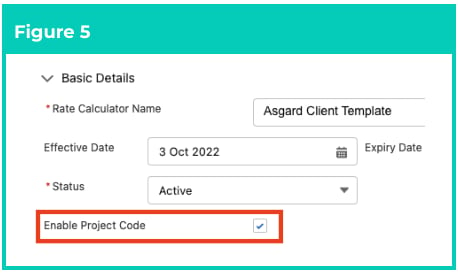
    1. Ensure the checkbox **Enable Project Code** is selected (see Figure 5).
  </Column>

  <Column>
    <Frame>
      <img src="https://mintcdn.com/2cloudnine-2edf05eb/YvlSrmIXKIIQY3K8/images/generated/reference-guides/rate-calculator/qrg-rate-calculator-template-final-setup/qrg-rate-calculator-template-final-setup-pdf-0-figure-5.png?fit=max&auto=format&n=YvlSrmIXKIIQY3K8&q=85&s=ea843e9ef8e09bf10842859867ea1494" alt="Screenshot from QRG Rate Calculator Template - Final Setup" width="458" height="274" data-path="images/generated/reference-guides/rate-calculator/qrg-rate-calculator-template-final-setup/qrg-rate-calculator-template-final-setup-pdf-0-figure-5.png" />
    </Frame>
  </Column>
</Columns>

2. Navigate to the **Manage Pay and Project Codes** section of the Manager page (see Figure 6).
3. To filter available Project Codes for selection, populate an Assignment or Account from the
   **Search Assignments** and **Search Accounts** lookup fields (see Figure 6).

<Frame>
  <img src="https://mintcdn.com/2cloudnine-2edf05eb/YvlSrmIXKIIQY3K8/images/generated/reference-guides/rate-calculator/qrg-rate-calculator-template-final-setup/qrg-rate-calculator-template-final-setup-pdf-1-figure-6.png?fit=max&auto=format&n=YvlSrmIXKIIQY3K8&q=85&s=7bf007608f4e9d8339af9abfe12e2062" alt="Screenshot from QRG Rate Calculator Template - Final Setup" width="976" height="198" data-path="images/generated/reference-guides/rate-calculator/qrg-rate-calculator-template-final-setup/qrg-rate-calculator-template-final-setup-pdf-1-figure-6.png" />
</Frame>

<Note>
  **Important Notes**\
  *(Figure 6)*

  *Although Project Code filtering is available in all Rate Calculator record types, it may only be applied*
  *to Employee Specific Rate Calculators.*
</Note>

<Columns cols={2}>
  <Column>
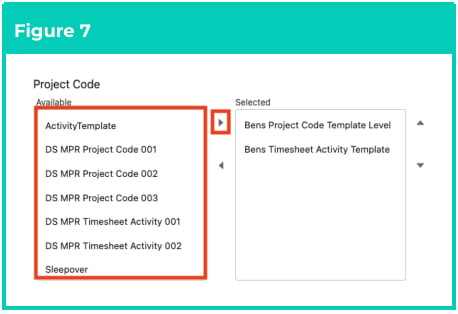
    4. Highlight the Project Codes to apply and use the arrow buttons to move from the **Available** to the
       **Selected** column in the **Project Code** field (see Figure 7).
  </Column>

  <Column>
    <Frame>
      <img src="https://mintcdn.com/2cloudnine-2edf05eb/YvlSrmIXKIIQY3K8/images/generated/reference-guides/rate-calculator/qrg-rate-calculator-template-final-setup/qrg-rate-calculator-template-final-setup-pdf-1-figure-7.png?fit=max&auto=format&n=YvlSrmIXKIIQY3K8&q=85&s=23f1bb38f13a1e26417bcad0d99abd61" alt="Screenshot from QRG Rate Calculator Template - Final Setup" width="458" height="314" data-path="images/generated/reference-guides/rate-calculator/qrg-rate-calculator-template-final-setup/qrg-rate-calculator-template-final-setup-pdf-1-figure-7.png" />
    </Frame>
  </Column>
</Columns>

<Columns cols={2}>
  <Column>
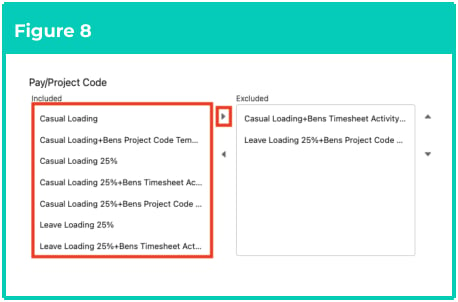
    5. To exclude Pay/Project Code combinations from being applied, highlight the Pay Code + Project Code
       combinations and use the arrow buttons to move from the **Included** to the **Excluded** column in the
       **Pay/Project Code** field (see Figure 8).
  </Column>

  <Column>
    <Frame>
      <img src="https://mintcdn.com/2cloudnine-2edf05eb/YvlSrmIXKIIQY3K8/images/generated/reference-guides/rate-calculator/qrg-rate-calculator-template-final-setup/qrg-rate-calculator-template-final-setup-pdf-1-figure-8.png?fit=max&auto=format&n=YvlSrmIXKIIQY3K8&q=85&s=aa57bfe9b1b7fea43bd9f99157aef0b9" alt="Screenshot from QRG Rate Calculator Template - Final Setup" width="458" height="302" data-path="images/generated/reference-guides/rate-calculator/qrg-rate-calculator-template-final-setup/qrg-rate-calculator-template-final-setup-pdf-1-figure-8.png" />
    </Frame>
  </Column>
</Columns>

<Note>
  **Important Notes**\
  *(Figure 8)*

  *For Rate Calculator Templates, only Template Level and Timesheet Activity - Template Level Project*
  *Codes may be applied. For Employee Specific Rate Calculators, only Project Codes related to the*
  *Assignment or the related Client record may be applied.*

  *When a Pay Code/Project Code combination is excluded, the Mark Up / Margin Rates and Pay Rates*
  *related to the excluded Pay Code/Project Code are no longer required to calculate Rate Calculator*
  *Lines.*
</Note>

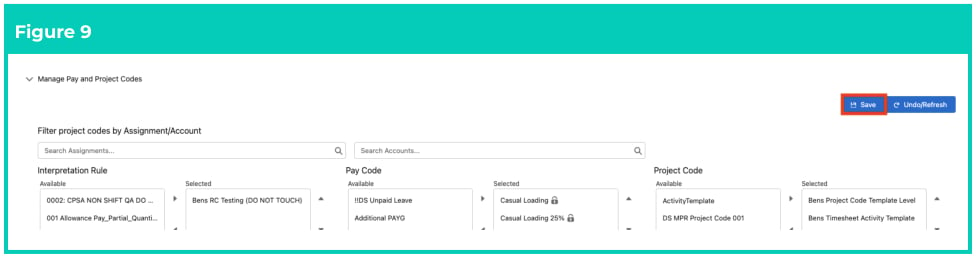
6. To save the changes made to Project Codes, click on the **Save** button (see Figure 9). The Rate
   Calculator will be updated with Project Codes Available or Excluded.
<Frame>
  <img src="https://mintcdn.com/2cloudnine-2edf05eb/YvlSrmIXKIIQY3K8/images/generated/reference-guides/rate-calculator/qrg-rate-calculator-template-final-setup/qrg-rate-calculator-template-final-setup-pdf-2-figure-9.png?fit=max&auto=format&n=YvlSrmIXKIIQY3K8&q=85&s=2e8ec377fbac7dbeb74dc2a871c3ef3d" alt="Screenshot from QRG Rate Calculator Template - Final Setup" width="976" height="256" data-path="images/generated/reference-guides/rate-calculator/qrg-rate-calculator-template-final-setup/qrg-rate-calculator-template-final-setup-pdf-2-figure-9.png" />
</Frame>

### add a Mark Up / Margin

To add a Mark Up / Margin Rate to a Rate Calculator Template, follow the steps below:

<Columns cols={2}>
  <Column>
    1. To add a Mark Up / Margin that will apply to all Pay Codes related to this Rate Calculator Template:
       1. Navigate to the Markup/Margin Rates section and click on the **Select All** button (see Figure 10).
       2. Alternatively, you can select only the required Pay Codes that the new Mark Up / Margin Rate will be
          applied to. Click on the **+ Add** button (see Figure 10).
  </Column>

  <Column>
    <Frame>
      <img src="https://mintcdn.com/2cloudnine-2edf05eb/YvlSrmIXKIIQY3K8/images/generated/reference-guides/rate-calculator/qrg-rate-calculator-template-final-setup/qrg-rate-calculator-template-final-setup-pdf-2-figure-10.png?fit=max&auto=format&n=YvlSrmIXKIIQY3K8&q=85&s=61996f7b43042fbb75bde08f08c51f8a" alt="Screenshot from QRG Rate Calculator Template - Final Setup" width="458" height="192" data-path="images/generated/reference-guides/rate-calculator/qrg-rate-calculator-template-final-setup/qrg-rate-calculator-template-final-setup-pdf-2-figure-10.png" />
    </Frame>
  </Column>
</Columns>

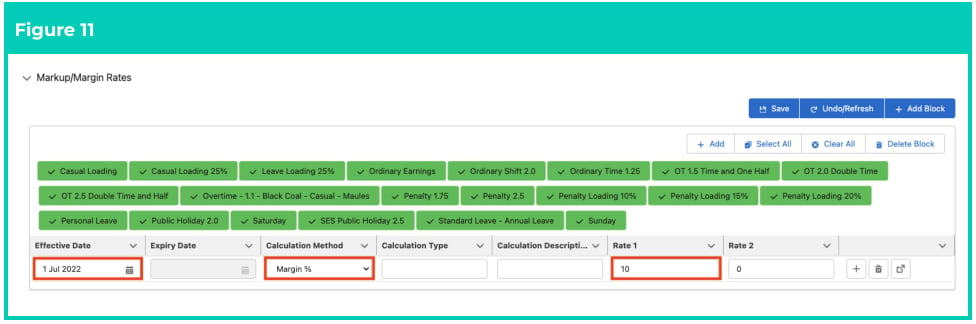
2. In the new line that appears, populate the following required fields to define the Rate Type and
   amount (see Figure 11):
   1. To define when this applies from, populate the **Effective Date** field.
   2. To define the Calculation Method, select from the available picklist options in the
      **Calculation Method** field.
   3. To define the rate or amount for the Mark Up / Margin Rate, populate the **Rate 1** field.
3. Populate the following optional fields as required (see Figure 11):
   1. **Calculation Type**
   2. **Calculation Description**
   3. To calculate a second Invoice Rate, populate the **Rate 2** field.
<Frame>
  <img src="https://mintcdn.com/2cloudnine-2edf05eb/YvlSrmIXKIIQY3K8/images/generated/reference-guides/rate-calculator/qrg-rate-calculator-template-final-setup/qrg-rate-calculator-template-final-setup-pdf-3-figure-11.png?fit=max&auto=format&n=YvlSrmIXKIIQY3K8&q=85&s=879ed11d1df4f64650b3a1c177aade76" alt="Screenshot from QRG Rate Calculator Template - Final Setup" width="976" height="324" data-path="images/generated/reference-guides/rate-calculator/qrg-rate-calculator-template-final-setup/qrg-rate-calculator-template-final-setup-pdf-3-figure-11.png" />
</Frame>

<Note>
  **Important Notes**\
  *(Figures 10 and 11)*

  At least one Mark Up / Margin Rate is required for Rate Calculator Lines to be generated. If no Mark
  Up / Margin Rate applies, enter a value of 0.

  *The picklist options available in the Calculation Method field will be dependent on the active*
  *Calculation Methods.*

  *When a Rate Calculator has both Rate 1 and Rate 2 fields populated on the Mark Up / Margin Rate,*
  *both Amount fields will be calculated on the Rate Calculator Line and* added together *when*
  *determining the Total Mark Up or Total Margin amounts.*
</Note>

<Columns cols={2}>
  <Column>
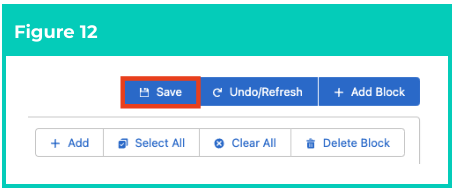
    4. Click on the **Save** button (see Figure 12).
  </Column>

  <Column>
    <Frame>
      <img src="https://mintcdn.com/2cloudnine-2edf05eb/YvlSrmIXKIIQY3K8/images/generated/reference-guides/rate-calculator/qrg-rate-calculator-template-final-setup/qrg-rate-calculator-template-final-setup-pdf-3-figure-12.png?fit=max&auto=format&n=YvlSrmIXKIIQY3K8&q=85&s=75b2d9c9c072a34115fb77f6e87461f2" alt="Screenshot from QRG Rate Calculator Template - Final Setup" width="456" height="192" data-path="images/generated/reference-guides/rate-calculator/qrg-rate-calculator-template-final-setup/qrg-rate-calculator-template-final-setup-pdf-3-figure-12.png" />
    </Frame>
  </Column>
</Columns>

<Columns cols={2}>
  <Column>
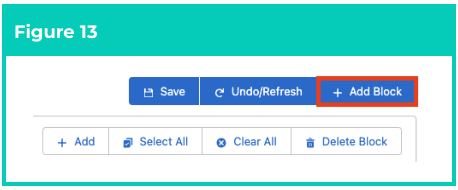
    5. Click on the **+ Add Block** button to create a new Mark Up / Margin Rates block populated with the
       remaining Pay Codes (see Figure 13).
    6. Repeat steps **1 - 4** until Mark Up / Margin Rates have been added for all Pay Codes requiring
       different methods of calculation.
  </Column>

  <Column>
    <Frame>
      <img src="https://mintcdn.com/2cloudnine-2edf05eb/YvlSrmIXKIIQY3K8/images/generated/reference-guides/rate-calculator/qrg-rate-calculator-template-final-setup/qrg-rate-calculator-template-final-setup-pdf-3-figure-13.png?fit=max&auto=format&n=YvlSrmIXKIIQY3K8&q=85&s=b471c5cd2f265145de3b269702a8300a" alt="Screenshot from QRG Rate Calculator Template - Final Setup" width="458" height="190" data-path="images/generated/reference-guides/rate-calculator/qrg-rate-calculator-template-final-setup/qrg-rate-calculator-template-final-setup-pdf-3-figure-13.png" />
    </Frame>
  </Column>
</Columns>

7. Once all required Mark Up / Margin Rates have been added, click on the **Save All** button to update the Rate Calculator (see Figure 14).

<Frame>
  <img src="https://mintcdn.com/2cloudnine-2edf05eb/YvlSrmIXKIIQY3K8/images/generated/reference-guides/rate-calculator/qrg-rate-calculator-template-final-setup/qrg-rate-calculator-template-final-setup-pdf-4-figure-14.png?fit=max&auto=format&n=YvlSrmIXKIIQY3K8&q=85&s=08700e2eea6044542b8c8b2d14704ed1" alt="Screenshot from QRG Rate Calculator Template - Final Setup" width="976" height="178" data-path="images/generated/reference-guides/rate-calculator/qrg-rate-calculator-template-final-setup/qrg-rate-calculator-template-final-setup-pdf-4-figure-14.png" />
</Frame>

### Add Pay Rates

To add a Pay Rate to a Rate Calculator, follow the steps below:

1. To add a single Pay Rate that will apply to all Pay Codes defined in this Rate Calculator:

   <Columns cols={2}>
     <Column>
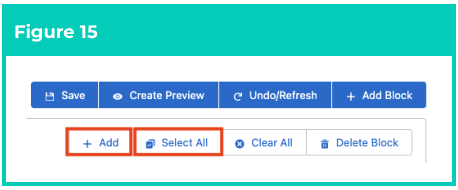
       1. Navigate to the Pay Rates section and click the **Select All** button, then click on the
          **+ Add** button (see Figure 15).
     </Column>

     <Column>
       <Frame>
         <img src="https://mintcdn.com/2cloudnine-2edf05eb/YvlSrmIXKIIQY3K8/images/generated/reference-guides/rate-calculator/qrg-rate-calculator-template-final-setup/qrg-rate-calculator-template-final-setup-pdf-4-figure-15.png?fit=max&auto=format&n=YvlSrmIXKIIQY3K8&q=85&s=ef7961da4a9cbbcf00cb9f05b122eea2" alt="Screenshot from QRG Rate Calculator Template - Final Setup" width="458" height="190" data-path="images/generated/reference-guides/rate-calculator/qrg-rate-calculator-template-final-setup/qrg-rate-calculator-template-final-setup-pdf-4-figure-15.png" />
       </Frame>
     </Column>
   </Columns>

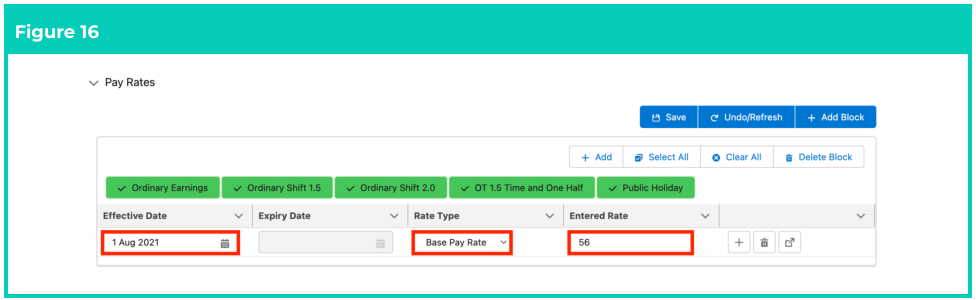
   2. In the new line that appears, populate the following required fields to define the Rate Type and
      the Rate amount (see Figure 16):
      1. **Effective Date**
      2. **Rate Type**
         * Base Pay Rate
         * Pay Rate
         * Total Pay Rate
         * Charge Rate
      3. Populate the Pay Rate in the **Entered Rate** field.
   <Frame>
     <img src="https://mintcdn.com/2cloudnine-2edf05eb/YvlSrmIXKIIQY3K8/images/generated/reference-guides/rate-calculator/qrg-rate-calculator-template-final-setup/qrg-rate-calculator-template-final-setup-pdf-4-figure-16.png?fit=max&auto=format&n=YvlSrmIXKIIQY3K8&q=85&s=8954d7c42758e05640b8abcba5112f75" alt="Screenshot from QRG Rate Calculator Template - Final Setup" width="976" height="300" data-path="images/generated/reference-guides/rate-calculator/qrg-rate-calculator-template-final-setup/qrg-rate-calculator-template-final-setup-pdf-4-figure-16.png" />
   </Frame>

   <Columns cols={2}>
     <Column>
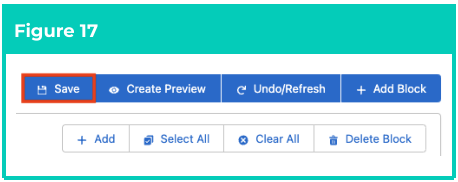
       3. Click on the **Save** button (see Figure 17).
     </Column>

     <Column>
       <Frame>
         <img src="https://mintcdn.com/2cloudnine-2edf05eb/YvlSrmIXKIIQY3K8/images/generated/reference-guides/rate-calculator/qrg-rate-calculator-template-final-setup/qrg-rate-calculator-template-final-setup-pdf-4-figure-17.png?fit=max&auto=format&n=YvlSrmIXKIIQY3K8&q=85&s=7e0f422faf86886727fbca91af1154b0" alt="Screenshot from QRG Rate Calculator Template - Final Setup" width="458" height="182" data-path="images/generated/reference-guides/rate-calculator/qrg-rate-calculator-template-final-setup/qrg-rate-calculator-template-final-setup-pdf-4-figure-17.png" />
       </Frame>
     </Column>
   </Columns>

2. Alternatively, to add a Pay Rate and apply it to Pay Codes individually:

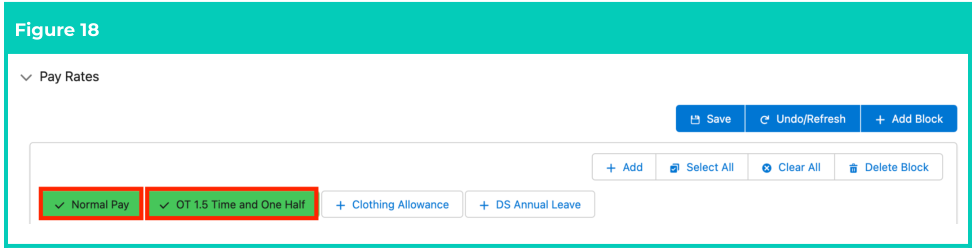
   1. Navigate to the Pay Rates section and select the Pay Codes the new Pay Rate will be applied to
      (see Figure 18).
   <Frame>
     <img src="https://mintcdn.com/2cloudnine-2edf05eb/YvlSrmIXKIIQY3K8/images/generated/reference-guides/rate-calculator/qrg-rate-calculator-template-final-setup/qrg-rate-calculator-template-final-setup-pdf-5-figure-18.png?fit=max&auto=format&n=YvlSrmIXKIIQY3K8&q=85&s=73acab42545855e6a7b85658b66b2b6b" alt="Screenshot from QRG Rate Calculator Template - Final Setup" width="976" height="252" data-path="images/generated/reference-guides/rate-calculator/qrg-rate-calculator-template-final-setup/qrg-rate-calculator-template-final-setup-pdf-5-figure-18.png" />
   </Frame>

   <Columns cols={2}>
     <Column>
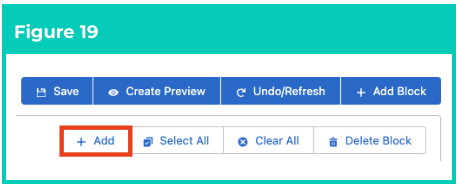
       2. Click on the **+ Add** button (see Figure 19).
     </Column>

     <Column>
       <Frame>
         <img src="https://mintcdn.com/2cloudnine-2edf05eb/YvlSrmIXKIIQY3K8/images/generated/reference-guides/rate-calculator/qrg-rate-calculator-template-final-setup/qrg-rate-calculator-template-final-setup-pdf-5-figure-19.png?fit=max&auto=format&n=YvlSrmIXKIIQY3K8&q=85&s=eb5974875becc825bca37169349913dd" alt="Screenshot from QRG Rate Calculator Template - Final Setup" width="458" height="188" data-path="images/generated/reference-guides/rate-calculator/qrg-rate-calculator-template-final-setup/qrg-rate-calculator-template-final-setup-pdf-5-figure-19.png" />
       </Frame>
     </Column>
   </Columns>

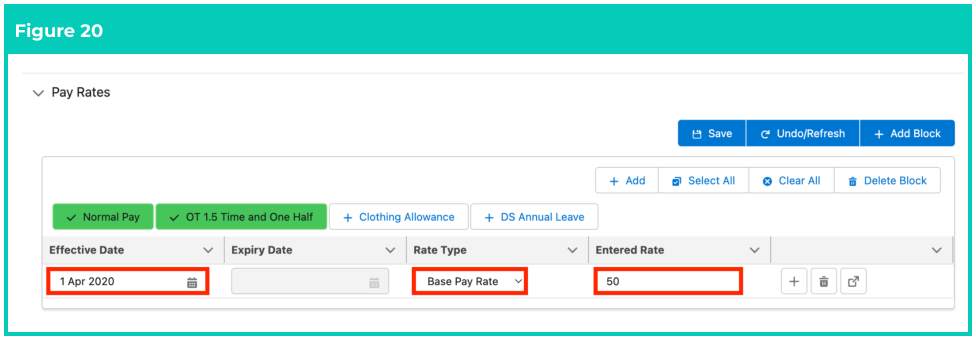
   3. In the new line which appears, populate the following fields to define the Rate Type and the
      Rate amount (see Figure 20):
      1. **Effective Date**
      2. **Rate Type**
         * Base Pay Rate
         * Pay Rate
         * Total Pay Rate
         * Charge Rate
      3. Populate the Pay Rate in the **Entered Rate** field.
   <Frame>
     <img src="https://mintcdn.com/2cloudnine-2edf05eb/YvlSrmIXKIIQY3K8/images/generated/reference-guides/rate-calculator/qrg-rate-calculator-template-final-setup/qrg-rate-calculator-template-final-setup-pdf-5-figure-20.png?fit=max&auto=format&n=YvlSrmIXKIIQY3K8&q=85&s=bbab54398b9e6da2f361df13a6692af5" alt="Screenshot from QRG Rate Calculator Template - Final Setup" width="976" height="340" data-path="images/generated/reference-guides/rate-calculator/qrg-rate-calculator-template-final-setup/qrg-rate-calculator-template-final-setup-pdf-5-figure-20.png" />
   </Frame>

   <Columns cols={2}>
     <Column>
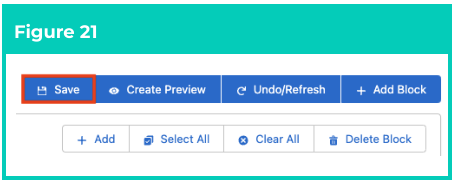
       4. Click on the **Save** button (see Figure 21).
     </Column>

     <Column>
       <Frame>
         <img src="https://mintcdn.com/2cloudnine-2edf05eb/LFYQOsAfddUM2nN4/images/generated/reference-guides/rate-calculator/qrg-rate-calculator-template-final-setup/qrg-rate-calculator-template-final-setup-pdf-6-figure-21.png?fit=max&auto=format&n=LFYQOsAfddUM2nN4&q=85&s=98dfce7e071f5f42e5acc49496e1eb7b" alt="Screenshot from QRG Rate Calculator Template - Final Setup" width="456" height="184" data-path="images/generated/reference-guides/rate-calculator/qrg-rate-calculator-template-final-setup/qrg-rate-calculator-template-final-setup-pdf-6-figure-21.png" />
       </Frame>
     </Column>
   </Columns>

<Columns cols={2}>
  <Column>
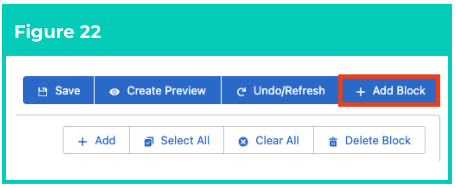
    3) Click the **+ Add Block** button to create a new Pay Rates block populated with the remaining Pay
       Codes (see Figure 22).
    4) Repeat steps **2a** - **2d** until Pay Rates have been added for all Pay Codes.
  </Column>

  <Column>
    <Frame>
      <img src="https://mintcdn.com/2cloudnine-2edf05eb/LFYQOsAfddUM2nN4/images/generated/reference-guides/rate-calculator/qrg-rate-calculator-template-final-setup/qrg-rate-calculator-template-final-setup-pdf-6-figure-22.png?fit=max&auto=format&n=LFYQOsAfddUM2nN4&q=85&s=83fad5ae998d48336243eef0d550575e" alt="Screenshot from QRG Rate Calculator Template - Final Setup" width="456" height="188" data-path="images/generated/reference-guides/rate-calculator/qrg-rate-calculator-template-final-setup/qrg-rate-calculator-template-final-setup-pdf-6-figure-22.png" />
    </Frame>
  </Column>
</Columns>

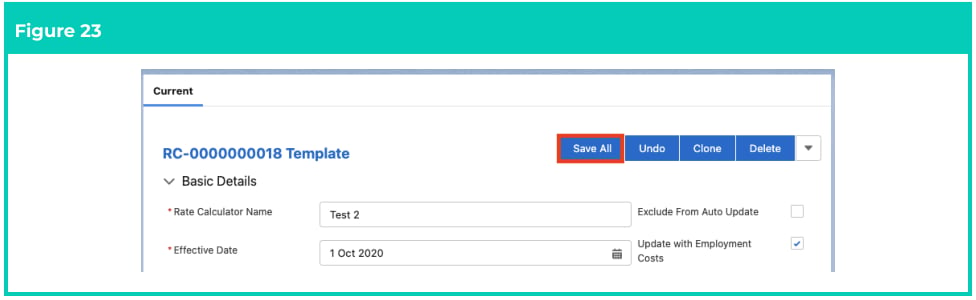
5. Once all required Pay Rates have been added, click on the **Save All** button to update the Rate
   Calculator (see Figure 23).
<Frame>
  <img src="https://mintcdn.com/2cloudnine-2edf05eb/LFYQOsAfddUM2nN4/images/generated/reference-guides/rate-calculator/qrg-rate-calculator-template-final-setup/qrg-rate-calculator-template-final-setup-pdf-6-figure-23.png?fit=max&auto=format&n=LFYQOsAfddUM2nN4&q=85&s=9081cf76398ecf622e14473cb5de1ef8" alt="Screenshot from QRG Rate Calculator Template - Final Setup" width="976" height="300" data-path="images/generated/reference-guides/rate-calculator/qrg-rate-calculator-template-final-setup/qrg-rate-calculator-template-final-setup-pdf-6-figure-23.png" />
</Frame>

<Note>
  **Important Notes**\
  *(Figure 23)*

  *Rate Calculator Lines cannot be generated unless Pay Rates and Mark Up/Margin Rates have been*
  *defined for EVERY Pay Code associated with the Rate Calculator.*
</Note>

### Add Pay Rate Loadings

To add a Pay Rate Loading to a Pay Code, follow the steps below:

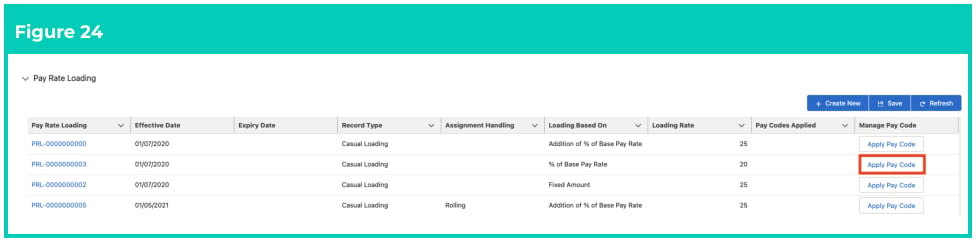
1. Navigate to the Pay Rate Loading section and click the **Apply Pay Code** button (see Figure 24).
<Frame>
  <img src="https://mintcdn.com/2cloudnine-2edf05eb/LFYQOsAfddUM2nN4/images/generated/reference-guides/rate-calculator/qrg-rate-calculator-template-final-setup/qrg-rate-calculator-template-final-setup-pdf-7-figure-24.png?fit=max&auto=format&n=LFYQOsAfddUM2nN4&q=85&s=2b6e726d30a90c4ff3ef8d51f1f1ddc1" alt="Screenshot from QRG Rate Calculator Template - Final Setup" width="976" height="242" data-path="images/generated/reference-guides/rate-calculator/qrg-rate-calculator-template-final-setup/qrg-rate-calculator-template-final-setup-pdf-7-figure-24.png" />
</Frame>

<Columns cols={2}>
  <Column>
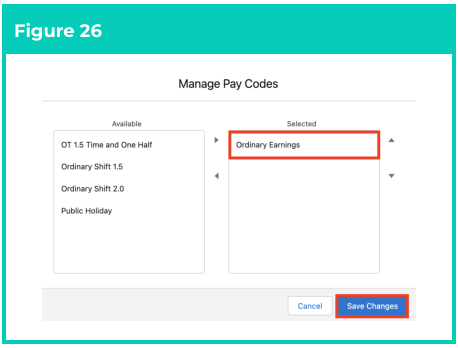
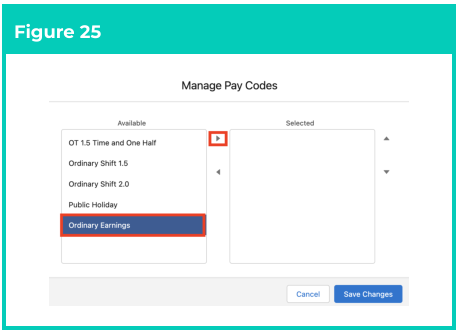
    2. Select Pay Codes from the **Available**
       column, then click on the arrow button
       to move the selected Pay Code into the
       **Selected** column (see Figure 25). If the
       required Pay Codes are not listed as
       Available, they must be manually added
       to the Rate Calculator. Once saved with
       the related Pay Codes, they will be
       available to be added to Pay Rate
       Loadings.
    3. Click the **Save Changes** button (see
       Figure 26).
  </Column>

  <Column>
    <Frame>
      <img src="https://mintcdn.com/2cloudnine-2edf05eb/LFYQOsAfddUM2nN4/images/generated/reference-guides/rate-calculator/qrg-rate-calculator-template-final-setup/qrg-rate-calculator-template-final-setup-pdf-7-figure-25.png?fit=max&auto=format&n=LFYQOsAfddUM2nN4&q=85&s=5beffe37999309a88158798547f1aa2f" alt="Screenshot from QRG Rate Calculator Template - Final Setup" width="458" height="334" data-path="images/generated/reference-guides/rate-calculator/qrg-rate-calculator-template-final-setup/qrg-rate-calculator-template-final-setup-pdf-7-figure-25.png" />
    </Frame>

    <Frame>
      <img src="https://mintcdn.com/2cloudnine-2edf05eb/LFYQOsAfddUM2nN4/images/generated/reference-guides/rate-calculator/qrg-rate-calculator-template-final-setup/qrg-rate-calculator-template-final-setup-pdf-7-figure-26.png?fit=max&auto=format&n=LFYQOsAfddUM2nN4&q=85&s=f4d6fe8269d14b9ee77976f0fbb0b36d" alt="Screenshot from QRG Rate Calculator Template - Final Setup" width="458" height="348" data-path="images/generated/reference-guides/rate-calculator/qrg-rate-calculator-template-final-setup/qrg-rate-calculator-template-final-setup-pdf-7-figure-26.png" />
    </Frame>
  </Column>
</Columns>

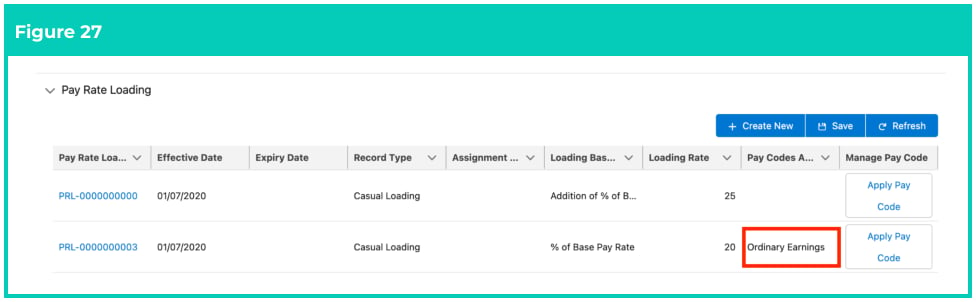
4. The **Pay Codes Applied** field will now be updated with the selected Pay Codes (see Figure 27).
<Frame>
  <img src="https://mintcdn.com/2cloudnine-2edf05eb/LFYQOsAfddUM2nN4/images/generated/reference-guides/rate-calculator/qrg-rate-calculator-template-final-setup/qrg-rate-calculator-template-final-setup-pdf-8-figure-27.png?fit=max&auto=format&n=LFYQOsAfddUM2nN4&q=85&s=0deae3d743644da3bf0a7b59f738f0f5" alt="Screenshot from QRG Rate Calculator Template - Final Setup" width="976" height="302" data-path="images/generated/reference-guides/rate-calculator/qrg-rate-calculator-template-final-setup/qrg-rate-calculator-template-final-setup-pdf-8-figure-27.png" />
</Frame>

5. Repeat steps 1-4 for all required Pay Rate Loadings.

<Note>
  **Important Notes**\
  *(Figure 27)*

  *Changes to Pay Rate Loadings will be saved automatically as soon as Pay Codes have been*
  *successfully applied to Pay Rate Loading records.*
</Note>

### Calculate and Manage Rate Calculator Lines

### Calculate Lines for Rate Calculators

To calculate Rate Calculator Lines, follow the steps below:

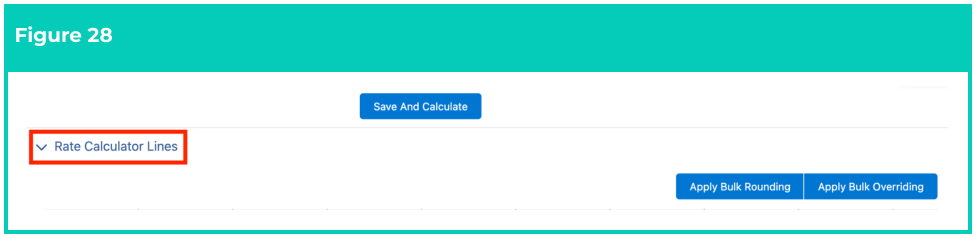
1. Identify the **Rate Calculator Lines** section within the Rate Calculator Builder (see Figure 28).
<Frame>
  <img src="https://mintcdn.com/2cloudnine-2edf05eb/LFYQOsAfddUM2nN4/images/generated/reference-guides/rate-calculator/qrg-rate-calculator-template-final-setup/qrg-rate-calculator-template-final-setup-pdf-8-figure-28.png?fit=max&auto=format&n=LFYQOsAfddUM2nN4&q=85&s=af4c905f912d5ff74a38c94c44af84ba" alt="Screenshot from QRG Rate Calculator Template - Final Setup" width="976" height="238" data-path="images/generated/reference-guides/rate-calculator/qrg-rate-calculator-template-final-setup/qrg-rate-calculator-template-final-setup-pdf-8-figure-28.png" />
</Frame>

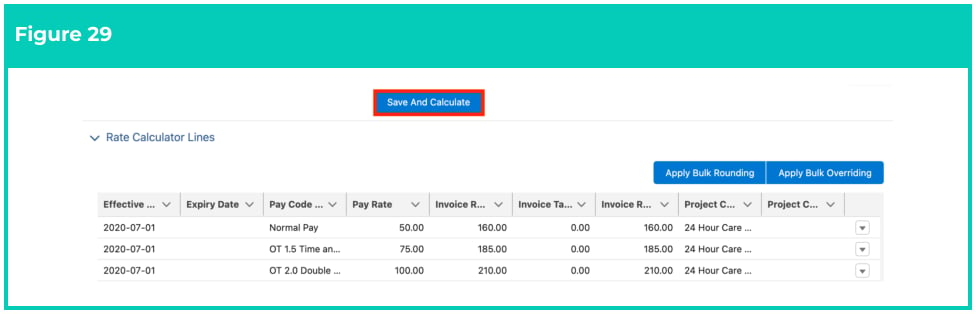
2. If no existing Rate Calculator Line are displayed, or to update existing Rate Calculator Lines, click on the **Save and Calculate** button. (see Figure 29).

   **OR**

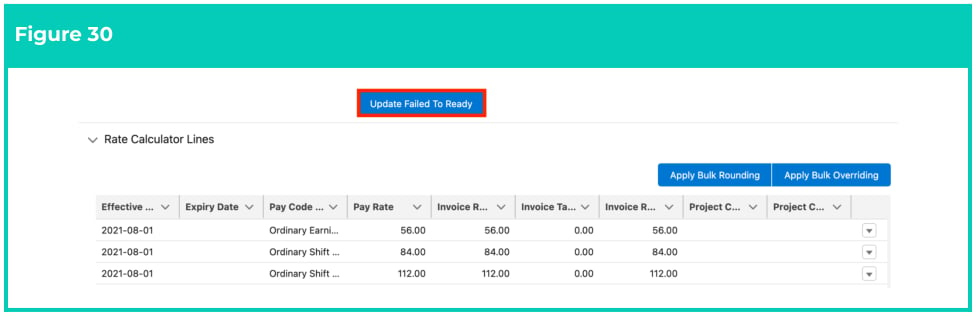
   If existing Rate Calculator Lines have failed calculation, click on the **Update Failed to Ready**
   button and click **Save and Calculate** (see Figure 30).
<Frame>
  <img src="https://mintcdn.com/2cloudnine-2edf05eb/LFYQOsAfddUM2nN4/images/generated/reference-guides/rate-calculator/qrg-rate-calculator-template-final-setup/qrg-rate-calculator-template-final-setup-pdf-9-figure-29.png?fit=max&auto=format&n=LFYQOsAfddUM2nN4&q=85&s=2a7d40212d9fbfb26e20f5faea946405" alt="Screenshot from QRG Rate Calculator Template - Final Setup" width="976" height="314" data-path="images/generated/reference-guides/rate-calculator/qrg-rate-calculator-template-final-setup/qrg-rate-calculator-template-final-setup-pdf-9-figure-29.png" />
</Frame>

<Frame>
  <img src="https://mintcdn.com/2cloudnine-2edf05eb/LFYQOsAfddUM2nN4/images/generated/reference-guides/rate-calculator/qrg-rate-calculator-template-final-setup/qrg-rate-calculator-template-final-setup-pdf-9-figure-30.png?fit=max&auto=format&n=LFYQOsAfddUM2nN4&q=85&s=5232c7e04cf8a2d9b2ddd2df2ecf9863" alt="Screenshot from QRG Rate Calculator Template - Final Setup" width="976" height="316" data-path="images/generated/reference-guides/rate-calculator/qrg-rate-calculator-template-final-setup/qrg-rate-calculator-template-final-setup-pdf-9-figure-30.png" />
</Frame>

To apply rounding to a Rate Calculator Line:

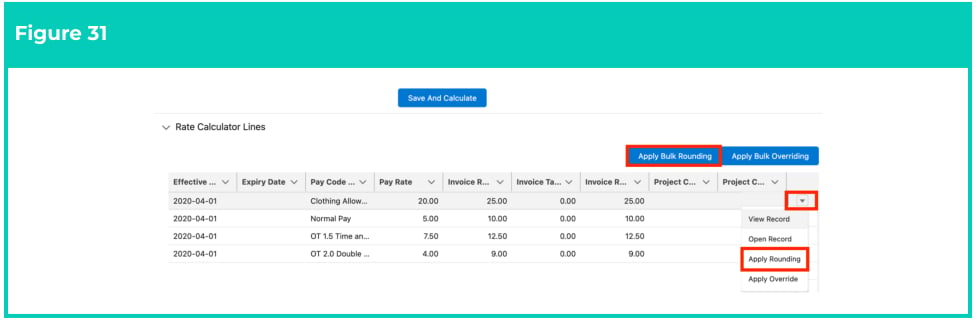
1. Click the drop-down next to a Rate Calculator Line and select **Apply Rounding** (see Figure 31).\
   **OR**\
   Select the **Apply Bulk Rounding** button to display and apply rounding to all Rate Calculator Lines (see Figure 31).
   <Frame>
     <img src="https://mintcdn.com/2cloudnine-2edf05eb/LFYQOsAfddUM2nN4/images/generated/reference-guides/rate-calculator/qrg-rate-calculator-template-final-setup/qrg-rate-calculator-template-final-setup-pdf-9-figure-31.png?fit=max&auto=format&n=LFYQOsAfddUM2nN4&q=85&s=c07703f22cf1ab65357cb005167e4046" alt="Screenshot from QRG Rate Calculator Template - Final Setup" width="976" height="322" data-path="images/generated/reference-guides/rate-calculator/qrg-rate-calculator-template-final-setup/qrg-rate-calculator-template-final-setup-pdf-9-figure-31.png" />
   </Frame>

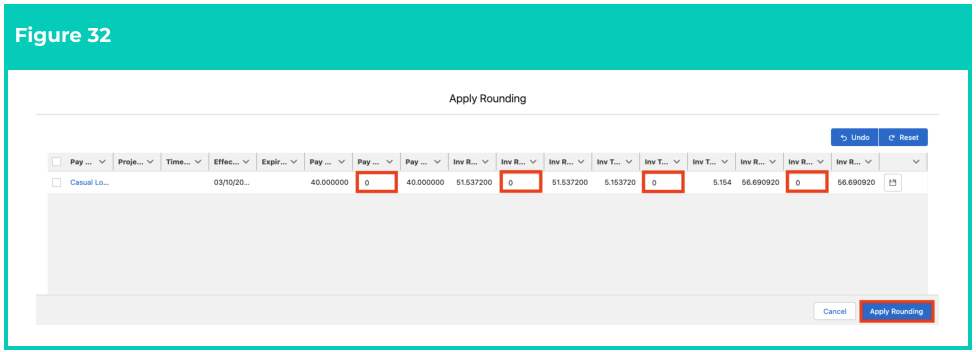
2. To round up the Pay Rate, enter the rounding value in the Pay Rate Rounding fields. To round
   down, enter the rounding value with a minus **-** symbol in front of it (see Figure 32).

3. To round up the Invoice Rate, enter the rounding value in the Invoice Rate Rounding fields. To
   round down, enter the rounding value with a minus **-** symbol in front of it (see Figure 32).

4. To remove any unsaved changes made to values on Pay Rate and Invoice Rate Rounding fields,
   click on the **Undo** button. To remove any saved changes made to values on Pay Rate and Invoice
   Rate Rounding fields, click on the Reset button (see Figure 32).

5. To apply the rounding changes to Pay Rates and/or Invoice Rates, click on the **Apply Rounding**
   button (see Figure 32). In the event of a change to a Rate Calculator Line, any applied rounding
   will remain on the Rate Calculator Line. If rounding is no longer required, it must be removed by
   applying rounding again using a value that negates the previous rounding applied.
<Frame>
  <img src="https://mintcdn.com/2cloudnine-2edf05eb/YvlSrmIXKIIQY3K8/images/generated/reference-guides/rate-calculator/qrg-rate-calculator-template-final-setup/qrg-rate-calculator-template-final-setup-pdf-10-figure-32.png?fit=max&auto=format&n=YvlSrmIXKIIQY3K8&q=85&s=e7adced2fb47b6463a0be6bac2be3ba1" alt="Screenshot from QRG Rate Calculator Template - Final Setup" width="976" height="352" data-path="images/generated/reference-guides/rate-calculator/qrg-rate-calculator-template-final-setup/qrg-rate-calculator-template-final-setup-pdf-10-figure-32.png" />
</Frame>

The Rate Calculator Lines will now be updated with rounding for Pay Rates and/or Invoice Rates.

<Note>
  **Important Notes**\
  *(Figure 32)*

  *Mark Up / Margin and Rate Calculator Rate records that are added, updated or deleted via the parent*
  *Rate Calculator will also be updated for the child Rate Calculators. HOWEVER, Rounding changes*
  *made to Rate Calculator Lines via parent Rate Calculator Template won’t be reflected in any related*
  *child Rate Calculators.*
</Note>

**Override Rate Calculator Rates**

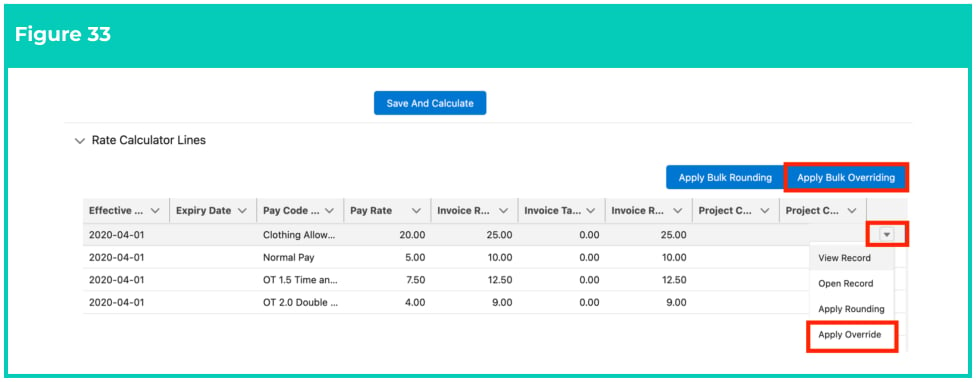
To override the values for any of the Rate or Total Cost fields on a Rate Calculator Line:

1. Click the drop-down next to a Rate Calculator Line and select **Apply Override** (see Figure 33).\
   **OR**\
   Select the **Apply Bulk Overriding** button to display and apply overrides to all Rate Calculator Lines (see Figure 33).
   <Frame>
     <img src="https://mintcdn.com/2cloudnine-2edf05eb/YvlSrmIXKIIQY3K8/images/generated/reference-guides/rate-calculator/qrg-rate-calculator-template-final-setup/qrg-rate-calculator-template-final-setup-pdf-11-figure-33.png?fit=max&auto=format&n=YvlSrmIXKIIQY3K8&q=85&s=a53273dbc56d86e7a2802236bb29abf2" alt="Screenshot from QRG Rate Calculator Template - Final Setup" width="976" height="382" data-path="images/generated/reference-guides/rate-calculator/qrg-rate-calculator-template-final-setup/qrg-rate-calculator-template-final-setup-pdf-11-figure-33.png" />
   </Frame>

2. In the window that appears, enter the override value(s) in the applicable Override Rate fields (see
   Figure 34).

3. To apply the updated values to Rate fields, click the **Apply Overriding** button (see Figure 34). To
   remove any unsaved changes made on Override Rate fields, click on the **Undo** or **Reset** button as
   required.

<Frame>
  <img src="https://mintcdn.com/2cloudnine-2edf05eb/YvlSrmIXKIIQY3K8/images/generated/reference-guides/rate-calculator/qrg-rate-calculator-template-final-setup/qrg-rate-calculator-template-final-setup-pdf-11-figure-34.png?fit=max&auto=format&n=YvlSrmIXKIIQY3K8&q=85&s=ea77f6d7b3b061ffa222a40fb0f56e1c" alt="Screenshot from QRG Rate Calculator Template - Final Setup" width="976" height="348" data-path="images/generated/reference-guides/rate-calculator/qrg-rate-calculator-template-final-setup/qrg-rate-calculator-template-final-setup-pdf-11-figure-34.png" />
</Frame>

<Note>
  **Important Notes**\
  *(Figures 33 and 34)*

  *If any features are currently not available, please contact your System Administrator for assistance on*
  *making them available to use.*

  *Mark Up / Margin and Rate Calculator Rate records that are added, updated or deleted via the parent*
  *Rate Calculator will also be updated for the child Rate Calculators. HOWEVER, Override changes*
  *made to Rate Calculator Lines via parent Rate Calculator Template won’t be reflected in any related*
  *child Rate Calculators.*
</Note>

4. The Rate Calculator Lines will now be updated with the overridden Rates.

## Field descriptions

| Field Name                                         | Description                                                                                                                                                                                                                                                                                                                                                                                                                                                                                                                                                                                                                                                                                                                                                                  |
| -------------------------------------------------- | ---------------------------------------------------------------------------------------------------------------------------------------------------------------------------------------------------------------------------------------------------------------------------------------------------------------------------------------------------------------------------------------------------------------------------------------------------------------------------------------------------------------------------------------------------------------------------------------------------------------------------------------------------------------------------------------------------------------------------------------------------------------------------- |
| **Add Mark Up / Margin Rates**                     | **Add Mark Up / Margin Rates**                                                                                                                                                                                                                                                                                                                                                                                                                                                                                                                                                                                                                                                                                                                                               |
| **Effective Date**                                 | Defines the Effective Date of the Mark Up / Margin Rate.                                                                                                                                                                                                                                                                                                                                                                                                                                                                                                                                                                                                                                                                                                                     |
| **Calculation Method**                             | Defines how the Mark Up / Margin Rate will be calculated within the Rate Calculator Lines. Examples of some common calculation methods are as follows: <ul><li>Margin \$ allows the Margin to be defined as a currency amount.</li><li>Margin % allows the Margin to be defined with a percentage amount.</li><li>Markup \$ allows the Mark Up to be defined with a currency amount.</li><li>Markup % on Base allows Mark Up to be defined as a percentage amount from Base Pay.</li><li>Markup % on Pay Rate allows Mark Up to be defined as a percentage amount from Pay Rate.</li><li>Markup % on Total Pay Rate + Costs allows the Mark Up to be defined as a percentage amount from the Total Pay Rate, added to the costs included in Rate Calculator Lines.</li></ul> |
| **Calculation Type**                               | Provides a definition for the Calculation method selected.                                                                                                                                                                                                                                                                                                                                                                                                                                                                                                                                                                                                                                                                                                                   |
| **Calculation Description**                        | Provides a description for the Calculation method selected.                                                                                                                                                                                                                                                                                                                                                                                                                                                                                                                                                                                                                                                                                                                  |
| **Rate 1**                                         | Defines the Mark Up or Margin Rate that will be applied for Rate Calculator Lines.                                                                                                                                                                                                                                                                                                                                                                                                                                                                                                                                                                                                                                                                                           |
| **Rate 2**                                         | Defines any custom Mark Up or Margin Rate requirements.                                                                                                                                                                                                                                                                                                                                                                                                                                                                                                                                                                                                                                                                                                                      |
| **Add or Exclude Project Codes**                   |                                                                                                                                                                                                                                                                                                                                                                                                                                                                                                                                                                                                                                                                                                                                                                              |
| **Filter project codes by** **Assignment/Account** | Enables the filtering of Project Codes by their related Assignment or Account records.                                                                                                                                                                                                                                                                                                                                                                                                                                                                                                                                                                                                                                                                                       |
| **Interpretation Rule**                            | Indicates the Interpretation Rule(s) applied to the Rate Calculator.                                                                                                                                                                                                                                                                                                                                                                                                                                                                                                                                                                                                                                                                                                         |
| **Pay Code**                                       | Indicates the Pay Codes inherited from the applied Interpretation Rule, or manually added to the Rate Calculator.                                                                                                                                                                                                                                                                                                                                                                                                                                                                                                                                                                                                                                                            |
| **Project Code**                                   | Indicates the Project Codes available to be applied to the Rate Calculator.                                                                                                                                                                                                                                                                                                                                                                                                                                                                                                                                                                                                                                                                                                  |
| **Pay/Project Code**                               | Indicates the Pay Codes / Project Code or Timesheet Activity combinations available for exclusion from the Rate Calculator.                                                                                                                                                                                                                                                                                                                                                                                                                                                                                                                                                                                                                                                  |
| **Add Pay Rate Loadings**                          |                                                                                                                                                                                                                                                                                                                                                                                                                                                                                                                                                                                                                                                                                                                                                                              |
| **Assignment Handling**                            | Defines how Pay Rate Loading will be handled when calculating rates. <ul><li>**Fixed** if selected, the Pay Rate Loading that applies on the Start Date of the Assignment will apply for the entire period of the Assignment, regardless of whether new Pay Rate Loadings come into effect.</li><li>**Rolling** if selected, the Pay Rate Loading applied to the Assignment will update as new Pay Rate Loadings come into effect.</li></ul>                                                                                                                                                                                                                                                                                                                                 |
| **Effective Date**                                 | Defines the Effective Date of the Pay Rate Loading.                                                                                                                                                                                                                                                                                                                                                                                                                                                                                                                                                                                                                                                                                                                          |
| **Expiry Date**                                    | Defines the Expiry Date of the Pay Rate Loading.                                                                                                                                                                                                                                                                                                                                                                                                                                                                                                                                                                                                                                                                                                                             |
| **Manage Pay Code**                                | Enables Pay Codes to be applied to each Pay Rate Loading record.                                                                                                                                                                                                                                                                                                                                                                                                                                                                                                                                                                                                                                                                                                             |
| **Loading Based On**                               | Defines the basis of calculation for related Casual and Shift Loadings.                                                                                                                                                                                                                                                                                                                                                                                                                                                                                                                                                                                                                                                                                                      |
| Loading Rate                                       | Defines the Loading Rate that will be applied to related Casual and Shift Loadings.                                                                                                                                                                                                                                                                                                                                                                                                                                                                                                                                                                                                                                                                                          |
| **Pay Codes Applied**                              | Details the Pay Codes that have been applied to the Pay Rate Loading record.                                                                                                                                                                                                                                                                                                                                                                                                                                                                                                                                                                                                                                                                                                 |
| **Pay Rate Loading**                               | Indicates the unique identifier for the Pay Rate Loading record.                                                                                                                                                                                                                                                                                                                                                                                                                                                                                                                                                                                                                                                                                                             |
| **Record Type**                                    | Defines whether the Pay Rate Loading record relates to Casual or Shift Loadings.                                                                                                                                                                                                                                                                                                                                                                                                                                                                                                                                                                                                                                                                                             |
| **Add Pay Rates**                                  |                                                                                                                                                                                                                                                                                                                                                                                                                                                                                                                                                                                                                                                                                                                                                                              |
| **Effective Date**                                 | Defines the Effective Date of the Pay Rate.                                                                                                                                                                                                                                                                                                                                                                                                                                                                                                                                                                                                                                                                                                                                  |
| **Entered Rate**                                   | Indicates Pay Rate that will be applied when generating Rate Calculator Lines for related Pay Codes.                                                                                                                                                                                                                                                                                                                                                                                                                                                                                                                                                                                                                                                                         |
| **Rate Type**                                      | Indicates the type of Pay Rate that will be applied when generating Rate Calculator Lines for related Pay Codes within the Rate Calculator record: <ul><li>Base Pay Rate will apply the amount entered in the Rate Entered field</li><li>Pay Rate will apply the amount entered in the Rate Entered field, added to the Casual Loading Rate</li><li>Total Pay Rate will apply the amount entered in the Rate Entered field, added to the Casual Loading and Superannuation Rates combined.</li><li>Charge Rate will apply reverse calculation to determine the Pay Rate using the Charge Rate defined in the Rate Entered field.</li></ul>                                                                                                                                   |
| **Calculate and Update Rate Calculator Lines**     | **Calculate and Update Rate Calculator Lines**                                                                                                                                                                                                                                                                                                                                                                                                                                                                                                                                                                                                                                                                                                                               |
| **Custom Costs (various)**                         | Defines the calculated Custom Costs that applies to the Rate Calculator Line.                                                                                                                                                                                                                                                                                                                                                                                                                                                                                                                                                                                                                                                                                                |
| **Effective Date**                                 | The date the Rate Calculator Line will become effective.                                                                                                                                                                                                                                                                                                                                                                                                                                                                                                                                                                                                                                                                                                                     |
| **Expiry Date**                                    | The date the Rate Calculator Line will expire and no longer apply.                                                                                                                                                                                                                                                                                                                                                                                                                                                                                                                                                                                                                                                                                                           |
| **Invoice Rate Ex. Tax**                           | Defines the calculated Invoice Rate Ex. Tax that applies to the Rate Calculator Line.                                                                                                                                                                                                                                                                                                                                                                                                                                                                                                                                                                                                                                                                                        |
| **Invoice Rate Ex. Tax** **Override**              | Allows the calculated Invoice Rate Ex. Tax that applies to the Rate Calculator Line to be overridden.                                                                                                                                                                                                                                                                                                                                                                                                                                                                                                                                                                                                                                                                        |
| **Invoice Rate Ex Tax** **Rounded**                | The rounded value that is used to adjust the Invoice Rate Ex Tax.                                                                                                                                                                                                                                                                                                                                                                                                                                                                                                                                                                                                                                                                                                            |
| **Invoice Rate Ex Tax** **Rounding Value**         | Enables a rounded value to be used to adjust the Invoice Rate ex Tax. Any value held in this field will be added to the Invoice Rate ex Tax. Negative numbers can be used.                                                                                                                                                                                                                                                                                                                                                                                                                                                                                                                                                                                                   |
| **Invoice Rate Inc Tax**                           | Defines the calculated Invoice Rate Inc. Tax that applies to the Rate Calculator Lines.                                                                                                                                                                                                                                                                                                                                                                                                                                                                                                                                                                                                                                                                                      |
| **Invoice Rate Inc Tax** **Rounding Value**        | Enables a rounded value to be used to adjust the Invoice Rate Inc Tax. Any value held in this field will be added to the Invoice Rate Inc Tax. Negative numbers can be used.                                                                                                                                                                                                                                                                                                                                                                                                                                                                                                                                                                                                 |
| **Invoice Tax Amount**                             | Defines the calculated Tax Amount that applies to the Rate Calculator Lines.                                                                                                                                                                                                                                                                                                                                                                                                                                                                                                                                                                                                                                                                                                 |
| **Invoice Tax Amount** **Override**                | Allows the calculated Invoice Tax Amount that applies to the Rate Calculator Line to be overridden.                                                                                                                                                                                                                                                                                                                                                                                                                                                                                                                                                                                                                                                                          |
| **Invoice Tax Amount** **Rounded**                 | The rounded value that is used to adjust the Invoice Tax Amount.                                                                                                                                                                                                                                                                                                                                                                                                                                                                                                                                                                                                                                                                                                             |
| **Invoice Rate Inc. Tax**                          | Defines the calculated Invoice Rate Inc. Tax that applies to the Rate Calculator Line.                                                                                                                                                                                                                                                                                                                                                                                                                                                                                                                                                                                                                                                                                       |
| **Invoice Rate Inc. Tax** **Override**             | Allows the calculated Invoice Rate Inc. Tax that applies to the Rate Calculator Line to be overridden.                                                                                                                                                                                                                                                                                                                                                                                                                                                                                                                                                                                                                                                                       |
| Pay Code Name                                      | Defines the Pay Code that applies to the Rate Calculator Line.                                                                                                                                                                                                                                                                                                                                                                                                                                                                                                                                                                                                                                                                                                               |
| **Pay Rate**                                       | Defines the calculated Pay Rate that applies to the Rate Calculator Line.                                                                                                                                                                                                                                                                                                                                                                                                                                                                                                                                                                                                                                                                                                    |
| **Pay Rate Rounded**                               | The rounded value that is used to adjust the Pay Rate.                                                                                                                                                                                                                                                                                                                                                                                                                                                                                                                                                                                                                                                                                                                       |
| **Pay Rate Rounding Value**                        | Enables a rounded value to be used to adjust the Pay Rate. Any value held in this field will be added to the Pay Rate. Negative numbers can be used.                                                                                                                                                                                                                                                                                                                                                                                                                                                                                                                                                                                                                         |
| **Total Pay Rate**                                 | Defines the calculated Total Pay Rate that applies to the Rate Calculator Line.                                                                                                                                                                                                                                                                                                                                                                                                                                                                                                                                                                                                                                                                                              |
| **Total Pay Rate + Costs**                         | Defines the calculated Total Pay Rate + Employment Costs that applies to the Rate Calculator Line.                                                                                                                                                                                                                                                                                                                                                                                                                                                                                                                                                                                                                                                                           |
| **Total Pay Rate + Costs** **Override**            | allows the calculated Total Pay Rate + Employment Costs that applies to the Rate Calculator Line to be overridden.                                                                                                                                                                                                                                                                                                                                                                                                                                                                                                                                                                                                                                                           |
| **Total Pay Rate Override**                        | Allows the calculated Total Pay Rate that applies to the Rate Calculator Line to be overridden.                                                                                                                                                                                                                                                                                                                                                                                                                                                                                                                                                                                                                                                                              |

## Further information

| Document                                                        | Document Type               | Description                                                                                                                                                           |
| --------------------------------------------------------------- | --------------------------- | --------------------------------------------------------------------------------------------------------------------------------------------------------------------- |
| QRG Rate Calculator Key Information                             | Information Quick Reference | Outlines useful information relevant to the Rate Calculator functionality. The document includes definitions, prerequisites, and other non-instructional information. |
| QRG Create a Location record                                    | Task Instructions           | How to create a Location record used for Rate Calculators.                                                                                                            |
| QRG Create a Calculation Method                                 | Task Instructions           | How to create Calculation Methods to define the calculation type and unit of calculation for Rate Calculator records.                                                 |
| QRG Create an Employment Cost Record                            | Task Instructions           | How to create Employment Cost records used for applying costs to the Rate Calculator.                                                                                 |
| QRG Manage Employment Cost Items using ECM                      | Task Instructions           | How to manage Employment Cost Items using the Employment Cost Manager.                                                                                                |
| QRG Create an Employment Cost Exception                         | Task Instructions           | How to apply Employment Cost Exceptions to Clients, Payees & Pay Codes.                                                                                               |
| QRG Create Pay Rate Loadings                                    | Task Instructions           | How to create Pay Rate Loadings used for Casual Loading or Shift Loading.                                                                                             |
| QRG Create Rate Calculators - Templates - Initial Setup         | Task Instructions           | How to create Rate Calculator Templates - Initial Setup.                                                                                                              |
| QRG Create Rate Calculators - Employee Specific                 | Task Instructions           | How to create an Employee Specific Rate calculator using Template automation.                                                                                         |
| QRG Create Rate Calculators - Preview, Clone & Save as Template | Task Instructions           | How to create Rate Calculator Previews, Save existing Rate Calculators as Templates, and use the Clone functionality.                                                 |