> ## Documentation Index
> Fetch the complete documentation index at: https://documentation.2cloudnine.com/llms.txt
> Use this file to discover all available pages before exploring further.
# Rate Calculator Functionality - Key Information
## Prerequisites
Before the creation of any records relating to Rate Calculators or Rate Calculator Templates, the following
prerequisites must be met:
1. 2cloundnine Payroll Users must be running the Salesforce Lightning Experience.
2. For a Rate Calculator record to be defined, Pay Codes, Interpretation Rules, Calculation Methods,
Employment Costs, Employment Cost Items, Locations, Employment Cost Exceptions, and
Assignments must be created and available. To utilise the full capability of Rate Calculator
functionality, Project Codes, Award Levels and Classifications, Invoice Tax IDs, Pay Rate Loadings,
Assignments, and Minimum Pay Rate records must also be created and available.
3. Users must have access to create Rate Calculator Templates related to a Location, Employment
Cost, Calculation Method, Interpretation Rules/Pay Codes, Markup/Margin, and Pay Rate.
4. Users must have the ability to create and assign Rate Calculator Templates to an Assignment.
5. Users must have the ability to calculate and modify Rate Calculator Lines.
## Definitions
The primary purpose of the Rate Calculator is to output Rate Calculator Lines containing all the
information related to the buildup of the Pay and Invoice Rates, and to provide a simple and effective way
to calculate costs. To familiarise yourself with Rate Calculators and related terminology, please refer to the
following definitions:
* **Rate Calculator**
There are two types of Rate Calculator records available:
* Rate Calculator Templates
* Employee Specific Rate Calculators
The No Employee Rate Calculator is no longer in use and is in the process of being archived.
* **Rate Calculator Templates**
Rate Calculator Templates are the parent record that can be applied to Assignments to create
Employee Specific Rate Calculators. They contain configurations, such as Employment Costs, Pay
Codes, Rate Calculator Rates, and Margin/Markup records.
* **Employee Specific Rate Calculators**
Employee Specific Rate Calculators are used to calculate Rates for individual Payees and,
therefore, are related to one Assignment only. Employee Specific Rate Calculators are created via
system automation when a Rate Calculator Template is assigned to an Assignment.
* **Rate Calculator Line**
Rate Calculator Lines are the records that utilise the information captured within Rate Calculators
to calculate Pay Rates, Invoice Rates, and other associated costs for each Rate Calculator. Rate
Calculator Lines may be calculated manually once a Rate Calculator has been created and
populated with at least one of each of the following records:
* Location
* Employment Cost
* Interpretation Rule
* Pay Code
* Mark Up / Margin Rates
* Pay Rate
Manual updates to Rate Calculator Lines may be made via the Assignment related to an Employee Specific Rate Calculator, or directly through the parent Rate Calculator Template.
* **Pay and Invoice Rates**
The Pay Rates populated within a Rate Calculator define the Rates that will be applied to Pay
Codes in each Rate Calculator Line, including Base Pay Rates, Total Pay Rates, and Invoice Rates.
After a Rate Calculator has been saved, it may be edited to include Pay Rates.
* **Pay Rate Loadings**
The Pay Rate Loadings populated within a Rate Calculator record define the Shift or Casual
Loading Rates to be applied to Pay Codes in addition to the defined Pay Rates.
* **Interpretation Rules, Pay Codes, and Project Codes**
The Pay and Project Codes section of the Rate Calculator is used to define the Interpretation
Rules, Pay Codes, and (optionally) Project Codes for which the Rate Calculator Lines will be
created. This section may also be used to exclude Combination Pay / Project Codes from the Mark
Up / Margin Rates or Pay Rates applied to the Rate Calculator. Multiple Interpretation Rules can
be applied to a Rate Calculator to make additional Pay Codes available. This is particularly useful
when there are Interpretation Variations. To ensure Payroll Tax and WorkCover can be calculated,
all relevant Pay Codes associated with Pay Transactions must have the AU Payroll Tax Reportable?
and WorkCover Reportable? checkbox fields selected.
* **Mark Up / Margin Rates**
The Mark Up / Margin Rates populated within a Rate Calculator define the Calculation Method
and amount to be applied to each Rate Calculator Line. Once a Rate Calculator has been saved, it
may be edited to include Mark Up/Margin Rates.
* **Employment Costs**
The Employment Cost defines the various costs that can be applied to a Rate Calculator.
Employment Cost records are the parent record for Employment Cost Items.
* **Employment Cost Items**
The Employment Cost Items contain the Effective date, Expiry date, the payable and invoiceable
amounts used during Rate Calculation, and the Calculation Methods used to determine these
amounts. Employment Cost Items are a child record for Employment Costs, and can only be
created after the related parent Employment Cost record has been created.
* **Employment Cost Exceptions**
The Employment Cost Exceptions provide a way to exclude certain Oncosts from being applied to
Rate Calculator Lines. When used, they must be applied per Location. The Rate Calculator
supports Employment Cost Exceptions for Pay Codes only. The most common use for
Employment Cost Exceptions is for Pay Code Superannuation, but they are not essential to use if
the calculation of Invoice Rates does not need to exclude any calculations.
* **Location, Industry & Risk Classifications**
Location, Industry, and Risk Classification are used by the Rate Calculator to define which
Employment Cost Items are applied when calculating the Rate Calculator Lines. Rate Calculator
Lines cannot be calculated until these values have been defined, as the Rate Calculator will be
unable to locate any related Employment Cost Items.
* **Calculation Methods**
The Calculation Method holds the calculation type and unit of calculation for Rate Calculators,
and is used to determine how Mark Up / Margin Rates will be calculated. When creating
Calculation Methods, some combinations of Calculation Types, Calculation Units, and Calculation
Based On values are not supported.
* If Margins are selected as the Calculation Type, the only supported Calculation Unit is
‘Percentage’, and Calculation Based On values are not applicable. Rate Calculator Lines
will default to this Calculation if any alternative values are populated with the Margin
Calculation Type.
* If the Calculation Type Markup is selected, but no Calculation Units or Calculation Based
On values are populated, Rate Calculator Lines will not calculate any Margin/Markup
amounts.
**Rate Calculator Interface Appearance and Usability**
* The Rate Calculator Manager pages are Lightning-enabled and must only be used when the
Salesforce Lightning Experience is active.
* All dates and times are displayed as per the location of the logged-in User.
* Currency is calculated at 6 decimal places but displayed with two decimal places.
* The default display resolution supported for the Rate Calculation User Interface pages is 1920 x
1080 (1080p) scaled at 100%. The minimum display resolution supported is 1024 x 768 as per the
Salesforce standard.
* The Rate Calculator User Interface pages will automatically resize in width and height so that the
components are stretched appropriately depending on resolution.
* If the fields/tabs within the Rate Calculator User Interface pages are unclear or overlap, zoom out
(or zoom in) through the web browser as needed.
**Rate Calculator using Minimum Pay Rates functionality**
* When updates are made to Minimum Pay Rates related to a Rate Calculator Template, new Rate
Calculator Rates will be created and related to the Rate Calculator Template.
* Rate Calculator Rates will not be created in the following scenarios:
1. A Rate Calculator Template created without any defined Interpretation Rules, Award
Classifications, or Award Levels.
2. The Update with MPR checkbox is not selected when a Rate Calculator Template is
created.
3. A Rate Calculator Template created using the Clone functionality.
4. An Employee Specific Rate Calculator.
* For scenarios 3 and 4, Rate Calculator Rates will be generated from the Scheduled Job, or Users
can select the Save and Calculate button to generate them.
* When Minimum Pay Rates expire, all related Rate Calculator Rate records with the Update with
MPR checkbox selected will inherit Expiry Dates from the Minimum Pay Rate. The Last Rate
Calculator Update Date field will be stamped with the Date and Time changed, and Rate
Calculator Lines will be expired and new ones calculated.
* When a new Minimum Pay Rate is created, Rate Calculators with matching Interpretation Rules,
Award Classifications, and Award Levels will be updated so that the field Has pending MPR to be
processed is selected. The Scheduled Job will identify all Rate Calculators with this field selected,
create the new Rate Calculator Rate records, and initiate calculations for the Rate Calculator
Lines.
* When future-dated Minimum Pay Rates are added, Rate Calculators will only be updated if the
Minimum Pay Rate amount is higher than the current Rate Calculator Pay Rate, and no other
future-dated Minimum Pay Rate records already exist. In this instance, the Rate Calculator Flag
field will be updated with ‘Minimum Pay Rate process failed due to future rates, please review
your rate calculator rates’.
* No new Rate Calculator Rate records will be created if the new Minimum Pay Rate amount is
lower than the current Rate Calculator Pay Rate.
## General Overviews
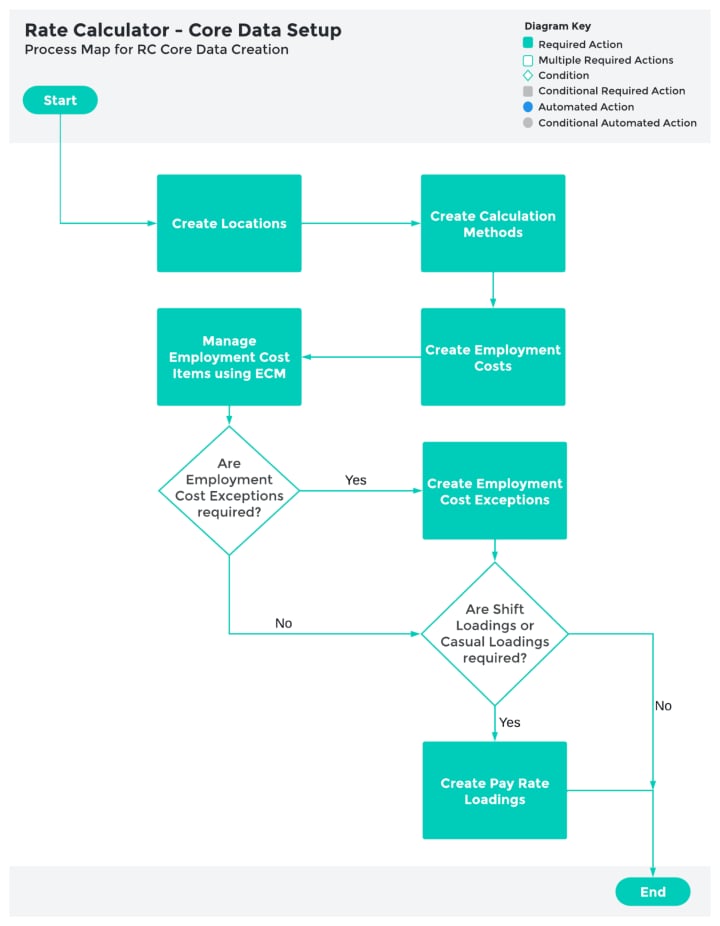
### Core Setup
The following documents provide the detailed information required to use the Rate Calculator
functionality:
* Create Locations
* Create Employment Costs
* Create Employment Cost Records
* Create Employment Cost Items
* Create Employment Cost Exceptions
* Create Pay Rate Loadings
* Casual Loading
* Shift Loading
* Create Calculation Methods
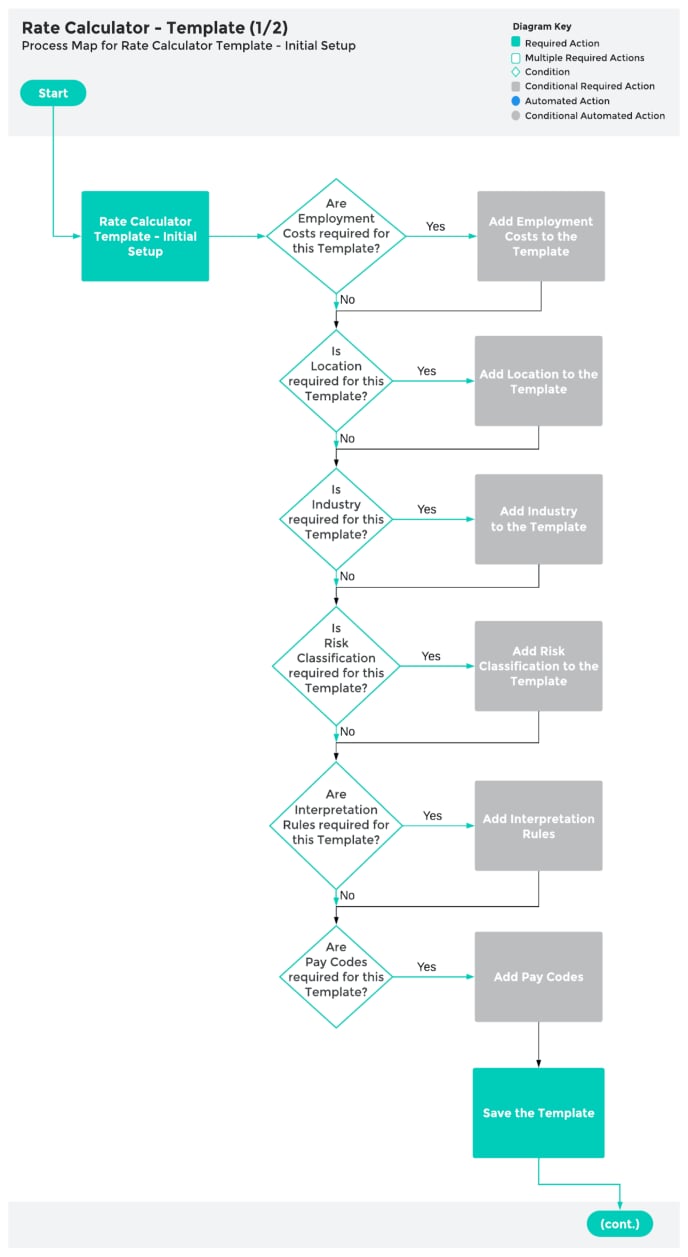
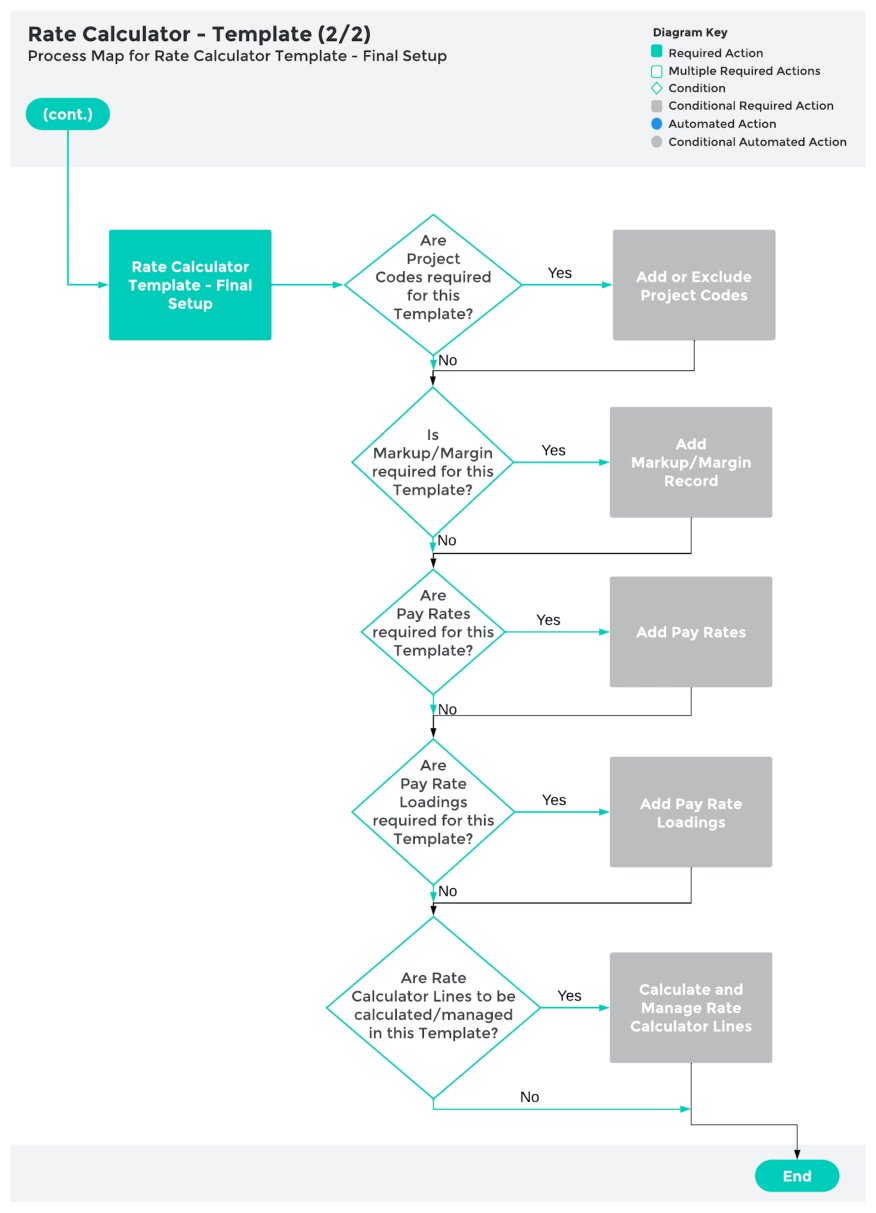
 ### Create a Rate Calculator Template
* Create Rate Calculators Templates
* Rate Calculator Template - Initial Setup
* Rate Calculator Template - Final Setup
### Create a Rate Calculator Template
* Create Rate Calculators Templates
* Rate Calculator Template - Initial Setup
* Rate Calculator Template - Final Setup
 ### Using Templates to create Rate Calculators
* Create Rate Calculators
* Create Employee Specific Rate Calculators
* Preview, Clone & Save as Template
### Using Templates to create Rate Calculators
* Create Rate Calculators
* Create Employee Specific Rate Calculators
* Preview, Clone & Save as Template
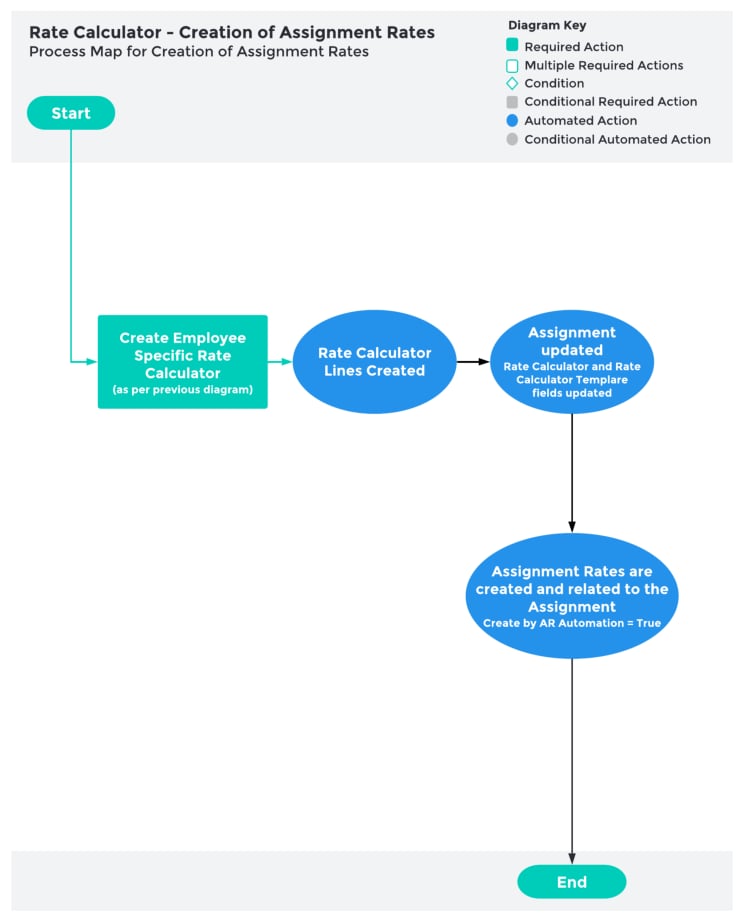
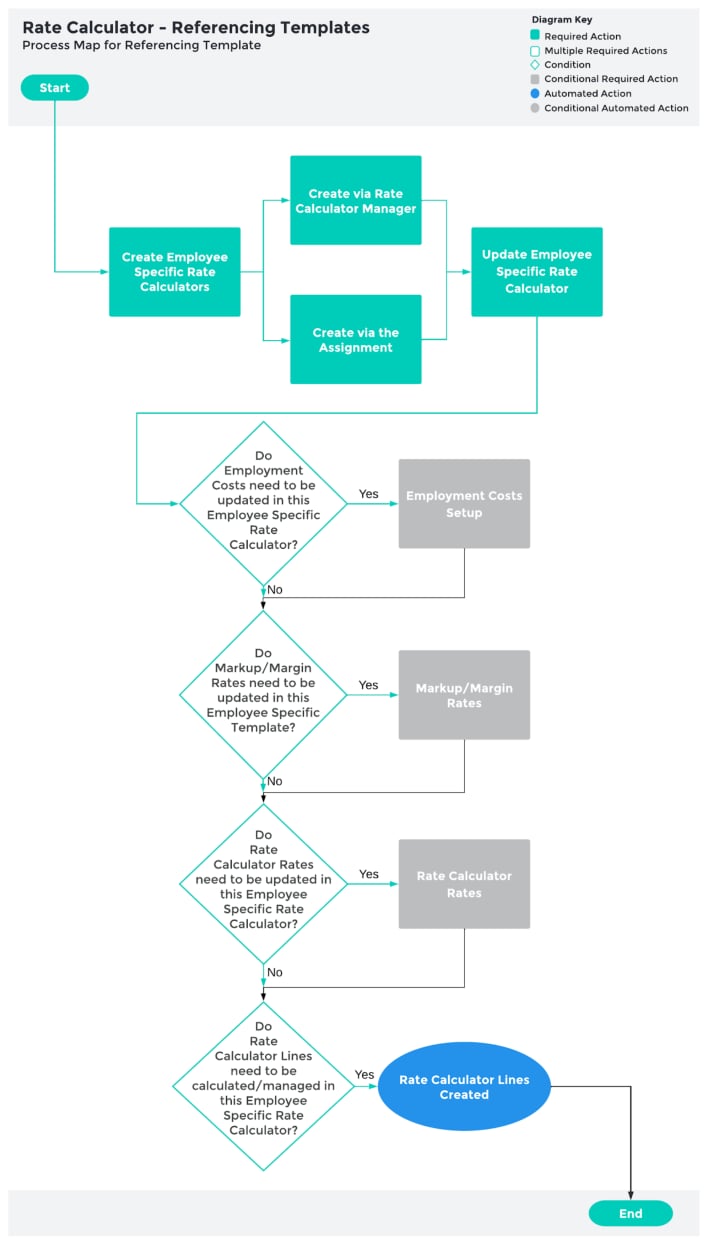 ### Creation of Assignment Rates
* Create Rate Calculators
* Create Employee Specific Rate Calculators
* Preview, Clone & Save as Template
### Creation of Assignment Rates
* Create Rate Calculators
* Create Employee Specific Rate Calculators
* Preview, Clone & Save as Template