> ## Documentation Index
> Fetch the complete documentation index at: https://documentation.2cloudnine.com/llms.txt
> Use this file to discover all available pages before exploring further.
# QRG Create a Minimum Pay Rate Record
export const InlineImage = ({src, alt = "", height = "1.6em"}) => {
return  ;
};
## Purpose
The purpose of this quick reference guide is to step through the process of creating Minimum Pay Rate
(MPR) records. The intended audience for this document is System Administrators / Standard Users.
MPR records facilitate the automatic creation of Timesheet Assignment Rate records for Assignments
with matching Assignment Rate Template Group, Interpretation Rule, Award Classification and if
applicable, Award Levels populated.
Once an MPR with matching values is identified for an Assignment, automation will generate
Assignment Rates according to the details of each related MPR record. If no Pay Code is populated, one
Assignment Rate will be created for each Pay Code from the related Interpretation Breakpoints. Any
additional MPRs with a defined Pay Code will create their Assignment Rates using the specific Pay Rate
on this MPR.
If Timesheet Activities or Project Codes are related to Assignments, additional MPRs must be created
using the Parent/Child structure, to ensure Assignment Rates are defined for each potential combination
of Pay Code and Timesheet Activity/Project Code.
* **Parent MPRs** capture the base Pay Rate for each Pay Code associated with Timesheet
Activities/Project Codes.
* **Child MPRs** define a specific Pay Rate for the Timesheet Activity and/or Project Code populated.
## Steps
### Create a Minimum Pay Rate record
Create a new MPR for use with Rates Automation by following the below steps:
1. Click on the **App Launcher** icon (see Figure 1).
;
};
## Purpose
The purpose of this quick reference guide is to step through the process of creating Minimum Pay Rate
(MPR) records. The intended audience for this document is System Administrators / Standard Users.
MPR records facilitate the automatic creation of Timesheet Assignment Rate records for Assignments
with matching Assignment Rate Template Group, Interpretation Rule, Award Classification and if
applicable, Award Levels populated.
Once an MPR with matching values is identified for an Assignment, automation will generate
Assignment Rates according to the details of each related MPR record. If no Pay Code is populated, one
Assignment Rate will be created for each Pay Code from the related Interpretation Breakpoints. Any
additional MPRs with a defined Pay Code will create their Assignment Rates using the specific Pay Rate
on this MPR.
If Timesheet Activities or Project Codes are related to Assignments, additional MPRs must be created
using the Parent/Child structure, to ensure Assignment Rates are defined for each potential combination
of Pay Code and Timesheet Activity/Project Code.
* **Parent MPRs** capture the base Pay Rate for each Pay Code associated with Timesheet
Activities/Project Codes.
* **Child MPRs** define a specific Pay Rate for the Timesheet Activity and/or Project Code populated.
## Steps
### Create a Minimum Pay Rate record
Create a new MPR for use with Rates Automation by following the below steps:
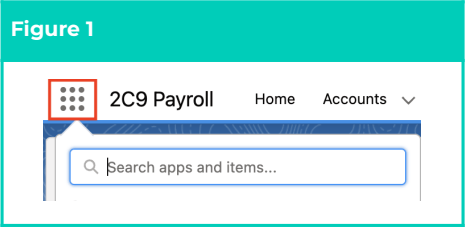
1. Click on the **App Launcher** icon (see Figure 1).
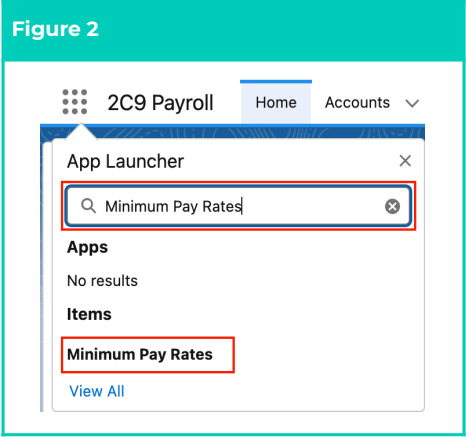
 2. Go to the **Minimum Pay Rate** object by using the Search function (see Figure 2).
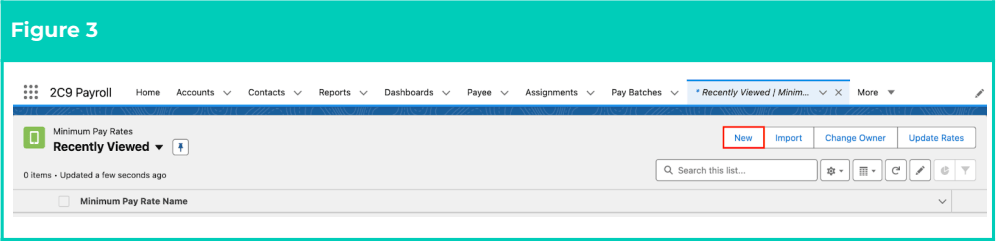
 3. Click on the **New** button (see Figure 3).
 4. Populate the following fields according to the instructions provided:
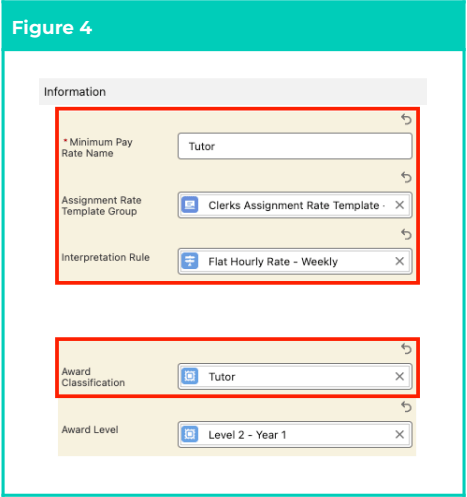
1. Create a unique identifier for the record by populating the **Minimum Pay Rate Name** field
(see Figure 4).
2. Populate an **Assignment Rate Template Group** using the lookup options available.
This record is only used as a filter condition for MPRs, and MUST NOT contain individual
Assignment Rates when populated on an MPR.
3. Specify the Timesheet Interpretation associated with MPR records by populating the
**Interpretation Rule** field using the lookup options available.
4. Select the applicable **Award Classification** using the lookup options available.
5. To define a specific level for Award Classification, populate the **Award Level** field using the
lookup options available.
The Status field is updated via system automation, and should not be manually populated.
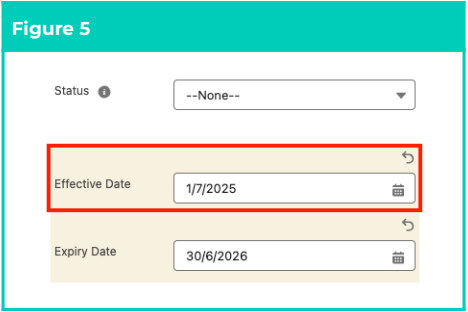
6. Define a date for the Pay Rate to come into effect by populating the **Effective Date** field
(see Figure 5).
7. If the Pay Rate is only valid up to a specific date, populate the **Expiry Date** field.
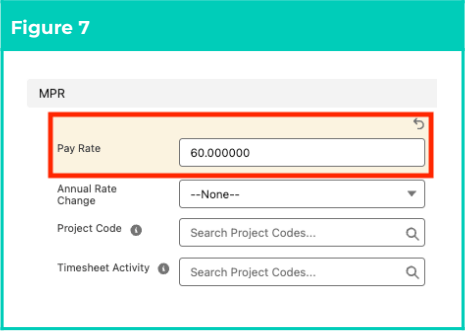
8. Populate the **Pay Rate** field with the value to be used during Assignment Rate creation for
related Pay Codes (see Figure 7).
The Annual Rate Change field is updated via system automation, and should not be manually
populated.
9. To relate a Project Code with the Pay Rate entered, populate the **Project Code** field using the
lookup options available.
10. To relate a Timesheet Activity with the Pay Rate entered, populate the **Timesheet Activity**
field using the lookup options available.
Assignment Level and Client Level records will not be available for selection from the Project
Code or Timesheet Activity lookup fields.
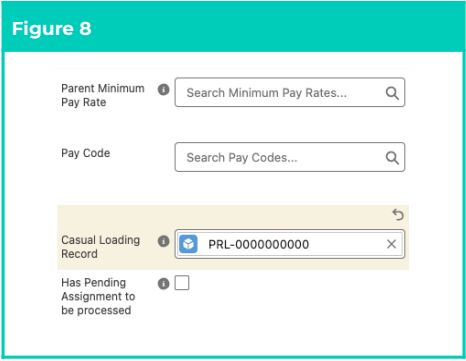
11. If Project Code or Timesheet Activity fields were populated, you MUST establish this record as
a Child MPR by populating the **Parent Minimum Pay Rate** lookup field (see Figure 8).
Please ensure the values populated for the fields in the Information section match those of the
Parent MPR populated. The Pay Rate field may be left blank on Child MPRs, if the value should
be inherited from the Parent MPR.
12. To associate the Pay Rate with a specific **Pay Code**, populate the **Pay Code** field using the
picklist options available.
13. To apply additional casual loading to the MPR, populate the **Casual Loading Record** field
using the lookup options available.
The Has Pending Assignment field is updated via system automation, and should not be
manually populated.
4. Populate the following fields according to the instructions provided:
1. Create a unique identifier for the record by populating the **Minimum Pay Rate Name** field
(see Figure 4).
2. Populate an **Assignment Rate Template Group** using the lookup options available.
This record is only used as a filter condition for MPRs, and MUST NOT contain individual
Assignment Rates when populated on an MPR.
3. Specify the Timesheet Interpretation associated with MPR records by populating the
**Interpretation Rule** field using the lookup options available.
4. Select the applicable **Award Classification** using the lookup options available.
5. To define a specific level for Award Classification, populate the **Award Level** field using the
lookup options available.
The Status field is updated via system automation, and should not be manually populated.
6. Define a date for the Pay Rate to come into effect by populating the **Effective Date** field
(see Figure 5).
7. If the Pay Rate is only valid up to a specific date, populate the **Expiry Date** field.
8. Populate the **Pay Rate** field with the value to be used during Assignment Rate creation for
related Pay Codes (see Figure 7).
The Annual Rate Change field is updated via system automation, and should not be manually
populated.
9. To relate a Project Code with the Pay Rate entered, populate the **Project Code** field using the
lookup options available.
10. To relate a Timesheet Activity with the Pay Rate entered, populate the **Timesheet Activity**
field using the lookup options available.
Assignment Level and Client Level records will not be available for selection from the Project
Code or Timesheet Activity lookup fields.
11. If Project Code or Timesheet Activity fields were populated, you MUST establish this record as
a Child MPR by populating the **Parent Minimum Pay Rate** lookup field (see Figure 8).
Please ensure the values populated for the fields in the Information section match those of the
Parent MPR populated. The Pay Rate field may be left blank on Child MPRs, if the value should
be inherited from the Parent MPR.
12. To associate the Pay Rate with a specific **Pay Code**, populate the **Pay Code** field using the
picklist options available.
13. To apply additional casual loading to the MPR, populate the **Casual Loading Record** field
using the lookup options available.
The Has Pending Assignment field is updated via system automation, and should not be
manually populated.
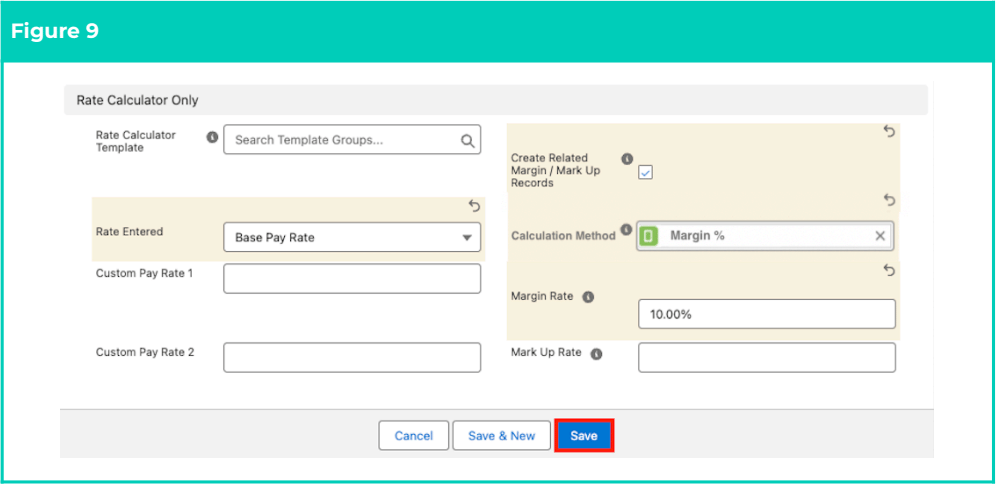
 5. Skip this step unless Rate Calculator components are required for the MPR (see Figure 9).
1. To relate the MPR with a specific Rate Calculator Template Group, populate the **Rate
Calculator Template** field using the lookup options available.
2. Define oncosts calculation using Pay Rate amount as either the Base Pay Rate, Pay Rate,
Total Pay Rate or Charge Rate by selecting from the available picklist options in the **Rate
Entered** field.
3. To define custom Pay Rates for calculation, populate the **Custom Pay Rate 1** and **Custom
Pay Rate 2** fields as needed.
4. Select the **Create Related Margin / Mark Up Records** checkbox field to enable the creation
of new Margin / Mark Up Rates for this MPR record.
* This field MUST be selected to enable Invoice Rate Calculation for the MPR.
5. Specify the calculation type to use for the Rate entered by populating the **Calculation
Method** field using the lookup options available.
6. Populate either the **Margin Rate** or **Mark Up Rate** field, as defined in the **Calculation
Method** field.
* The Rate entered will display as either currency or percentage, according to the
**Calculation Unit** of the selected Calculation Method.
6. Click on the **Save** button.
5. Skip this step unless Rate Calculator components are required for the MPR (see Figure 9).
1. To relate the MPR with a specific Rate Calculator Template Group, populate the **Rate
Calculator Template** field using the lookup options available.
2. Define oncosts calculation using Pay Rate amount as either the Base Pay Rate, Pay Rate,
Total Pay Rate or Charge Rate by selecting from the available picklist options in the **Rate
Entered** field.
3. To define custom Pay Rates for calculation, populate the **Custom Pay Rate 1** and **Custom
Pay Rate 2** fields as needed.
4. Select the **Create Related Margin / Mark Up Records** checkbox field to enable the creation
of new Margin / Mark Up Rates for this MPR record.
* This field MUST be selected to enable Invoice Rate Calculation for the MPR.
5. Specify the calculation type to use for the Rate entered by populating the **Calculation
Method** field using the lookup options available.
6. Populate either the **Margin Rate** or **Mark Up Rate** field, as defined in the **Calculation
Method** field.
* The Rate entered will display as either currency or percentage, according to the
**Calculation Unit** of the selected Calculation Method.
6. Click on the **Save** button.
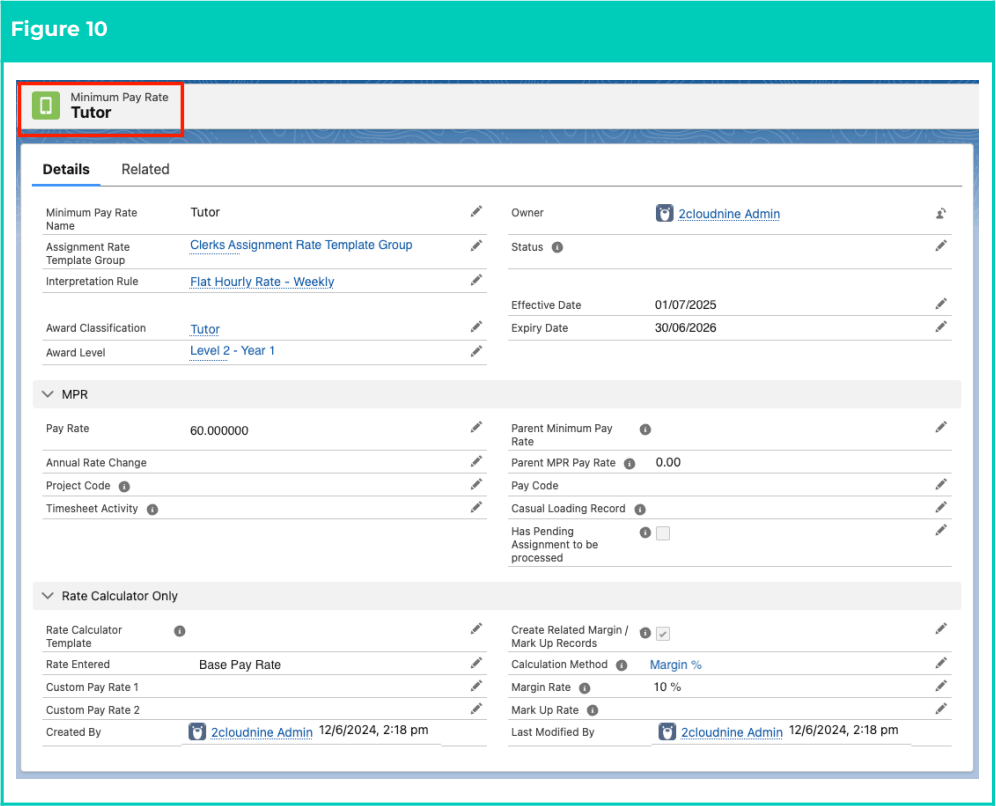
 7. A new Minimum Pay Rate record has been created (see Figure 10).
 Minimum Pay Rate records CAN NOT be deleted if they have related records or are used in other
records. Deleting records is not recommended unless absolutely essential.
8. To modify an existing **Minimum Pay Rate** record, open the required record and select the **Edit**
button available on the top right side of the page. You can also double-click in any of the fields
that need editing or just click on the pencil icon that appears within fields when you move your
cursor over the field.
9. When complete, click on the **Save** button.
## Field descriptions
| Field Name | Description |
| ------------------------------------------------------------ | ------------------------------------------------------------------------------------------------------------------------------------------------------------------------------------------------------------------------------------------------------------------------------------------------------------------------------------------------------------------------------------------------------------------------------------------------------------------------------------------------------------------------------------------------------------------------------------------------------------- |
| **Annual Rate Change** | Identifies whether this Minimum Pay Rate record is a result of an annual update completed for existing
Minimum Pay Rate records CAN NOT be deleted if they have related records or are used in other
records. Deleting records is not recommended unless absolutely essential.
8. To modify an existing **Minimum Pay Rate** record, open the required record and select the **Edit**
button available on the top right side of the page. You can also double-click in any of the fields
that need editing or just click on the pencil icon that appears within fields when you move your
cursor over the field.
9. When complete, click on the **Save** button.
## Field descriptions
| Field Name | Description |
| ------------------------------------------------------------ | ------------------------------------------------------------------------------------------------------------------------------------------------------------------------------------------------------------------------------------------------------------------------------------------------------------------------------------------------------------------------------------------------------------------------------------------------------------------------------------------------------------------------------------------------------------------------------------------------------------- |
| **Annual Rate Change** | Identifies whether this Minimum Pay Rate record is a result of an annual update completed for existing
Minimum Pay Rate records. Automatically updated to Yes when an MPR is created via Update Rates, to
replace an expired MPR record. |
| **Assignment Rate**
**Template Group** | The Assignment Rate Template Group that is applicable for this MPR. |
| **Award Classification** | Defines the Award Classification applicable to the MPR. |
| **Award Level** | Defines the Award Level applicable to the MPR. |
| **Calculation Method** | Defines the related Calculation Method to be used when calculating Oncosts for the MPR. |
| **Casual Loading Record** | The Casual Loading Record that applies to the MPR. |
| **Create Related Margin /**
**Mark Up Records** | Creates new related records to enable Margin / Mark Up Rate calculations for the MPR. |
| **Custom Pay Rate 1** | Defines a custom Pay Rate to be used when calculating Invoice Rates for the MPR. |
| **Custom Pay Rate 2** | Defines a second custom Pay Rate for MPR Invoice Rate calculations. |
| **Effective Date** | The date the MPR is effective from. |
| **Expiry Date** | The date the MPR record expires. |
| **Has Pending**
**Assignment to be**
**processed** | Indicates Assignment Rate creation is pending for an Assignment linked with the MPR. |
| **Interpretation Rule** | The Interpretation Rule associated with the MPR defined. |
| **Margin Rate** | The value to be used for Margin calculations related to the MPR. |
| **Mark Up Rate** | The value to be used for Mark Up calculations related to the MPR. |
| **Minimum Pay Rate**
**Name** | The name given to the MPR record. |
| **Parent Minimum Pay**
**Rate** | Identifies an existing MPR to be used as a Parent for this record.
- When populated, a Parent/Child relationship is established between the new MPR and the
existing Parent record.
|
| **Pay Code** | The specific Pay Code to be used with a defined Pay Rate in Assignment Rates. To be populated when the
Pay Rate x Pay Rate Multiplier on the Pay Code is not to be used in the Assignment Rates. |
| **Pay Rate** | The hourly base Pay Rate to be used when creating Assignment Rates. |
| **Project Code** | Defines a Project Code to be related with Assignment Rates created in relation to this MPR.
- This field should only be populated for Child MPRs.
|
| **Rate Calculator**
**Template** | Defines an existing Rate Calculator Template Group for the MPR record to be related to. |
| **Rate Entered** | Determines how the Pay Rate will be applied when calculating related Margin or Mark Up Rates:
- **Base Pay Rate**: The Pay Rate entered on the MPR record will be used as the Base Pay Rate for related Oncost calculations.
- **Pay Rate**: The Pay Rate entered on the MPR record will be used to calculate related Oncosts.
- **Total Pay Rate**: The Pay Rate entered on the MPR record will be used as the Total Pay Rate when calculating related Oncosts.
- **Charge Rate**: The Pay Rate entered on the MPR record will be used to calculate the Charge Rates.
|
| **Status** | Indicates whether the record is currently Active, Inactive, On Hold or Pending. |
| **Timesheet Activity** | Defines a Timesheet Activity to be related with Assignment Rates created in relation to this MPR.
- This field should only be populated for Child MPRs.
|
## Further information
| Document | Document Type | Description |
| -------------------------------------------------------------- | -------------------------------- | ------------------------------------------------------------------------------------------------------------------------------------------------------------------------------------- |
| QRG Rates Automation Key
Information | Information Quick
Reference | Outlines useful information relevant to the
Rates Automation functionality. The document
includes definitions, prerequisites, and other
non-instructional information. |
| QRG Rate Calculator Key
Information | Information Quick
Reference | Outlines useful information relevant to the
Rate Calculator functionality. The document
includes definitions, prerequisites, and other
non-instructional information. |
| QRG Create a Pay Rate Loading
Record | Task Instructions | How to create a Pay Rate Loading record |
| QRG Create an Award
Classification and Levels
Record | Task Instructions | How to create an Award Classification and an
Award Level record |
| QRG Create an Assignment
(Temp) | Task Instructions | How to create an Employee Assignment for
Timesheets |
| QRG Create a Payee Allowance
Template Group | Task Instructions | How to create a Payee Allowance Template
group |
| QRG Create an Assignment
Rate record (Timesheet) | Task Instructions | How to create an Assignment Rate record for
Timesheet Assignment Rates |
| QRG Create an Assignment
Rate Template Group | Task Instructions | How to create an Assignment Rate Template
Group |