> ## Documentation Index
> Fetch the complete documentation index at: https://documentation.2cloudnine.com/llms.txt
> Use this file to discover all available pages before exploring further.
# QRG Rates Automation Functionality - Key Information
## Prerequisites
Before the creation of a record relating to Minimum Pay Rates or Template Groups, the following prerequisites must be met:
1. 2cloudnine Payroll users must be running the Salesforce Lightning Experience.
2. For a Minimum Pay Rate record to be defined, information on Award Classifications, Award Levels,
Assignment Rate Template Groups, and Interpretation Rules should be available.
3. Users must have access to create Minimum Pay Rates related to an Interpretation Rule, Award
Classification and Award Levels (if necessary), and Template Groups.
4. Users must be able to create and assign Template Groups to an Assignment.
5. Users must have the ability to create and modify Assignment Rates.
### Minimum Pay Rates, Template Groups & Update Rates Interface Appearance and Usability
* All dates and times are displayed as per the location of the logged-in User.
* Currency is calculated at 6 decimal places but displayed with two decimal places.
* The recommended browser is Chrome as per the Salesforce standard.
* The default display resolution supported for the Update Rates Automation is 1920 x 1080 (1080p)
scaled at 100%. The minimum display resolution supported is 1024 x 768 as per the Salesforce
standard.
* The Update Rates Automation will automatically resize in width and height so that the
components are stretched appropriately depending on the resolution.
* If the fields/tabs within the Update Rates Automation are unclear or overlap, zoom out (or zoom
in) through the web browser as needed.
## Definitions
Rates Automation functionality is used to automatically create required Assignment Rates for Assignments. To familiarise yourself with these terms, please refer to the following definitions:
* **Minimum Pay Rate** (MPR)
This functionality enables base Pay Rates to be defined according to a specific combination of
Interpretation Rule, Award Classification, and Award Level (if necessary). Assignment Rates
generated using this method of Rates Automation are created using the **Pay Rate** defined on the
MPR, and the Pay Rate Multiplier defined on related Pay Codes.
* **Award Classification** **and** **Award Level**
Employment agreements such as Modern Awards, EBAs, and CAs classify Employees within an
Industry, according to level of skill, qualification and/or prior experience. Each Classification is
allocated a minimum weekly wage rate and/or minimum hourly rate. Each classification denotes
a separate minimum wage from other classifications in the same agreement. Classifications can
be further divided into Award Levels if required. Award Levels are not compulsory, but may be
necessary depending on the structure (or Rates) defined within the agreement.
* **Pay Rate** Loading
Pay Rate Loading is an additional payment made on top of an Employee’s base Pay Rate, more
commonly known as Casual Loading. The rate of loading is determined by the relevant Award or
agreement covering that specific role. Users can define how the Casual Loading component is
calculated (i.e. % of Multiplied Pay Rate, % of the base Pay Rate, etc). Separate Minimum Pay Rates
must be created for casual Employees to those used for either part-time or full-time Employees.
* **Assignment Rate Template Group (ARTG)**
This functionality enables the automatic creation of Assignment Rates by cloning the records
captured within the Template Group populated on an Assignment record. Enables both Invoice
Rates and Pay Rates to be defined without the need to use Rate Calculators.
* **Payee Allowance Template Group**
This functionality enables the automatic creation of Timesheet Allowances for Payees, by cloning the records captured within the Template Group.
* This functionality does not facilitate the automatic creation of Assignment Rates, as Pay
Rates must be defined using either MPR or ARTG functionality.
* **Update Rates Functionality**\
Update Rates Functionality allows Users to apply updates to the defined Rates within the
Minimum Pay Rate or Assignment Rate Template Groups, either in bulk or individually. Updates
using this method will trigger automation to expire outdated Assignment Rates and create new
related Assignment Rates for Assignment.
## General Overviews
The Rates Automation functionality can be split into three methods which allow the automatic creation of Assignment Rates:
1. **Assignment Rate Template Group (ARTG) Rates Automation**
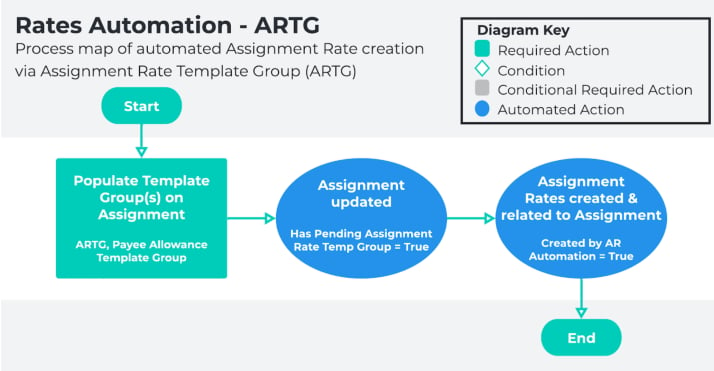
When this method is used, the Assignment Rates generated are clones of the Timesheet
Template Assignment Rate records captured within the ARTG populated on the Assignment.
2. **Minimum Pay Rate (MPR) Rates Automation**
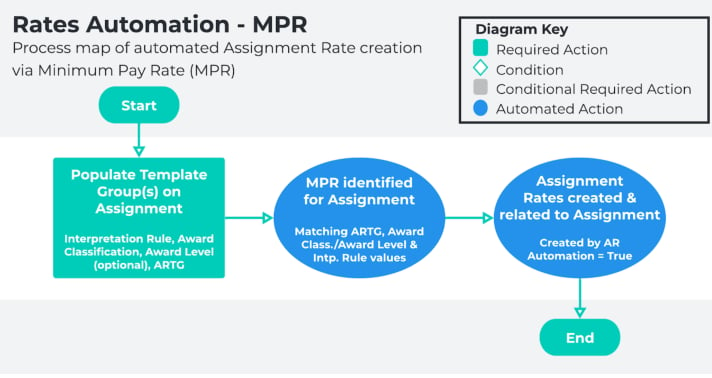
Assignment Rates are generated using the Pay Rate defined on the related MPR record and the
Pay Rate Multiplier from either the Pay Code populated on the MPR, or for all Pay Codes
associated with the related Interpretation Rule Breakpoints (if no Pay Code is populated).
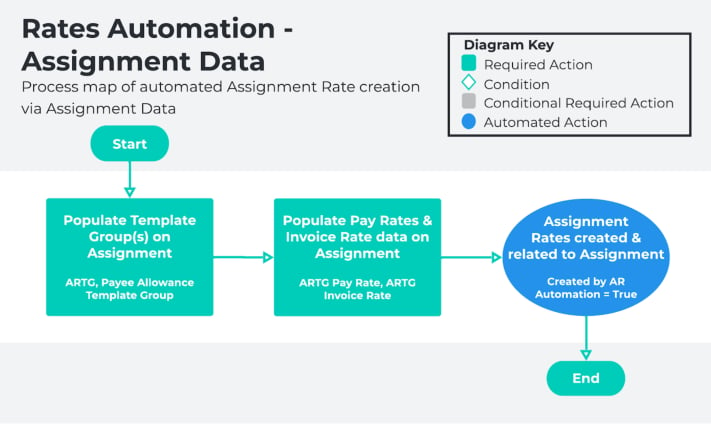
3. **Rates Automation via Assignment Data**
If the Assignment Rate Template GroupPay Rate and Assignment Rate Template Group Inv Rate
fields are defined on the Assignment record, then Assignment Rates will be created using the
values entered in these fields as the base rates, and the Pay and Invoice Rate Multipliers from the
Pay Codes populated on the related ARTG.
* This method utilises the same data setup process as Assignment Rate Template Group (ARTG) Rates Automation.
Once the necessary records have been created for one of the methods listed above, Rates Automation automatically generates the Assignment Rates required to facilitate Timesheet Interpretation.
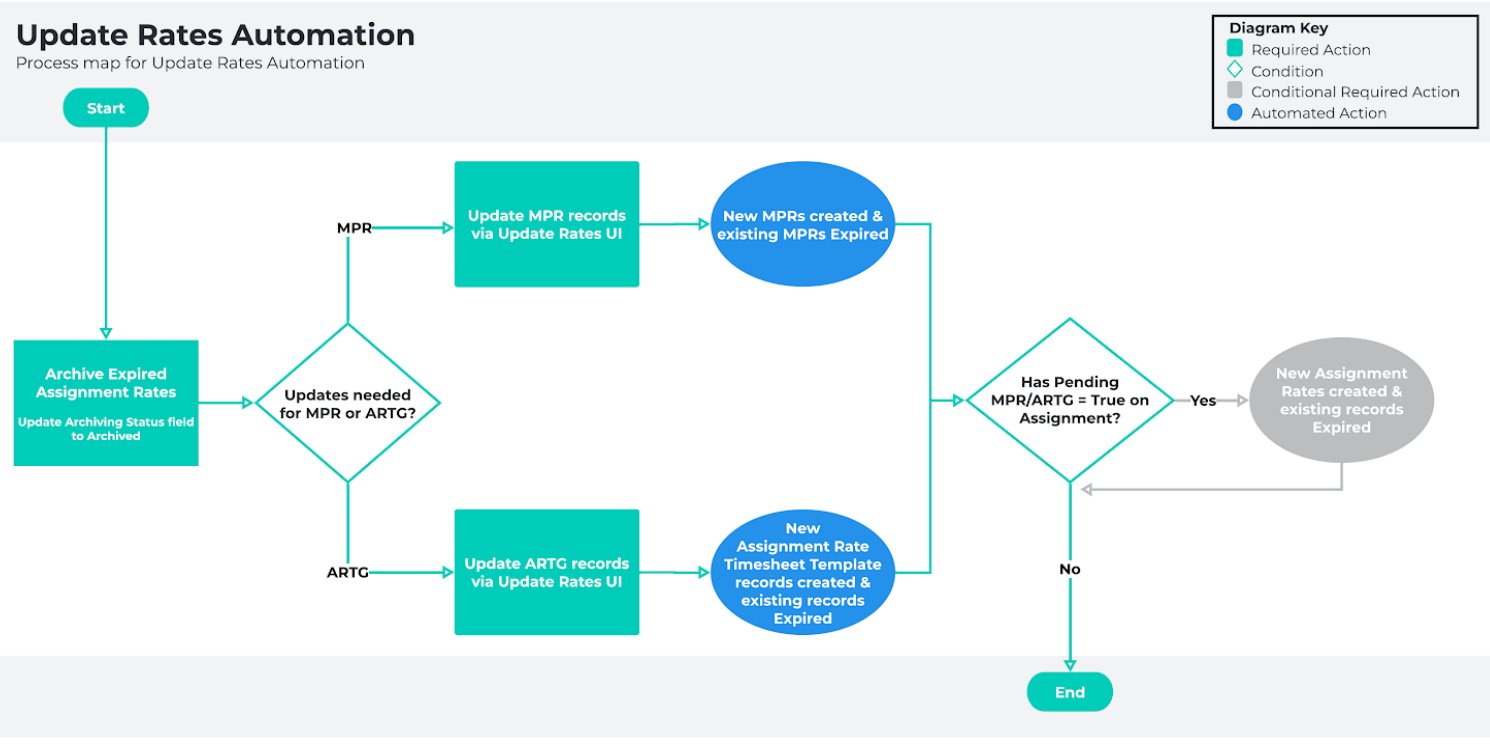
When updates to existing rates are required, Update Rates Automation is used to expire outdated records and create new records containing the updated rate values.
Please refer to the diagrams on the following pages for outlines of the process to create and update Assignment Rates using each Rates Automation method.
### Rates Automation Data creation
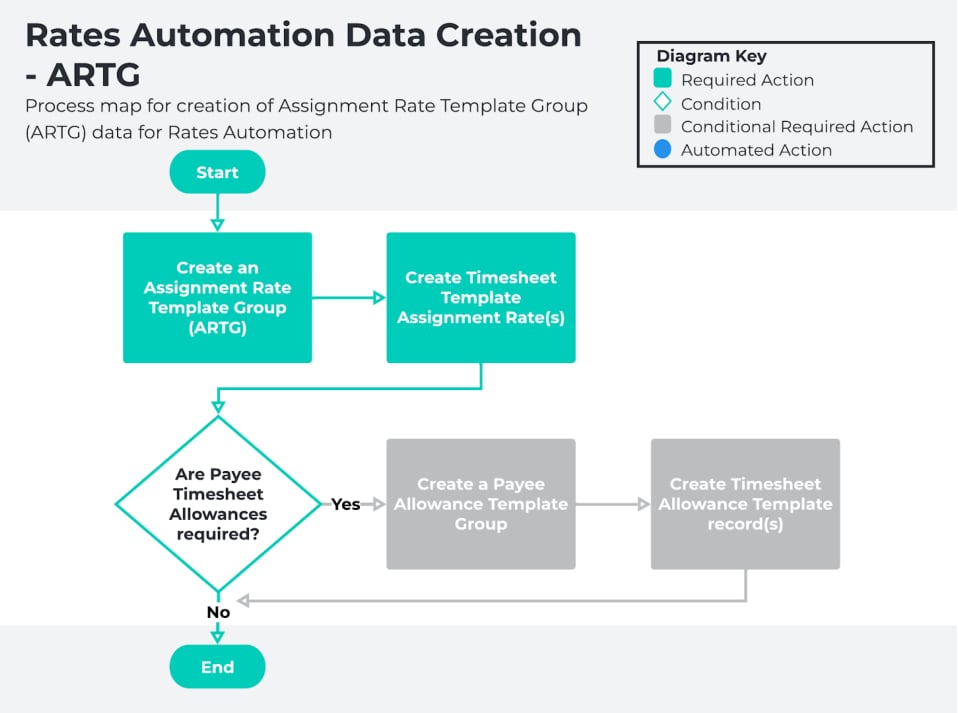
**Assignment Rate Template Group (ARTG) Rates Automation**
* Create an Assignment Rate Template Group
* Create an Assignment Rate Template Group
* Create Timesheet Template Assignment Rate records
* Create a Payee Timesheet Allowance Template Group
* Create a Payee Timesheet Allowance Template Group (if required)
* Create Timesheet Allowance records (if required)
 ### Minimum Pay Rate (MPR) Rates Automation
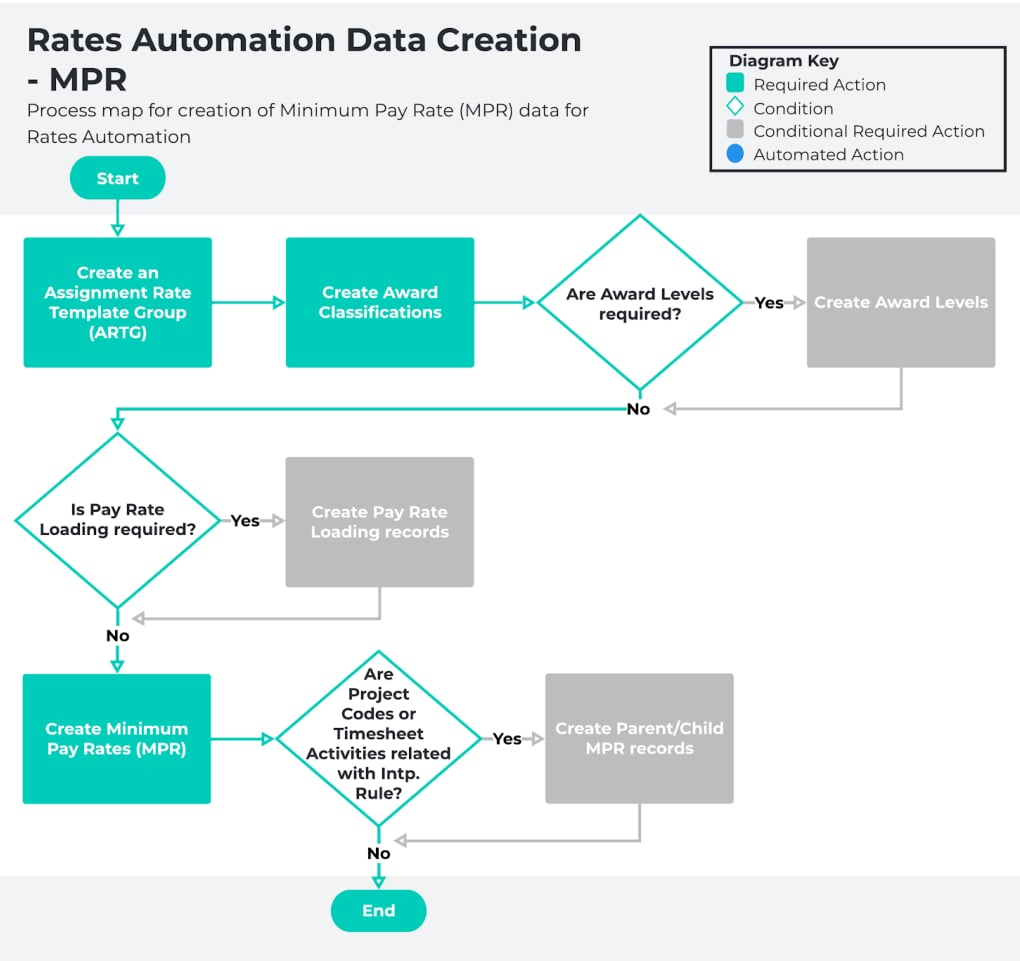
* Create an Award Classification and Award Level Record
* Create an Award Classification
* Create an Award Level (if required)
* Create a Pay Rate Loading Record
* Create a Casual Loading record (if required)
* Create an Assignment Rate Template Group
* Create an Assignment Rate Template Group
* Create Timesheet Template Assignment Rate records (if required)
* Create a Minimum Pay Rate Record
* Create a Minimum Pay Rate parent record
* Create a Minimum Pay Rate child records (if required)
### Minimum Pay Rate (MPR) Rates Automation
* Create an Award Classification and Award Level Record
* Create an Award Classification
* Create an Award Level (if required)
* Create a Pay Rate Loading Record
* Create a Casual Loading record (if required)
* Create an Assignment Rate Template Group
* Create an Assignment Rate Template Group
* Create Timesheet Template Assignment Rate records (if required)
* Create a Minimum Pay Rate Record
* Create a Minimum Pay Rate parent record
* Create a Minimum Pay Rate child records (if required)
 ### Automated Creation of Assignment Rates
1. **Creation of Assignment Rates via ARTG**
### Automated Creation of Assignment Rates
1. **Creation of Assignment Rates via ARTG**
 2. **Creation of Assignment Rates via MPR**
 3. **Creation of Assignment Rates via Assignment Data**
 ### Update Rates Automation
**Update Assignment Rates - ARTG/MPR**
* Update Rates Automation - Assignment Rate Template Group
* Update Rates Automation - Minimum Pay Rate
### Update Rates Automation
**Update Assignment Rates - ARTG/MPR**
* Update Rates Automation - Assignment Rate Template Group
* Update Rates Automation - Minimum Pay Rate
 ## Further information
| Document | Document Type | Description |
| ------------------------------------------------------------- | --------------------------- | ---------------------------------------------------------------------------------------------------------------------------------------------------------------------- |
| QRG Rates Automation Key Information | Information Quick Reference | Outlines useful information relevant to the Rates Automation functionality. The document includes definitions, prerequisites, and other non-instructional information. |
| QRG Create a Minimum Pay Rate Record | Task Instructions | How to create a Minimum Pay Rate record |
| QRG Create a Pay Rate Loading Record | Task Instructions | How to create a Pay Rate Loading record |
| QRG Create an Award Classification and Levels Record | Task Instructions | How to create an Award Classification and an Award Level record |
| QRG Create an Assignment (Temp) | Task Instructions | How to create an Employee Assignment for Timesheets |
| QRG Create a Payee Allowance Template Group | Task Instructions | How to create a Payee Allowance Template group |
| QRG Create an Assignment Rate record (Timesheet) | Task Instructions | How to create an Assignment Rate record for Timesheet Assignment Rates |
| QRG Create an Assignment Rate Template Group | Task Instructions | How to create an Assignment Rate Template Group |
| QRG Update Rates Automation - Assignment Rate Template Groups | Task Instructions | How to use the Update Rates UI to make changes to Assignment Rates created via Assignment Rate Template Group (ARTG) automation. |
| QRG Update Rates Automation - Minimum Pay Rates | Task Instructions | How to use the Update Rates UI to make changes to Assignment Rates created via Minimum Pay Rate (MPR) automation. |
## Further information
| Document | Document Type | Description |
| ------------------------------------------------------------- | --------------------------- | ---------------------------------------------------------------------------------------------------------------------------------------------------------------------- |
| QRG Rates Automation Key Information | Information Quick Reference | Outlines useful information relevant to the Rates Automation functionality. The document includes definitions, prerequisites, and other non-instructional information. |
| QRG Create a Minimum Pay Rate Record | Task Instructions | How to create a Minimum Pay Rate record |
| QRG Create a Pay Rate Loading Record | Task Instructions | How to create a Pay Rate Loading record |
| QRG Create an Award Classification and Levels Record | Task Instructions | How to create an Award Classification and an Award Level record |
| QRG Create an Assignment (Temp) | Task Instructions | How to create an Employee Assignment for Timesheets |
| QRG Create a Payee Allowance Template Group | Task Instructions | How to create a Payee Allowance Template group |
| QRG Create an Assignment Rate record (Timesheet) | Task Instructions | How to create an Assignment Rate record for Timesheet Assignment Rates |
| QRG Create an Assignment Rate Template Group | Task Instructions | How to create an Assignment Rate Template Group |
| QRG Update Rates Automation - Assignment Rate Template Groups | Task Instructions | How to use the Update Rates UI to make changes to Assignment Rates created via Assignment Rate Template Group (ARTG) automation. |
| QRG Update Rates Automation - Minimum Pay Rates | Task Instructions | How to use the Update Rates UI to make changes to Assignment Rates created via Minimum Pay Rate (MPR) automation. |