> ## Documentation Index
> Fetch the complete documentation index at: https://documentation.2cloudnine.com/llms.txt
> Use this file to discover all available pages before exploring further.
# QRG Process a new Reconciliation
## Purpose
The purpose of this quick reference guide details how to perform a Payroll Reconciliation which will create a Reconciliation Record and Reconciliation Items to report the results.
The intended audience for this document are System Administrators and Payroll Users. The Reconciliation process outlined in all the quick reference guides combined is used to compare the Opening Balances, Pay Transactions and Payee Aggregates to ensure the figures balance, and once balanced, provide confidence for the Final Update Event for STP Lodgements to be sent to the ATO.
## Steps
### Process a new Reconciliation
To create a Reconciliation, the following steps should be completed:
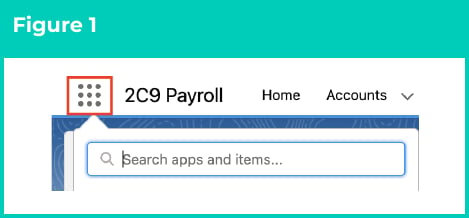
1. Click on the **App Launcher** icon. (See Figure 1)
 2.
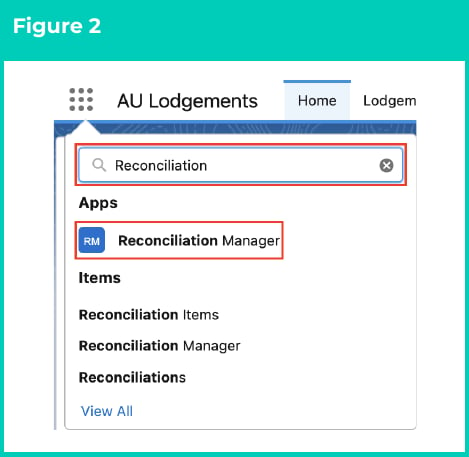
Go to the **Reconciliation Manager** App by using the Search function. (See Figure 2)
2.
Go to the **Reconciliation Manager** App by using the Search function. (See Figure 2)
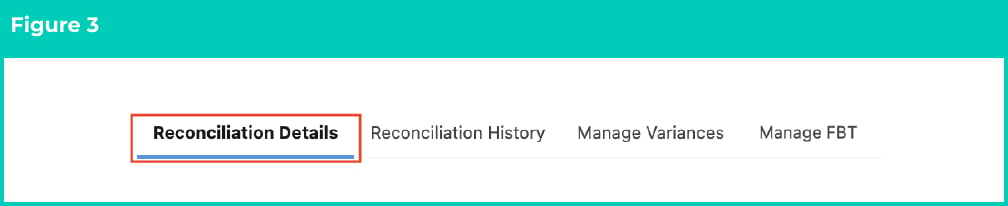
 3. In the Reconciliation Manager App, ensure the **Reconciliation Details** sub-tab is selected to process a new Reconciliation. (See Figure 3)
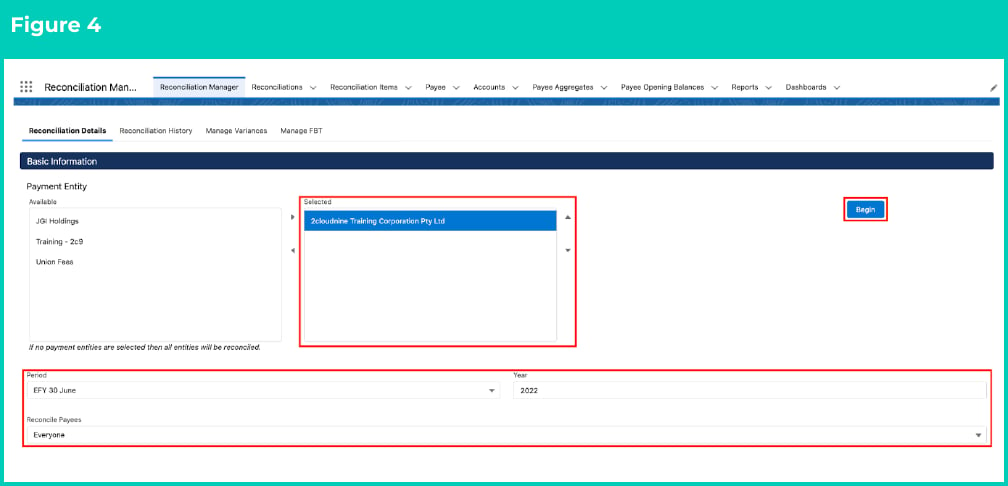
 4. Populate the following optional fields to filter the records: (See Figure 4)
1. **Payment Entity** (maximum 10 if required).
If no Payment Entity is selected before proceeding, the process will be run for all Payment Entities that are listed in the Available section.
5. Populate the following required fields to filter the records: (See Figure 4)
1. **Period**
1. **Since Last Reconciliation**
* When this option is selected, **Last Reconciled Date** and **EFY Date** fields appear automatically, and are pre-populated.
2. **Custom Payment Date**
* When this option is selected, **Custom Date From** and **Custom Date To** fields appear automatically and need to be populated by the user.
3. **EFY 30 June**
* When this option is selected, the **Year** field will appear automatically and needs to be populated by the user.
2. **Reconcile Payees**
1. **Failed Payees Only**
2. **Everyone**
When populating the Custom Date or the Year fields manually, please ensure to populate dates within a specific Financial Year. Dates ranging over two or more Financial Years cannot be populated, and a validation error will advise users of this.
6. Click on the **Begin** button.
4. Populate the following optional fields to filter the records: (See Figure 4)
1. **Payment Entity** (maximum 10 if required).
If no Payment Entity is selected before proceeding, the process will be run for all Payment Entities that are listed in the Available section.
5. Populate the following required fields to filter the records: (See Figure 4)
1. **Period**
1. **Since Last Reconciliation**
* When this option is selected, **Last Reconciled Date** and **EFY Date** fields appear automatically, and are pre-populated.
2. **Custom Payment Date**
* When this option is selected, **Custom Date From** and **Custom Date To** fields appear automatically and need to be populated by the user.
3. **EFY 30 June**
* When this option is selected, the **Year** field will appear automatically and needs to be populated by the user.
2. **Reconcile Payees**
1. **Failed Payees Only**
2. **Everyone**
When populating the Custom Date or the Year fields manually, please ensure to populate dates within a specific Financial Year. Dates ranging over two or more Financial Years cannot be populated, and a validation error will advise users of this.
6. Click on the **Begin** button.
 7. A notification message will appear advising “A batch job for reconciliation has been successfully initiated.” This process could take a number of hours, depending on the volume of Payees and Pay Transactions to be reconciled. There is a progress bar which will keep users updated with how the process is progressing, along with the percentage currently completed. (see Figure 5)
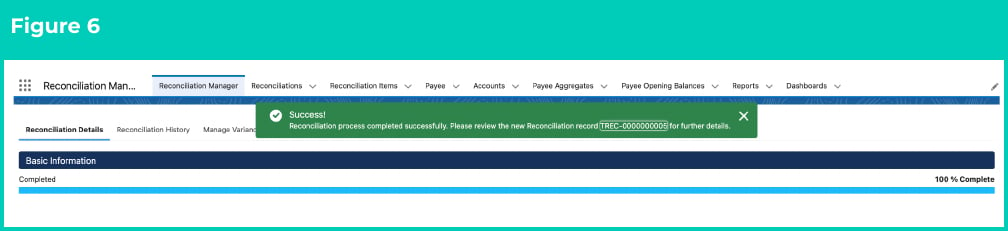
 8. When completed, another notification will appear advising “Reconciliation process completed successfully. Please review the new Reconciliation record TREC-xxxxxxxxxx for further details.” (see Figure 6)
 The progress bar stays on the page when navigating anywhere within the Reconciliation Manager. If you navigate to a different object, then it disappears.
9. If successful, a new Reconciliation record will be created.
A single Reconciliation record will be created for the whole process regardless of the Payment Entities selected. This Reconciliation record contains multiple Reconciliation Items that relate to various Payment Entities, Payees and Payee Aggregates.
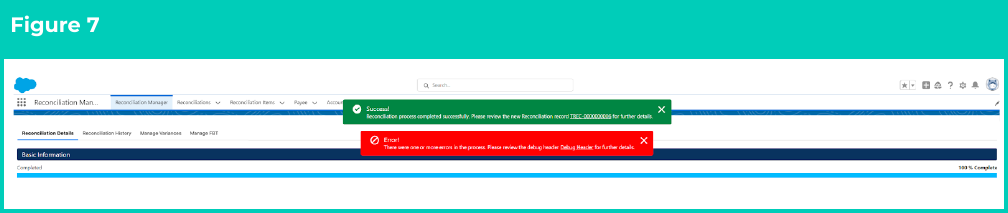
10. If unsuccessful, a red notification message will be displayed, indicating “There were one or more errors in the process. Please review the debug header for further details.”. If you need help resolving the error within the Debug Header, please contact your Customer Support Team. (see Figure 7)
The progress bar stays on the page when navigating anywhere within the Reconciliation Manager. If you navigate to a different object, then it disappears.
9. If successful, a new Reconciliation record will be created.
A single Reconciliation record will be created for the whole process regardless of the Payment Entities selected. This Reconciliation record contains multiple Reconciliation Items that relate to various Payment Entities, Payees and Payee Aggregates.
10. If unsuccessful, a red notification message will be displayed, indicating “There were one or more errors in the process. Please review the debug header for further details.”. If you need help resolving the error within the Debug Header, please contact your Customer Support Team. (see Figure 7)
 11. For steps on how to review the results of the Reconciliation, please review the [QRG Review Reconciliation History (Results)](/qrgs/reconciliation-manager/qrg-review-reconciliation-history-results).
## Field descriptions
No field descriptions are required for this QRG document.
## Further information
| Document | Document Type | Description |
| :-------------------------------------------------------------------------------------------------------------------------------------- | :-------------------------- | :------------------------------------------------------------------------------------------------------------------------------------------------------------------- |
| [Quick Reference Guide Index - Reconciliation Manager](/qrgs/reconciliation-manager/quick-reference-guide-index-reconciliation-manager) | Index | An index document that lists and provides links to all Quick Reference Guides relating to Reconciliations. |
| [QRG Review Reconciliation History (Results)](/qrgs/reconciliation-manager/qrg-review-reconciliation-history-results) | Task Instructions | How to review the existing Reconciliation records. |
| [QRG Resolving Failed Reconciliation Results](/qrgs/reconciliation-manager/qrg-resolving-failed-reconciliation-results) | Task Instructions | How to resolve the failed Reconciliation results. |
| [QRG Manage FBT](/qrgs/reconciliation-manager/qrg-manage-fbt) | Task Instructions | How to enter and search Reportable and Non-Reportable FBT amounts. |
| [QRG Reconciliation Manager - Key Information](/qrgs/reconciliation-manager/qrg-reconciliation-manager-key-information) | Information Quick Reference | Outlines useful information relevant to the Reconciliation functionality. The document includes definitions, prerequisites, and other non-instructional information. |
11. For steps on how to review the results of the Reconciliation, please review the [QRG Review Reconciliation History (Results)](/qrgs/reconciliation-manager/qrg-review-reconciliation-history-results).
## Field descriptions
No field descriptions are required for this QRG document.
## Further information
| Document | Document Type | Description |
| :-------------------------------------------------------------------------------------------------------------------------------------- | :-------------------------- | :------------------------------------------------------------------------------------------------------------------------------------------------------------------- |
| [Quick Reference Guide Index - Reconciliation Manager](/qrgs/reconciliation-manager/quick-reference-guide-index-reconciliation-manager) | Index | An index document that lists and provides links to all Quick Reference Guides relating to Reconciliations. |
| [QRG Review Reconciliation History (Results)](/qrgs/reconciliation-manager/qrg-review-reconciliation-history-results) | Task Instructions | How to review the existing Reconciliation records. |
| [QRG Resolving Failed Reconciliation Results](/qrgs/reconciliation-manager/qrg-resolving-failed-reconciliation-results) | Task Instructions | How to resolve the failed Reconciliation results. |
| [QRG Manage FBT](/qrgs/reconciliation-manager/qrg-manage-fbt) | Task Instructions | How to enter and search Reportable and Non-Reportable FBT amounts. |
| [QRG Reconciliation Manager - Key Information](/qrgs/reconciliation-manager/qrg-reconciliation-manager-key-information) | Information Quick Reference | Outlines useful information relevant to the Reconciliation functionality. The document includes definitions, prerequisites, and other non-instructional information. |