> ## Documentation Index
> Fetch the complete documentation index at: https://documentation.2cloudnine.com/llms.txt
> Use this file to discover all available pages before exploring further.
# QRG Checking Stapled Superannuation
## Purpose
The purpose of this quick reference guide is to step through the process of requesting Stapled
Superannuation through the ATO using the Super Stapling Quick Action button on the Payee record. The
intended audience for this document are Payroll Users.
## Steps
### **Checking an employee’s stapled superannuation information**
Checking an employee’s Stapled Superannuation Information is completed in 3 steps
1. The system will determine if sufficient information is already prepared for inclusion within an STP lodgement to provide the relevant employee information to the ATO required to access the Employee’s Stapled Superannuation information. If not, a zero dollar record is created ready for validation and lodgment.
2. The STP validation and lodgment is completed as normal via the STP Manager within 2cloudnine Payroll
3. Once the lodgement has been successfully received by the ATO, the employer can login to the ATO Online Services and lookup the employee’s Stapled Super information.
If the employee has already been included in an STP Event submitted to the ATO, or a
TFN Declaration has been provided to the ATO, the required access to view the
employee’s Stapled Super Fund will already be provided via ATO Online Services. In this
event steps 1 and 2 above can be skipped.
### **Determining if a zero dollar STP update event needs to be lodged**
To determine if a zero dollar STP lodgement needs to be sent to the ATO so an employee’s Stapled
Superannuation Information can be accessed, the following steps should be completed:
1. Go to the **Payee** object and open the Payee record that requires the Stapled Superannuation to be checked.
2. Click on the action button (see Figure 1)
3. Select the **Stapling Super** option The Super Stapling page will open
 If the relevant employee has not provided their TFN, the required information can not
be sent to the ATO and a message will be displayed accordingly (see Figure 2). No
further action can be taken until the TFN is provided.
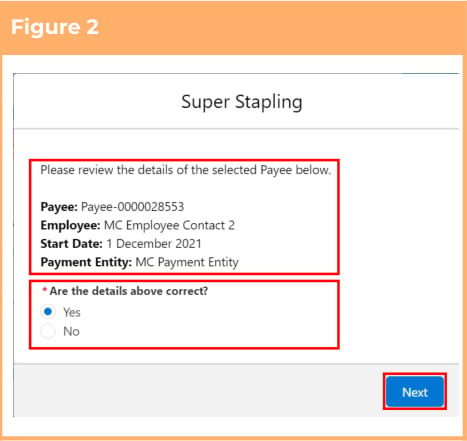
4. Check to ensure the information provided is correct and if so, select the **Yes** option (see Figure 2)
5. Click the Next button
If the displayed information
was incorrect, update the
relevant information within
the Payee record before
initiating the Super Stapling
page again.
If the relevant employee has not provided their TFN, the required information can not
be sent to the ATO and a message will be displayed accordingly (see Figure 2). No
further action can be taken until the TFN is provided.
4. Check to ensure the information provided is correct and if so, select the **Yes** option (see Figure 2)
5. Click the Next button
If the displayed information
was incorrect, update the
relevant information within
the Payee record before
initiating the Super Stapling
page again.
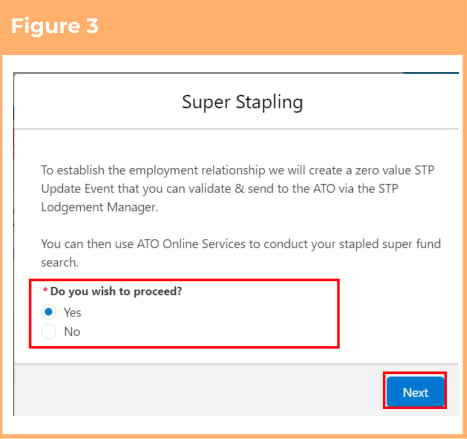
 6. Read the provided information and, if you would like to proceed, select the **Yes** option (see Figure 3)
7. Click the Next button The STP record will be created ready for validation and lodgment via the STP Manager. A launch button for the STP Manager is available from the final Super Stapling screen
If you do not agree to the zero
value STP record being
created, no further action can
be taken at this time.
6. Read the provided information and, if you would like to proceed, select the **Yes** option (see Figure 3)
7. Click the Next button The STP record will be created ready for validation and lodgment via the STP Manager. A launch button for the STP Manager is available from the final Super Stapling screen
If you do not agree to the zero
value STP record being
created, no further action can
be taken at this time.
 ## Further Information
| Document | Document Type | Description |
| ------------------------------------------------ | ------------- | --------------------------------------------------------------------------------------------------------------------------------------------------- |
| Request stapled super fund details for employees | External Link | ATO documentation on requesting stapled super fund details for employees including details on how to access the information via ATO Online Services |
## Further Information
| Document | Document Type | Description |
| ------------------------------------------------ | ------------- | --------------------------------------------------------------------------------------------------------------------------------------------------- |
| Request stapled super fund details for employees | External Link | ATO documentation on requesting stapled super fund details for employees including details on how to access the information via ATO Online Services |