> ## Documentation Index
> Fetch the complete documentation index at: https://documentation.2cloudnine.com/llms.txt
> Use this file to discover all available pages before exploring further.

# QRG Create Purchase Orders - Utilities

## Purpose

The purpose of this quick reference guide is to step through the process of creating Purchase Orders as part of the Utilities Package. The intended audience for this document is System Administrators / Standard Users.

Purchase Orders serve as the primary record to capture essential details pertaining to a customer's Purchase Order. These records must be initially created and linked to an Assignment using a Purchase Order Junction record.

## Assignment Requires Purchase Order

To enable Purchase Order Management for an Assignment, you must select the checkbox **Requires Purchase Order** on the Assignment.

Once an Assignment has been set to require a Purchase Order and the related Assignment Rates have been created, Purchase Order records can be created.

## Steps

### Create a Purchase Order

To create a Purchase Order, follow the steps below:

<Columns>
  <div>
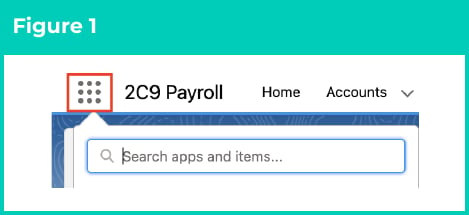
    1. Click on the **App Launcher** icon (see Figure 1).
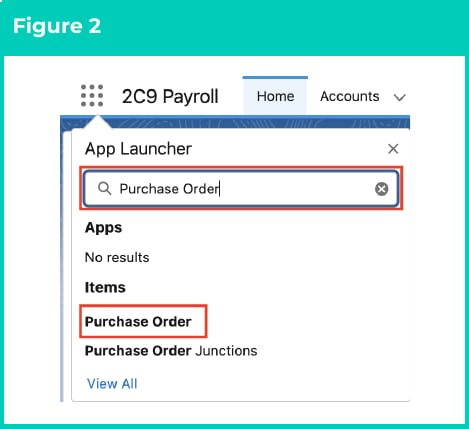
    2. Go to the **Purchase Order** object by using the Search function (see Figure 2).
  </div>

  <div>
    <Frame>
      <img src="https://mintcdn.com/2cloudnine-2edf05eb/kjqI8CUTFYifoD18/images/generated/reference-guides/utilities/qrg-create-purchase-orders-utilities/qrg-create-purchase-orders-utilities-pdf-0-figure-1.png?fit=max&auto=format&n=kjqI8CUTFYifoD18&q=85&s=cd0d883a47560941a27d75bc0c6e2617" alt="Figure 1" width="469" height="215" data-path="images/generated/reference-guides/utilities/qrg-create-purchase-orders-utilities/qrg-create-purchase-orders-utilities-pdf-0-figure-1.png" />
    </Frame>

    <Frame>
      <img src="https://mintcdn.com/2cloudnine-2edf05eb/kjqI8CUTFYifoD18/images/generated/reference-guides/utilities/qrg-create-purchase-orders-utilities/qrg-create-purchase-orders-utilities-pdf-0-figure-2.png?fit=max&auto=format&n=kjqI8CUTFYifoD18&q=85&s=6704bfe27977940d0cf6a83ada311836" alt="Figure 2" width="469" height="429" data-path="images/generated/reference-guides/utilities/qrg-create-purchase-orders-utilities/qrg-create-purchase-orders-utilities-pdf-0-figure-2.png" />
    </Frame>
  </div>
</Columns>

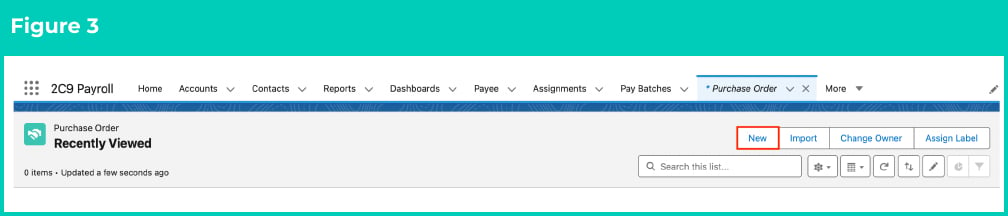
3. Click the **New** button (see Figure 3).

<Frame>
  <img src="https://mintcdn.com/2cloudnine-2edf05eb/kjqI8CUTFYifoD18/images/generated/reference-guides/utilities/qrg-create-purchase-orders-utilities/qrg-create-purchase-orders-utilities-pdf-1-figure-3.png?fit=max&auto=format&n=kjqI8CUTFYifoD18&q=85&s=7ab3850c9a4751e73bef872613bd6e29" alt="Figure 3" width="1008" height="216" data-path="images/generated/reference-guides/utilities/qrg-create-purchase-orders-utilities/qrg-create-purchase-orders-utilities-pdf-1-figure-3.png" />
</Frame>

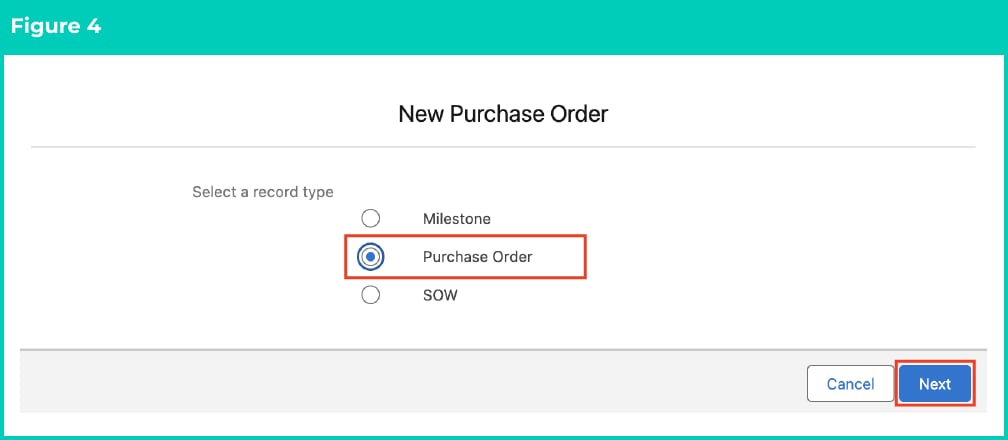
4. Select the **Purchase Order** Record Type (see Figure 4).
<Frame>
  <img src="https://mintcdn.com/2cloudnine-2edf05eb/kjqI8CUTFYifoD18/images/generated/reference-guides/utilities/qrg-create-purchase-orders-utilities/qrg-create-purchase-orders-utilities-pdf-1-figure-4.png?fit=max&auto=format&n=kjqI8CUTFYifoD18&q=85&s=c0aba86dd46b2860681ff87448c82894" alt="Figure 4" width="1008" height="440" data-path="images/generated/reference-guides/utilities/qrg-create-purchase-orders-utilities/qrg-create-purchase-orders-utilities-pdf-1-figure-4.png" />
</Frame>

<Note>
  **Important Notes**\
  (Milestone & SOW Record Types)

  The 'Milestone' Record Type is for custom Purchase Order Management requirements only. It is not currently used within the 2c9 Utilities Purchase Order Management solution.

  Please refer to the 'SOW (Purchase Order)' field in the Field Descriptions below for details relating to the 'SOW' Record Type.
</Note>

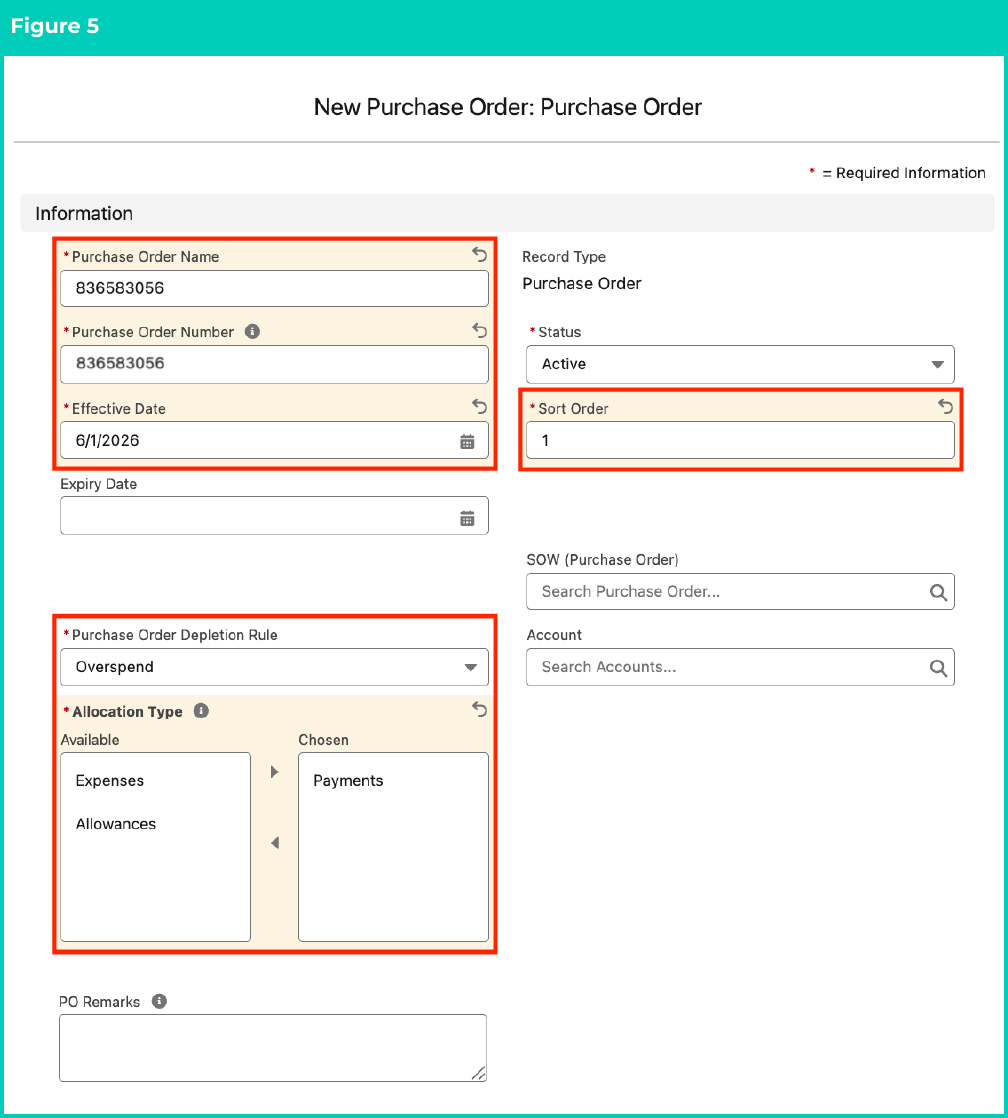
5. Populate the following required fields to provide the base details of the Purchase Order record (see Figure 5):
   1. **Purchase Order Name**
   2. **Purchase Order Number**
   3. **Effective Date**
   4. **Status**
   5. **Sort Number**
   6. **Purchase Order Depletion Rule**
   7. **Allocation Type**
6. Populate the following optional fields as needed (see Figure 5):
   1. To set a fixed term for the Purchase Order record, populate the **Expiry Date** field. If left blank, no Expiry Date will apply.
   2. To provide a method to group Purchase Orders into a parent Statement of Work (SOW) already created, populate the **SOW (Purchase Order)** field.
   3. To relate this Purchase Order to a specific Account, populate the **Account** field.
   4. To enter any notes related to the Purchase Order, use the **PO Remarks** field.

<Frame>
  <img src="https://mintcdn.com/2cloudnine-2edf05eb/kjqI8CUTFYifoD18/images/generated/reference-guides/utilities/qrg-create-purchase-orders-utilities/qrg-create-purchase-orders-utilities-pdf-2-figure-5.png?fit=max&auto=format&n=kjqI8CUTFYifoD18&q=85&s=c9d1f61f20d8aee7501b187dfaa3a6d3" alt="Figure 5" width="1008" height="1118" data-path="images/generated/reference-guides/utilities/qrg-create-purchase-orders-utilities/qrg-create-purchase-orders-utilities-pdf-2-figure-5.png" />
</Frame>

7. Populate the following required fields to provide the base details of the Purchase Order record (see Figure 6):
   1. **Value**
8. Populate the following optional fields as needed (see Figure 6):
   1. To send the first alert to a User when the Purchase Order reaches a defined threshold, populate the **First Alert** field.
   2. To send the last alert to a User when the Purchase Order reaches a defined threshold, populate the **Last Warning** field.
9. Click the **Save** button.

<Frame>
  <img src="https://mintcdn.com/2cloudnine-2edf05eb/kjqI8CUTFYifoD18/images/generated/reference-guides/utilities/qrg-create-purchase-orders-utilities/qrg-create-purchase-orders-utilities-pdf-3-figure-6.png?fit=max&auto=format&n=kjqI8CUTFYifoD18&q=85&s=7baa7dccb6811f3951a06d6a869693d8" alt="Figure 6" width="1008" height="742" data-path="images/generated/reference-guides/utilities/qrg-create-purchase-orders-utilities/qrg-create-purchase-orders-utilities-pdf-3-figure-6.png" />
</Frame>

<Note>
  **Important Notes**\
  (Current Spend field)

  The Current Spend field is automatically calculated during the PO Management process using the 'Invoice Total ex Tax' of each related Pay Transaction.
</Note>

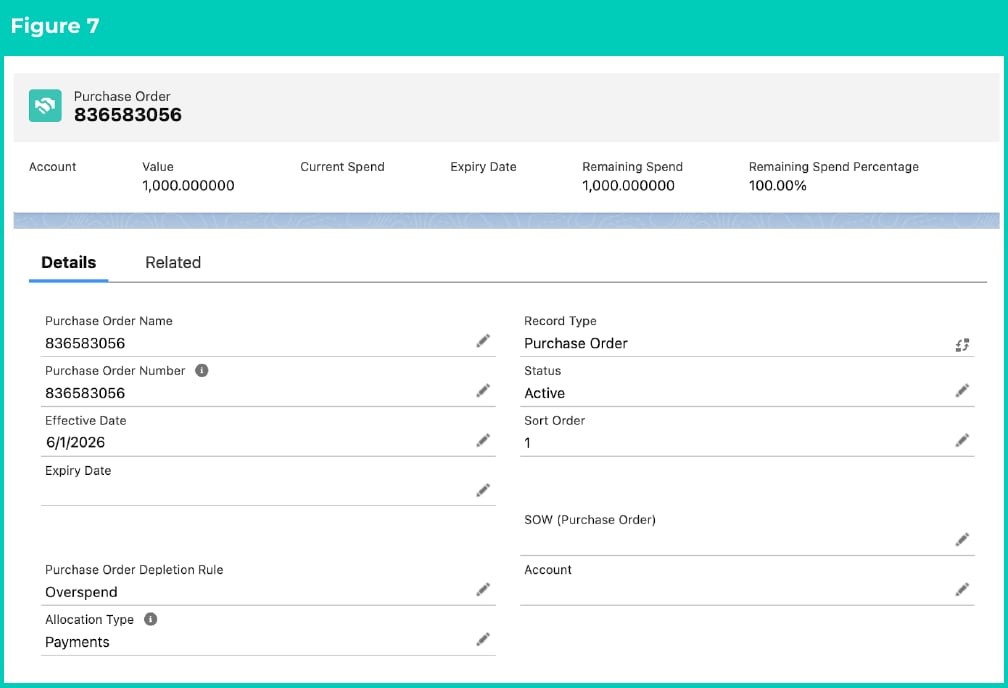
10. A new Purchase Order record has been created (see Figure 7).

<Frame>
  <img src="https://mintcdn.com/2cloudnine-2edf05eb/kjqI8CUTFYifoD18/images/generated/reference-guides/utilities/qrg-create-purchase-orders-utilities/qrg-create-purchase-orders-utilities-pdf-4-figure-7.png?fit=max&auto=format&n=kjqI8CUTFYifoD18&q=85&s=f067f570bffb160c2886d1e5502c3576" alt="Figure 7" width="1008" height="688" data-path="images/generated/reference-guides/utilities/qrg-create-purchase-orders-utilities/qrg-create-purchase-orders-utilities-pdf-4-figure-7.png" />
</Frame>

11. Now that the Purchase Order record has been created, please refer to [QRG Create Purchase Order Junctions](/qrgs/utilities/qrg-create-purchase-order-junctions-utilities) and [QRG Allocate Purchase Orders](/qrgs/utilities/qrg-allocate-purchase-orders-utilities) to learn more about the next steps for Purchase Orders.

## Field Descriptions

| Field Name                        | Description                                                                                                                                                                                                                                                                                                                                                                                                                                                                                                                                                                                                                                                                                                                                                                                                                                                                                                                                                                                                                                                                                                                                                                                                                                                                                                                                                                                                                                                                                                                                                                                                                                                                                                                                                                                                                                                                                                                                                                                                                                                                                                              |
| :-------------------------------- | :----------------------------------------------------------------------------------------------------------------------------------------------------------------------------------------------------------------------------------------------------------------------------------------------------------------------------------------------------------------------------------------------------------------------------------------------------------------------------------------------------------------------------------------------------------------------------------------------------------------------------------------------------------------------------------------------------------------------------------------------------------------------------------------------------------------------------------------------------------------------------------------------------------------------------------------------------------------------------------------------------------------------------------------------------------------------------------------------------------------------------------------------------------------------------------------------------------------------------------------------------------------------------------------------------------------------------------------------------------------------------------------------------------------------------------------------------------------------------------------------------------------------------------------------------------------------------------------------------------------------------------------------------------------------------------------------------------------------------------------------------------------------------------------------------------------------------------------------------------------------------------------------------------------------------------------------------------------------------------------------------------------------------------------------------------------------------------------------------------------------- |
| **Account**                       | The Account that the Purchase Order relates to. This field is optional if the Purchase Order can be related to many Accounts.                                                                                                                                                                                                                                                                                                                                                                                                                                                                                                                                                                                                                                                                                                                                                                                                                                                                                                                                                                                                                                                                                                                                                                                                                                                                                                                                                                                                                                                                                                                                                                                                                                                                                                                                                                                                                                                                                                                                                                                            |
| **Alert Threshold Met**           | Alerts the User when the Remaining Spend is less than the Alert Threshold. Used to proactively alert designated Users when to follow up on depleted Purchase Orders.                                                                                                                                                                                                                                                                                                                                                                                                                                                                                                                                                                                                                                                                                                                                                                                                                                                                                                                                                                                                                                                                                                                                                                                                                                                                                                                                                                                                                                                                                                                                                                                                                                                                                                                                                                                                                                                                                                                                                     |
| **Allocation Type**               | The type of Pay Transactions that will be allocated to the Purchase Order. This can be used when different Pay Transaction record types require different Purchase Orders.                                                                                                                                                                                                                                                                                                                                                                                                                                                                                                                                                                                                                                                                                                                                                                                                                                                                                                                                                                                                                                                                                                                                                                                                                                                                                                                                                                                                                                                                                                                                                                                                                                                                                                                                                                                                                                                                                                                                               |
| **Current Spend**                 | The total value of all Pay Transactions allocated to this Purchase Order so far. This field is automatically calculated during the PO Management Process using the 'Invoice Total ex Tax' of each related Pay Transaction.                                                                                                                                                                                                                                                                                                                                                                                                                                                                                                                                                                                                                                                                                                                                                                                                                                                                                                                                                                                                                                                                                                                                                                                                                                                                                                                                                                                                                                                                                                                                                                                                                                                                                                                                                                                                                                                                                               |
| **Effective Date**                | Effective date of the Purchase Order. If a child junction's Effective Date is blank, this value will apply. Ensures child junction dates stay within the Purchase Order's effective range.                                                                                                                                                                                                                                                                                                                                                                                                                                                                                                                                                                                                                                                                                                                                                                                                                                                                                                                                                                                                                                                                                                                                                                                                                                                                                                                                                                                                                                                                                                                                                                                                                                                                                                                                                                                                                                                                                                                               |
| **Expiry Date**                   | Expiry date of the Purchase Order. If a child junction's Expiry Date is blank, this value will apply. Ensures child junction dates stay within the Purchase Order's expiry range.                                                                                                                                                                                                                                                                                                                                                                                                                                                                                                                                                                                                                                                                                                                                                                                                                                                                                                                                                                                                                                                                                                                                                                                                                                                                                                                                                                                                                                                                                                                                                                                                                                                                                                                                                                                                                                                                                                                                        |
| **First Alert**                   | This percentage field determines when Users should be alerted to the Purchase Order reaching the defined threshold. This field can be used in custom reporting or automation.                                                                                                                                                                                                                                                                                                                                                                                                                                                                                                                                                                                                                                                                                                                                                                                                                                                                                                                                                                                                                                                                                                                                                                                                                                                                                                                                                                                                                                                                                                                                                                                                                                                                                                                                                                                                                                                                                                                                            |
| **Last Warning**                  | This percentage field determines when a User should be alerted to the Purchase Order reaching the defined threshold. This field can be used in custom reporting or automation.                                                                                                                                                                                                                                                                                                                                                                                                                                                                                                                                                                                                                                                                                                                                                                                                                                                                                                                                                                                                                                                                                                                                                                                                                                                                                                                                                                                                                                                                                                                                                                                                                                                                                                                                                                                                                                                                                                                                           |
| **PO Remarks**                    | Free text field for entering any notes related to the Purchase Order.                                                                                                                                                                                                                                                                                                                                                                                                                                                                                                                                                                                                                                                                                                                                                                                                                                                                                                                                                                                                                                                                                                                                                                                                                                                                                                                                                                                                                                                                                                                                                                                                                                                                                                                                                                                                                                                                                                                                                                                                                                                    |
| **Purchase Order Depletion Rule** | The Purchase Order Depletion Rule field on the Purchase Order and related Purchase Order Junction is used to determine how to handle the allocation of Pay Transactions when the Remaining Spend of the Purchase Order is nearing zero. There are four options available, which function as follows:<br /><br />• **Overspend**: Pay Transactions will continue to be allocated to the Purchase Order regardless of the Remaining Spend. This will mean Purchase Orders with Overspend can go into negative spend.<br /><br />• **Split Transaction**: Where the processing Pay Transaction Invoice Total Ex Tax is greater than the Remaining Spend, the Pay Transaction will be split to fully deplete the current Purchase Order to \$0. The second Pay Transaction will then be allocated to the next available Purchase Order (assuming one is available). *Example* - A Pay Transaction has an Invoice Total Ex Tax of \$2,000. The remaining spend of the Purchase Order is \$1,000. The Pay Transaction is split into 2 x \$1,000 Pay Transactions, with the first allocated to the Purchase Order, reducing it to \$0, and the second split Pay Transaction allocated to the next Purchase Order.<br /><br />• **Hold Off**: Pay Transactions where the Invoice Total Ex Tax is greater than the Remaining Spend will not be processed. Only Pay Transactions where the Invoice Total Ex Tax is less than or equal to the Remaining Spend will be allocated. Unlike the 'Split Transaction' option, this will keep the Purchase Order open for its Effective Period until a Pay Transaction that 'fits' is available. When this option is selected, another Purchase Order within the same Effective Period with a sort order of 2 should be available.<br /><br />• **Invoice without PO**: This option will allow Pay Transactions to be released for Invoicing (To Be Invoiced = TRUE) without applying the 'Purchase Order'. This option is typically only used where Pay Transactions have to be Invoiced however, the relevant Purchase Order may be incomplete, or a new one is pending with the Client. |
| **Purchase Order Name**           | The internal name of the Purchase Order record. This can be different from the actual Purchase Order Number, allowing Customers greater flexibility with PO naming conventions.                                                                                                                                                                                                                                                                                                                                                                                                                                                                                                                                                                                                                                                                                                                                                                                                                                                                                                                                                                                                                                                                                                                                                                                                                                                                                                                                                                                                                                                                                                                                                                                                                                                                                                                                                                                                                                                                                                                                          |
| **Purchase Order Number**         | The Purchase Order Number is to be applied to the Pay Transaction. This field is used in the grouping of Invoices and is the value that will be displayed on the Customer's Invoice.                                                                                                                                                                                                                                                                                                                                                                                                                                                                                                                                                                                                                                                                                                                                                                                                                                                                                                                                                                                                                                                                                                                                                                                                                                                                                                                                                                                                                                                                                                                                                                                                                                                                                                                                                                                                                                                                                                                                     |
| **Remaining Spend**               | Formula field with the difference between the Value of the PO and the Current Spend of the PO.                                                                                                                                                                                                                                                                                                                                                                                                                                                                                                                                                                                                                                                                                                                                                                                                                                                                                                                                                                                                                                                                                                                                                                                                                                                                                                                                                                                                                                                                                                                                                                                                                                                                                                                                                                                                                                                                                                                                                                                                                           |
| **Remaining Spend Percentage**    | Remaining Spend displayed as a percentage of the original amount.                                                                                                                                                                                                                                                                                                                                                                                                                                                                                                                                                                                                                                                                                                                                                                                                                                                                                                                                                                                                                                                                                                                                                                                                                                                                                                                                                                                                                                                                                                                                                                                                                                                                                                                                                                                                                                                                                                                                                                                                                                                        |
| **Sort Order**                    | Defines the Sort Order of the Purchase Order where multiple Purchase Orders are available for overlapping Effective periods.                                                                                                                                                                                                                                                                                                                                                                                                                                                                                                                                                                                                                                                                                                                                                                                                                                                                                                                                                                                                                                                                                                                                                                                                                                                                                                                                                                                                                                                                                                                                                                                                                                                                                                                                                                                                                                                                                                                                                                                             |
| **SOW (Purchase Order)**          | Provides a method to group Purchase Orders into a parent Statement of Work (SOW). Users can then utilise Salesforce reporting to view values and spend across the entire Statement of Work. Total Spend is still managed on the individual Purchase Orders. This is purely a method for grouping.                                                                                                                                                                                                                                                                                                                                                                                                                                                                                                                                                                                                                                                                                                                                                                                                                                                                                                                                                                                                                                                                                                                                                                                                                                                                                                                                                                                                                                                                                                                                                                                                                                                                                                                                                                                                                        |
| **Status**                        | The Status of the Purchase Orders. Any Purchase Order with a Status of Inactive or Completed will not have Pay Transactions assigned to it.                                                                                                                                                                                                                                                                                                                                                                                                                                                                                                                                                                                                                                                                                                                                                                                                                                                                                                                                                                                                                                                                                                                                                                                                                                                                                                                                                                                                                                                                                                                                                                                                                                                                                                                                                                                                                                                                                                                                                                              |
| **Value**                         | The Total value of the Purchase Order that can be allocated against Pay Transactions.                                                                                                                                                                                                                                                                                                                                                                                                                                                                                                                                                                                                                                                                                                                                                                                                                                                                                                                                                                                                                                                                                                                                                                                                                                                                                                                                                                                                                                                                                                                                                                                                                                                                                                                                                                                                                                                                                                                                                                                                                                    |
| **Warning Threshold Met**         | Alerts the User when the Remaining Spend is less than the Warning Threshold. This field is used to proactively alert designated Users when to follow up on Depleted PO's.                                                                                                                                                                                                                                                                                                                                                                                                                                                                                                                                                                                                                                                                                                                                                                                                                                                                                                                                                                                                                                                                                                                                                                                                                                                                                                                                                                                                                                                                                                                                                                                                                                                                                                                                                                                                                                                                                                                                                |

## Further Information

| Document                                                                                                                          | Document Type     | Description                                    |
| :-------------------------------------------------------------------------------------------------------------------------------- | :---------------- | :--------------------------------------------- |
| [QRG Allocate Purchase Orders](/qrgs/utilities/qrg-allocate-purchase-orders-utilities)                                            | Task Instructions | How to allocate Purchase Orders                |
| [QRG Create Purchase Order Junctions](/qrgs/utilities/qrg-create-purchase-order-junctions-utilities)                              | Task Instructions | How to create Purchase Order Junctions         |
| [QRG Create an Account Invoice Entity](/qrgs/data-set-up-and-creation/qrg-create-an-account-invoice-entity)                       | Task Instructions | How to create an Invoice Entity                |
| [QRG Create an Assignment Temp](/qrgs/data-set-up-and-creation/qrg-create-an-assignment-temp)                                     | Task Instructions | How to create an Assignment - Temp Record Type |
| [QRG Create an Assignment Rate record - Timesheet](/qrgs/data-set-up-and-creation/qrg-create-an-assignment-rate-record-timesheet) | Task Instructions | How to create Timesheet Assignment Rate        |