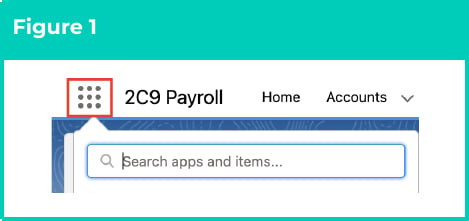
1. Click on the **App Launcher** icon (see Figure 1).
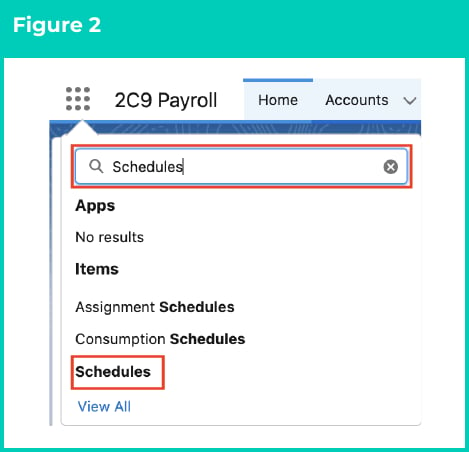
2. Go to the **Schedules** object by using the Search function (see Figure 2).

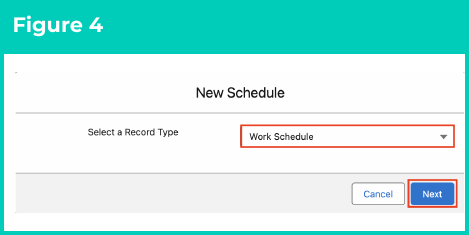
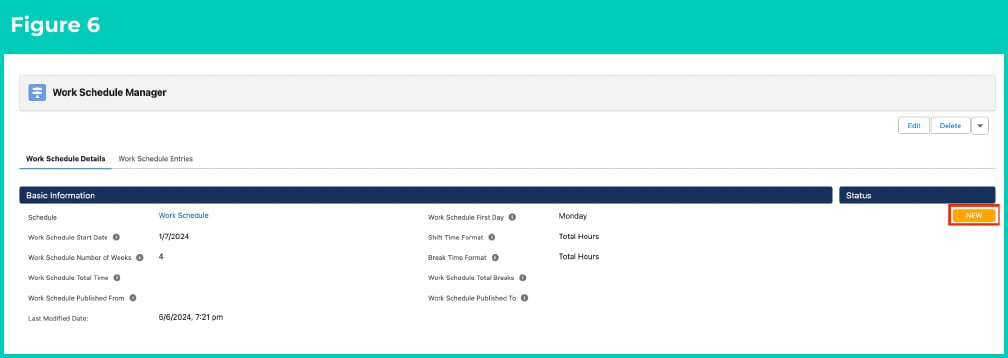
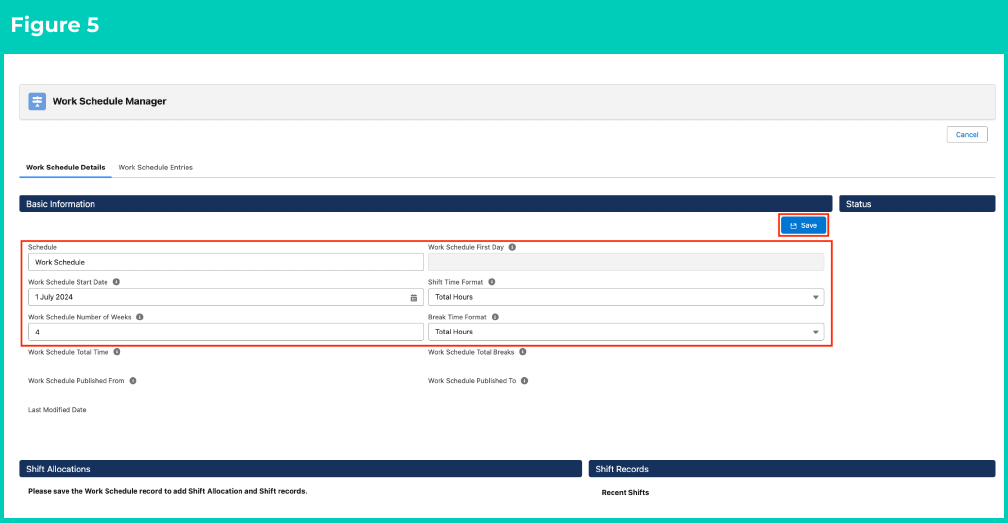 8. A new Work Schedule record with its Status as New is created and ready for Shift Records to be allocated (see Figure 6).
 ### Open and edit an existing Work Schedule
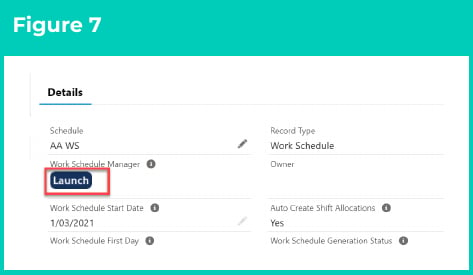
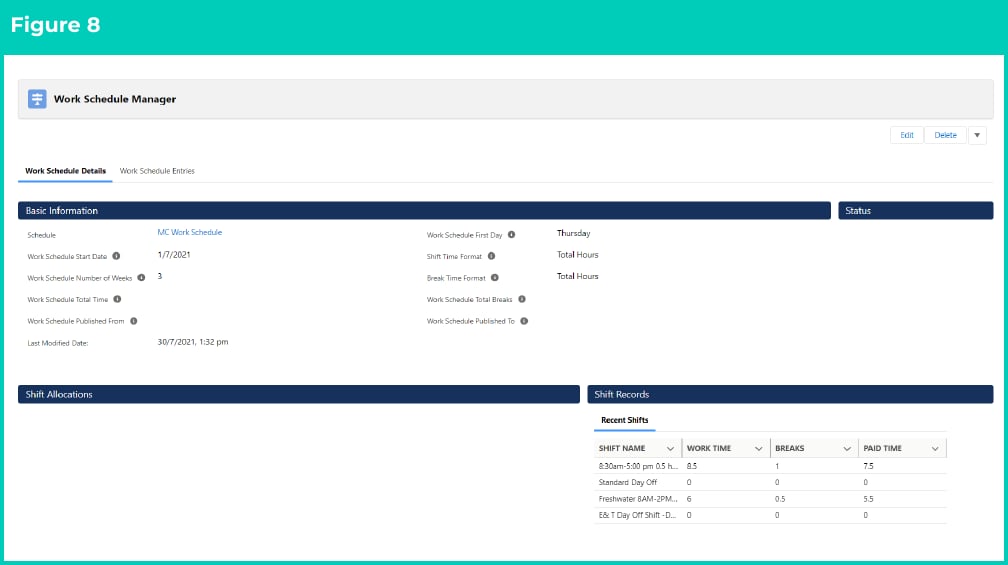
If you wish to open and edit an existing Work Schedule after exiting the Work Schedule Manager, follow the below steps:
### Open and edit an existing Work Schedule
If you wish to open and edit an existing Work Schedule after exiting the Work Schedule Manager, follow the below steps:
 ## Field Descriptions
| Field Name | Description |
| :-------------------------------- | :------------------------------------------------------------------- |
| **Break Time Format** | indicates how the break time will be entered. |
| **Schedule** | is the name given to the Work Schedule record that is being created. |
| **Shift Time Format** | indicates how the work hours will be entered. |
| **Work Schedule First Day** | is the day of the week this Work Schedule starts on. |
| **Work Schedule Number of Weeks** | is the number of weeks across which this Work Schedule rotates. |
| **Work Schedule Published From** | is the date Work Schedule Entries have been created from. |
| **Work Schedule Published To** | is the date Work Schedule Entries have been created to. |
| **Work Schedule Start Date** | is the first day of the first week in the Work Schedule. |
| **Work Schedule Total Breaks** | is the total duration of all breaks in the Work Schedule. |
| **Work Schedule Total Time** | is the total Working Time in the Work Schedule. |
## Further Information
| Document | Document Type | Description |
| :--------------------------------------------------------------------------------------------------------- | :-------------------------- | :--------------------------------------------------------------------------------------------------------------------------------------------------------------------------------------------------------------------------------------------------- |
| [Quick Reference Guide Index - Work Schedules](/qrgs/index) | Index | An index document that lists and provides links to all Quick Reference Guides relating to Work Schedules. |
| [Managing Work Schedules Key Information](/qrgs/work-schedules/qrg-managing-work-schedule-key-information) | Information Quick Reference | A quick reference guide outlining useful information relevant to the Work Schedule functionality. The document includes definitions, prerequisites and other non-instructional information relating to Work Schedules and the Work Schedule Manager. |
| [Create and Manage Shift Records](/qrgs/work-schedules/qrg-create-and-manage-shift-records) | Task Instructions | How to create and manage Shift Records using the Work Schedule Manager. |
## Field Descriptions
| Field Name | Description |
| :-------------------------------- | :------------------------------------------------------------------- |
| **Break Time Format** | indicates how the break time will be entered. |
| **Schedule** | is the name given to the Work Schedule record that is being created. |
| **Shift Time Format** | indicates how the work hours will be entered. |
| **Work Schedule First Day** | is the day of the week this Work Schedule starts on. |
| **Work Schedule Number of Weeks** | is the number of weeks across which this Work Schedule rotates. |
| **Work Schedule Published From** | is the date Work Schedule Entries have been created from. |
| **Work Schedule Published To** | is the date Work Schedule Entries have been created to. |
| **Work Schedule Start Date** | is the first day of the first week in the Work Schedule. |
| **Work Schedule Total Breaks** | is the total duration of all breaks in the Work Schedule. |
| **Work Schedule Total Time** | is the total Working Time in the Work Schedule. |
## Further Information
| Document | Document Type | Description |
| :--------------------------------------------------------------------------------------------------------- | :-------------------------- | :--------------------------------------------------------------------------------------------------------------------------------------------------------------------------------------------------------------------------------------------------- |
| [Quick Reference Guide Index - Work Schedules](/qrgs/index) | Index | An index document that lists and provides links to all Quick Reference Guides relating to Work Schedules. |
| [Managing Work Schedules Key Information](/qrgs/work-schedules/qrg-managing-work-schedule-key-information) | Information Quick Reference | A quick reference guide outlining useful information relevant to the Work Schedule functionality. The document includes definitions, prerequisites and other non-instructional information relating to Work Schedules and the Work Schedule Manager. |
| [Create and Manage Shift Records](/qrgs/work-schedules/qrg-create-and-manage-shift-records) | Task Instructions | How to create and manage Shift Records using the Work Schedule Manager. |