> ## Documentation Index
> Fetch the complete documentation index at: https://documentation.2cloudnine.com/llms.txt
> Use this file to discover all available pages before exploring further.
# Lilly Pilly Release Upgrade Guide Version 2
export const InlineImage = ({src, alt = "", height = "1.6em"}) => {
return  ;
};
#### Overview
| **Release:** | Lilly Pilly ‘21 |
| --------------------- | ------------------------------------------------------------------------------------------------------------------------------------------------------------------------------------------------------------------------------------------------------------------------------------------------------------------------------------------------------------------------------------------------------------------------------------------------------------ |
| **Version:** | v1.144 |
| **Release Date:** | 29/03/2021 |
| **Packages updated:** |
;
};
#### Overview
| **Release:** | Lilly Pilly ‘21 |
| --------------------- | ------------------------------------------------------------------------------------------------------------------------------------------------------------------------------------------------------------------------------------------------------------------------------------------------------------------------------------------------------------------------------------------------------------------------------------------------------------ |
| **Version:** | v1.144 |
| **Release Date:** | 29/03/2021 |
| **Packages updated:** | - 2cloudnine Payroll v1.144
(incorporates v1.134 to v1.144) - 2cloudnine Payroll Time2Pay Extension v1.89
(incorporates v1.82 to v1.89) - 2cloudnine Payroll Communities Extension v1.36
(incorporates v1.32 to v1.36) - 2cloudnine Payroll Base General Ledger Extension v1.48
(incorporates v1.47 to v1.48 ) - 2cloudnine Payroll Australia Extension v1.47
(incorporates v1.46 to v1.47)
|
## Important Information
This guide is intended for certified Salesforce System Administrators and/or suitably trained 2cloudnine
Payroll Partners and System Administrators. Only these people should be actioning any installation,
configuration items and tasks.
Any configuration undertaken without 2cloudnine guidance that interferes with the performance of
2cloudnine Payroll will be addressed on a time and materials basis. Resources for these fixes cannot be
guaranteed and will be allocated in the next available time slot.
All packages within the release must be installed. There may be compulsory and optional configuration
items and tasks that need to be completed prior to and post the installation of the packages. These will be
highlighted in the below checklists with further details given within this document.
The installer will be responsible for ensuring all these configuration items and tasks are completed within a
reasonable timeframe of the packages being installed. Please ensure you have familiarised yourself with all
the requirements PRIOR to installing the packages and ensure you have sufficient time and resources
available. Failing to do so can negatively impact the user experience and stability of 2cloudnine Payroll.
## Pre-Installation Checklist
The following items must be completed prior to commencing the installation and configuration of
packages within this release.
| | Configuration Item / Task | Requirement? |
| -------------------------------------------------------------------------------------------------------- | ------------------------------------------------- | -------------- |
| [New Component Review](#new-component-review) | | |
| | Remove / rename duplicate objects | **Optional** |
| | Remove / rename duplicate tabs | **Compulsory** |
| | Remove / rename duplicate record types | **Optional** |
| | Remove / rename duplicate fields | **Optional** |
| [Custom Automation Review (Workflows, Process Builders, Flows, Triggers etc)](#custom-automation-review) | | |
| | Deactivate / amend any required custom automation | **Optional** |
## Installation and Configuration Checklist
The following items must be completed in the listed order to install and configure the packages within this
release.
| | Configuration Item / Task | Requirement? |
| ---------------------------------------------------------------------------------------------------------------------------------------------- | ------------------------------------------------------------------------------ | ------------------------------------------------------------------------------------------------------------------------------------------------------------------------------------------------------------------------------------------------------------------------------------------------ |
| [Package Installation](#installation-links) | | |
| | Install 2cloudnine Payroll v1.144 | **Compulsory** Update |
| | Install 2cloudnine Payroll Time2Pay Extension v1.89 | **Compulsory** Update |
| | Install 2cloudnine Payroll Communities/Experience Extension v1.36 | **Compulsory** Update |
| | Install 2cloudnine Payroll Base General Ledger Extension v1.48 | **Compulsory** Update |
| | Install 2cloudnine Payroll Australia Extension v1.47 | **Conditionally**
**Compulsory**
UpdateEmployers who extract data
using SAFF Format when
using 2cloudnine Payroll
Australia SuperStream
functionality must have the
2cloudnine Payroll Australia
Extension package updated. |
| [Pay Employee Leave in Advance](#pay-employee-leave-in-advance) | | |
| | Update profile/permission sets | **Compulsory** |
| | Update page layouts for new fields | **Compulsory** |
| | Update new fields on existing records | **Compulsory** |
| | Make the new field available in Communities/Experience | **Optional** |
| [Indicate the Rate Leave Will Be Paid](#indicate-the-rate-that-leave-will-be-paid) | | |
| | Update profile/permission sets | **Compulsory** |
| | Update page layouts for new fields | **Compulsory** |
| | Update new fields on existing records | **Compulsory** |
| | Make the new field available in Communities/Experience | **Optional** |
| [Update Leave functionality in Communities/Experience](#update-leave-functionality-in-communitiesexperience) | | |
| | Configure the Communities/Experience Leave tab | **Optional** |
| Configuration Item / Task | Col2 | Requirement? |
| [Define Dual Leave Loading Interpretation Rules](#define-dual-leave-loading-interpretation-rules) | | |
| | Update profile/permission sets | **Compulsory** |
| | Update page layouts for new fields | **Optional** |
| | Update new fields on existing records | **Optional** |
| [Apply for Time off In Lieu Credit in Communities/Experience](#apply-for-time-off-in-lieu-credit-in-communitiesexperience) | | |
| | Update profile/permission sets | **Optional** |
| | Update page layouts for new fields | **Optional** |
| | Update new fields on existing records | **Optional** |
| | Make the new field available in Communities/Experience | **Optional** |
| [Perform Streamlined Payee Exit Tasks](#perform-streamlined-payee-exit-tasks) | | |
| | Update page layouts | **Optional** |
| [Automate Payee Allowance Records and Assignment Creation](#automate-payee-allowance-records-and-assignment-rate-creation) | | |
| | Update profile/permission sets | **Optional** |
| | Update page layouts for new fields | **Optional** |
| | Update new fields on existing records | **Optional** |
| [Define and Use of Minimum Pay Rates](#define-and-use-of-minimum-pay-rates) | | |
| | Update profile/permission sets | **Optional** |
| | Update page layouts for new fields | **Optional** |
| | Create a new picklist value for fields | **Optional** |
| | Update new fields on existing records | **Optional** |
| [Create and Allocate Work Schedules Efficiently](#create-and-allocate-work-schedules-efficiently) | | |
| | Update profile/permission sets | **Optional** |
| [Apply Work Schedule Information to Payroll](#apply-work-schedule-information-to-payroll) | | |
| | Update profile/permission sets | **Optional** |
| | Update page layouts for new fields | **Optional** |
| | Create a new picklist value for fields | **Optional** |
| [Extend Minimum Rest or Break Loading Interpretation](#extend-minimum-rest-or-break-loading-interpretation) | | |
| | Update profile/permission sets | **Compulsory** |
| | Update page layouts for new fields | **Compulsory** |
| | Update new fields on existing records | **Compulsory** |
| | Populate different Pay Codes for Sundays and Public Holidays | **Optional** |
| [Utilise Daily Interpretation Rules for Partial Days](#utilise-daily-interpretation-rules-for-partial-days) | | |
| | Update profile/permission sets | **Optional** |
| | Update page layouts for new fields | **Optional** |
| | Update new fields on existing records | **Optional** |
| [Pay Partial Allowances](#pay-partial-allowances) | | |
| | Update profile/permission sets | **Optional** |
| | Update page layouts for new fields | **Optional** |
| | Update new fields on existing records | **Optional** |
| [Provide Greater Detail on Pay Advice documents](#provide-greater-detail-on-pay-advice-documents) | | |
| | Update profile/permission sets | **Compulsory** |
| | Update page layouts for new fields | **Optional** |
| | Create a new picklist value for fields | **Optional** |
| | Update new fields on existing records | **Optional** |
| | Update the Pay Advice Detail Level on Pay Schedules | **Optional** |
| [Set a Custom Pay Advice Footer](#set-a-custom-pay-advice-footer) | | |
| | Update profile/permission sets | **Optional** |
| | Update page layouts for new fields | **Optional** |
| | Update new fields on existing records | **Optional** |
| [Define a Default Pay Advice Message](#define-a-default-pay-advice-message) | | |
| | Update profile/permission sets | **Optional** |
| | Update page layouts for new fields | **Optional** |
| [Mark Pay Advice Templates as Active or Inactive](#mark-pay-advice-templates-as-active-or-inactive) | | |
| | Update profile/permission sets | **Compulsory** |
| | Update page layouts for new fields | **Compulsory** |
| | Update new fields on existing records | **Compulsory** |
| [Consolidate Multiple Pay Advice Amounts in a Payment File](#consolidate-multiple-pay-advice-amounts-in-a-payment-file) | | |
| | Update profile/permission sets | **Optional** |
| | Update page layouts for new fields | **Optional** |
| | Update new fields on existing records | **Optional** |
| [Automatically Assign Defined Permission Sets to Community Users](#automatically-assign-defined-permission-sets-to-community-users) | | |
| | Populate the Time2pay Portal Permission Sets Configuration
custom setting | **Optional** |
| [Customised Invoice Grouping](#customised-invoice-grouping) | | |
| | Update profile/permission sets | **Optional** |
| | Update page layouts for new fields | **Optional** |
| | Create a new Picklist Value for fields | **Optional** |
| [Include Expense Receipts/Evidences as Attachments with Invoice emails](#include-expense-receiptsevidences-as-attachments-with-invoice-emails) | | |
| | Update profile/permission sets | **Optional** |
| | Update page layouts for new fields | **Optional** |
| | Update new fields on existing records | **Optional** |
| [Make Funding Requirement Mandatory](#make-funding-requirement-mandatory) | | |
| | Turn on functionality via custom setting | **Optional** |
| [Adhere to SuperStream Requirements](#adhere-to-superstream-requirements) | | |
| | Check and update data on existing records | **Compulsory** |
| [Customise Community/Experience Terminology](#customise-communitiesexperience-terminology) | | |
| | Override/translate custom labels | **Optional** |
## Installation Links
The installation of the following packages must be completed as part of the Lilly Pilly ‘21 release upgrade
| Package | Version | Install Link |
| ------------------------------------------------------------- | ---------------------------------------------- | --------------------------------------------------------------------------------------------------------------------------------------------------- |
| 2cloudnine Payroll | 1.144
Update | [https://login.salesforce.com/packaging/installPac](https://login.salesforce.com/packaging/installPac)
kage.apexp?p0=04t6F000004HC8N |
| 2cloudnine Payroll Time2Pay
Extension | 1.89
Update | [https://login.salesforce.com/packaging/installPac](https://login.salesforce.com/packaging/installPac)
kage.apexp?p0=04t0o000003bS68 |
| 2cloudnine Payroll
Communities/Experience
Extension | 1.36
Update | [https://login.salesforce.com/packaging/installPac](https://login.salesforce.com/packaging/installPac)
kage.apexp?p0=04t2v0000079C8B |
| 2cloudnine Payroll Base General
Ledger Extension | 1.48
Update | [https://login.salesforce.com/packaging/installPac](https://login.salesforce.com/packaging/installPac)
kage.apexp?p0=04t2v000007X8Ah\&isdtp=p1 |
| 2cloudnine Payroll Australia
Extension | V1.47
New | [https://login.salesforce.com/packaging/installPac](https://login.salesforce.com/packaging/installPac)
kage.apexp?p0=04t6F000000chLg |
## Pre-Installation Items
### New Component Review
The Lilly Pilly ‘21 Release contains a number of new components including Objects, Fields and Tabs. A
review of the list of components introduced should be conducted to check for duplicates to existing
custom components.
In some instances, where duplicates exist, the installation/upgrade of the package will not be permitted.
The creation of duplicate tabs is an example of this. In these instances the duplicate must be removed
prior to attempting to install. This could be completed through either deleting the custom component or,
where possible, renaming the Name/API Name of the component.
In other instances, the package installation/upgrade will be permitted however the duplicates could cause
user confusion and/or custom automation clashes within the org. In these instances, although it is
optional, it is highly recommended to delete/rename the component.
A list of the new components that should be reviewed are outlined on Appendix 1
### Custom Automation Review
This release includes new functionality and improvements which may perform duplicate tasks to those
configured as custom automations (workflows, process builders, flows, triggers etc) in the organisation. A
review of existing custom automation against the functionality outlined on the Release Notes should be
completed.
Where duplication is identified, it is highly suggested that the custom automation be deactivated or
amended. This will assist in preventing processing lag and data corruption as well as prevent things such
as notification emails being sent out a number of times.
## Configuration Items
### Pay Employee Leave In Advance
The functionality to allow leave to be paid in advance is optional, however there is required configuration
that must be completed regardless of if the function is used. The below configuration steps should be
completed:
1. Update profile/permission sets (Compulsory)
2. Update page layouts for new fields (Compulsory)
3. Update new fields on existing records (Compulsory)
4. Make the new field available in Communities/Experience (Optional)
#### Update Profile/Permission Sets (Compulsory)
The below fields have had read/edit access added to the following permission sets provided with the
package. Where these are in use, the permissions required will be automatically provisioned:
* 2cloudnine Payroll Admin
* 2cloudnine Time2Pay All Access
If the packaged permission sets are not used within the organisation, the access outlined in Appendix 2
must be made available for use either via profiles or custom permission sets.
#### Update Page Layouts for New Fields (Compulsory)
This requirement needs to be completed regardless of if the option to use the functionality is taken.
The update of Community/Experience page layouts is outlined in the *Make the New Field Available*
*in Communities/Experienc* e section below.
1. Go to Setup > Object Manager
2. Select Leave Rule (tc9\_pr\_\_Leave\_Rule\_\_c) > Page Layouts
3. Select a page layout that is used for Leave Rule record type
4. Add the following fields to the layout
* Allow Pay In Advance (tc9\_pr\_\_Allow\_Pay\_in\_Advance\_\_c)
5. Click Save
6. Repeat steps 3 to 5 for all page layouts that are used on the Leave Rule object
7. Return to the Object Manager
8. Select Payee Leave Event (tc9\_pr\_\_Payee\_Leave\_Event\_\_c) > Page Layouts
9. Select a page layout that is used for the Leave Take record type
10. Add the following fields to the layout
* Pay In Advance (tc9\_pr\_\_Pay\_in\_Advance\_\_c)
* Advance Pay Start Calendar Period (tc9\_pr\_\_Advance\_Pay\_Start\_Calendar\_Period\_\_c)
* Advance Pay End Calendar Period (tc9\_pr\_\_Advance\_Pay\_End\_Calendar\_Period\_\_c)
* Advance Pay Payment Calendar Period
(tc9\_pr\_\_Advance\_Pay\_Payment\_Calendar\_Period\_\_c)
11. Click Save
12. Repeat steps 9 to 11 for all page layouts that are used for the Leave Take record type
#### Update New Fields on Existing Records (Compulsory)
To prevent validation errors while processing leave requests and payroll, the new Allow Pay In Advance
field (tc9\_pr\_\_Allow\_Pay\_in\_Advance\_\_c) must be populated on all current leave rules.
To update the field the following steps should be followed:
1. Run Script 1 defined below through dev console to automatically populate the Allow Pay in
Advance field on all Leave Rules with the value of ‘No’
2. Manually edit any Leave Rules that require different values than those set by the script\`\`\`apex
```Script 1 theme={null}
//Payroll post-install script for Lilly Pilly 2021 Release - Leave Rules - Allow Pay In Advance
List overrides = [Select Id, tc9_pr__OV_Leave_Rule__c from
tc9_pr__Override_TC9P_Validation__c];
for(tc9_pr__Override_TC9P_Validation__c override1 : overrides){
override1.tc9_pr__OV_Leave_Rule__c = true;
}
update overrides;
List rules = [Select Id, tc9_pr__Allow_Pay_in_Advance__c from
tc9_pr__Leave_Rule__c];
for(tc9_pr__Leave_Rule__c rule : rules){
if(rule.tc9_pr__Allow_Pay_in_Advance__c == null){
rule.tc9_pr__Allow_Pay_in_Advance__c = 'No';}
}
update rules;
List overrides2 = [Select Id, tc9_pr__OV_Leave_Rule__c from
tc9_pr__Override_TC9P_Validation__c];
for(tc9_pr__Override_TC9P_Validation__c override2 : overrides2){
override2.tc9_pr__OV_Leave_Rule__c = false;
}
update overrides2;
```
#### Make the New Field Available in Communities/Experience (Optional)
This requirement only needs to be completed if the option to make the functionality available for
employee/approver use within Communities/Experience is taken. If not, this item can be skipped.
By default, this field is included on both the Employee Community Permission Set and the Approver User
Permission Set. Provided these permission sets are applied to the employee Community/Experience users
and the approver Community/Experience guest users respectively, the correct permissions to enable the
fields use will be automatically provisioned.
If the packaged permission sets are not used within the organisation, the access outlined in Appendix 3
must be made available for use either via profiles or custom permission sets.
### Indicate the Rate that Leave Will Be Paid
The functionality to allow users to indicate the rate at which leave will be paid is optional, however there is
required configuration that must be completed regardless of if the function is used. The below
configuration steps should be completed:
1. Update profile/permission sets (Compulsory)
2. Update page layouts for new fields (Compulsory)
3. Update new fields on existing records (Compulsory)
4. Make the new field available in Communities/Experience (Optional)
#### Update Profile/Permission Sets (Compulsory)
The below detailed fields have had read/edit access added to the following permission sets provided with
the package. Where these are in use, the permissions required will be automatically provisioned.
* 2cloudnine Payroll Admin
* 2cloudnine Time2Pay All Access
If the packaged permission sets are not used within the organisation, the access outlined in Appendix 4
must be made available for use either via profiles or custom permission sets.
#### Update Page Layouts for New Fields (Compulsory)
This requirement needs to be completed regardless of if the option to use the functionality is taken.
The update of Community/Experience page layouts is outlined in the *Make the New Field Available*
*in Communities/Experienc* e section below.
1. Go to Setup > Object Manager
2. Select Leave Rule (tc9\_pr\_\_Leave Rule\_\_c) > Page Layouts
3. Select a page layout that is used for any Leave Rule record type
4. Add the following field to the layout
* Available Pay Rates (tc9\_pr\_\_Available\_Pay\_Rates\_\_c)
5. Click Save
6. Repeat steps 3 to 5 for all page layouts that are used on the Leave Rule object
7. Return to the Object Manager
8. Select Payee Leave Event (tc9\_pr\_\_Payee\_Leave\_Event\_\_c) > Page Layouts
9. Select a page layout that is used for any Leave Take record type
10. Add the following field to the layout
* Selected Pay Rate (tc9\_pr\_\_Selected\_Pay\_Rate\_\_c)
11. Click Save
12. Repeat steps 9 to 11 for all page layouts that are used for the Leave Take record type
13. Return to the Object Manager
14. Select Pay Advice Line (tc9\_pr\_\_Pay\_Advice\_Line\_\_c) > Page Layouts
15. Select a page layout that is used for any Pay Advice Line record type
16. Add the following fields to the layout
* Leave Rate Multiplier (tc9\_pr\_\_Leave\_Rate\_Multiplier\_\_c)
17. Click Save
18. Repeat steps 15 to 17 for all page layouts that are used for the Leave Take record type
19. Return to the Object Manager
20. Select Pay Transaction (tc9\_pr\_\_Pay\_Transaction\_\_c) > Page Layouts
21. Select a page layout that is used for the Payment record type
22. Add the following fields to the layout
* Leave Rate Multiplier (tc9\_pr\_\_Leave\_Rate\_Multiplier\_\_c)
* Quantity by Leave Multiplier (tc9\_pr\_\_Quantity\_by\_Leave\_Multiplier\_\_c)
23. Click Save
24. Repeat steps 21 to 23 for all page layouts that are used for the Leave Take record type
#### Update New Fields on Existing Records (Compulsory)
To prevent validation errors while processing leave requests and payroll, the new Available Pay Rates field
(tc9\_pr\_\_Available\_Pay\_Rates\_\_c ) must be populated on all the current Leave Rules.
To update the fields the following steps should be followed:
1. Run Script 1 defined below through dev console to automatically populate the Available Pay Rates
field on all Leave Rules with the value of “Standard Pay”
2. Manually edit any Leave Rules that require different values than those set by the script
3. Run Script 2 defined below through dev console to automatically populate the Selected Pay Rate
field on all Leave Take Payee Leave Event records, that do not have the field populated, with the
value of “Standard Pay”
4. Manually edit any Payee Leave Events that require different values than those set by the script
```apex Script 1 theme={null}
//Payroll post-install script for Lilly Pilly 2021 Release - Leave Rules - Available Pay Rates
List overrides = [Select Id, tc9_pr__OV_Leave_Rule__c from
tc9_pr__Override_TC9P_Validation__c];
for(tc9_pr__Override_TC9P_Validation__c override1 : overrides){
override1.tc9_pr__OV_Leave_Rule__c = true;
}
update overrides;
List rules = [Select Id, tc9_pr__Available_Pay_Rates__c from
tc9_pr__Leave_Rule__c];
for(tc9_pr__Leave_Rule__c rule : rules){
if(rule.tc9_pr__Available_Pay_Rates__c == null){
rule.tc9_pr__Available_Pay_Rates__c = 'Standard Pay';}
}
update rules;
List overrides2 = [Select Id, tc9_pr__OV_Leave_Rule__c from
tc9_pr__Override_TC9P_Validation__c];
for(tc9_pr__Override_TC9P_Validation__c override2 : overrides2){
override2.tc9_pr__OV_Leave_Rule__c = false;
}
update overrides2;
```
```apex Script 2 theme={null}
//Payroll post-install script for Lilly Pilly 2021 Release - Payee Leave Event - blank Selected Pay Rate
List overrides = [Select Id, tc9_pr__OV_Payee_Leave_Event__c
from tc9_pr__Override_TC9P_Validation__c];
for(tc9_pr__Override_TC9P_Validation__c override1 : overrides){
override1.tc9_pr__OV_Payee_Leave_Event__c = true;
}
update overrides;
List events = [Select Id, tc9_pr__Selected_Pay_Rate__c,
tc9_pr__Processing_Status__c from tc9_pr__Payee_Leave_Event__c where
tc9_pr__Selected_Pay_Rate__c = null and RecordType.DeveloperName = 'Leave_Take'];
for(tc9_pr__Payee_Leave_Event__c event : events){
event.tc9_pr__Selected_Pay_Rate__c = 'Standard Pay';
}
update events;
List overrides2 = [Select Id, tc9_pr__OV_Payee_Leave_Event__c
from tc9_pr__Override_TC9P_Validation__c];
for(tc9_pr__Override_TC9P_Validation__c override2 : overrides2){
override2.tc9_pr__OV_Payee_Leave_Event__c = false;
}
update overrides2;
```
#### Make the New Field Available in Communities/Experience (Optional)
This requirement only needs to be completed if the option to make the functionality available for
employee/approver use within Communities/Experience is taken. If not, this item can be skipped.
By default, this field is included on both the Employee Community Permission Set and the Approver User
Permission Set. Provided these permission sets are applied to the employee Community/Experience users
and the approver Community/Experience guest users respectively, the correct permissions to enable the
fields use will be automatically provisioned.
If the packaged permission sets are not used within the organisation, the access outlined in Appendix 5
must be made available for use either via profiles or custom permission sets.
### Update Leave Functionality In Communities/Experience
The functionality to turn Leave sub-tabs on and off within the Employee Community/Experience is
optional. This requirement only needs to be completed if the option to use the functionality is taken. If not,
this item can be skipped. The below configuration steps should be completed if the functionality is
required:
1. Configure the Communities/Experience Leave tab (Optional)
By default, if this item is skipped, all Leave sub-tabs are turned on.
#### Configure the Communities/Experience Leave Tab (Optional)
1. Go to Setup > Feature Settings > Digital Experiences > All Sites
2. Locate the Employee Community/Experience within the All Sites list shown and click on the
Builder link alongside it
3. Use the Pages drop down to navigate to the page where the Community holds the
Emp\_Comm\_Leave component
4. Click on the Emp\_Comm\_Leave component. The Emp Comm Leave configuration window will
appear.
5. Use the yes/no picklists within the configuration window to turn the sub-tabs on and off as
required
6. Close the configuration window
7. Click the Preview button to view the page to ensure it is correct and fix any issues required
8. Repeat steps 5-7 for all pages where the Emp\_Comm\_Leave component is used (if any others)
9. Click the Publish button to make the changes live
### Define Dual Leave Loading Interpretation Rules
The functionality to define and use dual leave loading calculations during Timesheet Interpretation is
optional, however there is required configuration that must be completed regardless of if the function is
used. The below configuration steps should be completed:
1. Update profiles/permission sets (Compulsory)
2. Update page layouts for new fields (Optional)
3. Update new fields on existing records (Optional)
#### Update Profile/Permission Sets (Compulsory)
The below detailed fields have had read/edit access added to the following Permission Sets provided with
the package. Where these are in use, the permissions required will be automatically provisioned.
* 2cloudnine Payroll Admin
* 2cloudnine Time2Pay All Access
If the packaged permission sets are not used within the organisation, the access outlined in Appendix 6
must be made available for use either via profiles or custom permission sets.
#### Update Page Layouts for New Fields (Optional)
This requirement only needs to be completed if the option to use the functionality is taken. If not, this item
can be skipped.
1. Go to Setup > Object Manager
2. Select Interpretation Rule (tc9\_et\_\_Interpretation\_Rule\_c) > Page Layouts
3. Select a page layout that is used for the Shift End Time or Shift Start Time record types
4. Add the following field to the layout
* Apply Dual Leave Loading (tc9\_et\_\_Apply\_Dual\_Leave\_Loading\_Calculations\_\_c)
5. Click Save
6. Repeat steps 3 to 5 for all page layouts that are used on the Shift End Time and Shift Start Time
record types
7. Return to the Object Manager
8. Select Leave Rule (tc9\_pr\_\_Leave\_Rule\_\_c) > Page Layouts
9. Select a page layout that is used for any Leave Rule object
10. Add the following field to the layout
* Apply Dual Leave Loading (tc9\_pr\_\_Apply\_Dual\_Leave\_Loading\_Calculations\_\_c)
11. Click Save
12. Repeat steps 9 to 11 for all page layouts that are used for the Leave Rule object
#### Update New Fields on Existing Records (Optional)
By default, when the Apply Dual Leave Loading field on the Leave Rule and Interpretation Rule records is
not populated, they will be treated as if the value selected is “No”. This means that data on existing
interpretation rules does not need to be updated to ensure they continue to perform timesheet
interpretation with the same logic.
If there are existing Leave Rules and Interpretation Rules where the functionality is required, these should
be edited via the Interpretation Builder..
### Apply For Time Off In Lieu Credit in Communities/Experience
The functionality to allow users to submit, approve or reject leave requests for time off in lieu credits
through Communities/Experience is optional. This requirement only needs to be completed if the option to
use the functionality is taken. If not, these items can be skipped. The below configuration steps should be
completed if the functionality is required:
1. Update profile/permission sets (Optional)
2. Update page layouts for new fields (Optional)
3. Update new fields on existing records (Optional)
4. Make the new functionality available in Communities/Experience (Optional)
#### Update Profile/Permission Sets (Optional)
The below detailed fields have had read/edit access added to the following permission sets provided with
the package. Where these are in use, the permissions required will be automatically provisioned.
* 2cloudnine Payroll Admin
* 2cloudnine Time2Pay All Access
If the packaged permission sets are not used within the organisation, the access outlined in Appendix 7
must be made available for use either via profiles or custom permission sets.
#### Update Page Layouts for New Fields (Optional)
This requirement only needs to be completed if the option to use the functionality is taken. If not, this item
can be skipped.
1. Go to Setup > Object Manager
2. Select Leave Rule (tc9\_pr\_\_Leave\_Rule\_\_c) > Page Layouts
3. Select a page layout that is used for the Time off In Lieu record type
4. Add the following field to the layout
* Credit Available In Portal (tc9\_pr\_\_Credit\_Available\_in\_Portal\_\_c)
5. Click Save
6. Repeat steps 3 to 5 for all page layouts that are used for Time off In Lieu record type.
#### Update New Fields on Existing Records (Optional)
By default, where the value of the Credit Available In Portal field is not populated, it will be treated as if the
value is “No” and therefore access to the functionality will not be granted to employees and approvers via
Communities/Experience.
However, if there are existing leave rules where the functionality is required, these should be edited via the
standard Salesforce page..
#### Make the New Functionality Available in Communities/Experience (Optional)
By default, this record type is included on both the Employee Community Permission Set and the
Approver User Permission Set and, provided these permission sets are applied to the Employee
Community Users and the Approver Community Guest Users respectively, the correct permissions to
enable the fields use will be automatically provisioned.
If the packaged permission sets are not used within the organisation, the access outlined in Appendix 8
must be made available for use either via profiles or custom permission sets.
### Perform Streamlined Payee Exit Tasks
The new streamlined Payee Exit functionality does not require any configuration and will become available
on installation of the package.
That said, there have been significant changes to the previous versions of the standard page layouts
provided within the package. Below are the details of the suggested changes that could be made to the
page layouts used within your organisation.
#### Update Page Layouts(Optional)
This requirement only needs to be completed if the option to use the functionality is taken. If not, this item
can be skipped.
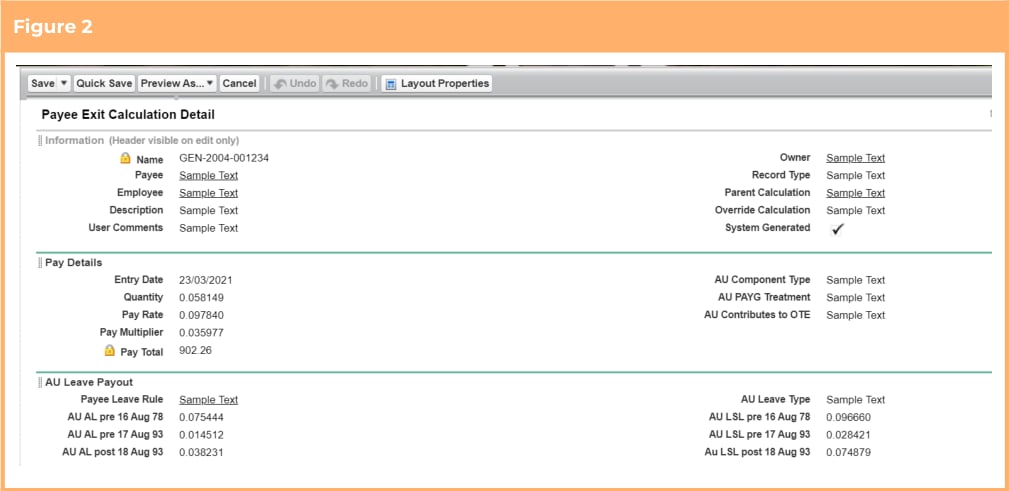
1. Select Payee Exit Calculation (tc9\_pr\_\_Payee\_Exit\_Calculation\_\_c) > Page Layouts
2. Select a page layout that is used for the Australia record type
3. Add the following fields to the layout
* AU Working Holiday Maker (tc9\_pr\_\_AU\_Working\_Holiday\_Maker\_\_c)
* AU Death Recipient Payee (tc9\_pr\_\_AU\_Death\_Recipient\_Payee\_\_c)
4. Arrange the sections/fields within the layout as required (See Figure 1 below for the suggested
format)
5. Click Save
6. Repeat steps 3-5 for all page layouts used for the Australia record type
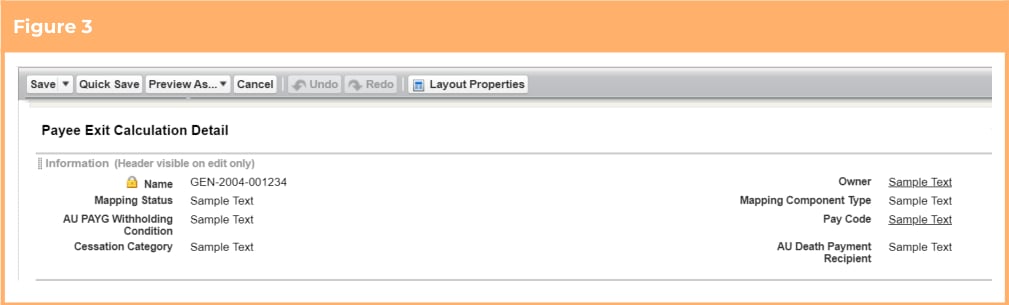
7. Select a page layout that is used for the Australia Item record type
8. Add the following fields to the layout
* User Comments (tc9\_pr\_\_User\_Comments\_\_c)
* AU Contributes to OTE (tc9\_pr\_\_AU\_Contributes\_to\_OTE\_\_c)
9. Arrange the sections/fields within the layout as required (See Figure 2 below for the suggested
format)
10. Click Save
11. Repeat steps 8-10 for all page layouts used for the Australia Item record type
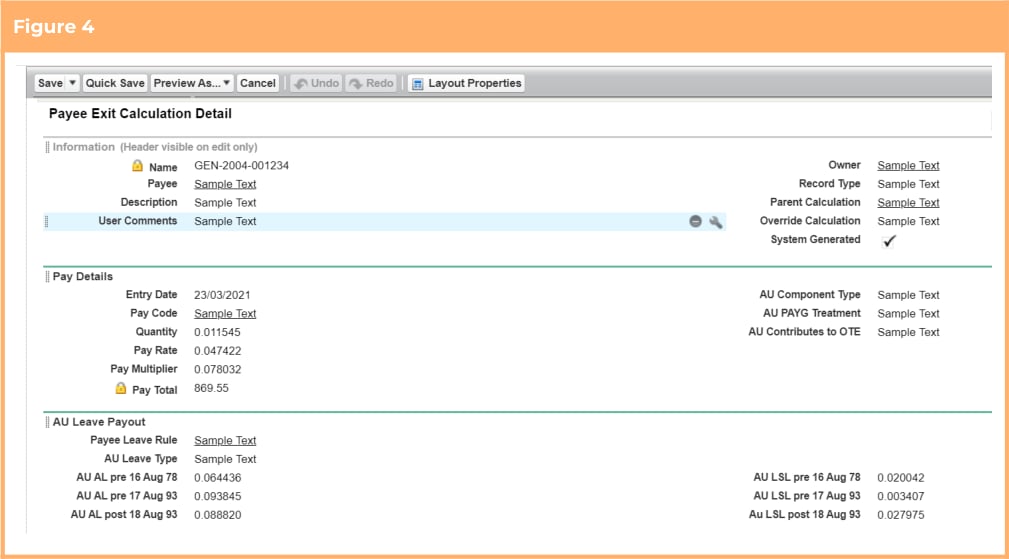
12. Select a page layout that is used for the Australia Mapping record type
13. Add the following fields to the layout
* Mapping Component Type (tc9\_pr\_\_Mapping\_Component\_Type\_\_c)
* Mapping Status (tc9\_pr\_\_Mapping\_Status\_\_c)
14. Arrange the sections/fields within the layout as required (See Figure 3 below for the suggested
format)
15. Click Save
16. Repeat steps 13-15 for all page layouts used for the Australia Mapping record type
17. Select a page layout that is used for the Australia Results record type
18. Arrange the sections/fields within the layout as required (See Figure 4 for the suggested format)
19. Click Save
20. Repeat steps 18-19 for all page layouts used for the Australia record type
 ### Automate Payee Allowance Records and Assignment Rate Creation
The functionality to automate the creation of Payee Allowance Records and Assignment Rates is optional.
This requirement only needs to be completed if the option to use the functionality is taken. If not, these
items can be skipped. The below configuration steps should be completed if the functionality is required:
1. Update profile/permission sets (Optional)
2. Update page layouts for new fields (Optional)
3. Update new fields on existing records (Optional)
#### Update Profile/Permission Sets (Optional)
The below detailed fields have had read/edit access added to the following permission sets provided with
the package. Where these are in use, the permissions required will be automatically provisioned.
* 2cloudnine Payroll Admin
* 2cloudnine Time2Pay All Access
If the packaged permission sets are not used within the organisation, the access outlined in Appendix 10
must be made available for use either via profiles or custom permission sets.
#### Update Page Layouts for New Fields (Optional)
This requirement only needs to be completed if the option to use the functionality is taken. If not, this item
can be skipped.
1. Go to Setup > Object Manager
2. Select Assignment (tc9\_pr\_\_Assignment\_\_c) > Page Layouts
3. Select a page layout that is used for any Assignment record type excluding the Perm and Temp to
Perm record types
4. Add the following fields to the layout
* Assignment Rate Template Group (tc9 pr\_\_Assignment\_Rate\_Template\_Group\_\_c)
* Assignment Rate Template Group Pay Rate
(tc9\_et\_\_Assignment\_Rate\_Template\_Group\_Pay\_Rate\_\_c)
* Assignment Rate Template Group Invoice Rate
(tc9\_et\_\_Assignment\_Rate\_Template\_Group\_Inv\_Rate\_\_c)
* Payee Timesheet Allowance Template Group
(tc9\_et\_\_Payee\_Timesheet\_Allowance\_Template\_Group\_\_c)
5. Click Save
6. Repeat steps 3 to 5 for all page layouts that are used on the Assignment object excluding those
used for the Perm and Temp to Perm record types
7. Return to the Object Manager
8. Select Pay Code (tc9\_pr\_\_Pay\_Code\_\_c) > Page Layouts
9. Select a page layout that is used for the Payment or Allowance record types
10. Add the following field to the layout
* Invoice Rate Multiplier (tc9\_et\_\_Invoice\_Rate\_Multiplier\_\_c)
11. Click Save
12. Repeat steps 8 to 11 for all page layouts that are used for the Payment and Allowance record types
#### Update New Fields on Existing Records (Optional)
When the Assignment Rate Template Group that is related to an Assignment has the Invoice Rate field
populated, the Invoice Rate Multiplier field (tc9\_et\_\_Invoice\_Rate\_Multiplier\_\_c) on the Pay Code is used to
calculate default values for the Assignment Rates/Payee Allowance Records created. Existing Payment and
Allowance Pay Codes should be updated to populate the Invoice Rate Multiplier otherwise, when the new
records are created, the calculated Invoice Rate will be set to be the same as the Pay Rate.
### Define and Use of Minimum Pay Rates
The functionality to define and use minimum pay rates is optional. This requirement only needs to be
completed if the option to use the functionality is taken. If not, these items can be skipped. The below
configuration steps should be completed if the functionality is required:
1. Update profile/permission sets (Optional)
2. Update page layouts for new fields (Optional)
3. Create a new picklist value for fields (Optional)
4. Update new fields on existing records (Optional)
#### Update Profile/Permission Sets (Optional)
The below detailed fields have had read/edit access added to the following permission sets provided with
the package. Where these are in use, the permissions required will be automatically provisioned.
* 2cloudnine Payroll Admin
* 2cloudnine Time2Pay All Access
If the packaged permission sets are not used within the organisation, the access outlined in Appendix 11
must be made available for use either via profiles or custom permission sets.
Note: This functionality builds on the Automate Payee Allowance Records and Assignment Rate Creation
item. To function correctly, the Update Profile/Permission Sets items within that section must also be
completed.
#### Update Page Layouts for New Fields (Optional)
This requirement only needs to be completed if the option to use the functionality is taken. If not, this item
can be skipped.
This functionality builds on the Automate Payee Allowance Records and Assignment Rate Creation
item. To function correctly, the Update Page Layouts for New Fields items within that section must also be
completed. Further, the new Minimum Pay Rate object has been packaged with a standard page layout
containing all required fields, so no updates are necessary in relation to this page layout.
1. Select Assignment (tc9\_pr\_\_Assignment\_c) > Page Layouts
2. Select a page layout that is used for any Assignment record type excluding the Perm and Temp to
Perm record types
3. Add the following fields to the layout
* Award Classification (tc9\_et\_\_Award\_Classifiation\_\_c)
* Award Level (tc9\_et\_\_Award\_Level\_\_c)
4. Click Save
5. Repeat steps 2 to 4 for all page layouts that are used on the Assignment object excluding those
used for the Perm and Temp to Perm record types
the functionality includes the creation of 1 new Award Classifications and Levels object
(tc9\_et\_\_Award\_Classification\_and\_Levels\_\_c) which has been packaged with a standard page layout
containing all required fields. No updates are necessary in relation to this page layout.
#### Create a New Picklist Value for Fields (Optional)
This requirement only needs to be completed if the option to use the functionality is taken. If not, this item
can be skipped.
1. Go to Setup > Objects and Fields > Picklist Value Sets
2. Select Pay Rate Loading Based On Picklists
3. Click the New button in the Values section
4. On the displayed page, add the new value Addition of % of Base Pay Rate
5. Check the “Add new picklist value sets to all record types that use this global value set” checkbox
(See Figure 1)
6. Click Save
### Automate Payee Allowance Records and Assignment Rate Creation
The functionality to automate the creation of Payee Allowance Records and Assignment Rates is optional.
This requirement only needs to be completed if the option to use the functionality is taken. If not, these
items can be skipped. The below configuration steps should be completed if the functionality is required:
1. Update profile/permission sets (Optional)
2. Update page layouts for new fields (Optional)
3. Update new fields on existing records (Optional)
#### Update Profile/Permission Sets (Optional)
The below detailed fields have had read/edit access added to the following permission sets provided with
the package. Where these are in use, the permissions required will be automatically provisioned.
* 2cloudnine Payroll Admin
* 2cloudnine Time2Pay All Access
If the packaged permission sets are not used within the organisation, the access outlined in Appendix 10
must be made available for use either via profiles or custom permission sets.
#### Update Page Layouts for New Fields (Optional)
This requirement only needs to be completed if the option to use the functionality is taken. If not, this item
can be skipped.
1. Go to Setup > Object Manager
2. Select Assignment (tc9\_pr\_\_Assignment\_\_c) > Page Layouts
3. Select a page layout that is used for any Assignment record type excluding the Perm and Temp to
Perm record types
4. Add the following fields to the layout
* Assignment Rate Template Group (tc9 pr\_\_Assignment\_Rate\_Template\_Group\_\_c)
* Assignment Rate Template Group Pay Rate
(tc9\_et\_\_Assignment\_Rate\_Template\_Group\_Pay\_Rate\_\_c)
* Assignment Rate Template Group Invoice Rate
(tc9\_et\_\_Assignment\_Rate\_Template\_Group\_Inv\_Rate\_\_c)
* Payee Timesheet Allowance Template Group
(tc9\_et\_\_Payee\_Timesheet\_Allowance\_Template\_Group\_\_c)
5. Click Save
6. Repeat steps 3 to 5 for all page layouts that are used on the Assignment object excluding those
used for the Perm and Temp to Perm record types
7. Return to the Object Manager
8. Select Pay Code (tc9\_pr\_\_Pay\_Code\_\_c) > Page Layouts
9. Select a page layout that is used for the Payment or Allowance record types
10. Add the following field to the layout
* Invoice Rate Multiplier (tc9\_et\_\_Invoice\_Rate\_Multiplier\_\_c)
11. Click Save
12. Repeat steps 8 to 11 for all page layouts that are used for the Payment and Allowance record types
#### Update New Fields on Existing Records (Optional)
When the Assignment Rate Template Group that is related to an Assignment has the Invoice Rate field
populated, the Invoice Rate Multiplier field (tc9\_et\_\_Invoice\_Rate\_Multiplier\_\_c) on the Pay Code is used to
calculate default values for the Assignment Rates/Payee Allowance Records created. Existing Payment and
Allowance Pay Codes should be updated to populate the Invoice Rate Multiplier otherwise, when the new
records are created, the calculated Invoice Rate will be set to be the same as the Pay Rate.
### Define and Use of Minimum Pay Rates
The functionality to define and use minimum pay rates is optional. This requirement only needs to be
completed if the option to use the functionality is taken. If not, these items can be skipped. The below
configuration steps should be completed if the functionality is required:
1. Update profile/permission sets (Optional)
2. Update page layouts for new fields (Optional)
3. Create a new picklist value for fields (Optional)
4. Update new fields on existing records (Optional)
#### Update Profile/Permission Sets (Optional)
The below detailed fields have had read/edit access added to the following permission sets provided with
the package. Where these are in use, the permissions required will be automatically provisioned.
* 2cloudnine Payroll Admin
* 2cloudnine Time2Pay All Access
If the packaged permission sets are not used within the organisation, the access outlined in Appendix 11
must be made available for use either via profiles or custom permission sets.
Note: This functionality builds on the Automate Payee Allowance Records and Assignment Rate Creation
item. To function correctly, the Update Profile/Permission Sets items within that section must also be
completed.
#### Update Page Layouts for New Fields (Optional)
This requirement only needs to be completed if the option to use the functionality is taken. If not, this item
can be skipped.
This functionality builds on the Automate Payee Allowance Records and Assignment Rate Creation
item. To function correctly, the Update Page Layouts for New Fields items within that section must also be
completed. Further, the new Minimum Pay Rate object has been packaged with a standard page layout
containing all required fields, so no updates are necessary in relation to this page layout.
1. Select Assignment (tc9\_pr\_\_Assignment\_c) > Page Layouts
2. Select a page layout that is used for any Assignment record type excluding the Perm and Temp to
Perm record types
3. Add the following fields to the layout
* Award Classification (tc9\_et\_\_Award\_Classifiation\_\_c)
* Award Level (tc9\_et\_\_Award\_Level\_\_c)
4. Click Save
5. Repeat steps 2 to 4 for all page layouts that are used on the Assignment object excluding those
used for the Perm and Temp to Perm record types
the functionality includes the creation of 1 new Award Classifications and Levels object
(tc9\_et\_\_Award\_Classification\_and\_Levels\_\_c) which has been packaged with a standard page layout
containing all required fields. No updates are necessary in relation to this page layout.
#### Create a New Picklist Value for Fields (Optional)
This requirement only needs to be completed if the option to use the functionality is taken. If not, this item
can be skipped.
1. Go to Setup > Objects and Fields > Picklist Value Sets
2. Select Pay Rate Loading Based On Picklists
3. Click the New button in the Values section
4. On the displayed page, add the new value Addition of % of Base Pay Rate
5. Check the “Add new picklist value sets to all record types that use this global value set” checkbox
(See Figure 1)
6. Click Save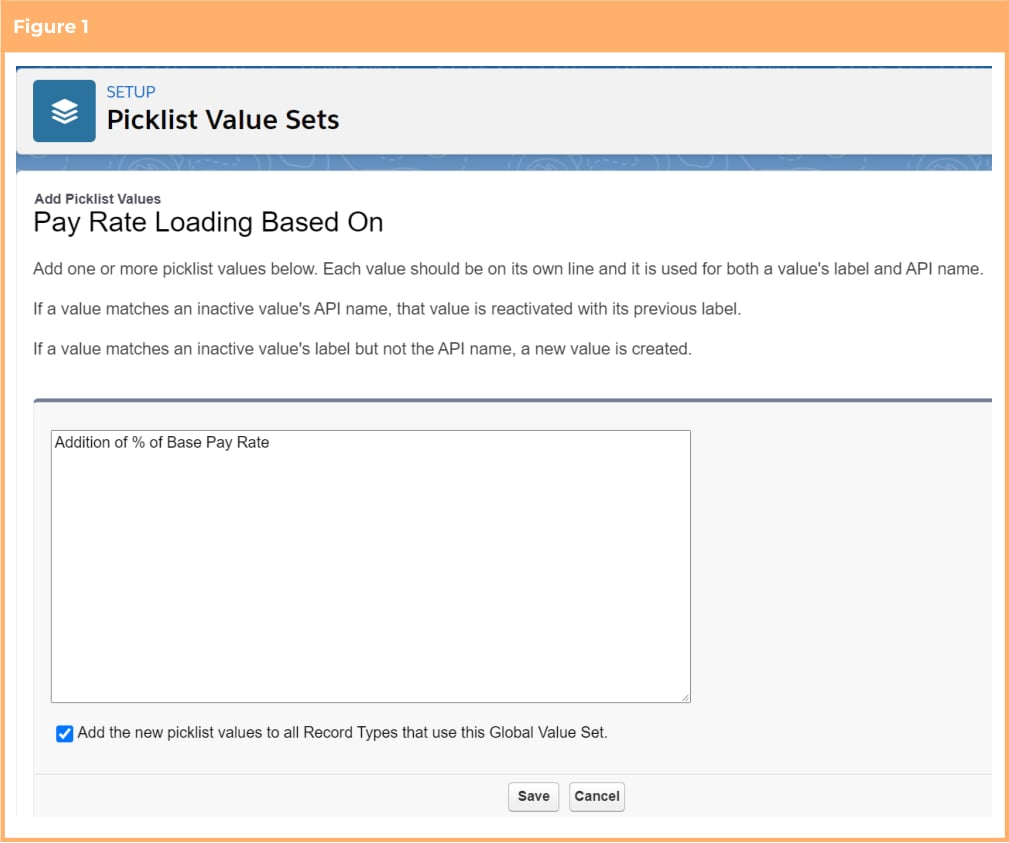 #### Update New Fields on Existing Records (Optional)
This functionality builds on the *Automate Payee Allowance Records and Assignment Rate Creation*
item. To function correctly, the *Update New Fields on Existing Records* items within that section must also
be completed.
Alternatively, existing Assignments can be updated to have an Award Classification and Award Level
applied, however this is not essential and can be completed if/when a user assigns an Assignment Rate
Template that contains minimum rates.
### Create and Allocate Work Schedules Efficiently
The functionality to create and allocate work schedules is optional and is a beta version. Further updates
and improvements will be included in the next release.
This requirement only needs to be completed if the option to use the beta functionality is taken. If not,
these items can be skipped. An updated version of these configuration steps will be included in the next
release for those who wish to wait for the non-beta version. The below configuration steps should be
completed if opting to trial the beta version:
1. Update profile/permission sets (Optional)
The functionality includes the creation of objects and record types which have all been packaged
with a standard page layout containing all required fields, so no updates are necessary in respect to these
page layouts.
#### Update Profile/Permission Sets (Optional)
The below detailed fields have had read/edit access added to the following permission sets provided with
the package. Where these are in use, the permissions required will be automatically provisioned.
* 2cloudnine Payroll Admin
* 2cloudnine Time2Pay All Access
If the packaged permission sets are not used within the organisation, the access outlined in Appendix 11
must be made available for use either via profiles or custom permission sets.
### Apply Work Schedule Information to Payroll
The functionality to apply work schedule information to payroll is optional and is a beta version. Further
updates and improvements will be included in the next release. This requirement only needs to be
complete if the option to use the beta functionality is taken. If not, these items can be skipped. An updated
version of these configuration steps will be included in the next release for those who wish to wait for the
non-beta version.
The below configuration steps should be completed if the functionality is required:
1. Update profile/permission sets (Optional)
2. Update page layouts for new fields (Optional)
3. Create a new picklist value for fields (Optional)
#### Update Profile/Permission Sets (Optional)
The below detailed fields have had read/edit access added to the following permission sets provided with
the package. Where these are in use, the permissions required will be automatically provisioned.
* 2cloudnine Payroll Admin
* 2cloudnine Time2Pay All Access
If the packaged permission sets are not used within the organisation, the access outlined in Appendix 12
must be made available for use either via profiles or custom permission sets.
This functionality builds on the *Create and Allocate Work Schedules Efficiently* . To function correctly,
the Update Profile/Permission Sets items within that section must also be completed.
#### Update Page Layouts for New Fields (Optional)
This requirement only needs to be completed if the option to use the functionality is taken. If not, this item
can be skipped.
1. Go to Setup > Object Manager
2. Select Assignment Rate (tc9\_pr\_\_Assignment\_Rate\_\_c) > Page Layouts
3. Select a page layout that is used for the Remuneration record type
4. Add the following field to the layout
* Auto Pay Calculation Basis (tc9\_pr\_\_Auto\_Pay\_Calculation\_Basis\_\_c)
5. Click Save
6. Repeat steps 3 to 5 for all page layouts that are used for the Remuneration record type
7. Return to the Object Manager
8. Select Pay Transaction (tc9\_pr\_\_Pay\_Transaction\_\_c) > Page Layouts
9. Select a page layout that is used for the Payment or Allowance record types
10. Add the following field to the layout
* Assignment Schedule (tc9\_pr\_\_Assignment\_Schedule\_\_c)
11. Click Save
12. Repeat steps 8 to 11 for all page layouts that are used for the Payment and Allowance record types
13. Return to the Object Manager
14. Select Timesheet Entry (tc9\_et\_\_Timesheet\_Entry\_\_c) > Page Layouts
15. Select a page layout that is used for Timesheet Entry record type
16. Add the following field to the layout
* Work Schedule Item (tc9\_pr\_\_Work\_Schedule\_Item\_\_c)
17. Click Save
18. Repeat steps 14 to 17 for all page layouts that are used on the Timesheet Entry object
#### Create a New Picklist Value for Fields (Optional)
This requirement only needs to be completed if the option to use the functionality is taken. If not, this item
can be skipped.
1. Go to Setup > Object Manager
2. Select Assignment Rate (tc9\_pr\_\_Assignment\_Rate\_\_c) > Fields & Relationships
3. Select the Pro Rata Method field (tc9\_pr\_\_Pro\_Rata\_Method\_\_c)
4. In the values section, click the New button
5. On the displayed page add the new value ‘Work Schedule’ and apply it only for the Remuneration
record type (See Figure 1)
6. Click Save
#### Update New Fields on Existing Records (Optional)
This functionality builds on the *Automate Payee Allowance Records and Assignment Rate Creation*
item. To function correctly, the *Update New Fields on Existing Records* items within that section must also
be completed.
Alternatively, existing Assignments can be updated to have an Award Classification and Award Level
applied, however this is not essential and can be completed if/when a user assigns an Assignment Rate
Template that contains minimum rates.
### Create and Allocate Work Schedules Efficiently
The functionality to create and allocate work schedules is optional and is a beta version. Further updates
and improvements will be included in the next release.
This requirement only needs to be completed if the option to use the beta functionality is taken. If not,
these items can be skipped. An updated version of these configuration steps will be included in the next
release for those who wish to wait for the non-beta version. The below configuration steps should be
completed if opting to trial the beta version:
1. Update profile/permission sets (Optional)
The functionality includes the creation of objects and record types which have all been packaged
with a standard page layout containing all required fields, so no updates are necessary in respect to these
page layouts.
#### Update Profile/Permission Sets (Optional)
The below detailed fields have had read/edit access added to the following permission sets provided with
the package. Where these are in use, the permissions required will be automatically provisioned.
* 2cloudnine Payroll Admin
* 2cloudnine Time2Pay All Access
If the packaged permission sets are not used within the organisation, the access outlined in Appendix 11
must be made available for use either via profiles or custom permission sets.
### Apply Work Schedule Information to Payroll
The functionality to apply work schedule information to payroll is optional and is a beta version. Further
updates and improvements will be included in the next release. This requirement only needs to be
complete if the option to use the beta functionality is taken. If not, these items can be skipped. An updated
version of these configuration steps will be included in the next release for those who wish to wait for the
non-beta version.
The below configuration steps should be completed if the functionality is required:
1. Update profile/permission sets (Optional)
2. Update page layouts for new fields (Optional)
3. Create a new picklist value for fields (Optional)
#### Update Profile/Permission Sets (Optional)
The below detailed fields have had read/edit access added to the following permission sets provided with
the package. Where these are in use, the permissions required will be automatically provisioned.
* 2cloudnine Payroll Admin
* 2cloudnine Time2Pay All Access
If the packaged permission sets are not used within the organisation, the access outlined in Appendix 12
must be made available for use either via profiles or custom permission sets.
This functionality builds on the *Create and Allocate Work Schedules Efficiently* . To function correctly,
the Update Profile/Permission Sets items within that section must also be completed.
#### Update Page Layouts for New Fields (Optional)
This requirement only needs to be completed if the option to use the functionality is taken. If not, this item
can be skipped.
1. Go to Setup > Object Manager
2. Select Assignment Rate (tc9\_pr\_\_Assignment\_Rate\_\_c) > Page Layouts
3. Select a page layout that is used for the Remuneration record type
4. Add the following field to the layout
* Auto Pay Calculation Basis (tc9\_pr\_\_Auto\_Pay\_Calculation\_Basis\_\_c)
5. Click Save
6. Repeat steps 3 to 5 for all page layouts that are used for the Remuneration record type
7. Return to the Object Manager
8. Select Pay Transaction (tc9\_pr\_\_Pay\_Transaction\_\_c) > Page Layouts
9. Select a page layout that is used for the Payment or Allowance record types
10. Add the following field to the layout
* Assignment Schedule (tc9\_pr\_\_Assignment\_Schedule\_\_c)
11. Click Save
12. Repeat steps 8 to 11 for all page layouts that are used for the Payment and Allowance record types
13. Return to the Object Manager
14. Select Timesheet Entry (tc9\_et\_\_Timesheet\_Entry\_\_c) > Page Layouts
15. Select a page layout that is used for Timesheet Entry record type
16. Add the following field to the layout
* Work Schedule Item (tc9\_pr\_\_Work\_Schedule\_Item\_\_c)
17. Click Save
18. Repeat steps 14 to 17 for all page layouts that are used on the Timesheet Entry object
#### Create a New Picklist Value for Fields (Optional)
This requirement only needs to be completed if the option to use the functionality is taken. If not, this item
can be skipped.
1. Go to Setup > Object Manager
2. Select Assignment Rate (tc9\_pr\_\_Assignment\_Rate\_\_c) > Fields & Relationships
3. Select the Pro Rata Method field (tc9\_pr\_\_Pro\_Rata\_Method\_\_c)
4. In the values section, click the New button
5. On the displayed page add the new value ‘Work Schedule’ and apply it only for the Remuneration
record type (See Figure 1)
6. Click Save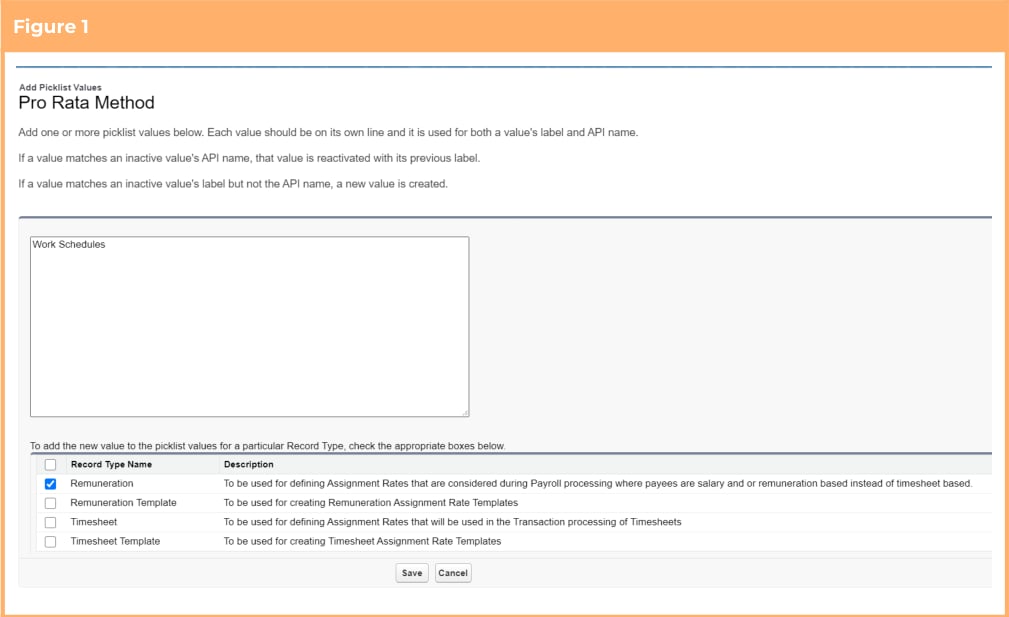 ### Extend Minimum Rest or Break Loading Interpretation
The functionality to define separate Pay Codes for Sunday and Public Holiday breakpoints while accessing
Minimum Rest or Break Loading Interpretation is optional, however there is required configuration that
must be completed regardless of if the function is used. The below configuration steps should be
completed:
1. Update profile/permission set (Compulsory)
2. Update page layouts for new fields (Compulsory)
3. Update new fields on existing records (Compulsory)
4. Populate different Pay Codes for Sundays and Public Holidays (Optional)
#### Update Profile/Permission Sets (Compulsory)
The below detailed fields have had read/edit access added to the following permission sets provided with
the package. Where these are in use, the permissions required will be automatically provisioned.
* 2cloudnine Payroll Admin
* 2cloudnine Time2Pay All Access
If the packaged permission sets are not used within the organisation, the access outlined in Appendix 13
must be made available for use either via profiles or custom permission sets.
#### Update Page Layouts For New Fields (Compulsory)
This requirement needs to be completed regardless of if the option to use the functionality is taken.
1. Go to Setup > Object Manager
2. Select Interpretation Rule (tc9\_et\_\_Interpretation\_Rule\_\_c) > Page Layouts
3. Select a page layout that is used for any Interpretation Rule record type excluding the Daily Rates
record type
4. Add the following fields to the page layout
* Days Minimum Rest Hours Apply (tc9\_et\_\_Days\_Minimum\_Rest\_Hours\_Apply2\_\_c)
* Days Total Span Hours Apply (tc9\_et\_\_Days\_Total\_Span\_Hours\_Apply2\_\_c)
5. Delete the following fields from the page layout
* DO NOT USE (tc9\_et\_\_Days\_Minimum\_Rest\_Hours\_Apply\_\_c)
* DO NOT USE (tc9\_et\_\_Days\_Total\_Span\_Hours\_Apply\_\_c)
6. Click Save
7. Repeat steps 3 to 5 for all page layouts that are used on the Interpretation Rule object excluding
those used for the Daily Rates record type
#### Update New Fields on Existing Records (Compulsory)
To prevent validation errors while performing Timesheet Interpretation, the new Days Minimum Rest
Hours Apply and Days Total Span Hours Apply and fields (tc9\_et\_\_Days\_Minimum\_Rest\_Hours\_Apply2\_\_c
and tc9\_et\_\_Days\_Total\_Span\_Hours\_Apply2\_\_c respectively) must be populated on all Interpretation
Rules.
To update the fields, the following steps should be followed:
1. Run a script through the dev console to automatically populate the Days Minimum Rest Hours
Apply field (tc9\_et\_\_Days\_Minimum\_Rest\_Hours\_Apply2\_\_c). See more details regarding options
available below
2. Run a script through the dev console to automatically populate the Days Total Span Hours Apply
field (tc9\_et\_\_Days\_Total\_Span\_Hours\_Apply2\_\_c). See more details regarding options available
below.
3. Manually edit, via the Interpretation Builder, any Interpretation Rules that require different values
than those set by the script
There are 2 options for how the Days Minimum Rest Hours Apply field should be populated via the scripts.
1. Populate the new Days Minimum Rest Hours Apply field
(tc9\_et\_\_Days\_Minimum\_Rest\_Hours\_Apply2\_\_c) with the value of the old depreciated fields
(tc9\_et\_\_Days\_Minimum\_Rest\_Hours\_Apply\_\_c). To take this option use Script 1 below.
2. Populate the Days Minimum Rest Hours Apply field
(tc9\_et\_\_Days\_Minimum\_Rest\_Hours\_Apply2\_\_c) on all Interpretation Rules with the values of
'Monday, Tuesday, Wednesday, Thursday, Friday, Saturday, Sunday and Public Holiday' (ignoring
the values in the old fields). To take this option use Script 2 below.
Likewise, there are 2 options for how the Days Total Span Hours Apply field should be populated via the
scripts.
1. Populate the new Days Total Span Hours Apply field (tc9\_et\_\_Days\_Total\_Span\_Hours\_Apply2\_\_c)
with the value of the old depreciated fields (tc9\_et\_\_Days\_Total\_Span\_Hours\_Apply2\_\_c). To take
this option use Script 3 below.
2. Populate the Days Total Span Hours Apply fields (tc9\_et\_\_Days\_Total\_Span\_Hours\_Apply2\_\_c) on all
Interpretation Rules with the values of 'Monday, Tuesday, Wednesday, Thursday, Friday, Saturday,
Sunday and Public Holiday' (ignoring the values in the old fields). To take this option use Script 4
below.
```apex Script 1 theme={null}
//Payroll post-install script for Lilly Pilly 2021 Release - Interpretation Rules - Days Minimum Rest Applies
//from depreciated fields to new fields
List interpretationrules = [Select Id,
tc9_et__Days_Minimum_Rest_Hours_Apply__c, tc9_et__Days_Minimum_Rest_Hours_Apply2__c from
tc9_et__Interpretation_Rule__c Where tc9_et__Days_Minimum_Rest_Hours_Apply__c != null];
for(tc9_et__Interpretation_Rule__c Interpretationrule : interpretationrules){
Interpretationrule.tc9_et__Days_Minimum_Rest_Hours_Apply2__c =
Interpretationrule.tc9_et__Days_Minimum_Rest_Hours_Apply__c;
}
update interpretationrules;
```
```apex Script 2 theme={null}
//Payroll post-install script for Lilly Pilly 2021 Release - Interpretation Rules - Days Minimum Rest Applies
// to add all days including Public Holidays
List interpretationrules = [Select Id,
tc9_et__Days_Minimum_Rest_Hours_Apply__c, tc9_et__Days_Minimum_Rest_Hours_Apply2__c from
tc9_et__Interpretation_Rule__c Where tc9_et__Days_Minimum_Rest_Hours_Apply__c != null];
for(tc9_et__Interpretation_Rule__c Interpretationrule : interpretationrules){
Interpretationrule.tc9_et__Days_Minimum_Rest_Hours_Apply2__c =
'Monday;Tuesday;Wednesday;Thursday;Friday;Saturday;Sunday;Public Holiday';
}
update interpretationrules;
```
```apex Script 3 theme={null}
//Payroll post-install script for Lilly Pilly 2021 Release - Interpretation Rules - Days Total Span Apply from
//depreciated fields to new fields
List interpretationrules = [Select Id,
tc9_et__Days_Total_Span_Hours_Apply__c, tc9_et__Days_Total_Span_Hours_Apply2__c from
tc9_et__Interpretation_Rule__c Where tc9_et__Days_Total_Span_Hours_Apply__c != null];
for(tc9_et__Interpretation_Rule__c Interpretationrule : interpretationrules){
Interpretationrule.tc9_et__Days_Total_Span_Hours_Apply2__c =
Interpretationrule.tc9_et__Days_Total_Span_Hours_Apply__c;
}
update interpretationrules;
```
```apex Script 4 theme={null}
//Payroll post-install script for Lilly Pilly 2021 Release - Interpretation Rules - Days Total Span Applies to
//add all days including Public Holidays
List interpretationrules = [Select Id,
tc9_et__Days_Total_Span_Hours_Apply__c, tc9_et__Days_Total_Span_Hours_Apply2__c from
tc9_et__Interpretation_Rule__c Where tc9_et__Days_Total_Span_Hours_Apply__c != null];
for(tc9_et__Interpretation_Rule__c Interpretationrule : interpretationrules){
Interpretationrule.tc9_et__Days_Total_Span_Hours_Apply2__c =
'Monday;Tuesday;Wednesday;Thursday;Friday;Saturday;Sunday;Public Holiday';
}
update interpretationrules;
```
#### Populate Different Pay Codes for Sundays and Public Holidays (Optional)
By default, the main pay code defined on each Interpretation Breakpoint will be used for all days/public
holidays relating to that breakpoint. If you wish to utilise the new functionality and define a different Pay
Code for Sundays and/or Public Holidays, you will need to update the breakpoints to set the optional pay
codes.
### Utilise Daily Interpretation Rules for Partial Days
The functionality to define partial day breakpoints in daily Interpretation Rules is optional. This
requirement only needs to be completed if the option to use the functionality is taken. If not, these items
can be skipped. The below configuration steps should be completed if the functionality is required:
1. Update profile/permission sets (Optional)
2. Update page layouts for new fields (Optional)
3. Update new fields on existing records (Optional)
#### Update Profile/Permission Sets (Optional)
The below detailed fields have had read/edit access added to the following permission sets provided with
the package. Where these are in use, the permissions required will be automatically provisioned.
* 2cloudnine Payroll Admin
* 2cloudnine Time2Pay All Access
If the packaged permission sets are not used within the organisation, the access outlined in Appendix 14
must be made available for use either via profiles or custom permission sets.
#### Update Page Layouts for New Fields (Optional)
This requirement only needs to be completed if the option to use the functionality is taken. If not, this item
can be skipped.
1. Go to Setup > Object Manager
2. Select Interpretation Rule (tc9\_et\_\_Interpretation\_Rule\_\_c) > Page Layouts
3. Select a page layout that is used for the Daily Rates record type
4. Add the following field to the layout
* Apply Partial Daily Rates field (tc9\_et\_\_Apply\_Partial\_Daily\_Rates\_\_c)
5. Click Save
6. Repeat steps 3 to 5 for all page layouts that are used for the Daily Rates record type
7. Return to the Object Manager
8. Select Interpretation Breakpoint (tc9\_et\_\_Interpretation\_Breakpoint\_\_c) > Page Layouts
9. Select a page layout that is used for the Daily Rate record type
10. Add the following field to the layout
* Daily Quantity (tc9\_et\_\_Daily\_Quantity\_\_c)
11. Click Save
12. Repeat steps 9 to 11 for all page layouts that are used for the Daily Rate record type
#### Update New Fields on Existing Records (Optional)
By default, daily interpretation rules will continue to operate on the day, or part thereof basis. If you wish to
utilise the new functionality to define partial breakpoints for any of your existing daily interpretation rules,
you will need to update them via the Interpretation Builder.
### Pay Partial Allowances
The functionality to define partial allowance breakpoints in Interpretation Rules is optional. This
requirement only needs to be completed if the option to use the functionality is taken. If not, these items
can be skipped. The below configuration steps should be completed if the functionality is required:
1. Update profile/permission sets (Optional)
2. Update page layouts for new fields (Optional)
3. Update new fields on existing records (Optional)
#### Update Profile/Permission Sets (Optional)
The below detailed fields have had read/edit access added to the following permission sets provided with
the package. Where these are in use, the permissions required will be automatically provisioned.
* 2cloudnine Payroll Admin
* 2cloudnine Time2Pay All Access
If the packaged permission sets are not used within the organisation, the access outlined in Appendix 15
must be made available for use either via profiles or custom permission sets.
#### Update Page Layouts for New Fields (Optional)
This requirement only needs to be completed if the option to use the functionality is taken. If not, this item
can be skipped.
1. Go to Setup > Object Manager
2. Select Interpretation Breakpoint (tc9\_et\_\_Interpretation\_Breakpoint\_\_c) > Page Layouts
3. Select a page layout that is used for any Allowance record type
4. Add the following field to the layout
* Pay Partial Quantity (tc9\_et\_\_Pay\_Partial\_Quantity\_\_c)
5. Click Save
6. Repeat steps 3 to 5 for all page layouts that are used for the Allowance record type
#### Update New Fields on Existing Records (Optional)
By default, allowances will continue to be interpreted on a whole period (hours, days, frequency) basis only.
If you wish to utilise the new functionality to pay allowances for partial periods, you will need to update
them via the Interpretation Builder
### Provide Greater Detail on Pay Advice Documents
The functionality that allows users to choose what level of detail is to be provided on Pay Advice
documents is optional, however there is required configuration that must be completed regardless of if
the function is used. The below configuration steps should be completed:
1. Update profile/permission set (Compulsory)
2. Update page layouts for new fields (Optional)
3. Create a new picklist value for fields (Optional)
4. Update new fields on existing records (Optional)
5. Update the Pay Advice Detail Level on Pay Schedules (Optional)
#### Update Profile/Permission Sets (Compulsory)
The below detailed fields have had read/edit access added to the following permission sets provided with
the package. Where these are in use, the permissions required will be automatically provisioned.
* 2cloudnine Payroll Admin
* 2cloudnine Time2Pay All Access
If the packaged permission sets are not used within the organisation, the access outlined in Appendix 16
must be made available for use either via profiles or custom permission sets.
#### Update Page Layouts for New Fields (Optional)
This requirement only needs to be completed if the option to use the functionality is taken. If not, this item
can be skipped.
1. Go to Setup > Object Manager
2. Select Pay Advice Line (tc9\_pr\_\_Pay\_Advice\_Line\_\_c) > Page Layouts
3. Select a page layout that is used for any Pay Advice Line record type
4. Add the following fields to the layout
* Project Code (tc9\_pr\_\_Project\_Code\_\_c)
5. Click Save
6. Repeat steps 3 to 5 for all page layouts that are used on the Pay Advice Line object
7. Return to the Object Manager
8. Select Project Code > Page Layouts
9. Select a page layout that is used for any Assignment Project Code record type
10. Add the following field to the layout
* Pay Advice Description (tc9\_pr\_\_Pay\_Advice\_Description\_\_c)
11. Click Save
12. Repeat steps 9 to 11 for all page layouts that are used on the Assignment Project Code record type
#### Create a New Picklist Value for Fields (Optional)
This requirement only needs to be completed if the option to use the functionality is taken. If not, this item
can be skipped.
1. Go to Setup > Objects Manager
2. Select Schedule (tc9\_pr\_\_Schedule\_\_c) > Fields & Relationships
3. Select the Pay Advice Detail Level field (tc9\_pr\_\_Pay\_Advice\_Detail\_Level\_\_c)
4. In the values section, click the New button
5. On the displayed page, add the new value Project Code and apply it only for the Pay Schedule
record type (See Figure 1)
6. Click Save
### Extend Minimum Rest or Break Loading Interpretation
The functionality to define separate Pay Codes for Sunday and Public Holiday breakpoints while accessing
Minimum Rest or Break Loading Interpretation is optional, however there is required configuration that
must be completed regardless of if the function is used. The below configuration steps should be
completed:
1. Update profile/permission set (Compulsory)
2. Update page layouts for new fields (Compulsory)
3. Update new fields on existing records (Compulsory)
4. Populate different Pay Codes for Sundays and Public Holidays (Optional)
#### Update Profile/Permission Sets (Compulsory)
The below detailed fields have had read/edit access added to the following permission sets provided with
the package. Where these are in use, the permissions required will be automatically provisioned.
* 2cloudnine Payroll Admin
* 2cloudnine Time2Pay All Access
If the packaged permission sets are not used within the organisation, the access outlined in Appendix 13
must be made available for use either via profiles or custom permission sets.
#### Update Page Layouts For New Fields (Compulsory)
This requirement needs to be completed regardless of if the option to use the functionality is taken.
1. Go to Setup > Object Manager
2. Select Interpretation Rule (tc9\_et\_\_Interpretation\_Rule\_\_c) > Page Layouts
3. Select a page layout that is used for any Interpretation Rule record type excluding the Daily Rates
record type
4. Add the following fields to the page layout
* Days Minimum Rest Hours Apply (tc9\_et\_\_Days\_Minimum\_Rest\_Hours\_Apply2\_\_c)
* Days Total Span Hours Apply (tc9\_et\_\_Days\_Total\_Span\_Hours\_Apply2\_\_c)
5. Delete the following fields from the page layout
* DO NOT USE (tc9\_et\_\_Days\_Minimum\_Rest\_Hours\_Apply\_\_c)
* DO NOT USE (tc9\_et\_\_Days\_Total\_Span\_Hours\_Apply\_\_c)
6. Click Save
7. Repeat steps 3 to 5 for all page layouts that are used on the Interpretation Rule object excluding
those used for the Daily Rates record type
#### Update New Fields on Existing Records (Compulsory)
To prevent validation errors while performing Timesheet Interpretation, the new Days Minimum Rest
Hours Apply and Days Total Span Hours Apply and fields (tc9\_et\_\_Days\_Minimum\_Rest\_Hours\_Apply2\_\_c
and tc9\_et\_\_Days\_Total\_Span\_Hours\_Apply2\_\_c respectively) must be populated on all Interpretation
Rules.
To update the fields, the following steps should be followed:
1. Run a script through the dev console to automatically populate the Days Minimum Rest Hours
Apply field (tc9\_et\_\_Days\_Minimum\_Rest\_Hours\_Apply2\_\_c). See more details regarding options
available below
2. Run a script through the dev console to automatically populate the Days Total Span Hours Apply
field (tc9\_et\_\_Days\_Total\_Span\_Hours\_Apply2\_\_c). See more details regarding options available
below.
3. Manually edit, via the Interpretation Builder, any Interpretation Rules that require different values
than those set by the script
There are 2 options for how the Days Minimum Rest Hours Apply field should be populated via the scripts.
1. Populate the new Days Minimum Rest Hours Apply field
(tc9\_et\_\_Days\_Minimum\_Rest\_Hours\_Apply2\_\_c) with the value of the old depreciated fields
(tc9\_et\_\_Days\_Minimum\_Rest\_Hours\_Apply\_\_c). To take this option use Script 1 below.
2. Populate the Days Minimum Rest Hours Apply field
(tc9\_et\_\_Days\_Minimum\_Rest\_Hours\_Apply2\_\_c) on all Interpretation Rules with the values of
'Monday, Tuesday, Wednesday, Thursday, Friday, Saturday, Sunday and Public Holiday' (ignoring
the values in the old fields). To take this option use Script 2 below.
Likewise, there are 2 options for how the Days Total Span Hours Apply field should be populated via the
scripts.
1. Populate the new Days Total Span Hours Apply field (tc9\_et\_\_Days\_Total\_Span\_Hours\_Apply2\_\_c)
with the value of the old depreciated fields (tc9\_et\_\_Days\_Total\_Span\_Hours\_Apply2\_\_c). To take
this option use Script 3 below.
2. Populate the Days Total Span Hours Apply fields (tc9\_et\_\_Days\_Total\_Span\_Hours\_Apply2\_\_c) on all
Interpretation Rules with the values of 'Monday, Tuesday, Wednesday, Thursday, Friday, Saturday,
Sunday and Public Holiday' (ignoring the values in the old fields). To take this option use Script 4
below.
```apex Script 1 theme={null}
//Payroll post-install script for Lilly Pilly 2021 Release - Interpretation Rules - Days Minimum Rest Applies
//from depreciated fields to new fields
List interpretationrules = [Select Id,
tc9_et__Days_Minimum_Rest_Hours_Apply__c, tc9_et__Days_Minimum_Rest_Hours_Apply2__c from
tc9_et__Interpretation_Rule__c Where tc9_et__Days_Minimum_Rest_Hours_Apply__c != null];
for(tc9_et__Interpretation_Rule__c Interpretationrule : interpretationrules){
Interpretationrule.tc9_et__Days_Minimum_Rest_Hours_Apply2__c =
Interpretationrule.tc9_et__Days_Minimum_Rest_Hours_Apply__c;
}
update interpretationrules;
```
```apex Script 2 theme={null}
//Payroll post-install script for Lilly Pilly 2021 Release - Interpretation Rules - Days Minimum Rest Applies
// to add all days including Public Holidays
List interpretationrules = [Select Id,
tc9_et__Days_Minimum_Rest_Hours_Apply__c, tc9_et__Days_Minimum_Rest_Hours_Apply2__c from
tc9_et__Interpretation_Rule__c Where tc9_et__Days_Minimum_Rest_Hours_Apply__c != null];
for(tc9_et__Interpretation_Rule__c Interpretationrule : interpretationrules){
Interpretationrule.tc9_et__Days_Minimum_Rest_Hours_Apply2__c =
'Monday;Tuesday;Wednesday;Thursday;Friday;Saturday;Sunday;Public Holiday';
}
update interpretationrules;
```
```apex Script 3 theme={null}
//Payroll post-install script for Lilly Pilly 2021 Release - Interpretation Rules - Days Total Span Apply from
//depreciated fields to new fields
List interpretationrules = [Select Id,
tc9_et__Days_Total_Span_Hours_Apply__c, tc9_et__Days_Total_Span_Hours_Apply2__c from
tc9_et__Interpretation_Rule__c Where tc9_et__Days_Total_Span_Hours_Apply__c != null];
for(tc9_et__Interpretation_Rule__c Interpretationrule : interpretationrules){
Interpretationrule.tc9_et__Days_Total_Span_Hours_Apply2__c =
Interpretationrule.tc9_et__Days_Total_Span_Hours_Apply__c;
}
update interpretationrules;
```
```apex Script 4 theme={null}
//Payroll post-install script for Lilly Pilly 2021 Release - Interpretation Rules - Days Total Span Applies to
//add all days including Public Holidays
List interpretationrules = [Select Id,
tc9_et__Days_Total_Span_Hours_Apply__c, tc9_et__Days_Total_Span_Hours_Apply2__c from
tc9_et__Interpretation_Rule__c Where tc9_et__Days_Total_Span_Hours_Apply__c != null];
for(tc9_et__Interpretation_Rule__c Interpretationrule : interpretationrules){
Interpretationrule.tc9_et__Days_Total_Span_Hours_Apply2__c =
'Monday;Tuesday;Wednesday;Thursday;Friday;Saturday;Sunday;Public Holiday';
}
update interpretationrules;
```
#### Populate Different Pay Codes for Sundays and Public Holidays (Optional)
By default, the main pay code defined on each Interpretation Breakpoint will be used for all days/public
holidays relating to that breakpoint. If you wish to utilise the new functionality and define a different Pay
Code for Sundays and/or Public Holidays, you will need to update the breakpoints to set the optional pay
codes.
### Utilise Daily Interpretation Rules for Partial Days
The functionality to define partial day breakpoints in daily Interpretation Rules is optional. This
requirement only needs to be completed if the option to use the functionality is taken. If not, these items
can be skipped. The below configuration steps should be completed if the functionality is required:
1. Update profile/permission sets (Optional)
2. Update page layouts for new fields (Optional)
3. Update new fields on existing records (Optional)
#### Update Profile/Permission Sets (Optional)
The below detailed fields have had read/edit access added to the following permission sets provided with
the package. Where these are in use, the permissions required will be automatically provisioned.
* 2cloudnine Payroll Admin
* 2cloudnine Time2Pay All Access
If the packaged permission sets are not used within the organisation, the access outlined in Appendix 14
must be made available for use either via profiles or custom permission sets.
#### Update Page Layouts for New Fields (Optional)
This requirement only needs to be completed if the option to use the functionality is taken. If not, this item
can be skipped.
1. Go to Setup > Object Manager
2. Select Interpretation Rule (tc9\_et\_\_Interpretation\_Rule\_\_c) > Page Layouts
3. Select a page layout that is used for the Daily Rates record type
4. Add the following field to the layout
* Apply Partial Daily Rates field (tc9\_et\_\_Apply\_Partial\_Daily\_Rates\_\_c)
5. Click Save
6. Repeat steps 3 to 5 for all page layouts that are used for the Daily Rates record type
7. Return to the Object Manager
8. Select Interpretation Breakpoint (tc9\_et\_\_Interpretation\_Breakpoint\_\_c) > Page Layouts
9. Select a page layout that is used for the Daily Rate record type
10. Add the following field to the layout
* Daily Quantity (tc9\_et\_\_Daily\_Quantity\_\_c)
11. Click Save
12. Repeat steps 9 to 11 for all page layouts that are used for the Daily Rate record type
#### Update New Fields on Existing Records (Optional)
By default, daily interpretation rules will continue to operate on the day, or part thereof basis. If you wish to
utilise the new functionality to define partial breakpoints for any of your existing daily interpretation rules,
you will need to update them via the Interpretation Builder.
### Pay Partial Allowances
The functionality to define partial allowance breakpoints in Interpretation Rules is optional. This
requirement only needs to be completed if the option to use the functionality is taken. If not, these items
can be skipped. The below configuration steps should be completed if the functionality is required:
1. Update profile/permission sets (Optional)
2. Update page layouts for new fields (Optional)
3. Update new fields on existing records (Optional)
#### Update Profile/Permission Sets (Optional)
The below detailed fields have had read/edit access added to the following permission sets provided with
the package. Where these are in use, the permissions required will be automatically provisioned.
* 2cloudnine Payroll Admin
* 2cloudnine Time2Pay All Access
If the packaged permission sets are not used within the organisation, the access outlined in Appendix 15
must be made available for use either via profiles or custom permission sets.
#### Update Page Layouts for New Fields (Optional)
This requirement only needs to be completed if the option to use the functionality is taken. If not, this item
can be skipped.
1. Go to Setup > Object Manager
2. Select Interpretation Breakpoint (tc9\_et\_\_Interpretation\_Breakpoint\_\_c) > Page Layouts
3. Select a page layout that is used for any Allowance record type
4. Add the following field to the layout
* Pay Partial Quantity (tc9\_et\_\_Pay\_Partial\_Quantity\_\_c)
5. Click Save
6. Repeat steps 3 to 5 for all page layouts that are used for the Allowance record type
#### Update New Fields on Existing Records (Optional)
By default, allowances will continue to be interpreted on a whole period (hours, days, frequency) basis only.
If you wish to utilise the new functionality to pay allowances for partial periods, you will need to update
them via the Interpretation Builder
### Provide Greater Detail on Pay Advice Documents
The functionality that allows users to choose what level of detail is to be provided on Pay Advice
documents is optional, however there is required configuration that must be completed regardless of if
the function is used. The below configuration steps should be completed:
1. Update profile/permission set (Compulsory)
2. Update page layouts for new fields (Optional)
3. Create a new picklist value for fields (Optional)
4. Update new fields on existing records (Optional)
5. Update the Pay Advice Detail Level on Pay Schedules (Optional)
#### Update Profile/Permission Sets (Compulsory)
The below detailed fields have had read/edit access added to the following permission sets provided with
the package. Where these are in use, the permissions required will be automatically provisioned.
* 2cloudnine Payroll Admin
* 2cloudnine Time2Pay All Access
If the packaged permission sets are not used within the organisation, the access outlined in Appendix 16
must be made available for use either via profiles or custom permission sets.
#### Update Page Layouts for New Fields (Optional)
This requirement only needs to be completed if the option to use the functionality is taken. If not, this item
can be skipped.
1. Go to Setup > Object Manager
2. Select Pay Advice Line (tc9\_pr\_\_Pay\_Advice\_Line\_\_c) > Page Layouts
3. Select a page layout that is used for any Pay Advice Line record type
4. Add the following fields to the layout
* Project Code (tc9\_pr\_\_Project\_Code\_\_c)
5. Click Save
6. Repeat steps 3 to 5 for all page layouts that are used on the Pay Advice Line object
7. Return to the Object Manager
8. Select Project Code > Page Layouts
9. Select a page layout that is used for any Assignment Project Code record type
10. Add the following field to the layout
* Pay Advice Description (tc9\_pr\_\_Pay\_Advice\_Description\_\_c)
11. Click Save
12. Repeat steps 9 to 11 for all page layouts that are used on the Assignment Project Code record type
#### Create a New Picklist Value for Fields (Optional)
This requirement only needs to be completed if the option to use the functionality is taken. If not, this item
can be skipped.
1. Go to Setup > Objects Manager
2. Select Schedule (tc9\_pr\_\_Schedule\_\_c) > Fields & Relationships
3. Select the Pay Advice Detail Level field (tc9\_pr\_\_Pay\_Advice\_Detail\_Level\_\_c)
4. In the values section, click the New button
5. On the displayed page, add the new value Project Code and apply it only for the Pay Schedule
record type (See Figure 1)
6. Click Save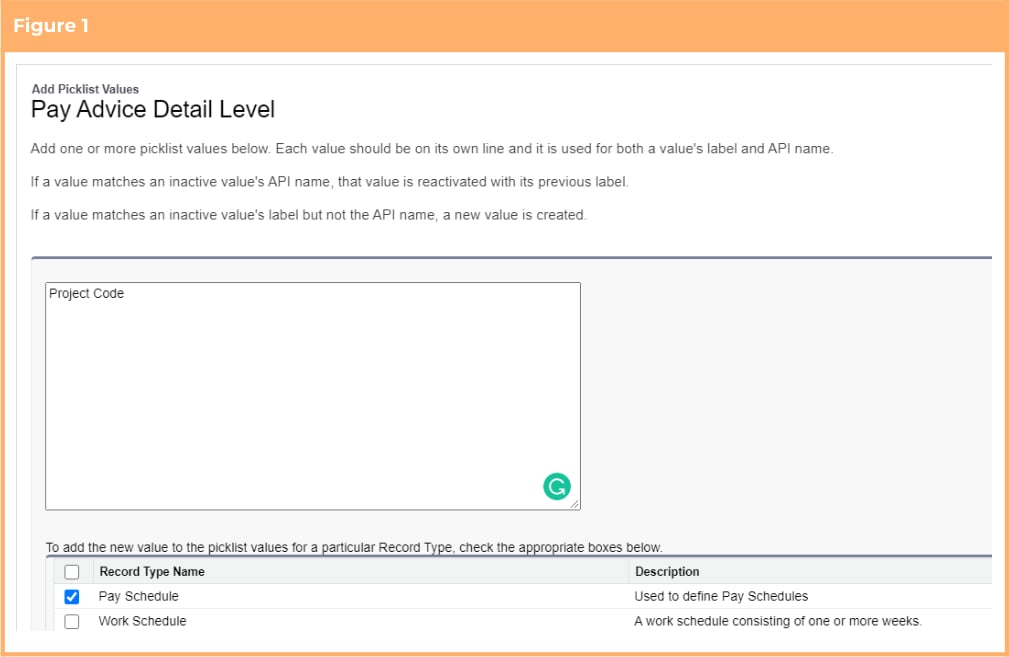 #### Update New Field on Existing Records (Optional)
This requirement only needs to be completed if the option to use the functionality is taken. If not, this item
can be skipped.
When Pay Advice documents are created with the corresponding Detail Level set to be “Project Code”, the
value held in the Project Code’s Pay Advice Description field is displayed on the Pay Advice. To ensure there
is a value to be used on the Pay Advice documents the Pay Advice Description field should be populated.
To update the fields the below steps should be followed:
1. Run Script 1 defined below through dev console to automatically populate the field on all current
Project Codes with the Project Code Name
2. Manually edit any Project Codes that require different values than those set by the script
```apex Script 1 theme={null}
//Payroll post-install script for Lilly Pilly 2021 Release - Project Code - Pay Advice Description
List projects = [Select Id, Name, tc9_pr__Pay_Advice_Description__c,
tc9_pr__Assignment__c from tc9_pr__Project_Code__c Where tc9_pr__Pay_Advice_Description__c = null
AND tc9_pr__Assignment__c != null];
for(tc9_pr__Project_Code__c project : projects){
project.tc9_pr__Pay_Advice_Description__c = project.Name;
}
update projects;
```
#### Update the Pay Advice Detail Level on Pay Schedules (Optional)
To enable Pay Advice documents to be created at the Project Code level, the Pay Advice Detail Level must
be set to the Project Code option. Any Pay Schedules that require the new level of detail should be
updated directly via the standard page.
### Set a Custom Pay Advice Footer
The functionality to set a custom Pay Advice Footer is optional. This requirement only needs to be
completed if the option to use the functionality is taken. If not, these items can be skipped. The below
configuration steps should be completed if the functionality is required:
1. Update profile/permission Sets (Optional)
2. Update page layouts for new fields (Optional
3. Update new fields on existing records (Optional)
#### Update Profile/Permission Sets (Optional)
The below detailed fields have had read/edit access added to the following permission sets provided with
the package. Where these are in use, the permissions required will be automatically provisioned.
* 2cloudnine Payroll Admin
* 2cloudnine Time2Pay All Access
If the packaged permission sets are not used within the organisation, the access outlined in Appendix 17
must be made available for use either via profiles or custom permission sets.
#### Update Page Layouts for New Fields (Optional)
This requirement only needs to be completed if the option to use the functionality is taken. If not, this item
can be skipped.
1. Go to Setup > Object Manager
2. Select Pay Advice Template (tc9\_pr\_\_Pay\_Advice\_Template\_\_c) > Page Layouts
3. Select a page layout that is used for any Pay Advice Template record type
4. Add the following fields to the layout
* Text Footer (tc9\_pr\_\_Text\_Footer\_\_c)
* Position - Footer (tc9\_pr\_\_Position\_Footer\_\_c)
* Colour Footer Text (tc9\_pr\_\_Colour\_Footer\_Text\_\_c)
5. Click Save
6. Repeat steps 3 to 5 for all page layouts that are used on the Pay Advice Template object
#### Update New Fields on Existing Records (Optional)
By default, Pay Advice documents will continue to generate without the custom footer. If you wish to
utilise the new custom footer functionality, you will need to update the relevant fields on the associated
Pay Advice Templates.
### Define a Default Pay Advice Message
The functionality to set a default Pay Advice message is optional. This requirement only needs to be
completed if the option to use the functionality is taken. If not, these items can be skipped. The below
configuration steps should be completed if the functionality is required:
1. Update profile/permission sets (Optional)
2. Update page layouts for new fields (Optional)
#### Update Profile/Permission Sets (Optional)
The below detailed fields have had read/edit access added to the following permission sets provided with
the package. Where these are in use, the permissions required will be automatically provisioned.
* 2cloudnine Payroll Admin
* 2cloudnine Time2Pay All Access
If the packaged permission sets are not used within the organisation, the access outlined in Appendix 18
must be made available for use either via profiles or custom permission sets.
#### Update Page Layouts for New Fields (Optional)
This requirement only needs to be completed if the option to use the functionality is taken. If not, this item
can be skipped.
1. Go to Setup > Object Manager
2. Select Pay Advice Template (tc9\_pr\_\_Pay\_Advice\_Template\_\_c) > Page Layouts
3. Select a page layout that is used for any Pay Advice Template record type
4. Add the following fields to the layout
* Text Pay Advice Message (tc9\_pr\_\_Text\_Pay\_Advice\_Message\_\_c)
5. Click Save
6. Repeat steps 3 to 5 for all page layouts that are used on the Pay Advice Template object
### Mark Pay Advice Templates as Active or Inactive
The functionality to mark Pay Advice Templates as Active or Inactive is compulsory and all the below
configuration steps should be completed:
1. Update profile/permission set (Compulsory)
2. Update page layouts for new fields (Compulsory)
3. Update new fields on existing records (Compulsory)
#### Update Profile/Permission Sets (Compulsory)
The below detailed fields have had read/edit access added to the following permission sets provided with
the package. Where these are in use, the permissions required will be automatically provisioned.
* 2cloudnine Payroll Admin
* 2cloudnine Time2Pay All Access
If the packaged permission sets are not used within the organisation, the access outlined in Appendix 19
must be made available for use either via profiles or custom permission sets.
#### Update Page Layouts for New Fields (Compulsory)
This requirement needs to be completed regardless of if the option to use the functionality is taken.
1. Go to Setup > Object Manager
2. Select Pay Advice Template (tc9\_pr\_\_Pay\_Advice\_Template\_\_c) > Page Layouts
3. Select a page layout that is used for any Pay Advice Template record type
4. Add the following field to the layout
* Available for Use (tc9\_pr\_\_Available\_for\_Use\_\_c)
5. Click Save
6. Repeat steps 3 to 5 for all page layouts that are used on the Pay Advice Template object
#### Update New Fields on Existing Records (Compulsory)
When the Pay Advice documents are created, the Available for Use field will determine if the Pay Advice
Templates can be used. To ensure Pay Advice documents can continue to generate without error, the
existing Pay Advice Templates should be updated to populate the new field.
To update the fields the following steps should be followed:
1. Run Script 1 defined below through dev console to automatically set the Available For Use field to
be “Yes”
2. Manually edit any Pay Advice Templates that need to be made inactive.
```apex Script 1 theme={null}
//Payroll post-install script for Lilly Pilly 2021 Release - Pay Advice Templates - Available for Use
List templates = [Select Id, tc9_pr__Available_For_Use__c from
tc9_pr__Pay_Advice_Template__c];
for(tc9_pr__Pay_Advice_Template__c template : templates){
if(template.tc9_pr__Available_for_Use__c == null){
template.tc9_pr__Available_For_Use__c = 'Yes';}
}
update templates;
```
### Consolidate Multiple Pay Advice Amounts in a Payment File
The functionality to consolidate multiple Pay Advice amounts in a Payment File is optional. This
requirement only needs to be completed if the option to use the functionality is taken. If not, these items
can be skipped. The below configuration steps should be completed if the functionality is required:
1. Update profile/permission set (Optional)
2. Update page layouts for new fields (Optional)
3. Update new fields on existing records (Optional)
#### Update Profile/Permission Sets (Optional)
The below detailed fields have had read/edit access added to the following permission sets provided with
the package. Where these are in use, the permissions required will be automatically provisioned.
* 2cloudnine Payroll Admin
* 2cloudnine Time2Pay All Access
If the packaged permission sets are not used within the organisation, the access outlined in Appendix 20
must be made available for use either via profiles or custom permission sets.
#### Update Page Layouts for New Fields (Optional)
This requirement only needs to be completed if the option to use the functionality is taken. If not, this item
can be skipped.
1. Go to Setup > Object Manager
2. Select Payee (tc9\_pr\_\_Payee\_\_c) > Page Layouts
3. Select a page layout that is used for any Payee record type
4. Add the following fields to the layout
* Payment Consolidation (tc9\_pr\_\_payment\_consolidation\_\_c) \*
5. Click Save
6. Repeat steps 3 to 5 for all page layouts that are used on the Payee object
7. Return to the Object Manager
8. Select Payment File Line (tc9\_pr\_\_Payment\_File\_Line\_\_c) > Page Layouts
9. Select a page layout that is used for any Payment File Line record type
10. Add the following fields to the layout
* Payment Consolidation (tc9\_pr\_\_payment\_consolidation\_\_c)
11. Click Save
12. Repeat steps 9 to 11 for all page layouts that are used on the Payment File Line object
* The Payment Consolidation field (Payment\_Consolidation\_\_c) on Payee is an existing field that was
previously unused so it may not have been added to page layouts. It is detailed here to ensure the correct
permission is given for the functionality.
#### Update New Field on Existing Records (Optional)
This requirement only needs to be completed if the option to use the functionality is taken. If not, this item
can be skipped.
By default, the Payment Consolidation will be processed as “Separated”, which is set as default option at
the package level. This means that in most instances, the field will be populated and, on the occasions it is
not, the Payment File functionality will continue to operate without error.
That said, if the option to use the functionality is undertaken, you may choose to ensure the field on the
Payee is populated so the setting is clearer to the user. To update the field the following steps should be
followed:
1. Run Script 1 defined below through dev console to automatically set the Payment Consolidation
field on any Payees where it is not populated to be “Separated”
2. Manually edit any Payee records that need to be made “Consolidated”
```apex Script 1 theme={null}
//Payroll post-install script for Lilly Pilly 2021 Release - Payee - Payment Consolidation
List payees = [Select Id, tc9_pr__Payment_Consolidation__c from tc9_pr__Payee__c
where tc9_pr__Payment_Consolidation__c = null];
for(tc9_pr__Payee__c payee : payees){
payee.tc9_pr__Payment_Consolidation__c = 'Separated';
}
update payees;
```
### Automatically Assign Defined Permission Sets to Community Users
The functionality to automatically assign defined permission sets to community users is optional, however
if the optional functionality to auto create community users introduced in v1.84 is in use, the auto
assignment to permission sets must also be set up. The below configuration steps should be completed if
the functionality is required:
1. Populate the Time2pay Portal Permission Sets Configuration custom setting (Optional)
#### Populate the Time2pay Portal Permission Sets Configuration Custom Setting (Optional)
This requirement only needs to be completed if the option to use the functionality is taken. If not, this item
can be skipped.
1. Go to Setup > Custom Code > Custom Setting
2. Locate the Time2pay Portal Permission Set custom setting and click on the Manage link alongside
it
3. Click the New button
4. Populate the following fields
* Name
Give the record a useful name that will help identify which Profile Name/Permission Set
Combination is set up. This name must be unique.
* Portal Profile Name
Defines the Profile Name that will be used to identify which permission sets will be
automatically assigned during community user creation and update. The value in this field
must match an existing User Profile’s Name.
* Permission Set API Name
Defines the Permission set that will be automatically assigned during community user
creation and update. The value in this field must match the API Name of the Permission.
5. Click Save
6. Repeat steps 3 to 5 for all Profile/Permission Set combinations required.
There can be multiple records created per Profile. Where there are multiple records created for a
profile, it will result in multiple permission sets being assigned to Users.
### Customised Invoice Grouping
The functionality to use Custom Invoice Group By IDs is optional. This requirement only needs to be
completed if the option to use the functionality is taken. If not, these items can be skipped. The below
configuration steps should be completed if the functionality is required:
1. Update profile/permission sets (Optional)
2. Update page layouts for new fields (Optional)
3. Create a new picklist value for fields (Optional)
#### Update Profile/Permission Sets (Optional)
The below detailed fields have had read/edit access added to the following permission sets provided with
the package. Where these are in use, the permissions required will be automatically provisioned.
* 2cloudnine Payroll Admin
* 2cloudnine Time2Pay All Access
If the packaged permission sets are not used within the organisation, the access outlined in Appendix 21
must be made available for use either via profiles or custom permission sets.
#### Update Page Layouts for New Fields (Optional)
This requirement only needs to be completed if the option to use the functionality is taken. If not, this item
can be skipped.
1. Go to Setup > Object Manager
2. Select Assignment (tc9\_pr\_\_Assignment\_\_c) > Page Layouts
3. Select a page layout that is used for any Assignment record type excluding the Employee record
type
4. Add the following fields to the layout
* Custom Invoice Group by ID (tc9\_et\_\_Custom\_Invoice\_group\_by\_id\_\_c)
5. Click Save
6. Repeat steps 3 to 5 for all page layouts that are used on the Assignment object excluding those
used for the Employee record type
#### Create a New Picklist Value for Fields (Optional)
This requirement only needs to be completed if the option to use the functionality is taken. If not, this item
can be skipped.
1. Go to Setup > Objects and Fields > Picklist Value Sets
2. Select Invoice Group By Picklists
3. Click the New button in the Values section
4. On the displayed page, add the new value Custom Group By Id
5. Check the “Add new picklist value sets to all record types that use this global value set” checkbox
(See Figure 1)
6. Click Save
#### Update New Field on Existing Records (Optional)
This requirement only needs to be completed if the option to use the functionality is taken. If not, this item
can be skipped.
When Pay Advice documents are created with the corresponding Detail Level set to be “Project Code”, the
value held in the Project Code’s Pay Advice Description field is displayed on the Pay Advice. To ensure there
is a value to be used on the Pay Advice documents the Pay Advice Description field should be populated.
To update the fields the below steps should be followed:
1. Run Script 1 defined below through dev console to automatically populate the field on all current
Project Codes with the Project Code Name
2. Manually edit any Project Codes that require different values than those set by the script
```apex Script 1 theme={null}
//Payroll post-install script for Lilly Pilly 2021 Release - Project Code - Pay Advice Description
List projects = [Select Id, Name, tc9_pr__Pay_Advice_Description__c,
tc9_pr__Assignment__c from tc9_pr__Project_Code__c Where tc9_pr__Pay_Advice_Description__c = null
AND tc9_pr__Assignment__c != null];
for(tc9_pr__Project_Code__c project : projects){
project.tc9_pr__Pay_Advice_Description__c = project.Name;
}
update projects;
```
#### Update the Pay Advice Detail Level on Pay Schedules (Optional)
To enable Pay Advice documents to be created at the Project Code level, the Pay Advice Detail Level must
be set to the Project Code option. Any Pay Schedules that require the new level of detail should be
updated directly via the standard page.
### Set a Custom Pay Advice Footer
The functionality to set a custom Pay Advice Footer is optional. This requirement only needs to be
completed if the option to use the functionality is taken. If not, these items can be skipped. The below
configuration steps should be completed if the functionality is required:
1. Update profile/permission Sets (Optional)
2. Update page layouts for new fields (Optional
3. Update new fields on existing records (Optional)
#### Update Profile/Permission Sets (Optional)
The below detailed fields have had read/edit access added to the following permission sets provided with
the package. Where these are in use, the permissions required will be automatically provisioned.
* 2cloudnine Payroll Admin
* 2cloudnine Time2Pay All Access
If the packaged permission sets are not used within the organisation, the access outlined in Appendix 17
must be made available for use either via profiles or custom permission sets.
#### Update Page Layouts for New Fields (Optional)
This requirement only needs to be completed if the option to use the functionality is taken. If not, this item
can be skipped.
1. Go to Setup > Object Manager
2. Select Pay Advice Template (tc9\_pr\_\_Pay\_Advice\_Template\_\_c) > Page Layouts
3. Select a page layout that is used for any Pay Advice Template record type
4. Add the following fields to the layout
* Text Footer (tc9\_pr\_\_Text\_Footer\_\_c)
* Position - Footer (tc9\_pr\_\_Position\_Footer\_\_c)
* Colour Footer Text (tc9\_pr\_\_Colour\_Footer\_Text\_\_c)
5. Click Save
6. Repeat steps 3 to 5 for all page layouts that are used on the Pay Advice Template object
#### Update New Fields on Existing Records (Optional)
By default, Pay Advice documents will continue to generate without the custom footer. If you wish to
utilise the new custom footer functionality, you will need to update the relevant fields on the associated
Pay Advice Templates.
### Define a Default Pay Advice Message
The functionality to set a default Pay Advice message is optional. This requirement only needs to be
completed if the option to use the functionality is taken. If not, these items can be skipped. The below
configuration steps should be completed if the functionality is required:
1. Update profile/permission sets (Optional)
2. Update page layouts for new fields (Optional)
#### Update Profile/Permission Sets (Optional)
The below detailed fields have had read/edit access added to the following permission sets provided with
the package. Where these are in use, the permissions required will be automatically provisioned.
* 2cloudnine Payroll Admin
* 2cloudnine Time2Pay All Access
If the packaged permission sets are not used within the organisation, the access outlined in Appendix 18
must be made available for use either via profiles or custom permission sets.
#### Update Page Layouts for New Fields (Optional)
This requirement only needs to be completed if the option to use the functionality is taken. If not, this item
can be skipped.
1. Go to Setup > Object Manager
2. Select Pay Advice Template (tc9\_pr\_\_Pay\_Advice\_Template\_\_c) > Page Layouts
3. Select a page layout that is used for any Pay Advice Template record type
4. Add the following fields to the layout
* Text Pay Advice Message (tc9\_pr\_\_Text\_Pay\_Advice\_Message\_\_c)
5. Click Save
6. Repeat steps 3 to 5 for all page layouts that are used on the Pay Advice Template object
### Mark Pay Advice Templates as Active or Inactive
The functionality to mark Pay Advice Templates as Active or Inactive is compulsory and all the below
configuration steps should be completed:
1. Update profile/permission set (Compulsory)
2. Update page layouts for new fields (Compulsory)
3. Update new fields on existing records (Compulsory)
#### Update Profile/Permission Sets (Compulsory)
The below detailed fields have had read/edit access added to the following permission sets provided with
the package. Where these are in use, the permissions required will be automatically provisioned.
* 2cloudnine Payroll Admin
* 2cloudnine Time2Pay All Access
If the packaged permission sets are not used within the organisation, the access outlined in Appendix 19
must be made available for use either via profiles or custom permission sets.
#### Update Page Layouts for New Fields (Compulsory)
This requirement needs to be completed regardless of if the option to use the functionality is taken.
1. Go to Setup > Object Manager
2. Select Pay Advice Template (tc9\_pr\_\_Pay\_Advice\_Template\_\_c) > Page Layouts
3. Select a page layout that is used for any Pay Advice Template record type
4. Add the following field to the layout
* Available for Use (tc9\_pr\_\_Available\_for\_Use\_\_c)
5. Click Save
6. Repeat steps 3 to 5 for all page layouts that are used on the Pay Advice Template object
#### Update New Fields on Existing Records (Compulsory)
When the Pay Advice documents are created, the Available for Use field will determine if the Pay Advice
Templates can be used. To ensure Pay Advice documents can continue to generate without error, the
existing Pay Advice Templates should be updated to populate the new field.
To update the fields the following steps should be followed:
1. Run Script 1 defined below through dev console to automatically set the Available For Use field to
be “Yes”
2. Manually edit any Pay Advice Templates that need to be made inactive.
```apex Script 1 theme={null}
//Payroll post-install script for Lilly Pilly 2021 Release - Pay Advice Templates - Available for Use
List templates = [Select Id, tc9_pr__Available_For_Use__c from
tc9_pr__Pay_Advice_Template__c];
for(tc9_pr__Pay_Advice_Template__c template : templates){
if(template.tc9_pr__Available_for_Use__c == null){
template.tc9_pr__Available_For_Use__c = 'Yes';}
}
update templates;
```
### Consolidate Multiple Pay Advice Amounts in a Payment File
The functionality to consolidate multiple Pay Advice amounts in a Payment File is optional. This
requirement only needs to be completed if the option to use the functionality is taken. If not, these items
can be skipped. The below configuration steps should be completed if the functionality is required:
1. Update profile/permission set (Optional)
2. Update page layouts for new fields (Optional)
3. Update new fields on existing records (Optional)
#### Update Profile/Permission Sets (Optional)
The below detailed fields have had read/edit access added to the following permission sets provided with
the package. Where these are in use, the permissions required will be automatically provisioned.
* 2cloudnine Payroll Admin
* 2cloudnine Time2Pay All Access
If the packaged permission sets are not used within the organisation, the access outlined in Appendix 20
must be made available for use either via profiles or custom permission sets.
#### Update Page Layouts for New Fields (Optional)
This requirement only needs to be completed if the option to use the functionality is taken. If not, this item
can be skipped.
1. Go to Setup > Object Manager
2. Select Payee (tc9\_pr\_\_Payee\_\_c) > Page Layouts
3. Select a page layout that is used for any Payee record type
4. Add the following fields to the layout
* Payment Consolidation (tc9\_pr\_\_payment\_consolidation\_\_c) \*
5. Click Save
6. Repeat steps 3 to 5 for all page layouts that are used on the Payee object
7. Return to the Object Manager
8. Select Payment File Line (tc9\_pr\_\_Payment\_File\_Line\_\_c) > Page Layouts
9. Select a page layout that is used for any Payment File Line record type
10. Add the following fields to the layout
* Payment Consolidation (tc9\_pr\_\_payment\_consolidation\_\_c)
11. Click Save
12. Repeat steps 9 to 11 for all page layouts that are used on the Payment File Line object
* The Payment Consolidation field (Payment\_Consolidation\_\_c) on Payee is an existing field that was
previously unused so it may not have been added to page layouts. It is detailed here to ensure the correct
permission is given for the functionality.
#### Update New Field on Existing Records (Optional)
This requirement only needs to be completed if the option to use the functionality is taken. If not, this item
can be skipped.
By default, the Payment Consolidation will be processed as “Separated”, which is set as default option at
the package level. This means that in most instances, the field will be populated and, on the occasions it is
not, the Payment File functionality will continue to operate without error.
That said, if the option to use the functionality is undertaken, you may choose to ensure the field on the
Payee is populated so the setting is clearer to the user. To update the field the following steps should be
followed:
1. Run Script 1 defined below through dev console to automatically set the Payment Consolidation
field on any Payees where it is not populated to be “Separated”
2. Manually edit any Payee records that need to be made “Consolidated”
```apex Script 1 theme={null}
//Payroll post-install script for Lilly Pilly 2021 Release - Payee - Payment Consolidation
List payees = [Select Id, tc9_pr__Payment_Consolidation__c from tc9_pr__Payee__c
where tc9_pr__Payment_Consolidation__c = null];
for(tc9_pr__Payee__c payee : payees){
payee.tc9_pr__Payment_Consolidation__c = 'Separated';
}
update payees;
```
### Automatically Assign Defined Permission Sets to Community Users
The functionality to automatically assign defined permission sets to community users is optional, however
if the optional functionality to auto create community users introduced in v1.84 is in use, the auto
assignment to permission sets must also be set up. The below configuration steps should be completed if
the functionality is required:
1. Populate the Time2pay Portal Permission Sets Configuration custom setting (Optional)
#### Populate the Time2pay Portal Permission Sets Configuration Custom Setting (Optional)
This requirement only needs to be completed if the option to use the functionality is taken. If not, this item
can be skipped.
1. Go to Setup > Custom Code > Custom Setting
2. Locate the Time2pay Portal Permission Set custom setting and click on the Manage link alongside
it
3. Click the New button
4. Populate the following fields
* Name
Give the record a useful name that will help identify which Profile Name/Permission Set
Combination is set up. This name must be unique.
* Portal Profile Name
Defines the Profile Name that will be used to identify which permission sets will be
automatically assigned during community user creation and update. The value in this field
must match an existing User Profile’s Name.
* Permission Set API Name
Defines the Permission set that will be automatically assigned during community user
creation and update. The value in this field must match the API Name of the Permission.
5. Click Save
6. Repeat steps 3 to 5 for all Profile/Permission Set combinations required.
There can be multiple records created per Profile. Where there are multiple records created for a
profile, it will result in multiple permission sets being assigned to Users.
### Customised Invoice Grouping
The functionality to use Custom Invoice Group By IDs is optional. This requirement only needs to be
completed if the option to use the functionality is taken. If not, these items can be skipped. The below
configuration steps should be completed if the functionality is required:
1. Update profile/permission sets (Optional)
2. Update page layouts for new fields (Optional)
3. Create a new picklist value for fields (Optional)
#### Update Profile/Permission Sets (Optional)
The below detailed fields have had read/edit access added to the following permission sets provided with
the package. Where these are in use, the permissions required will be automatically provisioned.
* 2cloudnine Payroll Admin
* 2cloudnine Time2Pay All Access
If the packaged permission sets are not used within the organisation, the access outlined in Appendix 21
must be made available for use either via profiles or custom permission sets.
#### Update Page Layouts for New Fields (Optional)
This requirement only needs to be completed if the option to use the functionality is taken. If not, this item
can be skipped.
1. Go to Setup > Object Manager
2. Select Assignment (tc9\_pr\_\_Assignment\_\_c) > Page Layouts
3. Select a page layout that is used for any Assignment record type excluding the Employee record
type
4. Add the following fields to the layout
* Custom Invoice Group by ID (tc9\_et\_\_Custom\_Invoice\_group\_by\_id\_\_c)
5. Click Save
6. Repeat steps 3 to 5 for all page layouts that are used on the Assignment object excluding those
used for the Employee record type
#### Create a New Picklist Value for Fields (Optional)
This requirement only needs to be completed if the option to use the functionality is taken. If not, this item
can be skipped.
1. Go to Setup > Objects and Fields > Picklist Value Sets
2. Select Invoice Group By Picklists
3. Click the New button in the Values section
4. On the displayed page, add the new value Custom Group By Id
5. Check the “Add new picklist value sets to all record types that use this global value set” checkbox
(See Figure 1)
6. Click Save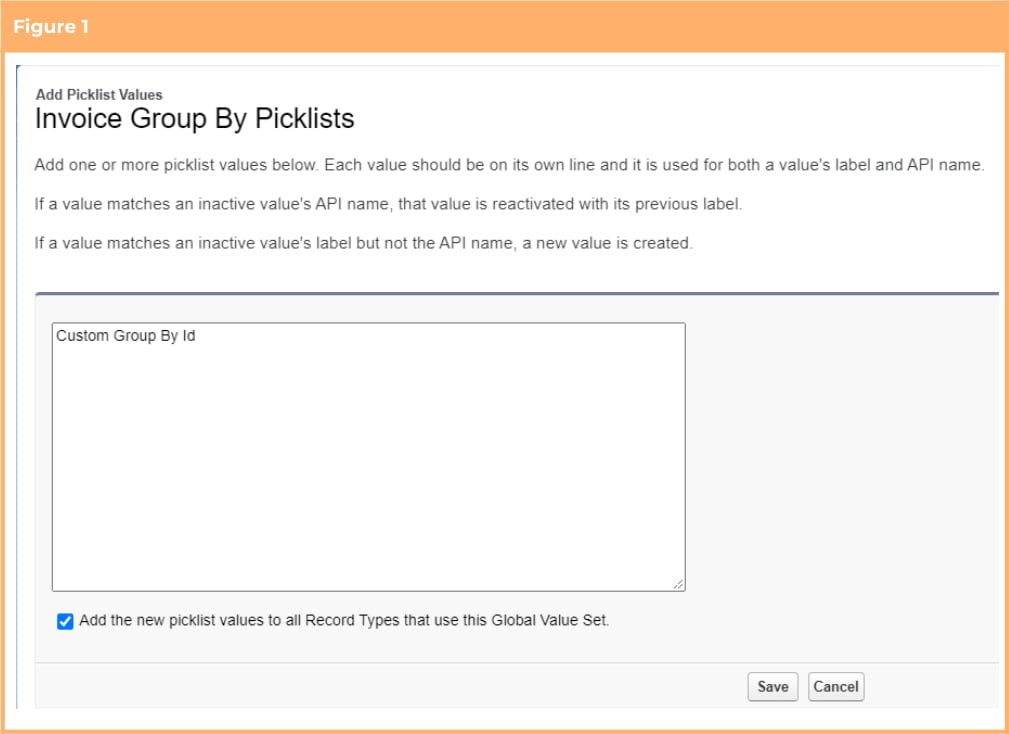 ### Include Expense Receipts/Evidences as Attachments with Invoice Emails
The functionality to include expense receipts/evidence as attachments with invoice emails is optional. This
requirement only needs to be completed if the option to use the functionality is taken. If not, these items
can be skipped. The below configuration steps should be completed if the functionality is required:
1. Update Profile/Permission Sets (Optional)
2. Update page layouts for new fields (Optional)
3. Update new fields on existing records (Optional)
#### Update Profile/Permission Sets (Optional)
The below detailed fields have had read/edit access added to the following permission sets provided with
the package. Where these are in use, the permissions required will be automatically provisioned.
* 2cloudnine Payroll Admin
* 2cloudnine Time2Pay All Access
If the packaged permission sets are not used within the organisation, the access outlined in Appendix 22
must be made available for use either via profiles or custom permission sets.
#### Update Page Layouts for New Fields (Optional)
This requirement only needs to be completed if the option to use the functionality is taken. If not, this item
can be skipped.
1. Go to Setup > Object Manager
2. Select Invoice Setting (tc9\_et\_\_Invoice\_Setting\_\_c) > Page Layouts
3. Select a page layout that is used for the Payroll Items record type
4. Add the following field to the layout
* Exp Claim Attachments with Invoice (tc9\_et\_\_Exp\_Claim\_Attachments\_with\_Invoice\_\_c)
5. Click Save
6. Repeat steps 3 to 5 for all page layouts that are used on the Payroll Items record type
#### Update New Field on Existing Records (Optional)
To send Expense receipts/evidence with Invoice emails, the Exp Claim Attachments with Invoice field must
be set to the “Yes” option in the Invoice Setting. Any Invoice Settings that require this should be updated
directly via the standard page.
### Make ‘Funding Requirement' Mandatory
The functionality to make the Funding Requirement a mandatory field on the Create Pay Batch page is
optional. The below configuration steps should be completed if the functionality is required:
1. Turn on functionality via custom setting (Optional)
#### Turn On Functionality via Custom Setting (Optional)
This requirement only needs to be completed if the option to use the functionality is taken. If not, this item
can be skipped.
1. Go to Setup > Custom Code > Custom Setting
2. Locate the Payroll Configuration custom setting and click on the Manage link alongside it
3. Click the Edit button
4. Set the Pay Batch Manager Funding Required checkbox field to be checked as “True” (See Figure 1)
5. Click Save
### Include Expense Receipts/Evidences as Attachments with Invoice Emails
The functionality to include expense receipts/evidence as attachments with invoice emails is optional. This
requirement only needs to be completed if the option to use the functionality is taken. If not, these items
can be skipped. The below configuration steps should be completed if the functionality is required:
1. Update Profile/Permission Sets (Optional)
2. Update page layouts for new fields (Optional)
3. Update new fields on existing records (Optional)
#### Update Profile/Permission Sets (Optional)
The below detailed fields have had read/edit access added to the following permission sets provided with
the package. Where these are in use, the permissions required will be automatically provisioned.
* 2cloudnine Payroll Admin
* 2cloudnine Time2Pay All Access
If the packaged permission sets are not used within the organisation, the access outlined in Appendix 22
must be made available for use either via profiles or custom permission sets.
#### Update Page Layouts for New Fields (Optional)
This requirement only needs to be completed if the option to use the functionality is taken. If not, this item
can be skipped.
1. Go to Setup > Object Manager
2. Select Invoice Setting (tc9\_et\_\_Invoice\_Setting\_\_c) > Page Layouts
3. Select a page layout that is used for the Payroll Items record type
4. Add the following field to the layout
* Exp Claim Attachments with Invoice (tc9\_et\_\_Exp\_Claim\_Attachments\_with\_Invoice\_\_c)
5. Click Save
6. Repeat steps 3 to 5 for all page layouts that are used on the Payroll Items record type
#### Update New Field on Existing Records (Optional)
To send Expense receipts/evidence with Invoice emails, the Exp Claim Attachments with Invoice field must
be set to the “Yes” option in the Invoice Setting. Any Invoice Settings that require this should be updated
directly via the standard page.
### Make ‘Funding Requirement' Mandatory
The functionality to make the Funding Requirement a mandatory field on the Create Pay Batch page is
optional. The below configuration steps should be completed if the functionality is required:
1. Turn on functionality via custom setting (Optional)
#### Turn On Functionality via Custom Setting (Optional)
This requirement only needs to be completed if the option to use the functionality is taken. If not, this item
can be skipped.
1. Go to Setup > Custom Code > Custom Setting
2. Locate the Payroll Configuration custom setting and click on the Manage link alongside it
3. Click the Edit button
4. Set the Pay Batch Manager Funding Required checkbox field to be checked as “True” (See Figure 1)
5. Click Save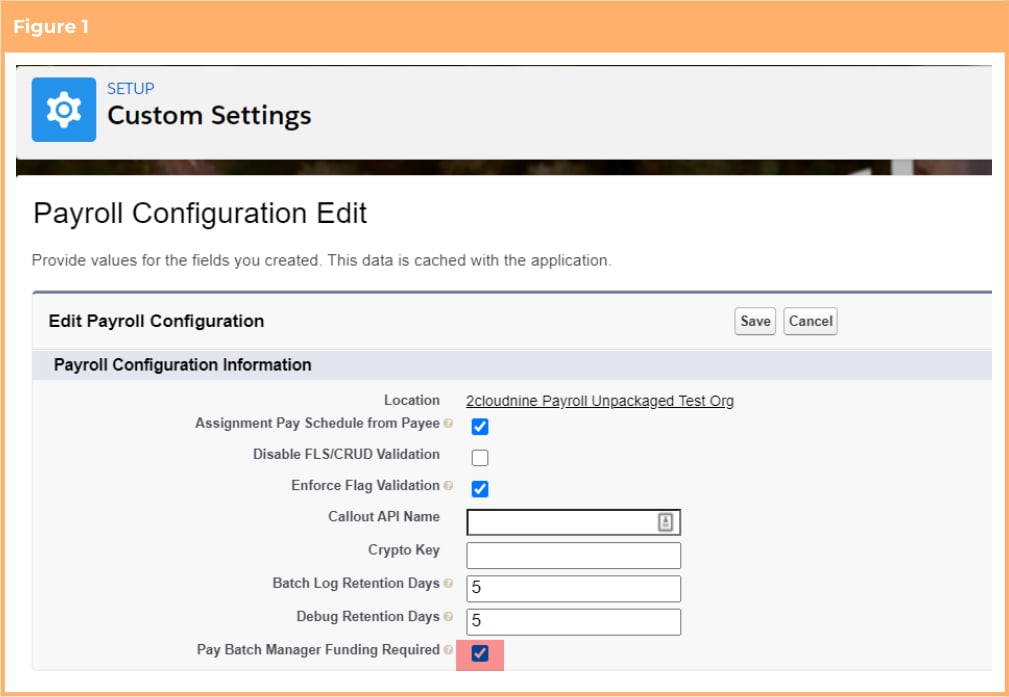 ### Adhere to SuperStream Requirements
The introduction of the Super Fund validation is a compulsory validation that will come into effect on
installation of the package. To prevent validation errors occurring during the payroll processing, the below
configuration steps should be completed:
1. Check and Update data on existing records (Compulsory)
#### Check and Update Data On Existing Records (Compulsory)
A check of current, existing Payee Withholding records should be completed to ensure that the
Superannuation Fund is populated and, where not, corrective action should be taken.
To make this process easier, a new list view on the Payee Withholding object, No Super Fund, has been
created. This will list any AU Super records that have not expired and do not have the superannuation fund
populated.
From this list view the following corrective action should be taken:
* Where the Pay Batch Event Processing Status is 'New' (see column in list view), the record can be
edited directly.
* Where the Pay Batch Event Processing Status is not 'New', the Payee Withholding record has
already been applied to a payroll therefore can not be updated. You will need to expire the existing
record and create a new one with the Superannuation Fund populated.
### Customise Communities/Experience Terminology
The functionality to customise terminology used within Communities/Experience is optional. If required,
system administrators can add Translations/Overrides against individual Custom Labels and the changes
will be reflected within both the Employee and Approver Communities/Experience. The below
configuration steps should be completed if the functionality is required:
1. Override/translate custom labels (Optional)
#### Override/Translate Custom Labels (Optional)
This requirement only needs to be completed if the option to use the functionality is taken. If not, this item
can be skipped.
1. Use the table provided in Appendix 23 to search for the out of the box terminology used within
Communities/Experience and establish the custom label that needs to be updated to change it
2. Go to Setup > User Interface > Custom Labels
3. Locate the custom label you wish to override/translate and click the Name link (not the Edit link
alongside it)
4. On the displayed page, scroll down to the Local Translations/Overrides section and click the New
Local Transactions/Overrides button
5. Populate the required fields
6. Click Save
7. Repeat steps 1 to 6 until all overrides / translations required are completed
UPDATE: The table provided in Appendix 23 has been updated to incorporate new Custom Label
information.
## Appendix 1
Below is a list of component included within the Lilly Pilly ‘21 Release
### Object
| Label | Name |
| ------------------- | ------------------------------------ |
| Assignment Schedule | tc9\_pr\_\_Assignment\_Schedule\_\_c |
| Minimum Pay Rate | tc9\_et\_\_Minimum\_Pay\_Rate\_\_c |
| Pay Rate Loading \* | tc9\_et\_\_Pay\_Rate\_Loading\_\_c |
| Schedule Item | tc9\_pr\_\_Schedule\_Item\_\_c |
### Object Fields
| Object | Label | Name |
| --------------------------------------------------------------------------- | --------------------------------------- | ------------------------------------------------- |
| Assignment (tc9\_pr\_\_Assignment\_\_c) | Assignment Rate Template Group Inv Rate | Assignment\_Rate\_Template\_Group\_Inv\_Rate\_\_c |
| Assignment (tc9\_pr\_\_Assignment\_\_c) | Assignment Rate Template Group Pay Rate | Assignment\_Rate\_Template\_Group\_Pay\_Rate\_\_c |
| Assignment (tc9\_pr\_\_Assignment\_\_c) | Custom Invoice Group By Id | Custom\_Invoice\_Group\_By\_Id\_\_c |
| Assignment Rate (tc9\_pr\_\_Assignment\_Rate\_\_c) | Auto Pay Calculation Basis | Auto\_Pay\_Calculation\_Basis\_\_c |
| Assignment Rate (tc9\_pr\_\_Assignment\_Rate\_\_c) | Exclude From Back Pay \* | Exclude\_From\_Back\_Pay\_\_c |
| Assignment Schedule
### Adhere to SuperStream Requirements
The introduction of the Super Fund validation is a compulsory validation that will come into effect on
installation of the package. To prevent validation errors occurring during the payroll processing, the below
configuration steps should be completed:
1. Check and Update data on existing records (Compulsory)
#### Check and Update Data On Existing Records (Compulsory)
A check of current, existing Payee Withholding records should be completed to ensure that the
Superannuation Fund is populated and, where not, corrective action should be taken.
To make this process easier, a new list view on the Payee Withholding object, No Super Fund, has been
created. This will list any AU Super records that have not expired and do not have the superannuation fund
populated.
From this list view the following corrective action should be taken:
* Where the Pay Batch Event Processing Status is 'New' (see column in list view), the record can be
edited directly.
* Where the Pay Batch Event Processing Status is not 'New', the Payee Withholding record has
already been applied to a payroll therefore can not be updated. You will need to expire the existing
record and create a new one with the Superannuation Fund populated.
### Customise Communities/Experience Terminology
The functionality to customise terminology used within Communities/Experience is optional. If required,
system administrators can add Translations/Overrides against individual Custom Labels and the changes
will be reflected within both the Employee and Approver Communities/Experience. The below
configuration steps should be completed if the functionality is required:
1. Override/translate custom labels (Optional)
#### Override/Translate Custom Labels (Optional)
This requirement only needs to be completed if the option to use the functionality is taken. If not, this item
can be skipped.
1. Use the table provided in Appendix 23 to search for the out of the box terminology used within
Communities/Experience and establish the custom label that needs to be updated to change it
2. Go to Setup > User Interface > Custom Labels
3. Locate the custom label you wish to override/translate and click the Name link (not the Edit link
alongside it)
4. On the displayed page, scroll down to the Local Translations/Overrides section and click the New
Local Transactions/Overrides button
5. Populate the required fields
6. Click Save
7. Repeat steps 1 to 6 until all overrides / translations required are completed
UPDATE: The table provided in Appendix 23 has been updated to incorporate new Custom Label
information.
## Appendix 1
Below is a list of component included within the Lilly Pilly ‘21 Release
### Object
| Label | Name |
| ------------------- | ------------------------------------ |
| Assignment Schedule | tc9\_pr\_\_Assignment\_Schedule\_\_c |
| Minimum Pay Rate | tc9\_et\_\_Minimum\_Pay\_Rate\_\_c |
| Pay Rate Loading \* | tc9\_et\_\_Pay\_Rate\_Loading\_\_c |
| Schedule Item | tc9\_pr\_\_Schedule\_Item\_\_c |
### Object Fields
| Object | Label | Name |
| --------------------------------------------------------------------------- | --------------------------------------- | ------------------------------------------------- |
| Assignment (tc9\_pr\_\_Assignment\_\_c) | Assignment Rate Template Group Inv Rate | Assignment\_Rate\_Template\_Group\_Inv\_Rate\_\_c |
| Assignment (tc9\_pr\_\_Assignment\_\_c) | Assignment Rate Template Group Pay Rate | Assignment\_Rate\_Template\_Group\_Pay\_Rate\_\_c |
| Assignment (tc9\_pr\_\_Assignment\_\_c) | Custom Invoice Group By Id | Custom\_Invoice\_Group\_By\_Id\_\_c |
| Assignment Rate (tc9\_pr\_\_Assignment\_Rate\_\_c) | Auto Pay Calculation Basis | Auto\_Pay\_Calculation\_Basis\_\_c |
| Assignment Rate (tc9\_pr\_\_Assignment\_Rate\_\_c) | Exclude From Back Pay \* | Exclude\_From\_Back\_Pay\_\_c |
| Assignment Schedule
(tc9\_pr\_\_Assignment\_Schedule\_\_c) | Assignment | Assignment\_\_c |
| Assignment Schedule
(tc9\_pr\_\_Assignment\_Schedule\_\_c) | Effective Date | Effective\_Date\_\_c |
| Assignment Schedule
(tc9\_pr\_\_Assignment\_Schedule\_\_c) | Employee | Employee\_\_c |
| Assignment Schedule
(tc9\_pr\_\_Assignment\_Schedule\_\_c) | Exclude From Auto Update | Exclude\_From\_Auto\_Update\_\_c |
| Assignment Schedule
(tc9\_pr\_\_Assignment\_Schedule\_\_c) | Expiry Date | Expiry\_Date\_\_c |
| Assignment Schedule
(tc9\_pr\_\_Assignment\_Schedule\_\_c) | External Id | External\_Id\_\_c |
| Assignment Schedule
(tc9\_pr\_\_Assignment\_Schedule\_\_c) | Payee | Payee\_\_c |
| Assignment Schedule
(tc9\_pr\_\_Assignment\_Schedule\_\_c) | Public Holiday Calendar | Public\_Holiday\_Calendar\_\_c |
| Assignment Schedule
(tc9\_pr\_\_Assignment\_Schedule\_\_c) | Status | Status\_\_c |
| Assignment Schedule
(tc9\_pr\_\_Assignment\_Schedule\_\_c) | Work Schedule | Work\_Schedule\_\_c |
| Interpretation Breakpoint
(tc9\_et\_\_Interpretation\_Breakpoint\_\_c) | Daily Quantity | Daily\_Quantity\_\_c |
| Interpretation Breakpoint
(tc9\_et\_\_Interpretation\_Breakpoint\_\_c) | Pay Partial Quantity | Pay\_Partial\_Quantity\_\_c |
| Interpretation Rule (tc9\_et\_\_Interpretation\_Rule\_\_c) | Apply Dual Leave Loading Calculations | Apply\_Dual\_Leave\_Loading\_Calculations\_\_c |
| Interpretation Rule (tc9\_et\_\_Interpretation\_Rule\_\_c) | Apply Partial Daily Rates | Apply\_Partial\_Daily\_Rates\_\_c |
| Interpretation Rule (tc9\_et\_\_Interpretation\_Rule\_\_c) | Days Minimum Rest Hours Apply | Days\_Minimum\_Rest\_Hours\_Apply2\_\_c |
| Interpretation Rule (tc9\_et\_\_Interpretation\_Rule\_\_c) | Days Total Span Hours Apply | Days\_Total\_Span\_Hours\_Apply2\_\_c |
| Invoice Setting (tc9\_et\_\_Invoice\_Setting\_\_c) | Exp Claim Attachments with Invoice | Exp\_Claim\_Attachments\_with\_Invoice\_\_c |
| Leave Rule (tc9\_pr\_\_Leave\_Rule\_\_c) | Allow Pay in Advance | Allow\_Pay\_in\_Advance\_\_c |
| Leave Rule (tc9\_pr\_\_Leave\_Rule\_\_c) | Apply Dual Leave Loading Calculations | Apply\_Dual\_Leave\_Loading\_Calculations\_\_c |
| Leave Rule (tc9\_pr\_\_Leave\_Rule\_\_c) | Available Pay Rates | Available\_Pay\_Rates\_\_c |
| Leave Rule (tc9\_pr\_\_Leave\_Rule\_\_c) | Credit Available in Portal? | Credit\_Available\_in\_Portal\_\_c |
| Leave Rule (tc9\_pr\_\_Leave\_Rule\_\_c) | Time Off in Lieu Expiry Days \* | Time\_Off\_in\_Lieu\_Expiry\_Days\_\_c |
| Minimum Pay Rate
(tc9\_et\_\_Minimum\_Pay\_Rate\_\_c) | Allowance Pay Code | Allowance\_Pay\_Code\_\_c |
| Minimum Pay Rate
(tc9\_et\_\_Minimum\_Pay\_Rate\_\_c) | Annual Rate Change | Annual\_Rate\_Change\_\_c |
| Minimum Pay Rate
(tc9\_et\_\_Minimum\_Pay\_Rate\_\_c) | Assignment Rate Template Group | Assignment\_Rate\_Template\_Group\_\_c |
| Minimum Pay Rate
(tc9\_et\_\_Minimum\_Pay\_Rate\_\_c) | Award Classification | Award\_Classification\_\_c |
| Minimum Pay Rate
(tc9\_et\_\_Minimum\_Pay\_Rate\_\_c) | Award Level | Award\_Level\_\_c |
| Minimum Pay Rate
(tc9\_et\_\_Minimum\_Pay\_Rate\_\_c) | Casual Loading Record | Casual\_Loading\_Record\_\_c |
| Minimum Pay Rate
(tc9\_et\_\_Minimum\_Pay\_Rate\_\_c) | Effective Date | Effective\_Date\_\_c |
| Minimum Pay Rate
(tc9\_et\_\_Minimum\_Pay\_Rate\_\_c) | Expiry Date | Expiry\_Date\_\_c |
| Minimum Pay Rate
(tc9\_et\_\_Minimum\_Pay\_Rate\_\_c) | Interpretation Rule | Interpretation\_Rule\_\_c |
| Minimum Pay Rate
(tc9\_et\_\_Minimum\_Pay\_Rate\_\_c) | Pay Rate | Pay\_Rate\_\_c |
| Minimum Pay Rate
(tc9\_et\_\_Minimum\_Pay\_Rate\_\_c) | Status | Status\_\_c |
| Pay Advice Line (tc9\_pr\_\_Pay\_Advice\_Line\_\_c) | Leave Rate Multiplier | Leave\_Rate\_Multiplier\_\_c |
| Pay Advice Template
(tc9\_pr\_\_Pay\_Advice\_Template\_\_c) | Available for Use | Available\_for\_Use\_\_c |
| Pay Advice Template
(tc9\_pr\_\_Pay\_Advice\_Template\_\_c) | Colour - Footer Text | Colour\_Footer\_Text\_\_c |
| Pay Advice Template
(tc9\_pr\_\_Pay\_Advice\_Template\_\_c) | Position - Footer | Position\_Footer\_\_c |
| Pay Advice Template
(tc9\_pr\_\_Pay\_Advice\_Template\_\_c) | Text - Footer | Text\_Footer\_\_c |
| Pay Advice Template
(tc9\_pr\_\_Pay\_Advice\_Template\_\_c) | Text - Pay Advice Message | Text\_Pay\_Advice\_Message\_\_c |
| Pay Code (tc9\_pr\_\_Pay\_Code\_\_c) | Invoice Rate Multiplier | Invoice\_Rate\_Multiplier\_\_c |
| Pay Rate Loading (tc9\_et\_\_PayRate\_Loading\_\_c) | Assignment Handling \* | Assignment\_Handling\_\_c |
| Pay Rate Loading (tc9\_et\_\_PayRate\_Loading\_\_c) | Effective Date \* | Effective\_Date\_\_c |
| Pay Rate Loading (tc9\_et\_\_PayRate\_Loading\_\_c) | Expiry Date \* | Expiry\_Date\_\_c |
| Pay Rate Loading (tc9\_et\_\_PayRate\_Loading\_\_c) | Interpretation Rule \* | Interpretation\_Rule\_\_c |
| Pay Rate Loading (tc9\_et\_\_PayRate\_Loading\_\_c) | Loading Based On \* | Loading\_Based\_On\_\_c |
| Pay Rate Loading (tc9\_et\_\_PayRate\_Loading\_\_c) | Loading Rate \* | Loading\_Rate\_\_c |
| Pay Transaction (tc9\_pr\_\_Pay\_Transaction\_\_c) | Assignment Schedule | Assignment\_Schedule\_\_c |
| Pay Transaction (tc9\_pr\_\_Pay\_Transaction\_\_c) | Auto Generated Back Pay \* | Auto\_Generated\_Back\_Pay\_\_c |
| Pay Transaction (tc9\_pr\_\_Pay\_Transaction\_\_c) | Leave Rate Multiplier | Leave\_Rate\_Multiplier\_\_c |
| Pay Transaction (tc9\_pr\_\_Pay\_Transaction\_\_c) | Quantity by Leave Multiplier | Quantity\_by\_Leave\_Multiplier\_\_c |
| Pay Transaction (tc9\_pr\_\_Pay\_Transaction\_\_c) | System Temp Value | System\_Temp\_Value\_\_c |
| Payee Leave Event (tc9\_pr\_\_Payee\_Leave\_Event\_\_c) | Advance Pay End Calendar Period | Advance\_Pay\_End\_Calendar\_Period\_\_c |
| Payee Leave Event (tc9\_pr\_\_Payee\_Leave\_Event\_\_c) | Advance Pay Payment Calendar Period | Advance\_Pay\_Payment\_Calendar\_Period\_\_c |
| Payee Leave Event (tc9\_pr\_\_Payee\_Leave\_Event\_\_c) | Advance Pay Start Calendar Period | Advance\_Pay\_Start\_Calendar\_Period\_\_c |
| Payee Leave Event (tc9\_pr\_\_Payee\_Leave\_Event\_\_c) | Pay in Advance | Pay\_in\_Advance\_\_c |
| Payee Leave Event (tc9\_pr\_\_Payee\_Leave\_Event\_\_c) | Selected Pay Rate | Selected\_Pay\_Rate\_\_c |
| Payee Pay Batch (tc9\_pr\_\_Pay\_Batch\_Item\_\_c) | Flag Back Pay Processed \* | Flag\_Back\_Pay\_Processed\_\_c |
| Payment File Line (tc9\_pr\_\_Payment\_File\_Line\_\_c) | Payment Consolidation | Payment\_Consolidation\_\_c |
| Rate Calculator Junction
(tc9\_et\_\_Rate\_Calculator\_Junction\_\_c) | Pay Rate Loading \* | Pay\_Rate\_Loading\_\_c |
| Rate Calculator Line
(tc9\_et\_\_Rate\_Calculator\_Line\_\_c) | Casual Rate Loading \* | Casual\_Rate\_Loading\_\_c |
| Rate Calculator Line
(tc9\_et\_\_Rate\_Calculator\_Line\_\_c) | Shift Rate Loading Record \* | Shift\_Rate\_Loading\_Record\_\_c |
| Schedule (tc9\_pr\_\_Schedule\_\_c) | Auto Create Shift Allocations | Auto\_Create\_Shift\_Allocations\_\_c |
| Schedule (tc9\_pr\_\_Schedule\_\_c) | Auto Pay Public Holiday Pay Code | Auto\_Pay\_Public\_Holiday\_Pay\_Code\_\_c |
| Schedule (tc9\_pr\_\_Schedule\_\_c) | Break Time Format | Break\_Time\_Format\_\_c |
| Schedule (tc9\_pr\_\_Schedule\_\_c) | Default Auto Pay Calculation Basis | Default\_Auto\_Pay\_Calculation\_Basis\_\_c |
| Schedule (tc9\_pr\_\_Schedule\_\_c) | Shift Time Format | Shift\_Time\_Format\_\_c |
| Schedule (tc9\_pr\_\_Schedule\_\_c) | Work Schedule First Day | Work\_Schedule\_First\_Day\_\_c |
| Schedule (tc9\_pr\_\_Schedule\_\_c) | Work Schedule Generation Status | Work\_Schedule\_Generation\_Status\_\_c |
| Schedule (tc9\_pr\_\_Schedule\_\_c) | Work Schedule Hours | Work\_Schedule\_Hours\_\_c |
| Schedule (tc9\_pr\_\_Schedule\_\_c) | Work Schedule Minutes | Work\_Schedule\_Minutes\_\_c |
| Schedule (tc9\_pr\_\_Schedule\_\_c) | Work Schedule Number of Weeks | Work\_Schedule\_Number\_of\_Weeks\_\_c |
| Schedule (tc9\_pr\_\_Schedule\_\_c) | Work Schedule Paid Breaks | Work\_Schedule\_Paid\_Breaks\_\_c |
| Schedule (tc9\_pr\_\_Schedule\_\_c) | Work Schedule Published From | Work\_Schedule\_Published\_From\_\_c |
| Schedule (tc9\_pr\_\_Schedule\_\_c) | Work Schedule Published To | Work\_Schedule\_Published\_To\_\_c |
| Schedule (tc9\_pr\_\_Schedule\_\_c) | Work Schedule Start Date | Work\_Schedule\_Start\_Date\_\_c |
| Schedule (tc9\_pr\_\_Schedule\_\_c) | Work Schedule Total Breaks | Work\_Schedule\_Total\_Breaks\_\_c |
| Schedule (tc9\_pr\_\_Schedule\_\_c) | Work Schedule Total Time | Work\_Schedule\_Total\_Time\_\_c |
| Schedule (tc9\_pr\_\_Schedule\_\_c) | Work Schedule Unpaid Breaks | Work\_Schedule\_Unpaid\_Breaks\_\_c |
| Schedule Item (tc9\_pr\_\_Schedule\_Item\_\_c) | Break 1 End Time | Break\_1\_End\_Time\_\_c |
| Schedule Item (tc9\_pr\_\_Schedule\_Item\_\_c) | Break 1 Paid? | Break\_1\_Paid\_\_c |
| Schedule Item (tc9\_pr\_\_Schedule\_Item\_\_c) | Break 1 Start Time | Break\_1\_Start\_Time\_\_c |
| Schedule Item (tc9\_pr\_\_Schedule\_Item\_\_c) | Break 1 Total Time | Break\_1\_Total\_Time\_\_c |
| Schedule Item (tc9\_pr\_\_Schedule\_Item\_\_c) | Break 2 End Time | Break\_2\_End\_Time\_\_c |
| Schedule Item (tc9\_pr\_\_Schedule\_Item\_\_c) | Break 2 Paid? | Break\_2\_Paid\_\_c |
| Schedule Item (tc9\_pr\_\_Schedule\_Item\_\_c) | Break 2 Start Time | Break\_2\_Start\_Time\_\_c |
| Schedule Item (tc9\_pr\_\_Schedule\_Item\_\_c) | Break 2 Total Time | Break\_2\_Total\_Time\_\_c |
| Schedule Item (tc9\_pr\_\_Schedule\_Item\_\_c) | Break Time Format | Break\_Time\_Format\_\_c |
| Schedule Item (tc9\_pr\_\_Schedule\_Item\_\_c) | Day Number | Day\_Number\_\_c |
| Schedule Item (tc9\_pr\_\_Schedule\_Item\_\_c) | Day of the Week | Day\_of\_the\_Week\_\_c |
| Schedule Item (tc9\_pr\_\_Schedule\_Item\_\_c) | Day Off | Day\_Off\_\_c |
| Schedule Item (tc9\_pr\_\_Schedule\_Item\_\_c) | Entry Date | Entry\_Date\_\_c |
| Schedule Item (tc9\_pr\_\_Schedule\_Item\_\_c) | External Id | External\_Id\_\_c |
| Schedule Item (tc9\_pr\_\_Schedule\_Item\_\_c) | Shift Allocation Record | Shift\_Allocation\_Record\_\_c |
| Schedule Item (tc9\_pr\_\_Schedule\_Item\_\_c) | Shift End Time | Shift\_End\_Time\_\_c |
| Schedule Item (tc9\_pr\_\_Schedule\_Item\_\_c) | Shift Number | Shift\_Number\_\_c |
| Schedule Item (tc9\_pr\_\_Schedule\_Item\_\_c) | Shift Paid Breaks | Shift\_Paid\_Breaks\_\_c |
| Schedule Item (tc9\_pr\_\_Schedule\_Item\_\_c) | Shift Record | Shift\_Record\_\_c |
| Schedule Item (tc9\_pr\_\_Schedule\_Item\_\_c) | Shift Start Time | Shift\_Start\_Time\_\_c |
| Schedule Item (tc9\_pr\_\_Schedule\_Item\_\_c) | Shift Time Format | Shift\_Time\_Format\_\_c |
| Schedule Item (tc9\_pr\_\_Schedule\_Item\_\_c) | Shift Total Breaks | Shift\_Total\_Breaks\_\_c |
| Schedule Item (tc9\_pr\_\_Schedule\_Item\_\_c) | Shift Total Hours | Shift\_Total\_Hours\_\_c |
| Schedule Item (tc9\_pr\_\_Schedule\_Item\_\_c) | Shift Total Minutes | Shift\_Total\_Minutes\_\_c |
| Schedule Item (tc9\_pr\_\_Schedule\_Item\_\_c) | Shift Total Time | Shift\_Total\_Time\_\_c |
| Schedule Item (tc9\_pr\_\_Schedule\_Item\_\_c) | Shift Unpaid Breaks | Shift\_Unpaid\_Breaks\_\_c |
| Schedule Item (tc9\_pr\_\_Schedule\_Item\_\_c) | Sort Order | Sort\_Order\_\_c |
| Schedule Item (tc9\_pr\_\_Schedule\_Item\_\_c) | Week Number | Week\_Number\_\_c |
| Schedule Item (tc9\_pr\_\_Schedule\_Item\_\_c) | Work Schedule | Work\_Schedule\_\_c |
| Superannuation Fund
(tc9\_pr\_\_Superannuation\_Fund\_\_c) | External ID \* | External\_ID\_\_c |
| Timesheet Entry (tc9\_et\_\_Timesheet\_Entry\_\_c) | Work Schedule Item | Work\_Schedule\_Item\_\_c |
### Object Record Types
| Object | Label | Name |
| ---------------------------------------------------------------------- | ----------------------------------- | -------------------------------------------- |
| Assignment Schedule
(tc9\_pr\_\_Assignment\_Schedule\_\_c) | Substitution | tc9\_pr.Substitution |
| Assignment Schedule
(tc9\_pr\_\_Assignment\_Schedule\_\_c) | Work Schedule | tc9\_pr.Work\_Schedule |
| Pay Rate Loading (tc9\_et\_\_Pay\_Rate\_Loading\_\_c) | Casual Loading \* | tc9\_et.Casual\_Loading |
| Pay Rate Loading (tc9\_et\_\_Pay\_Rate\_Loading\_\_c) | Shift Loading \* | tc9\_et.Shift\_Loading |
| Pay Transaction (tc9\_pr\_\_Pay\_Transaction\_\_c) | Fee \* | tc9\_pr.FEE |
| Payee Allowance Record
(tc9\_pr\_\_Payee\_Allowance\_Record\_\_c) | Payroll Allowance Template Group | tc9\_et.Payroll\_Allowance\_Template\_Group |
| Project Code (tc9\_et\_\_Project\_Code\_\_c) | Template Level | tc9\_et.Template\_Level |
| Project Code (tc9\_et\_\_Project\_Code\_\_c) | Timesheet Activity - Template Level | tc9\_et.Timesheet\_Activity\_Template\_Level |
| Project Code (tc9\_et\_\_Project\_Code\_\_c) | External ID | tc9\_et.External\_ID |
| Schedule (tc9\_pr\_\_Schedule\_\_c) | Work Schedule | tc9\_pr.Work\_Schedule |
| Schedule Item (tc9\_pr\_\_Schedule\_Item\_\_c) | Shift | tc9\_pr.Shift |
| Schedule Item (tc9\_pr\_\_Schedule\_Item\_\_c) | Shift Allocation | tc9\_pr.Shift\_Allocation |
| Schedule Item (tc9\_pr\_\_Schedule\_Item\_\_c) | Work Schedule Entry | tc9\_pr.Work\_Schedule\_Entry |
| Invoice Tax Id (tc9\_et\_\_Invoice\_tax\_id) | External ID | tc9\_et.External\_ID |
| Timesheet (tc9\_et\_\_Timesheet) | External ID | tc9\_et.External\_ID |
| Invoice Setting (tc9\_et\_\_Invoice\_Setting) | External ID | tc9\_et.External\_ID |
| Invoiceable Fee (tc9\_et\_\_Invoiceable\_Fee) External ID | | |
### Custom Setting
| Label | Name |
| ------------------------------- | ------------------------------------ |
| Time2pay Portal Permission Sets | tc9\_et\_\_PortalPermissionSets\_\_c |
### Custom Setting Fields
tc9\_et.External\_ID
| Custom Setting | Label | Name |
| ---------------------------------------------------------------------------- | ---------------------------------------- | -------------------------------------------------- |
| Automatic Status Update
(tc9\_pr\_\_Automatic\_Status\_Update\_\_c) | Assignment Schedule | Assignment\_Schedule\_\_c\_\_c |
| Payroll Configuration
(tc9\_pr\_\_Payroll\_Configuration\_\_c) | Pay Batch Manager Funding Required | Pay\_Batch\_Manager\_Funding\_Required\_\_c |
| Time2Pay Batch Size Overrides
(tc9\_et\_\_TCS\_Variable\_Settings\_\_c) | Batch size for assignment rates creation | Batch\_size\_for\_assignment\_rates\_creation\_\_c |
| Time2Pay Batch Size Overrides
(tc9\_et\_\_TCS\_Variable\_Settings\_\_c) | Batch size for mpr assignments | Batch\_size\_for\_mpr\_assignments\_\_c |
| Time2Pay Batch Size Overrides
(tc9\_et\_\_TCS\_Variable\_Settings\_\_c) | Batch size for payee allowance creation | Batch\_size\_for\_payee\_allowance\_creation\_\_c |
| Time2pay Portal Permission Sets
(tc9\_et\_\_PortalPermissionSets\_\_c) | Permission Set Api Name | tc9\_et\_\_Permission\_Set\_Api\_Name\_\_c |
| Time2pay Portal Permission Sets
(tc9\_et\_\_PortalPermissionSets\_\_c) | Portal Profile Name | tc9\_et\_\_Portal\_Profile\_Name\_\_c |
### Platform Events
| Label | Name |
| --------------------- | ---------------------------------------- |
| Pay Rate Change Event | tc9\_et\_\_Pay\_Rate\_Change\_Event\_\_e |
| Schedule Event | Schedule\_Event\_\_e |
### Platform Event Fields
| Platform Event | Label | Name |
| --------------------------------------------------------------------- | ---------------------- | ------------------------------ |
| Pay Rate Change Event
(tc9\_et\_\_Pay\_Rate\_Change\_Event\_\_e) | Assignment Id | Assignment\_Id\_\_c |
| Pay Rate Change Event
(tc9\_et\_\_Pay\_Rate\_Change\_Event\_\_e) | Assignment Rate ID | Assignment\_Rate\_ID\_\_c |
| Pay Rate Change Event
(tc9\_et\_\_Pay\_Rate\_Change\_Event\_\_e) | Pay Rate Change Action | Pay\_Rate\_Change\_Action\_\_c |
| Pay Rate Change Event
(tc9\_et\_\_Pay\_Rate\_Change\_Event\_\_e) | Pay Rate Change Id | Pay\_Rate\_Change\_Id\_\_c |
| Schedule Event (tc9\_pr\_Schedule\_Event\_\_e) | Schedule Action | Schedule\_Action\_\_c |
| Schedule Event (tc9\_pr\_Schedule\_Event\_\_e) | Schedule Id | Schedule\_Id\_\_c |
### Page Layout
| Object | Name |
| ---------------------------------------------------------------------- | ----------------------------------------------- |
| Assignment Schedule
(tc9\_pr\_\_Assignment\_Schedule\_\_c) | TC9PR Assignment Schedule Layout |
| Minimum Pay Rate
(tc9\_et\_\_Minimum\_Pay\_Rate\_\_c) | Minimum Pay Rate Layout |
| Pay Rate Loading (tc9\_et\_\_Pay\_Rate\_Loading\_\_c) | Pay Rate Loading Layout \* |
| Payee Allowance Record
(tc9\_pr\_\_Payee\_Allowance\_Record\_\_c) | Time2Pay Payee Allowance Template Layout |
| Payee Exit Calculation
(tc9\_pr\_\_Payee\_Exit\_Calculation\_\_c) | TC9PR Australia Exit Calculation Layout |
| Assignment Schedule
(tc9\_pr\_\_Assignment\_Schedule\_\_c) | TC9PR Assignment Schedule Layout |
| Minimum Pay Rate
(tc9\_et\_\_Minimum\_Pay\_Rate\_\_c) | Minimum Pay Rate Layout |
| Pay Rate Loading (tc9\_et\_\_Pay\_Rate\_Loading\_\_c) | Pay Rate Loading Layout \* |
| Payee Allowance Record
(tc9\_pr\_\_Payee\_Allowance\_Record\_\_c) | Time2Pay Payee Allowance Template Layout |
| Payee Exit Calculation
(tc9\_pr\_\_Payee\_Exit\_Calculation\_\_c) | TC9PR Australia Exit Calculation Layout |
| Payee Exit Calculation
(tc9\_pr\_\_Payee\_Exit\_Calculation\_\_c) | TC9PR Australia Exit Item Layout |
| Payee Exit Calculation
(tc9\_pr\_\_Payee\_Exit\_Calculation\_\_c) | TC9PR Australia Exit Mapping Layout |
| Payee Exit Calculation
(tc9\_pr\_\_Payee\_Exit\_Calculation\_\_c) | TC9PR Australia Exit Result Layout |
| Project Code (tc9\_pr\_\_Project\_Code\_\_c) | Template Project Code Layout |
| Project Code (tc9\_pr\_\_Project\_Code\_\_c) | Template Timesheet Activity Project Code Layout |
| Schedule (tc9\_pr\_\_Schedule\_\_c) | TC9PR Work Schedule Layout |
| Schedule Item (tc9\_pr\_\_Schedule\_Item\_\_c) | TC9PR Schedule Item Allocation Layout |
| Schedule Item (tc9\_pr\_\_Schedule\_Item\_\_c) | TC9PR Schedule Item Shift Layout |
| Schedule Item (tc9\_pr\_\_Schedule\_Item\_\_c) | TC9PR Schedule Item Work Schedule Entry Layout |
| Superannuation Fund
(tc9\_pr\_\_Superannuation\_Fund\_\_c) | TC9EC Self Managed Superannuation Fund Layout |
### Compact Layouts
| Object | Name |
| ----------------------------------------------------- | ------------------------------------------ |
| Payee Leave Rule (tc9\_pr\_\_Payee\_Leave\_Rule\_\_c) | TC9PR\_Payee\_Leave\_Rule\_Compact\_Layout |
### Lightning Pages
| Type | Label | Name |
| ----------- | ------------------------------- | ---------------------------------------- |
| App Page | Timesheet Notification Manager | tc9\_et.Timesheet\_Notification\_Manager |
| Record Page | Assignment Schedule Record Page | Assignment\_Schedule\_Record\_Page |
| Record Page | Schedule Item Record Page | Schedule\_Item\_Record\_Page |
### Global Value Sets
| Label | Name |
| ------------------------------- | ------------------------------------------ |
| Auto Pay Calculation Basis | tc9\_pr.Auto\_Pay\_Calculation\_Basis |
| Leave Pay Rates | tc9\_pr.Leave\_Pay\_Rates |
| Payment Consolidation | tc9\_pr.Payment\_Consolidation |
| Shift Time Formats | tc9\_pr.Shift\_Time\_Formats |
| Text Position | tc9\_pr.Text\_Position |
| Work Schedule Generation Status | tc9\_pr.Work\_Schedule\_Generation\_Status |
### Tabs
| Type | Label | Name |
| ------------------- | ------------------------------ | -------------------------------- |
| Custom Object Tabs | Assignment Schedule | N/A |
| Custom Object Tabs | Employment Cost \* | N/A |
| Custom Object Tabs | Employment Cost Exception \* | N/A |
| Custom Object Tabs | Employment Cost Item \* | N/A |
| Custom Object Tabs | Minimum Pay Rate | N/A |
| Custom Object Tabs | Pay Code Junction \* | N/A |
| Custom Object Tabs | Pay Rate Loading \* | N/A |
| Custom Object Tabs | Rate Calculator Junction \* | N/A |
| Custom Object Tabs | Schedule Item | N/A |
| Lightning Page Tabs | Timesheet Notification Manager | Timesheet\_Notification\_Manager |
### Buttons and Links
| Object | Label | Name |
| ----------------------------------- | -------- | ---------------- |
| Schedule (tc9\_pr\_\_Schedule\_\_c) | Publish | tc9\_pr.Publish |
| Schedule (tc9\_pr\_\_Schedule\_\_c) | Validate | tc9\_pr.Validate |
### List Views
| Object | Label | Name |
| --------------------------------------------------------------- | --------------------- | ------------------------------- |
| Assignment Schedule
(tc9\_pr\_\_Assignment\_Schedule\_\_c) | All | tc9\_pr.All |
| Payee Withholding (tc9\_pr\_\_Payee\_Withholding\_\_c) | No Super Fund | tc9\_pr.No\_Super\_Fund |
| Schedule Item (tc9\_pr\_\_Schedule\_Item\_\_c) | All | tc9\_pr.All |
| Schedule Item (tc9\_pr\_\_Schedule\_Item\_\_c) | Shift Allocations | tc9\_pr.Shift\_Allocations |
| Schedule Item (tc9\_pr\_\_Schedule\_Item\_\_c) | Shifts | tc9\_pr.Shifts |
| Schedule Item (tc9\_pr\_\_Schedule\_Item\_\_c) | Work Schedule Entries | tc9\_pr.Work\_Schedule\_Entries |
* These components have been included in the Lilly Pilly Release, however the related functionality will be introduced in future releases.
## Appendix 2
The below table defines the access that must be granted to Internal Users for new components introduced for the functionality to allow leave to be paid in
advance.
* **User 1** - Users who will create/update Leave Rules
* **User 2** - Users who will create/update Payee Leave Events
* **User 3** - Users who will process payroll
* **R** - Read
* **C** - Create
* **E** - Edit
* **A** - Assigned
| Type | Name | User 1 | User 2 | User 3 | User 4 |
| ------ | --------------------------------------------------------------------------------------------- | ------ | ------ | ------ | ------ |
| Object | Leave Rule (tc9\_pr\_\_Leave\_Rule\_\_c) | R/C/E | R | R | |
| Field | Allow Pay In Advance (tc9\_pr\_\_Allow\_Pay\_in\_Advance\_\_c) | R/E | R | R | |
| Object | Payee Leave Event (tc9\_pr\_\_Payee\_Leave\_Event\_\_c) | | R/C/E | R | |
| Field | Advance Pay End Calendar Period (tc9\_pr\_\_Advance\_Pay\_End\_Calendar\_Period\_\_c) | | R/E | R | |
| Field | Advance Pay Payment Calendar Period (tc9\_pr\_\_Advance\_Pay\_Payment\_Calendar\_Period\_\_c) | | R/E | R | |
| Field | Advance Pay Start Calendar Period (tc9\_pr\_\_Advance\_Pay\_Start\_Calendar\_Period\_\_c) | | R/E | R | |
| Field | Pay In Advance (tc9\_pr\_\_Pay\_in\_Advance\_\_c) | | R/E | R | |
## Appendix 3
The below table defines the access that must be granted to Experience/ Communities Users for new components introduced for the functionality to allow leave
to be paid in advance.
* **User 1** - Employee Community Users
* **User 2** - Approver Community Guest User
* **R** - Read
* **C** - Create
* **E** - Edit
* **A** - Assigned
| Type | Name | User 1 | User 2 | User 3 | User 4 |
| ------ | -------------------------------------------------------------- | ------ | ------ | ------ | ------ |
| Object | Leave Rule (tc9\_pr\_\_Leave\_Rule\_\_c) | R | R | | |
| Field | Allow Pay In Advance (tc9\_pr\_\_Allow\_Pay\_in\_Advance\_\_c) | R | R | | |
| Object | Payee Leave Event (tc9\_pr\_\_Payee\_Leave\_Event\_\_c) | R/C/E | R | | |
| Field | Pay In Advance (tc9\_pr\_\_Pay\_in\_Advance\_\_c) | R/E | R | | |
## Appendix 4
The below table defines the access that must be granted to Internal Users for new components introduced for the functionality to allow users to indicate the rate
at which leave will be paid.
* **User 1** - Users who will create/update Leave Rules
* **User 2** - Users who will create/update Payee Leave Events
* **User 3** - Users who will process payroll
* **R** - Read
* **C** - Create
* **E** - Edit
* **A** - Assigned
| Type | Name | User 1 | User 2 | User 3 | User 4 |
| ------ | ------------------------------------------------------------------------------ | ------ | ------ | ------ | ------ |
| Object | Leave Rule (tc9\_pr\_\_Leave\_Rule\_\_c) | R/C/E | R | R | |
| Field | Available Pay Rates (tc9\_pr\_\_Available\_Pay\_Rates\_\_c) | R/E | R | R | |
| Object | Payee Leave Event (tc9\_pr\_\_Payee\_Leave\_Event\_\_c) | | R/C/E | R | |
| Field | Selected Pay Rate (tc9\_pr\_\_Selected\_Pay\_Rate\_\_c) | | R/E | R | |
| Object | Pay Advice Line (tc9\_pr\_\_Pay\_Advice\_Line\_\_c) | | | R/C/E | |
| Field | Leave Rate Multiplier (tc9\_pr\_\_Leave\_Rate\_Multiplier\_\_c) | | | R/E | |
| Object | Pay Transaction (tc9\_pr\_\_Pay\_Transaction\_\_c) | | | R/C/E | |
| Field | Leave Rate Multiplier (Leave\_Rate\_Multiplier\_\_c) | | | R/E | |
| Field | Quantity by Leave Multiplier (tc9\_pr\_\_Quantity\_by\_Leave\_Multiplier\_\_c) | | | R/E | |
## Appendix 5
The below table defines the access that must be granted to Experience/Communities Users for new components introduced for the functionality to allow users to
indicate the rate at which leave will be paid.
* **User 1** - Employee Community Users
* **User 2** - Approver Community Guest User
* **R** - Read
* **C** - Create
* **E** - Edit
* **A** - Assigned
| Type | Name | User 1 | User 2 | User 3 | User 4 |
| ------ | ----------------------------------------------------------- | ------ | ------ | ------ | ------ |
| Object | Leave Rule (tc9\_pr\_\_Leave\_Rule\_\_c) | R | R | | |
| Field | Available Pay Rates (tc9\_pr\_\_Available\_Pay\_Rates\_\_c) | R | R | | |
| Object | Payee Leave Event (tc9\_pr\_\_Payee\_Leave\_Event\_\_c) | R/C/E | R | | |
| Field | Selected Pay Rate (tc9\_pr\_\_Selected\_Pay\_Rate\_\_c) | R/E | R | | |
## Appendix 6
The below table defines the access that must be granted to Internal Users for new components introduced for the functionality to define and use dual leave
loading calculations during Timesheet Interpretation.
* **User 1** - Users who will create/update Leave Rules
* **User 2** - Users who will create/update Interpretation Rules
* **User 3** - Users who will be processing Timesheets through Interpretation Rules
* **R** - Read
* **C** - Create
* **E** - Edit
* **A** - Assigned
| Type | Name | User 1 | User 2 | User 3 | User 4 |
| ------ | ------------------------------------------------------------------------------------------------- | ------ | ------ | ------ | ------ |
| Object | Leave Rule (tc9\_pr\_\_Leave\_Rule\_\_c) | R/C/E | | R | |
| Field | Apply Dual Leave Loading Calculations (tc9\_pr\_\_Apply\_Dual\_Leave\_Loading\_Calculations\_\_c) | R/E | | R | |
| Object | Interpretation Rule (tc9\_et\_\_Interpretation\_Rule\_\_c) | | R/C/E | R | |
| Field | Apply Dual Leave Loading Calculations (tc9\_et\_\_Apply\_Dual\_Leave\_Loading\_Calculations\_\_c) | | R/E | R | |
| Object | Pay Transaction (tc9\_pr\_\_Pay\_Transaction\_\_c) | | | R/C/E | |
| Field | System Temp Value (tc9\_et\_\_System\_Temp\_Value\_\_c) | | | R/E | |
## Appendix 7
The below table defines the access that must be granted to Internal Users for new components introduced for the functionality to allow users to submit, approve,
reject leave requests credit for time off in lieu through Communities/Experience.
| Type | Name | User 1 | User 2 | User 3 | User 4 |
| ------ | -------------------------------------------------------------------------- | ------ | ------ | ------ | ------ |
| Object | Leave Rule (tc9\_pr\_\_Leave\_Rule\_\_c) | R/C/E | | | |
| Field | Credit Available In Portal (tc9\_pr\_\_Credit\_Available\_in\_Portal\_\_c) | R/E | | | |
* **User 1** - Users who will create/update Leave Rules
* **R** - Read
* **C** - Create
* **E** - Edit
* **A** - Assigned
## Appendix 8
The below table defines the access that must be granted to Experience/Communities Users for new components introduced for the functionality to allow users
to submit, approve, reject leave requests credit for time off in lieu through Communities/Experience.
* **User 1** - Employee Community Users
* **User 2** - Approver Community Guest User
* **R** - Read
* **C** - Create
* **E** - Edit
* **A** - Assigned
| Type | Name | User 1 | User 2 | User 3 | User 4 |
| ------ | -------------------------------------------------------------------------- | ------ | ------ | ------ | ------ |
| Object | Leave Rule (tc9\_pr\_\_Leave\_Rule\_\_c) | R | R | | |
| Field | Credit Available In Portal (tc9\_pr\_\_Credit\_Available\_in\_Portal\_\_c) | R | R | | |
## Appendix 9
The below table defines the access that must be granted to Internal Users for new components introduced for the functionality to automate the creation of Payee
Allowance Records and Assignment Rates.
| Type | Name | User 1 | User 2 | User 3 | User 4 |
| ----------- | ---------------------------------------------------------------------------------- | ------ | ------ | ------ | ------ |
| Object | Template Group (tc9\_pr\_\_Template\_Group\_\_c) | R/C/E | | | R |
| Record Type | Payee Timesheet Allowance (tc9\_et.Payee\_Timesheet\_Allowance) | A | | | A |
| Object | Assignment Rate (tc9\_pr\_\_Assignment\_Rate\_\_c) | R/C/E | | | R/C/E |
| Record Type | Remuneration Template (tc9\_pr.Remuneration\_Template) | A | | | A |
| Record Type | Timesheet Template (tc9\_et.Timesheet\_Template) | A | | | A |
| Field | Template Group (tc9\_pr\_\_Template\_Group\_\_c) | R/E | | | R |
| Object | Payee Allowance Record (tc9\_pr\_\_Payee\_Allowance\_Record\_\_c) | | R/C/E | | R/C/E |
| Record Type | Payroll Allowance Template Group (tc9\_et.Payroll\_Allowance\_Template\_Group) | | A | | A |
| Record Type | Timesheet Allowance Template Group (tc9\_et.Timesheet\_Allowance\_Template\_Group) | | A | | A |
| Field | Template Group (tc9\_et\_\_Template\_Group\_\_c) | | R/E | | R |
* **User 1** - Users who will create/update Assignment Rate Templates
* **User 2** - Users who will create/update Payee Allowance Templates
* **User 3** - Users who will create/update Pay Codes
* **User 4** - Users who will create/update Assignments
* **R** - Read
* **C** - Create
* **E** - Edit
* **A** - Assigned
| Type | Name | User 1 | User 2 | User 3 | User 4 |
| ------ | ------------------------------------------------------------------------------------------------------------ | ------ | ------ | ------ | ------ |
| Object | Pay Code (tc9\_pr\_\_Pay\_Code\_\_c) | | | R/C/E | R |
| Field | Invoice Rate Multiplier (tc9\_et\_\_Invoice\_Rate\_Multiplier\_\_c) | | | R/E | R |
| Object | Assignment (tc9\_pr\_\_Assignment\_c) | | | | R/C/E |
| Field | Assignment Rate Template Group (tc9\_pr\_\_Assignment\_Rate\_Template\_Group\_\_c) | | | | R/E |
| Field | Assignment Rate Template Group Inv Rate (tc9\_et\_\_Assignment\_Rate\_Template\_Group\_\_c) | | | | R/E |
| Field | Assignment Rate Template Group Pay Rate
(tc9\_et\_\_Assignment\_Rate\_Template\_Group\_Pay\_Rate\_\_c) | | | | R/E |
| Field | Payee Timesheet Allowance Template Group
(tc9\_et\_\_Payee\_Timesheet\_Allowance\_Template\_Group\_\_c) | | | | R/E |
## Appendix 10
The below table defines the access that must be granted to Internal Users for new components introduced for the functionality to define and use minimum pay
rates.
* **User 1** - Users who will create/update Award Classifications and Levels
* **User 2** - Users who will create/update Minimum Pay Rates
* **User 3** - Users who will create/update Assignments
* **R** - Read
* **C** - Create
* **E** - Edit
* **A** - Assigned
| Type | Name | User 1 | User 2 | User 3 | User 4 |
| ----------- | -------------------------------------------------------------------------------------- | ------ | ------ | ------ | ------ |
| Object | Award Classifications and Levels (tc9\_et\_\_Award\_Classifications\_and\_Levels\_\_c) | R/C/E | R | R | |
| Record Type | Award Classification (tc9\_et.Award\_Classification) | A | R | R | |
| Record Type | Award Level (tc9\_et.Award\_Level) | A | R | R | |
| Field | Status (tc9\_et\_\_Status\_\_c) | R/E | R | R | |
| Object | Minimum Pay Rate (tc9\_et\_\_Minimum\_Pay\_Rate\_\_c) | | R/C/E | R | |
| Field | Allowance Pay Code (tc9\_et\_\_Allowance\_Pay\_Code\_\_c) | | R/E | R | |
| Field | Annual Rate Change (tc9\_et\_\_Annual\_Rate\_Change\_\_c) | | R/E | R | |
| Field | Assignment Rate Template Group (tc9\_et\_\_Assignment\_Rate\_Template\_Group\_\_c) | | R/E | R | |
| Field | Award Classification (tc9\_et\_\_Award\_Classification\_\_c) | | R/E | R | |
| Field | Award Level (tc9\_et\_\_Award\_Level\_\_c) | | R/E | R | |
| Field | Casual Loading Record (tc9\_et\_\_Casual\_Loading\_Record\_\_c) | | R/E | R | |
| Field | Effective Date (tc9\_et\_\_Effective\_Date\_\_c) | | R/E | R | |
| Field | Expiry Date (tc9\_et\_\_Expiry\_Date\_\_c) | | R/E | R | |
| Field | Interpretation Rule (tc9\_et\_\_Interpretation\_Rule\_\_c) | | R/E | R | |
| Field | Pay Rate (tc9\_et\_\_Pay\_Rate\_\_c) | | R/E | R | |
| Field | Status (tc9\_et\_\_Status\_\_c) | | R/E | R | |
| Object | Assignment (tc9\_pr\_\_Assignment\_c) | | | R/C/E | |
| Field | Award Classification (tc9\_et\_\_Award\_Classification\_\_c) | | | R/E | |
| Field | Award Level (tc9\_et\_\_Award\_Level\_\_c) | | | R/E | |
## Appendix 11
The below table defines the access that must be granted to Internal Users for new components introduced for the functionality to create and allocate work
schedules.
* **User 1** - Users who will create/edit Work Schedules
* **User 2** - Users who will allocate work schedules to assignments
* **R** - Read
* **C** - Create
* **E** - Edit
* **A** - Assigned
| Type | Name | User 1 | User 2 | User 3 | User 4 |
| ----------- | ------------------------------------------------------------------------------------ | ------ | ------ | ------ | ------ |
| Object | Schedule (tc9\_pr\_\_Schedule\_\_c) | R/C/E | R | | |
| Record Type | Work Schedule (tc9\_pr.Work\_Schedule) | A | A | | |
| Field | Auto Create Shift Allocations (tc9\_pr\_\_Auto\_Create\_Shift\_Allocations\_\_c) | R/E | R | | |
| Field | Break Time Format (tc9\_pr\_\_Break\_Time\_Format\_\_c) | R/E | R | | |
| Field | Shift Time Format (tc9\_pr\_\_Shift\_Time\_Format\_\_c) | R/E | R | | |
| Field | Work Schedule First Day (tc9\_pr\_\_Work\_Schedule\_First\_Day\_\_c) | R/E | R | | |
| Field | Work Schedule First Day (tc9\_pr\_\_Work\_Schedule\_First\_Day\_\_c) | R/E | R | | |
| Field | Work Schedule Generation Status (tc9\_pr\_\_Work\_Schedule\_Generation\_Status\_\_c) | R/E | R | | |
| Field | Work Schedule Hours (tc9\_pr\_\_Work\_Schedule\_Hours\_\_c) | R/E | R | | |
| Field | Work Schedule Minutes (tc9\_pr\_\_Work\_Schedule\_Minutes\_\_c) | R/E | R | | |
| Field | Work Schedule Number of Weeks (tc9\_pr\_\_Work\_Schedule\_Number\_of\_Weeks\_\_c) | R/E | R | | |
| Field | Work Schedule Paid Breaks (tc9\_pr\_\_Work\_Schedule\_Paid\_Breaks\_\_c) | R/E | R | | |
| Field | Work Schedule Published From (tc9\_pr\_\_Work\_Schedule\_Published\_From\_\_c) | R/E | R | | |
| Field | Work Schedule Published To (tc9\_pr\_\_Work\_Schedule\_Published\_To\_\_c) | R/E | R | | |
| Field | Work Schedule Start Date (tc9\_pr\_\_Work\_Schedule\_Start\_Date\_\_c) | R/E | R | | |
| Field | Work Schedule Start Day (tc9\_pr\_\_Work\_Schedule\_Start\_Day\_\_c) | R/E | R | | |
| Field | Work Schedule Total Breaks (tc9\_pr\_\_Work\_Schedule\_Total\_Breaks\_\_c) | R/E | R | | |
| Field | Work Schedule Total Time (tc9\_pr\_\_Work\_Schedule\_Total\_Time\_\_c) | R/E | R | | |
| Field | Work Schedule Unpaid Breaks (tc9\_pr\_\_Work\_Schedule\_Unpaid\_Breaks\_\_c) | R/E | R | | |
| Object | Schedule Item (tc9\_pr\_\_Schedule\_Item\_\_c) | R/C/E | R | | |
| Record Type | Shift (tc9\_pr.Shift) | A | A | | |
| Record Type | Shift Allocation (tc9\_pr.Shift\_Allocation) | A | A | | |
| Record Type | Work Schedule Entry (tc9\_pr.Work\_Schedule\_Entry) | A | A | | |
| Field | Break 1 End Time (tc9\_pr\_\_Break\_1\_End\_Time\_\_c) | R/E | R | | |
| Field | Break 1 Paid (tc9\_pr\_\_Break\_1\_Paid\_\_c) | R/E | R | | |
| Field | Break 1 Start Time (tc9\_pr\_\_Break\_1\_Start\_Time\_\_c) | R/E | R | | |
| Field | Break 1 Total Time (tc9\_pr\_\_Break\_1\_Total\_Time\_\_c) | R/E | R | | |
| Field | Break 2 End Time (tc9\_pr\_\_Break\_2\_End\_Time\_\_c) | R/E | R | | |
| Field | Break 2 Paid (tc9\_pr\_\_Break\_2\_Paid\_\_c) | R/E | R | | |
| Field | Break 2 Start Time (tc9\_pr\_\_Break\_2\_Start\_Time\_\_c) | R/E | R | | |
| Field | Break 2 Total Time (tc9\_pr\_\_Break\_2\_Total\_Time\_\_c) | R/E | R | | |
| Field | Break Time Format (tc9\_pr\_\_Break\_Time\_Format\_\_c) | R/E | R | | |
| Field | Day Number (tc9\_pr\_\_Day\_Number\_\_c) | R/E | R | | |
| Field | Day of the Week (tc9\_pr\_\_Day\_of\_the\_Week\_\_c) | R/E | R | | |
| Field | Day Off (tc9\_pr\_\_Day\_Off\_\_c) | R/E | R | | |
| Field | Entry Date (tc9\_pr\_\_Entry\_Date\_\_c) | R/E | R | | |
| Field | External Id (tc9\_pr\_\_External\_Id\_\_c) | R/E | R | | |
| Field | Shift Allocation Record (tc9\_pr\_\_Shift\_Allocation\_Record\_\_c) | R/E | R | | |
| Field | Shift End Time (tc9\_pr\_\_Shift\_End\_Time\_\_c) | R/E | R | | |
| Field | Shift Number (tc9\_pr\_\_Shift\_Number\_\_c) | R/E | R | | |
| Field | Shift Paid Breaks (tc9\_pr\_\_Shift\_Paid\_Breaks\_\_c) | R/E | R | | |
| Field | Shift Record (tc9\_pr\_\_Shift\_Record\_\_c) | R/E | R | | |
| Field | Shift Start Time (tc9\_pr\_\_Shift\_Start\_Time\_\_c) | R/E | R | | |
| Field | Shift Time Format (tc9\_pr\_\_Shift\_Time\_Format\_\_c) | R/E | R | | |
| Field | Shift Total Breaks (tc9\_pr\_\_Shift\_Total\_Breaks\_\_c) | R/E | R | | |
| Field | Shift Total Hours (tc9\_pr\_\_Shift\_Total\_Hours\_\_c) | R/E | R | | |
| Field | Shift Total Minutes (tc9\_pr\_\_Shift\_Total\_Minutes\_\_c) | R/E | R | | |
| Field | Shift Total Time (tc9\_pr\_\_Shift\_Total\_Time\_\_c) | R/E | R | | |
| Field | Shift Unpaid Breaks (tc9\_pr\_\_Shift\_Unpaid\_Breaks\_\_c) | R/E | R | | |
| Field | Sort Order (tc9\_pr\_\_Sort\_Order\_\_c) | R/E | R | | |
| Field | Week Number (tc9\_pr\_\_Week\_Number\_\_c) | R/E | R | | |
| Field | Work Schedule (tc9\_pr\_\_Work\_Schedule\_\_c) | R/E | R | | |
| Object | Assignment Schedule (tc9\_pr\_\_Assignment\_Schedule\_\_c) | | R/C/E | | |
| Record Type | Work Schedule (tc9\_pr.Work\_Schedule) | | A | | |
| Record Type | Substitution (tc9\_pr.Substitution) | | A | | |
| Field | Assignment (tc9\_pr\_\_Assignment\_\_c) | | R/E | | |
| Field | Effective Date (tc9\_pr\_\_Effective\_Date\_\_c) | | R/E | | |
| Field | Employee (tc9\_pr\_\_Employee\_\_c) | | R/E | | |
| Field | Exclude From Auto Update (tc9\_pr\_\_Exclude\_From\_Auto\_Update\_\_c) | | R/E | | |
| Field | Expiry Date (tc9\_pr\_\_Expiry\_Date\_\_c) | | R/E | | |
| Field | External Id (tc9\_pr\_\_External\_Id\_\_c) | R/E | | | |
| Field | Payee (tc9\_pr\_\_Payee\_\_c) | R/E | | | |
| Field | Public Holiday Calendar (tc9\_pr\_\_Public\_Holiday\_Calendar\_\_c) | R/E | | | |
| Field | Status (tc9\_pr\_\_Status\_\_c) | R/E | | | |
| Field | Work Schedule (tc9\_pr\_\_Work\_Schedule\_\_c) | R/E | | | |
## Appendix 12
The below table defines the access that must be granted to Internal Users for new components introduced for the functionality to apply work schedule
information to payroll.
* **User 1** - Users that create/update Assignment Rates
* **User 2** - Users who generate Timesheets
* **User 3** - Users who will be processing Timesheets through Interpretation Rules
* **User 4** - Users who will process payroll
* **R** - Read
* **C** - Create
* **E** - Edit
* **A** - Assigned
| Type | Name | User 1 | User 2 | User 3 | User 4 |
| ----------- | ------------------------------------------------------------------------------------------- | ------ | ------ | ------ | ------ |
| Object | Assignment Rate (tc9\_pr\_\_Assignment\_Rate\_\_c) | R/C/E | R | R | R |
| Field | Auto Pay Calculation Basis (tc9\_pr\_\_Auto\_Pay\_Calculation\_Basis\_\_c) | R/E | | | R |
| Object | Schedule (tc9\_pr\_\_Schedule\_\_c) | | R | | R |
| Record Type | Work Schedule (tc9\_pr.Work\_Schedule) | | A | | A |
| Field | Auto Create Shift Allocations (tc9\_pr\_\_Auto\_Create\_Shift\_Allocations\_\_c) | | R | | R |
| Field | Auto Pay Public Holiday Pay Code (tc9\_pr\_\_Auto\_Pay\_Public\_Holiday\_Pay\_Code\_\_c) | | R | | R |
| Field | Break Time Format (tc9\_pr\_\_Break\_Time\_Format\_\_c) | | R | | R |
| Field | Default Auto Pay Calculation Basis (tc9\_pr\_\_Default\_Auto\_Pay\_Calculation\_Basis\_\_c) | | R | | R |
| Field | Shift Time Format (tc9\_pr\_\_Shift\_Time\_Format\_\_c) | | R | | R |
| Field | Work Schedule First Day (tc9\_pr\_\_Work\_Schedule\_First\_Day\_\_c) | | R | | R |
| Field | Work Schedule Generation Status (tc9\_pr\_\_Work\_Schedule\_Generation\_Status\_\_c) | | R | | R |
| Field | Work Schedule Hours (tc9\_pr\_\_Work\_Schedule\_Hours\_\_c) | | R | | R |
| Field | Work Schedule Minutes (tc9\_pr\_\_Work\_Schedule\_Minutes\_\_c) | | R | | R |
| Field | Work Schedule Number of Weeks (tc9\_pr\_\_Work\_Schedule\_Number\_of\_Weeks\_\_c) | | R | | R |
| Field | Work Schedule Paid Breaks (tc9\_pr\_\_Work\_Schedule\_Paid\_Breaks\_\_c) | | R | | R |
| Field | Work Schedule Published From (tc9\_pr\_\_Work\_Schedule\_Published\_From\_\_c) | | R | | R |
| Field | Work Schedule Published To (tc9\_pr\_\_Work\_Schedule\_Published\_To\_\_c) | | R | | R |
| Field | Work Schedule Start Date (tc9\_pr\_\_Work\_Schedule\_Start\_Date\_\_c) | | R | | R |
| Field | Work Schedule Start Day (tc9\_pr\_\_Work\_Schedule\_Start\_Day\_\_c) | | R | | R |
| Field | Work Schedule Total Breaks (tc9\_pr\_\_Work\_Schedule\_Total\_Breaks\_\_c) | | R | | R |
| Field | Work Schedule Total Time (tc9\_pr\_\_Work\_Schedule\_Total\_Time\_\_c) | | R | | R |
| Field | Work Schedule Unpaid Breaks (tc9\_pr\_\_Work\_Schedule\_Unpaid\_Breaks\_\_c) | | R | | R |
| Object | Schedule Item (tc9\_pr\_\_Schedule\_Item\_\_c) | | R | R | R |
| Record Type | Shift (tc9\_pr.Shift) | | A | | A |
| Record Type | Shift Allocation (tc9\_pr.Shift\_Allocation) | | A | | A |
| Record Type | Work Schedule Entry (tc9\_pr.Work\_Schedule\_Entry) | | A | | A |
| Field | Break 1 End Time (tc9\_pr\_\_Break\_1\_End\_Time\_\_c) | | R | | R |
| Field | Break 1 Paid (tc9\_pr\_\_Break\_1\_Paid\_\_c) | | R | | R |
| Field | Break 1 Start Time (tc9\_pr\_\_Break\_1\_Start\_Time\_\_c) | | R | | R |
| Field | Break 1 Total Time (tc9\_pr\_\_Break\_1\_Total\_Time\_\_c) | | R | | R |
| Field | Break 2 End Time (tc9\_pr\_\_Break\_2\_End\_Time\_\_c) | | R | | R |
| Field | Break 2 Paid (tc9\_pr\_\_Break\_2\_Paid\_\_c) | | R | | R |
| Field | Break 2 Start Time (tc9\_pr\_\_Break\_2\_Start\_Time\_\_c) | | R | | R |
| Field | Break 2 Total Time (tc9\_pr\_\_Break\_2\_Total\_Time\_\_c) | | R | | R |
| Field | Break Time Format (tc9\_pr\_\_Break\_Time\_Format\_\_c) | | R | | R |
| Field | Day Number (tc9\_pr\_\_Day\_Number\_\_c) | | R | | R |
| Field | Day of the Week (tc9\_pr\_\_Day\_of\_the\_Week\_\_c) | | R | | R |
| Field | Day Off (tc9\_pr\_\_Day\_Off\_\_c) | | R | | R |
| Field | Entry Date (tc9\_pr\_\_Entry\_Date\_\_c) | | R | | R |
| Field | External Id (tc9\_pr\_\_External\_Id\_\_c) | | R | | R |
| Field | Shift Allocation Record (tc9\_pr\_\_Shift\_Allocation\_Record\_\_c) | | R | | R |
| Field | Shift End Time (tc9\_pr\_\_Shift\_End\_Time\_\_c) | | R | | R |
| Field | Shift Number (tc9\_pr\_\_Shift\_Number\_\_c) | | R | | R |
| Field | Shift Paid Breaks (tc9\_pr\_\_Shift\_Paid\_Breaks\_\_c) | | R | | R |
| Field | Shift Record (tc9\_pr\_\_Shift\_Record\_\_c) | | R | | R |
| Field | Shift Start Time (tc9\_pr\_\_Shift\_Start\_Time\_\_c) | | R | | R |
| Field | Shift Time Format (tc9\_pr\_\_Shift\_Time\_Format\_\_c) | | R | | R |
| Field | Shift Total Breaks (tc9\_pr\_\_Shift\_Total\_Breaks\_\_c) | | R | | R |
| Field | Shift Total Hours (tc9\_pr\_\_Shift\_Total\_Hours\_\_c) | | R | | R |
| Field | Shift Total Minutes (tc9\_pr\_\_Shift\_Total\_Minutes\_\_c) | | R | | R |
| Field | Shift Total Time (tc9\_pr\_\_Shift\_Total\_Time\_\_c) | | R | | R |
| Field | Shift Unpaid Breaks (tc9\_pr\_\_Shift\_Unpaid\_Breaks\_\_c) | | R | | R |
| Field | Sort Order (tc9\_pr\_\_Sort\_Order\_\_c) | | R | | R |
| Field | Week Number (tc9\_pr\_\_Week\_Number\_\_c) | | R | | R |
| Field | Work Schedule (tc9\_pr\_\_Work\_Schedule\_\_c) | | R | | R |
| Object | Assignment Schedule (tc9\_pr\_\_Assignment\_Schedule\_\_c) | | R | R | R |
| Record Type | Work Schedule (tc9\_pr.Work\_Schedule) | | A | A | A |
| Record Type | Substitution (tc9\_pr.Substitution) | | A | A | A |
| Field | Assignment (tc9\_pr\_\_Assignment\_\_c) | | R | R | R |
| Field | Effective Date (tc9\_pr\_\_Effective\_Date\_\_c) | | R | R | R |
| Field | Employee (tc9\_pr\_\_Employee\_\_c) | | R | R | R |
| Field | Exclude From Auto Update (tc9\_pr\_\_Exclude\_From\_Auto\_Update\_\_c) | | R | R | R |
| Field | Expiry Date (tc9\_pr\_\_Expiry\_Date\_\_c) | | R | R | R |
| Field | External Id (tc9\_pr\_\_External\_Id\_\_c) | | R | R | R |
| Field | Payee (tc9\_pr\_\_Payee\_\_c) | | R | R | R |
| Field | Public Holiday Calendar (tc9\_pr\_\_Public\_Holiday\_Calendar\_\_c) | | R | R | R |
| Field | Status (tc9\_pr\_\_Status\_\_c) | | R | R | R |
| Field | Work Schedule (tc9\_pr\_\_Work\_Schedule\_\_c) | | R | R | R |
| Object | Timesheet Entry (tc9\_et\_\_Timesheet\_Entry\_\_c) | | R/C/E | R | R |
| Field | Work Schedule Item (tc9\_pr\_\_Work\_Schedule\_Item\_\_c) | | R/E | R | R |
| Object | Pay Transaction (tc9\_pr\_\_Pay\_Transaction\_\_c) | | | R | R |
| Field | Assignment Schedule (tc9\_pr\_\_Assignment\_Schedule\_\_c) | | | R | R |
## Appendix 13
The below table defines the access that must be granted to Internal Users for new components introduced for the functionality to define separate Pay Codes for
Sunday and Public Holiday breakpoints, while accessing Minimum Rest or Break Loading Interpretation
* **User 1** - Users who will create/update Interpretation Rules
* **User 2** - Users who will be processing Timesheets through Interpretation Rules
* **R** - Read
* **C** - Create
* **E** - Edit
* **A** - Assigned
| Type | Name | User 1 | User 2 | User 3 | User 4 |
| ------ | ---------------------------------------------------------------------------------- | ------ | ------ | ------ | ------ |
| Object | Interpretation Rule (tc9\_et\_\_Interpretation\_Rule\_\_c) | R/C/E | R | | |
| Field | Days Total Span Hours Apply (tc9\_et\_\_Days\_Total\_Span\_Hours\_Apply2\_\_c) | R/E | R | | |
| Field | Days Minimum Rest Hours Apply (tc9\_et\_\_Days\_Minimum\_Rest\_Hours\_Apply2\_\_c) | R/E | R | | |
## Appendix 14
The below table defines the access that must be granted to Internal Users for new components introduced for the functionality to define partial day breakpoints
in daily Interpretation Rules.
* **User 1** - Users who will create/update Interpretation Rules
* **User 2** - Users who will be processing Timesheets through Interpretation Rules
* **R** - Read
* **C** - Create
* **E** - Edit
* **A** - Assigned
| Type | Name | User 1 | User 2 | User 3 | User 4 |
| ------ | ------------------------------------------------------------------------ | ------ | ------ | ------ | ------ |
| Object | Interpretation Rule (tc9\_et\_\_Interpretation\_Rule\_\_c) | R/C/E | R | | |
| Field | Apply Partial Daily Rates (tc9\_et\_\_Apply\_Partial\_Daily\_Rates\_\_c) | R/E | R | | |
| Object | Interpretation Breakpoint (tc9\_et\_\_Interpretation\_Breakpoint\_\_c) | R/C/E | R | | |
| Field | Daily Quantity (tc9\_et\_\_Daily\_Quantity\_\_c) | R/E | R | | |
## Appendix 15
The below table defines the access that must be granted to Internal Users for new components introduced for the functionality to define partial allowance
breakpoints in Interpretation Rules.
* **User 1** - Users who will create/update Interpretation Rules
* **User 2** - Users who will be processing Timesheets through Interpretation Rules
* **R** - Read
* **C** - Create
* **E** - Edit
* **A** - Assigned
| Type | Name | User 1 | User 2 | User 3 | User 4 |
| ------ | ---------------------------------------------------------------------- | ------ | ------ | ------ | ------ |
| Object | Interpretation Breakpoint (tc9\_et\_\_Interpretation\_Breakpoint\_\_c) | R/C/E | R | | |
| Field | Pay Partial Quantity (tc9\_et\_\_Pay\_Partial\_Quantity\_\_c) | R/E | R | | |
## Appendix 16
The below table defines the access that must be granted to Internal Users for new components introduced for the functionality to define partial allowance
breakpoints in Interpretation Rules.
* **User 1** - Users who will create/update Assignment Project Codes
* **User 2** - Users who will process payroll
* **R** - Read
* **C** - Create
* **E** - Edit
* **A** - Assigned
| Type | Name | User 1 | User 2 | User 3 | User 4 |
| ------ | ----------------------------------------------------------------- | ------ | ------ | ------ | ------ |
| Object | Project Code (tc9\_pr\_\_Project\_Code\_\_c) | R/C/E | R | | |
| Field | Pay Advice Description (tc9\_pr\_\_Pay\_Advice\_Description\_\_c) | R/E | R | | |
| Object | Pay Advice Line (tc9\_pr\_\_Pay\_Advice\_Line\_\_c) | | R/C/E | | |
| Field | Project Code (tc9\_pr\_\_Project\_Code\_\_c) | | R/E | | |
## Appendix 17
The below table defines the access that must be granted to Internal Users for new components introduced for the functionality to set a custom pay advice footer.
* **User 1** - Users who will create/update Pay Advice Templates
* **User 2** - Users who will process payroll
* **R** - Read
* **C** - Create
* **E** - Edit
* **A** - Assigned
| Type | Name | User 1 | User 2 | User 3 | User 4 |
| ------------------------------------------------------------------------------- | ----------------------------------------------------------- | ------ | ------ | ------ | ------ |
| Object | Pay Advice Template (tc9\_pr\_\_Pay\_Advice\_Template\_\_c) | R/C/E | R | | |
| Field | Text Footer (tc9\_pr\_\_Text\_Footer\_\_C) | R/E | R | | |
| | Position Footer (tc9\_pr\_\_Position\_Footer\_\_c) | R/E | R | | |
| | Colour Footer Text (tc9\_pr\_\_Colour\_Footer\_Text\_\_c) | R/E | R | | |
## Appendix 18
The below table defines the access that must be granted to Internal Users for new components introduced for the functionality to set a default Pay Advice
message.
* **User 1** - Users who will create/update Pay Advice Templates
* **User 2** - Users who will process payroll
* **R** - Read
* **C** - Create
* **E** - Edit
* **A** - Assigned
| Type | Name | User 1 | User 2 | User 3 | User 4 |
| ------ | -------------------------------------------------------------------- | ------ | ------ | ------ | ------ |
| Object | Pay Advice Template(tc9\_pr\_\_Pay\_Advice\_Template\_\_c) | R/C/E | R | | |
| Field | Text Pay Advice Message (tc9\_pr\_\_Text\_Pay\_Advice\_Message\_\_c) | R/E | R | | |
## Appendix 19
The below table defines the access that must be granted to Internal Users for new components introduced for the functionality to mark Pay Advice Templates as
Active or Inactive.
* **User 1** - Users who will create/update Pay Advice Templates
* **User 2** - Users who will process payroll
* **R** - Read
* **C** - Create
* **E** - Edit
* **A** - Assigned
| Type | Name | User 1 | User 2 | User 3 | User 4 |
| ------ | ----------------------------------------------------------- | ------ | ------ | ------ | ------ |
| Object | Pay Advice Template (tc9\_pr\_\_Pay\_Advice\_Template\_\_c) | R/C/E | R | | |
| Field | Available for Use (tc9\_pr\_\_Available\_for\_Use\_\_c) | R/E | R | | |
## Appendix 20
The below table defines the access that must be granted to Internal Users for new components introduced for the functionality to consolidate multiple Pay
Advice amounts in a Payment File.
* **User 1** - Users who will create/update Payee records
* **User 2** - Users who will process payroll (and create the Payment File)
* **R** - Read
* **C** - Create
* **E** - Edit
* **A** - Assigned
| Type | Name | User 1 | User 2 | User 3 | User 4 |
| ------ | ----------------------------------------------------------------- | ------ | ------ | ------ | ------ |
| Object | Payee (tc9\_pr\_\_Payee\_\_c) | R/C/E | R | | |
| Field | Payment Consolidation (tc9\_pr\_\_Payment\_Consolidation\_\_c) \* | R/E | R | | |
| Object | Payment File Line (tc9\_pr\_\_Payment\_File\_Line\_\_c) | | R/C/E | | |
| Field | Payment Consolidation (tc9\_pr\_\_Payment\_Consolidation\_\_c) | | R/E | | |
* The Payment Consolidation field (Payment\_Consolidation\_\_c) on Payee is an existing field that was previously unused so may not have been added to
profiles/permission sets. It is detailed here to ensure the correct permission is given for the functionality.
## Appendix 21
The below table defines the access that must be granted to Internal Users for new components introduced for the functionality to use Custom Invoice Group By
IDs.
* **User 1** - Users who will create/update Assignments
* **User 2** - Users who will create/update Pay Transactions (via Timesheet Interpretation, Payroll Processing or Invoiceable Fees)
* **User 3** - Users who will create invoices
* **R** - Read
* **C** - Create
* **E** - Edit
* **A** - Assigned
| Type | Name | User 1 | User 2 | User 3 | User 4 |
| ------ | --------------------------------------------------------------------------- | ------ | ------ | ------ | ------ |
| Object | Assignment (tc9\_pr\_\_Assignment\_c) | R/C/E | R | R | |
| Field | Custom Invoice Group by ID (tc9\_et\_\_Custom\_Invoice\_group\_by\_id\_\_c) | R/E | R | R | |
## Appendix 22
The below table defines the access that must be granted to Internal Users for new components introduced for the functionality to include expense
receipts/evidence as attachments with invoice emails.
* **User 1** - Users who will create/update Invoice Settings
* **User 2** - Users who will create/update Invoices
* **User 3** - Users who will send invoice emails
* **R** - Read
* **C** - Create
* **E** - Edit
* **A** - Assigned
| Type | Name | User 1 | User 2 | User 3 | User 4 |
| ------ | ------------------------------------------------------------------------------------------- | ------ | ------ | ------ | ------ |
| Object | Invoice Setting (tc9\_et\_\_Invoice\_Setting\_\_c) | R/C/E | R | R | |
| Field | Exp Claim Attachments with Invoice (tc9\_et\_\_Exp\_Claim\_Attachments\_with\_Invoice\_\_c) | R/E | R | R | |
## Appendix 23
The Custom Labels available for translation /override are as follows:
| Out of the Box Terminology | Associated Custom Label |
| ----------------------------------------------------------------------------------------------------------------------------------------------------------------------------------------------------------------------------------------------------------- | -------------------------- |
| -select- | commSelect |
| ABN | commABN |
| Actual Hours | commActualHours |
| Add Allowance | commAddAllowance |
| Add Documents / Expire | commAddDocsOrExpireRecord |
| Add Entry | commAddEntry |
| Add Expense | commAddExpense |
| Add Leave | commAddLeave |
| Alternative Address Details | commAlterAddress |
| Approval Status | commApprovalStatus |
| Approve | commApprove |
| Approve Selected Records | commApproveSelectedRecords |
| Approved | commApproved |
| Approved Expense Claims | commApprovedExpClaims |
| Approved Leave | commApprovedLeave |
| Approved Timesheets | commApprovedTimesheets |
| Approving... | commApproving |
| Are you sure you wish to resubmit your expense
claim? If you select "Proceed", this expense claim
will be recalled for you to make changes and will
NOT be available to be approved and processed for
payment until you submit it again | commExpClaimResubmitInfo |
| Are you sure you wish to resubmit your timesheet?
If you select "Proceed", this timesheet will be
recalled for you to make changes and will NOT be
available to be approved and processed for
payment until you submit it again | commTimesheetResubmitInfo |
| Are you sure you would like to clear the data in the
entry? | commConfirmClear |
| Are you sure you would like to delete the entry? | commConfirmDelete |
| Assignment | commAssignment |
| Average Hours | commAverageHours |
| Average Period | commAveragePeriod |
| Balance unavailable for this Leave Type | commBalanceUnavail |
| Balances | commBalances |
| Break 2 End commBreak2End | |
| Out of the Box Terminology | Associated Custom Label |
| ----------------------------------------------------------------------------------------------------------------------- | -------------------------- |
| Break 2 Paid? | commBreak2Paid |
| Break 2 Start | commBreak2Start |
| Break End | commBreakEnd |
| Break Min | commBreakMin |
| Break Paid? | commBreakPaid |
| Break Start | commBreakStart |
| Calculate | commCalculate |
| Calculated Successfully | commCalculatedSuccessfully |
| Cancel | commCancel |
| Change Assignment | commChangeAssignment |
| Claim Amount | commClaimAmount |
| Claim Date | commClaimDate |
| Clear | commClear |
| Clear data for Entry - | commClearEntryData |
| cleared successfully | commClearSuccessful |
| Client | commClient |
| Closing Balance | commClosingBalance |
| Company Details | commCompanyDetails |
| Company Name | commCompanyName |
| Confirm | commConfirm |
| Contact Details | commContactDetails |
| Create Leave Credit | commCreateLeaveCredit |
| Create Leave Event | commCreateLeaveEvent |
| Create New Company Details | commCreateNewCompany |
| Create New Emergency Contact | commCreateEmerContact |
| Create New Expense Claim | commCreateNewExpClaim |
| Create New Payment Details | commCreatePayDetails |
| Create New Super Details | commNewSuperDetails |
| Create New TFN Details | commCreateNewTFNDetails |
| Current | commCurrent |
| Current Emergency Contacts | commCurrentEmerContacts |
| Current Expense Claims | commCurrentExpClaims |
| Current Leave | commCurrentLeave |
| Date Incurred | commDateIncurred |
| Date Paid | commDatePaid |
| Date Period | commDatePeriod |
| Delete Entry - | commDeleteEntry |
| Delete Expense Claim | commDeleteExpClaim |
| Delete File | commDeleteFile |
| Delete Leave Event | commDeleteLeaveEvent |
| deleted successfully | commDeleteSuccessful |
| Description | commDescription |
| Double Pay | commLeaveDoublePay |
| Edit | commEdit |
| Edit Payment Distribution | commEditPayDist |
| Effective Date | commEffectiveDate |
| Email | commEmail |
| Emergency Contacts | commEmergencyContacts |
| Employee | commEmployee |
| Employee Comments | commEmployeeComments |
| End Date | commEndDate |
| End Time | commEndTime |
| Entry Date | commEntryDate |
| Error during process | commErrorDuringProcess |
| Expense Claim | commExpClaim |
| Expense Claim does not exist please go back and
select or create another Expense Claim | commExpClaimNotExist |
| Expense Claim has been deleted and no longer
exists please go back and select or create another
Expense Claim | commExpClaimDeleteInfo |
| Expenses | commExpenses |
| Expiry Date | commExpiryDate |
| Expire Record | commCloseRecord |
| File deleted | commFileDeleted |
| File not found. | commFileNotFound |
| Filter Records by Date Range | commFilterByDateRange |
| Forecast Balance | commForecastBalance |
| Forecast Based On | commForecastBasedOn |
| Forecast Leave commForecastLeave | |
| Out of the Box Terminology | Associated Custom Label |
| ----------------------------------------------------------------------------------------------------- | ------------------------- |
| Forecast To | commForecastTo |
| From Date | commFromDate |
| Go Back | commGoBack |
| Gross Earnings | commGrossEarnings |
| Half Pay | commLeaveHalfPay |
| Historical Leave | commHistoricalLeave |
| History | commHistory |
| Hours | commHours |
| If you can't fnd your required super fund, please
type in a key character and search for a fund. | commSuperFundSearchInfo |
| Invoices | commInvoices |
| Leave | commLeave |
| Leave Balances | commLeaveBalances |
| Leave Event | commLeaveEvent |
| Leave Forecast | commLeaveForecast |
| Leave Type | commLeaveType |
| Manage any Overtime as Time Off in Lieu has been
updated | commManageOTasTOILUpdated |
| Manage any Overtime as Time Off in Lieu? | commManageOTasTOIL |
| Membership Number | commMemberNumber |
| Mins | commMins |
| Mobile | commMobile |
| Name | commName |
| Net Earnings | commNetEarnings |
| New | commNew |
| New APRA Approved Super Fund Details | commNewApraDetails |
| New Company | commNewCompany |
| New Emergency Contact | commNewEmerContact |
| New Payment Details | commNewPayDetails |
| New SMSF Details | commNewSMSFDetails |
| New TFN Details | commNewTfnDetails |
| No | commNo |
| No Assignments available, please contact your
Manager. | commNoAssignmentAvailable |
| No Details Provided. Please provide Company or | commCompanyOrTfnDetails |
#### TFN details.
| No Pay Advices available for viewing. | commNoPayAdvice |
| ------------------------------------- | --------------- |
| Out of the Box Terminology | Associated Custom Label |
| ----------------------------------------------------------------------------------------------------- | ------------------------------- |
| No Payment Details Provided, please create at least
one Payment Detail Record to ensure payment. | commNoPaymentDetails |
| No Super Details Provided, please create a new
super record. | commNoSuperFund |
| No TFN Details Provided. Please provide TFN or
Company details. | commNoTFN |
| Not accessible via mobile browser. | commNoAccessViaMobile |
| Notes for this Entry | commNotesForEntry |
| Online creation of Expense Claims is disabled. | commCreateExpClaimDisabled |
| Only numeric values allowed for phone numbers. | commPhoneWarning |
| Or drop fles | commOrDropFiles |
| Overview | commOverview |
| Pay Advice | commPayAdvice |
| Pay Advice Message | commPayAdviceMsg |
| Pay Code | commPayCode |
| Pay Code missing. Please enter a value for Pay
Code. | commPayCodeMissing |
| Pay in Advance? | commLeavePayInAdvance |
| Payment Detail | commPaymentDetail |
| Payment Details | commPaymentDetails |
| Payment Detail Type (select) | commPaymentDetailType |
| Payment Distribution | commPaymentDist |
| Payment Method | commPaymentMethod |
| Period End Date | commPeriodEndDate |
| Period Start Date | commPeriodStartDate |
| Personal Details | commPersonalDetails |
| Personal Information | commPersonalInfo |
| Phone | commPhone |
| Please enter a forecast date to proceed. | commForecastDateWarning |
| Please enter the details for your self managed super
fund | commProvideSMSFDetails |
| Please note that new records will be activated at
midnight. | commActivatedAtMidnight |
| Please provide a reason before rejecting a record... | commRejectionCommentPlaceholder |
| Please Review | commPleaseReview |
| Primary Address Details | commPrimaryAddress |
| Proceed | commProceed |
| Processed | commProcessed |
| Out of the Box Terminology | Associated Custom Label |
| ----------------------------------------- | ------------------------ |
| Processing Status | commProcessingStatus |
| Project Code | commProjectCode |
| Public Holiday | commPublicHoliday |
| Quantity | commQuantity |
| Reason | commReason |
| Record Approved | commRecordApproved |
| Record Closed | commRecordClosed |
| Record Locked | commRecordLocked |
| Record Rejected | commRecordRejected |
| Record reverted back to New | commRevertedToNew |
| Record Saved | commRecordSaved |
| Record Type | commRecordType |
| Records Approved | commRecordsApproved |
| Reject | commReject |
| Rejected | commRejected |
| Rejected Expense Claims | commRejectedExpClaims |
| Rejected Leave | commRejectedLeave |
| Rejected Timesheets | commRejectedTimesheets |
| Rejection Comment | commRejectionComment |
| Rejection Comment Required | commRejectionCommentReq |
| Relationship | commRelationship |
| Resolve Error | commResolveError |
| Resubmit | commResubmit |
| Review/Approve | commReviewApprove |
| Save | commSave |
| Save All Changes | commSaveAllChanges |
| Select Assignment | commSelectAssignment |
| Select Leave Type | commSelectLeaveType |
| Selected Pay Rate | commLeaveSelectedPayRate |
| Selected Records: | commSelectedRecords |
| SMSF Created and new Super Details saved. | commSMSFCreateSuccess |
| Sort Order | commSortOrder |
| Standard Pay | commLeaveStandardPay |
| Start Date | commStartDate |
| Start Time | commStartTime |
| Out of the Box Terminology | Associated Custom Label |
| ---------------------------------------------------------------------------------------------------------------------------------------------------------------------------------------------- | -------------------------------- |
| Status | commStatus |
| Status will not update on save, update the expiry
date to change the record to inactive. | commStatusSaveAsInactiveWarning |
| Submit | commSubmit |
| Submitted | commSubmitted |
| Submitted Expense Claims | commSubmittedExpClaims |
| Submitted Leave | commSubmittedLeave |
| Submitted Timesheets | commSubmittedTimesheets |
| Super Details | commSuperDetails |
| Super Distribution Type | commSuperDistType |
| Super Fund | commSuperFund |
| Super Fund Type | commSuperFundType |
| Supporting documents can be uploaded however
the record can not be updated.
If you need to make changes to your super, please
expire this record and create a new super record. | commSuperEditWarning |
| Tax | commTax |
| Tax File Number | commTaxFileNumber |
| Taxable | commTaxable |
| TFN Details | commTFNDetails |
| This record can not be updated, please expire this
record and then create a new company record if
you wish to make changes to your Company. | commCompanyCannotBeUpdated |
| This record can only be edited to change the sort
order, expiry date and status. Please make these
changes in the Payment Distribution tab. | commPaymentDetailEditRestriction |
| This record is inactive please refer to or create a new
company record if you wish to view or make
changes to your Company. | commCompanyIsInactive |
| This record is inactive please refer to or create a new
super record if you wish to view or make changes to
your Super. | commSuperInactiveWarning |
| Timesheet | commTimesheet |
| Timesheet Activity | commTimesheetActivity |
| Timesheet Allowance | commTimesheetAllowance |
| Timesheet Allowances | commTimesheetAllowances |
| Timesheet Leave | commTimesheetLeave |
| Timesheets | commTimesheets |
| To Date | commToDate |
| Out of the Box Terminology | Associated Custom Label |
| ---------------------------------------------------------------------------------------------------------------------------------------------------------- | ------------------------- |
| To view, update or create, please access via a
desktop browser. | commAccessViaDesktop |
| Total Ex Tax | commTotalExTax |
| Total Inc Tax | commTotalIncTax |
| Trading Name | commTradingName |
| Undo All Changes | commUndoAllChanges |
| Unsaved changes have been cancelled and undone. | commChangesCancelled |
| Update Company | commUpdateCompany |
| Update Expense Claim | commUpdateExpClaim |
| Update has occurred. Please save to prevent loss of
data. Save must occur before using the copy down
feature or updating previously locked data. | commUpdateWarning |
| Update TFN | commUpdateTFN |
| Update to employee notes has occurred. Please
save to prevent loss of data. | commEmployeeNotesUpdated |
| Upload Files | commUploadFiles |
| Upload Supporting Documents | commUploadingDocs |
| Upload Supporting Documents | commUploadingDocs |
| View | commView |
| View File | commViewFile |
| Warning | commWarning |
| Yes | commYes |
| You cannot forecast leave to a date earlier than
today. | commEnterForecastDate |
| You have at least one rejected Expense Claim.
Please review ASAP to ensure no delays in payment. | commHaveRejectedExpClaim |
| You have at least one rejected Timesheet. Please
review ASAP to ensure no delays in payment. | commHaveRejectedTimesheet |