> ## Documentation Index
> Fetch the complete documentation index at: https://documentation.2cloudnine.com/llms.txt
> Use this file to discover all available pages before exploring further.
# Bottlebrush Release Upgrade Guide
export const InlineImage = ({src, alt = "", height = "1.6em"}) => {
return  ;
};
### Overview
| **Release:** | Bottlebrush ‘21/’22 |
| --------------------- | ------------------------------------------------------------------------------------------------------------------------------------------------------------------------------------------------------------------------------------------------------------------------------------------------------------------------------------------------------------------------------------------------------------------------------------------------------------ |
| **Version:** | v1.173.1 |
| **Release Date:** | 23/12/2021 |
| **Packages updated:** |
;
};
### Overview
| **Release:** | Bottlebrush ‘21/’22 |
| --------------------- | ------------------------------------------------------------------------------------------------------------------------------------------------------------------------------------------------------------------------------------------------------------------------------------------------------------------------------------------------------------------------------------------------------------------------------------------------------------ |
| **Version:** | v1.173.1 |
| **Release Date:** | 23/12/2021 |
| **Packages updated:** | - 2cloudnine Payroll v1.173.1
(incorporates v1.161 to v1.173.1) - 2cloudnine Payroll Time2Pay Extension v1.123
(incorporates v1.100 to v1.123) - 2cloudnine Payroll Communities Extension v1.48
(incorporates v1.44 to v1.48) - 2cloudnine Payroll Australia Extension v1.63
(incorporates v1.61 to v1.63) - 2cloudnine Payroll Data Creation Extension v1.42
(incorporates v1.39 to v1.42)
|
## Important Information
Only your authorised Salesforce System Administrator or Partner should be actioning any installation,
configuration items and tasks.
All packages within the release must be installed. There may be compulsory and optional configuration
items and tasks that need to be completed pre and post the installation of the packages. These will be
highlighted in the below checklists, with further details given within this document.
The installer will be responsible for ensuring all these configuration items and tasks are completed within a
reasonable timeframe of the packages being installed. Please ensure you have familiarised yourself with all
of the requirements PRIOR to installing the packages and ensure you have sufficient time and resources
available. Failing to do so can negatively impact the User experience and stability of 2cloudnine Payroll.
This guide should always be opened and used via your web browser. This will ensure you are viewing the most
recent version of the document. Further, downloading the document and opening it with desktop
programs, such as Adobe, has been found to cause errors when copying and using the scripts provided for
data updates. These errors do not occur when viewed through a browser.
## Pre-Installation Checklist
The following items are highly recommended to be completed prior to commencing the installation and
configuration of packages within this release.
| | Configuration Item / Task | Requirement? |
| ------------------------------------------------------------------------------------------------------------------------------------------------------------- | -------------------------------------- | ------------ |
| [New Component Review](/upgrade-guides/2cloudnine-payroll-v1-164-1-bottlebrush-release-upgrade-guide#new-component-review) Update | | |
| | Remove / rename duplicate objects | **Optional** |
| | Remove / rename duplicate record types | **Optional** |
| | Remove / rename duplicate fields | **Optional** |
## Installation and Configuration Checklist
The following items must be completed in the listed order to install and configure the packages within this
release.
| | Configuration Item / Task | Requirement? |
| ---------------------------------------------------------------------------------------------------------------------------------------------------------------------------------------------------------------------------------------------------------------- | --------------------------------------------------------------------------------------------------------------------------------------------------------------------------------------------------------------- | -------------- |
| [Package Installation](/upgrade-guides/2cloudnine-payroll-v1-164-1-bottlebrush-release-upgrade-guide#installation-links) New Update | | |
| | Install 2cloudnine Payroll v1.173.1 | **Compulsory** |
| | Install 2cloudnine Payroll Time2Pay Extension v1.123 | **Compulsory** |
| | Install 2cloudnine Payroll Communities / Experience Extension
v1.48 | **Compulsory** |
| | 2cloudnine Payroll Australia Extension v1.63 | **Compulsory** |
| | 2cloudnine Payroll Data Creation Extension v1.42 | **Compulsory** |
| [Abide by the new 2022/2023 Pay As You Go Tax Tables](/upgrade-guides/2cloudnine-payroll-v1-164-1-bottlebrush-release-upgrade-guide#abide-by-the-new-20222023-pay-as-you-go-tax-tables) EOFY New | | |
| | Complete the Setup Payroll Process | **Compulsory** |
| [Updates to the 2022/2023 Lump Sum D and ETP Rates](/upgrade-guides/2cloudnine-payroll-v1-164-1-bottlebrush-release-upgrade-guide#updates-to-the-20222023-lump-sum-d-and-etp-rates) EOFY New | | |
| | Configuration steps for [Abide by the new 2022/2023 Pay As You Go Tax Tables](/upgrade-guides/2cloudnine-payroll-v1-164-1-bottlebrush-release-upgrade-guide#abide-by-the-new-20222023-pay-as-you-go-tax-tables) | **Compulsory** |
| [Adhere to the 2022/2023 Superannuation Changes](/upgrade-guides/2cloudnine-payroll-v1-164-1-bottlebrush-release-upgrade-guide#adhere-to-the-20222023-superannuation-changes) EOFY New | | |
| | Configuration steps for [Abide by the new 2022/2023 Pay As You Go Tax Tables](/upgrade-guides/2cloudnine-payroll-v1-164-1-bottlebrush-release-upgrade-guide#abide-by-the-new-20222023-pay-as-you-go-tax-tables) | **Compulsory** |
| [2023 Public Holiday Available Via Bulk Data Creation](/upgrade-guides/2cloudnine-payroll-v1-164-1-bottlebrush-release-upgrade-guide#2023-public-holiday-available-via-bulk-data-creation) EOFY New | | |
| | Configuration steps for [Abide by the new 2022/2023 Pay As You Go Tax Tables](/upgrade-guides/2cloudnine-payroll-v1-164-1-bottlebrush-release-upgrade-guide#abide-by-the-new-20222023-pay-as-you-go-tax-tables) | **Compulsory** |
| [Timesheet Interpretation and the Ability to Define Sleepovers](/upgrade-guides/2cloudnine-payroll-v1-164-1-bottlebrush-release-upgrade-guide#timesheet-interpretation-and-the-ability-to-define-sleepovers) New | | |
| | Update Profile / Permission Sets | **Compulsory** |
| | Create a new picklist value for field(s) | **Compulsory** |
| | Update page layouts for new field(s) | **Optional** |
| | Update new field(s) on existing records | **Optional** |
| [Introduction of Interpretation Rules Frequency Pay Code Caps](/upgrade-guides/2cloudnine-payroll-v1-164-1-bottlebrush-release-upgrade-guide#introduction-of-interpretation-rules-frequency-pay-code-caps) New | | |
| | Update new field(s) on existing records | **Optional** |
| [The Ability to Define Interpretation Allowances For Payment During Leave](/upgrade-guides/2cloudnine-payroll-v1-164-1-bottlebrush-release-upgrade-guide#the-ability-to-define-interpretation-allowances-for-payment-during-leave) | | |
| | Update Profile / Permission Sets | **Compulsory** |
| | Update new field(s) on existing records | **Optional** |
| [Define Interpretation Allowances For Payment Using Timesheet Activities](/upgrade-guides/2cloudnine-payroll-v1-164-1-bottlebrush-release-upgrade-guide#define-interpretation-allowances-for-payment-using-timesheet-activities) New | | |
| | Update Profile / Permission Sets | **Compulsory** |
| | Update page layouts for new field(s) | **Optional** |
| | Update new field(s) on existing records | **Optional** |
| [Update to the Minimum Paid Hours When Variations Apply](/upgrade-guides/2cloudnine-payroll-v1-164-1-bottlebrush-release-upgrade-guide#update-to-the-minimum-paid-hours-when-variations-apply) New | | |
| | Update new field(s) on existing records | **Optional** |
| [Enhancement to When Minimum Rest is Applied](/upgrade-guides/2cloudnine-payroll-v1-164-1-bottlebrush-release-upgrade-guide#enhancement-to-when-minimum-rest-is-applied) New | | |
| | Update Profile / Permission Sets | **Compulsory** |
| | Update page layouts for new field(s) | **Optional** |
| | Update new field(s) on existing records | **Optional** |
| [Enhancements to the Split / Broken Shifts Logic](/upgrade-guides/2cloudnine-payroll-v1-164-1-bottlebrush-release-upgrade-guide#enhancements-to-the-split-broken-shifts-logic) | | |
| | Update profile / permission sets | **Compulsory** |
| | Update page layouts for new field(s) and action(s) | **Optional** |
| | Update new field(s) on existing records | **Compulsory** |
| [Control When Broken Shift Logic Will Apply](/upgrade-guides/2cloudnine-payroll-v1-164-1-bottlebrush-release-upgrade-guide#control-when-broken-shift-logic-will-apply) New | | |
| | Update profile / permission sets | **Compulsory** |
| | Update page layouts for new field(s) and action(s) | **Optional** |
| | Update new field(s) on existing records | **Optional** |
| [Save Time with the Update Rate Manager](/upgrade-guides/2cloudnine-payroll-v1-164-1-bottlebrush-release-upgrade-guide#save-time-with-the-update-rate-manager) | | |
| | Update page layouts for new action(s) | **Optional** |
| | Update list views for new button(s) | **Optional** |
| | Update the Time2Pay Update Rates Settings custom setting | **Optional** |
| [Provide Enhancements to Rate Calculator (Beta\*)](/upgrade-guides/2cloudnine-payroll-v1-164-1-bottlebrush-release-upgrade-guide#provide-enhancements-to-rate-calculator-beta) | | |
| | Update profile / permission sets | **Optional** |
| | Update page layouts for new field(s) and action(s) | **Optional** |
| | Update the Time2Pay Rate Calculator Configurator custom setting | **Optional** |
| [Automation of Template Group Population on Assignments](/upgrade-guides/2cloudnine-payroll-v1-164-1-bottlebrush-release-upgrade-guide#automation-of-template-group-population-on-assignments) | | |
| | Update the Time2Pay Ext Main Settings custom setting | **Optional** |
| | Update existing records | **Optional** |
| [Define Overtime Pay Codes for Minimum Rest and Break Loading](/upgrade-guides/2cloudnine-payroll-v1-164-1-bottlebrush-release-upgrade-guide#define-overtime-pay-codes-for-minimum-rest-and-break-loading) | | |
| | Update profile / permission sets | **Optional** |
| | Update page layouts for new field(s) | **Optional** |
| | Update new field(s) on existing records | **Optional** |
| [Improved Timesheet Interpretation for Allowances](/upgrade-guides/2cloudnine-payroll-v1-164-1-bottlebrush-release-upgrade-guide#improved-timesheet-interpretation-for-allowances) | | |
| | Update profile / permission sets | **Optional** |
| | Update page layouts for new field(s) | **Optional** |
| | Create a new picklist value for field(s) | **Optional** |
| | Update new field(s) on existing records | **Optional** |
| [Define Penalty Time Bands in Hourly Rates Timesheet Interpretation](/upgrade-guides/2cloudnine-payroll-v1-164-1-bottlebrush-release-upgrade-guide#define-penalty-time-bands-in-hourly-rates-timesheet-interpretation) | | |
| | Update profile / permission sets | **Optional** |
| | Update page layouts for new field(s) | **Optional** |
| | Create a new picklist value for field(s) | **Optional** |
| | Update new field(s) on existing records | **Optional** |
| [Improved Superannuation Deduction Capability](/upgrade-guides/2cloudnine-payroll-v1-164-1-bottlebrush-release-upgrade-guide#improved-superannuation-deduction-capability) | | |
| | Create a new picklist value for field(s) | **Optional** |
| [Override Superannuation Minimum Age Requirements](/upgrade-guides/2cloudnine-payroll-v1-164-1-bottlebrush-release-upgrade-guide#override-superannuation-minimum-age-requirements) | | |
| | Update profile / permission sets | **Optional** |
| | Update page layouts for new field(s) | **Optional** |
| | Update new field(s) on existing records | **Optional** |
| [Customise What is Displayed on Pay Advice Documents](/upgrade-guides/2cloudnine-payroll-v1-164-1-bottlebrush-release-upgrade-guide#customise-what-is-displayed-on-pay-advice-documents) | | |
| | Update profile / permission sets | **Optional** |
| | Update page layouts for new field(s) | **Optional** |
| | Update new field(s) on existing records | **Optional** |
| [Validating Leave Availability When Creating Payee Leave](/upgrade-guides/2cloudnine-payroll-v1-164-1-bottlebrush-release-upgrade-guide#validating-leave-availability-when-creating-payee-leave) | | |
| | Update profile / permission sets | **Optional** |
| | Update page layouts for new field(s) | **Optional** |
| | Update new field(s) on existing records | **Optional** |
| [New Deduction Record Page Layouts](/upgrade-guides/2cloudnine-payroll-v1-164-1-bottlebrush-release-upgrade-guide#new-deduction-record-page-layouts) | | |
| | Assign page layouts to relevant record types | **Optional** |
| | Update picklist value available based on record types | **Optional** |
| [Automated Back Pay (Pilot Program\*)](/upgrade-guides/2cloudnine-payroll-v1-164-1-bottlebrush-release-upgrade-guide#automated-back-pay-pilot-program) | | |
| | Instructions for signing up to pilot program | **Optional** |
## Installation Links
The installation of the following packages must be completed as part of the Bottlebrush ‘21 release
upgrade.
| Package | Version | Install Link |
| ----------------------------------------------------- | ------------------------------------------ | ----------------------------------------------------------------------------------------------------------- |
| 2cloudnine Payroll | 1.173.1 Update | [Install package](https://login.salesforce.com/packaging/installPackage.apexp?p0=04t6F0000049A70) |
| 2cloudnine Payroll Time2Pay Extension | 1.123 Update | [Install package](https://login.salesforce.com/packaging/installPackage.apexp?p0=04t0o000002Zwts) |
| 2cloudnine Payroll Communities / Experience Extension | 1.48 | [Install package](https://login.salesforce.com/packaging/installPackage.apexp?p0=04t2v000007XA83) |
| 2cloudnine Payroll Australia Extension | v1.63 | [Install package](https://login.salesforce.com/packaging/installPackage.apexp?p0=04t6F000004HDFe\&isdtp=p1) |
| 2cloudnine Payroll Data Creation Extension | V1.42 New | [Install package](https://login.salesforce.com/packaging/installPackage.apexp?p0=04t2w0000091WCf) |
## Pre-Installation Items
### New Component Review Update
The Bottlebrush ’21 release contains a number of new components including Objects, Fields and
Buttons. A review of the list of components introduced should be conducted to check for Salesforce limits
and duplicates of existing custom components.
Please note for the Bottlebrush release, there have been new lookup fields introduced on multiple objects.
Full details for the lookup fields included can be found in [Appendix 1](/upgrade-guides/2cloudnine-payroll-v1-164-1-bottlebrush-release-upgrade-guide#appendix-1), however, the below table provides a
per object summary.
| Object | Number Of New Lookup Fields |
| --------------------------------------------------------------------------- | --------------------------- |
| Interpretation Breakpoint
(tc9\_et\_\_Interpretation\_Breakpoint\_\_c) | 3 |
| Rate Calculator (tc9\_et\_\_Rate\_Calculator\_\_c) | 3 |
Upon review of the lookups that already exist on this object in your organisation, if you find that you are
going to exceed Salesforce limits, we suggest logging a case with Salesforce to have your organisation’s
limit increased.
In some instances, where duplicates exist, the installation / upgrade of the package will not be permitted.
In these instances, the duplicates must be removed prior to attempting to install it. This could be
completed through either deleting the custom component or, where possible, renaming the Name / API
Name of the component.
In other instances, the package installation / upgrade will be permitted, however, the duplicates could
cause user confusion and/or custom automation clashes within the org. In these instances, although it is
optional, it is highly recommended to delete / rename the component.
When deleting a component, Salesforce does not permanently delete them for 15 days so although they
are deleted for the user, they do still exist within the organisation. To remove the component completely,
from the Object > Fields & Relationships screen, click the Deleted Fields button. The fields that have been
deleted but not permanently removed will be detailed. From there they can be permanently removed by
clicking on the Erase link next to the relevant field name.
A list of all the new components that should be reviewed are outlined in [Appendix 1](/upgrade-guides/2cloudnine-payroll-v1-164-1-bottlebrush-release-upgrade-guide#appendix-1)
## Configuration Items
### Abide by the new 2022/2023 Pay As You Go Tax Tables EOFY New
The update which allows users to pay PAYG employees based on the 2022/2023 tax rates is compulsory and
all of the below configuration steps must be completed.
Configuration steps:
1. Complete the Setup Payroll Process (Compulsory)
### Complete the Setup Payroll Process (Compulsory)
This configuration also completes the configuration for the [Updates to the 2022/2023 Lump Sum D and ETP Rates](/upgrade-guides/2cloudnine-payroll-v1-164-1-bottlebrush-release-upgrade-guide#updates-to-the-20222023-lump-sum-d-and-etp-rates), [Adhere to the 2022/2023 Superannuation Changes](/upgrade-guides/2cloudnine-payroll-v1-164-1-bottlebrush-release-upgrade-guide#adhere-to-the-20222023-superannuation-changes) and [2023 Public Holiday Available Via Bulk Data Creation](/upgrade-guides/2cloudnine-payroll-v1-164-1-bottlebrush-release-upgrade-guide#2023-public-holiday-available-via-bulk-data-creation) sections below.
Based on whether the Setup Payroll Process has been completed previously, it will walk you
through what needs to be done.
* if the Setup Payroll Process has already been run in the Org, you’ll be taken directly to the
appropriate page for performing the update required.
* If the Setup Payroll Process has not previously been run in the org, it will start the whole
process and the new updates will be included along with the other records created.
2. Select the Setup Payroll item.
Based on whether the Setup Payroll Process has been completed previously, it will walk you
through what needs to be done.
○
if the Setup Payroll Process has already been run in the Org, you’ll be taken directly to the
appropriate page for performing the update required.
○
If the Setup Payroll Process has not previously been run in the org, it will start the whole
process and the new updates will be included along with the other records created.
3. Follow the online instructions to complete the Setup Payroll Process.
4. Once this is done, the process is complete and provides you with a summary of the changes made.
Make sure ‘Withholding Rules July 2022’ and ‘Public Holidays (2023)’ are both in the included list. If
they are not included, run the Setup Payroll Process again.
### Updates to the 2022/2023 Lump Sum D and ETP Rates EOFY New
The update which allows users to access the 2022/2023 Lump Sum D and ETP rates is compulsory,
however, the configuration steps that need to be completed are grouped together with the configuration
steps for Abide by the new 2022/2023 Pay As You Go Tax Tables. After you have completed the
configuration outlined in the above section, this item is also complete.
### Adhere to the 2022/2023 Superannuation Changes EOFY New
The update which allows users to adhere to the 2022/2023 Superannuation changes to the SGC rate and
threshold amounts is compulsory however, the configuration steps that need to be completed are
grouped together with the configuration steps for Abide by the new 2022/2023 Pay As You Go Tax Tables.
After you have completed the configuration outlined in the above section, this item is also complete.
### 2023 Public Holiday Available Via Bulk Data Creation EOFY New
The update which allows users to install the 2023 Public Holidays is compulsory, however, the configuration
steps that need to be completed are grouped together with the configuration steps for Abide by the new
2022/2023 Pay As You Go Tax Tables. After you have completed the configuration outlined in the above
section, this item is also complete.
### Timesheet Interpretation and the Ability to Define Sleepovers New
The update which allows users to define Sleepover rules directly in the Interpretation Rule instead
of using Variations is compulsory and all the below configuration steps marked as compulsory must be
completed. The configuration steps marked as optional only need to be completed if the option to use the
functionality is taken.
Configuration steps:
1. Update profile / permission sets (Compulsory)
2. Create a new picklist value for field(s) (Compulsory)
3. Update page layouts for new field(s) (Optional)
4. Update new field(s) on existing records (Optional)
### Update Profile / Permission Sets (Compulsory)
The fields associated with this item have had read / edit access added to the following permission sets
provided with the package. Where these are in use, the permissions required will be automatically
provisioned.
* 2cloudnine Payroll Admin
* 2cloudnine Time2Pay All Access
If the packaged permission sets are not used within the organisation, the access outlined in [Appendix 2](/upgrade-guides/2cloudnine-payroll-v1-164-1-bottlebrush-release-upgrade-guide#appendix-2)
must be made available for use either via profiles or custom permission sets.
### Create a New Picklist Value for Field(s) (Compulsory)
This requirement only needs to be completed if the option to use the functionality is taken. If not, this item
can be skipped.
1. Go to Setup > Objects and Fields > Picklist Value Sets
2. Select Interpretation Breakpoint Type (tc9\_et.Interpretation\_Breakpoint\_Type)
3. Click the New button in the Values section
4. On the displayed page, add the new values
* Sleepover
* Allowance/Leave Junction \*
* Allowance/Timesheet Activity Junction \*
* Broken Shift Standard Hours \*
5. Ensure the “Add new picklist value sets to all record types that use this global value set” checkbox
is NOT checked
6. Click Save
7. Go to Setup > Object Manager
8. Select Interpretation Breakpoint (tc9\_et\_\_Interpretation\_Breakpoint\_\_c) > Record Types
9. Click on the Sleepover Record Type
10. In the Picklist Available for Editing section, locate the Breakpoint Type picklist and select edit
11. Move the Sleepover value onto the Selected Values list
12. Click Save
13. Return to the Interpretation Breakpoint (tc9\_et\_\_Interpretation\_Breakpoint\_\_c) > Record Types
14. Click on the Interpretation Breakpoint Junction Record Type
15. In the Picklist Available for Editing section, locate the Breakpoint Type picklist and select edit
16. Move the Allowance/Leave Junction and Allowance/Timesheet Activity Junction values onto the
Selected Values list
17. Click Save
18. Return to the Interpretation Breakpoint (tc9\_et\_\_Interpretation\_Breakpoint\_\_c) > Record Types
19. Click on the Split/Broken Shift Record Type
20. In the Picklist Available for Editing section, locate the Breakpoint Type picklist and select edit
21. Move the Broken Shift Standard Hours value onto the Selected Values list
22. Click Save
23. Return to the Object Manager
24. Select Project Code (tc9\_pr\_Project\_Code \_\_c) > Record Types
25. Click on the Timesheet Activity - Assignment Level Record Type
26. In the Picklist Available for Editing section, locate the Interpretation Breakpoint Type picklist and
select edit
27. Move the Sleepover value onto the Selected Values list
28. Click Save
29. Return to the Project Code (tc9\_pr\_Project\_Code \_\_c) > Record Types
30. Click on the Timesheet Activity - Client Level Record Type
31. In the Picklist Available for Editing section, locate the Interpretation Breakpoint Type picklist and
select edit
32. Move the Sleepover value onto the Selected Values list
33. Click Save
34. Return to the Project Code (tc9\_pr\_Project\_Code \_\_c) > Record Types
35. Click on the Timesheet Activity - Template Level Record Type
36. In the Picklist Available for Editing section, locate the Interpretation Breakpoint Type picklist and
select edit
37. Move the Sleepover value onto the Selected Values list
38. Click Save
* To save configuration time, the Interpretation Breakpoint Type global picklist has been set for all items
requiring a change.
The Allowance/Leave Junction value is the The Ability to Define Interpretation Allowances For Payment
During Leave item.
The Allowance/Timesheet Activity Junction value is the Define Interpretation Allowances For Payment
Using Timesheet Activities item.
The Broken Shift Standard Hours value is the Enhancements to the Split / Broken Shifts Logic item.
### Update Page Layouts for New Field(s) (Optional)
This requirement only needs to be completed if the option to use the functionality is taken. If not, this item
can be skipped.
1. Go to Setup > Object Manager
2. Select Interpretation Rule (tc9\_et\_\_Interpretation\_Rule\_\_c) > Page Layouts
3. Select any page layout that is used for the Interpretation Rule object excluding those used for the
Daily Rates and Interpretation Variation Rules record types\*
4. Add the following field(s) to the layout
* Apply Sleepover Interpretation? (tc9\_et\_\_Apply\_Sleepover\_Interpretation\_\_c)
* Sleepover Breakpoint Application (tc9\_et\_\_Sleepover\_Breakpoint\_Application\_\_c)
* Sleepover Minimum Rest Hours (tc9\_et\_\_Sleepover\_Minimum\_Rest\_Hours\_\_c)
5. Click Save
6. Repeat steps 3 to 5 for all page layouts that are used for the Interpretation Rule object excluding
those used for the Daily Rates and Interpretation Variation Rules record types
* Page layouts used by external users, such as those used for Employee Experience (Communities) and
Approver (Communities) do not need to be included in the above update. If a change to one of these
layouts is required, it will be listed as a separate configuration item.
### Update New Field(s) on Existing Records (Optional)
To utilise the update which allows users to define Sleepover rules directly in the Interpretation Rule instead
of using Variations for existing Interpretation Rules, they will need to be updated, via the Interpretation
Builder, to provide the Sleepovers setting.
### Introduction of Interpretation Rules Frequency Pay Code Caps New
The update for users to set Frequency Pay Code Caps through the Interpretation Rules is optional. This
requirement only needs to be completed if the option to use the functionality is taken. If not, these items
can be skipped.
Configuration steps:
1. Update new field(s) on existing records (Optional)
### Update New Field(s) on Existing Records (Optional)
To utilise the update for users to set Frequency Pay Code Caps through the existing Interpretation Rules,
they will need to be updated, via the Interpretation Builder, to provide the Frequency Pay Code Caps
information.
### The Ability to Define Interpretation Allowances For Payment During Leave New
The update to allow users the ability to define Interpretation Allowances for payment during Leave is
compulsory and all the below configuration steps marked as compulsory must be completed. The
configuration steps marked as optional only need to be completed if the option to use the functionality is
taken.
Configuration steps:
1. Update profile / permission sets (Compulsory)
2. Update new field(s) on existing records (Optional)
The configuration of the Interpretation Breakpoint Type global picklist, which is also required for this
item, has been outlined on the Timesheet Interpretation and the Ability to Define Sleepovers item - Create
a New Picklist Value for Field(s) task. This task must also be completed.
### Update Profile / Permission Sets (Compulsory)
The fields associated with this item have had read / edit access added to the following permission sets
provided with the package. Where these are in use, the permissions required will be automatically
provisioned.
* 2cloudnine Payroll Admin
* 2cloudnine Time2Pay All Access
If the packaged permission sets are not used within the organisation, the access outlined in [Appendix 3](/upgrade-guides/2cloudnine-payroll-v1-164-1-bottlebrush-release-upgrade-guide#appendix-3)
must be made available for use either via profiles or custom permission sets.
### Update New Field(s) on Existing Records (Optional)
To utilise the update to allow users the ability to define Interpretation Allowances for payment during
Leave for existing Interpretation Rules, they will need to be updated, via the Interpretation Builder, to
provide the Allowance Rules and the Leave Breakpoints (if they haven’t already been defined). Then use the
Allowance Junction Rules Allowance/Leave Junction tab to form a connection between the Allowance and
the Leave Breakpoint.
### Define Interpretation Allowances For Payment Using Timesheet Activities New
The update which allows users to define Interpretation Allowances for payment using Timesheet Activities
is compulsory and all the below configuration steps marked as compulsory must be completed. The
configuration steps marked as optional only need to be completed if the option to use the functionality is
taken.
Configuration steps:
1. Update profile / permission sets (Compulsory)
2. Update new field(s) on existing records (Optional)
The configuration of the Interpretation Breakpoint Type global picklist which is also required for this
item, has been outlined on the Timesheet Interpretation and the Ability to Define Sleepovers item - Create
a New Picklist Value for Field(s) task. This task must also be completed.
### Update Profile / Permission Sets (Compulsory)
The fields associated with this item have had read / edit access added to the following permission sets
provided with the package. Where these are in use, the permissions required will be automatically
provisioned.
* 2cloudnine Payroll Admin
* 2cloudnine Time2Pay All Access
If the packaged permission sets are not used within the organisation (ie. a different or custom profile or
permission set is used), the access outlined in [Appendix 4](/upgrade-guides/2cloudnine-payroll-v1-164-1-bottlebrush-release-upgrade-guide#appendix-4) must be made available for use either via
profiles or custom permission sets.
### Update New Field(s) on Existing Records (Optional)
To utilise the update which allows users to define Interpretation Allowances for payment using Timesheet
Activities for existing Interpretation Rules, they will need to be updated, via the Interpretation Builder, to
provide the Allowance Rules (if they haven’t already been defined). Then use the Allowance Junction Rules
Allowance/Timesheet Activity Junction tab to form a connection between the Allowance and the
Timesheet Activity Types.
### Update to the Minimum Paid Hours When Variations Apply New
The update to Time Interpretation functionality so that when a Variation applies, it will always use the
Minimum Paid Hours value on the Variation instead of the Interpretation Rule will apply on installation of
the latest Bottlebrush packages. This requirement only needs to be completed if the option to use the
functionality is taken. If not, these items can be skipped.
Configuration steps:
1. Check existing records (Optional)
### Check Existing Records (Optional)
It is recommended that any existing Variations are checked to make sure the Minimum Paid Hours defined
is correct to prevent there being an issue when Timesheet Interpretation occurs.
### Enhancement to When Minimum Rest is Applied New
The update to provide improvements to the Minimum Rest logic in the Time Interpretation functionality is
compulsory and all the below configuration steps marked as compulsory must be completed. The
configuration steps marked as optional only need to be completed if the option to use the functionality is
taken.
Configuration steps:
1. Update profile / permission sets (Compulsory)
2. Update page layouts for new field(s) (Optional)
3. Update new field(s) on existing records (Optional)
### Update Profile / Permission Sets (Compulsory)
The fields associated with this item have had read / edit access added to the following permission sets
provided with the package. Where these are in use, the permissions required will be automatically
provisioned.
* 2cloudnine Payroll Admin
* 2cloudnine Time2Pay All Access
If the packaged permission sets are not used within the organisation, the access outlined in [Appendix 5](/upgrade-guides/2cloudnine-payroll-v1-164-1-bottlebrush-release-upgrade-guide#appendix-5)
must be made available for use either via profiles or custom permission sets.
### Update Page Layouts for New Field(s) (Optional)
This requirement only needs to be completed if the option to use the functionality is taken. If not, this item
can be skipped.
1. Go to Setup > Object Manager
2. Select Interpretation Rule (tc9\_et\_\_Interpretation\_Rule\_\_c) > Page Layouts
3. Select any page layout that is used for the Interpretation Rule object excluding those used for the
Daily Rates and Interpretation Variation Rules record types\*
4. Add the following field(s) to the layout
* Apply Minimum Rest on Overtime
(tc9\_et\_\_tc9\_et\_\_Apply\_Minimum\_Rest\_on\_Overtime\_\_c)
5. Click Save
6. Repeat steps 3 to 5 for all page layouts that are used for the Interpretation Rule object excluding
those used for the Daily Rates and Interpretation Variation Rules record types
### Update New Field(s) on Existing Records (Optional)
To utilise the update to provide improvements to the Minimum Rest logic for existing Interpretation Rules,
they will need to be updated, via the Interpretation Builder, to provide the Apply Minimum Rest on
Overtime setting.
### Enhancements to the Split / Broken Shifts Logic New
The update to provide improved Timesheet Interpretation logic is compulsory and all the below
configuration steps marked as compulsory must be completed. The configuration steps marked as
optional only need to be completed if the option to use the functionality is taken.
Configuration steps:
1. Update profile / permission sets (Compulsory)
2. Update page layouts for new field(s) (Optional)
3. Update new field(s) on existing records (Compulsory)
The configuration of the Interpretation Breakpoint Type global picklist which is also required for this
item, has been outlined on the Timesheet Interpretation and the Ability to Define Sleepovers item - Create
a New Picklist Value for Field(s) task. This task must also be completed.
### Update Profile / Permission Sets (Compulsory)
The fields associated with this item have had read / edit access added to the following permission sets
provided with the package. Where these are in use, the permissions required will be automatically
provisioned.
* 2cloudnine Payroll Admin
* 2cloudnine Time2Pay All Access
If the packaged permission sets are not used within the organisation, the access outlined in [Appendix 6](/upgrade-guides/2cloudnine-payroll-v1-164-1-bottlebrush-release-upgrade-guide#appendix-6)
must be made available for use either via profiles or custom permission sets.
### Update Page Layouts for New Field(s) (Optional)
This requirement only needs to be completed if the option to use the functionality is taken. If not, this item
can be skipped.
1. Go to Setup > Object Manager
2. Select Interpretation Rule (tc9\_et\_\_Interpretation\_Rule\_\_c) > Page Layouts
3. Select any page layout that is used for the Interpretation Rule object excluding those used for the
Daily Rates and Interpretation Variation Rules record types\*
4. Add the following field(s) to the layout:
* Broken Shift Breakpoint Application (tc9\_et\_\_Broken\_Shift\_Breakpoint\_Application\_\_c)
5. Click Save
6. Repeat steps 3 to 5 for all page layouts that are used for the Interpretation Rule object excluding
those used for the Daily Rates and Interpretation Variation Rules record types
### Update New Field(s) on Existing Records (Compulsory)
It is essential to the continued use of existing Interpretation Rules that the Broken Shift Breakpoint
Application field is populated. It is recommended that you run the below script to populate the picklist
field with the Standard Interpretation value. This will ensure the current logic continues to apply when
performing Time Interpretation.
Once the script has completed running, any Interpretation Rules that require a different value of the
Broken Shift Breakpoint Application field than the Standard Interpretation, will need to be updated via the
Interpretation Builders.
Alternatively, you can choose not to run the script and instead, update the field on an individual basis
through the Interpretation Builder.
To update the field, the following steps should be followed:
1. Run Script 1 defined below through the Developer Console Execute Anonymous Window to
automatically update the Broken Shift Breakpoint Application field on the Interpretation Rule to be
set the Standard Interpretation
```java Script 1 theme={null}
//Payroll post-install script for Bottlebrush Release - Interpretation Rule - Broken Shift Breakpoint Application
List interpretationrules = [
Select
Id,
tc9_et__Broken_Shift_Breakpoint_Application__c
from tc9_et__Interpretation_Rule__c
Where tc9_et__Broken_Shift_Breakpoint_Application__c = null
];
for (tc9_et__Interpretation_Rule__c Interpretationrule : interpretationrules) {
String theValue = 'Standard Interpretation';
Interpretationrule.tc9_et__Broken_Shift_Breakpoint_Application__c = theValue;
}
update interpretationrules;
```
### Control When Broken Shift Logic Will Apply New
The update to provide user control when Split / Broken Shift logic will apply through Timesheet Activities is
compulsory and all the below configuration steps marked as compulsory must be completed. The
configuration steps marked as optional only need to be completed if the option to use the functionality is
taken.
Configuration steps:
1. Update profile / permission sets (Compulsory)
2. Update page layouts for new field(s) (Optional)
3. Update new field(s) on existing records (Optional)
### Update Profile / Permission Sets (Compulsory)
The fields associated with this item have had read / edit access added to the following permission sets
provided with the package. Where these are in use, the permissions required will be automatically
provisioned.
* 2cloudnine Payroll Admin
* 2cloudnine Time2Pay All Access
If the packaged permission sets are not used within the organisation, the access outlined in [Appendix 7](/upgrade-guides/2cloudnine-payroll-v1-164-1-bottlebrush-release-upgrade-guide#appendix-7)
must be made available for use either via profiles or custom permission sets.
### Update Page Layouts for New Field(s) (Optional)
This requirement only needs to be completed if the option to use the functionality is taken. If not, this item
can be skipped.
1. Go to Setup > Object Manager
2. Select Interpretation Rule (tc9\_et\_\_Interpretation\_Rule\_\_c) > Page Layouts
3. Select any page layout that is used for the Interpretation Rule object excluding those used for the
Daily Rates and Interpretation Variation Rules record types\*
4. Add the following field(s) to the layout
* Broken Shift Timesheet Activity Required
(tc9\_et\_\_Broken\_Shift\_Timesheet\_Activity\_Required\_\_c)
5. Click Save
6. Repeat steps 3 to 5 for all page layouts that are used for the Interpretation Rule object excluding
those used for the Daily Rates and Interpretation Variation Rules record types
### Update New Field(s) on Existing Records (Optional)
To utilise the update to provide user control when Split / Broken Shift logic will apply through Timesheet
Activities for existing Interpretation Rules, they will need to be updated, via the Interpretation Builder, to
provide the Broken Shift Timesheet Activity Required setting.
### Save Time with the Update Rate Manager
The below configuration steps should be completed if the functionality is required:
1. Update page layouts for new action(s) (Optional)
2. Update list views for new button(s) (Optional)
3. Update the Time2Pay Update Rates Settings custom setting (Optional)
### Update Page Layouts for New Action(s) (Optional)
This requirement only needs to be completed if the option to use the functionality is taken. If not, this item
can be skipped.
1. Go to Setup > Object Manager
2. Select Minimum Pay Rate (tc9\_et\_\_Minimum\_Pay\_Rate\_\_c) > Page Layouts
3. Select any page layout that is used for the Minimum Pay Rate object\*
4. Add the following Action (under the Mobile & Lightning Action options) to the layout
* Update Rates (tc9\_et.Update\_Rates)
5. Click Save
6. Repeat steps 3 to 5 for all page layouts that are used for the Assignment Rate or Payee Timesheet
Allowance record types
7. Return to the Object Manager
8. Select Template Group (tc9\_pr\_\_Template\_Group\_\_c) > Page Layouts
9. Select any page layout that is used for the Assignment Rate or Payee Timesheet Allowance record
types\*
10. Add the following Action (under the Mobile & Lightning Action options) to the layout
* Update Rates (tc9\_et.Update\_Rates)
11. Click Save
12. Repeat steps 9 to 11 for all page layouts that are used for the Assignment Rate or Payee Timesheet
Allowance record types
\*Page layouts used by external users, such as those used for Employee Experience (Communities) and
Approver (Communities) do not need to be included in the above update. If a change to one of these
layouts is required, it will be listed as a separate configuration item.
### Update List Views for New Button(s) (Optional)
This requirement only needs to be completed if the option to use the functionality is taken. If not, this item
can be skipped.
1. Go to Setup > Object Manager
2. Select Minimum Pay Rate (tc9\_et\_\_Minimum\_Pay\_Rate\_\_c) > Search Layouts
3. Select the Edit option next to the Default Layout value
4. In the Custom Buttons section, move the Update Rates button to the Selected Buttons list
5. Click Save
6. Select Minimum Pay Rate (tc9\_et\_\_Minimum\_Pay\_Rate\_\_c) > Search Layouts for Salesforce Classic
7. Select the Edit option next to the List View layout
8. In the Custom Buttons section, move the Update Rates button to the Selected Buttons list
9. Click Save
10. Return to the Object Manager
11. Select Template Group (tc9\_pr\_\_Template\_Group\_\_c) > Search Layouts
12. Select the Edit option next to the Default Layout value
13. In the Custom Buttons section, move the Update Rates button to the Selected Buttons list
14. Click Save
15. Select Template Group (tc9\_pr\_\_Template\_Group\_\_c) > Search Layouts for Salesforce Classic
16. Select the Edit option next to the List View layout
17. In the Custom Buttons section, move the Update Rates button to the Selected Buttons list
18. Click Save
### Update the Time2Pay Update Rates Settings Custom Setting (Optional)
This requirement only needs to be completed if the option to lock and disable the Invoice Rates fields so
users cannot edit them via the Update Rates functionality is taken. If not, this item can be skipped.
1. Go to Setup > Custom Setting
2. Locate the Time2Pay Update Rates Settings custom setting
(tc9\_et\_\_Time2Pay\_Update\_Rates\_Setting\_\_c) and click on the Manage link alongside it
3. Click the Edit button
4. Check (tick) the Disable Invoice Rates (tc9\_et\_\_Disable\_Invoice\_Rates\_\_c) checkbox
5. Click Save
### Provide Enhancements to Rate Calculator (Beta\*)
The Rate Calculator functionality is optional and is a beta version. Further updates and improvements will
be included in future releases. These configuration requirements only need to be completed if the option
to use the beta functionality is taken. If not, these items can be skipped. An updated version of these
configuration steps will be included in the next release for those who wish to wait for the non-beta version.
The below configuration steps should be completed if opting to trial the beta version:
1. Update profile / permission sets (Optional)
2. Update page layouts for new field(s) and action(s) (Optional)
3. Update the Time2Pay Rate Calculator Configurator custom setting (Optional)
### Update Profile / Permission Sets (Optional)
The fields associated with this item have had read / edit access added to the following permission sets
provided with the package. Where these are in use, the permissions required will be automatically
provisioned.
* 2cloudnine Payroll Admin
* 2cloudnine Time2Pay All Access
If the packaged permission sets are not used within the organisation, the access outlined in [Appendix 8](/upgrade-guides/2cloudnine-payroll-v1-164-1-bottlebrush-release-upgrade-guide#appendix-8)
must be made available for use either via profiles or custom permission sets.
### Update Page Layouts for New Field(s) and Action(s) (Optional)
This requirement only needs to be completed if the option to use the functionality is taken. If not, this item
can be skipped.
1. Go to Setup > Object Manager
2. Select Rate Calculator (tc9\_et\_\_Rate\_Calculator\_\_c) > Page Layouts
3. Select any page layout that is used for the Employee Specific or No Employee record types\*
4. Add the following field(s) to the layout
* Account (tc9\_et\_\_Account\_\_c)
* Assignments Require Industry? (tc9\_et\_\_Assignments\_Require\_Industry\_\_c)
* Assignments Require Location? (tc9\_et\_\_Assignments\_Require\_Location\_\_c)
* Assignments Require Risk Classification?
(tc9\_et\_\_Assignments\_Require\_Risk\_Classification\_\_c)
* Award Classification (tc9\_et\_\_Award\_Classification\_\_c)
* Award Level (tc9\_et\_\_Award\_Level\_\_c)
* Previous Assignment Award Classification
(tc9\_et\_\_Previous\_Assignment\_Award\_Classification\_\_c)
* Previous Assignment Award Level (tc9\_et\_\_Previous\_Assignment\_Award\_Level\_\_c)
* Previous Assignment Industry (tc9\_et\_\_Previous\_Assignment\_Industry\_\_c)
* Previous Assignment Location (tc9\_et\_\_Previous\_Assignment\_Location\_\_c)
* Previous Assignment Rate Calculator ID (tc9\_et\_\_Previous\_Assignment\_RC\_Id\_\_c)
* Previous Assignment Risk Classification
(tc9\_et\_\_Previous\_Assignment\_Risk\_Classification\_\_c)
5. Click Save
6. Repeat steps 3 to 5 for all page layouts that are used for the Employee Specific or No Employee
record types.
7. Go to Setup > Object Manager
8. Select Rate Calculator Rate (tc9\_et\_\_Rate\_Calculator\_Rate\_\_c) > Page Layouts
9. Select any page layout that is used for the Employee Specific or No Employee record types\*
10. Add the following field(s) to the layout
* Minimum Pay Rate ID (tc9\_et\_\_Minimum\_Pay\_Rate\_ID\_\_c)
* Primary Rate Calculator Rate (tc9\_et\_\_Primary\_Rate\_Calculator\_Rate\_\_c)
11. Click Save
12. Repeat steps 9 to 11 for all page layouts that are used for the Employee Specific or No Employee
record types
13. Return to the Object Manager
14. Select Mark Up / Margin Rate Record (tc9\_et\_\_Mark\_Up\_Margin\_Rate\_Record\_\_c) > Page Layouts
15. Select any page layout that is used for the Employee Specific or No Employee record types\*
16. Add the following field(s) to the layout
* Primary Margin/Markup Rate (tc9\_et\_\_Primary\_Margin\_Markup\_Rate\_\_c)
17. Click Save
18. Repeat steps 15 to 17 for all page layouts that are used for the Employee Specific or No Employee
record types
19. Return to the Object Manager
20. Select Assignment (tc9\_pr\_\_Assignment\_\_c) > Page Layouts
21. Select any page layout that is used for the Temp record type\*
22. Add the following Action (under the Mobile & Lightning Action options) to the layout
* Apply New Rate Calculator (tc9\_et.Apply\_New\_Rate\_Calculator)
23. Click Save
24. Repeat steps 21 to 23 for all page layouts that are used for the Temp record type
25. Return to the Object Manager
26. Select Account (Account) > Page Layouts
27. Select any page layout that is used for the Client record type\*
28. Add the following field(s) to the layout
* Exclude Global Rate Calc Templates? (tc9\_et\_\_Exclude\_Global\_Rate\_Calc\_Templates\_\_c)
29. Click Save
30. Repeat steps 27 to 29 for all page layouts that are used for the Client record type
\*Page layouts used by external users, such as those used for Employee Experience (Communities) and
Approver (Communities) do not need to be included in the above update. If a change to one of these
layouts is required, it will be listed as a separate configuration item.
### Update the Time2Pay Rate Calculator Configurator Custom Setting (Optional)
This requirement only needs to be completed if the option to incorporate Award Classification and Award
Level information into the Rate Calculator is taken. If not, this item can be skipped.
1. Go to Setup > Custom Setting
2. Locate the Time2Pay Rate Calculator Configurator custom setting
(tc9\_et\_\_Rate\_Calculator\_Configurator\_\_c) and click on the Manage link alongside it
3. Click the Edit button
4. Check (tick) the Enable Award Classification and Levels
(tc9\_et\_\_Enable\_Award\_Classification\_and\_Levels\_\_c) checkbox
5. Click Save
### Automation of Template Group Population on Assignments
The functionality to automatically assess and, where appropriate, populate the Assignment Rate and/or
Payee Timesheet Allowance Template Group fields on the Assignment is optional. This requirement only
needs to be completed if the option to use the functionality is taken. If not, these items can be skipped.
The below configuration steps should be completed if the functionality is required:
1. Update the Time2Pay Ext Main Settings custom setting (Optional)
2. Update existing records (Optional)
### Update the Time2Pay Ext Main Settings Custom Setting (Optional)
This requirement only needs to be completed if the option to use the functionality is taken. If not, this item
can be skipped.
1. Go to Setup > Custom Setting
2. Locate the Time2Pay Ext Main Settings custom setting (tc9\_et\_\_T2Pext\_mainSettings\_\_c) and click
on the Manage link alongside it
3. Click the Edit button
4. Check (tick) the Default Template Groups MPR (tc9\_et\_\_Default\_Template\_Groups\_MPR\_\_c)
checkbox
5. Click Save
### Update Existing Records (Optional)
When in use, this functionality will determine the Assignment Rate and/or Payee Timesheet Allowance
Template Group records that need to be populated onto the Assignment based on them having exactly
the same name as the Interpretation Rule that is also allocated to the Assignment. For example, if the
Interpretation Rule allocated to the Assignment is ‘Rule ABC’, the system will determine if there are any
Assignment Rate or Payee Timesheet Allowance Template Group which also have the name ‘Rule ABC’. If
there are, these records will be populated into the relevant lookup fields on the Assignment. To ensure this
functionality will be able to match records, the names of existing Interpretation Rules, Assignment Rate
and Payee Timesheet Allowance Template Group will need to be updated so their names align.
### Define Overtime Pay Codes for Minimum Rest and Break Loading
The functionality to allow improved interpretation logic for minimum rest and break loading overtime is
optional. This requirement only needs to be completed if the option to use the functionality is taken. If not,
these items can be skipped.
The below configuration steps should be completed if the functionality is required:
1. Update profile / permission sets (Optional)
2. Update page layouts for new field(s) (Optional)
3. Update new field(s) on existing records (Optional)
### Update Profile / Permission Sets (Optional)
The fields associated with this item have had read / edit access added to the following permission sets
provided with the package. Where these are in use, the permissions required will be automatically
provisioned.
* 2cloudnine Payroll Admin
* 2cloudnine Time2Pay All Access
To use this optional functionality, if the packaged permission sets are not used within the organisation, the
access outlined in [Appendix 9](/upgrade-guides/2cloudnine-payroll-v1-164-1-bottlebrush-release-upgrade-guide#appendix-9) must be made available for use either via profiles or custom permission sets.
### Update Page Layouts for New Field(s) (Optional)
This requirement only needs to be completed if the option to use the functionality is taken. If not, this item
can be skipped.
7. Go to Setup > Object Manager
8. Select Interpretation Breakpoint (tc9\_et\_\_Interpretation\_Breakpoint\_\_c) > Page Layouts
9. Select any page layout that is used for the Interpretation Breakpoint object excluding those used
for the Allowance Breakpoint and Pay Code Cap record types\*
10. Add the following field(s) to the layout
* Overtime Pay Code (tc9\_et\_\_Overtime\_Pay\_Code\_\_c)
11. Click Save
12. Repeat steps 3 to 5 for all page layouts that are used for the Interpretation Breakpoint object
excluding those used for the Allowance Breakpoint and Pay Code Cap record types
\*Page layouts used by external users, such as those used for Employee Experience (Communities) and
Approver (Communities) do not need to be included in the above update. If a change to one of these
layouts is required, it will be listed as a separate configuration item.
### Update New Field(s) on Existing Records (Optional)
To utilise the improved timesheet interpretation functionality for minimum rest and break loading
overtime, any existing Interpretation Rules that the new improvements will apply to will need to be
updated, via the Interpretation Builder, to provide the necessary overtime breakpoint information.
### Improved Timesheet Interpretation for Allowances
The functionality to allow improved interpretation logic for Interpretation Rule defined Allowances is
optional. This requirement only needs to be completed if the option to use the functionality is taken. If not,
these items can be skipped.
The below configuration steps should be completed if the functionality is required:
1. Update profile / permission sets (Optional)
2. Update page layouts for new field(s) (Optional)
3. Create a new picklist value for field(s) (Optional)
4. Update new field(s) on existing records (Optional)
### Update Profile / Permission Sets (Optional)
The fields associated with this item have had read / edit access added to the following permission sets
provided with the package. Where these are in use, the permissions required will be automatically
provisioned.
* 2cloudnine Payroll Admin
* 2cloudnine Time2Pay All Access
To use this optional functionality, if the packaged permission sets are not used within the organisation, the
access outlined in [Appendix 10](/upgrade-guides/2cloudnine-payroll-v1-164-1-bottlebrush-release-upgrade-guide#appendix-10) must be made available for use either via profiles or custom permission
sets.
### Update Page Layouts for New Field(s) (Optional)
This requirement only needs to be completed if the option to use the functionality is taken. If not, this item
can be skipped.
1. Go to Setup > Object Manager
2. Select Timesheet Entry (tc9\_et\_\_Timesheet\_Entry) > Page Layouts
3. Select any page layout that is used for the Timesheet Entry object\*
4. Add the following field(s) to the layout
* Weekly Number (tc9\_et\_\_Weekly\_Number\_\_c)
5. Click Save
6. Repeat steps 3 to 5 for all page layouts that are used for the Timesheet Entry object
\*Page layouts used by external users, such as those used for Employee Experience (Communities) and
Approver (Communities) do not need to be included in the above update. If a change to one of these
layouts is required, it will be listed as a separate configuration item.
### Create a New Picklist Value for Field(s) (Optional)
This requirement only needs to be completed if the option to use the functionality is taken. If not, this item
can be skipped.
19. Go to Setup > Objects and Fields > Picklist Value Sets
20. Select Interpretation Breakpoint Type (tc9\_et.Interpretation\_Breakpoint\_Type)
21. Click the New button in the Values section
22. On the displayed page, add the new value ‘Weekly Allowance’
23. Ensure the “Add new picklist value sets to all record types that use this global value set” checkbox
is NOT checked
24. Click Save
25. Go to Setup > Object Manager
26. Select Interpretation Breakpoint (tc9\_et\_\_Interpretation\_Breakpoint\_\_c) > Record Types
27. Click on the Allowance Breakpoint Record Type
28. In the Picklist Available for Editing section, locate the Breakpoint Type picklist and select edit
29. Move the Weekly Allowance value onto the Selected Values list
30. Click Save
### Update New Field(s) on Existing Records (Optional)
To utilise the new weekly allowance functionality for existing Interpretation Rules, they will need to be
updated, via the Interpretation Builder, to provide the required weekly allowance breakpoint information.
### Define Penalty Time Bands in Hourly Rates Timesheet Interpretation
The functionality to define penalty time bands in hourly rate timesheet interpretation is optional. This
requirement only needs to be completed if the option to use the functionality is taken. If not, these items
can be skipped.
The below configuration steps should be completed if the functionality is required:
1. Update profile / permission sets (Optional)
2. Update page layouts for new field(s) (Optional)
3. Create a new picklist value for field(s) (Compulsory)
4. Update new field(s) on existing records (Optional)
### Update Profile / Permission Sets (Optional)
The fields associated with this item have had read / edit access added to the following permission sets
provided with the package. Where these are in use, the permissions required will be automatically
provisioned.
* 2cloudnine Payroll Admin
* 2cloudnine Time2Pay All Access
To use this optional functionality, if the packaged permission sets are not used within the organisation, the
access outlined in [Appendix 11](/upgrade-guides/2cloudnine-payroll-v1-164-1-bottlebrush-release-upgrade-guide#appendix-11) must be made available for use either via profiles or custom permission
sets.
### Update Page Layouts for New Field(s) (Optional)
This requirement only needs to be completed if the option to use the functionality is taken. If not, this item
can be skipped.
1. Go to Setup > Object Manager
2. Select Interpretation Breakpoint (tc9\_et\_\_Interpretation\_Breakpoint\_\_c) > Page Layouts
3. Select any page layout that is used for the Interpretation Breakpoint object excluding those used
for the Allowance Breakpoint and Pay Code Cap record types\*
4. Add the following field(s) to the layout
* Overtime Breakpoint (tc9\_et\_\_Overtime\_Breakpoint\_\_c)
5. Click Save
6. Repeat steps 3 to 5 for all page layouts that are used for the Interpretation Breakpoint object
excluding those used for the Allowance Breakpoint and Pay Code Cap record types
\*Page layouts used by external users, such as those used for Employee Experience (Communities) and
Approver (Communities) do not need to be included in the above update. If a change to one of these
layouts is required, it will be listed as a separate configuration item.
### Create a New Picklist Value for Field(s) (Compulsory)
This requirement only needs to be completed if the option to use the functionality is taken. If not, this item
can be skipped.
1. Go to Setup > Objects and Fields > Picklist Value Sets
2. Select Interpretation Type Picklists (tc9\_et.Interpretation\_Type\_Picklists)
3. Click the New button in the Values section
4. On the displayed page, add the new value ‘Standard Time with Time of Day Breakpoints’
5. Ensure the “Add new picklist value sets to all record types that use this global value set” checkbox
is NOT checked
6. Click Save
7. Go to Setup > Object Manager
8. Select Interpretation Rule (tc9\_et\_\_Interpretation\_Rule\_\_c) > Record Types
9. Click on the Hourly Rate (tc9\_et.Hourly\_Rates) Record Type
10. In the Picklist Available for Editing section, locate the Friday Interpretation Type picklist and select
edit
11. Move the Standard Time with Time of Day Breakpoints value onto the Selected Values list
12. Click Save
13. Repeat steps 11 - 12 for the following picklists
* Monday Interpretation Type
* Public Holiday Interpretation Type
* Saturday Interpretation Type
* Sunday Interpretation Type
* Thursday Interpretation Type
* Tuesday Interpretation Type
* Wednesday Interpretation Type
* Weekday Interpretation Type
### Update Field(s) on Existing Records (Optional)
To utilise the functionality to define penalty time bands for existing Interpretation Rules, they will need to
be updated, via the Interpretation Builder, to provide the required time band information.
### Improved Superannuation Deduction Capability
The functionality to allow employees the option to direct their deduction to a different fund other than
where their employer contributions are made is optional. This requirement only needs to be completed if
the option to use the functionality is taken. If not, these items can be skipped.
The below configuration steps should be completed if the functionality is required:
1. Create a new picklist value for field(s) (Optional)
### Create a New Picklist Value for Field(s) (Optional)
This requirement only needs to be completed if the option to use the functionality is taken. If not, this item
can be skipped.
1. Go to Setup > Objects and Fields > Picklist Value Sets
2. Select Superannuation Types (tc9\_eau.Superannuation\_Types)
3. Click the New button in the Values section
4. On the displayed page, add the new value ‘Alternative Fund’
5. Ensure the “Add new picklist value sets to all record types that use this global value set” checkbox
is checked
6. Click Save
### Override Superannuation Minimum Age Requirements
The functionality to allow users to override the minimum age requirements for when calculating
Superannuation is optional. This requirement only needs to be completed if the option to use the
functionality is taken. If not, these items can be skipped.
The below configuration steps should be completed if the functionality is required:
1. Update profile / permission sets (Optional)
2. Update page layouts for new field(s) (Optional)
3. Update new field(s) on existing records (Optional)
### Update Profile / Permission Sets (Optional)
The fields associated with this item have had read / edit access added to the following permission sets
provided with the package. Where these are in use, the permissions required will be automatically
provisioned.
* 2cloudnine Payroll Admin
* 2cloudnine Time2Pay All Access
To use this optional functionality, if the packaged permission sets are not used within the organisation, the
access outlined in [Appendix 12](/upgrade-guides/2cloudnine-payroll-v1-164-1-bottlebrush-release-upgrade-guide#appendix-12) must be made available for use either via profiles or custom permission
sets.
### Update Page Layouts for New Field(s) (Optional)
This requirement only needs to be completed if the option to use the functionality is taken. If not, this item
can be skipped.
1. Go to Setup > Object Manager
2. Select Payee Withholding (tc9\_pr\_\_Payee\_Withholding\_\_c) > Page Layouts
3. Select any page layout that is used for the AU SUPER record type\*
4. Add the following field(s) to the layout
* Override Minimum Age Requirement (tc9\_pr\_\_Override\_Minimum\_Age\_Requirement\_\_c)
5. Click Save
6. Repeat steps 3 to 5 for all page layouts that are used for the AU SUPER record type
\*Page layouts used by external users, such as those used for Employee Experience (Communities) and
Approver (Communities) do not need to be included in the above update. If a change to one of these
layouts is required, it will be listed as a separate configuration item.
### Update New Field(s) on Existing Records (Optional)
If there are any Payees that need to be included in the superannuation calculation that are under 18 years
of age, their AU Super Payee Withholding record should be updated to have the Override Minimum Age
Requirement field set to Yes. The minimum monthly earnings requirement of \$450 (unless this is also
overridden) will still apply.
### Customise What is Displayed on Pay Advice Documents
The functionality to hide blank sections and selected pay codes on a Pay Advice document is optional. This
requirement only needs to be completed if the option to use the functionality is taken. If not, these items
can be skipped.
The below configuration steps should be completed if the functionality is required:
1. Update profile / permission sets (Optional)
2. Update page layouts for new field(s) (Optional)
3. Update new field(s) on existing records (Optional)
### Update Profile / Permission Sets (Optional)
The fields associated with this item have had read / edit access added to the following permission sets
provided with the package. Where these are in use, the permissions required will be automatically
provisioned.
* 2cloudnine Payroll Admin
* 2cloudnine Time2Pay All Access
To use this optional functionality, if the packaged permission sets are not used within the organisation, the
access outlined in [Appendix 13](/upgrade-guides/2cloudnine-payroll-v1-164-1-bottlebrush-release-upgrade-guide#appendix-13) must be made available for use either via profiles or custom permission
sets.
### Update Page Layouts for New Field(s) (Optional)
This requirement only needs to be completed if the option to use the functionality is taken. If not, this item
can be skipped.
1. Go to Setup > Object Manager
2. Select Pay Advice Template (tc9\_pr\_\_Pay\_Advice\_Template\_\_c) > Page Layouts
3. Select any page layout that is used for the Pay Advice Template object\*
4. Add the following field(s) to the layout
* Hide Blank Detail Sections (tc9\_pr\_\_Hide\_Blank\_Detail\_Sections\_\_c)
5. Click Save
6. Repeat steps 3 to 5 for all page layouts that are used for the Pay Advice Template object
7. Return to the Object Manager
8. Select Pay Code (tc9\_pr\_\_Pay\_Code\_\_c) > Page Layouts
9. Select any page layout that is used for the Pay Code object\*
10. Add the following field(s) to the layout
* Exclude From Pay Advice (tc9\_pr\_\_Exclude\_From\_Pay\_Advice\_\_c)
11. Click Save
12. Repeat steps 9 to 11 for all page layouts that are used for the Pay Code object
13. Return to the Object Manager
14. Select Pay Advice Line (tc9\_pr\_\_Pay\_Advice\_Line\_\_c) > Page Layouts
15. Select any page layout that is used for the Pay Advice Line object\*
16. Add the following field(s) to the layout
* Display Pay Code (tc9\_pr\_\_Display\_Pay\_Code\_\_c)
17. Click Save
18. Repeat steps 15 to 17 for all page layouts that are used for the Pay Advice Line object
\*Page layouts used by external users, such as those used for Employee Experience (Communities) and
Approver (Communities) do not need to be included in the above update. If a change to one of these
layouts is required, it will be listed as a separate configuration item.
### Update New Field(s) on Existing Records (Optional)
If the option to hide blank sections is required for an existing Pay Advice Template, the relevant Pay Advice
Template should be updated to have the Hide Blank Detail Sections field set as Yes.
Likewise, if there are any existing Pay Codes that should be hidden on Pay Advice documents, the relevant
Pay Code record should be updated to have the Exclude From Pay Advice field set as Yes.
Note that historic Pay Advice records and their associate documents will not be updated. Changes will only
apply to newly created Pay Advice records/documents.
### Validating Leave Availability When Creating Payee Leave
The functionality to validate the leave balance of employees is optional. This requirement only needs to be
completed if the option to use the functionality is taken. If not, these items can be skipped.
The below configuration steps should be completed if the functionality is required:
1. Update profile / permission sets (Optional)
2. Update page layouts for new field(s) (Optional)
3. Update new field(s) on existing records (Optional)
### Update Profile / Permission Sets (Optional)
The fields associated with this item have had read / edit access added to the following permission sets
provided with the package. Where these are in use, the permissions required will be automatically
provisioned.
* 2cloudnine Payroll Admin
* 2cloudnine Time2Pay All Access
To use this optional functionality, if the packaged permission sets are not used within the organisation, the
access outlined in [Appendix 14](/upgrade-guides/2cloudnine-payroll-v1-164-1-bottlebrush-release-upgrade-guide#appendix-14) must be made available for use either via profiles or custom permission
sets.
### Update Page Layouts for New Field(s) (Optional)
This requirement only needs to be completed if the option to use the functionality is taken. If not, this item
can be skipped.
1. Go to Setup > Object Manager
2. Select Leave Rule (tc9\_pr\_\_Leave\_Rule\_\_c) > Page Layouts
3. Select any page layout that is used for the Leave Rule object\*
4. Add the following field(s) to the layout
* Validate Balance on Leave Takes (tc9\_pr\_\_Validate\_Balance\_on\_Leave\_Takes\_\_c)
5. Click Save
6. Repeat steps 3 to 5 for all page layouts that are used for the Leave Rule object
7. Return to the Object Manager
8. Select Payee Leave Event (tc9\_pr\_\_Payee\_Leave\_Event\_\_c) > Page Layouts
9. Select any page layout that is used for the Leave Take record type\*
10. Add the following field(s) to the layout
* Override Leave Balance Validation (tc9\_pr\_\_Override\_Leave\_Balance\_Validation\_\_c)
11. Click Save
12. Repeat steps 9 to 11 for all page layouts that are used for the Leave Take record type
\*Page layouts used by external users, such as those used for Employee Experience (Communities) and
Approver (Communities) do not need to be included in the above update. If a change to one of these
layouts is required, it will be listed as a separate configuration item.
### Update New Field(s) on Existing Records (Optional)
If the option to validate leave balances on leave take creation/update is required for an existing Leave Rule,
the relevant Leave Rule should be updated to have the Validate Balance on Leave Takes field set as Yes.
Likewise, if the validation is turned on for a Leave Rule and any of the existing related Payee Leave Events
(Leave Take) need to be excluded from the validation, the relevant Payee Leave Event record should be
updated to have the Override Leave Balance Validation field set to Yes.
Where no configuration is applied, the product will continue to operate as it currently does and the
leave balance of the applicable Payee Leave Rule will not be validated when a related Payee Leave Event is
created.
### New Deduction Record Page Layouts
The use of the new record type based page layouts for Payee Deduction records is optional. This
requirement only needs to be completed if the option to use the layouts is taken. If not, these items can be
skipped.
The below configuration steps should be completed if the functionality is required:
1. Assign page layouts to relevant record types (Optional)
2. Update picklist value available based on record types (Optional)
### Assign Page Layouts To Relevant Record Types (Optional)
This requirement only needs to be completed if the option to use the record type based layouts is taken. If
not, this item can be skipped.
1. Go to Setup > Object Manager
2. Select Payee Deduction Record (tc9\_pr\_\_Payee\_Deduction\_Record\_\_c) > Record Types
3. Click on the Page Layout Assignment button
4. Click the Edit Assignment button
5. Assign the layouts as follows\*
* Layout: TC9PR General Deduction Record Layout
Record Type:
* Master
* General Deductions Page Layout
* Layout: TC9PR Purchased Leave Deduction Record Layout
Record Type:
* Purchased Leave Deductions
* Layout: TC9PR Withholding Deduction Record Layout
Record Type:
* PAYG Deductions
* Superannuation Deductions
6. Click Save
\*These layouts are not intended for external users and care should be taken to ensure they are not
assigned to external user profiles. Likewise, care should be taken to ensure that the layouts are assigned
inline with your organisation's field level security requirements. These assignments are only suggested
based on the assumption all internal users will use the same layouts.
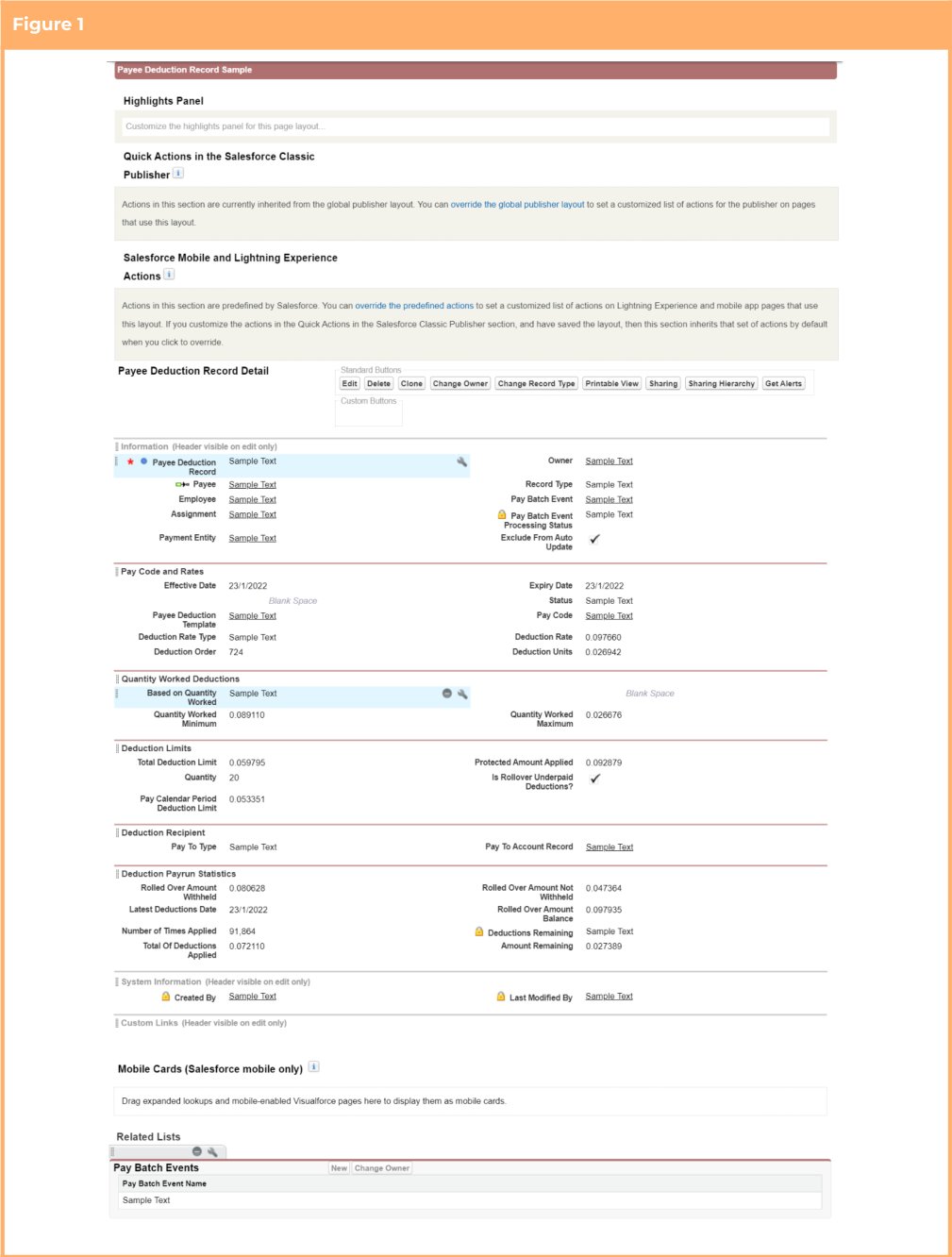
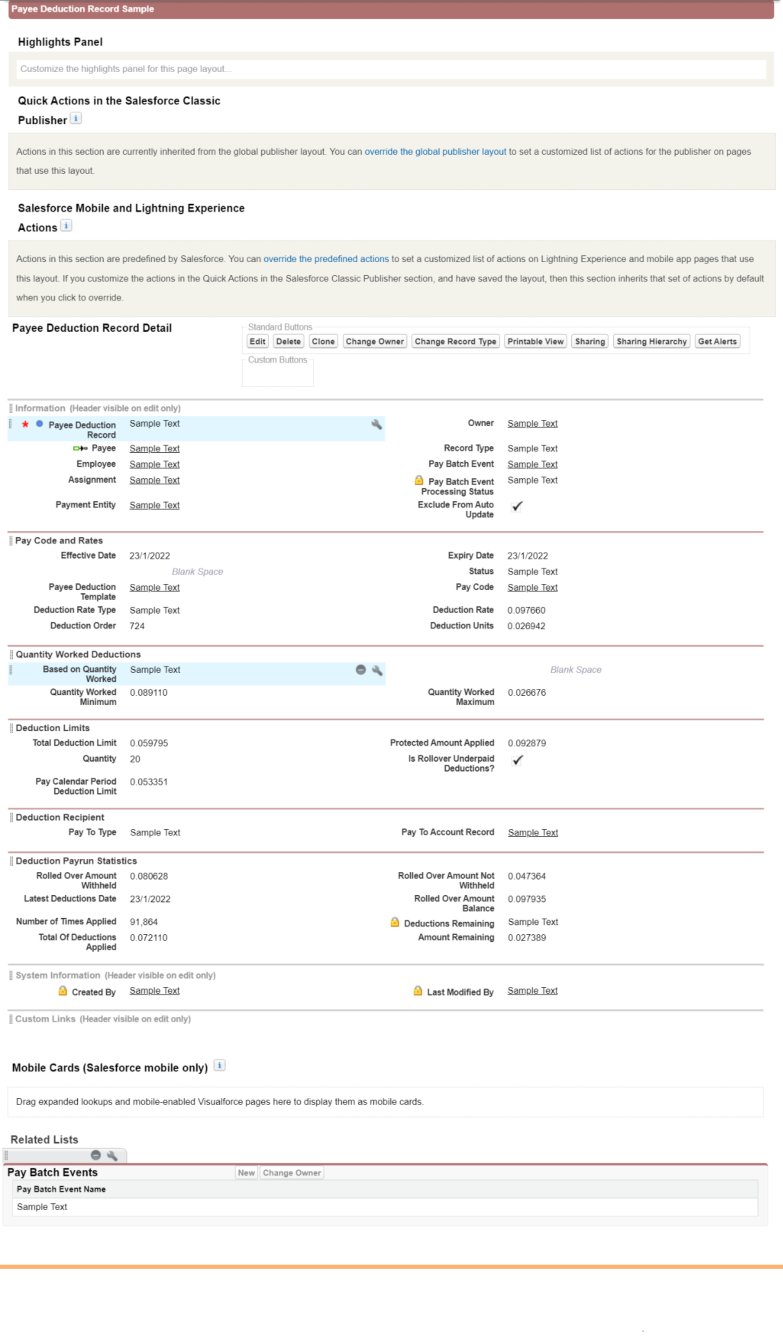
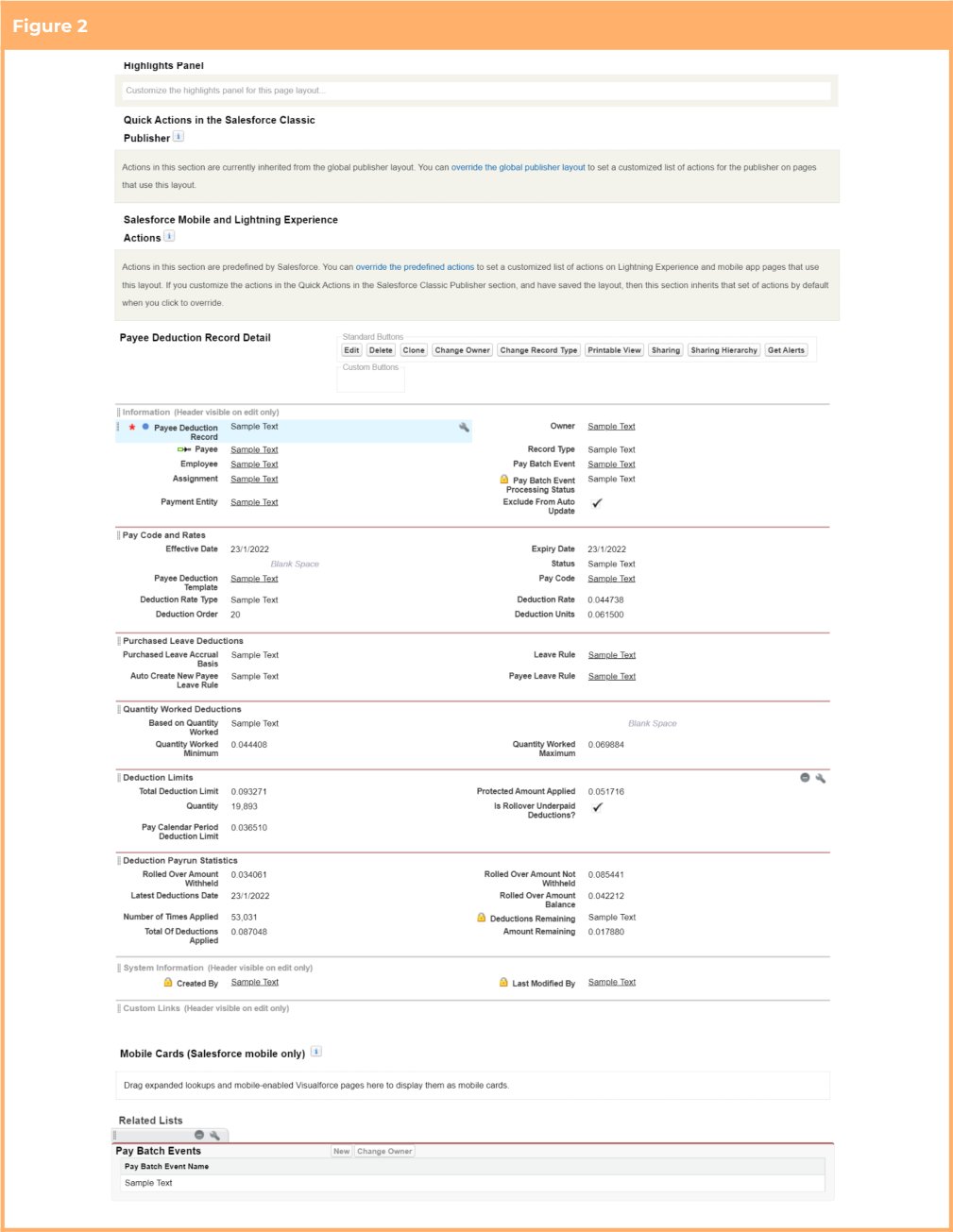
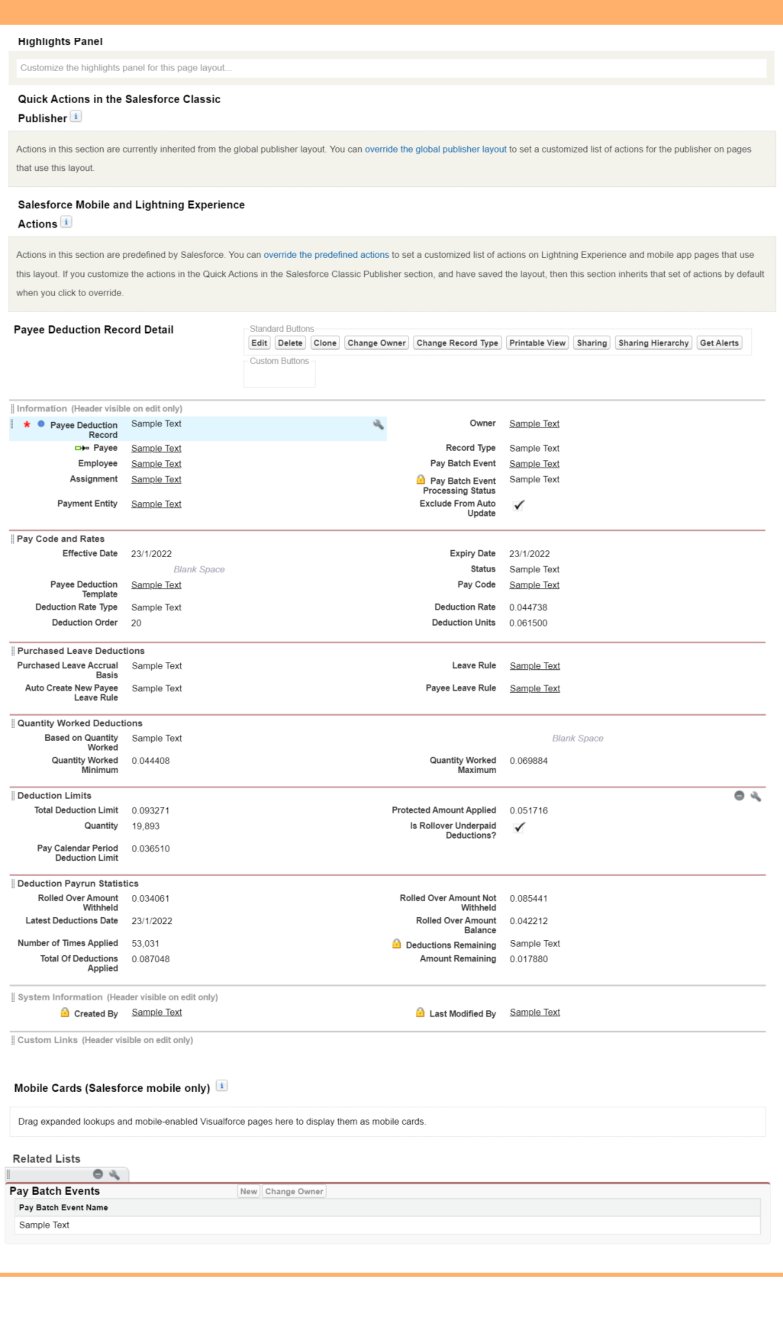
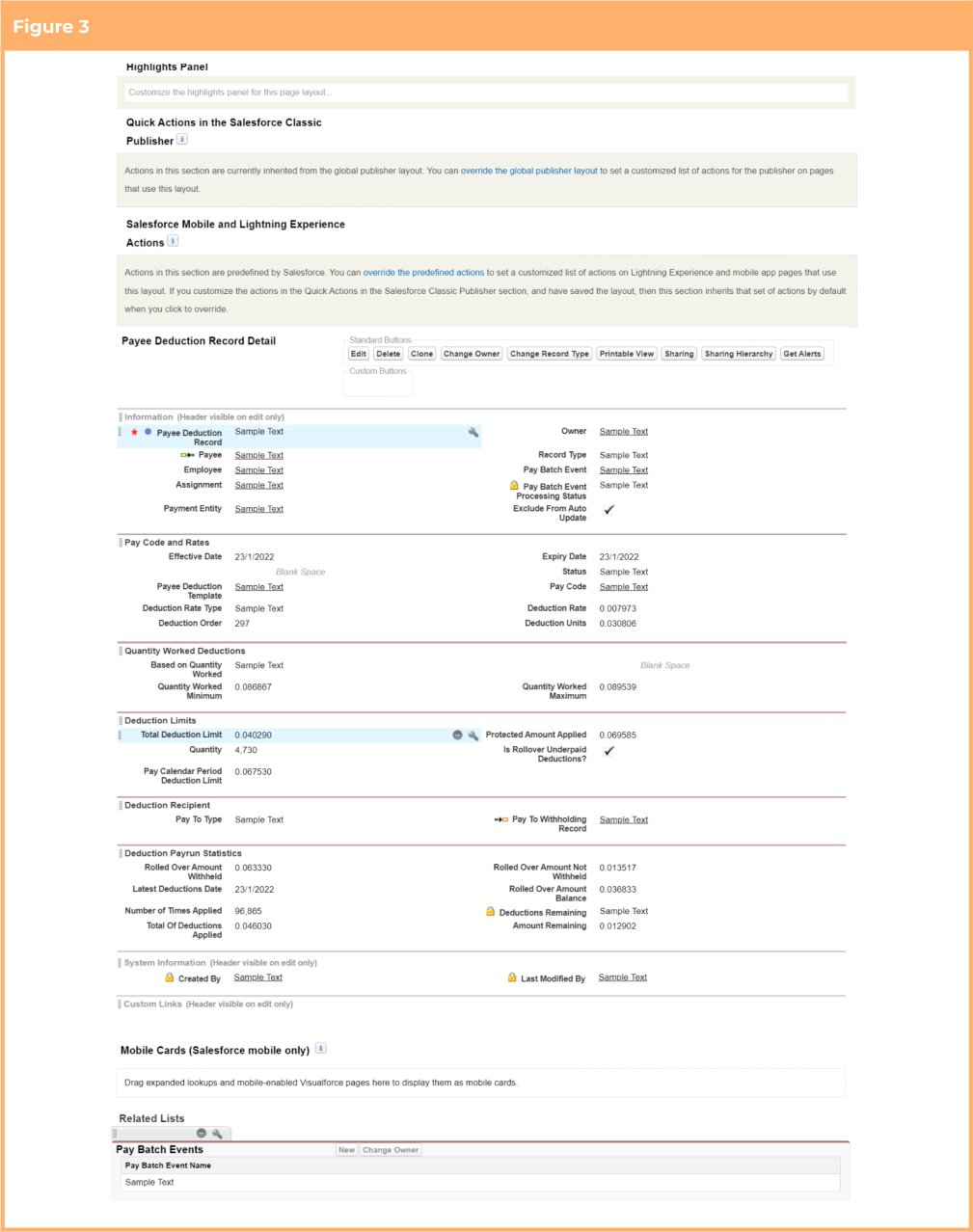
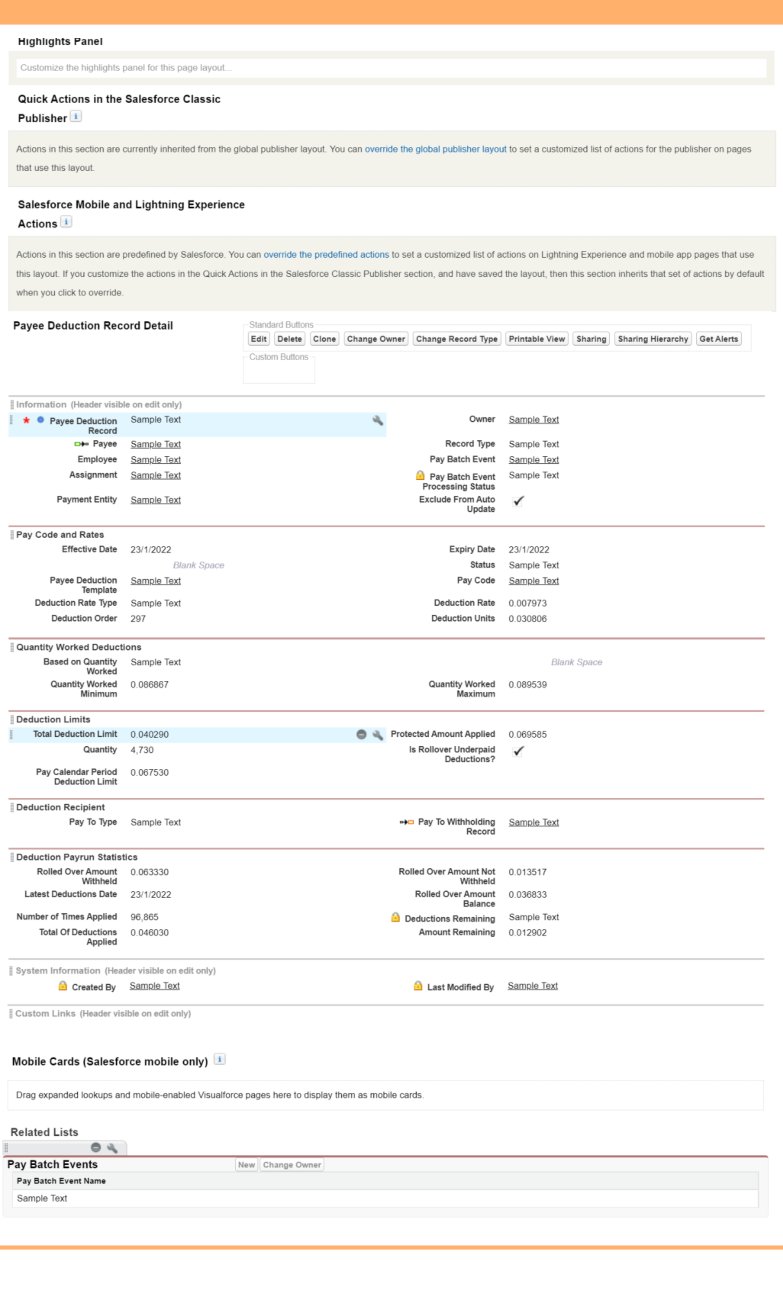
In the event that the packaged versions of the page layouts are not used, but custom versions of the page
layouts need to be updated instead, the below figures show samples of the packaged versions of the
layouts so they can be replicated.
* Figure 1 - TC9PR General Deduction Record Layout
* Figure 2 - TC9PR Purchased Leave Deduction Record Layout
* Figure 3 - TC9PR Withholding Deduction Record Layout
 ### Update Picklist Value Available Based On Record Types (Optional)
This requirement only needs to be completed if the option to use the record type based layouts is taken. If
not, this item can be skipped.
1. Go to Setup > Object Manager
2. Select Payee Deduction Record (tc9\_pr\_\_Payee\_Deduction\_Record\_\_c) > Record Types
3. Click on the General Deductions (tc9\_et.General\_Deductions) Record Type
4. In the Picklist Available for Editing section, locate the Pay To Type picklist and select Edit
5. Ensure that only the Account value is listed in the Selected Values list
6. Ensure that there are no Default values assigned
7. Click Save
8. Return to the Record Types page
9. Click on the Purchased Leave Deductions (tc9\_et.Purchased\_Leave\_Deductions) Record Type
10. In the Picklist Available for Editing section, locate the Pay To Type picklist and select Edit
11. Ensure that only the Account value is listed in the Selected Values list
12. Ensure that there are no Default values assigned
13. Click Save
14. Return to the Record Types page
15. Click on the PAYG Deductions (tc9\_et.PAYG\_Deductions) Record Type
16. In the Picklist Available for Editing section, locate the Pay To Type picklist and select Edit
17. Ensure that only the Payee Withholding value is listed in the Selected Values list
18. Ensure that the Payee Withholding value is set as the Default
19. Click Save
20. Return to the Record Types page
21. Click on the Superannuation Deductions (tc9\_et.Superannuation\_Deductions) Record Type
22. In the Picklist Available for Editing section, locate the Pay To Type picklist and select Edit
23. Ensure that only the Payee Withholding value is listed in the Selected Values list
24. Ensure that the Payee Withholding value is set as the Default
25. Click Save
### Automated Back Pay (Pilot Program\*)
Configuration instructions for the Automated Back Pay functionality will be released upon an organisations
agreement to participate in the pilot program. If you would like your organisation to take part in the pilot
program, and have resources available that can be dedicated to testing and providing feedback, please
contact your Project Manager.
## Appendix 1
Below is a list of new components included within the Bottlebrush ‘21 Release
***Object Record Types***
| Object | Label | Name |
| ---------------------------------------------------------------------------------------------------------------- | ---------------------------------- | ------------------------------------------- |
| New
### Update Picklist Value Available Based On Record Types (Optional)
This requirement only needs to be completed if the option to use the record type based layouts is taken. If
not, this item can be skipped.
1. Go to Setup > Object Manager
2. Select Payee Deduction Record (tc9\_pr\_\_Payee\_Deduction\_Record\_\_c) > Record Types
3. Click on the General Deductions (tc9\_et.General\_Deductions) Record Type
4. In the Picklist Available for Editing section, locate the Pay To Type picklist and select Edit
5. Ensure that only the Account value is listed in the Selected Values list
6. Ensure that there are no Default values assigned
7. Click Save
8. Return to the Record Types page
9. Click on the Purchased Leave Deductions (tc9\_et.Purchased\_Leave\_Deductions) Record Type
10. In the Picklist Available for Editing section, locate the Pay To Type picklist and select Edit
11. Ensure that only the Account value is listed in the Selected Values list
12. Ensure that there are no Default values assigned
13. Click Save
14. Return to the Record Types page
15. Click on the PAYG Deductions (tc9\_et.PAYG\_Deductions) Record Type
16. In the Picklist Available for Editing section, locate the Pay To Type picklist and select Edit
17. Ensure that only the Payee Withholding value is listed in the Selected Values list
18. Ensure that the Payee Withholding value is set as the Default
19. Click Save
20. Return to the Record Types page
21. Click on the Superannuation Deductions (tc9\_et.Superannuation\_Deductions) Record Type
22. In the Picklist Available for Editing section, locate the Pay To Type picklist and select Edit
23. Ensure that only the Payee Withholding value is listed in the Selected Values list
24. Ensure that the Payee Withholding value is set as the Default
25. Click Save
### Automated Back Pay (Pilot Program\*)
Configuration instructions for the Automated Back Pay functionality will be released upon an organisations
agreement to participate in the pilot program. If you would like your organisation to take part in the pilot
program, and have resources available that can be dedicated to testing and providing feedback, please
contact your Project Manager.
## Appendix 1
Below is a list of new components included within the Bottlebrush ‘21 Release
***Object Record Types***
| Object | Label | Name |
| ---------------------------------------------------------------------------------------------------------------- | ---------------------------------- | ------------------------------------------- |
| New
Interpretation Breakpoint
(tc9\_et\_\_Interpretation\_Breakpoint\_\_c) | Interpretation Breakpoint Junction | tc9\_et.Interpreation\_Breakpoint\_Junction |
| New
Interpretation Breakpoint
(tc9\_et\_\_Interpretation\_Breakpoint\_\_c) | Sleepover | tc9\_et.Sleepover |
***Object Fields***
| Object | Label | Name | Type |
| ---------------------------------------------------------------------------------------------------------------- | ---------------------------------------- | ------------------------------------------------------------------ | -------- |
| Account (Account) | Exclude Global Rate Calc Templates? | tc9\_et\_\_Exclude\_Global\_Rate\_Calc\_Templa
tes\_\_c | Picklist |
| New
Interpretation Breakpoint
(tc9\_et\_\_Interpretation\_Breakpoint\_\_c) | Additional Interpretation BP Details | tc9\_et\_\_Additional\_Interpretation\_BP\_Det
ails\_\_c | Picklist |
| New
Interpretation Breakpoint
(tc9\_et\_\_Interpretation\_Breakpoint\_\_c) | Allowance Type | tc9\_et\_\_Allowance\_Type\_\_c | Picklist |
| Interpretation Breakpoint
(tc9\_et\_\_Interpretation\_Breakpoint\_\_c) | Overtime Breakpoint | tc9\_et\_\_Overtime\_Breakpoint\_\_c | Picklist |
| Interpretation Breakpoint
(tc9\_et\_\_Interpretation\_Breakpoint\_\_c) | Overtime Pay Code | tc9\_et\_\_Overtime\_Pay\_Code\_\_c | Lookup |
| New
Interpretation Breakpoint
(tc9\_et\_\_Interpretation\_Breakpoint\_\_c) | Primary Interpretation Breakpoint | tc9\_et\_\_Primary\_Interpretation\_Breakpoi
nt\_\_c | Lookup |
| New
Interpretation Breakpoint
(tc9\_et\_\_Interpretation\_Breakpoint\_\_c) | Secondary Interpretation Breakpoint | tc9\_et\_\_Secondary\_Interpretation\_Break
point\_\_c | Lookup |
| New
Interpretation Rule
(tc9\_et\_\_Interpretation\_Rule\_\_c) | Apply Minimum Rest Interpretation? | tc9\_et\_\_Apply\_Minimum\_Rest\_Interpreta
tion\_\_c | Picklist |
| New
Interpretation Rule
(tc9\_et\_\_Interpretation\_Rule\_\_c) | Apply Minimum Rest on Overtime | tc9\_et\_\_Apply\_Minimum\_Rest\_on\_Overti
me\_\_c | Picklist |
| New
Interpretation Rule
(tc9\_et\_\_Interpretation\_Rule\_\_c) | Broken Shift Breakpoint Application | tc9\_et\_\_Broken\_Shift\_Breakpoint\_Applica
tion\_\_c | Picklist |
| New
Interpretation Rule
(tc9\_et\_\_Interpretation\_Rule\_\_c) | Broken Shift Timesheet Activity Required | tc9\_et\_\_Broken\_Shift\_Timesheet\_Activity\_
Required\_\_c | Picklist |
| New
Interpretation Rule
(tc9\_et\_\_Interpretation\_Rule\_\_c) | Sleepover Breakpoint Application | tc9\_et\_\_Sleepover\_Breakpoint\_Application
\_\_c | Picklist |
| New
Interpretation Rule
(tc9\_et\_\_Interpretation\_Rule\_\_c) | Sleepover Minimum Rest Hours | tc9\_et\_\_Sleepover\_Minimum\_Rest\_Hours\_
\_c | Number |
| Leave Rule (tc9\_pr\_\_Leave\_Rule\_\_c) | Validate Balance on Leave Takes | tc9\_pr\_\_Validate\_Balance\_on\_Leave\_Takes
\_\_c | Picklist |
| Minimum Pay Rate
(tc9\_ti\_\_Minimum\_Pay\_Rate\_\_c | Minimum Pay Rate ID | tc9\_et\_\_Minimum\_Pay\_Rate\_ID\_\_c | Text |
| Mark Up / Margin Rate Record
(tc9\_et\_\_Mark\_Up\_Margin\_Rate\_Record\_
\_c) | Primary Margin/Markup Rate | tc9\_et\_\_Primary\_Margin\_Markup\_Rate\_\_c | Text |
| Pay Advice Line
(tc9\_pr\_\_Pay\_Advice\_Line\_\_c) | Display Pay Code | tc9\_pr\_\_Display\_Pay\_Code\_\_c | Picklist |
| Pay Code (tc9\_pr\_\_Pay\_Code\_\_c) | Exclude From Pay Advice | tc9\_pr\_\_Exclude\_From\_Pay\_Advice\_\_c | Checkbox |
| Payee Leave Event
(tc9\_pr\_\_Payee\_Leave\_Event\_\_c) | Override Leave Balance Validation | tc9\_pr\_\_Override\_Leave\_Balance\_Validatio
n\_\_c | Picklist |
| Payee Withholding
(tc9\_pr\_\_Payee\_Withholding\_\_c) | Override Minimum Age Requirement | tc9\_pr\_\_Override\_Minimum\_Age\_Require
ment\_\_c | Picklist |
| New
Project Code
(tc9\_pr\_\_Project\_Code\_\_c) | Allowance Type | tc9\_et\_\_Allowance\_Type\_\_c | Picklist |
| Rate Calculator
(tc9\_et\_\_Rate\_Calculator\_\_c) | Account | tc9\_et\_\_Account\_\_c | Lookup |
| Rate Calculator
(tc9\_et\_\_Rate\_Calculator\_\_c) | Assignments Require Industry? | tc9\_et\_\_Assignments\_Require\_Industry\_\_c | Picklist |
| Rate Calculator
(tc9\_et\_\_Rate\_Calculator\_\_c) | Assignments Require Location? | tc9\_et\_\_Assignments\_Require\_Location\_\_
c | Picklist |
| Rate Calculator
(tc9\_et\_\_Rate\_Calculator\_\_c) | Assignments Require Risk Classification? | tc9\_et\_\_Assignments\_Require\_Risk\_Classification\_\_c | Picklist |
| Rate Calculator
(tc9\_et\_\_Rate\_Calculator\_\_c) | Award Classification | tc9\_et\_\_Award\_Classification\_\_c | Lookup |
| Rate Calculator
(tc9\_et\_\_Rate\_Calculator\_\_c) | Award Level | tc9\_et\_\_Award\_Level\_\_c | Lookup |
| Rate Calculator
(tc9\_et\_\_Rate\_Calculator\_\_c) | Previous Assignment Award Classification | tc9\_et\_\_Previous\_Assignment\_Award\_Classification\_\_c | Text |
| Rate Calculator
(tc9\_et\_\_Rate\_Calculator\_\_c) | Previous Assignment Award Level | tc9\_et\_\_Previous\_Assignment\_Award\_Lev
el\_\_c | Text |
| Rate Calculator
(tc9\_et\_\_Rate\_Calculator\_\_c) | Previous Assignment Industry | tc9\_et\_\_Previous\_Assignment\_Industry\_\_c | Picklist |
| Rate Calculator
(tc9\_et\_\_Rate\_Calculator\_\_c) | Previous Assignment Location | tc9\_et\_\_Previous\_Assignment\_Location\_\_c | Text |
| Rate Calculator
(tc9\_et\_\_Rate\_Calculator\_\_c) | Previous Assignment Rate Calculator ID | tc9\_et\_\_Previous\_Assignment\_Rate\_Calcul
ator\_ID\_\_c | Text |
| Rate Calculator
(tc9\_et\_\_Rate\_Calculator\_\_c) | Previous Assignment Risk Classification | tc9\_et\_\_Previous\_Assignment\_Risk\_Classif
ication\_\_c | Picklist |
| Rate Calculator Rate
(tc9\_et\_\_Rate\_Calculator\_Rate\_\_c) | Primary Rate Calculator Rate | tc9\_et\_\_Primary\_Rate\_Calculator\_Rate\_\_c | Text |
| Timesheet Entry
(tc9\_et\_\_Timesheet\_Entry\_\_c) | Weekly Number | tc9\_et\_\_Weekly\_Number\_\_c | Formula |
***Custom Setting***
| Label | Name |
| ------------------------------ | ------------------------------------------------ |
| Time2Pay Update Rates Settings | tc9\_et\_\_Time2Pay\_Update\_Rates\_Setting\_\_c |
***Custom Setting Fields***
| Custom Setting | Label | Name |
| ------------------------------------------------------------------------------------------- | -------------------------------------- | ---------------------------------------------------------- |
| Time2Pay Ext Main Settings
(tc9\_et\_\_T2Pext\_mainSettings\_\_c) | Default Template Groups MPR | tc9\_et\_\_Default\_Template\_Groups\_MPR\_\_c |
| Time2Pay Rate Calculator Configurator
(tc9\_et\_\_Rate\_Calculator\_Configurator\_\_c) | Enable Award Classification and Levels | tc9\_et\_\_Enable\_Award\_Classification\_and\_Levels\_\_c |
| Time2Pay Update Rates Settings
(tc9\_et\_\_Time2Pay\_Update\_Rates\_Setting\_\_c) | Disable Invoice Rates | tc9\_et\_\_Disable\_Invoice\_Rates\_\_c |
| ***Page Layout*** | | |
| Object | Name |
| ---------------------------------------------------------------------- | --------------------------------------------- |
| Payee Deduction Record
(tc9\_pr\_\_Payee\_Deduction\_Record\_\_c) | TC9PR General Deduction Record Layout |
| Payee Deduction Record
(tc9\_pr\_\_Payee\_Deduction\_Record\_\_c) | TC9PR Purchased Leave Deduction Record Layout |
| Payee Deduction Record
(tc9\_pr\_\_Payee\_Deduction\_Record\_\_c) | TC9PR Withholding Deduction Record Layout |
***Action***
| Object | Label | Name |
| ---------------------------------------------------------- | ------------------------- | ------------------------------------ |
| Assignment (tc9\_pr\_\_Assignment\_\_c) | Apply New Rate Calculator | tc9\_et.Apply\_New\_Rate\_Calculator |
| Template Group (tc9\_pr\_\_Template\_Group\_\_c) | Update Rates | tc9\_et.Update\_Rates |
| Minimum Pay Rate
(tc9\_et\_\_Minimum\_Pay\_Rate\_\_c) | Update Rates | tc9\_et.Update\_Rates |
***Buttons and Links***
| Object | Label | Name |
| ---------------------------------------------------------- | ------------ | --------------------------- |
| Template Group (tc9\_pr\_\_Template\_Group\_\_c) | Update Rates | tc9\_et.Update\_Rates\_List |
| Minimum Pay Rate
(tc9\_et\_\_Minimum\_Pay\_Rate\_\_c) | Update Rates | tc9\_et.Update\_Rates\_List |
## Appendix 2
The below table defines the access that must be granted to Internal Users for new components introduced for the update which allows users to define Sleepover
rules directly in the Interpretation Rule instead of using Variations
***Users Key***
| User | Description |
| ------ | -------------------------------------------------------------------- |
| User 1 | Users who will create / update Interpretation Rules |
| User 2 | Users who will be processing Timesheets through Interpretation Rules |
***Minimum Access Key***
| Access | Meaning |
| ------ | -------- |
| R | Read |
| C | Create |
| E | Edit |
| A | Assigned |
| Type | Name | User 1 | User 2 | User 3 | User 4 |
| ----------- | ------------------------------------------------------------------------------------- | ------ | ------ | ------ | ------ |
| Object | Interpretation Breakpoint (tc9\_et\_\_Interpretation\_Breakpoint\_\_c) | R/C/E | R | | |
| Record Type | Sleepovers (tc9\_et.Sleepovers) | A | A | | |
| Object | Interpretation Rule (tc9\_et\_\_Interpretation\_Rule\_\_c) | R/C/E | R | | |
| Field | Apply Sleepover Interpretation? (tc9\_et\_\_Apply\_Sleepover\_Interpretation\_\_c) | R/E | R/E | | |
| Field | Sleepover Breakpoint Application (tc9\_et\_\_Sleepover\_Breakpoint\_Application\_\_c) | R/E | R/E | | |
| Field | Sleepover Minimum Rest Hours (tc9\_et\_\_Sleepover\_Minimum\_Rest\_Hours\_\_c) | R/E | R/E | | |
## Appendix 3
The below table defines the access that must be granted to Internal Users for new components introduced for the update to allow the users the ability to define
Timesheet Allowances for payment during Leave.
***Users Key***
| User | Description |
| ------ | -------------------------------------------------------------------- |
| User 1 | Users who will create / update Interpretation Rules |
| User 2 | Users who will be processing Timesheets through Interpretation Rules |
***Minimum Access Key***
| Access | Meaning |
| ------ | -------- |
| R | Read |
| C | Create |
| E | Edit |
| A | Assigned |
| Type | Name | User 1 | User 2 | User 3 | User 4 |
| ----------- | --------------------------------------------------------------------------------- | ------ | ------ | ------ | ------ |
| Object | Interpretation Breakpoint (tc9\_et\_\_Interpretation\_Breakpoint\_\_c) | R/C/E | R | | |
| Record Type | Interpretation Breakpoint Junction (tc9\_et.Interpretation\_Breakpoint\_Junction) | A | A | | |
## Appendix 4
The below table defines the access that must be granted to internal users for the new components introduced that allows them to define Interpretation
Allowances for payment using Timesheet Activities:
***Users Key***
| User | Description |
| ------ | -------------------------------------------------------------------- |
| User 1 | Users who will create / update Interpretation Rules |
| User 2 | Users who will be processing Timesheets through Interpretation Rules |
***Minimum Access Key***
| Access | Meaning |
| ------ | -------- |
| R | Read |
| C | Create |
| E | Edit |
| A | Assigned |
| Type | Name | User 1 | User 2 | User 3 | User 4 |
| ------ | ---------------------------------------------------------- | ------ | ------ | ------ | ------ |
| Object | Interpretation Rule (tc9\_et\_\_Interpretation\_Rule\_\_c) | R/C/E | R | | |
| Field | Allowance Type (tc9\_et\_\_Allowance\_Type\_\_c ) | R/E | R/E | | |
| Object | Project Code (tc9\_pr\_\_Project\_Code\_\_c) | R/C/E | R | | |
| Field | Allowance Type (tc9\_et\_\_Allowance\_Type\_\_c ) | R/E | R/E | | |
## Appendix 5
The below table defines the access that must be granted to Internal Users for new components introduced for the update to provide improvements to the
Minimum Rest logic in the Time Interpretation functionality
***Users Key***
| User | Description |
| ------ | -------------------------------------------------------------------- |
| User 1 | Users who will create / update Interpretation Rules |
| User 2 | Users who will be processing Timesheets through Interpretation Rules |
***Minimum Access Key***
| Access | Meaning |
| ------ | -------- |
| R | Read |
| C | Create |
| E | Edit |
| A | Assigned |
| Type | Name | User 1 | User 2 | User 3 | User 4 |
| ------ | ---------------------------------------------------------------------------------------------- | ------ | ------ | ------ | ------ |
| Object | Interpretation Rule (tc9\_et\_\_Interpretation\_Rule\_\_c) | R/C/E | R | | |
| Field | Apply Minimum Rest on Overtime (tc9\_et\_\_tc9\_et\_\_Apply\_Minimum\_Rest\_on\_Overtime\_\_c) | R/E | R/E | | |
## Appendix 6
The below table defines the access that must be granted to Internal Users for new components introduced for the update to provide improved Timesheet
Interpretation logic.
***Users Key***
| User | Description |
| ------ | -------------------------------------------------------------------- |
| User 1 | Users who will create / update Interpretation Rules |
| User 2 | Users who will be processing Timesheets through Interpretation Rules |
***Minimum Access Key***
| Access | Meaning |
| ------ | -------- |
| R | Read |
| C | Create |
| E | Edit |
| A | Assigned |
| Type | Name | User 1 | User 2 | User 3 | User 4 |
| ------ | -------------------------------------------------------------------------------------------- | ------ | ------ | ------ | ------ |
| Object | Interpretation Rule (tc9\_et\_\_Interpretation\_Rule\_\_c) | R/C/E | R | | |
| Field | Broken Shift Breakpoint Application (tc9\_et\_\_Broken\_Shift\_Breakpoint\_Application\_\_c) | R/E | R/E | | |
## Appendix 7
The below table defines the access that must be granted to Internal Users for new components introduced for the update to provide user control when Split /
Broken Shift logic will apply through Timesheet Activities.
***Users Key***
| User | Description |
| ------ | -------------------------------------------------------------------- |
| User 1 | Users who will create / update Interpretation Rules |
| User 2 | Users who will be processing Timesheets through Interpretation Rules |
***Minimum Access Key***
| Access | Meaning |
| ------ | -------- |
| R | Read |
| C | Create |
| E | Edit |
| A | Assigned |
| Type | Name | User 1 | User 2 | User 3 | User 4 |
| ------ | ------------------------------------------------------------------------------------------------------- | ------ | ------ | ------ | ------ |
| Object | Interpretation Breakpoint (tc9\_et\_\_Interpretation\_Breakpoint\_\_c) | R/C/E | R | | |
| Field | Additional Interpretation BP Details (tc9\_et\_\_Additional\_Interpretation\_BP\_Details) | R/E | R/E | | |
| Field | Primary Interpretation Breakpoint (tc9\_et\_\_Primary\_Interpretation\_Breakpoint\_\_c) | R/E | R/E | | |
| Field | Secondary Interpretation Breakpoint (tc9\_et\_\_Secondary\_Interpretation\_Breakpoint\_\_c) | R/E | R/E | | |
| Object | Interpretation Rule (tc9\_et\_\_Interpretation\_Rule\_\_c) | R/C/E | R | | |
| Field | Broken Shift Timesheet Activity Required (tc9\_et\_\_Broken\_Shift\_Timesheet\_Activity\_Required\_\_c) | R/E | R/E | | |
## Appendix 8
The below table defines the access that must be granted to Internal Users for new components introduced for the beta Rate Calculator functionality.
***Users Key***
| User | Description |
| ------ | ------------------------------------------------------ |
| User 1 | Users who will create / edit Rate Calculator Templates |
| User 2 | Users who will create / edit Rate Calculators |
***Minimum Access Key***
| Access | Meaning |
| ------ | -------- |
| R | Read |
| C | Create |
| E | Edit |
| A | Assigned |
| Type | Name | User 1 | User 2 | User 3 | User 4 |
| ------ | ------------------------------------------------------------------------------------------------------ | ------ | ------ | ------ | ------ |
| Object | Rate Calculator (tc9\_et\_\_Rate\_Calculator\_\_c) | R/C/E | R/C/E | | |
| Field | Account (tc9\_et\_\_Account\_\_c) | R/E | R/E | | |
| Field | Assignments Require Industry? (tc9\_et\_\_Assignments\_Require\_Industry\_\_c) | R/E | R/E | | |
| Field | Assignments Require Location? (tc9\_et\_\_Assignments\_Require\_Location\_\_c) | R/E | R/E | | |
| Field | Assignments Require Risk Classification? (tc9\_et\_\_Assignments\_Require\_Risk\_Classification\_\_c) | R/E | R/E | | |
| Field | Award Classification (tc9\_et\_\_Award\_Classification\_\_c) | R/E | R/E | | |
| Field | Award Level (tc9\_et\_\_Award\_Level\_\_c) | R/E | R/E | | |
| Field | Previous Assignment Award Classification (tc9\_et\_\_Previous\_Assignment\_Award\_Classification\_\_c) | R/E | R/E | | |
| Field | Previous Assignment Award Level (tc9\_et\_\_Previous\_Assignment\_Award\_Level\_\_c) | R/E | R/E | | |
| Field | Previous Assignment Industry (tc9\_et\_\_Previous\_Assignment\_Industry\_\_c) | R/E | R/E | | |
| Field | Previous Assignment Location (tc9\_et\_\_Previous\_Assignment\_Location\_\_c) | R/E | R/E | | |
| Field | Previous Assignment Rate Calculator ID (tc9\_et\_\_Previous\_Assignment\_RC\_Id\_\_c) | R/E | R/E | | |
| Object | Rate Calculator (tc9\_et\_\_Rate\_Calculator\_\_c) | R/C/E | R/C/E | | |
| Field | Previous Assignment Risk Classification (tc9\_et\_\_Previous\_Assignment\_Risk\_Classification\_\_c) | R/E | R/E | | |
| Object | Rate Calculator Rate (tc9\_et\_\_Rate\_Calculator\_Rate\_\_c) | R/C/E | R/C/E | | |
| Field | Minimum Pay Rate ID (tc9\_et\_\_Minimum\_Pay\_Rate\_ID\_\_c) | R/E | R/E | | |
| Field | Primary Rate Calculator Rate (tc9\_et\_\_Primary\_Rate\_Calculator\_Rate\_\_c) | R/E | R/E | | |
| Object | Account (Account) | R/C/E | R/C/E | | |
| Field | Exclude Global Rate Calc Templates? (tc9\_et\_\_Exclude\_Global\_Rate\_Calc\_Templates\_\_c) | R/E | R/E | | |
| Object | Mark Up / Margin Rate Record (tc9\_et\_\_Mark\_Up\_Margin\_Rate\_Record\_\_c) | R/C/E | R/C/E | | |
| Field | Primary Margin/Markup Rate (tc9\_et\_\_Primary\_Margin\_Markup\_Rate\_\_c) | R/E | R/E | | |
## Appendix 9
The below table defines the access that must be granted to Internal Users for new components introduced to improve the minimum rest and break loading
overtime interpretation processing capabilities.
***Users Key***
| User | Description |
| ------ | -------------------------------------------------------------------- |
| User 1 | Users who will create / update Interpretation Rules |
| User 2 | Users who will be processing Timesheets through Interpretation Rules |
***Minimum Access Key***
| Access | Meaning |
| ------ | -------- |
| R | Read |
| C | Create |
| E | Edit |
| A | Assigned |
| Type | Name | User 1 | User 2 | User 3 | User 4 |
| ------ | ---------------------------------------------------------------------- | ------ | ------ | ------ | ------ |
| Object | Interpretation Breakpoint (tc9\_et\_\_Interpretation\_Breakpoint\_\_c) | R/C/E | R | | |
| Field | Overtime Pay Code (tc9\_et\_\_Overtime\_Pay\_Code\_\_c) | R/E | R | | |
## Appendix 10
The below table defines the access that must be granted to Internal Users for new components introduced to improve the allowance interpretation processing
capabilities.
***Users Key***
| User | Description |
| ------ | -------------------------------------------------------------------- |
| User 1 | Users who will create / update Interpretation Rules |
| User 2 | Users who will be processing Timesheets through Interpretation Rules |
***Minimum Access Key***
| Access | Meaning |
| ------ | -------- |
| R | Read |
| C | Create |
| E | Edit |
| A | Assigned |
| Type | Name | User 1 | User 2 | User 3 | User 4 |
| ------ | ---------------------------------------------- | ------ | ------ | ------ | ------ |
| Object | Timesheet Entry (tc9\_et\_\_Timesheet\_Entry) | R/E | R | | |
| Field | Weekly Number (tc9\_et\_\_Weekly\_Number\_\_c) | R/E | R | | |
## Appendix 11
The below table defines the access that must be granted to internal users for new components introduced to allow the definition of penalty time bands to be
used during interpretation processing capabilities.
***Users Key***
| User | Description |
| ------ | -------------------------------------------------------------------- |
| User 1 | Users who will create / update Interpretation Rules |
| User 2 | Users who will be processing Timesheets through Interpretation Rules |
***Minimum Access Key***
| Access | Meaning |
| ------ | -------- |
| R | Read |
| C | Create |
| E | Edit |
| A | Assigned |
| Type | Name | User 1 | User 2 | User 3 | User 4 |
| ------ | ---------------------------------------------------------------------- | ------ | ------ | ------ | ------ |
| Object | Interpretation Breakpoint (tc9\_et\_\_Interpretation\_Breakpoint\_\_c) | R/C/E | R | | |
| Field | Overtime Breakpoint (tc9\_et\_\_Overtime\_Breakpoint\_\_c) | R/E | R | | |
## Appendix 12
The below table defines the access that must be granted to internal users for new components introduced to allow the minimum age requirements for when
calculating Superannuation to be overridden.
***Users Key***
| User | Description |
| ------ | --------------------------------------------------------------------------- |
| User 1 | Users who will create / update Payee Withholding records for Superannuation |
| User 2 | Users who process payroll |
***Minimum Access Key***
| Access | Meaning |
| ------ | -------- |
| R | Read |
| C | Create |
| E | Edit |
| A | Assigned |
| Type | Name | User 1 | User 2 | User 3 | User 4 |
| ------ | -------------------------------------------------------------------------------------- | ------ | ------ | ------ | ------ |
| Object | Payee Withholding (tc9\_pr\_\_Payee\_Withholding\_\_c) | R/C/E | R | | |
| Field | Override Minimum Age Requirement (tc9\_pr\_\_Override\_Minimum\_Age\_Requirement\_\_c) | R/E | R | | |
## Appendix 13
The below table defines the access that must be granted to internal users for new components introduced to allow users to hide blank sections and selected pay
codes on Pay Advice documents.
***Users Key***
| User | Description |
| ------ | --------------------------------------------------- |
| User 1 | Users who will create / update Pay Advice Templates |
| User 2 | Users who will create / update Pay Codes |
| User 3 | Users who process payroll |
***Minimum Access Key***
| Access | Meaning |
| ------ | -------- |
| R | Read |
| C | Create |
| E | Edit |
| A | Assigned |
| Type | Name | User 1 | User 2 | User 3 | User 4 |
| ------ | -------------------------------------------------------------------------- | ------ | ------ | ------ | ------ |
| Object | Pay Advice Template (tc9\_pr\_\_Pay\_Advice\_Template\_\_c) | R/C/E | | R | |
| Field | Hide Blank Detail Sections (tc9\_pr\_\_Hide\_Blank\_Detail\_Sections\_\_c) | R/E | | R | |
| Object | Pay Code (tc9\_pr\_\_Pay\_Code\_\_c) | | R/C/E | R | |
| Field | Exclude From Pay Advice (tc9\_pr\_\_Exclude\_From\_Pay\_Advice\_\_c) | | R/E | R | |
| Object | Pay Advice Line (tc9\_pr\_\_Pay\_Advice\_Line\_\_c) | | | R/C/E | |
| Field | Display Pay Code (tc9\_pr\_\_Display\_Pay\_Code\_\_c) | | | R/E | |
## Appendix 14
The below table defines the access that must be granted to internal users for new components introduced to validate Employee leave.
***Users Key***
| User | Description |
| ------ | ------------------------------------------- |
| User 1 | Users who will create / update Leave Rules |
| User 2 | Users who will create / update leave Events |
| User 3 | Users who process payroll |
***Minimum Access Key***
| Access | Meaning |
| ------ | -------- |
| R | Read |
| C | Create |
| E | Edit |
| A | Assigned |
| Type | Name | User 1 | User 2 | User 3 | User 4 |
| ------ | ---------------------------------------------------------------------------------------- | ------ | ------ | ------ | ------ |
| Object | Leave Rule (tc9\_pr\_\_Leave\_Rule\_\_c) | R/C/E | R | R | |
| Field | Validate Balance on Leave Takes (tc9\_pr\_\_Validate\_Balance\_on\_Leave\_Takes\_\_c) | R/E | R | R | |
| Object | Payee Leave Event (tc9\_pr\_\_Payee\_Leave\_Event\_\_c) | | R/C/E | R | |
| Field | Override Leave Balance Validation (tc9\_pr\_\_Override\_Leave\_Balance\_Validation\_\_c) | | R/E | R | |