

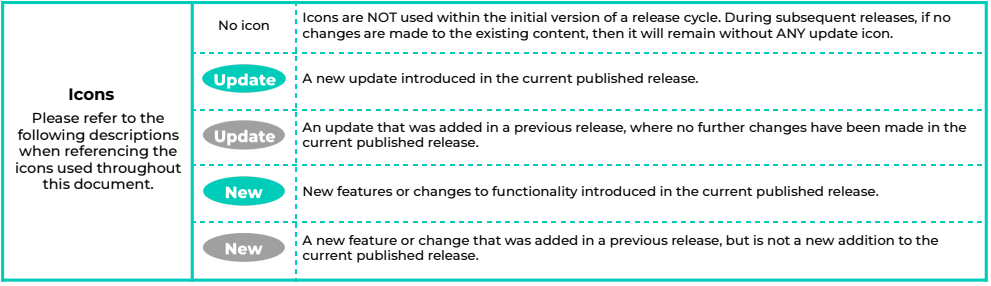
Updated Validations for Pay Condition Records New
To ensure Processed Pay Conditions are not deleted or orphaned as a result of data maintenance for related records, validations for several records have been updated. Validations will no longer allow the deletion of Expenses, Work Orders or Work Order Line Items related to Pay Conditions with a Status of Processed, so that Pay Condition records cannot be orphaned once successfully processed. Please note, Pay Conditions with a Status of New or a blank status may still be orphaned if the related Expenses or Work Order records are deleted, and to be mindful of related records when deleting data. Configuration Requirement: No Configuration RequiredUser Story Reference Number(s): SC-37484, SC-37483
Access Provisioning for the Field Service Extension Update New
Work has been completed to enable the integration to reference Custom Permission Sets when validating Field Service Extension data. Thanks to these changes, editing records related to Field Service data will no longer fail due to missing Field Service Extension Permissions. Now, Field Service records will only inherit data updates via integration when Users have been assigned the Field Service Extension Permissions. For example, if a Payee Record is updated by a User who does not have Permission to modify Service Resource Objects, integration will not prevent the updates from being saved, however changes to related Service Resources will not be inherited. Users without assigned Field Service Permissions will now be able to create and update Resource Absences, Service Resources, Payees, Payee Leave Events, Expenses, Timesheets, Work Orders and Work Order Line items without triggering automation related to the Field Service Extension package. Configuration Requirement: CompulsoryUser Story Reference Number(s): SC-36608, SC-36606
Service Resource Updates
An enhancement has been made to enable the automatic update of Service Resource records when changes are made on Custom Fields for related Payee and Employee Contacts records. This allows data between these related records to be maintained dynamically, so that Service Resources continue to inherit updates following their initial creation. Configuration Requirement: Conditionally CompulsoryUser Story Reference Number(s): SC-35933
Paid Breaks for Timesheets
A new Paid Break checkbox field has been added to Field Service Time Sheet Entry records. When selected, this enables integration to create 2cloudnine Timesheet Entries with Paid Breaks automatically marked to allow for both paid and unpaid Breaks within interpretation. Configuration Requirement: Conditionally CompulsoryUser Story Reference Number(s): SC-34347
Introducing Merge Logic for Breaks and Travel Entries
Existing functionality enables Field Service Time Sheet Entries to be merged according to defined thresholds and topped up to create a longer ‘shift’ Timesheet Entry. Further functionality is now being introduced to include merge logic for Break and Travel Entries. Configurable thresholds enable integration to consider the amount of time between Field Service Time Sheet Break and Travel Entries, so that the data inserted into 2cloudnine Timesheets is merged according to whether or not thresholds have been met or exceeded. This also includes the ability to disregard the first and/or the last Travel Entries of the day. Configuration Requirement: Conditionally CompulsoryUser Story Reference Number(s): SC-35323
New Status Field for Field Service Time Sheets
A new dynamic Status field has been added to Field Service Time Sheets, so that any data issues identified by integration during processing can be more easily identified and amended. Following creation of new Field Service Time Sheets, this field must be set to New. Once processed by integration, this field will be updated to Processed if successful, or Failed where errors have prevented insertion. Debug Headers will be generated to prompt necessary corrections to be made against Failed Time Sheets individually, without affecting processing for subsequent Field Service Time Sheets. Integration will not attempt to process Failed Time Sheets again until the Status field is manually reverted to ‘New’, after data corrections have been made. Configuration Requirement: CompulsoryUser Story Reference Number(s): SC-35754, SC-35439
Resource Absence Time/Date Logic
Local Time and Date fields have been added to Resource Absence records to mitigate discrepancies caused by UTC timezone limitations. Due to these updates, we can ensure integration inserts 2cloudnine Timesheet Entry data according to the time worked in the Service Resource’s own time zone. Configuration Requirement: CompulsoryUser Story Reference Number(s): SC-36012
Addition of Status to Resource Absences
Similar to the new Time Sheet Status field, Integration Status is now available from the Resource Absence Object. This field can be used to easily identify whether the record has been processed successfully by integration. Configuration Requirement: CompulsoryUser Story Reference Number(s): SC-36037
Lookup Fields & Record Types for Resource Absences
New automations have been introduced for Resource Absences created via integration. The Timesheet Entry lookup field will automatically populate the related 2cloudnine Timesheet record upon creation of the Resource Absence. Thanks to these updates, it’s now easier to identify record relationships at a glance, and complete necessary data analytics and reporting activities. Also, the ability to set up Custom Record Types for Resource Absences has been introduced. This allows integration to cater to a wider range of Leave Types when Resource Absences trigger the automatic creation of Leave Events. Configuration Requirement: CompulsoryUser Story Reference Number(s): SC-36038, SC-35332
New Record Types for Pay Conditions
Three new Record Types for Pay Conditions have been created to expand the range of records automatically created and populated on 2cloudnine Timesheets following Field Service data integration. The Project Code Record Type has been introduced for Pay Conditions. This allows Field Service data associated with different rates of pay, Award Classifications or Award Levels to be automatically related to specific 2cloudnine Project Codes. Once these new records have been created, integration will be able to identify Field Service Entries associated with altered work conditions (such as higher duties) and automatically populate the corresponding Project Code on 2cloudnine Timesheet Entries. Also new to Pay Conditions is the Timesheet Activity Record Type. Similar to the new Project Code Record Type, this allows a specific 2cloudnine Timesheet Activity to be defined and associated with corresponding Field Service data, so that the integration is able to automatically populate Timesheet Activities on related 2cloudnine Timesheet Entries. This change enables Interpretation Variations to be applied, where Field Service data associated with 24-hour care shifts and similar conditions has been integrated. With these additions, a new Pay Condition Record Type has been introduced. The ‘Combination’ Pay Condition Record Type enables a Payee Allowance to be linked with specific Project Codes and/or Timesheet Activities. Once set up, the integration will be able to automatically populate 2cloudnine Timesheet Entries with the related Project Code or Timesheet Activity that relate to the Payee Allowance, as well as creating the Allowance Timesheet Item for the time entered and work conditions identified during Field Service data assessment. This functionality is particularly useful when integrating data for Sleepover shifts. For example, Entries associated with Sleepover work will be automatically populated with the Sleepover Timesheet Activity and Sleepover Allowance Timesheet Item (per records defined on the Combination Pay Condition), for successful Interpretation of Sleepover periods. Configuration Requirement: OptionalUser Story Reference Number(s): SC-34336, SC-34331, SC-34330
Automation for Allowance Quantities
Integration has been enhanced with the ability to determine how data related to Allowances is assessed and transformed, thanks to new Quantity Cap fields added to Pay Condition records. The values defined in the Quantity Cap, Quantity Cap Start Time and Quantity Cap End Time will define the amount of Allowance Timesheet Items that can be created within a specific period of time each day for the related Payee Allowance record. This new functionality has also been introduced to benefit data transformation for Sleepovers and similar shift-based scenarios, where limitations on Allowance entitlements should be applied according to specific times of day, rather than on a per-day basis. Configuration Requirement: Conditionally CompulsoryUser Story Reference Number(s): SC-34330
Create Allowances separate from Entered Time
Building upon the above enhancements introduced for Pay Conditions, new logic enables integration to cater for scenarios where Allowance entitlements are either not associated with entered time, such as for on-call duties, or where Allowance quantities should be determined by the length of time worked, such as with First-Aid Allowances. Integration will now be able to identify and exempt time from being inserted into 2cloudnine Entries, when Field Service Entries are associated with particular Payee Allowances. When ‘Predefined Quantity’ is selected from the Allowance Type picklist field on Combination and Allowance Pay Conditions, the Deduct Hours Start Time and Deduct Hours End Time fields can be used to preclude the creation of 2cloudnine Timesheet Entries for the Payee Allowance within a specific period. This allows the Integration to create Allowance Timesheet Items for the Payee Allowance, without inserting time from the related Field Service Entries. Where Field Service Entries contain Allowance data that should be quantified according to the length of shift, integration will now assess the related Field Service Time Sheet Entries to determine the Quantity populated on the Allowance Timesheet Items for 2cloudnine Entries. This logic will be applied when ‘Enterable Quantity’ is selected from the Allowance Type picklist field on Allowance or Combination Pay Conditions. Configuration Requirement: Conditionally CompulsoryUser Story Reference Number(s): SC-3327, SC-34325
Minor Updates
Minor updates in the following areas have also been provided. There are no configuration requirements and these items will become available on installation of the package.Data Validation New
- Validations have been updated to display a specialised warning when Service Resource creation from Payee fails due to a missing or invalid primary email address on the related Contact.
User Story Reference Number(s): SC-37419
Timesheet Data Processing New
- Improvements made to facilitate the successful processing of Timesheets with multiple Pay Condition Allocations related to Expense records.
User Story Reference Number(s): SC-37670
Timesheet Interpretation New
- Updates have been made to ensure Quantity Caps are applied according to Product design. This change was made to address discrepancies identified during interpretation for Timesheets with related Pay Conditions falling outside of defined Allowance Time Caps.
User Story Reference Number(s): SC-37703
Timesheet Items New
- Updates have been made to ensure the integration is able to successfully process each individual Pay Condition Allocation related to Expenses when creating Timesheet Items. Previously, only the first Pay Condition Allocation for each calendar day would be processed successfully, with duplicate Timesheet Items generated for each subsequent record. This issue is now resolved.
User Story Reference Number(s): SC-37515