Prerequisites
Prior to completing Payroll data creation within an Org, the following prerequisites must be met:
- 2cloudnine Payroll users must be running the Salesforce Lightning Experience.
- Org Setup, configuration, implementation and provisioning tasks must be complete.
- Users must have sufficient privileges to create and manage Payroll records within 2cloudnine Payroll.
- Please contact your System Administrator for assistance if you do not have the required access.
Data Creation Appearance and Usability
-
All dates and times are displayed as per the location of the logged in User.
-
Numerical values for dollar amounts are calculated at 6 decimal places, but displayed with two decimal places.
-
The recommended browser is Chrome as per the Salesforce standard.
-
The default display resolution supported is 1920 x 1080 (1080p) scaled at 100%, with the minimum display resolution supported at 1024 x 768 as per the Salesforce standard.
-
Data Creation pages will automatically resize in width and height so that the components are stretched appropriately depending on resolution.
Definitions
This document provides an overview of the 2cloudnine Payroll data required within an Org. It also details the sequence that should be followed when creating new records, and the QRGs available for each specific Object and Record Type that may be created. To familiarise yourself with the terms used in this document, please refer to the following definitions:
-
Accounts
Holds the relevant account data for Payment Entities, Invoice Entities, and Clients.
Payment Entity
Required for basic Payroll functionality, these records are a part of core data, and contain basic information in relation to the Employer of Payees.
Invoice Entity
These records are a part of core Payroll data, and are required for all Orgs using Timesheets, even if Invoicing is not in use.
Client
For Timesheet Orgs, Client Accounts are required for successful Timesheet processing.
-
Assignments
Captures details related to an Employee’s assigned position or role, including their commencement date, Timesheet/Expense/Leave Approver(s), and, as applicable, Timesheet Interpretation Rule. Required for both Payroll and Timesheet Payees, these are the primary records used to reference all Assignment-related data.
-
Assignment Rates
Defines the Pay and Invoice Rates, and accompanying details for each Pay Code used by an Assignment. Utilised during the creation of Pay Transactions and required for both Payroll and Timesheet Payees, Assignment Rates are considered a part of core Payroll data. The method to be used for the creation of Assignment Rates can be either manual, or automatic, via Rates Automation or Rate Calculator functionality, however, the creation of Assignment Rate records occurs following Assignment creation.
-
Calendars
Determines the behaviour and settings for Payroll, Invoice, Public Holiday and Timesheet
Calendars. Payroll & Invoice Calendars are Entity-specific, and are used to associate Pay
Transactions with specific Calendar Periods. These records are considered part of core data.
-
Calendar Periods
Defines the fixed dates for each Payroll and Invoice Period, and represent specific Public Holiday
dates. Required for Payroll functionality, the creation of Calendar Periods is completed following
the creation of the related Calendar, as a part of core data.
-
Contacts
Captures the details of Client, Employee and Emergency Contacts.
Employee
Required to facilitate Payroll, the creation of Employee records is a prerequisite to the
creation of a Payee. Employee Contacts detail the basic contact and personal information
for each Employee.
Emergency Contacts
These records may be created as a part of Payee data, if Emergency Contact details are
provided.
Client Contacts
Also a requirement for Payroll functionality, these records are created to capture and
relate contact information with the corresponding Payroll records. This is primarily for the
purposes of approving Timesheets, Leave, Expenses, and to receive invoices.
-
General Ledger
If required for an Org, these records are created as a part of core Payroll data. See the General
Ledger Key Information QRG for definitions related to General Ledger.
-
Interpretation Rules
These records form part of the core data for all Orgs where Timesheet processing is required.
Refer to the Interpretation Rules Key Information QRG for definitions related to Interpretation
Rules.
-
Invoice Settings
This required Client data must be created for each Client Account, to fulfil the Invoicing
requirements necessary for successful Payroll processing. Invoice Settings define the specific
details for invoiceable data related to Payroll Items and Invoiceable Fees, including Payment
Terms, Invoice Format, etc.
-
Invoice Tax ID
These records define the Tax Rate applied to Invoices. Invoice Tax Ids are required for every Org as
a part of core Payroll data, necessary to fulfil the Invoicing requirements for successful Payroll
processing.
-
Leave Rules
Determines the eligibility and Payroll controls for each type of Leave required in an Org.
Necessary for the creation of Payee Leave Rule records, these records form a part of core Payroll
data.
-
Leave Rule Items
If any implemented Leave Rules require accruals, the creation of related Leave Rule Items details
accrual conditions. Created following Leave Rules, as a part of core Payroll data.
-
Leave Templates
Created following Leave Rules (and optionally Leave Rule Items) as a part of core data, Leave Rule
Templates may be used to automate the creation of the multiple Payee Leave Rules required for
each Payee.
-
Lodgement AU
The only Lodgement AU record type relevant to the scope of this document is Authorised
Contacts. Created as a part of core Payroll data, these records are required for Single Touch
Payroll Lodgements. Refer to the QRG Single Touch Payroll (STP) Lodgements Key Information
document for definitions related to Lodgements.
-
Notification Settings
Used to determine the conditions of email notifications for the approval of Leave, Expense Claims
and Timesheets. Required in all Orgs, Notification Settings form a part of core Payroll data
activities.
-
Pay Advice Template
Defines the PDF and Email Templates for Employee Pay Advice details (i.e. pay slips). Required for
Pay Batch generation, Pay Advice Templates are a part of the core Payroll data.
-
Pay Codes
These records are essential to core Payroll functionality, defining the conditions applied when a
Pay Code is detailed within a Pay Transaction. This includes PAYG treatment, Leave Accrual, OTE
Contributions, Pay Rate Multipliers, and all STP types as required by the ATO.
-
Payees
Captures the relationship between an Employee and a Payment Entity. Payee records are central
to the creation of Payment Details, Payee Withholdings, Payee Allowances, Payee Deductions,
etc. Payee records are created following Employee Contacts, to define each individual Payment
Entity that an Employee is employed by, and relate the Assignments for each position or role
where work is completed.
-
Payee Allowance records
Captures the details for Payroll and Timesheet Allowances. Defines the Pay Codes and conditions
of the Allowances.
Payroll Allowances
These records will hold the rate of the Allowance payable, along with the conditions of the
Allowance. These records are created as a part of Payee data.
Timesheet Allowances
While Timesheet Allowances enable the conditions of an Allowance to be defined, the
rate of the Allowance payable and the associated Pay Code must be defined on an
Assignment Rate. These records are only required for Timesheet Employees, and are
created as a part of Assignment data.
-
Payee Deduction records
Captures the details for General, PAYG, Superannuation and Purchased Leave Deductions.
Defines the Pay Codes, Rates and conditions of the Deduction. Required as a part of Payee data
creation.
-
Payee Leave Rules
Defines which Leave Rules apply for each Payee, as well as specifying the Leave Rule conditions
for the related Payee. Required Payee data for all Payees entitled to Leave, and also used to
facilitate associated accruals.
-
Payee Opening Balances
When migrating data from legacy systems, Payee Opening Balances are used to define any
Leave, Deduction, Allowance, Expense or Withholding balances for newly created 2cloudnine
Payee records, so that these amounts can be considered during Payroll processing.
-
Payee Withholdings
Required Payee data for all Payees. These records are used to define the Superannuation, PAYG,
GST or Payroll Tax conditions to be applied.
-
Payment Details
Several record types are available to capture Payee Payment Details information, while an
additional record type is provided to capture the Payment Entity Payment Details for an Org.
Payee Payment Details
These records contain the bank details necessary for Payee wages to be received via
electronic bank files. The records are created as a part of Payee data, if the necessary
details have been provided. Record types available are Payee Australia Bank, Payee Cash,
Payee Cheque and Payee International Bank.
Payment Entity Payment Details
These records contain the banking information necessary for the creation of the ABA
Payment File generated during Pay Batch processing when sending wages to Payees.
Payment Entity Australian Bank records form part of the core data required to facilitate
Payroll.
-
Payment Terms
Required to fulfil the Invoicing requirements for successful Payroll processing, these records
control the due dates for the payment of Invoices. The creation of Payment Terms is considered
part of core Payroll data.
-
Project Codes
When Pay Codes are associated with a secondary activity requiring a separate set of Assignment
Rates, Project Codes allow the Rates and associated conditions to be defined. Project Codes may
be created as a part of core Payroll data, Client data, or even Assignment data, depending on the
origin of the associated activity.
Assignment Level
These records may be created to define a separate set of Assignment Rates for activities
specific to a particular Assignment.
Client Level
These records may be created to define a separate set of Assignment Rates for activities
specific to a particular Client.
Timesheet Activity
When populated on Timesheets, these Project Codes allow Interpretation to generate Pay
Transactions according to the defined work conditions. Although these records are a part
of Interpretation Rule functionality, they are typically not created until after Assignment
records. Refer to the Interpretation Rules Key Information QRG for further details.
-
Rate Calculators
Enabling Rate Calculator functionality for an Org requires the creation of numerous records
related to core data. Refer to the Rate Calculator Key Information QRG for definitions related to
Rate Calculators.
-
Rates Automation
Upon creation of core Payroll data, this functionality automates the creation and management of
Timesheet Assignment Rates through various methods, including Assignment Rate Template
Groups, Payee Allowance Template Groups and Minimum Pay Rates. Refer to the Rates
Automation Key Information QRG for definitions related to Rates Automation and associated
functionality.
-
Schedules
The different Record Types available within the Schedules Object relate to two different sets of
Payroll functionality: Work Schedules, and Pay and Invoice Schedules.
Work Schedules
If utilised within an Org, Work Schedules are considered part of core Payroll data. The
related Assignment Schedules are set up during Assignment creation, if required. Refer
to the Work Schedules Key Information QRG for definitions related to Work Schedules.
Pay & Invoice Schedules
Also forming part of core data, Pay Schedules and Invoice Schedules are required for all
Orgs (even if invoicing is not utilised) to define the variations of pay and invoice cycles
available, and determine the frequency and conditions of each cycle.
General Overview
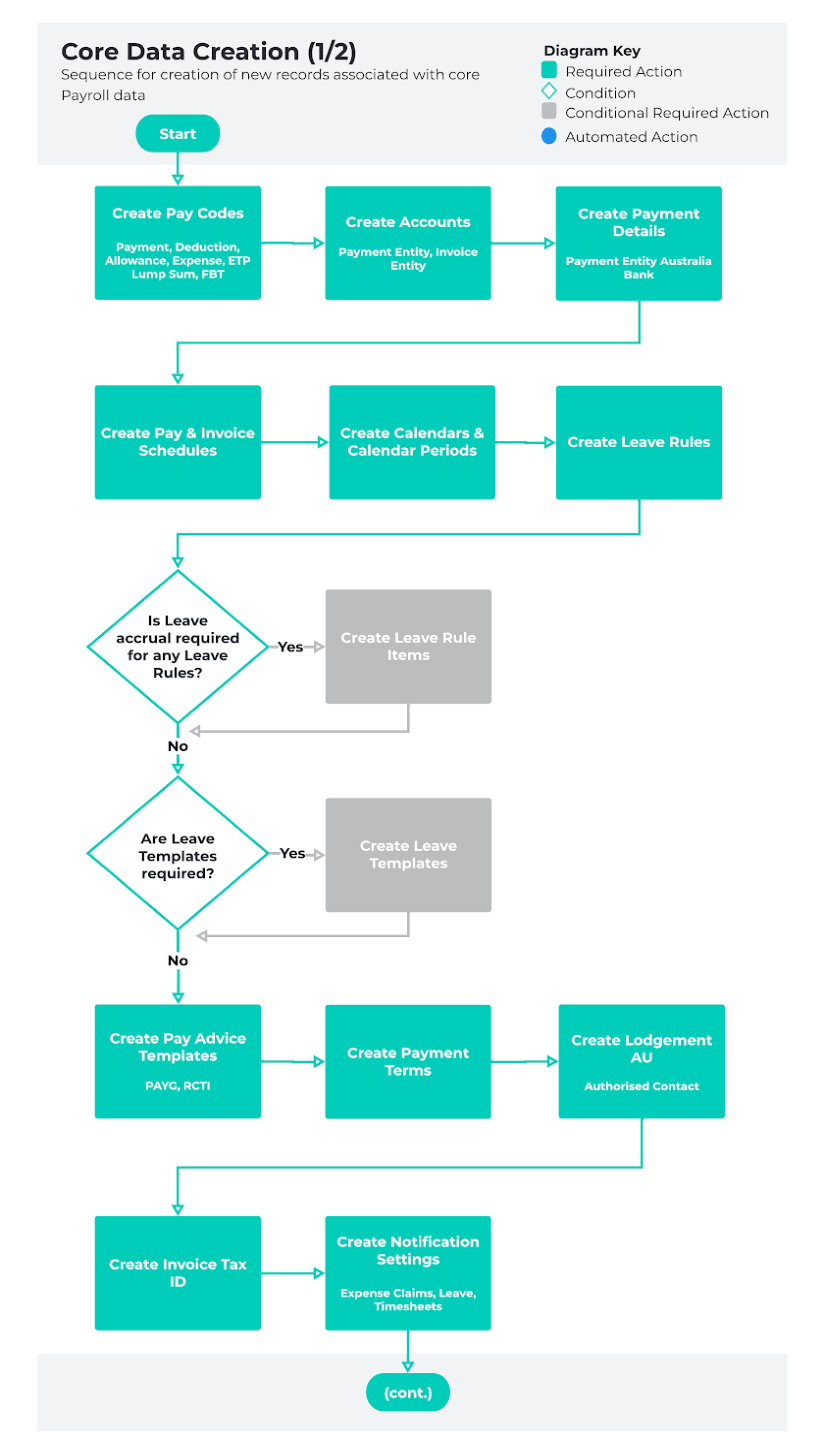
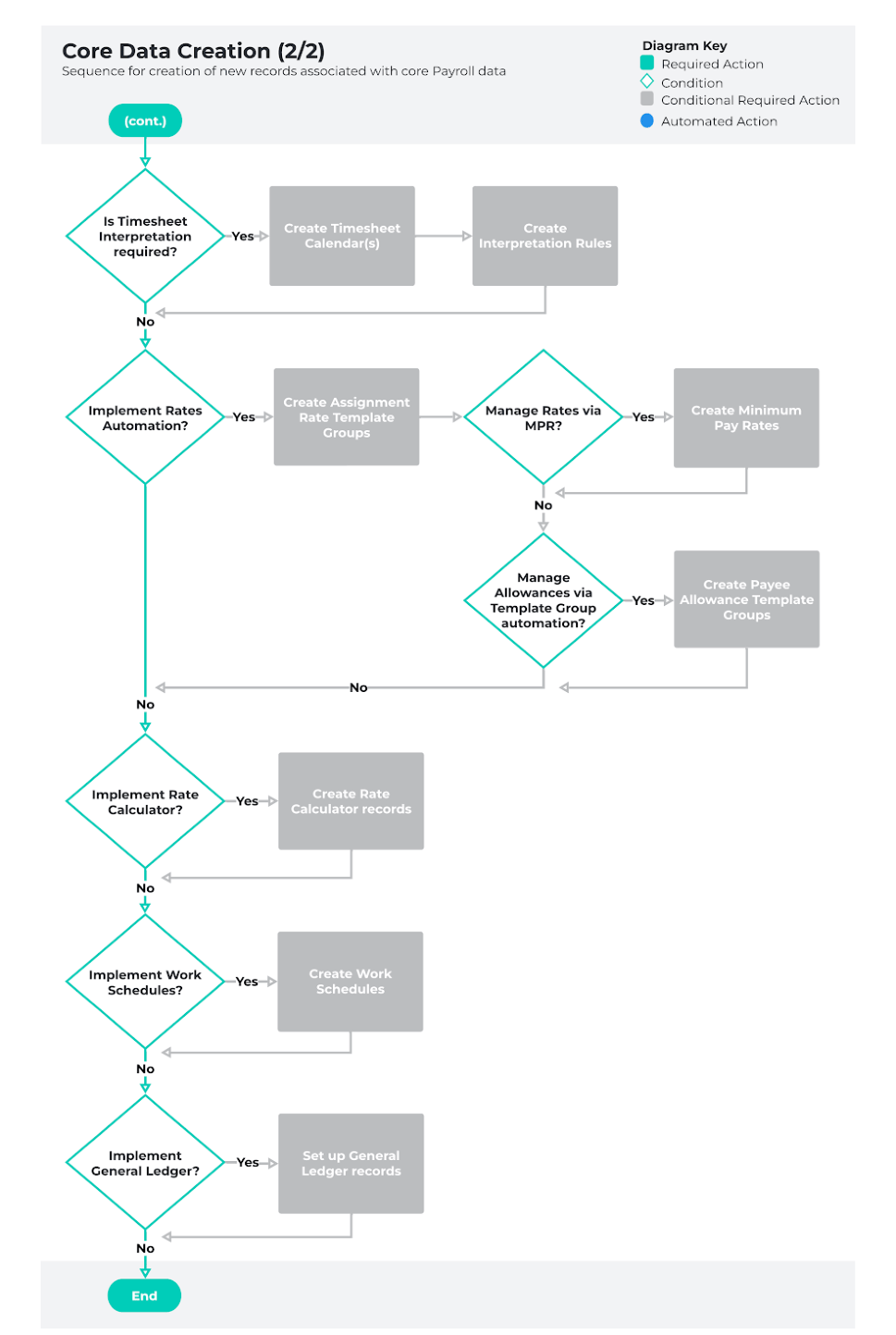
Core Data Creation
The diagrams captured on the following pages provide an overview of the core Payroll records required
to generate Pay Transactions for both Autopay and Timesheet Payees. The process outlined here reflects
the order that record creation should occur, according to best practice.
Please note, depending on the specific requirements of each Org, some of the records represented here
may not be required. Please use this guide as an outline of the sequence to follow when creating new
records associated with core Payroll data.
Below is a list of the QRGs available to support the creation of core Payroll data:
- QRG Create Pay Codes - Payment Pay Code
- QRG Create Pay Codes - Allowance Pay Code
- QRG Create Pay Codes - Deduction Pay Code
- QRG Create Pay Codes - ETP Pay Code
- QRG Create Pay Codes - Expense Pay Code
- QRG Create Pay Codes - FBT Pay Code
- QRG Create Pay Codes - Lump Sum Pay Code
- QRG Create an Account - Payment Entity
- QRG Create an Account - Invoice Entity
- QRG Create Payment Details
- QRG Create Pay Schedules
- QRG Create Invoice Schedules
- QRG Create Payroll Calendar & Calendar Periods
- QRG Setup Leave Rules
- QRG Setup Leave Rule Items
- QRG Setup Leave Templates
- QRG Create a Pay Advice Template
- QRG Create Payment Terms
- QRG Authorised Contacts
- QRG Create an Invoice Tax ID
- QRG Create Notification Settings - Expense Claim
- QRG Create Notification Settings - Leave
- QRG Create Notification Settings - Timesheet
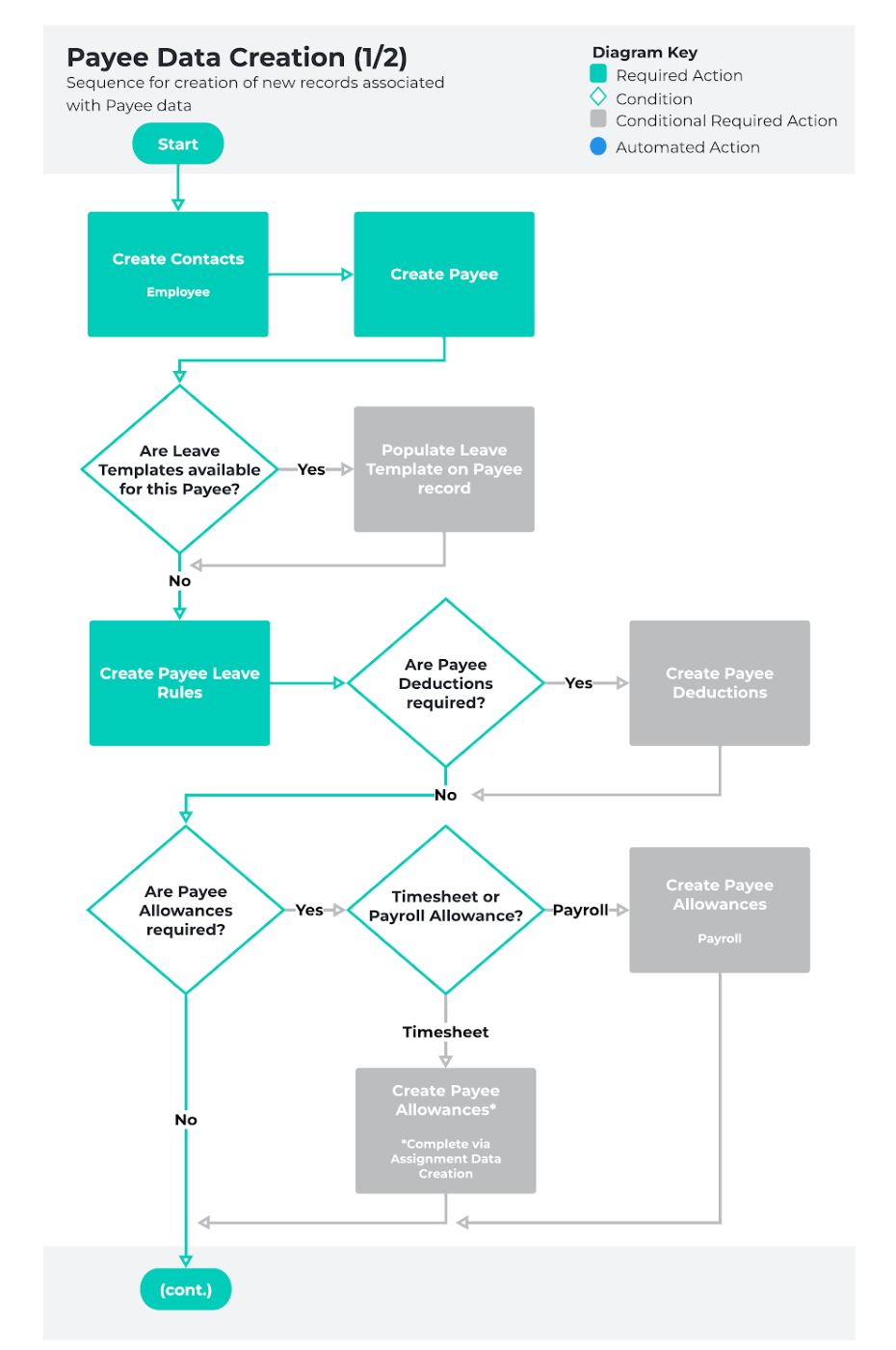
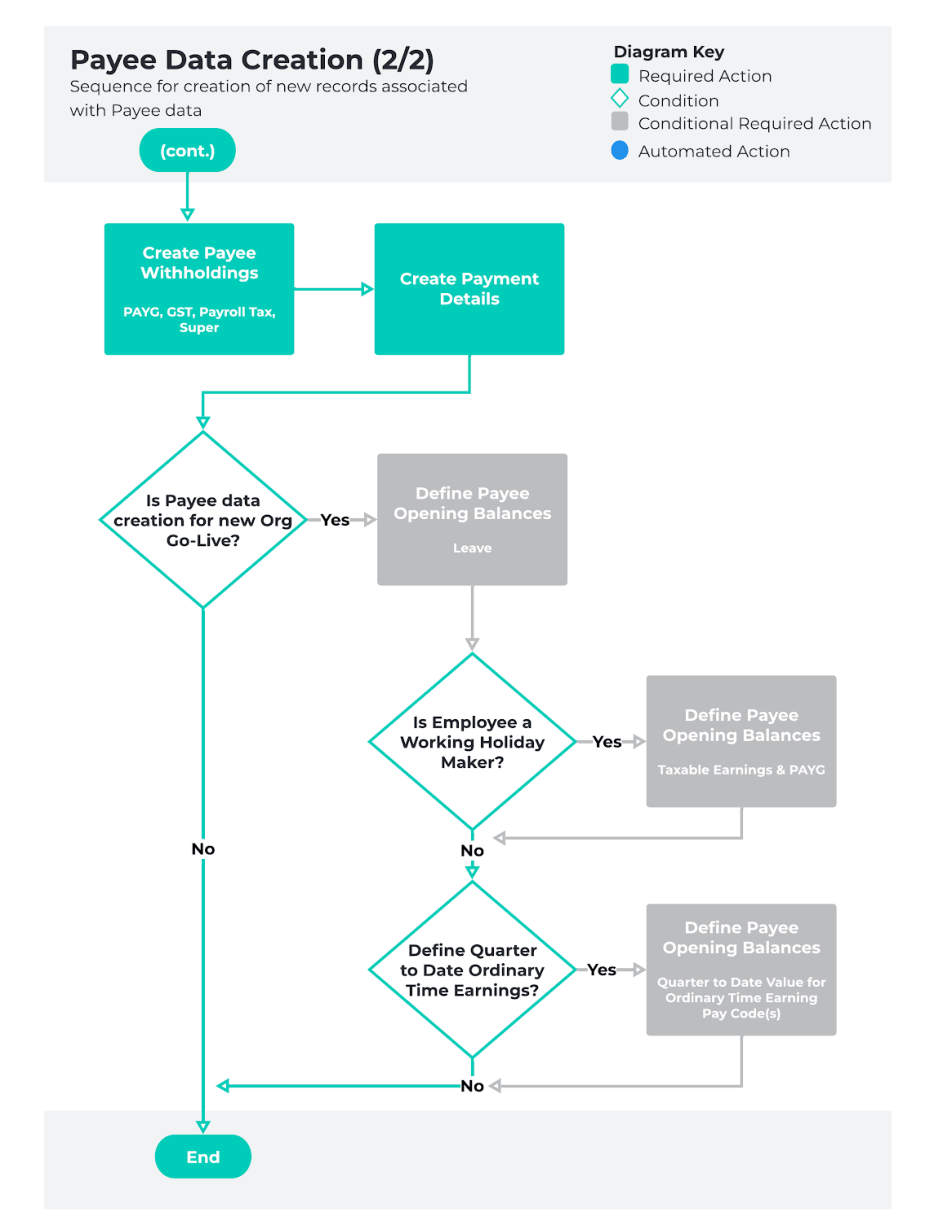
Payee Data Creation
The diagram included on the following page provides an overview of the Payee-specific data necessary to
facilitate Payroll. Record creation for Payee data should not commence until after core data creation is
complete.
As with the previous section, it may not be necessary to create all records represented here. Please use
this outline as a guide for the order that records should be created in when new Payee data is required,
according to best-practice.
Below is a list of the QRGs available to support the creation of Payee data:
- QRG Create an Employee - Contact
- QRG Create a Payee record
- QRG Setup Payee Leave Rules
- QRG Create a Payee Deduction - General
- QRG Create a Payee Deduction - PAYG
- QRG Create a Payee Deduction - Purchased Leave
- QRG Create a Payee Deduction - Superannuation
- QRG Create Payee Withholdings - AU PAYG
- QRG Create Payee Withholdings - AU GST
- QRG Create Payee Withholdings - Superannuation
- QRG Create Payee Withholdings - AU Payroll Tax
- QRG Create Payee Allowances - Payroll
- QRG Create Payment Details
- QRG Define Payee Opening Balances - Leave
- QRG Define Payee Opening Balances - Deduction
- QRG Define Payee Opening Balances - Payment
- QRG Define Payee Opening Balances - ETP
- QRG Define Payee Opening Balances - PAYG
- QRG Define Payee Opening Balances - STSL
- QRG Define Payee Opening Balances - Super
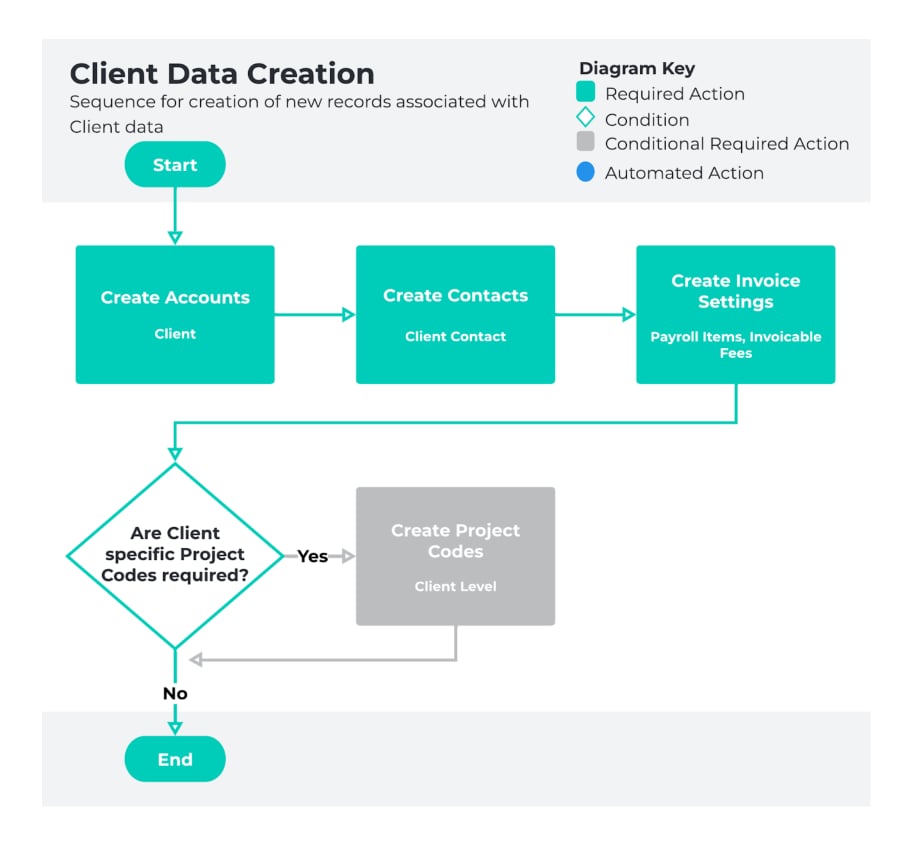
Client Data Creation
Creation of Client-specific data should be considered once both core data and Payee-specific data
creation is completed, but is required prior to the creation of Assignments using Timesheets.
The Client specified on the Assignment will detail areas for the Invoices generated to be defined, and
determine certain default values for related Assignments.
Even if not utilising Invoicing, all Orgs using Timesheets must create at least one set of ‘default’ Client
records, to enable successful Timesheet processing.
As stated previously, it may not be necessary to create all records represented here, depending on the
requirements of your Org. Please use this outline as a guide for the order that records should be created
when new Client data is required, according to best-practice.
Below is a list of the QRGs available to support the creation of Client data:
- QRG Create an Account - Client
- QRG Create a Contact - Client Contact
- QRG Create Invoice Settings
- QRG Create Project Codes
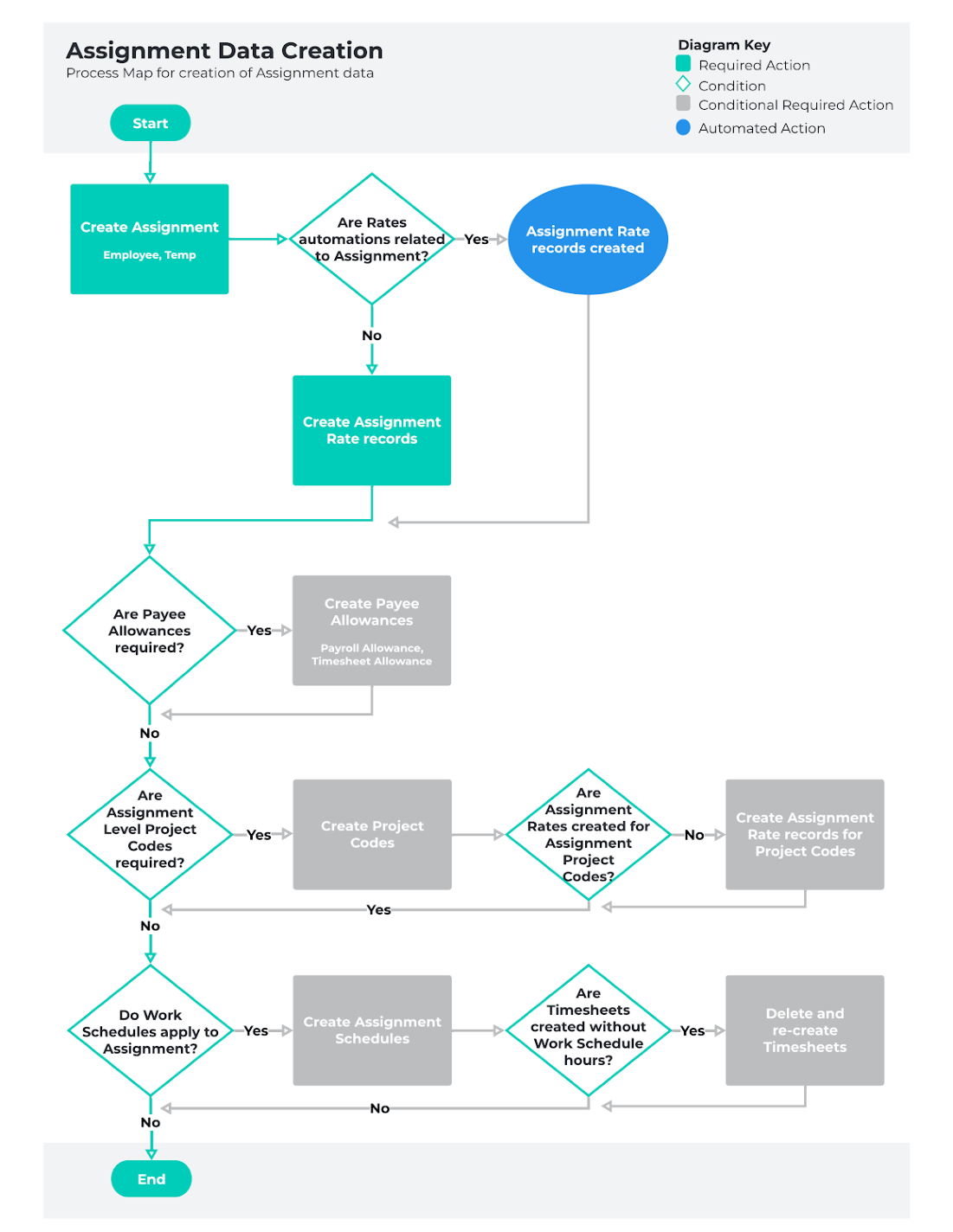
Assignment Data Creation
Assignment data should be considered following the creation of core data, Payee-specific data and
Client-specific data.
The creation of Assignments enables the payment of Payees according to the entitlements detailed. The
amount paid will be based directly on the Assignment Rates related to the Assignment, however the
Assignment will detail other factors such as Timesheets Calendars, Interpretation Rules, Pay Schedule,
Hiring Manager, etc.
It is seldom required to create all records referenced in the following diagram for each new Assignment.
Please use this outline as a guide for the order that records should be created when new Assignment
data is required, according to best-practice.
Below is a list of the QRGs available to support the creation of Assignment data:
- QRG Create an Assignment - Employee
- QRG Create an Assignment - Temp
- QRG Create an Assignment Rate record - Remuneration
- QRG Create an Assignment Rate record - Timesheet
- QRG Create Payee Allowances - Timesheet
- QRG Create Project Codes
- QRG Create Project Codes - Timesheet Activity (Assignment Level)
- QRG Create and Manage Assignment Schedules
Last modified on July 20, 2026