Prerequisites
Before the creation of a SuperStream Batch, the following prerequisites must be met:
- Ensure that a Pay Batch is processed successfully and a Payment File is Released.
- The Lodgement can only be created once for each Pay Batch using the same filters (i.e. Employee, Employer, or All). Therefore, if there is already a SuperStream Pay Batch Lodgement for Employer, you can create another for Employee or All, but not for Employer.
- A SuperStream Lodgement can be extracted any number of times in multiple formats.
Definitions
SuperStream functionality is split into:
- non-API method
- SuperChoice Contributions API methods
Some definitions apply to both methods, some to the non-API method only, and the rest to the SuperChoice Contributions API method. Further details are given below:
Both methods
-
SuperStream
‘SuperStream’ is a standard process for sending Superannuation data and payments electronically. Employers, self-managed super funds, and APRA-regulated funds must use it.
-
Superannuation Lodgement Manager
The screen used to create, review, and process a SuperStream Lodgement. Two versions exist, and the Payment Entity’s API setting determines which one is presented.
-
All, Employer and Employee filters
This enables the end-user to have the ability to run the Superannuation Lodgements that contain combined Employer and Employee superannuation contributions, or individual reports specific to just Employer contributions or Employee contributions.
-
Contribution types
The categories a superannuation contribution falls into: Super Guarantee (employer super guarantee contributions), Award or Productivity (employer contributions above the standard rate stipulated by an award or agreement), Salary Sacrifice, Voluntary Additional, Personal, Spouse and Child (contributions directed to a spouse or child), and Third Party.
-
Super Employer Id
The Employer Id that applies to a particular combination of Superannuation Fund and Payment Entity.
-
Unallocated Contributions
Contributions with no superannuation fund attached. They are not submitted and are reported separately from Total Contributions. Shown as a total on the non-API screen and as its own tab under the API.
-
Negative Contributions
Contributions that are calculated to a negative amount. A superannuation fund cannot accept a negative contribution, so the amount is held back rather than reported, and preserved against the Payee.
-
Pay Batch Superannuation
The total value of employer and employee superannuation contributions from the related Pay Batches. Used to reconcile the Lodgement against what payroll calculated.
-
Maximum Super Contribution Base
The contribution base applicable to the pay or update date. Qualifying Earnings above the Maximum Contribution Base are not reported, even where superannuation has been calculated on them.
-
Qualifying Earnings
The earnings amount held against each Lodgement Item, submitted through Single Touch Payroll alongside the existing Ordinary Time Earnings amount.
-
Retrieve an active list of Superannuation Funds
A scheduled job that refreshes the list of superannuation funds from the clearing house, so newly available funds can be selected without payroll users intervening. It runs on a nightly schedule and reports one of two statuses:
- Funds Retrieved – the job completed and any new funds were added.
- Retrieval Failed – the job did not complete. The fund list is no longer being updated, so a fund an employee has recently joined may be missing, and changed fund details may not be reflected.
-
Shared Lodgement statuses
SuperStream Data Creating and SuperStream Data Created apply while contributions are being built and once they are ready for review. SuperStream Deleting and Delete Failed apply during deletion. A Lodgement at Delete Failed can only be deleted.
-
Payday Super
Payday Super is a legislative change affecting the calculation, reporting, submission and payment of superannuation contributions. Contributions move from a monthly or quarterly cycle to being allocated, with the associated payment, to the end superannuation fund within seven days of the Payee’s payday. Qualifying Earnings are also reported through Single Touch Payroll, so contributions can be confirmed as correct and timely. The Maximum Super Contribution Base moves from a quarterly to an annual assessment at the same time.
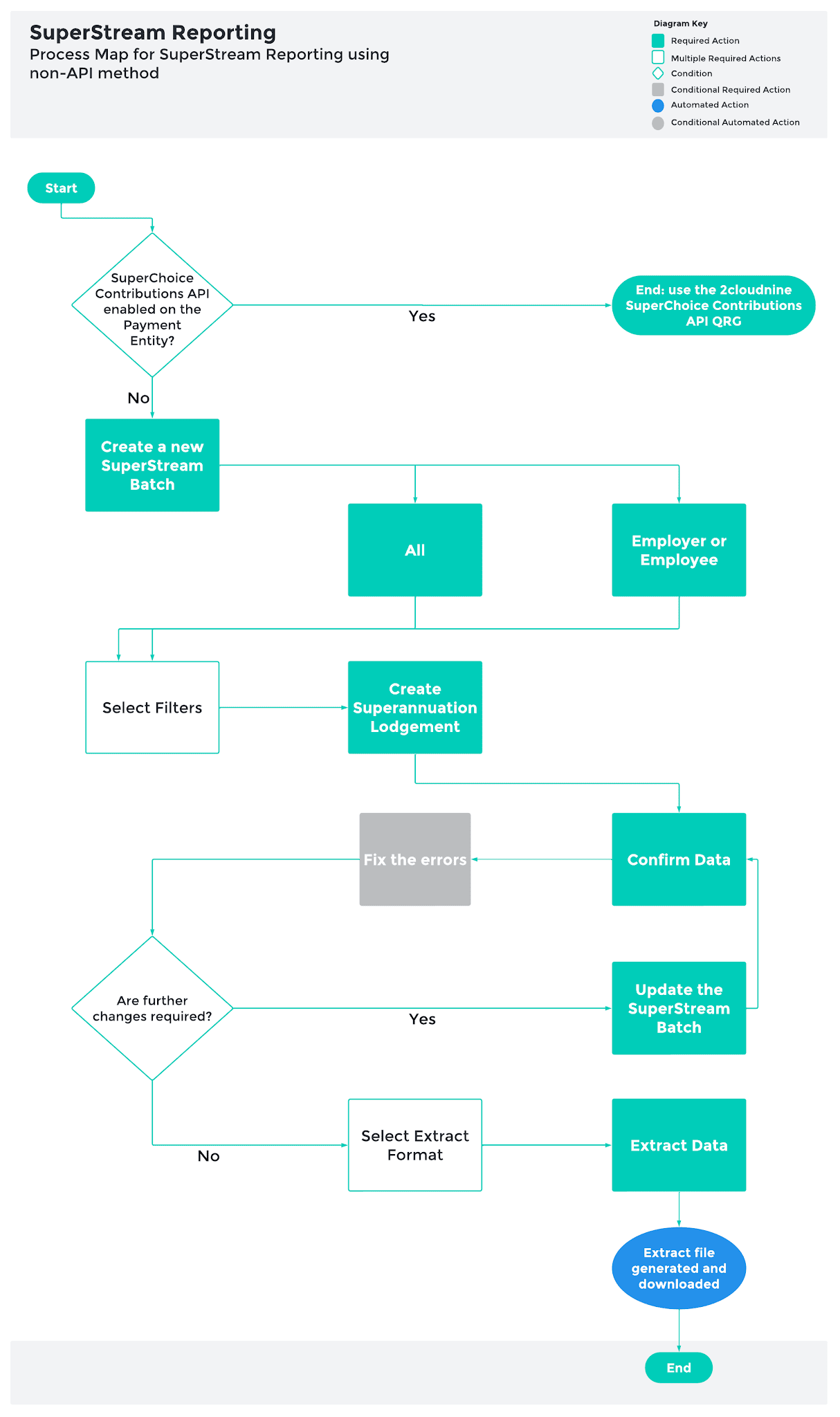
SuperStream Reporting using non-API method
-
Confirm Data
Confirms the contribution data is complete and locks it for extraction. The API method has no Confirm Data step.
-
Data Extract
Determines which of the four standard SuperStream reporting formats is generated: SuperChoice, Quick Super, One Path or SAFF. The format required depends on the receiving clearing house or superannuation fund. A Lodgement can be extracted any number of times and in more than one format.
-
Extraction statuses
SuperStream Data Confirmed, SuperStream Data Extracting, SuperStream Data Extracted and SuperStream Data Extraction Failed apply only to this method.
-
Provider submission
The extracted file is uploaded to the clearing house or superannuation fund portal outside 2cloudnine. Each provider has its own mandatory data requirements, so a file accepted by one may be rejected by another.
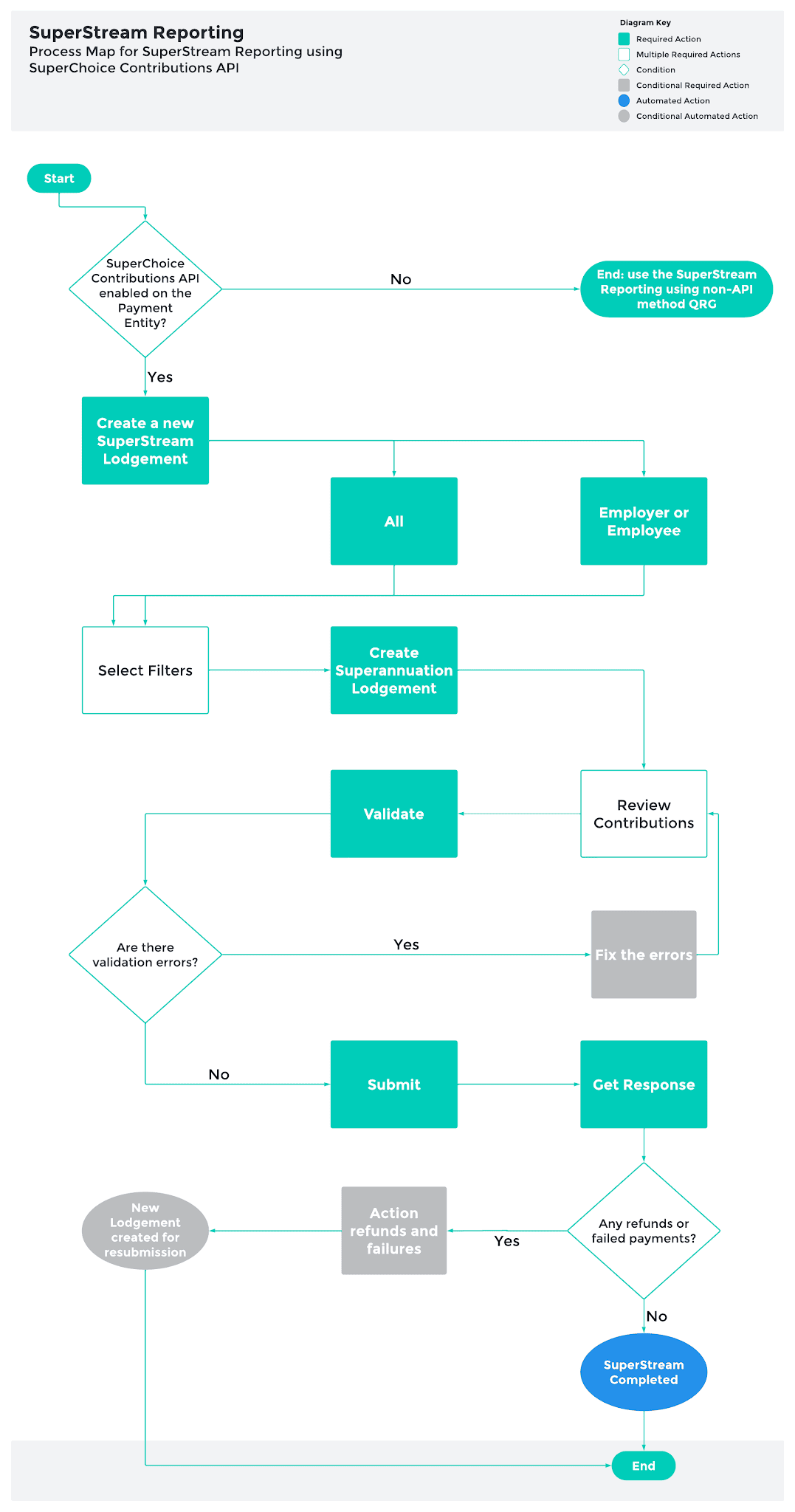
SuperStream Reporting using SuperChoice Contributions API method
-
SuperChoice Contributions API
Also known as the Payday Super API. Submits contribution data directly from 2cloudnine to SuperChoice, rather than extracting a file for upload through a clearing house portal. It is an alternative to the non-API method, not a replacement.
-
Enable SuperChoice Contributions API
Indicates whether the standard 2cloudnine API for managing superannuation contributions via SuperChoice is enabled. Set for each Payment Entity individually, and can be set back to No at any time to return to the non-API method.
-
SuperChoice registration
Use of the API requires its own registration with SuperChoice, separate from any existing STP registration and completed once for each Payment Entity.
-
Fund Payment
SuperChoice makes a separate payment to each superannuation fund. A Fund Payment is the record of one of those payments, holding the combined total for all Payees contributing to that fund, and carrying its own payment status.
-
Superannuation Contact
The designated contact submitted with the contributions. The first name, last name, phone, phone type and email address are held on the Payment Entity.
-
Superannuation Payment Type
Determines how superannuation contributions are paid, and is included in the data sent to SuperChoice. Set on with the Payment Reference and the bank accounts used for contributions and for refunds.
-
Superannuation Payment Reference
The default payment reference number allocated to superannuation payments. Set on the Payment Entity and able to be changed once a Lodgement has been created.
-
Superannuation contribution and refund bank accounts
The account name, account number and branch code of the bank account superannuation payments are made from, and of the account any contribution refunds are returned to. Both are drawn from the Payment Entity’s Payment Details.
-
API Transaction Id
A unique identifier generated for tracking the progress of a SuperStream Lodgement through the SuperChoice API.
-
SuperChoice Payment Status
The technical payment status retrieved from SuperChoice for the Lodgement as a whole: New, Employer Payment, Fund Payment, Payment Complete or Payment Cancelled.
-
SuperChoice Transaction Status
The status of an individual superannuation fund payment submitted through the SuperChoice integration, held against each Fund Payment.
-
API Payment Stage
A summary of where a SuperStream Lodgement sits across the several payment processing stages.
-
SuperChoice Severity Code
Indicates the severity of a SuperChoice error response: Response, Partial, Warning, Information, Progressive or Error.
-
API Lodgement statuses
Validating, Validated, and Validation Failed apply while contribution data is checked. Submitting and Contributions Submitted apply to the submission. API Error means SuperChoice rejected the submission. Submission Error means the submission could not be sent because of a problem in 2cloudnine. SuperStream Full Refund, SuperStream Partial Refund, and SuperStream Completed are the outcomes.
-
Refund
A contribution returned by SuperChoice, at one of three levels. Employer level means the entire payment has been refunded. Member level means contributions for one or more Payees have been returned. Contribution level means one or more contribution types have been returned.
-
Member Verification Request
Confirms a Payee’s fund membership and personal details with the fund before contributions are submitted, reducing submission delays and refunds caused by mismatched details. The fund has up to 24 hours to respond, and the response is retrieved as a Member Verification Outcome Response. A response of Fund not Certified indicates the fund is not yet certified.
-
Deactivate Super API Emails
When set, emails are not sent to the Superannuation Contact nominated on the Payment Entity when superannuation refunds are created, or payments are updated.
Status
Understanding SuperStream Reporting Status for non-API method
The non-API method has one Status field. When creating a SuperStream Lodgement, the Status field displays the following values:
-
SuperStream Data Created
The SuperStream Records have been created, but still require confirmation that all mandatory data is complete
When finalising a SuperStream Lodgement, the Status field displays the following values:
-
SuperStream Data Confirmed
The superannuation data for the Lodgement Items are verified and confirmed
-
SuperStream Data Extracting
Extraction in progress
-
SuperStream Data Extracted
A CSV file is generated in the file format selected
-
SuperStream Data Extraction Failed
The SuperStream file was unable to be extracted in CSV format
When deleting a SuperStream Lodgement, the Status field displays the following values:
-
SuperStream Deleting
The Deletion process is in progress
-
Delete Failed
Technical errors were encountered, and the data was not deleted
Understanding SuperStream Reporting Status for SuperChoice Contributions API
The SuperChoice Contributions API method has three status fields, each having different values. Lodgement Status says where your paperwork has got to in 2cloudnine. Payment Status says where the money has got to in SuperChoice. Fund Payment Status says what happened to each Fund’s share of it.
You set the first by working through the process. The other two are set by SuperChoice and read back through the API, so you cannot change them, and they keep moving after your lodgement has finished. That is why a completed Lodgement does not by itself mean the super is paid. The three fields hold multiple values, described below in the order you meet them:
Lodgement Status
Where your Lodgement is up to in 2cloudnine. You drive this by clicking through the process. When creating a SuperStream Lodgement, the Status field displays the following values:
-
SuperStream Data Creating
Set the moment the Lodgement is created and held until the whole creation run concludes. Badge is blue. Added so that the Manager shows work in progress rather than appearing idle while the chained jobs run.
-
SuperStream Data Created
Contribution data has been created, and the Lodgement is ready to validate. Shared with the Data Extract method, but renders grey in API Mode and amber in File Mode. This is the starting point for the Validate button.
When validating a SuperStream Lodgement, the Status field displays the following values:
-
Validating
The validation callout to SuperChoice is in progress. All three buttons are disabled while this runs.
-
Validated
Every fund passed validation. Submit becomes available and is styled as the recommended next action.
-
Validation_Failed
One or more funds failed validation. The Lodgement rolls up to this value if any single fund fails. Validate is re-enabled so you can correct the data and try again.
When submitting a SuperStream Lodgement, the Status field displays the following values:
-
Submitting
The submission callout is in progress. Buttons are disabled to prevent a double submission.
-
Submitted
Appears in the badge and stage mappings in code but is never defined in any picklist table. Treat as unconfirmed until checked against installed metadata.
-
Contributions Submitted
The contributions reached SuperChoice successfully, set on HTTP 200. Also set on errorCode 4018, a duplicate request, which is deliberately treated as success so a retry cannot double-lodge. This is where the Lodgement sits while the payment moves, so it is not a terminal state.
When displaying errors on a SuperStream Lodgement, the Status field displays the following values:
-
API Error
SuperChoice rejected the call at the HTTP level: a 401, any other non-2xx, a pre-callout failure, or missing configuration. The problem is at the integration boundary, so Submit stays enabled for a retry.
-
Submission Error
A Salesforce or system-side submission failure, kept deliberately separate from API_Error so you can tell an internal fault from a SuperChoice rejection. Terminal, with its own red banner.
When retrieving errors on a SuperStream Lodgement, the Status field displays the following values:
-
SuperStream Retrieving
Transient, shown while the retrieve job pulls the payment summary and the chained job rolls the result up to the Lodgement.
-
SuperStream Completed
Every fund returned COMPLETED. This is the terminal success state for the API method, the equivalent of SuperStream Data Extracted in File Mode.
-
SuperStream Full Refund
The whole contribution came back, indicated by the return item sitting at SOURCE_FAILED.
-
SuperStream Partial Refund
Some members were refunded and the rest completed, indicated by refund clones at MEMBER_REFUND or MEMBER_CONTRIBUTION_TYPE_REFUND.
When deleting errors on a SuperStream Lodgement, the Status field displays the following values:
-
SuperStream Deleting
Deletion is in progress. Shared with the Data Extract method.
-
SuperStream Delete Failed
Technical errors were hit, and the data was not deleted. Shared with the Data Extract method, and reused in v1.121 as the state a failed API creation run is left in. A record here can only be deleted, not validated, and its Pay Batch is blocked from new Lodgements until it is cleared.
SuperChoice Payment Status (API Payment Stage field)
One value per Lodgement showing where the money is up to. It is shown as the API Payment Stage field. It tracks the money reaching SuperChoice. It says nothing about whether any individual fund was paid. SuperChoice sets this, and 2cloudnine reads it back through the API. You cannot change it.
-
NEW
The payment record exists at SuperChoice, but no money has moved. Normal, straight after submitting.
-
EMPLOYER PAYMENT
Your money is on its way from your bank account to SuperChoice. Nothing to do, this is the first of two hops.
-
FUND PAYMENT
SuperChoice has your money and is now paying it out to each super fund. The second hop.
-
PAYMENT COMPLETE
The money has reached the funds. This is the only value that means your employees’ super is actually paid. Check the fund rows to confirm every fund accepted its share, because one fund can still fail after a complete payment.
-
PAYMENT CANCELLED
The payment was cancelled, and no money will move. Contact SuperChoice to find out why before resubmitting.
SuperChoice Transaction Status (Fund Payment and Refund Payment tabs)
One value per fund, and one per refund item. It tracks whether each fund actually received and accepted its share.
It is shown under the Fund Payments tab, below the Status column. One badge per fund row, shown through the API Transaction Stage formula, which title-cases the raw code. This is why a fund awaiting submission reads “New” rather than “NEW”.
It is also shown under the Refund Payments tab, below the Status column. Same field, scoped to the SuperStream Refund record type where only five values apply.
Values on Fund Payments rows, lifecycle:
-
NEW
This fund’s item has been created. No outcome has come back yet. Correct state before Submit runs.
-
VALIDATED
This fund’s details passed validation, and it is ready to submit.
-
VALIDATION FAILED
This fund’s details failed validation. Fix the data and re-validate. If any single fund lands here, the whole lodgement rolls up to Validation_Failed.
-
COMPLETED
This fund received its money. Members on this fund are paid.
-
ERROR
SuperChoice returned an error for this fund. Check the Lodgement Errors tab.
-
PENDING
Available on the record type but not evidenced as written by the integration. Do not rely on it.
Values on Fund Payments rows, Source codes:
Source means the money never left the Employer. Check the bank details on the lodgement and the amount paid against the amount lodged.
-
SOURCE FAILED
The employer-side payment failed.
-
SOURCE CANCELLED
The employer-side payment was cancelled before the money moved.
-
SOURCE UNDERPAID
The money arrived but was short of the amount lodged.
-
SOURCE OVERPAID
The money arrived but exceeded the amount lodged.
-
SOURCE EXPIRED
The payment window lapsed before the money arrived.
-
SOURCE DELAYED
The employer-side payment is late but not yet failed.
Values on Fund Payments rows, Destination codes
Destination means the money left, but the fund refused it. Different problem, different fix.
-
DESTINATION FAILED
The fund rejected its share, usually a member number or USI problem. The rest of the lodgement can still be fine, so check the other fund rows before assuming the whole thing failed.
-
DESTINATION CANCELLED
The fund cancelled the payment. Expect a refund to the refund account on the lodgement.
Values on Refund Payments rows, five
-
NEW
The refund item has been created.
-
COMPLETED
The refund has been processed.
-
ERROR
The refund could not be processed.
-
MEMBER REFUND
This member’s contribution came back from the fund.
-
MEMBER CONTRIBUTION TYPE REFUND
A specific contribution type for this member came back, rather than the whole amount.
How they fit together
The three statuses run in sequence, each more specific than the last. Lodgement Status ends when the data is handed over. Payment Status follows the money in two hops. Fund Payment Status breaks the second hop apart, fund by fund.
A parent is never further along than its children, so Payment Status only reaches PAYMENT_COMPLETE once every fund row has.
Each field has a blind spot, which is why all three exist. Lodgement Status says nothing about money. Payment Status confirms money moved but not to whom. Only the fund rows name the fund that failed. So when someone says their super has not gone through, work down in order: did the data leave us, did the money move, and what does that employee’s fund row say.
General Overviews
Superstream Reporting Functionality
QRG SuperStream Reporting using non-API method
QRG SuperStream Reporting using SuperChoice Contributions API
Payday Super enhancements
- If a Payment Entity wants to utilise the SuperChoice API to send their SuperStream Lodgements directly from 2cloudnine, they will firstly need to ensure they are registered with SuperChoice.
- The following new fields on the Payment Entity will need to be populated to provide the information required for the API of the SuperStream Lodgements to validate and submit successfully.
- Superannuation Payment Reference
- Superannuation Payment Type
Register a new SuperChoice user for Payday Super
Before you start
- Registration is required per Payment Entity — repeat these steps for every payment entity that will lodge Payday Super.
- An existing STP registration does not carry over. Even customers already registered with SuperChoice for STP, and existing SuperChoice clearing-house customers, must register again against the Payday Super URL.
Steps
- Decide the environment:
- Production: https://www.employerpay.com.au/2cloudnine1
- Sandbox/testing: https://www.test.employerpay.com.au/2cloudnine1
- Open the URL in a browser.
- Select the New User Register Account link.
- Complete the registration details for the payment entity and submit.
- Repeat steps 2–4 for each remaining payment entity, using the same environment URL.
- Once registered, record the credentials against the corresponding payment entity configuration in the org.
System Process Outlines
QRG SuperStream Reporting using non-API method
QRG SuperStream Reporting using SuperChoice Contributions API
- First Published: 12 September, 2024
- Last Published: 29 October, 2026
Last modified on October 29, 2026