Purpose
The purpose of this Administrator Guide is to provide information about packaged Workflow Rules. The content in this guide is optional, and may be utilised during implementation, or even after a project has gone live. The intended audience for this document is System Administrators.2cloudnine Workflow Rules
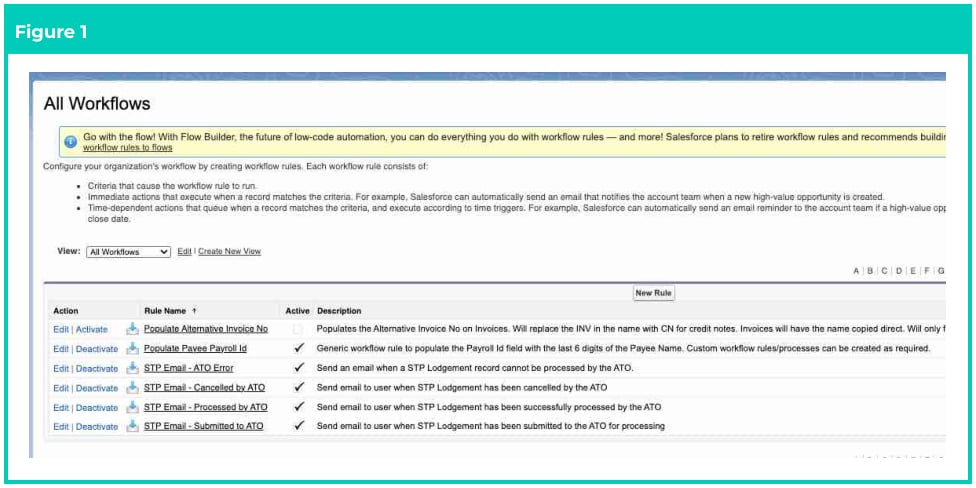
Overview Workflow Rules are automation features contained within the 2cloudnine Payroll Package that perform predefined actions when specific conditions are met, such as updating a record, sending an email alert, or creating a Task. They are triggered by changes to a record and help enforce business processes, improve efficiency, and reduce manual effort by automating repetitive tasks. Despite Salesforce announcing they will not be supporting Workflow Rules after December 31, 2025, packaged Workflow Rules, such as the six mentioned below, will continue to work as needed when activated/deactivated. After installation of the packages, Users are reminded to review these Workflow Rules and determine if they need to turn on or off the Workflow Rule compared to how it is defaulted. Populate Alternative Invoice No This Workflow Rule only needs to be activated if there is a need for an alternative Invoice Number to be populated, instead of the standard 2cloudnine Invoice numbering used by default within 2cloudnine Payroll. It also replaces the INV in the name with CN for Credit Notes. Go to Setup > Process Automation > Workflow Rules- Select Activate next to the Workflow Populate Alternative Invoice No.
- Select Deactivate next to the Populate Payee Payroll Id Workflow .
- Select Deactivate next to the STP Email - ATO Error Workflow .
- Select Deactivate next to the STP Email - Cancelled by ATO Workflow .
- Select Deactivate next to the STP Email - Processed by ATO Workflow .
- Select Deactivate next to the STP Email - Submitted to ATO Workflow .